
The best RGB computer cases combine eye-catching lighting with the airflow, space, and connectivity a modern gaming PC needs. The right choice can also simplify your build by including fans, thoughtful cable routing, and support for large graphics cards or radiators.
We compared 10 standout cases across ATX and Micro-ATX formats, focusing on cooling potential, included ARGB fans, viewing angles, expansion space, and practical build features. Use the guide below to narrow the list to the case that best fits your hardware and budget.
Best 10 RGB Computer Cases Picks for 2026
Best Value Airflow Pick

- Six PWM ARGB fans included
- Opening tempered-glass side panel
- ATX support with flexible storage
Best For: Fan-rich, easy-access gaming builds
Premium Dual-Chamber Pick

- Seven RGB fans and Control Hub
- Supports up to nine 140mm fans
- 420mm radiator and panoramic glass support
Best For: High-performance ATX showcase systems
Best Panoramic Lighting Pick
- Seven Infinity Mirror ARGB fans
- 270-degree tempered-glass view
- 410mm GPU and 360mm radiator support
Best For: White, display-focused gaming PCs
Best Airflow Value

- Four pre-installed 120mm ARGB fans
- Mesh front and tempered-glass side panel
- Supports 340mm GPUs and 360mm radiators
Best For: Airflow-focused gaming builds with built-in lighting
Best Panoramic Showcase

- Seven pre-installed 120mm ARGB PWM fans
- 270-degree tempered-glass presentation
- Supports 400mm GPUs and 360mm radiators
Best For: High-cooling showcase builds with substantial hardware
Best Budget Pick
- Four pre-installed fixed-RGB fans
- Diamond mesh front for airflow
- Supports ATX, Micro-ATX, and Mini-ITX
Best For: Affordable mainstream gaming builds
Panoramic Cooling Pick

- Seven PWM ARGB fans included
- 270-degree dual-glass showcase design
- Supports GPUs up to 400mm and 360mm radiators
Best For: Showcase gaming builds with strong out-of-box airflow
Practical Airflow Pick

- Four ARGB PWM fans included
- Supports GPUs up to 420mm
- Built-in GPU bracket and magnetic dust filters
Best For: ATX gaming systems with long graphics cards
Large-Build Performance Pick

- Eight PWM ARGB fans included
- Supports 420mm radiators and GPUs up to 455mm
- Dual-chamber design improves cable organization
Best For: High-end, heavily cooled, expansion-focused builds
Best Value Airflow Pick – MUSETEX NN8 ARGB Mid-Tower
For shoppers comparing rgb computer cases, the MUSETEX NN8 combines six pre-installed PWM ARGB fans with a mesh front panel and an opening tempered-glass side panel. Its ATX mid-tower layout supports ATX, Micro-ATX, and Mini-ITX motherboards, with room for substantial storage and cooling hardware.
Best For: Builders who want abundant included lighting, adjustable fan speeds, and convenient internal access in an ATX case.
Pros:
- Includes six speed-adjustable PWM ARGB fans with motherboard lighting control.
- Opening magnetic glass side panel makes cleaning and component access easier.
- Supports up to a 280mm top radiator and multiple storage configurations.
- Mesh front panel and built-in dust filtering support airflow-focused builds.
Cons:
- Requires a 3-pin ARGB motherboard connection for motherboard-based lighting control.
- Power supply, motherboard, graphics card, and radiator are not included.
The NN8 is a practical choice when included fans and serviceable access matter as much as appearance. Confirm your motherboard has the required ARGB header before buying.
Premium Dual-Chamber Pick – NZXT H9 Flow RGB+
The NZXT H9 Flow RGB+ is a strong option among rgb computer cases for high-performance systems that need airflow, cable-management space, and a showcase-style presentation. Its dual-chamber design separates the main components from the power supply and drives, while perforated panels and angled fan placement support cooling.
Best For: Enthusiast ATX builders who want panoramic glass, extensive fan capacity, large-radiator support, and integrated NZXT lighting control.
Pros:
- Dual-chamber layout helps separate heat-producing components from the PSU and drives.
- Includes seven RGB fans and an NZXT Control Hub for synchronized lighting through CAM.
- Supports up to nine 140mm fans and radiators up to 420mm on the top and front-right.
- Provides wide cable channels, Velcro straps, and rear-connect motherboard compatibility.
Cons:
- Its 13.4 kg chassis is relatively substantial to move.
- Designed around ATX compatibility, so it may be excessive for compact builds.
Choose the H9 Flow RGB+ when cooling expansion and a clean, highly visible build are priorities. It is especially suitable for large graphics cards and custom liquid-cooling layouts.
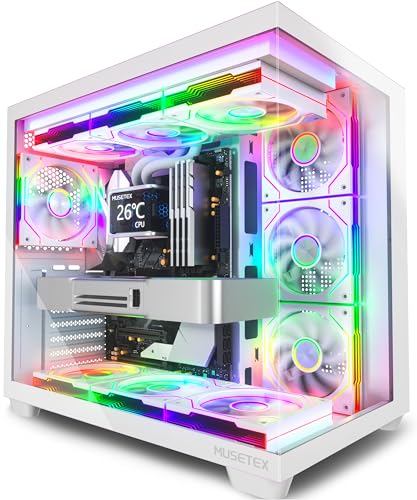
Best Panoramic Lighting Pick – MUSETEX Y6 White
The MUSETEX Y6 stands out among rgb computer cases with seven pre-installed Infinity Mirror ARGB fans and 270-degree tempered-glass panels. This white ATX mid-tower also includes Type-C connectivity and supports graphics cards up to 410mm, making it suitable for visually focused gaming builds with substantial components.
Best For: Builders who want a white panoramic case with distinctive gradient lighting, broad hardware compatibility, and included airflow fans.
Pros:
- Seven 120mm Infinity Mirror ARGB fans create continuous gradient lighting effects.
- 270-degree dual tempered-glass panels provide a wide view of the internal hardware.
- Supports ATX, Micro-ATX, and Mini-ITX motherboards, GPUs up to 410mm, and top-mounted 360mm radiators.
- Front I/O includes Type-C, USB 3.0, USB 2.0, audio, power, and restart controls.
Cons:
- CPU cooler height is limited to 160mm.
- Only three internal bays are listed, which may limit storage expansion.
- Motherboard, graphics card, PSU, and radiator are not included.
The Y6 is a compelling pick for a centerpiece PC where lighting and glass visibility are central to the design. Check cooler height, radiator placement, and storage needs before assembling.
Best Compact Build Pick – FOIFKIN F100 ARGB
The FOIFKIN F100 offers a compact alternative for shoppers seeking rgb computer cases without moving to a full-size ATX enclosure. This Micro-ATX/ Mini-ITX mini-tower uses a dual-chamber layout, 270-degree tempered glass, and three pre-installed ARGB fans while retaining support for two 240mm radiators.
Best For: Compact gaming builds using Micro-ATX or Mini-ITX motherboards and graphics cards up to 320mm.
Pros:
- Compact dual-chamber design helps organize hardware, power supply, and drive spaces.
- Includes three 120mm ARGB fans, including two reverse fans and one forward fan.
- Supports up to two 240mm radiators for a small case.
- Panoramic tempered glass showcases the assembled hardware.
Cons:
- Limited to Micro-ATX and Mini-ITX motherboards.
- GPU clearance is limited to 320mm and PSU clearance to 170mm.
- Storage support is listed as one HDD and two SSDs.
The F100 makes the most sense when desk space and a compact footprint outweigh expansion room. Verify the dimensions of your GPU, PSU, cooler, and radiators before purchase.
Best Airflow Value – GAMDIAS AURA GC1 ELITE ARGB
For shoppers comparing RGB computer cases, the GAMDIAS AURA GC1 ELITE ARGB combines a mesh front panel with four pre-installed 120mm ARGB fans. Its tempered-glass side panel, broad motherboard compatibility, and support for large graphics cards make it a practical mid-tower foundation for a colorful gaming build.
Best For: Airflow-focused ATX, Micro-ATX, or Mini-ITX gaming systems that need built-in ARGB lighting.
Pros:
- Four built-in 120mm ARGB fans support front-to-back airflow.
- Mesh front panel and magnetic dust filter help prioritize cooling and maintenance.
- Supports GPUs up to 340mm, 360mm radiators, and CPU coolers up to 160mm.
- Tempered-glass side panel and tool-free installation showcase components.
Cons:
- Only three listed USB ports are available on the front I/O.
- Four included fans may offer less cooling headroom than cases with larger fan packages.
The AURA GC1 ELITE ARGB is a balanced choice when airflow, compatibility, and ready-to-use lighting matter more than elaborate dual-chamber cable management.
Best Panoramic Showcase – FOIFKIN F600 ARGB
The FOIFKIN F600 stands out among RGB computer cases with a 270-degree panoramic tempered-glass design and a pre-installed seven-fan setup. Its dual-chamber layout separates core hardware from the power supply and drives, while extensive radiator and GPU support suits ambitious gaming builds.
Best For: Showcase-oriented ATX builds with extensive liquid-cooling plans and generous graphics-card clearance.
Pros:
- Includes seven 120mm ARGB PWM fans, including reverse-blade fans.
- Dual-chamber design can improve cable management and thermal separation.
- Supports GPUs up to 400mm and up to three 360mm radiators.
- 270-degree tempered glass provides a broad view of installed hardware.
Cons:
- The case is larger and heavier than a basic mid-tower design.
- Storage support is limited to one HDD and two SSDs.
- The supplied details list six fans in one specification field despite describing seven pre-installed fans.
Choose the F600 if visual presentation and cooling expansion are priorities. It offers impressive capacity, but its showcase-focused layout may be more case than a modest build needs.
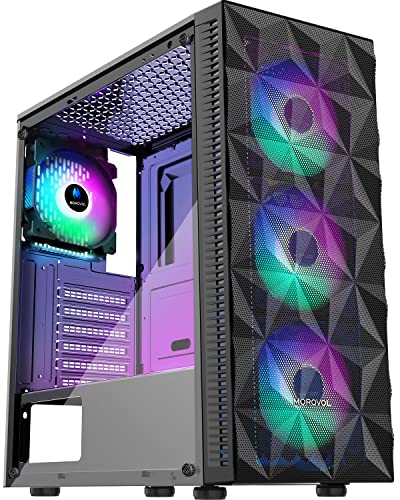
Best Budget Pick – MOROVOL 621 RGB
The MOROVOL 621 is a budget-friendly option among RGB computer cases, arriving with four fixed-RGB 120mm fans and a diamond-shaped mesh front panel. It supports the three common motherboard sizes and offers straightforward component compatibility for an affordable gaming PC.
Best For: Cost-conscious ATX, Micro-ATX, or Mini-ITX builds using mainstream-sized components.
Pros:
- Four pre-installed 120mm fans provide airflow without requiring immediate fan purchases.
- Diamond mesh front panel emphasizes ventilation.
- Tempered-glass side panel displays components and is removable for installation.
- Supports two 2.5-inch SSDs and two 3.5-inch HDDs.
Cons:
- The lighting is fixed RGB rather than addressable.
- GPU clearance is limited to 300mm and CPU cooler height to 155mm.
- The I/O panel has only one USB 3.0 port.
The 621 makes sense for buyers who want an inexpensive RGB-equipped case with useful airflow. Check your graphics-card, cooler, and power-supply dimensions before purchasing.
Panoramic Cooling Pick – MUSETEX K2 ARGB Mid-Tower
For shoppers comparing RGB computer cases, the MUSETEX K2 combines a wide dual-tempered-glass view with seven pre-installed PWM ARGB fans. Its ATX mid-tower layout supports full-size components while providing Type-C connectivity and room for substantial cooling hardware.
Best For: Gamers who want abundant out-of-the-box lighting, airflow, and a showcase-style build.
Pros:
- Includes seven adjustable-speed PWM ARGB fans and supports up to 10 total.
- 270-degree panoramic dual tempered glass displays internal components clearly.
- Supports GPUs up to 400mm, CPU coolers up to 165mm, and top-mounted radiators up to 360mm.
- Front I/O includes one Type-C port and two USB 3.0 ports.
Cons:
- Power-supply length is limited to 140mm with the hard-drive cage installed.
- Motherboard support is limited to ATX, Micro-ATX, and Mini-ITX.
The K2 is a strong choice when visual presentation and included cooling matter more than minimalist design. Check component clearances carefully, especially if you plan to keep the drive cage and use a longer PSU.
Practical Airflow Pick – RUIX OV303 ARGB Mid-Tower
The RUIX OV303 is a practical option among RGB computer cases, pairing four pre-installed ARGB PWM fans with three tempered-glass panels. It also emphasizes expandability, dust protection, modern front I/O, and support for long graphics cards.
Best For: ATX gaming builds that need generous GPU clearance and flexible cooling expansion.
Pros:
- Four 120mm ARGB prism PWM fans come pre-installed.
- Supports up to 10 fans or up to seven fans with a 360mm AIO liquid cooler.
- Accommodates graphics cards up to 420mm and includes a built-in GPU support bracket.
- Large magnetic dust filters are positioned on the top and bottom.
Cons:
- Supports ATX motherboards rather than a broader range of motherboard sizes.
- Storage capacity is listed as two 3.5-inch drives and one 2.5-inch drive.
The OV303 makes sense for a spacious ATX build where GPU support and cooling flexibility are priorities. Its four included fans provide a starting point, while the available fan and radiator capacity leaves room for future upgrades.
Large-Build Performance Pick – HYXN H2 Dual-Chamber Case
The HYXN H2 stands out among RGB computer cases with a dual-chamber layout, eight pre-installed PWM ARGB fans, and support for exceptionally large cooling systems. Its spacious interior also accommodates E-ATX boards, long GPUs, large power supplies, and organized rear cable routing.
Best For: High-end or expansion-focused builds needing extensive cooling, component clearance, and cable-management space.
Pros:
- Includes eight ARGB PWM fans: six 140mm reverse fans and two 120mm forward fans.
- Supports 420mm radiators and multiple 360mm radiator configurations.
- Fits E-ATX through Mini-ITX motherboards, GPUs up to 455mm, and PSUs up to 220mm.
- Dual chambers separate core hardware from the PSU and drives, with a large rear cable compartment.
Cons:
- The larger dual-chamber design may require more physical setup space than a compact mid-tower.
- Its extensive cooling capacity may be more than needed for basic builds.
The H2 is the most expansion-oriented option in this group. It is particularly appealing for powerful hardware or elaborate liquid-cooling plans, provided your desk and component budget can accommodate its larger layout.
How We Picked the Best RGB Computer Cases
We evaluated these cases by looking beyond lighting effects. Our comparisons considered airflow design, fan quantity and control, radiator support, motherboard compatibility, graphics-card clearance, storage options, front-panel connectivity, tempered-glass construction, and ease of assembly. Included fans received extra attention because they can improve value, but a higher fan count is not automatically better if the case restricts intake or lacks useful fan-control options.
We also considered the needs of different builders. A dual-chamber case may offer cleaner cable management and better component visibility, while a conventional mid-tower can be easier to place and more affordable. Because specifications can vary by configuration, confirm clearance and radiator measurements before ordering.
Quick Comparison
| What to Compare | Why It Matters |
|---|---|
| Case format | ATX cases provide broader motherboard and expansion compatibility; Micro-ATX models can save desk space. |
| Included fans | Pre-installed ARGB or PWM fans reduce setup cost and effort, but check their size, connectors, and control method. |
| Front and side design | Mesh generally favors intake airflow, while panoramic glass emphasizes component visibility. |
| Cooling support | Confirm support for your preferred air cooler, AIO radiator, and additional exhaust fans. |
| Connectivity | USB 3.0, USB Type-C, audio, and accessible power controls improve everyday convenience. |
Key Buying Factors for RGB Computer Cases
Airflow and Cooling
Prioritize an open mesh intake or another design with a clear path for cool air. Check whether the included fans are positioned for balanced intake and exhaust, and leave room for upgrades if your CPU or GPU runs hot.
Compatibility and Clearance
Verify motherboard size, power-supply length, graphics-card clearance, CPU-cooler height, and radiator placement. Large GPUs and front-mounted radiators can compete for space, so manufacturer measurements matter more than the exterior dimensions.
Lighting and Fan Control
ARGB lighting is most flexible when fans use standard 5V three-pin connectors and can connect to your motherboard or a supplied controller. PWM fans provide more precise speed control than basic fixed-speed models.
Build Quality and Access
Tempered-glass panels showcase lighting but add weight and require careful handling. Look for removable panels, useful cable-routing channels, dust filtration, and enough rear clearance to close the side panel without pinching cables.
Who Should Buy Which RGB Computer Cases?
Choose a mesh-focused mid-tower if cooling performance and value are your priorities. A panoramic or dual-chamber model suits builders who want a showcase system with cleaner component visibility and cable separation. Cases with many included fans are attractive for first-time builders or anyone replacing an older enclosure, while a more compact Micro-ATX option makes sense for smaller desks and modest builds.
Before buying, compare the case’s exact dimensions with your motherboard, GPU, cooler, power supply, and planned radiator. Also confirm whether the included lighting controller works with your motherboard ecosystem. Those checks will help ensure the RGB Computer Cases on your shortlist deliver both the appearance and performance you want.