
Overheating can shorten component life, cause throttling, and make an otherwise capable computer feel unreliable. The right cooling fan improves airflow without forcing you to spend heavily on premium hardware.
We selected 10 affordable options ranging from PWM case fans and multi-packs to USB-powered cooling fans and variable-speed AC models, so you can match the fan to your setup, connector, noise preferences, and airflow needs.
Best 10 Computer Cooling Fans Under 100 Picks for 2026
Quiet Performance Pick

- 120mm pressure-optimized design
- 4-pin PWM control up to 1700 RPM
- 25.1 dB(A) maximum noise rating
Best For: Quiet CPU cooler, radiator, or case ventilation
Budget Case Bundle
DARKROCK 3-Pack 120mm Case Fans

- Includes three 120mm fans
- 1200 RPM with 47.8 CFM airflow
- 3-pin hydraulic-bearing design
Best For: Affordable multi-fan case ventilation
Flexible Electronics Cooler
AC Infinity MULTIFAN S5 Dual USB Fan

- Two quiet 80mm USB-powered fans
- 52 CFM combined airflow
- Multi-speed controller and flexible placement
Best For: USB cooling for consoles, AV gear, and cabinets
ARGB Multi-Fan Value
Thermalright TL-C12C X3 120mm PWM Fans
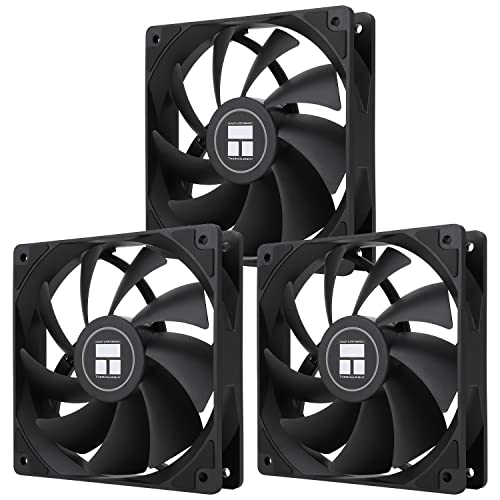
- Three 120mm 4-pin PWM fans
- 66.17 CFM airflow at up to 1550 RPM
- ARGB lighting with motherboard synchronization
Best For: PWM-controlled airflow and coordinated ARGB builds
Flexible Plug-In Cooling

- Stepless 3V–12V airflow control
- Up to 95 CFM with dual ball bearings
- Includes plug adapter and mounting hardware
Best For: Receivers, consoles, routers, and DIY electronics cooling
Quiet PC Case Cooling
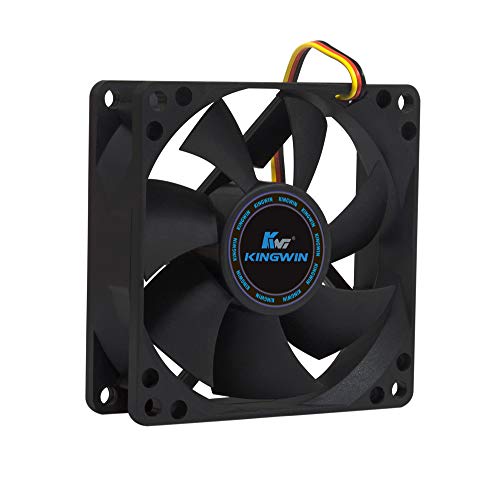
- 25 dB noise rating for quieter builds
- 30 CFM airflow at up to 1700 RPM
- Standard 80mm, 3-pin 12V design
Best For: Compact desktops, home servers, and compatible CPU coolers
USB Dual-Fan Cooling
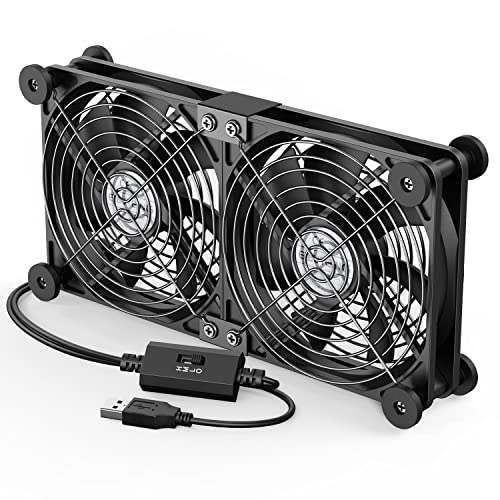
- Dual 120mm fans run from one USB connection
- Three speeds from 900 to 1500 RPM
- Protective grilles and rubber feet included
Best For: USB-equipped laptops, consoles, routers, and AV devices
Best Compact USB Pick
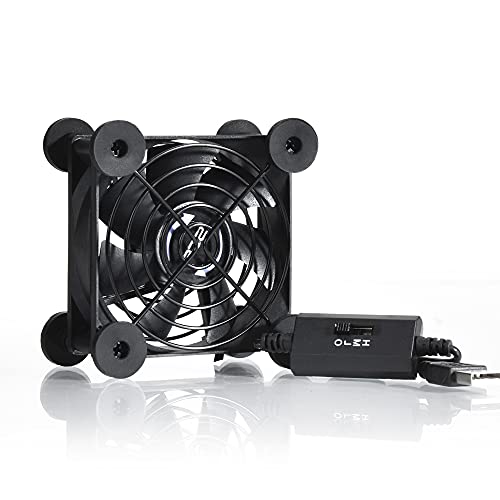
- USB-powered with three speed settings
- 21dB listed noise on low gear
- Flat or upright placement with protective grills
Best For: Small electronics, consoles, routers, and computer cabinets
Best High-Airflow AC Option

- Up to 95.8 CFM listed airflow
- 700–2800 RPM adjustable speed range
- AC plug with dual ball bearings
Best For: Large cabinets, servers, PCs, and equipment needing strong ventilation
Best Large USB Fan
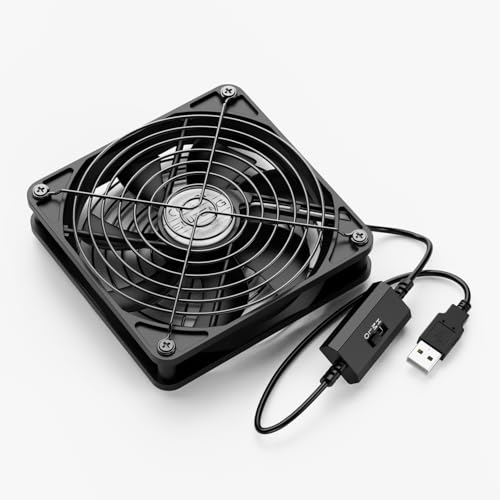
- Three-speed USB-powered cooling
- Flat or upright placement
- Aluminum protective grills on both sides
Best For: Larger electronics, consoles, routers, and narrow spaces
Quiet Performance Pick – Noctua NF-P12 redux-1700 PWM
For computer cooling fans under 100, the Noctua NF-P12 redux-1700 PWM is a strong single-fan option when you want adjustable performance without excessive noise. Its 120mm pressure-optimized design suits CPU coolers, radiators, and case ventilation.
Best For: Quiet, high-performance cooling in desktop PCs, especially with CPU coolers or water-cooling radiators.
Pros:
- 4-pin PWM control adjusts speed automatically through a compatible motherboard.
- Reaches up to 1700 RPM with airflow rated at 120.2 m³/h.
- Low maximum noise rating of 25.1 dB(A).
- Backed by a six-year manufacturer warranty.
Cons:
- Sold as a single fan, so outfitting a case may require multiple purchases.
- It does not include built-in lighting.
This is a practical choice for buyers prioritizing proven airflow, PWM control, and long-term support over lighting or multi-fan bundle value.
Budget Case Bundle – DARKROCK 3-Pack 120mm Case Fans
If you need several computer cooling fans under 100, this DARKROCK three-pack offers a straightforward way to add 120mm airflow to a desktop case. The 3-pin fans run at up to 1200 RPM and use hydraulic bearings with vibration-damping cushions.
Best For: Affordable multi-fan case ventilation and simple installations where 3-pin motherboard connections are available.
Pros:
- Three 120mm fans provide convenient case airflow coverage.
- Hydraulic bearings are designed for stable operation and a stated 30,000-hour average lifespan.
- Soft silicone cushions help reduce vibration.
- Rated airflow is 47.8 CFM per fan, with a maximum noise rating of 32.1 dBA.
Cons:
- 3-pin connectors do not provide the same PWM control as 4-pin fans.
- 1200 RPM is more modest than some performance-focused alternatives.
- No lighting is listed.
This bundle makes sense when quantity and basic cooling matter more than advanced speed control or the lowest possible noise level.
Flexible Electronics Cooler – AC Infinity MULTIFAN S5 Dual USB Fan
The AC Infinity MULTIFAN S5 is a useful alternative to conventional internal case fans for computer cooling fans under 100. Its two 80mm fans connect through USB, include a multi-speed controller, and can be placed flat or upright around electronics.
Best For: Cooling consoles, receivers, DVRs, cabinets, and other electronics where USB power and flexible placement are useful.
Pros:
- Dual 80mm fans deliver a combined 52 CFM of airflow.
- Multi-speed control lets you balance airflow and noise.
- USB power works with ports found on many AV devices and game consoles.
- Dual-ball bearings support horizontal or vertical placement and are rated for 67,000 hours.
Cons:
- Its 80mm format is not a direct replacement for standard 120mm case fans.
- It is primarily an external USB cooling solution rather than a motherboard-connected PC fan.
Choose this model when portability, USB operation, and quiet supplemental cooling are more important than traditional PC case integration.
ARGB Multi-Fan Value – Thermalright TL-C12C X3 120mm PWM Fans
For builders comparing computer cooling fans under 100, the Thermalright TL-C12C X3 combines three 120mm fans with 4-pin PWM control and addressable RGB lighting. It reaches up to 1550 RPM and is designed for cases or CPU-cooler use.
Best For: Desktop builders who want a three-fan setup with PWM speed control, strong airflow, and synchronized ARGB lighting.
Pros:
- Three 120mm fans provide a convenient multi-fan installation.
- 4-pin PWM control enables motherboard-based automatic speed adjustment.
- Airflow is rated at 66.17 CFM, with up to 1550 RPM and noise of 25.6 dBA or less.
- ARGB blades support up to 17 lighting modes and motherboard synchronization.
Cons:
- ARGB synchronization requires a compatible motherboard connection.
- Lighting may not suit minimalist, non-RGB builds.
- The product has a three-year warranty, shorter than some premium alternatives.
This kit is a well-rounded value for a coordinated build, particularly if you want to add airflow and lighting without buying fans individually.
Flexible Plug-In Cooling – Variable-Speed 120mm Fan
For computer cooling fans under 100, this 120mm AC-powered model stands out when you need adjustable airflow without additional wiring. Its included US plug adapter, 3V–12V stepless control, and up to 95 CFM make it suitable for electronics and DIY cooling projects.
Best For: Receivers, amplifiers, DVRs, game consoles, routers, NAS devices, and other electronics needing flexible external cooling.
Pros:
- Stepless airflow adjustment helps balance cooling and noise.
- Includes a US plug adapter, grilles, rubber feet, screws, and speed control.
- Standard 120mm size supports flat, embedded, or external installation.
- Dual ball bearing design is intended for continuous operation.
Cons:
- Its 37 dB noise level may be more noticeable than quieter low-speed fans.
- Uses an AC adapter and 5.5 × 2.1mm female plug rather than a standard PC fan connector.
- Only one fan is included.
This is a versatile choice for cooling equipment outside a conventional PC case. Choose it when broad voltage adjustment and a complete installation kit matter more than silent operation or native motherboard connectivity.
Quiet PC Case Cooling – Kingwin 80mm Silent Fan
Among computer cooling fans under 100, the Kingwin 80mm fan is a straightforward replacement for compact PC cases and CPU coolers. It combines a 25 dB noise rating with 30 CFM airflow and a standard 3-pin, 12V connection.
Best For: Quiet office desktops, home servers, compact computer cases, CPU coolers, and mining rigs with standard 80mm mounts.
Pros:
- Quiet 25 dB operation suits noise-sensitive workspaces.
- Standard 80mm size fits compatible case and cooler mounts.
- Delivers up to 30 CFM of airflow for ventilation.
- Long-life bearing and a one-year manufacturer warranty support regular use.
Cons:
- Its 80mm format moves less air than larger 120mm fans in the lineup.
- It has a fixed-speed design rather than adjustable airflow control.
- Requires a compatible 3-pin, 12V connection.
This fan is best suited to targeted replacement or added ventilation where an 80mm mount is already available. It offers a useful balance of low noise and basic airflow, but verify connector and mounting compatibility before buying.
USB Dual-Fan Cooling – Adjustable 120mm ELUTENG Fan
This ELUTENG model is a practical pick among computer cooling fans under 100 when you want portable, USB-powered airflow for a PC, console, router, or AV device. Its dual 120mm fans run together and offer three selectable speeds through a wired controller.
Best For: Laptops, receivers, DVRs, game consoles, routers, hard-drive enclosures, projectors, and other devices with an available USB port.
Pros:
- Dual fans provide combined airflow while remaining plug-and-play through USB.
- Three speed settings range from 900 to 1500 RPM.
- Hydraulic bearings and a listed 25.6–32.5 dB noise range support relatively quiet use.
- Metal grilles, removable rubber feet, and a 1m cable support stable placement.
Cons:
- USB power limits it to compatible 5V ports.
- The two fans operate together rather than independently.
- Its external form factor may not fit an internal PC chassis mount.
Choose this fan when easy placement and USB convenience are more important than internal case installation. The adjustable speeds and protective grilles make it especially useful for cooling electronics on a desk or shelf.
Best Compact USB Pick – Quiet 80mm USB Fan
For computer cooling fans under 100, this compact 80mm USB model is a practical choice for routers, consoles, DVRs, and computer cabinets. Its three-speed controller lets you balance airflow and noise, with a listed low-speed noise level of 21dB.
Best For: Small electronics, game consoles, routers, and cabinets with an available USB port.
Pros:
- USB-powered for convenient use with compatible electronics.
- Three speed settings support flexible airflow and noise control.
- Compact design can sit flat or upright, with protective grills on both sides.
- Dual ball bearing is rated for a 65,000-hour service life.
Cons:
- The 80mm size and 33 CFM airflow are suited to smaller spaces rather than large cases.
- Requires a USB power source instead of a standard internal PC fan connection.
This fan stands out when portability, simple USB power, and low-speed quiet operation matter more than maximum airflow. Its small footprint also makes placement easier around entertainment equipment.
Best High-Airflow AC Option – 120mm Variable-Speed Fan
Among computer cooling fans under 100, this 120mm axial fan is designed for users who want adjustable cooling from an AC outlet. Its controller covers a 700-to-2800 RPM range, while the fan is rated for up to 95.8 CFM of airflow.
Best For: PC cases, servers, cabinets, DVRs, routers, and other equipment needing stronger adjustable ventilation.
Pros:
- High listed airflow of 95.8 CFM for demanding cooling applications.
- Variable speed control helps tune cooling and operating noise.
- AC plug simplifies powering the fan from an outlet.
- Dual ball bearings are rated for a 50,000-hour lifespan.
Cons:
- Its listed noise level is below 41dB, so it may be less quiet than smaller USB models.
- The AC-powered design may be less convenient for installations requiring an internal PC connection.
- The 120mm frame requires more mounting space than an 80mm fan.
This is the strongest airflow-focused option in the group, with broad compatibility and a useful speed range. Choose it when outlet power and ventilation capacity are higher priorities than compactness.
Best Large USB Fan – ELUTENG 120mm USB Case Fan
This 120mm USB fan is a versatile pick among computer cooling fans under 100, combining USB power with three selectable speeds. It is suited to cooling consoles, receivers, routers, tablets, and computer equipment where flexible placement is useful.
Best For: USB-powered cooling of larger electronics, entertainment devices, and narrow spaces.
Pros:
- Three-speed controller allows airflow adjustment for different setups.
- USB power works with compatible computers, consoles, TVs, and adapters.
- Can be placed flat or upright for flexible positioning.
- Aluminum grills on both sides provide operational protection.
Cons:
- The listed maximum speed is 1500 RPM, lower than the AC model in this roundup.
- Noise is listed at 29dB in the specifications, while the low-speed bullet cites 23dB.
- The 120mm frame needs more space than a compact 80mm fan.
Choose this model for a balance of broad device compatibility, USB convenience, and larger fan coverage. Its flat-or-upright design is particularly useful beside receivers, consoles, and other space-constrained equipment.
How We Picked the Best Computer Cooling Fans Under 100
We focused on practical cooling performance, compatibility, adjustability, noise-conscious design, power options, and value. The list includes standard 120mm case fans, compact 80mm models, USB fans for electronics and workstations, and AC-powered units for situations where a motherboard header is unavailable.
We also considered whether each fan is best suited to internal PC installation, targeted exhaust or intake, portable cooling, or equipment such as routers, DVRs, consoles, and receivers. Before buying, confirm the product’s dimensions, connector type, voltage, mounting method, and included accessories.
Quick Comparison
| Fan type | Best for | What to check |
|---|---|---|
| 120mm PWM case fan | Desktop cases and CPU cooling | 4-pin header, clearance, airflow and noise |
| 80mm fan | Compact cases and restricted spaces | Mounting-hole spacing and higher potential noise |
| USB-powered fan | Laptops, consoles, routers, and external equipment | USB power availability and speed control |
| AC-powered fan | Standalone ventilation and workshops | Voltage, plug style, safety, and controller type |
| Multi-pack | Full-case airflow upgrades | Available headers, splitters, and total noise |
Key Buying Factors for Computer Cooling Fans Under 100
Size and Installation
Measure the mounting location before ordering. A 120mm fan is a common desktop standard and usually moves more air at lower noise than a smaller model, while 80mm fans can fit compact or older cases. Check screw-hole spacing and available depth around heatsinks, drive cages, and side panels.
Connector and Power Source
Internal PC fans commonly use 3-pin DC or 4-pin PWM connectors. A PWM fan can usually be controlled more precisely by a compatible motherboard header. USB models are simpler for external devices but may offer less control, while AC fans are useful when direct wall power is more convenient.
Airflow, Speed, and Noise
Higher RPM does not automatically mean better cooling. Look for a sensible balance between airflow and acoustic output, especially in a bedroom, office, or recording space. Variable-speed controls are useful when maximum cooling is only occasionally needed.
Use and Durability
For a gaming or workstation PC, prioritize dependable bearings, appropriate airflow direction, and easy motherboard control. For a router, console, DVR, or laptop, a USB fan with adjustable speed may be more practical than an internal case fan.
Who Should Buy Which Computer Cooling Fans Under 100?
Choose a 120mm PWM model or a 120mm multi-pack if you are improving airflow inside a standard desktop case. A quiet premium-style 120mm fan is a strong choice for users who value lower noise and consistent operation, while a multi-pack makes sense when you need several intake and exhaust positions.
Choose an 80mm fan for a compact case, older enclosure, or tight equipment cabinet. Pick a USB-powered model when you need simple plug-and-play cooling for a laptop, console, router, DVR, or receiver. An AC-powered variable-speed fan is better for standalone ventilation or specialized setups, but verify voltage and plug compatibility carefully.
For most desktop builders, start with size and connector compatibility, then compare noise and control features. That approach will help you find the best value among these Computer Cooling Fans Under 100 without paying for performance your system cannot use.