
When it comes to setting up your home office, the right computer monitor can make all the difference. You’ll find that a well-chosen monitor not only boosts your productivity but also enhances your comfort during long work sessions. With various options available, from curved displays to high-resolution screens, it’s essential to know what features to prioritize. Let’s explore the top choices that can transform your workspace into an efficient haven.
Samsung 27″ Essential S3 Curved Computer Monitor (S36GD)

If you’re looking for a monitor that enhances your home office experience, the Samsung 27″ Essential S3 Curved Computer Monitor (S36GD) stands out with its immersive 1800R curvature. This design improves depth perception and minimizes distractions, making it perfect for long hours of work. With a Full HD resolution of 1920×1080 and a 100Hz refresh rate, you’ll enjoy smooth visuals whether you’re gaming or watching videos. Plus, its TÜV certified Eye Comfort technology helps reduce eye strain during extended use. Connectivity is a breeze with HDMI and D-sub ports, ensuring you can easily connect multiple devices.
Best For: Individuals seeking an immersive and comfortable viewing experience for work, gaming, or media consumption.
Pros:
- Curved 1800R screen enhances immersion and minimizes distractions.
- 100Hz refresh rate reduces lag and motion blur for smooth visuals.
- TÜV certified Eye Comfort technology significantly reduces eye strain.
Cons:
- Limited resolution of 1920×1080 may not meet the needs of professional graphic designers.
- May not have enough advanced features for high-end gamers.
- Weight of 8.4 pounds might be cumbersome for some setups or mounting solutions.
Dell S2425HS Monitor (23.8 Inch, FHD)

The Dell S2425HS Monitor (23.8 Inch, FHD) is perfect for professionals seeking a blend of style and functionality in their home office setup. With a 1920×1080 resolution and a 100Hz refresh rate, it delivers crisp visuals and smooth performance. The ultrathin bezels and ash white design complement modern aesthetics. Enjoy vibrant colors thanks to 99% sRGB coverage, while TÜV Rheinland certification guarantees eye comfort during long hours. Multiple connectivity options, including dual HDMI ports, streamline device switching, and the customizable ergonomic adjustments let you find the ideal viewing angle. With a solid 4.6-star rating, it’s a reliable choice for productivity.
Best For: Professionals seeking a stylish and functional monitor for their home office setup.
Pros:
- High refresh rate of 100Hz for smooth visuals, ideal for gaming or video editing.
- 99% sRGB color coverage ensures vibrant and accurate colors for creative tasks.
- Ergonomic adjustments allow for a customizable viewing experience to reduce eye fatigue.
Cons:
- Limited resolution of 1920×1080 may not meet the demands of high-end graphic designers.
- Integrated speakers may not provide the best audio quality for audiophiles.
- Weight of 7.03 pounds might make it less portable compared to lighter models.
Philips 221V8LB 22 inch Full HD Monitor

For anyone seeking a reliable and visually appealing monitor for their home office, the Philips 221V8LB 22 inch Full HD Monitor stands out with its impressive 100Hz refresh rate and adaptive-sync technology, ensuring smooth visuals during both work and leisure. With a resolution of 1920 x 1080, this VA panel delivers vibrant colors and remarkable contrast, making your images pop. Its LowBlue mode and flicker-free technology protect your eyes during long hours of use. Plus, the monitor’s adjustable connectivity options, including HDMI and VGA ports, provide flexibility for your setup. You’ll appreciate the 4-year warranty for added peace of mind.
Best For: Those seeking a reliable and visually appealing monitor for work and leisure activities at home.
Pros:
- Adaptive-Sync Technology ensures smooth visuals and rapid response times, perfect for gaming and streaming.
- Eye Care Features such as LowBlue Mode and flicker-free technology help reduce eye strain during extended use.
- VESA Mount Compatibility provides flexibility in mounting options to suit various workspace configurations.
Cons:
- Limited connectivity options with only one HDMI and one VGA port may not meet all user’s needs.
- The 21.5-inch display size may feel small for users looking for a larger screen experience.
- VA panel technology can have slower response times compared to IPS panels, which may affect fast-paced gaming.
Amazon Basics 27″ IPS Monitor FHD 1080P

Looking for an affordable yet high-quality monitor for your home office? The Amazon Basics 27″ IPS Monitor FHD 1080P offers impressive features without breaking the bank. With a full HD resolution of 1920×1080, you’ll enjoy vibrant colors thanks to AOC technology. Its adjustable stand allows you to tilt between -5 to 20 degrees for ideal comfort. Plus, built-in speakers and multiple connectivity options—HDMI, DisplayPort, and VGA—make it versatile. Weighing just under 10 pounds, it’s easy to set up. Rated 4.6 out of 5 stars by over 1,000 customers, it’s a smart choice for productivity.
Best For: Budget-conscious individuals seeking a reliable monitor for home office use or casual entertainment.
Pros:
- Full HD resolution (1920×1080) delivers vibrant colors and sharp images for an enhanced viewing experience.
- Multiple connectivity options (HDMI, DisplayPort, VGA) allow for versatile setups with various devices.
- Adjustable stand with tilt capabilities provides customizable comfort for extended use.
Cons:
- Built-in speakers may lack the audio quality needed for immersive sound experiences.
- Limited tilt range (-5 to 20 degrees) may not accommodate all ergonomic preferences.
- No USB-C port for modern device compatibility.
Samsung 32-Inch Flat Computer Monitor (LS32B304NWNXGO)

If you’re aiming to enhance your home office setup, the Samsung 32-Inch Flat Computer Monitor (LS32B304NWNXGO) stands out with its stunning three-sided borderless display. This design not only offers a clean aesthetic but also allows for seamless alignment in multi-monitor setups. With a 75Hz refresh rate, you’ll enjoy smooth visuals free from lag or ghosting. Gamers will appreciate AMD FreeSync for reducing image tearing, while advanced eye care technology minimizes strain during long hours. Plus, its HDMI and DisplayPort connectivity guarantees you can easily connect your devices. Upgrade your workspace with this versatile monitor!
Best For: Those seeking a high-performance monitor for gaming, home office use, or multi-monitor setups.
Pros:
- Three-sided borderless design enhances aesthetics and facilitates seamless multi-monitor arrangements.
- 75Hz refresh rate ensures smooth visuals and improved responsiveness, ideal for gaming and productivity.
- Advanced eye care technology reduces strain and discomfort during extended use, promoting better eye health.
Cons:
- Limited adjustment options for height and tilt may not suit all ergonomic preferences.
- Some users may find the screen size too large for smaller desks or workspaces.
- The monitor lacks built-in speakers, requiring external audio solutions.
Dell 27-inch Full HD Monitor (SE2725HM)

The Dell 27-inch Full HD Monitor (SE2725HM) is an excellent choice for professionals who need a reliable and vibrant display for their home office. With a stunning 1920×1080 resolution and 100Hz refresh rate, you’ll enjoy seamless scrolling and smoother motion during work or play. Its IPS panel showcases 16.7 million colors, while the anti-glare finish reduces distractions. ComfortView Plus technology minimizes harmful blue light, ensuring your eyes stay comfortable. The monitor’s small footprint and built-in power supply keep your workspace organized, and the tilt feature allows for ideal viewing angles. Plus, it’s VESA mount compatible for added flexibility.
Best For: Professionals seeking a reliable and vibrant display for their home office setup.
Pros:
- Excellent 1920×1080 resolution with a 100Hz refresh rate for smooth visuals.
- IPS panel with 16.7 million colors and anti-glare finish for enhanced viewing experience.
- ComfortView Plus technology minimizes blue light exposure, promoting eye comfort during long use.
Cons:
- Limited to a tilt feature, lacking height or swivel adjustments.
- The 27-inch size may be too large for smaller desk spaces.
- VESA mount compatibility requires additional mounting hardware, which is not included.
LG 32MR50C-B Curved Monitor (32-Inch FHD)

For those who crave an immersive viewing experience, the LG 32MR50C-B Curved Monitor is an excellent choice. With its 32-inch FHD display and 100Hz refresh rate, you’ll enjoy fluid visuals for both work and gaming. The curved design enhances your field of view, while the vibrant VA panel guarantees colors pop. Plus, features like Reader Mode and Black Stabilizer make long hours more comfortable. You can easily customize your setup with OnScreen Control, and the ergonomic stand allows for the perfect tilt. With a solid customer rating and responsive support, it’s a smart addition to your home office.
Best For: Gamers and professionals seeking an immersive and vibrant display experience for both work and entertainment.
Pros:
- 100Hz refresh rate ensures smooth visuals and reduced motion blur during gameplay.
- Curved design enhances immersion, making it ideal for multitasking and gaming.
- Ergonomic stand with flexible tilt adjustment allows for personalized viewing comfort.
Cons:
- Limited resolution of 1920×1080 may not satisfy those looking for higher pixel density.
- OnScreen Control may have a learning curve for users unfamiliar with monitor customization.
- The weight of 11.3 pounds may require sturdy support for mounting or placement.
Dell 34 Plus USB-C Curved Monitor (S3425DW)

Designed with professionals in mind, the Dell 34 Plus USB-C Curved Monitor (S3425DW) offers an immersive viewing experience that enhances productivity. With its 34-inch display and 3440 x 1440 resolution, you’ll enjoy a stunning 21:9 aspect ratio that brings your work to life. This monitor boasts 99% sRGB and 95% DCI-P3 color coverage, ensuring vivid, true-to-life colors. The AMD FreeSync Premium support and ultra-low response time provide a smooth, tear-free experience. Plus, the single USB-C connection simplifies setup while the ComfortView Plus feature reduces blue light emissions for all-day comfort. Elevate your workspace with this powerful tool.
Best For: Professionals and creatives seeking an immersive, high-quality display for enhanced productivity and color accuracy.
Pros:
- Vivid color reproduction with 99% sRGB and 95% DCI-P3 coverage for true-to-life visuals.
- Smooth performance with AMD FreeSync Premium and ultra-low 0.03ms response time.
- Convenient connectivity via a single USB-C cable, providing up to 65W power delivery.
Cons:
- Limited HDR capabilities may not satisfy users looking for high-end HDR performance.
- Curved design may not appeal to everyone and could take some getting used to.
- Integrated speakers might lack the audio quality desired by audiophiles for an immersive sound experience.
Amazon Basics 24-inch Full HD IPS Monitor

If you’re seeking a reliable monitor that enhances your home office setup, the Amazon Basics 24-inch Full HD IPS Monitor is an excellent choice. With a resolution of 1920×1080 and a refresh rate of 75 Hz, it delivers crisp visuals. Thanks to its IPS panel technology, you’ll enjoy rich colors from any angle. You’ll find multiple connectivity options, including HDMI, VGA, and Display Port, making it versatile for your needs. Its adjustable stand lets you tilt the screen for ideal comfort, and it’s Energy Star certified for efficiency. Plus, it comes with essential accessories to get you started right away.
Best For: Those looking for an affordable and reliable monitor to enhance their home office or gaming setup.
Pros:
- Rich color production with IPS panel technology, providing vibrant visuals from any angle.
- Multiple connectivity options including HDMI, VGA, and Display Port for versatility.
- Energy Star certified for reduced power consumption, making it an eco-friendly choice.
Cons:
- Limited refresh rate of 75 Hz may not satisfy high-end gaming enthusiasts.
- No built-in speakers, requiring external audio solutions for sound.
- Tilt-only adjustability may not provide optimal ergonomics for all users.
ViewSonic VA3209M 32 Inch IPS Full HD Monitor
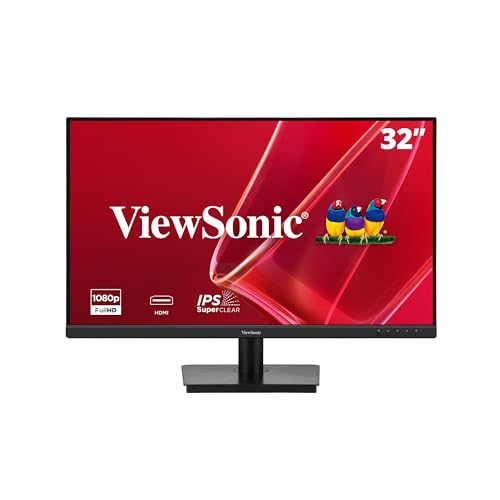
The ViewSonic VA3209M 32 Inch IPS Full HD Monitor stands out as an excellent choice for anyone needing a spacious display that enhances productivity and comfort in a home office. With its 1920x1080p resolution and 75Hz refresh rate, you’ll enjoy sharp visuals and smooth performance. The Flicker-Free technology and Blue Light Filter help reduce eye strain during long hours of work. Plus, its variable refresh rate eliminates image tearing, making it great for gaming too. With multiple preset settings for various activities and flexible connectivity options like HDMI and VGA, this monitor caters to all your needs seamlessly.
Best For: The ViewSonic VA3209M is best for professionals and gamers seeking a large, comfortable display that balances productivity and entertainment.
Pros:
- Flicker-Free technology and Blue Light Filter reduce eye strain during extended use.
- Variable Refresh Rate provides smooth visuals, enhancing gaming and fast-paced content.
- Multiple preset view settings allow for tailored experiences for different activities.
Cons:
- Limited resolution at 1920x1080p may not satisfy users looking for ultra-high-definition displays.
- No built-in speakers, requiring external audio solutions for sound.
- Heavier weight compared to smaller monitors, making it less portable.
Factors to Consider When Choosing a Computer Monitor for Home Office
When choosing a computer monitor for your home office, you’ll want to think about several key factors. Screen size, resolution, and refresh rate can greatly impact your productivity and comfort. Additionally, considering eye comfort features and available connectivity options will help guarantee your setup meets your needs.
Screen Size Considerations
Choosing the right screen size for your home office monitor can greatly impact your productivity and comfort. A larger screen, like a 27-inch or bigger, offers more space for multitasking and viewing multiple applications at once. Monitors sized between 23.8 inches and 32 inches typically provide Full HD resolution, ensuring clear visuals for text and images. Your ideal screen size also depends on your viewing distance; a 27-inch monitor works well from about 2 to 3 feet away. Consider curved monitors in these sizes for enhanced immersion and reduced distractions. Finally, make sure the monitor fits your workspace comfortably, preventing it from overwhelming your desk area while maintaining a functional setup.
Resolution and Clarity
Resolution and clarity are vital elements that can greatly enhance your home office experience. The monitor’s resolution, measured in pixels, directly affects how sharp text and images appear. For instance, a Full HD monitor (1920×1080) delivers clearer visuals, which is essential for detailed tasks like graphic design or video editing. Higher pixel density guarantees accurate color representation and finer details, making your work easier. Additionally, consider the monitor’s viewing angle; IPS panels provide wider angles, maintaining color consistency from various perspectives. Eye care technologies, such as Flicker-Free and Low Blue Light modes, can further improve clarity during long hours, reducing eye strain and enhancing comfort. Choosing the right resolution and clarity will greatly boost your productivity.
Refresh Rate Importance
While you might not think about refresh rates at first, they play an essential role in your overall monitor experience. The refresh rate, measured in Hertz (Hz), indicates how many times per second your monitor refreshes the displayed image. A standard rate is 60Hz, but if you’re into fast-paced tasks like gaming or video watching, you’ll benefit from 100Hz or higher. This higher rate reduces motion blur and lag, enhancing your viewing experience. It also helps minimize eye strain during long sessions, especially with dynamic content. Many modern monitors come with variable refresh rate technologies, synchronizing the refresh rate with your graphics card’s output, which can greatly improve visual performance and reduce screen tearing.
Eye Comfort Features
Enhancing your monitor experience goes beyond refresh rates; eye comfort features are equally important, especially for long hours spent working from home. Look for monitors with TÜV certified eye comfort technology to reduce blue light emission and flicker, minimizing eye strain. Features like LowBlue Mode and Flicker-Free technology help protect your eyes from harmful blue light and prevent fatigue. Adjustable brightness and contrast settings allow you to customize your viewing experience based on ambient lighting, enhancing comfort further. Additionally, consider displays with anti-glare coatings to reduce reflections, making it easier to see content without straining your eyes. A higher refresh rate of at least 75Hz can also provide smoother visuals, reducing motion blur during fast-paced activities.
Connectivity Options Available
How can the right connectivity options elevate your home office setup? When choosing a monitor, opt for models with multiple connectivity options like HDMI, DisplayPort, and VGA to guarantee compatibility with various devices. Consider USB-C connectivity too; it streamlines your setup by enabling data transfer and power delivery through a single cable. Integrated USB ports on the monitor can reduce cable clutter, keeping your desk organized. Make certain there are enough ports to connect all your peripherals without constant unplugging. Finally, check for VESA mount compatibility to allow flexible mounting options, optimizing your workspace layout. With the right connectivity, you can create a more efficient and comfortable home office environment.
Design and Ergonomics
Choosing the right connectivity options is just the beginning of optimizing your home office setup. Design and ergonomics play an essential role in your comfort and productivity. Look for a monitor with an adjustable stand that lets you tilt, swivel, and pivot the screen. This feature helps you find a comfortable viewing angle and reduces neck strain during long hours. Thin bezels enhance the modern look and allow for seamless multi-monitor setups. Opt for ergonomic designs that minimize the monitor’s footprint to keep your workspace organized. Finally, consider features like flicker-free technology and blue light filters to reduce eye fatigue. A high refresh rate of 100Hz or above guarantees smoother visuals for both work and leisure activities.
Budget and Value
When you’re setting up your home office, establishing a clear budget is essential, as computer monitor prices can vary widely based on features and specifications. You’ll find options ranging from under $200 to over $1,000, so it’s important to know what you need. Consider features like screen size and resolution—larger monitors (27 inches and above) with at least 1080p can boost productivity and comfort. Refresh rates matter too; aim for at least 75Hz for a smoother experience, especially during prolonged use. Look for eye care technologies, like low blue light and flicker-free features, to reduce eye strain. Finally, check warranty and return policies for added peace of mind and potential savings down the line.