
The best condenser microphones can capture detailed vocals, instruments, podcasts, streams, and voice calls with impressive clarity. This roundup compares 10 options across USB, XLR, and hybrid setups.
Whether you are building a home studio or upgrading a gaming desk, the right microphone depends on sound quality, connection type, controls, and how much setup you want to manage.
Best 10 Condenser Microphones Picks for 2026
Proven Studio Value
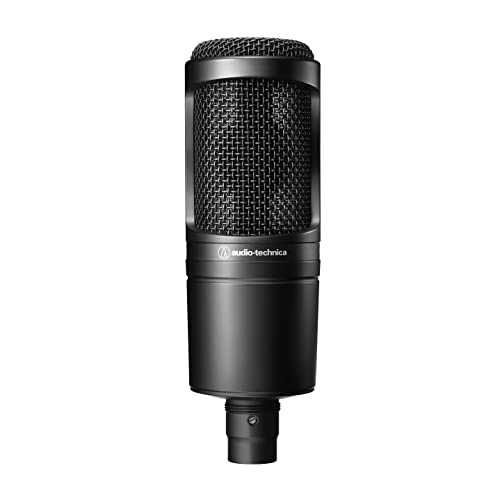
- Cardioid XLR condenser for home studios
- Handles high SPL and wide dynamics
- Requires phantom power and an interface
Best For: Project studios and vocal recording
Quiet Vocal Specialist
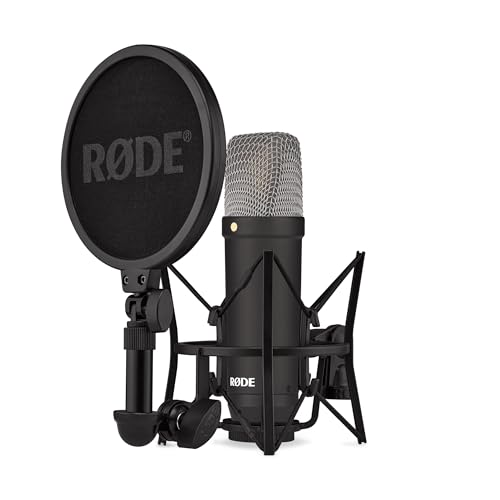
- Large-diaphragm XLR condenser for vocals
- Very low 4.5dBA listed self-noise
- Includes shock mount, pop filter, and cable
Best For: Quiet vocal recording and home studios
Simple Gaming Setup

- Plug-and-play USB-C desktop condenser
- Built-in pop filter and internal suspension
- 24-bit/96kHz audio with tap-to-mute
Best For: Gaming, streaming, and compact PC setups
Budget Studio Pick

- Affordable large-diaphragm condenser
- Cardioid XLR studio setup
- Shock mount and cable included
Best For: Home studios and budget vocal recording
Flexible USB Creator Mic

- Plug-and-play USB connectivity
- Four selectable pickup patterns
- Built-in controls and desktop stand
Best For: Streaming, podcasting, and computer recording
Hybrid Studio Upgrade

- XLR and USB-C connectivity
- Ultra-low-noise large-diaphragm capsule
- Shock mount and pop filter included
Best For: Flexible home-studio and direct computer recording
Best Budget Pick
Amazon Basics USB Condenser Microphone

- Plug-and-play USB setup
- Cardioid pickup for clearer voice capture
- Adjustable stand and one-tap mute
Best For: Beginners streaming, podcasting, or recording on a PC
Best Versatile Kit
MAONO A04 Gen2 XLR/USB Condenser Microphone

- USB and XLR connectivity
- 192kHz/24-bit USB recording
- Includes arm, shock mount, pop filter, and windscreen
Best For: Creators wanting a complete kit with room to upgrade
Best Simple Desktop Mic
FIFINE K669B USB Condenser Microphone

- Easy USB plug-and-play setup
- Durable metal body with tripod stand
- Built-in volume control
Best For: Desktop recording, meetings, gaming, and streaming
Proven Studio Value – Audio-Technica AT2020
The Audio-Technica AT2020 is a practical starting point for anyone building a home studio around condenser microphones. Its cardioid pickup pattern helps reduce sound from the sides and rear, while high SPL handling and a wide dynamic range support a range of recording applications. Because it uses an XLR connection and phantom power, you will need a compatible audio interface or mixer.
Best For: Project studios, home vocal recording, and buyers seeking a dependable XLR condenser microphone.
Pros:
- Cardioid pattern improves isolation of the intended sound source.
- High SPL handling and wide dynamic range offer recording versatility.
- Custom-engineered low-mass diaphragm supports extended frequency and transient response.
Cons:
- XLR connectivity requires an audio interface or other compatible equipment.
- Does not include a USB connection or listed desktop accessories.
The AT2020 remains a straightforward choice for a conventional studio signal chain. Choose it when you want an affordable, focused microphone and already have—or plan to add—the necessary phantom-power setup.
Complete USB Desktop Studio – RØDE NT-USB+
The RØDE NT-USB+ is designed for simple, computer-connected recording without a separate interface. This USB condenser microphone combines a studio-grade capsule with a low-noise preamp, headphone monitoring, and included desktop accessories. It supports computers, tablets, and smartphones through USB-C and records at up to 48kHz/24-bit.
Best For: Podcasters, streamers, musicians, and remote workers who want an all-in-one USB recording setup.
Pros:
- Plug-and-play USB-C connectivity works with computers and mobile devices.
- Zero-latency headphone output and controls support real-time monitoring.
- Includes a detachable pop filter, desktop stand, and USB-C cable.
- Optional RØDE Central software provides APHEX audio processing.
Cons:
- USB connectivity is less suited to users building a traditional XLR studio chain.
- Its 48kHz/24-bit recording specification may not meet every high-resolution workflow.
The NT-USB+ is a convenient choice when speed and simplicity matter. It delivers monitoring, accessories, and direct device compatibility in one package, making it particularly practical for desktop recording and streaming.
Quiet Vocal Specialist – RØDE NT1 Signature
The RØDE NT1 Signature is an XLR large-diaphragm condenser microphone aimed at clean vocal and studio recording. Its tight cardioid pattern focuses on the performer while helping reject room sound, and its listed 4.5dBA self-noise rating is suited to detailed, quiet takes. The package includes the key accessories needed to get started, but an audio interface is required.
Best For: Vocalists, streamers, and home-studio users who want a quiet XLR microphone with a complete accessory bundle.
Pros:
- Very low listed self-noise helps preserve quiet details.
- Large-diaphragm design and established NT1 voicing suit vocal recording.
- Tight cardioid pickup helps focus on the voice and reject room sound.
- Includes SM6 shock mount, pop filter, six-meter XLR cable, and dust cover.
Cons:
- Requires an audio interface and suitable phantom-power setup.
- Less convenient than a USB microphone for direct connection to a computer.
The NT1 Signature is a strong fit for buyers prioritizing a quiet vocal chain and useful included accessories. Select it if you are prepared to use XLR equipment and want fewer extras to purchase separately.
Simple Gaming Setup – HyperX SoloCast 2
The HyperX SoloCast 2 is a USB condenser microphone built for gaming, streaming, and straightforward desktop recording. Its cardioid pattern favors sound from the front, while the internal suspension system, built-in pop filter, and weighted tiltable stand help keep setup simple. USB-C to USB-A plug-and-play connectivity gets it working quickly with a PC.
Best For: Gamers and streamers who want a compact, ready-to-use desktop microphone with software-adjustable filters.
Pros:
- Includes a tiltable stand, built-in pop filter, and internal shock-mount-style suspension.
- 24-bit/96kHz recording supports high-resolution capture.
- Tap-to-mute control uses an LED indicator to show microphone status.
- HyperX NGENUITY enables high-pass, low-pass, and voice-enhancement filters.
Cons:
- USB-C to USB-A connectivity is primarily suited to computer-based setups.
- Advanced filter customization requires optional software.
- Desktop form factor may be less suitable for users seeking a traditional studio microphone.
The SoloCast 2 is a convenient option for a tidy gaming or streaming desk. Its built-in accessories and controls reduce the need for extra hardware, while the mounting threads leave room to move it onto a compatible microphone arm later.
Budget Studio Pick – Mackie EM-91C
For shoppers comparing condenser microphones for vocals and instruments, the Mackie EM-91C is a straightforward XLR option built around a large-diaphragm capsule and cardioid pickup pattern. Its included shock mount and XLR cable make it a practical starting point for a home or studio recording setup.
Best For: Home studios and budget-conscious vocal or instrument recording.
Pros:
- Affordable professional-quality condenser design
- Cardioid pattern helps reduce ambient sound
- Includes a shock mount and XLR cable
- Rugged, reliable construction
Cons:
- XLR connectivity requires a compatible audio mixer or interface
- Designed for corded electric operation rather than a simple USB connection
The EM-91C keeps the feature set focused, making it a sensible choice when you want a traditional studio condenser microphone without a complicated setup or premium price positioning.
Flexible USB Creator Mic – Logitech Blue Yeti
The Logitech Blue Yeti is one of the more versatile condenser microphones for computer-based recording, streaming, podcasting, and calls. Its USB plug-and-play design, adjustable desktop stand, onboard controls, and four pickup patterns let you adapt it to different recording situations without additional audio hardware.
Best For: Streamers, podcasters, gamers, and creators recording directly on a PC or Mac.
Pros:
- USB plug-and-play setup for Mac or PC
- Four pickup patterns: cardioid, omni, bidirectional, and stereo
- Onboard gain, volume, pattern, and mute controls
- Includes adjustable desktop stand and supports no-latency monitoring
Cons:
- USB connectivity is less suited to traditional XLR studio systems
- Its desktop form factor is relatively substantial at 3.5 pounds
With multiple pickup patterns and built-in controls, the Blue Yeti is a convenient all-in-one option for creators who value flexibility and quick computer setup over a conventional interface-based workflow.
Hybrid Studio Upgrade – RØDE NT1 5th Gen
The RØDE NT1 5th Gen is a hybrid choice among condenser microphones, combining XLR output with direct USB-C connection. It pairs a large-diaphragm cardioid design with very low self-noise, high SPL handling, up to 192kHz conversion over USB, and a supplied shock mount, pop filter, and cables.
Best For: Home-studio users who want both interface-based and direct-to-computer recording.
Pros:
- Supports both XLR and USB-C connections
- Ultra-low-noise capsule with high SPL handling
- Includes shock mount, pop filter, XLR cable, and USB-C cable
- Rugged aluminium body with nickel plating and ceramic coating
Cons:
- Its broad feature set may be more than a basic recording setup requires
- USB recording depends on a compatible computer connection
The NT1 5th Gen is a strong fit for recording setups that may evolve over time: use USB-C for direct computer recording now, then connect through an interface or mixer via XLR when your studio expands.
Best Budget Pick – Amazon Basics USB Condenser Microphone
If you want straightforward condenser microphones for streaming, meetings, podcasting, or casual recording, this Amazon Basics USB model keeps setup simple. Its cardioid pickup pattern focuses on sound from the front, while the adjustable stand and one-tap mute add everyday convenience.
Best For: Beginners who need an affordable plug-and-play USB microphone for PC recording, streaming, or online calls.
Pros:
- USB plug-and-play setup requires no additional drivers.
- Cardioid pickup helps isolate background noise.
- Includes a 360-degree adjustable stand, shock absorber, and one-tap mute.
Cons:
- USB connectivity is less flexible than an XLR/USB hybrid design.
- Designed for one-channel desktop recording.
This is a practical entry-level choice for users who value easy setup and basic voice clarity over advanced studio controls or connectivity options.
Best Versatile Kit – MAONO A04 Gen2 XLR/USB Condenser Microphone
The MAONO A04 Gen2 stands out among condenser microphones for its dual USB and XLR connectivity. It combines high-resolution USB recording, software-based controls, and a complete boom-arm setup, making it suitable for users who may move from simple computer recording to an audio interface.
Best For: Podcasters, voiceover creators, and streamers who want both plug-and-play USB recording and an upgrade path through XLR.
Pros:
- Supports both USB and XLR connections.
- USB mode offers up to 192kHz/24-bit sampling and MAONO Link controls.
- Includes a shock mount, pop filter, windscreen, and adjustable arm stand.
- Cardioid capsule and adjustable software noise reduction help manage unwanted sound.
Cons:
- XLR cable is not included.
- XLR use requires phantom power.
- Software controls are available only in USB mode.
This is the most adaptable option of the three, especially if you want a fuller starter kit now and the flexibility to connect to an interface or mixer later.
Best Simple Desktop Mic – FIFINE K669B USB Condenser Microphone
The FIFINE K669B is one of the more straightforward condenser microphones for computer recording, online meetings, gaming, and streaming. Its metal construction, included tripod, direct USB connection, and built-in volume knob make it a convenient desktop option.
Best For: PC, Mac, and PS4/PS5 users who want a durable USB desktop microphone with simple volume control.
Pros:
- Plug-and-play USB setup includes a 5.9-foot cable.
- Cardioid pickup focuses on the main voice source.
- Metal construction and included tripod provide a stable desktop setup.
- Built-in volume knob allows quick level adjustment or muting.
Cons:
- Not compatible with Xbox or phones.
- USB connectivity does not provide an XLR upgrade path.
- Automatic volume controls in some apps may affect recording levels.
Choose the K669B if you prefer a compact, durable desktop microphone with uncomplicated controls for everyday communication and content creation.
How We Picked the Best Condenser Microphones
We focused on microphones suited to realistic recording, streaming, podcasting, gaming, and home-studio needs. The lineup includes simple USB models, traditional XLR microphones, and flexible microphones with both USB-C and XLR outputs. We also considered pickup pattern, included accessories, monitoring features, setup requirements, and overall value.
Because microphone choice is highly dependent on workflow, no single model is ideal for everyone. A studio performer may prioritize an XLR connection and a quiet room, while a streamer may benefit more from plug-and-play controls and headphone monitoring.
Quick Comparison
| Best For | Recommended Type | Why It Matters |
|---|---|---|
| First home-studio microphone | Cardioid XLR | Reliable vocal capture and compatibility with audio interfaces |
| Streaming and gaming | USB condenser | Simple setup with direct computer connection |
| Podcasting and voice recording | USB or hybrid | Convenient controls, monitoring, and flexible placement |
| Long-term studio upgrade | USB/XLR hybrid | Works now with a computer and later with an interface |
Key Buying Factors for Condenser Microphones
USB, XLR, or Both
USB microphones connect directly to a computer and are usually the easiest choice for streaming, meetings, and podcasting. XLR microphones require an audio interface or mixer but provide a more expandable setup. Hybrid models offer both connections, making them useful if your recording system may grow.
Pickup Pattern and Room Conditions
A cardioid pattern focuses on sound in front of the capsule while reducing sound from behind. It is a practical default for solo vocals and desk recording. Condenser Microphones are sensitive, so untreated rooms may reveal fans, keyboards, reflections, and outside noise. A quiet space and close, consistent positioning can make a major difference.
Monitoring and Controls
Look for a headphone jack, volume control, mute button, gain adjustment, and low-latency monitoring when you need to hear yourself while recording or streaming. Built-in pop filters and shock mounts can also reduce plosives and desk vibrations, though a separate boom arm or pop filter may still improve results.
Sound Quality and Compatibility
Check operating-system support, connector type, included cables, sample-rate capability, and whether phantom power is required. A microphone with a flattering sound is helpful, but placement, gain staging, and room acoustics often matter as much as specifications.
Who Should Buy Which Condenser Microphones?
- Choose a USB model if you want the fastest setup for gaming, streaming, meetings, or podcasting.
- Choose an XLR model if you already own an interface or want more control over preamps, processing, and future upgrades.
- Choose a hybrid microphone if you want immediate USB convenience without giving up an XLR upgrade path.
- Choose an affordable entry-level option for casual recording, school projects, and voice calls where professional studio features are unnecessary.
- Choose a larger-diaphragm studio microphone for detailed vocals and instruments, provided your room is quiet enough to support its sensitivity.
Before buying, confirm the connection you need, the available desk or stand space, and whether your room requires acoustic treatment. The best value usually comes from matching the microphone to your environment and recording habits rather than choosing the most feature-heavy model.