
Modern meeting rooms need more than a power strip tucked under the table. The best conference table charging stations keep laptops, phones, displays, and accessories powered without cluttering the workspace.
Below, we focus on practical options for boardrooms, huddle spaces, and multipurpose conference tables, with an eye toward charging speed, outlet mix, and installation style.
Best 10 Conference Table Charging Stations Picks for 2026
Multifunction Meeting Hub
Conference Table Power Hub with HDMI & PD20W

- 2 AC outlets plus USB-A and USB-C charging
- HDMI supports 4K video transmission
- Pop-up design helps reduce cable clutter
Best For: Meeting spaces that need power, charging, and HDMI in one hub
Boardroom Table With Power
10FT Conference Table for 8-10 People

- Two built-in stations with AC, USB, and USB-C ports
- 2-inch thick tabletop for sturdy daily use
- Sized for 8-10 people in boardroom settings
Best For: Large teams needing a conference table with built-in charging
Flush-Mount Power Strip
Recessed Conference Table Power Hub

- 3 AC outlets plus USB-A and dual USB-C ports
- 20W USB-C PD supports faster charging
- Flush-mounted design keeps tables tidy
Best For: Built-in charging on desks and conference tables
Boat-Shaped Boardroom Table
Tribesigns 8FT Conference Table

- Two grommets help route cables neatly
- Boat-shaped top improves face-to-face discussion
- Scratch- and stain-resistant laminate finish
Best For: Meeting rooms that need cable management more than power
Hidden High-Capacity Charging

- 6 AC outlets plus 8 USB ports
- PD 30W and 20W USB-C charging
- Flush-mount design keeps desks clean
Best For: Conference tables and built-in furniture charging
Power Plus Connectivity

- HDMI and RJ45 included for meetings
- 20W USB-C with 2 AC outlets
- UL listed recessed metal design
Best For: Conference rooms that need charging and connectivity
Compact Recessed Charging

- 35W USB-C plus 30W USB-A fast charging
- 2 AC outlets and 4 USB ports
- Round flush-mount design saves space
Best For: Smaller desks and conference tables with limited space
Large Boardroom Pick
10FT Boardroom Table for 10 People

- 4 AC outlets, 2 USB, 2 Type-C ports
- 2-inch scratch-resistant tabletop
- Seats up to 10 people
Best For: Big meeting rooms needing built-in charging and seating for 10
Wireless Pop-Up Hub
5-in-1 Conference Table Power Hub

- 15W wireless charging included
- PD 20W USB-C fast charging
- Pop-up design with 2 AC outlets
Best For: Tables and counters that need wireless charging with built-in wired power
Recessed Charging Pick
PD20W Recessed Table Power Outlet
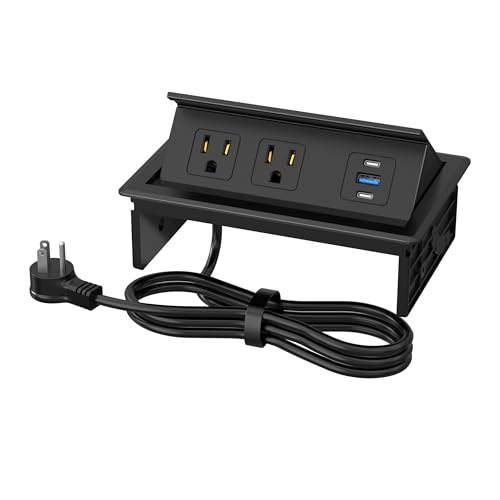
- 2 AC outlets plus USB-A and USB-C
- PD 20W USB-C fast charging
- Recessed flip-up design
Best For: Built-in conference room tables that need a flush, clutter-reducing outlet
Multifunction Meeting Hub – Conference Table Power Hub with HDMI & PD20W
If you want conference table charging stations that do more than power laptops and phones, this pop-up hub is built for the job. It combines AC outlets, USB charging, LAN, HDMI 4K support, and a compact in-table design that fits cleanly into offices, meeting rooms, and collaborative workspaces.
Best For: Teams that need a tidy, multiport conference table charging station with HDMI and fast USB-C charging.
Pros:
- Includes 2 AC outlets plus USB-A and USB-C charging with up to 20W PD.
- HDMI supports 4K video transmission for presentations and meeting displays.
- Built-in LAN port adds useful connectivity for office conference setups.
- Pop-up design helps keep tabletop wiring organized and out of the way.
Cons:
- Requires a cutout installation, so it is not a plug-and-play tabletop accessory.
- Best suited to desks and conference tables with the right opening size.
For a practical conference table charging station with a broader feature set, this model stands out for connectivity as much as power delivery. It is especially useful when meetings need both device charging and video input from the same central hub.
Boardroom Table With Power – 10FT Conference Table for 8-10 People
For larger rooms, conference table charging stations are often built into the furniture itself, and this 10-foot boardroom table is a good example. It includes two charging stations in the tabletop, giving meeting attendees access to AC, USB, and USB-C power while keeping the room layout clean and professional.
Best For: Larger conference rooms, boardrooms, and seminar spaces that need built-in power for multiple users.
Pros:
- Two built-in charging stations provide 4 AC outlets, 2 USB ports, and 2 USB-C ports.
- 2-inch thick tabletop adds a sturdy feel for daily office and meeting use.
- Heavy-duty trapezoidal base supports a modern boardroom look.
- Designed for 8-10 people, making it suitable for group collaboration.
Cons:
- Large size requires a dedicated conference room with enough floor space.
- Ships in four boxes and needs two adults for assembly.
This is less of a standalone accessory and more of an all-in-one meeting solution. If you want conference table charging stations integrated directly into a large table, this model offers strong utility and a polished presentation-ready setup.
Flush-Mount Power Strip – Recessed Conference Table Power Hub
This recessed hub is a smart pick if you want conference table charging stations that disappear into the surface when not in use. It combines multiple outlets, USB charging, and a flush-mounted design that helps keep desks, conference tables, and work surfaces neat.
Best For: Clean, recessed power access on conference tables, desks, and other built-in work surfaces.
Pros:
- Offers 3 AC outlets, 1 USB-A port, and 2 USB-C ports in one recessed unit.
- USB-C PD delivers up to 20W for faster device charging.
- Flush-mounted style helps reduce cable clutter on the tabletop.
- 6-foot power cord adds flexibility for placement.
Cons:
- Requires cutting a 6.3 x 4-inch opening for installation.
- Designed for built-in use, so it is not ideal if you want a portable charger.
Its strength is the clean installation and versatile port mix. For buyers comparing conference table charging stations, this one is a strong choice when you want the power solution to blend into the furniture instead of sitting on top of it.
Boat-Shaped Boardroom Table – Tribesigns 8FT Conference Table
When comparing conference table charging stations, some buyers need the table itself to manage cables neatly rather than adding a separate hub. This 8-foot boat-shaped conference table includes tabletop grommets and internal cable channels, making it a practical fit for organized meeting spaces.
Best For: Offices and meeting rooms that want an integrated cable-management conference table with a modern look.
Pros:
- Two tabletop grommet cutouts help route cords and cables cleanly.
- Open channels inside the legs support more discreet cable management.
- Boat-shaped top improves visibility so people can face each other more easily.
- Scratch- and stain-resistant laminate finish is built for regular office use.
Cons:
- Does not include built-in outlets or USB charging ports.
- Ships in two parcels, which may arrive separately.
This table is best for teams that prioritize cable routing and collaboration over built-in electrical hardware. If your goal is a cleaner conference setup without adding electronics, it offers a straightforward and professional foundation.
Hidden High-Capacity Charging – Recessed 6-Outlet Desk Strip
If you need conference table charging stations that can handle a busy meeting setup, this recessed power strip is built for high device counts and a clean tabletop look. It combines 6 AC outlets with 8 USB ports, including PD 30W and 20W USB-C charging, so teams can plug in phones, tablets, and accessories without cluttering the surface.
Best For: Conference tables, office furniture, and DIY desks that need a hidden, high-capacity charging hub.
Pros:
- Up to 14 devices can be powered at once with 6 outlets and 8 USB ports.
- Includes fast USB-C charging with PD 30W and a second 20W USB-C option.
- Recessed flush-mount design helps keep tabletops neat and organized.
- Wide-spaced outlets are better suited for larger plugs and adapters.
Cons:
- Requires a rectangular cutout for installation.
- Not the simplest option if you want a portable plug-and-play charger.
- Best suited to furniture installation rather than temporary use.
This is a strong fit if your priority is a tidy, built-in charging solution with lots of USB capacity. The ETL and CSA certifications, surge protection, and fire-resistant materials add confidence for regular meeting-room use.
Power Plus Connectivity – 3-Pack Power Hub with HDMI
For conference table charging stations that also handle presentation gear, this power hub stands out with HDMI and Ethernet built in. It combines 2 AC outlets, 3 USB ports, and a 20W USB-C fast-charging port in a recessed metal box, making it useful when you want power and basic connectivity in one tidy unit.
Best For: Meeting tables, office desks, and shared workspaces that need charging plus multimedia connections.
Pros:
- Includes HDMI and RJ45 network connectivity alongside power.
- 20W USB-C plus USB-A ports support everyday device charging.
- UL listed with a 125V/12A/1500W rating.
- Carbon steel construction is built for a more durable recessed install.
Cons:
- Only 2 AC outlets, so it is less outlet-dense than some alternatives.
- Installation requires a specific cutout size.
- The multimedia features may be unnecessary if you only need charging.
This is a smart choice when your conference table needs more than power alone. The added HDMI and Ethernet ports make it especially practical for presentation-ready rooms and cleaner cable management.
Compact Recessed Charging – 3-Inch Desk Grommet Charger
If you want conference table charging stations in a smaller round format, this desk grommet is designed to keep work surfaces tidy without taking up much space. It offers 2 AC outlets, 4 USB ports, and an HDMI port, plus a 35W USB-C fast-charging connection and 30W USB-A ports for everyday devices.
Best For: Smaller conference tables, office desks, and furniture tops where a compact recessed charger makes sense.
Pros:
- Compact 3-inch round design fits cleanly into desks and countertops.
- 35W USB-C and 30W USB-A fast charging support quick top-ups.
- Includes HDMI in addition to AC and USB charging.
- ETL listed with overload protection and fire-resistant ABS material.
Cons:
- Only 2 AC outlets, so it is not ideal for high plug counts.
- Requires drilling a 3-inch hole for installation.
- Round form factor may not suit every conference table layout.
This model makes sense if you want a neat built-in charging point with a small footprint and faster USB charging. It is a practical pick for conference spaces that need power, but not a large multi-outlet hub.
Large Boardroom Pick – 10FT Boardroom Table for 10 People
This conference table charging stations option is built for larger meeting rooms that need both seating capacity and dependable built-in power. With a 10-foot rectangular top, integrated AC, USB, and Type-C ports, and a heavy-duty base, it suits boardrooms where devices stay powered through long working sessions.
Best For: Large conference rooms, boardrooms, and seminar spaces that need a full-size table with built-in charging.
Pros:
- Built-in charging includes 4 AC outlets, 2 USB ports, and 2 Type-C ports.
- Thick 2-inch tabletop is scratch-resistant and made for heavy use.
- Modern trapezoid metal legs give the table a strong, professional look.
- Comes with cable management and assembly tools for setup.
Cons:
- Large 118-inch footprint requires a spacious room.
- Ships in four boxes, so delivery and setup are more involved.
- Assembly is required and may take multiple people.
For teams that want a conference table charging stations setup built into the furniture itself, this model focuses on capacity, durability, and practical connectivity. It is a strong fit when the meeting space needs to support several devices without extra tabletop clutter.
Wireless Pop-Up Hub – 5-in-1 Conference Table Power Hub
For buyers comparing conference table charging stations, this pop-up power hub stands out by combining AC outlets, USB charging, and a 15W wireless pad in one compact unit. It is designed for table cutout installation and gives conference rooms or shared work surfaces a cleaner, more built-in charging solution.
Best For: Conference tables, kitchen counters, or office worktops that need wireless charging plus wired power.
Pros:
- Includes 15W wireless charging for Qi-compatible devices.
- PD 20W USB-C fast charging helps power phones and other devices faster.
- Pop-up design keeps the power hub tucked away when not in use.
- Durable aluminum alloy and plastic construction is treated to be wear-resistant and flame-retardant.
Cons:
- Requires a table cutout for installation.
- Best suited to furniture that can accommodate a recessed power box.
- Black finish may be less flexible for lighter decor schemes.
This is a practical choice when you want a sleek conference table charging stations solution that reduces clutter while adding wireless convenience. The pop-up format and mixed charging options make it useful in rooms where multiple users need quick access to power.
Recessed Charging Pick – PD20W Recessed Table Power Outlet
This recessed power outlet is a straightforward choice for conference table charging stations when you want a cleaner tabletop and fast USB charging. It combines 2 AC outlets with USB-A and USB-C ports in a flip-up design that is meant to sit neatly into a table cutout.
Best For: Conference rooms, offices, and worktables that need a recessed outlet box with fast USB-C charging.
Pros:
- Includes 2 AC outlets plus USB-A and USB-C charging ports.
- PD 20W USB-C output supports faster device charging.
- Flip-up design tilts to 45° or 80° for easier plug compatibility.
- Recessed installation helps reduce messy cords and bulky adapters.
Cons:
- Requires a specific hole cut size of L6.3 in x W4 in.
- Installation is only practical for surfaces that can be cut.
- No wireless charging feature is included.
If your priority is a low-profile conference table charging stations setup, this model focuses on neat integration and broad charging support. It is best for spaces that want a recessed, built-in look rather than a surface-mounted power strip.
How We Picked These Conference Table Charging Stations
We focused on Conference Table Charging Stations that match real meeting-room use: enough AC outlets for laptops and adapters, USB-C fast charging for modern devices, and layouts that reduce cable mess. We also looked at installation type, including pop-up, recessed, flush-mount, and grommet-style units, since the right fit depends on the table and how permanent the setup needs to be.
For larger boardrooms, we gave extra attention to products that add HDMI or network connectivity, because shared presentation spaces often need more than power alone.
Quick Comparison
Choose a pop-up hub if you want easy access and a polished look. Choose a recessed or flush-mounted unit if you want a lower profile and a more permanent installation. If your team regularly presents or docks devices, multimedia ports such as HDMI and RJ45 can be more valuable than extra USB ports. Built-in table power units are best for new tables or renovations, while surface-friendly grommet and retrofit options suit upgrades to existing furniture.
Key Buying Factors for Conference Table Charging Stations
Charging Speed and Port Mix
USB-C PD output matters most for modern phones, tablets, and many laptops. If your team uses mixed devices, look for a balanced setup with both USB-C and USB-A ports plus enough AC outlets for power bricks.
Mounting Style and Table Compatibility
Measure the cutout size, tabletop thickness, and under-table clearance before buying. Recessed and flush-mount designs save space and look cleaner, while pop-up units are easier to access during meetings. Larger integrated tables with built-in charging are convenient, but they make the most sense when you are furnishing the room from scratch.
Connectivity for Presentations
Some Conference Table Charging Stations include HDMI and Ethernet, which can simplify screen sharing and wired networking. If your meeting room supports frequent presentations, those extras can be more useful than a few additional charging ports.
Durability and Cable Management
Look for sturdy housings, reliable cord length, and a layout that keeps plugs from crowding one another. A well-designed station should make the table easier to use, not just add more ports.
Who Should Buy Which Conference Table Charging Stations?
Small teams and flexible spaces should prioritize compact recessed or pop-up stations with fast USB-C charging. Conference rooms that host presentations should look for models with HDMI or RJ45 support. Larger boardrooms or new office builds may benefit most from integrated Conference Table Charging Stations built directly into the table for the cleanest result and easiest day-to-day use.
If your main goal is to modernize an existing room quickly, a flush-mount or grommet-style unit is usually the best balance of convenience, cost, and appearance.