
Recessed power outlets for conference tables help keep meeting spaces organized while giving teams easy access to charging and connectivity. The best options combine flush-mounted design, fast USB-C power, and useful ports for HDMI or Ethernet.
Below, we focus on practical choices for conference rooms, collaboration tables, and office installs where reliability, appearance, and connectivity matter.
Best 10 Recessed Power Outlets for Conference Tables Picks for 2026
Conference Table Power Hub with USB-C and CAT6
2 USB-C, 2 USB-A, CAT6, Switch
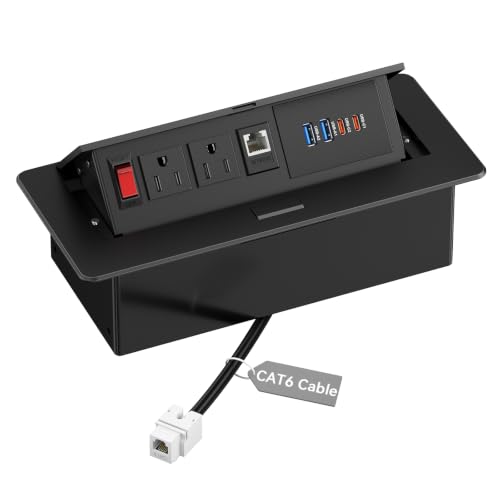
- Dual USB-C PD 30W charging
- Built-in CAT6 networking with 6 ft cord
- Metal recessed pop-up design with switch
Best For: meeting tables that need charging and wired network access
Multimedia Pop-Up Desk Hub with HDMI

- Adds HDMI, LAN, and USB 3.0
- PD 20W charging with 2 AC outlets
- Pop-up design for clean tabletop use
Best For: meeting rooms that need HDMI plus everyday charging
Flush-Mount Recessed Power Strip
2 Outlets, USB-C 20W, Flat Plug

- Compact recessed layout for tidy installs
- 2 AC outlets plus USB-C and USB-A
- 6 ft cord with flat plug included
Best For: compact furniture and lighter-duty conference-table power
UL-Listed Multimedia Conference Hub

- HDMI and RJ45 built into the hub
- USB-C PD 20W plus QC 18W USB-A
- UL listed metal build with brush cover
Best For: conference tables needing media, network, and power in one hub
High-Capacity Flush Mount
Recessed Power Strip with PD 30W

- 6 AC outlets and 8 USB ports
- PD 30W and 20W fast charging
- Wide-spaced outlets for larger plugs
Best For: large conference tables and shared work surfaces
Power + AV Connectivity Hub
Conference Table Power Hub with 65W USB-C

- 4 AC outlets with 65W USB-C
- Adds RJ45 and HDMI connectivity
- Flush-mount aluminum alloy design
Best For: conference tables needing power, data, and presentation connections
Flush-Mounted Multi-Outlet Hub
Recessed Conference Table Power Hub

- 3 AC outlets plus USB-A and dual USB-C ports
- 20W USB-C PD charging for faster device top-ups
- Flush-mounted build helps cut tabletop clutter
Best For: Conference tables needing a clean, mixed-device charging hub
Dual-AC Flip-Up Hub
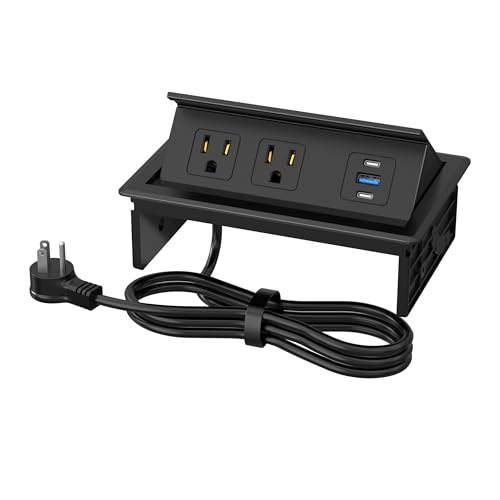
- 2 AC outlets plus USB-A and USB-C charging
- 20W USB-C PD supports faster device charging
- Flip-up recessed design with a 6.3 x 4 in. cutout
Best For: Small conference rooms and counters needing a compact built-in outlet
High-Capacity USB-C Hub
Recessed Conference Table Power Hub

- Two 20W USB-C ports for simultaneous fast charging
- 3 AC outlets and an 18W USB-A port
- Brush cover helps block dust when not in use
Best For: Conference tables and shared desks with heavy USB-C charging needs
Conference Table Power Hub with USB-C and CAT6 – 2 USB-C, 2 USB-A, CAT6, Switch
If you want recessed power outlets for conference tables that handle charging and networking in one clean install, this Kungfuking hub is built for that job. It combines AC power, dual USB-C PD charging, USB-A ports, and CAT6 connectivity in a matte black metal housing with a pop-up design for a more professional tabletop finish.
Best For: conference rooms, shared workstations, and office tables that need both charging and wired network access.
Pros:
- Two USB-C PD ports deliver up to 30W each when used individually.
- Includes CAT6 Ethernet connectivity plus a 6 ft power cord.
- Metal housing and built-in on/off switch add durability and control.
- Recessed, pop-up design helps keep conference tables looking tidy.
Cons:
- Requires an 8.86″ x 4.33″ cutout, so installation is not universal.
- USB-C output drops to shared-use behavior when both ports are in use.
- Best suited to furniture with enough depth for a recessed module.
This is a strong choice if your table needs more than basic outlets. The mix of power, data, and USB charging makes it especially practical for meeting spaces where laptops and phones are used all day.
Multimedia Pop-Up Desk Hub with HDMI – 2 AC, PD 20W, 4K HDMI
For recessed power outlets for conference tables that also handle presentation gear, this pop-up hub adds HDMI alongside power and charging. It fits well in offices and meeting rooms where you want a single built-in module for devices, displays, and everyday desk charging.
Best For: conference tables and workspaces that need HDMI connectivity with basic power and USB charging.
Pros:
- Includes 2 AC outlets, PD 20W charging, LAN, HDMI, and USB 3.0.
- HDMI supports 4K video transmission with stable, anti-interference performance.
- Pop-up design keeps the tabletop cleaner when not in use.
- Simple through-hole installation with an 8.85″ x 4.33″ cutout.
Cons:
- USB-C output is limited to 20W, which is less powerful than higher-wattage options.
- Housing is plastic rather than metal.
- Only 2 USB ports are listed in the details.
This model is a practical pick if your meetings involve display connections as well as charging. It is less about heavy-duty power delivery and more about convenient all-in-one table connectivity.
Flush-Mount Recessed Power Strip – 2 Outlets, USB-C 20W, Flat Plug
If you need recessed power outlets for conference tables in a compact form factor, this flush-mount strip keeps the footprint small while still adding power and USB charging. It is designed for simple table cut-in installation and works well where you want an unobtrusive outlet solution for everyday use.
Best For: smaller tables, side tables, cabinets, and office furniture that need a compact recessed outlet.
Pros:
- Compact recessed design helps reduce clutter on the tabletop.
- Includes 2 AC outlets plus 1 USB-C and 1 USB-A port.
- USB-C port supports PD 20W fast charging.
- 6 ft cable and flat plug make placement easier in tighter setups.
Cons:
- Only one USB-C port, so charging flexibility is limited.
- The opening size is much smaller than larger conference-table hubs.
- USB-A output is modest compared with more feature-rich models.
This is a sensible choice when you want a clean recessed install without the bulk of a full conference hub. It is best for light-duty charging and simple tabletop power access.
UL-Listed Multimedia Conference Hub – HDMI, RJ45, 20W USB-C
For recessed power outlets for conference tables that need a more premium, all-in-one layout, this Kungfuking power hub combines AC outlets, USB charging, HDMI, and RJ45 networking. Its metal construction and brush cover give it a more finished look for offices, meeting rooms, and countertop installations.
Best For: conference tables, office desks, and meeting spaces that need power plus media and network connections.
Pros:
- 7-in-1 design includes HDMI, RJ45, 3 USB ports, and 2 AC outlets.
- USB-C PD 20W and USB-A QC 18W support convenient device charging.
- UL listed with a 125V/12A/1500W rating and 6 ft power cord.
- Carbon steel and metal recessed parts improve durability.
Cons:
- Installation requires a 252mm x 120mm cutout, so it needs a fairly large opening.
- Only one USB-C port is listed.
- 30-day return guarantee is shorter than some alternatives’ warranty terms.
This is the most feature-packed option in the group if you want more than simple charging. It is a strong fit for rooms where wired connectivity and a more polished built-in look both matter.
High-Capacity Flush Mount – Recessed Power Strip with PD 30W
If you need recessed power outlets for conference tables that can handle lots of devices at once, this flush-mount strip is built for busy shared spaces. It combines 6 AC outlets with 8 USB ports, including PD 30W and 20W charging, so it suits conference tables, narrow desks, and other furniture where a clean, low-profile install matters.
Best For: conference rooms, office tables, and furniture builds that need a high-capacity recessed charging hub
Pros:
- 6 AC outlets plus 8 USB ports for up to 14 devices
- PD 30W USB-C charging plus a second 20W fast-charging option
- Wide-spaced outlets help accommodate larger plugs
- ETL and CSA certified with surge and overload protection
Cons:
- Requires a cutout installation in the tabletop or furniture surface
- Best suited to North American Type B power setups
This is a strong pick when capacity and a tidy desktop layout are both priorities. The recessed design keeps the socket hidden while still giving you a lot of charging flexibility for meetings, workstations, or DIY furniture projects.
Compact Pop-Up Hub – Pop-Up Conference Table Hub
For recessed power outlets for conference tables where a pop-up design is preferred, this hub keeps the surface neat until you need access. It offers 3 AC outlets plus USB-A and USB-C charging, and the 45-degree damped pop-up action makes it a practical choice for conference rooms, countertops, and other multi-user spaces.
Best For: conference rooms, kitchen counters, and office tables that need a compact pop-up power hub
Pros:
- 3 AC outlets plus USB-A and USB-C ports
- PD 20W USB-C fast charging for quicker top-ups
- 45-degree pop-up mechanism with damped spring structure
- Thickened aluminum alloy construction for a sturdier mount
Cons:
- Lower outlet count than larger conference table power hubs
- Less ideal if you need many USB ports at once
This model makes sense when you want a more compact recessed solution without giving up USB charging. It is straightforward to install, offers a cleaner tabletop look, and fits light-to-moderate meeting room power needs well.
Power + AV Connectivity Hub – Conference Table Power Hub with 65W USB-C
This recessed power outlet option for conference tables stands out because it is more than just charging. Along with 4 AC outlets and 65W USB-C fast charging, it adds RJ45, HDMI, and extra data/power connections, making it a strong fit for conference setups that need both device charging and table connectivity.
Best For: meeting tables, workstations, and presentation spaces that need power plus AV and network ports
Pros:
- 4 AC outlets plus 65W USB-C fast charging
- Includes RJ45, HDMI, USB-A, and USB-C connectivity
- Flush-mount aluminum alloy build with flip-up dust cover
- Designed with short-circuit, ground, overload, and overvoltage protection
Cons:
- Installation opening is larger than simpler power-only models
- More specialized than basic charging hubs if you only need outlets
If your conference table needs to support laptops, monitors, projectors, and network connections, this is the most feature-rich option here. It is geared toward organized, professional installations where power and connectivity need to live in one recessed box.
Flush-Mounted Multi-Outlet Hub – Recessed Conference Table Power Hub
If you want recessed power outlets for conference tables that keep the surface tidy without sacrificing charging options, this flush-mounted hub is a practical pick. It combines AC outlets with USB-A and USB-C ports, so teams can plug in laptops, phones, and other devices from one built-in location. The 6-foot cord also gives you flexibility when positioning the unit in offices, schools, hotels, or conference rooms.
Best For: Conference tables and workspaces that need a clean built-in charging point with mixed device support.
Pros:
- Includes 3 AC outlets plus 1 USB-A and 2 USB-C ports
- 20W USB-C PD charging for faster phone and device charging
- Flush-mounted design helps reduce cable clutter on the tabletop
- 45° and 80° adjustable opening angles for easier access
Cons:
- Requires a cutout and screw installation
- Best suited to tables with enough depth for the recessed housing
Overall, this hub is a strong all-around choice if you need a hidden table power solution with enough ports for day-to-day meeting use. Its mix of AC and USB charging makes it more versatile than a basic outlet insert, while the recessed format keeps the workspace looking organized.
Dual-AC Flip-Up Hub – Table Power Outlet Hub
For recessed power outlets for conference tables that are simple to install and cover the basics well, this table power outlet hub is a straightforward option. It offers 2 AC outlets along with USB-A and USB-C fast charging, making it suitable for meeting spaces where multiple people need access to power at once. The recessed, flip-up format helps keep plugs accessible while reducing countertop mess.
Best For: Conference rooms, kitchen counters, and shared tables that need a compact built-in charging station.
Pros:
- 2 AC outlets plus USB-A and USB-C ports for mixed charging needs
- PD 20W USB-C fast charging supports quicker top-ups
- 45° and 80° flip-up design improves access for larger plugs
- Tool-free, solderless installation option with a 6.3 x 4 in. cutout
Cons:
- Fewer AC outlets than some larger conference-table hubs
- Best for users who only need moderate port capacity
This model makes sense if you want a recessed outlet box that keeps the installation process relatively simple while still adding modern USB charging. It is especially appealing for smaller conference tables or multipurpose surfaces where a compact footprint matters.
High-Capacity USB-C Hub – Recessed Conference Table Power Hub
If your priority is a recessed power outlet for conference tables with more USB-C focus, this table connectivity box stands out. It combines 3 AC outlets with two 20W USB-C ports and an 18W USB-A port, so it can support multiple phones, tablets, and laptops in one hidden station. The flush-mounted design and 6-foot cord make it easier to keep the workspace organized while still staying flexible during setup.
Best For: Shared desks and conference tables where multiple users need fast USB-C charging.
Pros:
- Two 20W USB-C ports for charging two devices at once
- 3 AC outlets plus 18W USB-A add useful charging variety
- Built-in brush helps reduce dust entering the interface
- 45-degree pop-up design keeps the surface neat when closed
Cons:
- Requires a larger rectangular cutout for installation
- More feature-rich than basic outlet inserts, which may be more than some users need
This is a solid pick for meeting spaces that regularly charge newer USB-C devices and need a little extra capacity. The dust-reducing brush and hidden pop-up style also make it a good fit for busy tables that need to stay presentable between uses.
How We Picked Recessed Power Outlets for Conference Tables
We focused on products that make sense for real meeting rooms: flush or recessed installation, a balanced mix of AC and USB charging, and ports that support presentations or network access when needed. We also looked at cord length, build quality, and whether the layout feels easy to use in a crowded table environment.
Quick Comparison
In this category, the main differences usually come down to charging speed, number of outlets, and connectivity. Some Recessed Power Outlets for Conference Tables are simple power-and-USB solutions, while others add HDMI, Ethernet, or higher-watt USB-C for laptops and tablets. Choose a basic hub if you mainly need charging, or a multimedia box if your table doubles as a presentation station.
Key Buying Factors for Recessed Power Outlets for Conference Tables
Charging Speed and USB-C Output
Look closely at USB-C wattage. A 20W port works well for phones and many tablets, while 30W or 65W is better for faster top-ups and more demanding devices. If your team relies on modern laptops, higher USB-C output can be a meaningful upgrade.
Outlet and Port Mix
Count how many AC outlets and USB ports you actually need at the table. Conference rooms with laptops, phones, and accessories often benefit from a larger mix, while smaller huddle spaces can use a simpler setup.
Connectivity for Meetings
If presentations or wired networking matter, consider models with HDMI and RJ45/CAT6. These features can reduce adapter clutter and make the table more versatile for hybrid meetings.
Installation Fit and Table Use
Check the cutout size, depth, and cord routing before buying. A good recessed unit should sit flush, preserve table space, and stay out of the way during note-taking and device use.
Who Should Buy Which Recessed Power Outlets for Conference Tables?
Choose a basic recessed hub if you want clean charging for everyday office meetings. Pick a model with HDMI and Ethernet if the table is used for presentations, video calls, or shared devices. If your users bring multiple devices and need quick charging, go with a higher-watt USB-C option and a broader port layout. For larger conference tables, the best solution is usually the one that balances power, connectivity, and a tidy flush-mounted design rather than the one with the most ports on paper.