
Conference rooms work better when power and connectivity are easy to reach. The right module keeps laptops, phones, displays, and network gear charged without cluttering the table.
Below, we focus on the best conference table power modules for modern meeting spaces, with options for fast USB-C charging, multimedia inputs, and clean recessed or pop-up installs.
Best 10 Conference Table Power Modules Picks for 2026
Ultra-Connected Metal Hub
10FT Conference Table Power Hub with HDMI and USB-C

- 2 AC outlets plus HDMI, RJ45, USB-C, and USB-A
- 20W USB-C PD and QC 18W USB-A charging
- Heavy-duty carbon steel build with UL listing
Best For: conference rooms and work tables needing power plus media connections
Pop-Up Charging Center
Retractable Outlet with Wireless Charging
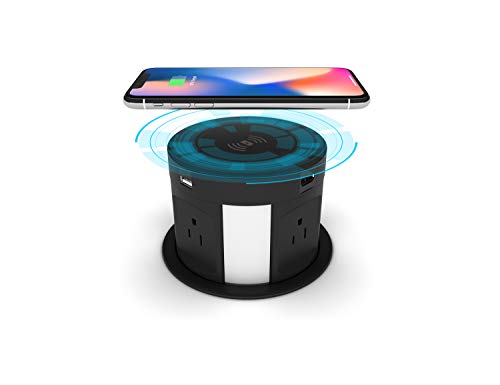
- Pop-up recessed design keeps the desktop clean
- 4 AC outlets plus USB, HDMI, RJ45, and wireless charging
- Easy top-mount install with a 4.7-inch cutout
Best For: shared tables and counters where a flush, hidden charger is preferred
Aluminum Conference Box
Black Pop-Up Connection Center

- HDMI, VGA, RJ45, USB data, and audio ports
- 2 outlets in a clean aluminum alloy panel
- Cable-protecting rubber ring in the base
Best For: conference and hospitality spaces needing display and network connections
Compact Recessed Hub
3-Outlet Conference Table Power Module

- 3 AC outlets with USB-C and USB-A charging
- 20W USB-C PD fast charging support
- Flame-retardant ABS with adjustable opening angles
Best For: clean built-in charging on conference tables and office counters
All-in-One Connectivity Box

- 4 AC outlets plus HDMI, RJ45, USB-C, USB 3.0, and audio
- Flush-mounted cover with brush helps keep dust out
- Aluminum-alloy body with 5.58 ft power cord
Best For: Conference rooms and office desks needing power plus media connections
Fast-Charge Meeting Hub

- PD 20W charging with USB-A and USB-C outputs
- HDMI supports 4K video transmission
- Includes 2 AC outlets plus LAN
Best For: Office and conference tables needing fast charging and HDMI
Heavy-Duty Rotating Power Hub
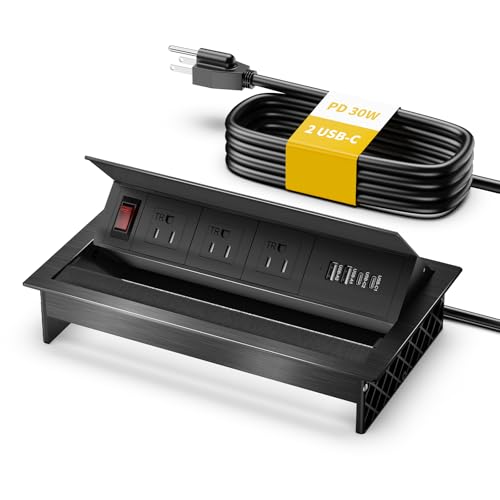
- 3 AC outlets with dual 30W USB-C and dual 18W USB-A
- Rotatable design with brush helps manage access and dust
- Carbon steel and flame-retardant build for heavier-duty use
Best For: Shared worktables needing durable power and strong USB charging
Multimedia Meeting Hub
Conference Table Power Hub with HDMI and PD20W

- 2 AC outlets plus PD 20W USB-C charging
- HDMI 4K, LAN, and USB 3.0 in one hub
- Recessed design for desks and conference tables
Best For: Meeting rooms and workspaces needing power and presentation connectivity
Heavy-Duty Collaboration Box
UL Listed Conference Table Power Hub

- UL listed metal enclosure with 2 AC outlets
- HDMI, RJ45, USB-A, and USB-C in one box
- PD 20W USB-C and QC 18W USB-A charging
Best For: Rugged office or conference-table installs with wired connectivity
Ultra-Connected Metal Hub – 10FT Conference Table Power Hub with HDMI and USB-C
If you want conference table power modules that do more than add outlets, this recessed hub is built for busy meeting spaces. It combines AC power with HDMI, RJ45, USB-C, USB-A, and a 10-foot cord, so it works well when you need charging and connectivity in one clean tabletop install.
Best For: conference rooms, office tables, and countertops that need both power and media connections.
Pros:
- Includes 2 AC outlets plus HDMI, RJ45, and 3 USB ports for broad connectivity.
- 20W USB-C PD and QC 18W USB-A charging support mobile devices efficiently.
- Heavy-duty carbon steel construction with a polished metal look.
- UL listed with mounting hardware included for a more confident install.
Cons:
- Requires a fairly specific cutout size for installation.
- Only offers 2 AC outlets, so it may not suit very power-heavy setups.
- Best for dry indoor use only.
Overall, this is a strong pick when your workspace needs a practical mix of power, charging, and wired connectivity without cluttering the table surface.
Pop-Up Charging Center – Retractable Outlet with Wireless Charging
Among conference table power modules, this pop-up unit is a good fit when you want the desktop to stay almost flush and tidy. It gives you AC outlets, USB charging, HDMI, RJ45, and a 5W wireless charger, making it a flexible all-in-one option for shared tables and counter installations.
Best For: meeting tables, kitchen counters, and desks that need hidden power with wireless charging.
Pros:
- Retractable pop-up design keeps the surface neat when outlets are not in use.
- Offers 4 AC outlets, 2 USB ports, RJ45, HDMI, and 5W wireless charging.
- Easy top-mount installation with a 4.7-inch cutout.
- Works well for office, kitchen, workshop, and conference setups.
Cons:
- Wireless charging is limited to 5W.
- Not waterproof, so it needs protection from water spray.
- Some phone cases thicker than 6 mm may reduce wireless charging convenience.
This is a useful choice if you want a hidden desktop power solution that balances outlet access, wired data ports, and simple wireless charging.
Aluminum Conference Box – Black Pop-Up Connection Center
This connection box is a solid choice if you need conference table power modules with more emphasis on data and presentation ports than on sheer outlet count. It pairs 2 outlets with HDMI, VGA, RJ45, USB data, and audio, so it can support meeting-room connections in a compact pop-up format.
Best For: conference rooms, hotel rooms, and workspaces that need display and network connectivity.
Pros:
- Includes HDMI, VGA, 2 RJ45 ports, USB data, and 3.5 mm audio.
- Aluminum alloy panel gives it a clean, professional look.
- Rubber ring in the bottom box helps protect cables from damage.
- Suitable for conference rooms, sofas, bedside tables, and hotel installations.
Cons:
- Only 2 power outlets are included.
- Provides 1 USB data port rather than multiple charging USB ports.
- Installation requires a specific cutout size.
For teams that care more about AV and network hookup than charging volume, this is a practical and tidy tabletop connection point.
Compact Recessed Hub – 3-Outlet Conference Table Power Module
If you want conference table power modules that are simple to live with and easy to install, this recessed hub keeps things streamlined. It combines 3 AC outlets with USB-C and USB-A charging, plus a 6-foot cord, so it works well for modern desks that need tidy built-in power without complicated wiring.
Best For: conference tables, office counters, and kitchens that need a clean recessed charging point.
Pros:
- 3 AC outlets plus 1 USB-A and 2 USB-C ports cover common charging needs.
- USB-C ports support up to 20W PD fast charging.
- Flame-retardant ABS construction is designed for regular use.
- Adjustable opening angles help with larger plugs and easier access.
Cons:
- No HDMI or network ports for conference connectivity.
- Requires a specific desk opening for built-in installation.
- Power cord is 6 feet, which may limit placement in some rooms.
This model makes sense when your priority is a neat recessed power strip with modern USB charging rather than a full multimedia dock.
All-in-One Connectivity Box – Tabletop Multimedia Hub
If you want conference table power modules that do more than provide outlets, this tabletop multimedia connectivity box is built for full meeting-room integration. It combines AC power with HDMI, RJ45, USB, USB-C, and audio in a single flush-mounted unit, making it a strong fit for desks that need both charging and A/V connections in one clean installation.
Best For: Conference rooms and office desks that need a compact all-in-one power and media connection point.
Pros:
- Includes 4 AC outlets plus HDMI, RJ45, USB-C, USB 3.0, and 3.5 mm audio ports
- Flush-mounted design with flip-up cover and brush helps reduce dust and keeps the surface neat
- Metal aluminum-alloy build with brushed black finish
- Comes with a 5.58 ft power cord for straightforward placement
Cons:
- Requires a custom tabletop cutout for installation
- Best suited to setups that will actually use the multimedia ports
This is a practical choice if your table needs more than basic power and you want a centralized panel for meetings, presentations, and device hookups. It offers broad connectivity in a single recessed unit, but the installation size and feature set make it most useful for planned conference furniture.
Fast-Charge Meeting Hub – Pop Up Outlet with HDMI
For buyers comparing conference table power modules, this pop-up outlet focuses on everyday meeting-room charging and display needs. It combines two AC outlets, PD 20W charging, LAN, HDMI with 4K support, and USB ports in a silver, easy-to-install box designed for offices and other business spaces.
Best For: Offices and conference tables that need fast phone charging plus HDMI connectivity in a compact pop-up unit.
Pros:
- PD 20W charging with USB-A and USB-C outputs for compatible devices
- HDMI supports 4K video transmission
- Includes 2 AC outlets and LAN in one multiport station
- Simple back-screw installation after cutting the required opening
Cons:
- Only 2 AC outlets, which may be limited for larger groups
- Cutout installation means it is not a drop-in portable solution
This model makes sense when you want charging and display connections without overcomplicating the table surface. Its mix of fast charging, HDMI, and network support is well suited to meeting rooms, but the outlet count is modest compared with larger power hubs.
Heavy-Duty Rotating Power Hub – 7-in-1 Table Box
If your conference table power modules need durability and flexible access, this rotatable connectivity box is built around heavy-duty materials and high-output USB charging. It offers 3 AC outlets, dual PD 30W USB-C, and dual QC 18W USB-A ports in a recessed metal design that helps keep cables organized and the tabletop clear.
Best For: Shared worktables and conference setups that need durable power access and strong USB charging.
Pros:
- Dual 30W USB-C ports for fast charging phones, tablets, and other devices
- Three AC outlets plus dual 18W USB-A ports provide broad everyday compatibility
- Rotatable outlets and brush opening help keep charging accessible while reducing dust entry
- Heavy-duty carbon steel and flame-retardant construction with a polished finish
Cons:
- Requires a custom cutout for installation
- Uses a fixed 6 ft cord, which may limit placement in some rooms
This is a strong pick if you want a conference-table solution that feels sturdy and supports multiple device types at once. The rotating design adds convenience for busy tables, while the overall layout is best for planned installations rather than temporary use.
Multimedia Meeting Hub – Conference Table Power Hub with HDMI and PD20W
If you want conference table power modules that handle charging and meeting-room connections in one recessed unit, this hub covers the basics well. It combines two AC outlets, PD 20W USB charging, LAN, HDMI 4K support, and USB 3.0, making it a practical fit for desks and conference tables where people need both power and presentation connectivity.
Best For: Meeting rooms, office desks, and workspaces that need power plus HDMI connectivity.
Pros:
- Built-in 2 AC outlets plus PD 20W USB-C charging
- Includes HDMI with 4K transmission and LAN support
- USB-A and USB-C outputs support common devices
- Designed for recessed installation in desks and conference tables
Cons:
- Requires a cutout installation, so setup is not completely tool-free
- Only two AC outlets, which may be limiting for larger groups
- Plastic enclosure may feel less premium than metal alternatives
This is a straightforward all-in-one option if your priority is combining charging and meeting connectivity in a compact footprint. The 4K HDMI support and PD 20W port make it more versatile than a basic outlet strip, though the overall outlet count is still modest.
Heavy-Duty Collaboration Box – UL Listed Conference Table Power Hub
For conference table power modules that need to do more than just provide outlets, this connectivity box is built around organization and durability. It adds HDMI, RJ45, three USB ports, and two AC outlets in a UL listed metal enclosure, which makes it a solid choice for busy desks, meeting rooms, and countertop installs.
Best For: Offices and conference tables that need a rugged, wired connectivity hub.
Pros:
- UL listed with a 125V/12A/1500W rating
- Seven-in-one layout with HDMI, RJ45, USB, and AC outlets
- PD 20W USB-C and QC 18W USB-A support faster device charging
- Carbon steel construction adds a durable, heavy-duty feel
Cons:
- Larger footprint and cutout requirement may not suit every desk
- Heavier than plastic or aluminum alternatives at 3.4 pounds
- Best suited to wired connectivity needs rather than minimal setups
This model stands out if durability and cable management matter as much as charging. The metal build, included mounting hardware, and mix of power and multimedia ports make it especially useful in shared workspaces where the table sees frequent use.
Compact Pop-Up Charger – 3-Outlet Conference Table Power Hub
If you need conference table power modules that stay low-profile until called on, this pop-up hub offers a compact and practical layout. It combines three AC outlets with USB-A and USB-C charging, plus a 45-degree spring-assisted pop-up design that suits conference rooms, kitchen counters, and general office use.
Best For: Users who want a compact recessed power hub with simple pop-up access.
Pros:
- Three AC outlets for powering multiple devices at once
- USB-A and USB-C ports with PD 20W fast charging
- 45-degree pop-up mechanism with damped spring structure
- Thickened aluminum alloy body for a sturdier recessed install
Cons:
- No HDMI or network port for meeting-room connectivity
- Charging and outlet count are useful, but still limited for larger teams
- Best for general power needs rather than multimedia setups
Compared with more feature-heavy options, this one keeps the focus on compact charging convenience. It is a good fit when you want a clean recessed look, fast USB-C charging, and enough AC capacity for everyday use without extra connectivity extras.
How We Picked the Best Conference Table Power Modules
We prioritized practical features that matter in real meeting rooms: port variety, charging speed, build quality, installation style, and compatibility with common office devices. We also looked for models that balance convenience with a low-profile look, since conference tables need to stay organized and professional.
For this roundup, we favored units that offer a mix of AC outlets, USB-C, USB-A, HDMI, and network connections so teams can handle both power and presentations from one central spot.
Quick Comparison
Pop-up designs are best for a cleaner tabletop and occasional use, while recessed and flush-mounted models tend to suit permanent installations. If your team connects laptops to displays often, choose Conference Table Power Modules with HDMI and RJ45 ports. If the main need is charging, focus on higher-watt USB-C PD and enough AC outlets for adapters and docks.
Key Buying Factors for Conference Table Power Modules
Port Mix
Look for a combination that matches your workflow. USB-C PD is ideal for newer laptops and tablets, while USB-A still helps with legacy accessories. HDMI and Ethernet are valuable for presentation rooms and hybrid meetings.
Charging Output
Not all USB-C ports are equal. For faster charging, check for at least 20W PD, and compare total output if multiple devices may charge at once.
Installation Style
Pop-up modules are convenient and discreet, but recessed units may offer a more permanent, flush look. Make sure the cutout dimensions and cord length fit your table and power access points.
Durability and Safety
Metal housings, surge protection, and secure mounting are worth paying for in busy offices. Conference tables see frequent plugging and unplugging, so sturdy mechanisms matter.
Room Use Case
Large boardrooms may benefit from multimedia hubs with HDMI, audio, and network ports. Smaller huddle rooms may only need a compact power and charging module. Match the feature set to the room, not just the price.
Who Should Buy Which Conference Table Power Modules?
If you want the cleanest look, choose a hidden pop-up or recessed option. If your team presents often, prioritize Conference Table Power Modules with HDMI and Ethernet. If charging speed is the top concern, go with a USB-C PD model. For rooms with lots of shared devices, a larger hub with multiple AC outlets and mixed connectivity will usually be the most versatile choice.
In short, the best option is the one that fits your table layout, meeting style, and device mix without adding clutter.