
If you’re looking to enhance your workspace, investing in a dual monitor arm can make a significant difference. These arms not only save desk space but also promote better ergonomics and productivity. With various options available, it can be challenging to find the right fit for your needs. Let’s explore the top contenders that can transform your setup and help you work more efficiently.
HUANUO Dual Monitor Stand for 13–32″ Screens

If you’re looking to optimize your workspace, the HUANUO Dual Monitor Stand is the perfect choice for users with monitors ranging from 13 to 32 inches. This stand supports monitors weighing between 4.4 to 19.8 lbs and features a sturdy dual C-clamp structure for secure attachment. You can adjust the height up to 16.2 inches and enjoy full-motion capabilities, including tilt and swivel. Plus, it promotes a clutter-free environment by lifting monitors off your desk and providing built-in cable management. By aligning your screens to eye level, you’ll relieve strain and enhance your focus, making this stand a smart investment for productivity.
Best For: Users seeking to improve their workspace ergonomics and organization with dual monitors ranging from 13 to 32 inches.
Pros:
- Sturdy Design: Dual C-clamp structure ensures a secure and stable attachment to the desk.
- Full-Motion Adjustment: Offers extensive tilt, swivel, and rotation for optimal viewing angles.
- Space-Saving: Frees up desk space while providing built-in cable management for a tidy setup.
Cons:
- Limited Compatibility: Only suitable for wooden desks; not designed for plastic or glass surfaces.
- Weight Restriction: Monitors must weigh between 4.4 to 19.8 lbs, limiting some larger displays.
- Installation Requirements: Requires no cross beams or panels underneath the desk for proper mounting.
HUANUO NITROGLIDE Dual Monitor Stand (HNDS7)

The HUANUO NITROGLIDE Dual Monitor Stand (HNDS7) is perfect for professionals who need versatility and stability in their workspace. It supports two monitors from 13″ to 40″, each weighing up to 26.4 lbs, thanks to its solid aluminum arms and robust dual C-clamp design. With NITROGLIDE technology, you can easily adjust the height up to 21.1″ and extend arms up to 25.59″. Enjoy full motion capabilities, including swivel, tilt, and rotation for ideal positioning. Plus, its integrated cable management keeps your area tidy, and the built-in USB ports offer convenient charging for your devices.
Best For: Professionals seeking a versatile and stable dual monitor setup for enhanced productivity and comfort.
Pros:
- Supports a wide range of monitor sizes (13″ to 40″) and weights (up to 26.4 lbs each).
- Features full motion adjustments for optimal positioning, including swivel, tilt, and rotation capabilities.
- Includes USB ports for convenient device charging and an integrated cable management system to keep your workspace organized.
Cons:
- Installation may require precise measurements for grommet mounting.
- Some users may find the arm extension limited for deeper desks.
- The setup might be overkill for casual users with smaller or lighter monitors.
HUANUO Dual Monitor Stand for 13 to 32 Inch Screens

For those seeking a streamlined workspace, the HUANUO Dual Monitor Stand is an ideal choice. This versatile stand supports screens from 13 to 32 inches and holds up to 19.8 lbs per arm. You’ll appreciate the easy installation with C-clamp or grommet options and included mounting hardware. Its ergonomic design raises monitors to eye level, promoting better posture while reducing neck strain. Plus, with its cable management system, you can keep your setup tidy and organized. Rated 4.6 stars by over 33,000 customers, this stand is a top seller, promising stability and efficiency for your dual-screen needs.
Best For: Those looking to enhance their workspace with a functional and ergonomic dual monitor setup.
Pros:
- Ergonomic Design: Raises monitors to eye level, improving posture and reducing neck strain.
- Space Saver: Frees up to 50% of desktop space, keeping your workspace organized.
- Versatile Compatibility: Supports a wide range of monitor sizes (13 to 32 inches) and weights (up to 19.8 lbs per arm).
Cons:
- Weight Limit: Each arm only supports monitors weighing up to 19.8 lbs, which may not accommodate heavier screens.
- VESA Requirement: Monitors must have compatible VESA mounting holes, limiting options for some displays.
- Installation Complexity: While hardware is included, some users may find installation challenging without prior experience.
HUANUO Dual Monitor Stand (Adjustable for 13–32″ Screens)

Designed with flexibility in mind, the HUANUO Dual Monitor Stand is ideal for professionals juggling multiple tasks or gamers craving an immersive experience. It accommodates screens from 13 to 32 inches and supports weights up to 19.8 lbs. With dual C-clamp and grommet mounting options, stability is assured, preventing any wobble. You can easily adjust the height, tilt, and rotation to achieve the best ergonomics, reducing neck and shoulder strain. Its sleek design fits seamlessly on wooden desks with a thickness of 0.59 to 3.54 inches, making it an excellent choice for creating an organized workspace.
Best For: Professionals managing multiple tasks and gamers seeking an immersive dual-screen experience.
Pros:
- Versatile Compatibility: Supports a wide range of screen sizes (13-32 inches) and weights (up to 19.8 lbs).
- Enhanced Ergonomics: Full motion design allows for height adjustment, tilt, and rotation, promoting better posture and reducing strain.
- Stable Mounting Options: Features dual C-clamp and grommet mounts for reliable stability and secure hold of monitors.
Cons:
- Desk Compatibility: Only recommended for wooden desks, limiting options for other desk materials.
- Installation Requirements: Requires specific VESA mounting holes and no cross beams or panels under the desk for installation.
- Weight Limitations: May not accommodate heavier monitors or those outside the specified weight range.
MOUNTUP Dual Monitor Stand for Desk

Looking to maximize your workspace efficiency? The MOUNTUP Dual Monitor Stand is perfect for you. It supports monitors weighing between 4.4 to 17.6 pounds and fits screens from 17 to 32 inches. With its full motion design, you can tilt, swivel, and rotate your monitors for the best viewing angles. Installation is a breeze, whether you choose a C-clamp or grommet base. Plus, its cable management system keeps your desk tidy. Enjoy ergonomic benefits as you reduce neck and back strain while creating a clean, stylish workspace. It’s time to elevate your productivity with MOUNTUP!
Best For: Professionals and gamers looking to enhance their workspace with adjustable dual monitor setups for improved productivity and comfort.
Pros:
- Full motion design allows for customized positioning and optimal viewing angles.
- Easy installation options with C-clamp or grommet base for versatile use.
- Cable management system keeps wires organized, freeing up desk space.
Cons:
- Weight limit may not accommodate heavier monitors.
- Installation may require additional tools for optimal setup.
- Height adjustment range may not suit all user preferences.
ErGear Dual Monitor Desk Mount (Up to 40 inches Screens)

If you need a sturdy and versatile solution for mounting monitors, the ErGear Dual Monitor Desk Mount is an excellent choice. It supports 13 to 40-inch flat and curved screens, with a maximum weight capacity of 26.4 lbs per monitor. Crafted from heavy-duty aviation aluminum, it’s tested for durability, ensuring stability. You’ll appreciate its full-motion adjustment, offering a 25.6-inch arm extension and a maximum height of 21 inches. With integrated cable management and built-in USB ports, your workspace stays organized and efficient. Installation is a breeze with the included hardware, fitting desks up to 3.54 inches thick.
Best For: Professionals and gamers who require a sturdy and adjustable mount for dual monitors in their workspace.
Pros:
- Durable construction with heavy-duty aviation aluminum, ensuring stability and longevity.
- Full motion adjustability allows for optimal viewing angles with tilt, swivel, and rotation features.
- Integrated cable management and built-in USB ports help maintain an organized and efficient workspace.
Cons:
- May not be suitable for desks thinner than 0.39 inches.
- Requires some assembly, which may be challenging for those unfamiliar with mounting hardware.
- Maximum weight capacity of 26.4 lbs per monitor may limit options for heavier screens.
HUANUO Dual Monitor Stand (17-32 Inch, Adjustable)

The HUANUO Dual Monitor Stand is perfect for anyone seeking an adjustable solution to enhance their workspace organization and ergonomics. Supporting monitors from 17 to 32 inches, it offers a maximum weight capacity of 19.8 lbs. With a 17-inch extension, you can easily adjust the height up to 25.19 inches, promoting better posture and reducing strain. Its full-motion capabilities allow for 90° tilt, 180° swivel, and 360° rotation, making it ideal for various tasks. Plus, the integrated cable management keeps your workspace tidy. Installation is a breeze, and expert support is available if you need assistance.
Best For: Those seeking an ergonomic and adjustable dual monitor stand to enhance workspace organization and reduce strain during long hours of work or gaming.
Pros:
- Supports a wide range of monitor sizes (17-32 inches) and weights (4.4-19.8 lbs).
- Full-motion capabilities (tilt, swivel, rotation) for optimal viewing angles.
- Integrated cable management system keeps your workspace organized and clutter-free.
Cons:
- Compatibility limited to monitors with VESA 75/100mm mounting holes.
- Not suitable for glass desks, requiring solid wood or metal surfaces.
- Installation may require additional tools or assistance for some users.
ErGear Dual Monitor Arm for 13–32″ Screens

Designed for users with dual displays ranging from 13 to 32 inches, the ErGear Dual Monitor Arm is perfect for anyone seeking a more organized and ergonomic workspace. It supports up to 19.8 lbs and features tool-free VESA mounting for quick setup. You can choose between a C-clamp or bolt-through grommet mount depending on your desk thickness. With independent monitor positioning, you can adjust height, tilt, swivel, and rotation for ideal viewing. Plus, upgraded cable clips keep your workspace tidy by managing wires efficiently. This durable arm has been tested for over 20,000 cycles, ensuring reliable performance.
Best For: Users with dual monitors ranging from 13 to 32 inches who seek an organized and ergonomic workspace.
Pros:
- Tool-free installation with versatile mounting options (C-clamp or grommet).
- Independent positioning and adjustability for optimal viewing angles.
- Efficient cable management keeps the workspace tidy.
Cons:
- Maximum load capacity of 19.8 lbs may limit use with heavier monitors.
- Recommended for wooden desks without crossbeams, which may not suit all setups.
- Some users may find the assembly process challenging without clear instructions.
VIVO Dual Monitor Desk Mount (STAND-V002)

For professionals and enthusiasts who require flexibility in their workspace, the VIVO Dual Monitor Desk Mount (STAND-V002) is an excellent choice. This sturdy mount supports two screens from 13” to 30”, accommodating up to 22 lbs each. You’ll appreciate its adjustability, allowing +90° to -90° tilt, 180° swivel, and 360° rotation, with options for portrait or landscape orientation. The heavy-duty C-clamp fits desks up to 3.25” thick, plus an optional grommet mount guarantees stability. Installation is a breeze with detachable VESA bracket plates and included hardware. Plus, it comes with a 3-Year Warranty and friendly tech support for peace of mind.
Best For: Professionals and enthusiasts seeking a versatile dual monitor setup that enhances workspace efficiency.
Pros:
- Supports a wide range of monitor sizes from 13” to 30”, accommodating various setups.
- Highly adjustable with +90° to -90° tilt, 180° swivel, and 360° rotation for optimal viewing angles.
- Easy installation process with detachable VESA bracket plates and included hardware.
Cons:
- Weight limit of 22 lbs per monitor may not accommodate heavier displays.
- C-clamp may not fit all desk types, especially those thicker than 3.25”.
- Grommet mount installation may require additional drilling, which some users might find inconvenient.
VIVO Dual Monitor Stand for 17 to 32 inch Screens
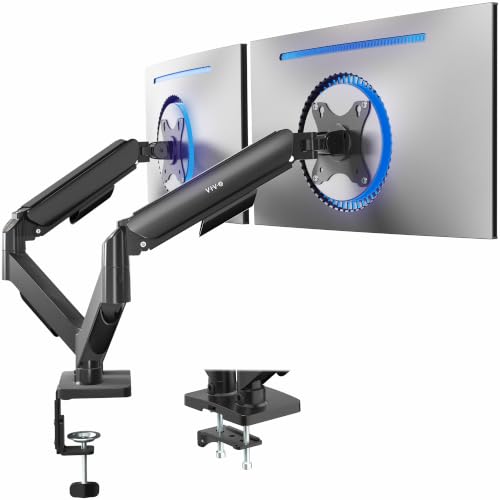
If you’re looking to enhance your productivity and reclaim valuable desk space, the VIVO Dual Monitor Stand is an excellent choice for anyone using monitors between 17 and 32 inches. This stand supports weights from 4.4 to 19.8 lbs per screen and is compatible with both flat and curved monitors. The mechanical spring adjustment allows you to easily position your monitors with a tilt of +90° to -90°, 180° swivel, and 360° rotation. Assembly is straightforward with included hardware and instructions. Plus, it mounts securely via a heavy-duty C-clamp or optional bolt-through grommet, optimizing your workspace efficiently.
Best For: Professionals and gamers seeking an ergonomic dual monitor setup that maximizes desk space and offers customizable viewing angles.
Pros:
- Supports a wide range of monitor sizes from 17 to 32 inches, accommodating both flat and curved screens.
- Easy adjustment features allow for versatile positioning with tilt, swivel, and rotation.
- Space-saving design elevates monitors off the desk, freeing up valuable workspace.
Cons:
- Weight limit of 19.8 lbs per screen may not accommodate heavier monitors.
- Installation may require tools for certain mounting options, despite the included hardware.
- C-clamp and grommet options may not fit all desk types, limiting compatibility for some users.
Factors to Consider When Choosing a Dual Monitor Arm
When choosing a dual monitor arm, you need to take into account several key factors to guarantee it fits your needs. Think about your monitor size, VESA mounting standards, and weight capacity first. Then, evaluate the adjustability, ergonomics, and installation options to create a comfortable and efficient workspace.
Compatibility With Monitor Size
Choosing the right dual monitor arm hinges on compatibility with your monitor sizes. Most models support monitors ranging from 13 to 32 inches, so make certain to check this before purchasing. It’s also crucial to verify the weight capacity of the arm; typically, they hold monitors weighing between 4.4 to 26.4 lbs each, which varies by design. Additionally, you’ll need to ascertain VESA mounting compatibility to match your monitor’s mounting holes, usually found in 75x75mm or 100x100mm patterns. Don’t forget to take into account the desk material; many arms are meant for wooden surfaces and might not work well with plastic or glass. Finally, check that the arm’s height adjustment accommodates your preferred viewing height for ideal comfort.
VESA Mounting Standards
Understanding VESA mounting standards is essential for ensuring your dual monitor arm functions effectively. These standards are defined by specific hole patterns on the back of monitors, typically 75x75mm or 100x100mm, which determine compatibility with monitor arms. By adhering to these standards, you guarantee a secure fit and proper alignment, making it easy to attach and detach monitors. Plus, VESA-compliant monitors allow for height, tilt, and rotation adjustments, enhancing your ergonomic comfort. Remember, the weight capacity of VESA mounts can vary, usually between 4.4 lbs to 26.4 lbs, so you should check your monitor’s specifications before installation. Following these standards helps prevent damage to both your monitor and the mount, ensuring long-term reliability and stability during use.
Weight Capacity Considerations
Selecting the right dual monitor arm involves careful consideration of weight capacity. Each arm typically supports between 4.4 lbs and 26.4 lbs, so check the specifications before you buy. Make certain the combined weight of your monitors doesn’t exceed the arm’s limit to prevent instability and potential damage. Arms with higher weight capacities often use reinforced designs and materials that enhance stability and durability. Additionally, look for adjustable tension settings that allow you to customize resistance based on your monitors’ weight. Don’t forget VESA compatibility too—this guarantees that the mounting holes on your monitors align properly with the arm, providing a secure fit. Choosing wisely here leads to a more organized and efficient workspace.
Adjustability and Ergonomics
While a dual monitor arm enhances your workspace, the adjustability and ergonomic features it offers play an essential role in your overall comfort and productivity. Full-motion arms allow you to tilt your monitors from +85° to -50°, swivel ±90°, and rotate 360°, so you can easily customize your viewing angles. Height adjustments can elevate your monitors by over 21 inches, helping align screens with your natural line of sight and reducing neck strain. Many arms utilize pneumatic spring technology for smooth adjustments, making it easy to position your monitors whether you’re gaming, coding, or video conferencing. Additionally, ergonomic designs let you position each monitor independently, while integrated cable management keeps your workspace tidy and distraction-free.
Installation Process and Options
When choosing a dual monitor arm, you’ll want to contemplate the installation process and your specific mounting options. Most arms offer C-clamp and grommet mounts, catering to different desk thicknesses and preferences. C-clamp mounts fit desks from 0.39 to 4.53 inches thick, while grommet mounts need a bolt-through hole diameter of 0.39 to 2.36 inches. Look for tool-free VESA mounting features, which make it easy to install monitors with 75x75mm or 100x100mm patterns. Many products include installation hardware and clear assembly instructions, simplifying the setup. Remember to check that your desk material suits the chosen mounting method, as some arms are best for wooden desks without crossbeams or panels. Choose wisely for a hassle-free installation experience!
Stability and Durability
After installing your dual monitor arm, the next important consideration is its stability and durability. You’ll want an arm that can securely hold monitors weighing between 4.4 to 26.4 lbs without wobbling. Look for a dual C-clamp design; it provides a larger attachment platform to minimize movement. The construction material matters, too—heavy-duty options like aviation aluminum are stronger and more durable than standard materials. Check for models that have been cycle-tested over 20,000 times for reliable performance. Also, guarantee proper weight distribution and adjustable tension; these features help maintain stability, allowing you to position your monitors without fear of them drifting or falling. Prioritizing these factors will enhance your workspace efficiency.
Cable Management Features
Effective cable management is essential for a tidy workspace, and choosing a dual monitor arm with strong cable management features can make a significant difference. Look for models that have integrated systems to route cables along the arms, keeping them organized and out of sight. This not only reduces clutter but also minimizes visual distractions. Some dual monitor arms come with upgraded cable clips that allow for tool-free organization, making it hassle-free to manage your cables. Proper cable management enhances airflow around your monitors, which can improve their performance and longevity by preventing overheating. By investing in a dual monitor arm with excellent cable management, you’ll save desk space, leaving room for work materials or personal items.
Design and Aesthetics
A well-organized workspace isn’t just about functionality; it’s also about how it looks. When choosing a dual monitor arm, consider its design and aesthetics to enhance your workspace. Options abound in various colors and finishes, allowing you to complement your office style effortlessly. Sleek, modern designs not only boost visual appeal but also provide essential functionality. High-quality materials like aluminum add sophistication and durability, making your setup more professional. Don’t overlook the importance of cable management; an effective system keeps wires concealed and organized, contributing to a cleaner appearance. Finally, adjustable arms with full-motion capabilities let you customize your monitor positioning, ensuring a personalized and visually pleasing workspace that suits your needs.