
Choosing the right printer can make in-house badge creation faster, cleaner, and more cost-effective. The best ID card printers for small businesses balance print quality, ease of use, and long-term value.
In this roundup, we focus on practical options for teams that need professional-looking employee badges, visitor passes, and membership cards without a complicated setup.
Best 10 ID Card Printers for Small Businesses Picks for 2026
Best Budget Starter
Easy Badges Solid 210 for Small Teams

- Includes software, ribbons, PVC cards, and clips
- 300 dpi direct-to-card output for standard badges
- Compact, lightweight, and PC/Mac compatible
Best For: Small teams that need an affordable starter badge printer
Best Premium Bundle
Magicard 300 Dual Sided ID Card Printer
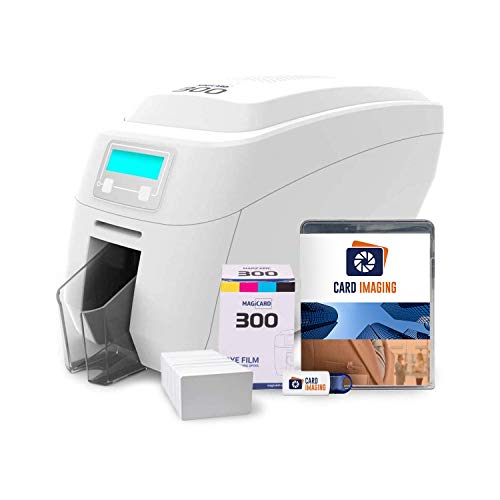
- Dual-sided printing for more flexible badge layouts
- Includes ribbon, 100 PVC cards, and design software
- Expert setup support included in the bundle
Best For: Small businesses wanting a professional dual-sided badge printer bundle
Best Easy-Use Pick
Badgy200 With Badge Studio+ Software
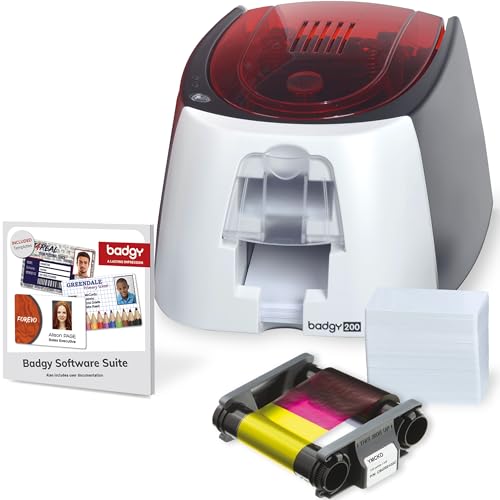
- All-in-one bundle with printer, ribbon, cards, and software
- Badge Studio+ includes templates, import tools, and a design wizard
- Built for full-color, tamper-proof plastic ID cards
Best For: Small teams that want guided, easy badge design and printing
Best Security-Focused
Magicard 300 Single-Sided ID Printer

- Fast output for full-color or monochrome cards
- Numerous security options highlighted in the notes
- Includes a 30-day CloudBadging subscription
Best For: Offices needing a fast single-sided badge printer with security options
Compact Dual-Sided Choice
Fargo DTC1250e Badge Printer Bundle

- Dual-sided dye sublimation printing
- Compact desktop-friendly footprint
- Includes software and supplies
Best For: Small businesses needing a compact badge printer with bundled starter supplies
Easy Network Issuer
Zebra ZC300 Double-Sided Printer
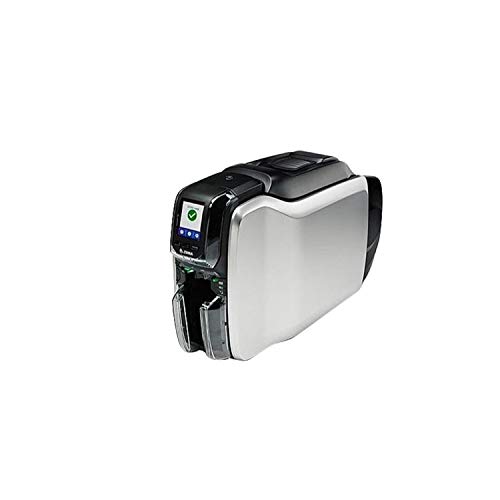
- Plug-and-play USB and Ethernet setup
- Easy-to-use interface and loading
- Supports magnetic stripe and contactless encoding
Best For: Small offices needing a network-ready card printer with simple operation
Fast Bundled Printer
Evolis Primacy 2 Dual Sided Bundle

- Up to 280 full-color cards per hour
- Includes ribbon, cards, and software
- USB and Ethernet with Mac/Windows support
Best For: Small businesses that need fast card production with starter supplies included
Compact Starter Badge Printer
Fargo DTC1250e Single Sided ID Card Printer

- Compact desktop form factor
- 100-card input hopper
- 300 dpi single-sided color printing
Best For: Small offices needing a simple single-sided badge printer
Bundle Value Badge Kit
2ID Fargo DTC1250e Single-Sided Badge Printer Package

- Includes software and supplies package
- Erase-and-rewrite support for reusable cards
- Ethernet-connected single-sided badge printing
Best For: Businesses that want an all-in-one ID card printer bundle
Security-Focused Desktop Printer
Fargo DTC1250e Single Sided Desktop Printer

- AES-256 encryption and resin scramble protection
- Compact 7.7-pound desktop design
- 300 dpi color card printing
Best For: Businesses that need secure badge printing in a compact desktop unit
Best Budget Starter – Easy Badges Solid 210 for Small Teams
If you need ID card printers for small businesses, the Easy Badges Solid 210 is a straightforward way to get single-sided badges running without a complicated setup. It bundles beginner software, PVC cards, ribbons, and clips, so you can start designing and printing employee or student IDs right away. The 300 dpi direct-to-card output is aimed at everyday office use, and the compact footprint helps it fit on a crowded desk.
Best For: Small organizations that want a compact, budget-friendly starter printer with bundled supplies.
Pros:
- Includes software, ribbons, PVC cards, and strap clips to get started quickly
- 300 dpi direct-to-card printing is suitable for most standard ID badge needs
- Compact and lightweight design fits easily in small office spaces
- Compatible with both PC and Mac
Cons:
- Single-sided printing only
- Manual feeding is less automated than higher-end systems
- Best suited to standard badge work rather than advanced security features
Overall, the Solid 210 is a practical entry point if you want an all-in-one badge printer bundle without adding extra software or supply purchases upfront. It is a sensible pick for simple, cost-conscious badge programs.
Best Premium Bundle – Magicard 300 Dual Sided ID Card Printer
Among ID card printers for small businesses, the Magicard 300 bundle stands out for teams that want dual-sided printing plus setup help. The package includes a color ribbon, 100 PVC cards, and Card Imaging design software, and the notes highlight expert help with printer setup. With 300 dpi printing and support for images, logos, and micro-text, it is built for polished employee IDs and other professional cards.
Best For: Small businesses that want a dual-sided printer bundle with support and professional-looking output.
Pros:
- Dual-sided printing adds flexibility for more complete ID layouts
- Bundle includes ribbon, PVC cards, and design software
- Expert setup support is included
- 300 dpi printing is suitable for logos, images, and micro-text
Cons:
- More involved than a basic single-sided starter printer
- Bundle is geared toward users who need a more premium setup
- 100-card supply pack may be limiting for very high-volume use
This is a strong choice if you want a more capable card printer bundle and value setup assistance. It suits businesses that expect their badges to look polished and need both sides available.
Best Easy-Use Pick – Badgy200 With Badge Studio+ Software
If you are comparing ID card printers for small businesses and want a simple all-in-one option, the Badgy200 is built around quick badge creation. The bundle includes the printer, 100-color ribbon, 100 blank cards, and Badge Studio+ software with database import, templates, and a design wizard. It is aimed at full-color, tamper-proof plastic ID cards for employees, students, members, and events.
Best For: Schools, gyms, and small organizations that want easy full-color badge creation from a bundled system.
Pros:
- All-in-one bundle includes printer, ribbon, cards, software, and cables
- Badge Studio+ offers database import, templates, and a design wizard
- Made for full-color, tamper-proof plastic ID cards
- Useful for employee, student, member, and event IDs
Cons:
- Supplied card and ribbon quantities are limited to 100 each
- Print speed is modest compared with higher-volume systems
- Single-purpose design focuses on badge printing rather than broader office use
The Badgy200 is a practical option when ease of use matters more than raw speed. It gives small teams a guided path to producing professional-looking cards without piecing together separate components.
Best Security-Focused – Magicard 300 Single-Sided ID Printer
For buyers looking at ID card printers for small businesses, the Magicard 300 bundle is a focused single-sided option with fast output and security-minded positioning. The notes call out numerous security options, 160 full-color cards or 720 monochrome cards per hour, and a 30-day CloudBadging subscription. That makes it a solid fit for offices that want efficient badge production without moving to a dual-sided system.
Best For: Offices that need a fast single-sided printer with security options and cloud badging access.
Pros:
- Fast output for both full-color and monochrome cards
- Numerous security options are highlighted in the product notes
- 30-day CloudBadging subscription is included
- Single-sided format keeps the workflow simple
Cons:
- Single-sided only
- Bundle details are more limited than some other kits
- Best suited to ID badge creation rather than broader printing needs
This model makes sense if your priority is speed, security features, and a straightforward single-sided workflow. It is a good match for office badge programs that want a more polished system without unnecessary complexity.
Compact Dual-Sided Choice – Fargo DTC1250e Badge Printer Bundle
If you need ID card printers for small businesses that can handle everyday badge production without taking over your desk, the Fargo DTC1250e is a practical pick. It prints on both sides, supports CR79 and CR80 PVC cards, and includes beginner card production software, making it a straightforward option for teams producing employee IDs, access cards, or membership cards.
Best For: Small businesses that want a compact dual-sided printer with bundled supplies and simple setup.
Pros:
- Dual-sided dye sublimation printing with edge-to-edge color or black-and-white output
- Compact footprint that fits easily on a desktop
- Includes complete supplies package and beginner edition software
- Built-in erase and rewrite support for temporary or reusable cards
Cons:
- Print-only model, so it does not add encoding or scanning functions
- Uses USB connectivity rather than network options
- Maximum print speed is modest at 10 pages per minute in black and white
Overall, this bundle is geared toward smaller teams that want a reliable, space-saving printer with the essentials included. The three-year global warranty also adds confidence for businesses looking for a long-term badge solution.
Easy Network Issuer – Zebra ZC300 Double-Sided Printer
Zebra ZC32 ZC300 Series Double-Sided USB Ethernet ID Card Printer ZC32-000C000US00
Check Price On AmazonFor businesses comparing ID card printers for small businesses, the Zebra ZC300 stands out for its easy operation and flexible deployment. It is designed for plug-and-play setup, supports USB and Ethernet connectivity, and offers multiple encoding options for magnetic stripe or contactless cards.
Best For: Small offices that want an easy-to-use, network-ready card printer with encoding flexibility.
Pros:
- Highly intuitive interface with icons, animations, and language-based prompts
- Plug-and-play design with USB and Ethernet support
- Multiple encoding options for magnetic stripe and contactless cards
- Saloon-style output doors and easy card loading help simplify use
Cons:
- Print-only device, so it does not handle other office tasks
- Bundled media and software are not mentioned in the notes
- Uses ribbon-based consumables, which adds an ongoing supply requirement
This is a strong choice if your priority is ease of use and the ability to issue cards quickly across a small office network. The 200-sheet capacity and automatic duplex printing also make it suitable for higher-volume badge runs.
Fast Bundled Printer – Evolis Primacy 2 Dual Sided Bundle
If speed matters in your search for ID card printers for small businesses, the Evolis Primacy 2 is built to move cards quickly. It uses direct-to-card dye sublimation printing, comes with a ribbon, 100 blank cards, and card design software, and is rated for up to 280 full-color cards per hour.
Best For: Small businesses that want a fast dual-sided printer bundle with included consumables and software.
Pros:
- Fast output rated at 280 full-color cards per hour
- Dual-sided dye sublimation printing for office badge workflows
- Includes ribbon, 100 blank cards, and card design software
- USB and Ethernet connectivity with Windows and Mac compatibility
Cons:
- Printer only, so it is still a print-focused device
- Optional LCD touch screen and larger feeder are not included by default
- Physical footprint may be less desktop-friendly than more compact models
For teams that need to produce a steady stream of employee IDs or access cards, this bundle offers a balanced mix of speed and convenience. The three-year warranty and included starter supplies make it easier to get running right away.
Compact Starter Badge Printer – Fargo DTC1250e Single Sided ID Card Printer
If you need an ID card printer for small businesses that keeps setup simple, the Fargo DTC1250e is a straightforward single-sided desktop option. It prints color cards over USB, includes auto-feed with a 100-card input hopper, and is built for basic office badge production without adding unnecessary complexity.
Best For: Small teams that want a compact, USB-connected printer for simple single-sided employee IDs and badges.
Pros:
- Compact desktop design fits easily in a small office
- 100-card input hopper supports longer print runs
- 300 dpi output for clear color and monochrome cards
- Auto-feed and card-stock handling keep operation simple
Cons:
- Single-sided printing only
- USB connectivity may be limiting for shared network use
- Designed for print only, with no added multifunction features
Overall, this Fargo model is a practical fit when you want a dependable entry-level badge printer focused on small-office ID card production. It favors simplicity, compactness, and steady throughput over advanced features.
Bundle Value Badge Kit – 2ID Fargo DTC1250e Single-Sided Badge Printer Package
This ID card printer for small businesses is built as a complete package, pairing the Fargo DTC1250e with supplies and beginner edition card production software. It uses dye sublimation color printing, supports access cards and business badges, and adds a built-in erase-and-rewrite function for temporary or reusable cards.
Best For: Small businesses that want an all-in-one badge printing bundle with software and supplies included.
Pros:
- Includes beginner edition software plus supplies package
- Built-in erase and rewrite function for reusable cards
- Ethernet connectivity can suit a networked office setup
- 100-card capacity supports practical batch printing
Cons:
- Single-sided simplex printing only
- Maximum copies per run is listed at 30
- Still limited to print-only operation
For buyers who want more than just a printer, this bundle stands out because it lowers the setup barrier with software and consumables included. It is a sensible choice if you want to start producing IDs, badges, and access cards right away.
Security-Focused Desktop Printer – Fargo DTC1250e Single Sided Desktop Printer
If security matters in your search for ID card printers for small businesses, this Fargo DTC1250e version adds AES-256 encryption and resin scramble data protection. It is a compact desktop printer with USB connectivity, 300 dpi color output, and support for CR-80 and similar card sizes, making it a solid fit for office badge workflows.
Best For: Small businesses that value security features alongside basic badge and ID card printing.
Pros:
- AES-256 encryption and resin scramble data protection
- Compact 7.7-pound desktop footprint
- GreenCircle Certified energy efficiency
- 300 x 300 resolution for color card output
Cons:
- Single-sided printing only
- USB-only connectivity limits network sharing
- Maximum copies per run is listed at 1
This model is best if your priority is protecting card data while keeping the printer simple and desktop-friendly. It balances security, output quality, and a small physical footprint well for office badge creation.
How We Picked the Best ID Card Printers for Small Businesses
We prioritized models that are realistic for small teams: easy setup, dependable card handling, clear print quality, and bundles that reduce first-time frustration. We also favored printers with beginner-friendly software, starter supplies, and support for everyday badge tasks.
Quick Comparison
If you need the simplest path, starter bundles are usually the fastest way to get printing right away. If you expect frequent badge updates or want a cleaner two-sided layout, dual-sided printers are worth the upgrade. For lower-volume use, single-sided models often deliver the best value.
Key Buying Factors for ID Card Printers for Small Businesses
Print Volume
Match the printer to your daily or weekly demand. Occasional badge printing does not require a high-capacity system, but busier offices benefit from faster throughput and larger card hoppers.
Single-Sided Vs. Dual-Sided
Single-sided printers are usually cheaper and simpler. Dual-sided models save space on the card and can look more professional if you need employee details, access info, or policy notes on the back.
Software and Setup
Look for included card design software that is easy for nontechnical users. For small businesses, the best ID Card Printers for Small Businesses are often the ones your staff can learn quickly without IT help.
Supplies and Total Cost
Check whether the bundle includes ribbons, blank cards, and cleaning supplies. Starter packages can lower upfront cost, but it is still smart to compare long-term consumable pricing before you buy.
Who Should Buy Which ID Card Printers for Small Businesses?
If you want the lowest learning curve, choose a complete bundle with software and supplies. If your business prints mostly standard employee badges, a single-sided printer is usually enough. If you need more polished credentials or expect growing badge requirements, step up to a dual-sided model from the start.
For most buyers, the best choice is the printer that matches your real workflow, not the one with the most features. A good fit will save time, reduce waste, and keep badge production in-house where it belongs.