
Choosing the right printer for employee badges can save time, reduce reprints, and make access control look more professional.
Below, we focus on practical ID card printers for employee badges that balance print quality, ease of use, and overall value for offices of different sizes.
Best 10 ID Card Printers for Employee Badges Picks for 2026
Bronze Starter Package
Bodno Seaory S25 Single-Sided ID Card Printer

- All-in-one package with supplies included
- Manual feed system for one-card printing
- Lifetime Bodno software license and support
Best For: Small teams needing a complete starter badge-printing setup
App-Control Badge Maker
- Dye sublimation color printing
- App-based control with iOS support
- 100-sheet capacity and USB connection
Best For: Offices needing a compact badge printer with app control
High-Detail Bronze Kit
Bodno Seaory S26 Single-Sided ID Card Printer

- Up to 300 x 1200 dpi color resolution
- Includes ribbon, software, and camera support
- Lifetime Bodno software license included
Best For: Offices wanting a higher-resolution bundled badge printer
Fast On-Demand Choice

- Designed for single on-demand badge printing
- Includes Badge Studio design software
- Online template library for badge layouts
Best For: Small organizations replacing or issuing badges one at a time
Compact Desktop Badge Printing
Fargo DTC1250e Single Sided ID Card Printer

- Single-sided dye sublimation/thermal transfer printing
- 100-card input hopper with auto feed
- Compact USB desktop design
Best For: Offices needing straightforward employee badge printing
All-in-One Starter Kit
- Includes printer, ribbon, blank cards, and Badge Studio+
- Full-color printing at 600 x 600 dpi
- Built for employee, student, and event IDs
Best For: Small teams wanting a ready-to-use badge printing bundle
Dual-Sided Premium Bundle
Bodno Seaory S28 Bronze Edition

- Dual-sided printing in one pass
- Up to 300 x 1200 dpi resolution
- Includes ribbon, software, and lifetime support
Best For: Teams needing dual-sided badges with bundled tools and support
Starter Kit
IDP SMART-21S Simplex Printer Kit

- Includes printer, software, ribbon, and 100 PVC cards
- Compact desktop design for small spaces
- Prints color or monochrome employee badges
Best For: Small businesses and badge programs that want an easy starter bundle
CloudBadging Bundle

- Includes printer, ribbon, cards, and software access
- CloudBadging supports badge creation and management
- Good bundle for launching an employee badge program
Best For: Teams that want a ready-to-run badge printer with cloud software
Desktop Workhorse
Fargo DTC1250e Single-Sided Printer

- Printer-only model for existing badge workflows
- Compact desktop footprint with USB connectivity
- Edge-to-edge color or black-and-white printing
Best For: Organizations that need a dependable single-sided badge printer
Bronze Starter Package – Bodno Seaory S25 Single-Sided ID Card Printer
If you want ID card printers for employee badges that are easy to launch right away, the Bodno Seaory S25 is built around an all-in-one setup. It includes the printer, supplies, and Bodno Bronze Edition software with templates and drag-and-drop design tools, making it a practical pick for smaller offices, schools, or other low-volume badge programs.
Best For: Small teams that need a ready-to-use badge printer package with software and supplies included.
Pros:
- All-inclusive package with supplies and a Seaory 11011 color ribbon for 100 prints
- Manual feed system gives precise control for one-card-at-a-time printing
- Bodno Bronze Edition includes a lifetime license and pre-made templates
- Compatible with Windows, Mac, and Linux
Cons:
- Manual feed design is better suited to low-volume printing
- Included ribbon supports 100 prints, so ongoing supplies will be needed
The S25 makes sense when simplicity matters more than speed. It is a straightforward employee badge solution for organizations that want a complete starter bundle with long-term software support and a 2-year hardware warranty.
App-Control Badge Maker – Zone 31S ID Card Printer
The Zone 31S is a compact option among ID card printers for employee badges when you want simple badge creation with color output and app-based control. It uses dye sublimation printing, supports 300 dpi resolution, and includes a 100-sheet capacity, which makes it a workable fit for offices producing badges in modest batches.
Best For: Offices that want a portable badge printer with app control and a higher sheet capacity.
Pros:
- Dye sublimation color printing with 300 x 300 resolution
- App-based control and iOS controller support
- 100-sheet capacity for moderate badge runs
- Portable design with USB connectivity
Cons:
- Manual duplex printing only
- Not positioned as a full bundled supplies package
This model is best viewed as a streamlined badge maker rather than a complete start-to-finish kit. For teams that already have a badge workflow and want a portable printer with straightforward control, it keeps the setup compact.
High-Detail Bronze Kit – Bodno Seaory S26 Single-Sided ID Card Printer
For ID card printers for employee badges that emphasize sharper output, the Bodno Seaory S26 stands out with up to 300 x 1200 dpi color resolution. It also comes as a complete supplies package with ribbon, software, and camera support, so it is aimed at offices that want a more polished badge-printing setup without assembling every piece separately.
Best For: Offices that want a higher-resolution badge printer with bundled software and supplies.
Pros:
- Up to 300 x 1200 dpi color printing for sharper cards
- Includes Seaory 17031 ribbon rated for 300 prints
- Bodno Bronze Edition software with lifetime license
- Compatible with Windows, Mac, and Linux
Cons:
- Single-sided printing only
- Uses USB connectivity rather than broader network-focused features
The S26 is a stronger fit when badge quality matters and you want the convenience of a bundled package. It is well suited to office teams that need dependable employee badges and prefer a ready-made setup with support included.
Fast On-Demand Choice – Badgy100 Plastic Card Printer
The Badgy100 is a practical pick for ID card printers for employee badges when you need to print on demand and replace lost or stolen cards quickly. It is designed for single printing needs, includes Badge Studio design software, and offers online templates for creating full-color, tamper-proof badges without relying on outside vendors.
Best For: Small organizations that want on-demand badge printing with simple design software.
Pros:
- Built for on-demand single printing needs
- Badge Studio software included for badge design
- Online template library provides professional-looking layouts
- Full-color printing on plastic cards
Cons:
- Output sheet capacity is listed as 1, so it is not built for high-volume runs
- Best suited to single printing rather than batch workflows
This printer fits organizations that want control over badge issuance and immediate reprints. If your priority is convenience, design support, and low-volume employee badge creation, the Badgy100 is easy to understand and easy to deploy.
Compact Desktop Badge Printing – Fargo DTC1250e Single Sided ID Card Printer
If you need an ID card printer for employee badges that keeps things simple, the Fargo DTC1250e is built for straightforward single-sided card production. It uses dye sublimation/thermal transfer printing, supports 300 dpi output, and includes an auto feed with a 100-card input hopper, making it a practical fit for everyday office badge needs.
Best For: Offices that want a compact, USB-connected printer for straightforward employee badge printing.
Pros:
- Single-sided dye sublimation/thermal transfer printing at 300 dpi
- 100-card input hopper with auto feed for batch printing
- Compact desktop design with USB connectivity
- Includes a 30-card output hopper and cleaning roller
Cons:
- Simplex printing only, so it does not print both sides
- USB connection only, with no network or Ethernet listed
- Best suited to basic card workflows rather than higher-security dual-sided badges
Overall, this Fargo model is a solid no-frills choice if your badge program is centered on fast, reliable single-sided employee cards. It looks best for organizations that value compact size and easy card handling over advanced finishing options.
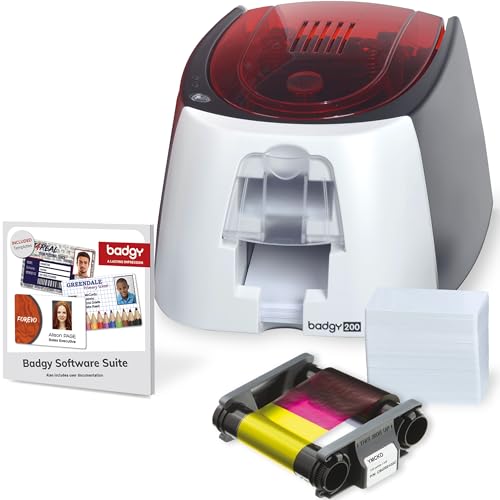
All-in-One Starter Kit – Badgy200 Plastic Card Printer
The Badgy200 is a practical ID card printer for employee badges when you want an all-in-one setup with software and starter supplies included. It prints full-color plastic cards, comes with Badge Studio+ design software, and is aimed at small and medium-sized organizations that need to create employee, student, member, or event IDs quickly.
Best For: Schools, gyms, and small workplaces that want a starter badge printer bundle with design software.
Pros:
- Includes printer, 100-print color ribbon, 100 blank cards, and USB/power cables
- Badge Studio+ software offers database import, templates, and a design wizard
- Full-color printing with 600 x 600 dpi resolution
- Designed for employee IDs, student IDs, member IDs, and event badges
Cons:
- Single-sided printing is not described as a dual-sided system
- Input capacity is limited to 25 sheets/cards in the supplied details
- USB 2.0 connection only, with no network option listed
As a bundle, the Badgy200 stands out for convenience more than raw speed. It is a good fit if you want to get started quickly with employee badges and prefer having software and consumables included from day one.
Dual-Sided Premium Bundle – Bodno Seaory S28 Bronze Edition
The Bodno Seaory S28 is a feature-rich ID card printer for employee badges if you need a complete dual-sided setup right out of the box. It supports one-pass printing on both sides, offers up to 300 x 1200 dpi resolution, and comes in an all-inclusive package with ribbon, software, and camera support for a smoother badge workflow.
Best For: Organizations that want dual-sided employee badges with bundled software and long-term support.
Pros:
- Dual-sided printing in one pass for faster badge production
- Up to 300 x 1200 dpi resolution for detailed color output
- Includes a 300-print color ribbon and lifetime Bodno software support
- Compatible with Windows, Mac, and Linux
Cons:
- Maximum copy run is limited to 20 color cards per run in the supplied details
- Uses USB 2.0 and Ethernet is listed, but setup may still be more involved than a basic USB-only unit
- Larger and heavier than compact entry-level badge printers
This Bodno bundle is aimed at teams that want more capability and a more polished badge process. If dual-sided printing and bundled software support matter more than keeping the footprint minimal, it is an easy model to consider.
Starter Kit – IDP SMART-21S Simplex Printer Kit
If you need ID card printers for employee badges and want a simple all-in-one setup, the IDP SMART-21S kit is built to get a badge program running quickly. It includes the printer, PC-only software, driver, ribbon, and 100 PVC cards, so small teams can start producing color or monochrome badges without sourcing extras separately.
Best For: Small businesses, onboarding teams, and larger organizations that need a compact single-sided badge printer for employee IDs, access control cards, and other basic card programs.
Pros:
- Starter kit includes printer, software, ribbon, and 100 PVC cards
- Produces full-color or monochrome cards with dye-sublimation printing
- Compact footprint fits desktop and multi-use spaces
- Supports Windows 10 and 11 with USB connectivity
Cons:
- Simplex design means single-sided printing only
- PC-only software may not suit mixed-device environments
- Best fit for basic badge programs rather than advanced card workflows
This is a practical entry-level choice if you want a compact badge printer with the essentials bundled in. The included EasyCapture trial is a useful bonus for photo collection and rebadging workflows.
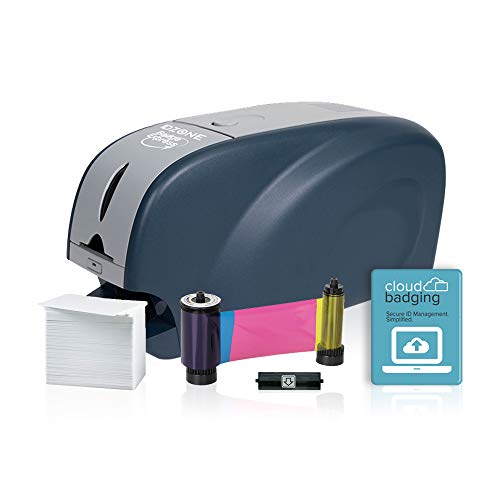
CloudBadging Bundle – Solid 210-SE Badge Printer
ID Zone Solid 210-SE Single Sided ID Card Printer ID Badge Maker ID Card Maker
Check Price On AmazonFor ID card printers for employee badges, the Solid 210-SE stands out as a bundle that helps you start issuing cards right away. The kit includes the printer, ribbon, cards, and a 30-day software subscription, plus access to CloudBadging for creating, managing, and printing badges from a cloud-based workspace.
Best For: Teams that want a bundled badge maker with cloud-based software for employee IDs, membership cards, and photo security cards.
Pros:
- Includes printer, ribbon, cards, and software subscription
- CloudBadging supports creating, managing, and printing ID badges
- Supplied with 100 PVC cards and a 100-print color ribbon
- Easy way to launch a card program without gathering accessories separately
Cons:
- Software subscription is only included for 30 days
- Product details do not specify print speed or connectivity beyond the included setup
- Single-sided use is implied by the kit style rather than expanded features
This is a sensible pick if software access matters as much as hardware. The bundled supplies make it easier to get a basic employee badge workflow moving immediately.
Desktop Workhorse – Fargo DTC1250e Single-Sided Printer
Among ID card printers for employee badges, the 2ID Fargo DTC1250e is a straightforward printer-only option for organizations that already have cards and ribbon on hand. It is designed for single-sided printing, supports Windows, and offers edge-to-edge full-color or black-and-white output in a compact desktop footprint.
Best For: Schools, corporate offices, and small to medium businesses that want a reliable printer-only solution for employee badges and access cards.
Pros:
- Printer-only model for buyers who already have supplies
- Compact size fits easily on a desktop
- Edge-to-edge printing in full color or black and white
- Includes a complimentary beginner software offer via 2ID
Cons:
- Ribbon cartridge and ID cards are sold separately
- Single-sided printing only
- USB-only connectivity may limit placement options
This printer makes sense for teams that want a dependable badge machine without buying a full starter kit. The three-year global warranty is a notable plus for organizations that value long-term support.
How We Picked These ID Card Printers for Employee Badges
We prioritized printers that are realistic for workplace use: reliable daily output, clear card quality, sensible software bundles, and setup that won’t overwhelm a small team. We also considered whether a model is better suited to single-sided or dual-sided badge printing, since that choice affects both workflow and cost.
Quick Comparison
If you want a simple takeaway, entry-level bundled kits are usually best for first-time badge programs, while established office environments often benefit from a more durable printer with better throughput and upgrade flexibility. Single-sided models cover most standard employee badges, but dual-sided printers are worth it when you need photos, policies, barcodes, or credentials on both sides of the card.
Key Buying Factors for ID Card Printers for Employee Badges
Print Volume
Estimate how many badges you will print each month, not just on day one. Small businesses may only need occasional runs, while schools, multi-site offices, and growing companies should think about durability and ribbon efficiency.
Single-Sided Vs. Dual-Sided
Single-sided printers are usually simpler and more affordable. Dual-sided models make sense if you want to add terms, emergency details, department info, or cardholder instructions without increasing card count.
Software and Card Design
Good software matters as much as hardware. Look for easy badge creation, database support, and straightforward photo import tools so you can issue cards quickly without extra training.
Security and Access Needs
If badges also function as access cards, prioritize print clarity, encoding options, and consistent card handling. For purely visual IDs, ease of use and color quality may matter more than advanced encoding features.
Included Supplies
Starter bundles can be a smart buy for new programs because they reduce the need to source ribbons, cards, and software separately. Just confirm the included supply count matches your expected usage.
Who Should Buy Which ID Card Printers for Employee Badges?
Small offices and first-time buyers should lean toward bundled kits that make setup easy. Teams printing a modest but steady volume should look for dependable single-sided printers from recognized badge brands. If your organization needs more information on each card or expects the badge program to grow, a dual-sided model is often the better long-term choice.
For most buyers, the best option is the one that matches your daily badge workflow, not the one with the most features on paper. Start with your volume, software needs, and security requirements, then choose the printer that fits those priorities cleanly.