
Choosing the right badge printer can save time, reduce waste, and make every campus or workplace look more professional.
This roundup of ID card printers for schools and offices focuses on simple setup, print quality, durability, and the features that matter most for everyday use.
Best 10 ID Card Printers for Schools and Offices Picks for 2026
Bronze All-in-One Starter

- Includes printer, supplies, and software in one box
- Manual feed supports one-card-at-a-time control
- Works with Windows, Mac, and Linux
Best For: Low-volume school or office ID printing with an included software bundle
White Compact Badge Maker

- Print-on-demand design for quick badge replacement
- Badge Studio software includes template access
- Compact, portable build for desktop use
Best For: Small teams needing a simple portable printer for custom ID badges
Security-Focused Office Pick

- Prints up to 160 color or 720 mono cards per hour
- Includes security options and CloudBadging trial
- Handles up to 100 cards in the sheet capacity
Best For: Fast single-sided badge printing with security features
Compact School Kit

- Includes printer, software, ribbon, and 100 PVC cards
- Compact hand-feed design for small spaces
- EasyCapture trial helps streamline photo collection
Best For: Schools and small offices wanting an affordable starter kit
Dual-Sided Reusable Option
Fargo DTC1250e Dual Sided ID Card Printer
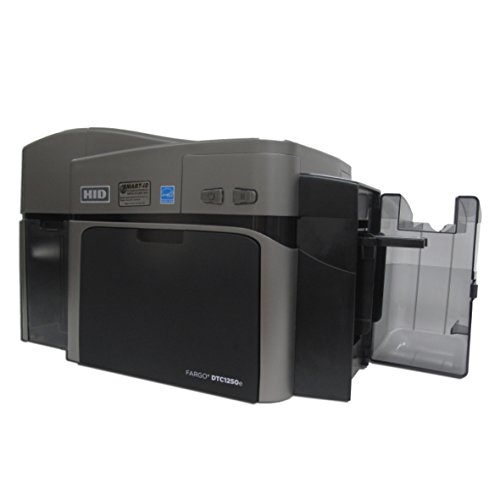
- Dual-sided direct-to-card printing
- Erase and rewrite function for rewritable cards
- USB-connected compact design
Best For: Schools and offices needing a compact dual-sided printer for standard PVC badges and temporary cards
Complete Bundle Pick
Zebra ZC100 LT ID Card Printer

- Includes software, blank cards, ribbon, and labels
- 600 x 600 dpi color printing
- Automatic card thickness adjustment
Best For: Small offices and schools that want an easy-to-start bundle for ID card printing
Starter Package Value
Easy Badges Solid 210 ID Badge Printer

- Includes beginner software and starter supplies
- Single-sided direct-to-card printing
- Compact lightweight desk-friendly design
Best For: Cost-conscious schools or offices that need a simple starter printer for basic ID badges
Dual-Sided Starter Package
Bodno Seaory S28 Dual Sided ID Card Printer

- Includes printer, software, camera support, and a 300-print ribbon.
- Dual-sided printing in one pass helps speed up card production.
- Compatible with Windows, Mac, and Linux.
Best For: Schools or offices needing an all-in-one dual-sided ID card setup
Long-Warranty Dual-Sided Choice
Bodno Magicard 400X Dual Sided ID Card Printer

- Includes a 300-print YMCKO ribbon and Bronze Edition software.
- Dual-sided printing supports more complete ID card designs.
- Comes with a 4-year warranty and lifetime software support.
Best For: Schools and offices prioritizing warranty coverage and included supplies
Simple Single-Sided Starter
Bodno Seaory S26 Single Sided ID Card Printer

- Single-sided direct-to-card printing keeps badge jobs simple.
- Includes a 300-print color ribbon and Bronze Edition software.
- Compatible with Windows, Mac, and Linux.
Best For: Schools and offices that only need simple single-sided ID cards
Bronze All-in-One Starter – Bodno Seaory S25
If you’re comparing ID card printers for schools and offices, this Bodno Seaory S25 bundle is built for a straightforward start. It includes the printer, supplies, and Bodno Bronze Edition software, so you can begin producing professional ID cards without piecing together extras.
Best For: Small teams that want an all-in-one, low-volume ID card setup with software included.
Pros:
- Complete package with supplies and a Seaory 11011 color ribbon for 100 prints
- Manual feed design gives precise one-card-at-a-time control
- Bodno Bronze Edition includes a lifetime license with templates and drag-and-drop design tools
- Compatible with Windows, Mac, and Linux
Cons:
- Manual feed system is better for low-volume use than large batch runs
- Simplex printing only
- USB-based connectivity limits placement flexibility
This is a practical pick if you want a compact, software-backed printer for occasional school badges or office IDs. Its bundled supplies and lifetime software support reduce setup friction, but the manual feed approach makes it more suitable for smaller workloads.
White Compact Badge Maker – Badgy100 Plastic Card Printer
The Badgy100 is a compact option for ID card printers for schools and offices when you need on-demand badge creation in a small footprint. It is designed for single printing needs and comes with Badge Studio software plus access to an online template library.
Best For: Small offices or school teams that want a portable, quick-print badge solution.
Pros:
- Print on demand to replace lost or stolen cards quickly
- Badge Studio software and online templates help simplify design work
- Compact and portable for desktop use
- Produces full-color, high-resolution cards on plastic stock
Cons:
- Output sheet capacity is listed as 1, so it is not aimed at batch printing
- Manual duplex operation adds extra handling
- USB connection only
For lighter badge workloads, the Badgy100 focuses on convenience over volume. It suits schools or offices that need quick reprints and custom badges, but it is not the strongest choice for high-throughput environments.
Security-Focused Office Pick – Magicard 300 Bundle
When comparing ID card printers for schools and offices, the Magicard 300 stands out for speed and security-oriented features. This bundle includes the single-sided printer and 30 days of CloudBadging, making it a strong fit for organizations that want fast card production with extra management tools.
Best For: Offices or school departments that need fast single-sided badge printing with security features.
Pros:
- Fast output rated at 160 full-color or 720 monochrome cards per hour
- High-capacity sheet handling with a 100-card maximum sheet capacity
- Includes security options and 30 days of CloudBadging
- 600 x 600 resolution and 720 dpi black-and-white support
Cons:
- Single-sided and simplex only
- Bundle details list iOS/app control, which may not fit every workflow
- More focused on office ID badge creation than general-purpose printing
This is a solid pick if speed matters and your badge workflow is mostly one-sided. Its security emphasis and CloudBadging trial make it especially appealing for workplaces that need a more controlled ID process.
Compact School Kit – IDP SMART-21S Starter
The IDP SMART-21S starter kit is a practical choice in ID card printers for schools and offices when you want a compact, ready-to-run package. It includes the printer, PC-only software, ribbon, PVC cards, and photo capture trial tools, which makes it easy to get started on student IDs, access badges, or membership cards.
Best For: Schools and small offices that want an affordable starter kit with supplies included.
Pros:
- Bundle includes 100-print YMCKO ribbon and 100 PVC cards
- Compact hand-feed design fits small spaces
- Can produce over 150 color cards or 600 monochrome cards per hour
- Includes EasyCapture free trial for photo collection workflows
Cons:
- PC-only software limits operating system flexibility
- Simplex printer with no duplex capability
- USB connectivity only
This kit is appealing if you want a compact, budget-conscious setup with the essentials included. It is especially useful for schools and offices that need straightforward badge printing without building a system from scratch.
Dual-Sided Reusable Option – Fargo DTC1250e Dual Sided ID Card Printer
If you need ID card printers for schools and offices that can handle everyday badge runs without much setup, the Fargo DTC1250e is a practical direct-to-card option. It prints on CR79 and CR80 PVC cards, includes a built-in erase and rewrite function for temporary or reusable cards, and connects by USB for straightforward deployment.
Best For: Offices or school teams that want a compact, dual-sided ID card printer for standard PVC badges and reusable card workflows.
Pros:
- Dual-sided printing supports more complete ID layouts.
- Built-in erase and rewrite function works with rewritable cards.
- Compact design and USB connection keep setup simple.
- Includes a 3-year manufacturer warranty.
Cons:
- Prints only, so card design and workflow tools must come from elsewhere.
- Maximum dual-sided run size is listed as 30 copies per run.
Overall, the DTC1250e is a solid fit when you want a dependable, space-saving printer for standard school or office ID cards, especially if reusable cards are part of the plan.
Complete Bundle Pick – Zebra ZC100 LT ID Card Printer
For buyers comparing ID card printers for schools and offices, the Zebra ZC100 LT stands out for its complete package and easy operation. It offers color printing at 600 x 600 dpi, automatic card thickness adjustment, and a graphical user interface designed to make card production less frustrating.
Best For: Small offices or school teams that want a compact printer bundle with software, cards, and ribbon included.
Pros:
- Includes CloudBadging software, blank cards, ribbon, and labels.
- 600 x 600 dpi color resolution supports sharp card output.
- Automatic card thickness adjustment simplifies daily use.
- Compact footprint suits smaller workspaces.
Cons:
- USB connectivity only, so network flexibility is limited.
- Manual duplex operation may add steps for two-sided cards.
In practice, this is a strong pick when you want a near plug-and-play setup and prefer a bundle that gets you printing with fewer extra purchases.
Starter Package Value – Easy Badges Solid 210 ID Badge Printer
If you want ID card printers for schools and offices on a tighter budget, the Easy Badges Solid 210 is built as a simple single-sided badge printer. It comes with beginner software, a color ribbon, and 200 PVC cards, so you can start designing and printing standard CR80-sized IDs with minimal setup.
Best For: Small organizations that want an affordable, compact ID badge printer with starter supplies included.
Pros:
- Includes beginner software, ribbon, and 200 PVC cards.
- Compact and lightweight design fits easily on a desk.
- Direct-to-card printing at 300 dpi is suitable for most organizations.
- Compatible with PC and Mac.
Cons:
- Single-sided printing only.
- Manual feeding means less automation than larger systems.
This model makes sense when your priority is getting a simple, low-friction badge printer that covers basic school or office ID needs without a lot of extras.
Dual-Sided Starter Package – Bodno Seaory S28 Dual Sided ID Card Printer
If you want ID card printers for schools and offices that can handle full card production from day one, the Bodno Seaory S28 is built for a streamlined setup. This dual-sided, direct-to-card printer comes in a complete package with a 300-print ribbon, software, and camera support, making it a practical choice for teams that need polished badges without piecing together extras.
Best For: Schools or offices that want a ready-to-use dual-sided ID card system with included software and supplies.
Pros:
- Dual-sided printing in a single pass helps save time and improve throughput.
- Includes the supplies needed to start printing right away, including a 300-print color ribbon.
- Bodno Bronze Edition software includes templates and drag-and-drop design tools.
- Works with Windows, Mac, and Linux for broad compatibility.
Cons:
- Print-only design means it is focused on card production rather than multifunction office tasks.
- USB connectivity may be limiting for setups that prefer network-first deployment.
Overall, the S28 is a strong fit when you need a complete ID card printer package with dual-sided output and straightforward software support. The included warranty and lifetime Bodno support add confidence for ongoing school or office use.
Long-Warranty Dual-Sided Choice – Bodno Magicard 400X Dual Sided ID Card Printer
Among ID card printers for schools and offices, the Bodno Magicard 400X stands out for buyers who want a complete package with a stronger warranty. It includes a 300-print YMCKO ribbon, dual-sided printing support, and Bronze Edition software, giving you the essentials for producing professional ID cards with a clean, guided workflow.
Best For: Schools and offices that want a dual-sided ID card printer package with a longer warranty and included supplies.
Pros:
- Includes a 300-print YMCKO ribbon so you can start printing immediately.
- Dual-sided printing supports more detailed card layouts and information.
- Bronze Edition software adds templates and drag-and-drop design tools.
- Backed by a 4-year warranty and lifetime Bodno software support.
Cons:
- Uses USB connectivity, which may not suit every networked environment.
- Print output is configured for ID cards and office use, not broader document printing.
If warranty coverage matters as much as setup convenience, the 400X is the most reassuring option here. It combines included supplies, dual-sided output, and long-term software support in one package.
Simple Single-Sided Starter – Bodno Seaory S26 Single Sided ID Card Printer
If you need ID card printers for schools and offices but only plan to print on one side, the Bodno Seaory S26 is a straightforward, compact option. This single-sided, direct-to-card printer includes a 300-print ribbon, Bronze Edition software, and camera support, so it is geared toward simple badge workflows with less setup overhead.
Best For: Schools or offices that only need single-sided ID cards and want an easy starter package.
Pros:
- Single-sided printing keeps the workflow simple for basic ID cards.
- Includes a 300-print color ribbon and software in the package.
- Compatible with Windows, Mac, and Linux operating systems.
- Offers high-resolution output up to 300 x 1200 dpi.
Cons:
- Simplex printing means it cannot print both sides in one pass.
- USB connection may be less flexible than networked setups.
The S26 is a sensible choice when simplicity and included supplies matter more than duplex output. For schools and offices focused on basic badge issuance, it covers the essentials without unnecessary complexity.
How We Picked the Best ID Card Printers for Schools and Offices
We looked for printers that balance ease of use, print quality, card security, and overall value for schools, HR teams, front desks, and small offices. Priority went to models with clear software, reliable supplies packages, and options that fit both occasional badge runs and higher-volume needs.
Quick Comparison
Single-sided printers are usually the best fit for basic employee or student badges, visitor cards, and small offices. Dual-sided models make more sense when you need more space for access details, emergency info, policies, or branding. Bundle packages can be especially useful if you want to start printing immediately without sourcing ribbons, cards, and software separately.
Key Buying Factors for ID Card Printers for Schools and Offices
Print Volume
Estimate how many cards you print each week or month. Low-volume buyers can prioritize simplicity, while larger schools and offices should look for better output speed and lower per-card operating costs.
Single-Sided Vs. Dual-Sided
Single-sided printers are more affordable and straightforward. Dual-sided printers are better when you need more information on the card or want to keep the front clean and professional.
Software and Workflow
Good badge software matters as much as the printer itself. Look for easy template creation, database support, and smooth photo importing so staff can create cards quickly with minimal training.
Security and Durability
For schools and offices, cards often need to withstand daily handling. Consider tamper-resistant printing, durable ribbons, and support for lamination or edge-to-edge color where needed.
Supplies and Support
Starter kits can reduce setup friction, but ongoing supply availability is just as important. Make sure replacement ribbons, blank cards, and cleaning supplies are easy to reorder.
Who Should Buy Which ID Card Printers for Schools and Offices?
Choose a compact single-sided model if you need straightforward badges for staff, students, or visitors and want the easiest setup. Pick a dual-sided printer if your cards need more data, better organization, or a more polished look. If your team is new to badge printing, a complete package with software and supplies is often the safest starting point. For schools and offices with recurring badge needs, investing in a dependable, well-supported system will usually pay off faster than chasing the cheapest option.