
Dead zones and crowded connections can disrupt work across an office. The right mesh system can improve coverage, but square-footage claims alone will not tell you how it will perform through walls, between floors, or alongside dozens of devices.
These 10 picks range from straightforward Wi-Fi 6 kits to Wi-Fi 7 systems and a PoE-ready option. Use the guide below to match the hardware to your floor plan, wiring, and support needs.
Best 10 Mesh Wifi Systems for Office Buildings Picks for 2026
Largest Coverage
NETGEAR Orbi 970 Series WiFi 7

- Up to 10,000 sq ft and 200 devices
- Quad-band with dedicated backhaul
- 10 Gig and 2.5 Gig wired connections
Best For: Large offices with many devices and multi-gig networking needs
Balanced Large-Office Pick
NETGEAR Orbi 770 Series WiFi 7

- Up to 8,000 sq ft and 100 devices
- Tri-band with enhanced backhaul
- App-based guest WiFi management
Best For: Spread-out offices with up to 100 devices
High Device Capacity

- Up to 7,600 sq ft and over 200 devices
- 10G and 2.5G Ethernet ports
- Supports wired backhaul and guest mode
Best For: Device-heavy offices needing multi-gig Ethernet
Smaller-Office Option
NETGEAR Orbi 370 Series WiFi 7

- Up to 6,000 sq ft and 70 devices
- Dual-band with enhanced backhaul
- App-guided setup and guest WiFi
Best For: Smaller offices with moderate device counts
Best for PoE Placement

- PoE+ or plug-in power
- Two 2.5 GbE ports per unit
- Up to 6,500 sq. ft.; 150 devices
Best For: Offices with PoE+ wiring and flexible mounting needs
Best Wi-Fi 7 Upgrade

- Dual-band Wi-Fi 7 mesh
- Two 2.5 GbE ports per unit
- Up to 6,000 sq. ft.; 120+ devices
Best For: Offices upgrading Wi-Fi while retaining older eero units
Best Gigabit Wired Option

- AX3000 Wi-Fi 6 mesh
- Three Gigabit ports per unit
- Ethernet backhaul supported
Best For: Offices with Gigabit wiring and nearby power outlets
Easy Management

- Up to 4,500 sq. ft. of stated coverage
- Connects 75+ devices
- App setup and remote management
Best For: Smaller offices seeking straightforward setup
Multi-Gig Wired Options

- Wi-Fi 7 dual-band mesh
- Two 2.5 Gbps ports per node
- Up to 6,500 sq. ft. and 150 devices
Best For: Offices planning multi-gig wired connections
Flexible Node Placement
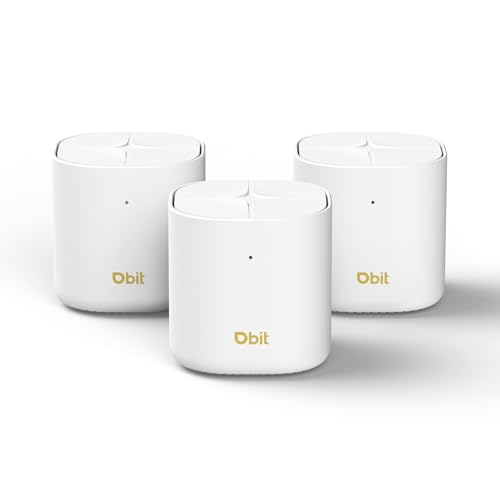
- Up to 6,500 sq. ft. of stated coverage
- Two Gigabit ports per node
- Mesh or standalone access-point setup
Best For: Offices needing flexible node deployment
Largest Coverage – NETGEAR Orbi 970 Series WiFi 7
For buyers comparing mesh wifi systems for office buildings, the Orbi 970 three-pack offers the broadest stated coverage here: up to 10,000 square feet and 200 devices. Its quad-band design reserves a dedicated backhaul lane for traffic between the router and satellites.
Best For: Large offices that need extensive coverage, high device capacity, and multi-gig wired connections.
Pros:
- Router and two satellites cover up to 10,000 square feet.
- Dedicated backhaul helps preserve bandwidth for connected devices.
- Includes 10 Gig and 2.5 Gig Ethernet connections across the system.
Cons:
- Stated coverage depends on layout, building materials, and placement.
- NETGEAR Armor requires a separate subscription after its 30-day trial.
The 10 Gig internet port and wired LAN options make this the strongest fit of the four for demanding office connections. Survey the building before relying on the maximum coverage figure.
Balanced Large-Office Pick – NETGEAR Orbi 770 Series WiFi 7
Among mesh wifi systems for office buildings, the Orbi 770 three-pack is a middle ground for spaces needing up to 8,000 square feet of stated coverage without the Orbi 970’s larger device allowance. Its tri-band WiFi 7 system supports up to 100 devices.
Best For: Spread-out offices with up to 100 connected devices and internet plans up to 2.5 Gbps.
Pros:
- Router and two satellites provide up to 8,000 square feet of stated coverage.
- Tri-band design with enhanced backhaul helps maintain connections across the mesh.
- App setup includes device and guest WiFi management.
Cons:
- Supports fewer stated devices than the Orbi 970 or Deco 7 Pro.
- Actual coverage varies with layout, materials, and satellite placement.
This is a practical step down from the Orbi 970 when 100-device capacity is enough. Its stated 11 Gbps WiFi rate is an aggregate specification, not a speed guarantee for individual office devices.
High Device Capacity – TP-Link Deco 7 Pro WiFi 7
The Deco 7 Pro stands out among mesh wifi systems for office buildings where device count matters: its three-pack is rated for up to 7,600 square feet and more than 200 devices. Tri-band WiFi 7 and support for wired backhaul offer placement options across a larger space.
Best For: Offices with many connected devices that also want multi-gig Ethernet and guest network controls.
Pros:
- Supports more than 200 devices across a stated 7,600-square-foot coverage area.
- Includes a 10G WAN/LAN port and four 2.5G WAN/LAN ports.
- Offers guest mode, VPN client and server support, and app management.
Cons:
- Coverage and wireless speeds vary with distance and obstacles such as walls.
- Wired backhaul requires at least two Deco units and a suitable Ethernet connection between them.
Choose this model if connection count and wired flexibility rank ahead of maximum stated area. Check the proposed node locations and cabling before planning around its coverage rating.
Smaller-Office Option – NETGEAR Orbi 370 Series WiFi 7
For smaller spaces considering mesh wifi systems for office buildings, the Orbi 370 three-pack provides up to 6,000 square feet of stated coverage and connects up to 70 devices. Its dual-band WiFi 7 design includes enhanced backhaul and app-guided setup.
Best For: Smaller offices with moderate device counts and internet plans up to 2.5 Gbps.
Pros:
- Router and two satellites cover up to 6,000 square feet.
- Supports up to 70 connected devices.
- Orbi app provides guided setup and guest WiFi management.
Cons:
- Lower stated coverage and device capacity than the other three systems listed.
- Dual-band design lacks the additional band offered by tri- and quad-band options.
This is the more modest choice when 70 devices will suffice. As with the larger systems, verify coverage against the office layout and construction materials rather than treating the stated maximum as guaranteed.
Best for PoE Placement – TP-Link Deco X50-PoE 3-Pack
For buyers comparing mesh wifi systems for office buildings, the Deco X50-PoE stands out when power outlets are scarce near ideal access-point locations. Its three Wi-Fi 6 units can use PoE+ or standard power and support ceiling installation.
Best For: Offices that can use PoE+ wiring for flexible placement and wired backhaul.
Pros:
- PoE+ or plug-in power makes placement more flexible.
- Two 2.5 GbE ports per unit support multi-gig connections.
- Rated for up to 6,500 sq. ft. and 150 devices.
Cons:
- PoE+ switch is not included.
- Dual-band design has no dedicated wireless backhaul band.
This is the most installation-flexible option here if your office can take advantage of Ethernet runs. Treat the stated coverage and device count as planning figures, then check the building layout before committing to three units.
Best Wi-Fi 7 Upgrade – Amazon eero 7 3-Pack
Among mesh wifi systems for office buildings, the eero 7 is a straightforward choice for smaller offices seeking Wi-Fi 7 and a simple app-managed mesh. The three-pack is rated for up to 6,000 sq. ft. and more than 120 devices.
Best For: Offices upgrading to Wi-Fi 7 that want 2.5 GbE ports and compatibility with older eero units.
Pros:
- Two auto-sensing 2.5 GbE ports per unit support internet plans up to 2.5 Gbps.
- TrueMesh, TrueRoam, and TrueChannel manage connections across the mesh.
- Backward compatible with previous eero generations; includes a three-year warranty.
Cons:
- Dual-band design does not provide a dedicated wireless backhaul band.
- Advanced Security and other eero Plus features require an optional subscription.
Choose this model if Wi-Fi 7 and an existing eero setup matter more than specialized mounting options. Its stated wireless speed is up to 1.8 Gbps, separate from the 2.5 Gbps internet-plan support.
Best Gigabit Wired Option – TP-Link Deco X55 3-Pack
The Deco X55 is a practical entry among mesh wifi systems for office buildings where standard Gigabit Ethernet wiring is available. This three-pack combines AX3000 Wi-Fi 6 with wired Ethernet backhaul support and three Gigabit ports on each unit.
Best For: Offices that want Wi-Fi 6 coverage and wired backhaul without needing PoE or multi-gig ports.
Pros:
- Rated to cover up to 6,500 sq. ft. and connect up to 150 devices.
- Three Gigabit Ethernet ports per unit accommodate wired connections.
- Supports Ethernet backhaul and app-based setup and management.
Cons:
- Ports are Gigabit rather than multi-gigabit.
- Units use power adapters; the supplied notes do not list PoE support.
The X55 makes the most sense when existing network cables can handle backhaul and conventional power outlets are conveniently located. For ceiling placement powered over Ethernet, the X50-PoE is the better match.
Easy Management – Amazon eero 6+ 3-Pack
Among mesh wifi systems for office buildings, the eero 6+ is a practical fit for a smaller office that values straightforward setup. Its three units are rated to cover up to 4,500 square feet and connect 75+ devices, while TrueMesh routes traffic to help reduce dead spots.
Best For: Smaller offices that want simple app-based management and gigabit-plan support.
Pros:
- Supports internet plans up to a gigabit and Wi-Fi 6 with a 160 MHz channel.
- The eero app guides setup and allows remote network management.
- Automatic updates and compatibility with previous-generation eero devices.
Cons:
- Its stated 4,500-square-foot coverage is lower than the other two three-packs here.
- Additional security and network-management features require a separate subscription.
Choose this if ease of operation matters more than maximum stated coverage. Check your floor plan against the coverage rating before relying on three nodes for an entire building.
For buyers comparing mesh wifi systems for office buildings, the Deco 7 BE23 stands out for its Wi-Fi 7 hardware and wired connectivity. TP-Link rates the three-pack for up to 6,500 square feet and 150 devices; each node has two 2.5 Gbps WAN/LAN ports.
Best For: Offices with multi-gig networking plans, newer Wi-Fi 7 devices, or Ethernet available for backhaul.
Pros:
- Two 2.5 Gbps ports per node support high-speed wired connections.
- Supports wired and wireless backhaul, plus Wi-Fi 7 Multi-Link Operation.
- Offers a guest mode and a separate IoT network.
Cons:
- Dual-band design has no separate third radio dedicated to wireless backhaul.
- Advertised top speeds depend on compatible Wi-Fi 7 devices.
This is the strongest match of the three for an office planning multi-gig wired links. Its coverage and device figures are stated maximums, so plan node placement around the building’s actual layout.
For offices considering mesh wifi systems for office buildings with several rooms or floors, the DBIT AX1800 offers three Wi-Fi 6 nodes rated for up to 6,500 square feet and 150+ devices. The units can form a mesh, use wired backhaul, or be configured individually as access points.
Best For: Offices that want flexible node placement, gigabit wired backhaul, and app-based controls.
Pros:
- Two Gigabit Ethernet ports per unit provide six ports across the three-pack.
- Supports wired backhaul and standalone access-point configuration.
- App controls include guest networks, with WPA3 and automatic firmware updates listed.
Cons:
- Gigabit ports do not offer the multi-gig wired speeds of the Deco 7 BE23.
- Dual-band AX1800 hardware is less capable on paper than the Wi-Fi 7 Deco option.
The DBIT’s appeal is deployment flexibility rather than cutting-edge speed. Its stated coverage is a useful starting point, but walls and floor separation should guide where you place each node.
How We Picked the Best Mesh Wifi Systems for Office Buildings
We focused on the practical differences among these 10 kits: Wi-Fi generation, band configuration, advertised coverage and device capacity, wired connectivity, installation flexibility, and likely fit for a small office. Manufacturer coverage figures are useful starting points, not guarantees. Walls, floors, neighboring networks, and node placement can change real-world results substantially.
Quick Comparison
For higher-end Wi-Fi 7 needs: The Orbi 970 and Orbi 770 are the premium choices to examine when fast connections and broad coverage are priorities. The Deco 7 Pro is another tri-band Wi-Fi 7 option worth considering if you want to compare features and port layouts.
For a simpler Wi-Fi 7 upgrade: The Orbi 370, eero 7, and Deco 7 BE23 offer alternatives to the higher-end kits. Compare their wired ports, management features, and actual office layout rather than choosing by wireless generation alone.
For Wi-Fi 6 value or flexible mounting: The Deco X50-PoE stands out when Ethernet-powered placement matters. The Deco X55, eero 6+, and DBIT AX1800 are options to assess for more conventional installations and tighter budgets.
Key Buying Factors for Mesh Wi-Fi Systems for Office Buildings
Floor Plan and Node Placement
Start with a floor plan, not a coverage number. Dense walls, metal shelving, elevators, and multiple floors can weaken signals. Position nodes where they can maintain a reliable connection to one another while reaching work areas. A three-pack may need a different layout—or additional hardware—than an open-plan coverage estimate suggests.
Wired Backhaul, Ports, and PoE
If Ethernet runs are available, wired backhaul can provide a more dependable link between nodes than wireless backhaul, particularly across floors. Check whether the specific kit supports it and whether its port speeds suit your internet plan and local network. PoE can simplify placement where a compatible switch and cabling are available; confirm power requirements before buying.
Capacity, Security, and Administration
Count laptops, phones, printers, meeting-room equipment, and guest devices—not just employees. Look beyond an advertised device total to guest-network controls, update policies, management access, and any subscription-dependent features. If you need VLANs, advanced access controls, centralized administration, or formal support, verify those capabilities explicitly; a consumer mesh kit may not replace a business Wi-Fi deployment.
Who Should Buy Which Mesh Wifi Systems for Office Buildings?
Choose a premium tri-band Wi-Fi 7 kit if your office has demanding traffic and the budget to match. Prioritize the Deco X50-PoE if suitable Ethernet and power infrastructure make flexible node placement the main challenge. Consider the midrange Wi-Fi 7 or Wi-Fi 6 kits for smaller offices that need easier setup and sensible coverage. For a larger, multi-tenant, or compliance-sensitive building, consult an IT professional about business-grade access points before relying on a three-node mesh kit.