
Hybrid work depends on a router that can keep video calls, cloud apps, and secure access stable even when the office is small or the network is busy.
These nine picks cover everything from business-focused VPN routing to fast Wi‑Fi 6, 6E, and Wi‑Fi 7 options for teams that split time between home and office.
Best 9 Routers for Hybrid Offices Picks for 2026
Best for Multi-WAN Resilience
TP-Link ER605 V2 Gigabit VPN Router

- Up to 3 WAN ports plus USB WAN backup
- Strong VPN support for remote and site-to-site links
- SPI firewall and filtering tools for added security
Best For: Small hybrid teams needing a secure wired router with failover and VPN support.
Best for Privacy-First Hybrid Teams
Deeper Connect SE Smart Decentralized VPN Router
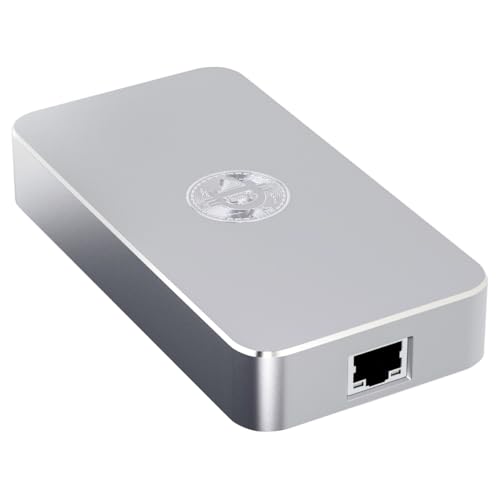
- No-subscription privacy protection for home, office, and travel
- Plug-and-play setup with no apps or accounts needed
- Compact, ultra-low-power design for 24/7 use
Best For: Hybrid workers and small teams wanting simple privacy protection across multiple locations.
Best Multi-Gig VPN Router
TP-Link ER707-M2 Omada VPN Router

- Dual 2.5GbE WAN ports for faster upstream connectivity
- Supports large-client hybrid office networks and heavy session loads
- Omada cloud management and strong VPN support simplify remote work
Best For: Hybrid offices needing multi-gig WAN performance, VPN access, and centralized management.
Best for Privacy
Deeper Connect Air Portable WiFi Router
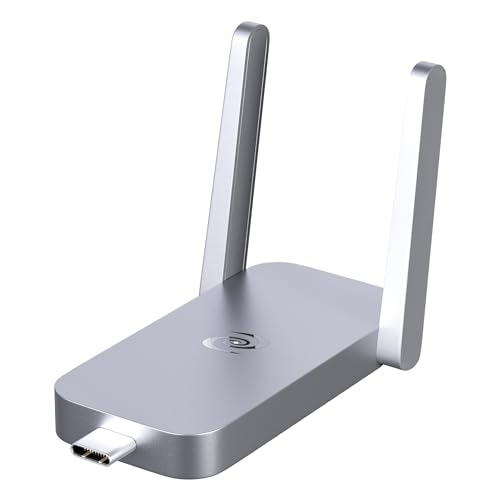
- Lifetime free privacy protection
- Compact for 1–3 connected devices
- Built-in ad, tracker, and malware blocking
Best For: Solo remote workers and frequent travelers who want portable security for light office use.
Best for Multi-WAN Redundancy
Cudy R700 Gigabit Multi-WAN VPN Router

- 4-WAN load balancing improves bandwidth use and failover
- Broad VPN support for secure hybrid-office access
- Office-ready controls with IP/MAC/URL filtering
Best For: Small offices and hybrid teams that need multi-line internet redundancy and secure VPN access.
Best Value Wi‑Fi 6 Pick

- AX1800 Wi‑Fi 6 with dual-band performance
- OFDMA, Beamforming, and Easy Mesh support
- Good fit for busy mixed-use home-office networks
Best For: Hybrid workers needing an affordable Wi‑Fi 6 router with dependable everyday performance.
Best for Secure Hybrid VPN
D-Link DSR-250V2 Gigabit VPN Router

- Multiple VPN protocols for secure remote access
- Dual-WAN failover and load balancing improve uptime
- TAA/NDAA compliance suits regulated organizations
Best For: Small businesses and hybrid teams needing secure VPN access with backup internet failover.
Best Wi‑Fi 7 Upgrade
TP-Link BE6500 Dual-Band WiFi 7 Router

- Wi‑Fi 7 with MLO and 4K-QAM for faster, steadier connections
- Dual 2.5Gbps ports support multi-gig internet and wired gear
- Covers up to 2,400 sq. ft. and 90 devices with HomeShield security
Best For: Remote workers and hybrid teams that want a simple Wi‑Fi 7 router with multi-gig ports and strong coverage.
Best Wi‑Fi 6E Upgrade
TP-Link Archer AXE75 WiFi 6E Router

- Tri-band Wi‑Fi 6E with a 6GHz band for lower congestion
- 2.5Gbps WAN port suits faster internet plans
- VPN support, WPA3, and OneMesh add flexibility
Best For: Hybrid offices and busy homes that need faster wireless performance and stronger device capacity.
Best for Multi-WAN Resilience – TP-Link ER605 V2 Gigabit VPN Router
The TP-Link ER605 V2 is a practical pick for routers for hybrid offices that need dependable wired routing, VPN support, and backup connectivity without overpaying for enterprise gear. Its multi-WAN design helps spread traffic across links, while the USB WAN option adds a useful failover path for maintaining access when the primary line drops.
Best For: Small hybrid teams that want a secure, wired router with WAN redundancy, VPN support, and Omada integration.
Pros:
- Up to 3 WAN ports plus USB WAN backup for flexible failover and load balancing
- Strong VPN support for site-to-site and remote access use cases
- Built-in security tools like SPI firewall, DoS defense, and filtering controls
- Omada SDN integration makes it easier to manage in a TP-Link ecosystem
Cons:
- No built-in Wi-Fi, so you’ll need separate access points
- Best suited to users comfortable with network configuration
For routers for hybrid offices, the ER605 V2 stands out as a wired backbone that prioritizes uptime, security, and VPN connectivity over consumer-style extras. If your team needs stable internet handling across office and remote work, it is a strong value-focused option.
Best for Privacy-First Hybrid Teams – Deeper Connect SE Smart Decentralized VPN Router
If you’re comparing routers for hybrid offices, the Deeper Connect SE stands out as a privacy-first option for teams that split time between home, office, and travel. Its plug-and-play design, decentralized DPN approach, and no-subscription model make it appealing for users who want secure browsing without extra software or ongoing fees.
Best For: Remote workers and hybrid office users who want simple, always-on privacy protection for home networks and travel hotspots.
Pros:
- Plug-and-play setup with no apps, accounts, or recurring subscription fees
- Decentralized DPN and firewall features help protect devices on untrusted networks
- Compact, ultra-low-power design is easy to leave running 24/7
- Useful for home, office, hotel, and café connections
Cons:
- Not a traditional high-throughput router for performance-focused networking
- Privacy and filtering features may be more than some casual users need
For hybrid workplaces that prioritize security and portability over advanced networking features, the SE is a practical fit. It’s especially compelling among routers for hybrid offices when you want straightforward protection that travels with you and doesn’t add monthly costs.
Best Multi-Gig VPN Router – TP-Link ER707-M2 Omada VPN Router
The TP-Link ER707-M2 is a strong fit for routers for hybrid offices that need fast internet handoff, secure remote access, and centralized control without moving up to a full enterprise stack. With dual 2.5GbE WAN options, Omada SDN integration, and a high session cap, it is built for mixed in-office and remote work environments.
Best For: Hybrid offices that want multi-gig connectivity, VPN flexibility, and cloud-managed networking in one compact router.
Pros:
- Dual 2.5GbE WAN support plus flexible WAN/LAN ports for high-bandwidth setups
- Handles large networks with up to 500,000 concurrent sessions and 1000+ clients
- Strong VPN support for site-to-site and remote access use cases
- Omada cloud management makes it easier to oversee multiple locations
Cons:
- Best suited to users already in the Omada ecosystem
- More router than many small offices need
- Setup may be overkill for basic home-style networking
For routers for hybrid offices, the ER707-M2 stands out when you need business-grade networking features, multi-gig throughput, and remote management in a single device. It is a practical pick for teams balancing local office traffic, VPN access, and future bandwidth growth.
Best for Privacy – Deeper Connect Air Portable WiFi Router
If you want one of the more privacy-focused routers for hybrid offices, the Deeper Connect Air is built for travelers and remote workers who need a compact way to secure everyday browsing on hotel, café, or public Wi‑Fi. It combines always-on VPN-style protection with ad blocking and basic content controls, but it’s best suited to light daily use rather than heavy multi-user networking.
Best For: Solo remote workers and frequent travelers who want portable privacy protection for light office tasks, messaging, and cloud apps.
Pros:
- Lifetime free private browsing with no VPN subscription
- Compact design works well for 1–3 devices
- Built-in ad blocking, tracker blocking, and malware filtering
- Easy plug-and-play setup on public networks
Cons:
- Not ideal for bandwidth-heavy teams or large households
- Best performance is focused on light browsing and messaging
- Hybrid office users who need top speed may want a stronger full-size router
As a niche pick among routers for hybrid offices, this model makes the most sense when privacy and portability matter more than raw throughput. It’s a practical choice if you split time between home and the road and want an easier way to harden insecure Wi‑Fi without adding monthly costs.
Best for Multi-WAN Redundancy – Cudy R700 Gigabit Multi-WAN VPN Router
If you need one of the more flexible routers for hybrid offices, the Cudy R700 stands out for its 4-WAN support, load balancing, and broad VPN options. It is built to help small teams spread traffic across multiple internet lines, keep remote access secure, and maintain connectivity if one connection drops.
Best For: Small offices and hybrid work setups that want multi-line internet failover, VPN access, and basic network access controls in one compact gateway.
Pros:
- Supports up to 4 WAN connections for load balancing and redundancy
- Works with WireGuard, OpenVPN, IPsec, PPTP, and L2TP
- Includes IP/MAC/URL filtering and device control for office policy management
- Metal desktop design with built-in lightning protection
Cons:
- More feature-rich than a simple plug-and-play consumer router
- VPN and multi-WAN setup may be more involved for first-time users
For hybrid offices that rely on multiple internet sources and secure remote connections, the R700 delivers a practical mix of resilience and control. It is a strong fit when uptime, traffic balancing, and VPN flexibility matter more than Wi‑Fi convenience features.
Best Value Wi‑Fi 6 Pick – TP-Link AX1800 WiFi 6 Router
For routers for hybrid offices, the TP-Link Archer AX21 V5 is an easy-to-recommend value pick if you need solid Wi‑Fi 6 performance without overpaying. Its dual-band AX1800 speed, OFDMA support, and Beamforming help keep video calls, file transfers, and everyday streaming steady across a busy home-office setup.
Best For: Hybrid workers who want a straightforward, affordable Wi‑Fi 6 router with enough capacity for multiple devices and reliable coverage.
Pros:
- Wi‑Fi 6 with AX1800 speeds helps reduce congestion on shared networks
- OFDMA and Beamforming improve multitasking and device reach
- Gigabit ports and Easy Mesh support add flexibility as your needs grow
- Works with major ISPs and includes TP-Link’s security-focused design approach
Cons:
- Dual-band only, so there’s no 6 GHz band for newer devices
- Performance depends on layout, walls, and device distance
- Modem required for most internet providers
Overall, the Archer AX21 V5 makes sense for routers for hybrid offices when you want a balanced mix of speed, coverage, and price rather than a feature-heavy flagship. It’s a practical upgrade for supporting meetings, cloud apps, and family traffic on the same network.
Best for Secure Hybrid VPN – D-Link DSR-250V2 Gigabit VPN Router
The D-Link DSR-250V2 is a strong fit for routers for hybrid offices that need secure remote access, dual-WAN resilience, and straightforward management without moving up to a much larger enterprise appliance. It combines VPN flexibility with business-focused connectivity features, making it practical for small teams split between home and office.
Best For: Small businesses and hybrid teams that need an affordable, security-first VPN router with backup internet failover.
Pros:
- Supports multiple VPN options, including IPSec, OpenVPN, SSL, and L2TP
- Dual-WAN failover and load balancing help keep work online during outages
- Business-friendly controls, plus TAA/NDAA compliance for regulated environments
- Solid throughput and session capacity for small office deployments
Cons:
- Not a Wi-Fi router, so you’ll need separate wireless access points
- More feature-rich than most home users need
For teams comparing routers for hybrid offices, this model stands out for secure VPN access and dependable failover rather than flashy consumer extras. If your priority is keeping distributed staff connected with less downtime, it’s an easy router to shortlist.
Best Wi‑Fi 7 Upgrade – TP-Link BE6500 Dual-Band WiFi 7 Router
If you want a fast, future-ready pick for routers for hybrid offices, the TP-Link BE6500 is built around Wi‑Fi 7, dual 2.5Gbps ports, and enough capacity for busy households or shared workspaces. It’s a solid option when multiple people are video calling, cloud syncing, streaming, and connecting lots of devices at once.
Best For: Remote workers and hybrid teams that need Wi‑Fi 7 speed, multi-gig wired ports, and broad coverage without moving to a full enterprise system.
Pros:
- Wi‑Fi 7 features like MLO and 4K-QAM help improve speed and responsiveness
- Dual 2.5Gbps ports make it easier to support fast internet plans and wired devices
- Coverage for up to 2,400 sq. ft. and 90 devices suits active hybrid environments
- HomeShield, WPA3, and a private IoT SSID add useful network protection
Cons:
- Dual-band design may not be ideal for larger office-style networks needing more separation
- Wi‑Fi 7 benefits are strongest if your laptops and phones support the standard
For routers for hybrid offices, this model stands out as a practical bridge between consumer simplicity and higher-end performance. It offers the speed, wired flexibility, and security features that matter most when work and home traffic share the same network.
Best Wi‑Fi 6E Upgrade – TP-Link Archer AXE75 WiFi 6E Router
If you need one of the more capable routers for hybrid offices, the TP-Link Archer AXE75 is a strong fit thanks to its tri-band Wi‑Fi 6E design, 6GHz support, and 2.5Gbps WAN port. It’s built to keep video calls, cloud backups, streaming, and gaming moving at once without overloading the network.
Best For: Hybrid teams and households that want faster wireless speeds, lower latency, and better device handling in a midrange router.
Pros:
- Wi‑Fi 6E with a 6GHz band for more bandwidth and less congestion
- Tri-band design and OFDMA help support many devices at once
- 2.5Gbps WAN port is useful for faster internet plans and heavy traffic
- Includes VPN support, WPA3 security, and OneMesh compatibility
Cons:
- No built-in mesh system; OneMesh requires a separate extender
- Best performance depends on having Wi‑Fi 6E-capable devices
- Advanced features may be more than casual users need
For routers for hybrid offices, the AXE75 stands out as a practical step up when you need stronger multitasking and room to grow. It’s not the cheapest pick, but the speed, 6GHz headroom, and security tools make it a smart long-term upgrade.
How We Picked These Routers for Hybrid Offices
We focused on routers that make mixed-use work easier: dependable uptime, strong security features, flexible WAN options, and enough throughput for modern collaboration tools. For Routers for Hybrid Offices, the best choices balance business-grade reliability with setup simplicity, so small teams and remote workers can stay connected without adding complexity.
Quick Comparison
In broad terms, the lineup splits into two groups: VPN and multi-WAN routers built for failover, segmentation, and secure networking, and high-speed Wi‑Fi routers better suited to shared internet access, larger device counts, and performance-heavy workflows. If your priority is resilience and traffic control, lean toward the VPN models. If your priority is fast wireless coverage for a flexible workplace, look at the newer Wi‑Fi 6E and Wi‑Fi 7 options.
Key Buying Factors for Routers for Hybrid Offices
WAN and Failover Support
Look for dual-WAN or multi-WAN support if downtime is costly. Automatic failover helps keep calls and cloud apps online when the primary connection drops, while load balancing can spread traffic more evenly across links.
VPN and Remote Access
Hybrid offices often need secure access to internal resources from home or while traveling. Built-in VPN protocols, SDN integration, and firewall tools matter more than flashy wireless specs when security is the main concern.
Wireless Standard and Capacity
For shared spaces, Wi‑Fi 6, 6E, and Wi‑Fi 7 can improve responsiveness when many devices connect at once. Higher-end wireless routers may be the better fit if staff bring laptops, phones, printers, conferencing gear, and smart office devices onto the same network.
Ports, Speed, and Expansion
Multi-gig ports are worth considering if you already have fast broadband or expect upgrades soon. USB WAN support and extra LAN ports also add flexibility for backup connections and wired endpoints.
Who Should Buy Which Routers for Hybrid Offices?
If you need secure routing, failover, and traffic management for a small office or distributed team, a VPN-focused model is usually the best fit. If your main challenge is covering a busy workspace with strong wireless performance, choose a faster consumer-style router with multi-gig ports and broad device support. Travelers and highly mobile users may prefer compact privacy-focused units, while growing teams should prioritize multi-WAN models with stronger admin controls.
For most buyers, the right choice comes down to whether the network problem is security, uptime, or wireless capacity. Match the router to the hardest problem first, then use speed and coverage to narrow the final pick.