
Good webcam lighting can instantly make you look sharper, brighter, and more confident on video calls. The right monitor light helps reduce shadows, soften harsh room lighting, and create a more polished on-camera appearance.
In this roundup, we focus on monitor lights for video conferencing that are practical, easy to mount, and well suited for remote work, meetings, and streaming.
Best 10 Monitor Lights for Video Conferencing Picks for 2026
Best for Soft Webcam Lighting
Logitech Litra Glow Streaming Light

- TrueSoft LED gives a natural, balanced look on camera
- Soft diffuser helps eliminate harsh shadows
- Monitor mount and G HUB app make setup and tuning easy
Best For: Remote workers and creators who want flattering, natural-looking webcam lighting.
Best for Flexible Desk Mount
LitONES Video Conference Light for Zoom Calls
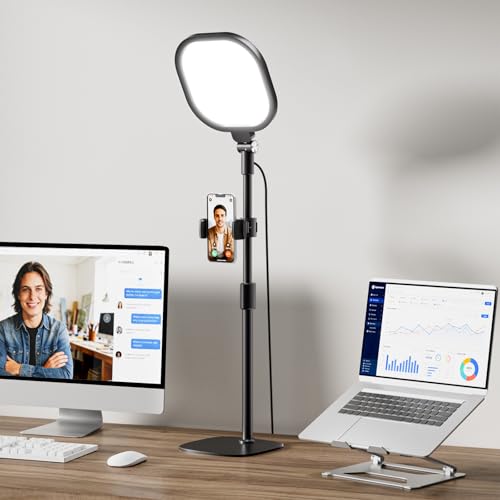
- Flexible stand for precise positioning
- 30 lighting modes for better control
- Memory function saves preferred settings
Best For: Remote workers and creators who want an adjustable desk light for regular video calls.
Best for Easy Setup
HumanCentric Zoom Meeting Light

- Top-of-screen mount with no adhesive or suction cups
- Soft diffuser with adjustable brightness and color temperature
- Cable clips and Velcro straps help keep setup tidy
Best For: Remote workers and students who want a simple, polished light for video calls.
Best for Color Accuracy
Upgraded Ring Light for Laptop & Monitor

- CRI 97.8+ for more natural-looking on-camera color
- Diffused LED design aims for softer, eye-caring light
- 50 modes and adjustable mount suit varied desk setups
Best For: People who want accurate, flattering lighting for video calls and streaming.
Best for Dual-Light Setups
Dual Monitor Light Bar for Video Calls

- Two light bars for broader, more flexible coverage
- Anti-glare, flicker-free output for eye comfort
- 10 brightness levels and 3 color modes
Best For: Remote workers and creators who want adjustable, studio-style lighting for video calls.
Best for Flexible Mounting
Evershop Laptop Clip-On Ring Light

- Upgraded adjustable clip fits more monitor shapes
- 3 color modes and up to 30 brightness levels
- USB-powered, foldable, and travel-friendly
Best For: People who want a compact ring light that mounts securely to laptops or monitors and doubles as a phone stand.
Best for Multi-Light Coverage
HumanCentric Video Conference Lighting Double Kit

- Twin-light setup helps brighten your face more evenly.
- Mounts easily on a monitor or laptop with no adhesive.
- Adjustable color temperature and brightness for call-friendly lighting.
Best For: Remote workers, streamers, and students who want a polished two-light setup for video calls.
Best for Eye-Care
5" Ring Light for Computer

- Flicker-free diffused light reduces glare on long calls.
- CRI 97.8+ delivers natural skin tones and color.
- 50 lighting modes plus USB power make it flexible and portable.
Best For: Remote workers and video callers who want gentle, adjustable face lighting.
Best for Soft Webcam Lighting – Logitech Litra Glow Streaming Light
If you want monitor lights for video conferencing that make you look polished without a harsh ring-light effect, the Logitech Litra Glow is an easy pick. Its TrueSoft LED output and wide diffuser create soft, even illumination that works well for Zoom calls, streaming, and everyday webcam use.
Best For: Professionals, creators, and remote workers who want natural-looking face lighting with simple monitor-mounted setup and app-based control.
Pros:
- TrueSoft lighting delivers balanced, flattering color for more natural skin tones
- Frameless diffuser spreads soft light to reduce harsh shadows on camera
- 3-way monitor mount offers adjustable height, tilt, and rotation for flexible placement
- G HUB desktop app lets you save presets and fine-tune brightness and color temperature
Cons:
- More expensive than basic clip-on webcam lights
- Best for close-up desktop use rather than larger room lighting
For buyers comparing monitor lights for video conferencing, the Litra Glow stands out for its soft, camera-friendly output and easy positioning. It is a strong choice if you care more about flattering image quality and convenience than maximum brightness.
Best for Flexible Desk Mount – LitONES Video Conference Light for Zoom Calls
If you want monitor lights for video conferencing that are easy to position and simple to tune, the LitONES desk light is a practical pick. Its flexible stand, multiple lighting modes, and memory function make it a straightforward way to improve face lighting for Zoom calls, webcam meetings, and live streams.
Best For: Remote workers, creators, and students who want a versatile desk light with quick adjustments for everyday video calls.
Pros:
- Flexible stand makes it easier to aim light exactly where you need it.
- 30 light modes give you more control over brightness and color temperature.
- Memory function helps it reopen with your preferred settings.
- Useful for both conferencing and casual streaming setups.
Cons:
- Desk-mounted design may take up space on smaller workstations.
- Light output flexibility can be more complex than a basic plug-and-go lamp.
Overall, this is a strong option if you want monitor lights for video conferencing that can adapt to different rooms, setups, and lighting preferences without much fuss.
Best for Easy Setup – HumanCentric Zoom Meeting Light
If you want monitor lights for video conferencing that are simple to mount and easy to dial in, HumanCentric’s single light kit is a practical pick. It sits on top of your monitor or laptop like a webcam, adds soft front-facing illumination, and helps reduce the washed-out look caused by bright windows or lights behind you.
Best For: Remote workers, students, and presenters who want a straightforward lighting upgrade for Zoom calls and streaming without a complicated setup.
Pros:
- Quick top-of-screen setup with no suction cups or adhesive
- Soft diffuser and adjustable brightness/temperature for a more natural look
- Includes cable clips and Velcro straps for cleaner desk management
Cons:
- Requires USB power and does not include a battery
- Power adapter is not included, so full brightness may need a wall adapter
- Single-kit design is best for one person, not larger setups
Overall, this is a strong option for monitor lights for video conferencing if you value a neat, stationary setup and a softer, more professional on-camera appearance. It’s especially appealing for users who want a reliable light that’s easy to position and remove.
Best for Color Accuracy – Upgraded Ring Light for Laptop & Monitor
If you want monitor lights for video conferencing that improve your face lighting without washing out the screen, this upgraded ring light is built for desk setups. The diffused LED design, screen-safe clip, adjustable mount, and high CRI make it a practical choice for Zoom calls, livestreams, and everyday webcam use.
Best For: Users who want accurate, flattering lighting for video calls, streaming, and hybrid work setups.
Pros:
- CRI 97.8+ helps deliver more natural, color-accurate skin tones on camera.
- Diffused LED output is designed to be easier on the eyes and less harsh than bare lights.
- Adjustable monitor mount and clip make it flexible for laptops, monitors, and desk use.
- 50 lighting modes give you plenty of control over brightness and color temperature.
Cons:
- Ring-light style may not suit users who prefer a softer, wider panel light.
- More features can mean more setup time than a basic clip-on light.
For shoppers comparing monitor lights for video conferencing, this model stands out for its color quality and flexibility rather than just raw brightness. It is a strong fit if you care about looking natural on camera and want one light that adapts to different desk setups.
Best for Easy Clip-On Setup – Cyezcor Video Conference Light
If you want monitor lights for video conferencing that are simple to mount and easy to tune, this Cyezcor clip-on ring light is a practical pick. It adds soft, face-forward illumination to help you look clearer on Zoom calls, remote meetings, and online classes without taking up desk space.
Best For: People who want a lightweight, USB-powered light that clips directly onto a laptop or monitor for quick everyday use.
Pros:
- 3 color temperatures and 5 brightness levels make it easy to match your room and camera setup
- Ring light design gives even, soft light with less glare and shadow on your face
- Clip-on mount and flexible rotation make placement fast and space-saving
- USB power works with laptops, monitors, power banks, and chargers
Cons:
- Smaller light output than a full-size desktop ring light
- Best suited for close-range face lighting rather than full-room coverage
Overall, this is a straightforward option for buyers who want monitor lights for video conferencing without a complicated setup. It focuses on convenience, adjustable front lighting, and portability rather than extra pro features.
Best for Dual-Light Setups – Dual Monitor Light Bar for Video Calls
If you want monitor lights for video conferencing that can do more than just brighten your face, this dual-bar kit is built for flexible, screen-friendly lighting. It aims to reduce glare, adds soft flicker-free illumination, and gives you enough control to match different rooms, cameras, and call styles.
Best For: Remote workers, streamers, and creators who want a clean, adjustable light setup for Zoom, Teams, and webcam use.
Pros:
- Dual light bars offer more coverage and placement flexibility than a single lamp.
- Anti-glare, flicker-free lighting is designed to be easier on the eyes during long calls.
- 10 brightness levels and 3 color modes make it easier to match your setup.
- Tool-free monitor mount and included cables make installation straightforward.
Cons:
- Two-bar design may be more than some users need for simple desk setups.
- Stationary monitor mounting is less ideal if you move your display often.
- Requires USB power, so cable management may take a little effort.
For buyers comparing monitor lights for video conferencing, this model stands out if you want a softer, more studio-like look without relying on a ring light. The dual-bar design and adjustable color temperatures make it a practical pick for polished on-camera lighting at home or in a small office.
Best for Flexible Mounting – Evershop Laptop Clip-On Ring Light
If you want one of the more adaptable monitor lights for video conferencing, this Evershop ring light stands out for its upgraded clip design and adjustable stand. It’s built to work on laptops, desktop monitors, and even curved screens, while the 5-inch LED head keeps your setup compact for everyday calls and recordings.
Best For: Remote workers, students, and creators who need a compact light that mounts securely to different screens and also works as a phone stand.
Pros:
- Adjustable mounting system is designed for better stability on straight or curved monitors.
- Three color modes and up to 30 brightness levels help you tune the look for different rooms.
- USB-powered, lightweight, and easy to pack for office, travel, or home use.
- Foldable structure and 360° rotation make angle adjustments simple.
Cons:
- 5-inch light size is better for close-up desk use than wider room coverage.
- Clip-on design may not suit unusually thick or unconventional monitor edges.
This is a practical pick if you want monitor lights for video conferencing that emphasize versatility over size. The flexible mount, built-in phone support, and strong brightness control make it a useful all-in-one option for everyday webcam calls.
Best for Multi-Light Coverage – HumanCentric Video Conference Lighting Double Kit
If you want monitor lights for video conferencing that make your face look brighter and more even on camera, this HumanCentric double kit is built for that exact job. The twin-light setup helps reduce shadows, adds a more polished look for Zoom and streaming, and mounts neatly on top of a monitor or laptop without suction cups or adhesive.
Best For: People who want a cleaner, more professional on-camera look from a double light setup for meetings, classes, and streaming.
Pros:
- Double-light design gives more even facial illumination than a single lamp.
- Easy top-of-screen mount with a stable, removable webcam-style stand.
- Adjustable brightness and color temperature for different rooms and skin tones.
- Soft diffuser creates a natural, less harsh look on video.
Cons:
- USB-powered only; no battery or included wall adapter.
- Best brightness may require a stronger USB power source.
- Not ideal if you need a highly portable lighting solution.
As monitor lights for video conferencing go, this kit stands out for users who want a more polished, evenly lit frame without dealing with a ring light setup. It is especially useful for fixed desks where you can leave the lights in place and dial in a consistent look for calls.
Best for Eye-Care – 5" Ring Light for Computer
If you want monitor lights for video conferencing that are easy on your eyes and simple to tune, this 5-inch LitONES ring light is built for long Zoom days. The flicker-free, edge-lit design and 4-layer diffusion panel help soften glare, while the 50-mode color and brightness range makes it easier to match your room and camera setup.
Best For: Remote workers, streamers, and anyone who wants softer, more natural-looking face lighting for daily video calls.
Pros:
- Flicker-free, diffused lighting helps reduce harsh glare on long calls.
- High CRI 97.8+ supports natural skin tones and true color in video.
- 50 lighting modes give you wide control over warmth and brightness.
- USB-powered, foldable, and portable for desks, travel, or hybrid work.
Cons:
- Needs a proper 5V/2A power source to avoid flicker or weak output.
- The 5-inch light is better for close-up face lighting than broad room coverage.
For shoppers comparing monitor lights for video conferencing, this model stands out for eye comfort and color quality rather than sheer size. It is a smart pick if you want a compact light that keeps your face evenly lit without making your workspace feel overbuilt.
Best for Remote Control Convenience – InnoGear Video Conference Light
If you want one of the more flexible monitor lights for video conferencing, this InnoGear option is built for quick adjustments at the desk. It’s aimed at webcam and laptop use, with on-camera lighting that helps soften shadows and improve face lighting for calls, streaming, and recording without taking up much space.
Best For: People who want an easy-to-tweak monitor light for video calls, Zoom meetings, and desktop content creation.
Pros:
- Remote and touch controls make brightness and color changes fast during calls
- Designed for monitor, laptop, webcam, podcast, and streaming setups
- Compact desk-friendly design keeps your workspace uncluttered
Cons:
- Best suited to close-range lighting rather than larger rooms
- May require some positioning to avoid glare on glossy screens
For shoppers comparing monitor lights for video conferencing, this model stands out for convenience and broad desk-use versatility. It’s a practical choice if you want simple, adjustable front lighting that improves your on-camera look without a complicated setup.
How We Picked These Monitor Lights for Video Conferencing
We prioritized products designed for everyday desk use, with attention to light quality, mount style, adjustability, and ease of setup. For Monitor Lights for Video Conferencing, the most important goal is even, flattering illumination without glare on your screen or discomfort during long meetings.
We also favored options that suit common work setups, including laptops, external monitors, and compact home offices. Useful controls, portability, and eye-friendly diffusion mattered too.
Quick Comparison: What Matters Most
Some lights are best for a minimalist desk and fast setup, while others offer more shaping, brightness control, or flexible positioning. If you want the simplest upgrade, choose a clip-on or monitor-mounted light. If you need more placement freedom, a stand-based or ring-light design may be a better fit.
Think about whether you want a soft, broad wash of light, a more focused beam, or a portable option you can move between workspaces.
Key Buying Factors for Monitor Lights for Video Conferencing
Light Quality and Diffusion
Look for flicker-free, eye-caring illumination that reduces hard shadows and keeps skin tones natural. Diffused LED panels and soft ring lights usually provide the most flattering results for webcam use.
Brightness and Color Temperature Control
Adjustable brightness is essential, especially if you take calls at different times of day. Variable color temperature can help you match daylight, warm indoor lighting, or a neutral office look.
Mounting and Desk Compatibility
Check whether the light clips securely to a monitor, laptop, or stand. A stable mount is important for comfort, especially if you move your screen often or use a thin-bezel monitor.
Size and Portability
Compact lights are ideal for travel, shared desks, or small spaces. Larger lights may offer softer coverage, but they can take up more room and be less convenient to reposition.
Who Should Buy Which Monitor Lights for Video Conferencing?
If you want the easiest all-around upgrade, choose a simple monitor-mounted light with adjustable brightness. If you spend a lot of time on Zoom or client calls, prioritize soft diffusion and broader coverage. Creators and presenters may prefer a more configurable setup with stronger output and multiple lighting modes.
For hybrid workers, portable options are often the smartest choice because they work well at home, in the office, and on the go. The best choice depends on your space, how often you appear on camera, and how much control you want over your lighting.