
If you need more storage, better cable management, and easier drive access, the right enclosure can make a huge difference. The best NAS enclosures for PC help turn a standard build into a flexible, high-capacity storage system.
In this roundup, we focus on practical options for home media, backups, and DIY server use, with an eye on drive support, cooling, expansion, and overall value.
Best 10 Nas Enclosures for PC Picks for 2026
High-Capacity DIY NAS Case

- Supports up to 11 x 3.5-inch HDDs
- Mesh front plus 4 pre-installed 140mm PWM fans
- ATX, micro ATX, ITX, and BTF compatible
Best For: DIY NAS and media server builds with many hard drives
Compact 5-Bay Desktop DAS

- Supports 2.5-inch and 3.5-inch SATA drives
- Up to 110TB total capacity across 5 bays
- Quiet 80mm fan and 12V/10A power adapter
Best For: Simple desktop storage expansion and drive consolidation
Raspberry Pi NAS Tower Case
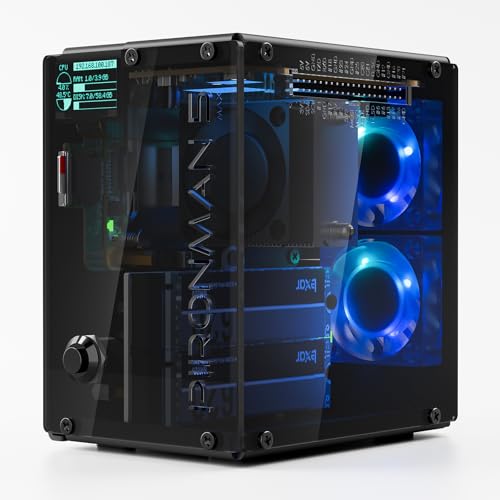
- Dual NVMe M.2 slots with RAID 0/1 support
- PWM tower cooler plus dual RGB fans
- OLED display shows CPU, memory, IP, and disk status
Best For: Pi 5 users building a compact NAS or smart home hub
Fast 4-Bay USB DAS

- USB 3.2 Gen2 delivers up to 10Gbps
- Supports 4 individual drives with hot swap
- Tool-free trays and quiet cooling design
Best For: Fast direct-attached storage for PC, Mac, or Linux
Compact 8-Bay NAS
8 Bay NAS Case, Hot-Swap MATX/ITX

- 8 hot-swappable 3.5-inch bays plus 2 SSD slots
- Micro-ATX and Mini-ITX support with 4 PCIe slots
- Steel dual-chamber design with 4 x 120mm fan positions
Best For: Home NAS and media server builds needing compact hot-swap storage
Full Tower NAS Server
Rosewill Thor NAS Workstation Chassis

- Up to 11 x 3.5-inch HDDs or 13 x 2.5-inch SSDs
- E-ATX support with room for 400mm expansion cards
- USB 3.2 Gen Type-C and 140mm PWM fan included
Best For: Large storage-heavy NAS and workstation builds
USB-C 4-Bay DAS

- Four SATA bays for 3.5-inch and 2.5-inch drives
- USB 3.2 Type-C up to 10Gbps with temp-controlled fans
- Independent bay power switches and aluminum shell
Best For: External PC storage expansion, backups, and media workflows
High-Capacity Full Tower
DARKROCK Classico Storage Master ATX NAS Case

- Supports up to 13 internal hard drives
- Includes 4 pre-installed 120mm fans
- Mesh panels help with airflow and cooling
Best For: Large NAS-style builds that need maximum drive capacity and ATX compatibility
Hot-Swap Storage Enclosure
8-Bay Mini ITX/Micro ATX NAS Case

- 8 hot-swap bays for HDDs and SSDs
- Dual air channels separate drive and system cooling
- Includes 3 temperature-controlled silent fans
Best For: DIY storage and media-server builds that need easy drive swaps and compact compatibility
High-Capacity DIY NAS Case – Rosewill Helium NAS Max
If you want one of the more straightforward nas enclosures for pc builds, the Rosewill Helium NAS Max is a roomy ATX mid tower that emphasizes storage and airflow. It supports ATX, micro ATX, ITX, and BTF motherboards, while the mesh front and four pre-installed 140mm PWM fans are aimed at keeping multiple drives cool in a DIY NAS or home server setup.
Best For: DIY NAS builders, media servers, and small business file storage with lots of 3.5-inch drives.
Pros:
- Supports up to 11 x 3.5-inch HDDs for very high internal capacity.
- Includes 4 x 140mm PWM fans and a mesh front for strong airflow.
- Compatible with ATX, micro ATX, ITX, and BTF motherboards.
- Front USB 3.2 Type-C adds modern connectivity.
Cons:
- ATX mid-tower size takes up more desk or floor space than compact enclosures.
- Focused on HDD storage rather than compact, all-in-one convenience.
Overall, this is a practical case for anyone prioritizing drive count, cooling, and standard PC compatibility over a smaller footprint. It fits the classic DIY NAS formula well: lots of bays, good airflow, and room for a mainstream motherboard.
Compact 5-Bay Desktop DAS – ORICO 9758C3 5-Bay Enclosure
For buyers comparing nas enclosures for pc with desktop-friendly expansion, the ORICO 5-bay enclosure is really a plug-and-play DAS for centralized storage. It supports 2.5-inch and 3.5-inch SATA drives, includes a 2-in-1 USB/Type-C cable, and is built for quick access and simple multi-drive management on a desk.
Best For: Users who want easy external multi-drive storage for backups, media, and data organization.
Pros:
- Five-bay design supports up to 5 drives and up to 110TB total capacity.
- USB 3.1/Type-C connection offers up to 5 Gbps transfer speeds.
- 12V/10A power adapter helps support simultaneous multi-drive use.
- Quiet 80mm fan helps with cooling during longer sessions.
Cons:
- It is a DAS enclosure, not a NAS, so it does not provide network sharing on its own.
- Data transfer speed is lower than higher-end 10Gbps enclosures.
This is a good fit if you want simple, external mass storage without building a full server. Its value is in straightforward capacity, broad drive support, and easy desk-side access.
Raspberry Pi NAS Tower Case – Pironman 5-MAX Pi 5 NAS Case
If you’re exploring smaller nas enclosures for pc alternatives built around a single-board computer, the Pironman 5-MAX turns a Raspberry Pi 5 into a capable mini NAS or edge device. It adds dual NVMe M.2 slots with RAID 0/1 support, a PCIe Gen2 switch, active cooling, and an OLED display, making it a feature-heavy enclosure for advanced hobbyist builds.
Best For: Raspberry Pi 5 users building a compact NAS, AI edge device, or Home Assistant hub.
Pros:
- Dual NVMe M.2 slots support RAID 0/1 for flexible storage setups.
- PWM tower cooler plus dual RGB fans improve airflow for sustained use.
- OLED screen shows system stats like CPU, memory, IP, and disk status.
- Includes safe shutdown button, HDMI support, and GPIO extender.
Cons:
- Raspberry Pi 5 is not included.
- Designed for Pi-based builds, so it is not a standard PC case.
This enclosure stands out for turning a Raspberry Pi 5 into a more polished storage or automation box. It is best viewed as an advanced maker-oriented platform, not a replacement for a full-size PC NAS chassis.
Fast 4-Bay USB DAS – TerraMaster D4-320 4-Bay DAS
Among nas enclosures for pc, the TerraMaster D4-320 is a strong option if you mainly want external storage speed and convenience rather than a network appliance. It is a 4-bay DAS with USB 3.2 Gen2 connectivity, tool-free trays, and hot-swap support, so it suits users who need fast access to several drives from a Mac, Windows, or Linux machine.
Best For: Creators and PC users who want fast, direct-attached multi-drive storage.
Pros:
- USB 3.2 Gen2 connection delivers up to 10Gbps performance.
- Supports 4 drives with no RAID function for simple, direct storage use.
- Tool-free trays and hot swapping make drive changes easy.
- Temperature-controlled fan and damping features help reduce noise.
Cons:
- It is a DAS, not a NAS, so it does not provide network storage features.
- No RAID support, which may limit redundancy-focused setups.
This enclosure makes sense when speed, compatibility, and ease of use matter more than built-in network functionality. It is a practical desktop expansion box for large media libraries, backups, and project files.
Compact 8-Bay NAS – 8 Bay NAS Case, Hot-Swap MATX/ITX
If you want one of the more compact nas enclosures for pc builds, this 8-bay case is built for serious storage in a desk-friendly footprint. It combines eight hot-swappable 3.5-inch bays with two 2.5-inch SSD slots, plus Micro-ATX and Mini-ITX support for a flexible DIY home NAS or media server setup.
Best For: Home NAS builders who want lots of hot-swap storage in a compact mini-tower.
Pros:
- 8 hot-swappable 3.5-inch HDD bays plus 2 dedicated 2.5-inch SSD slots
- Supports Micro-ATX and Mini-ITX motherboards with 4 full-height PCIe slots
- ATX PSU support and room for up to 4 x 120mm fans
- Sturdy steel construction with magnetic front panel and ventilation panels
Cons:
- CPU cooler height is limited to 55mm
- GPU length is limited to 240mm
- Designed for smaller motherboards rather than ATX or E-ATX builds
Overall, this is a practical choice if you want dense storage, hot-swap convenience, and a small footprint instead of a full-size server chassis. It suits DIY users who prioritize capacity and straightforward access over maximum expansion room.
Full Tower NAS Server – Rosewill Thor NAS Workstation Chassis
For large nas enclosures for pc setups, this full-tower chassis is aimed at users who need extensive drive capacity and workstation-class room. It supports E-ATX motherboards, up to 11 x 3.5-inch HDDs or 13 x 2.5-inch SSDs, and is positioned for AI servers, media hubs, and SMB NAS builds.
Best For: Large NAS and workstation builds that need maximum drive expansion and full-tower space.
Pros:
- Supports up to 11 x 3.5-inch HDDs or 13 x 2.5-inch SSDs
- E-ATX compatibility and support for expansion cards up to 400mm
- Includes a 140mm PWM fan and dust filter for airflow management
- USB 3.2 Gen Type-C connectivity for faster external transfers
Cons:
- Full-tower size takes much more space than compact NAS cases
- Uses a single included 140mm fan, so additional cooling may be needed depending on the build
- External 5.25-inch bay design is geared more toward expansion-heavy builds than minimal setups
This is the strongest option here if your priority is scale rather than size. It makes sense for builders who want room for many drives, large motherboards, and professional add-in cards in one chassis.
USB-C 4-Bay DAS – WAVLINK 4-Bay HDD Enclosure
If you need a desktop storage add-on rather than a full internal tower, this is a very different type of option among nas enclosures for pc. The WAVLINK unit is a 4-bay USB-C enclosure for 3.5-inch and 2.5-inch SATA drives, making it a practical pick for external storage expansion, backups, and media work.
Best For: Users who want a fast external multi-bay enclosure for backups and desktop storage expansion.
Pros:
- Four SATA bays support both 3.5-inch and 2.5-inch HDDs and SSDs
- USB 3.2 Type-C connection supports up to 10Gbps transfer speeds
- Built-in temp-controlled fans help keep drives cool during use
- Independent power switches make drive swapping more convenient
Cons:
- 2.5-inch drives require separate mounting brackets that are not included
- HDMI output depends on host USB-C video support and the correct cable
- Max capacity is lower than the larger NAS case and tower options in this roundup
This enclosure is best viewed as an external storage dock for a PC, not an internal NAS chassis. It stands out for speed, simple hot-swap style convenience, and useful connectivity extras like HDMI and a second USB-C port.
High-Capacity Full Tower – DARKROCK Classico Storage Master ATX NAS Case
If you want one of the larger nas enclosures for pc builds, the DARKROCK Classico Storage Master is built around sheer drive capacity and strong airflow. It supports up to 13 internal 3.5-inch drives, adds 4 pre-installed 120mm fans, and uses mesh front and side panels to help keep storage-heavy builds cool.
Best For: Builders who need a full-tower NAS-style case with room for lots of hard drives, airflow-focused cooling, and ATX hardware support.
Pros:
- Supports up to 13 hard drives for high-capacity storage builds
- Includes 4 pre-installed 120mm fans for immediate cooling support
- Mesh front and side panels improve airflow around drives and components
- Supports ATX, Micro-ATX, and Mini-ITX motherboards plus a 360mm radiator
Cons:
- Large full-tower footprint may be too big for compact setups
- Designed more for capacity and airflow than a minimalist small-form-factor build
The Classico Storage Master is a practical pick if your priority is mixing lots of storage with standard PC flexibility. It is best suited to users who want a spacious NAS-style enclosure that can also handle broader high-performance components.
Home-Style Compact NAS – JONSBO N4 Black NAS Case with Walnut Wood
For buyers comparing nas enclosures for pc setups that will sit in an office or living space, the JONSBO N4 stands out for its walnut wood panel and compact storage-first layout. It supports 6 x 3.5-inch HDDs and 2 x 2.5-inch SSDs, with 4 hot-swap bays and a built-in 120mm fan for a cleaner home-server build.
Best For: Home office or personal server builders who want a compact NAS case with hot-swap drive bays and a more furniture-like look.
Pros:
- 8-drive layout with 6 x 3.5-inch HDD support and 2 x 2.5-inch SSD slots
- 4 hot-swap drive bays make drive changes easier
- Walnut wood panel gives it a more refined, home-friendly appearance
- Includes USB 3.2 Gen 2 Type-C and a built-in 120mm fan
Cons:
- Limited to Micro-ATX and ITX motherboards
- Single built-in fan suggests modest cooling headroom compared with larger cases
The N4 is a strong fit if you want storage capability without the industrial look of a rack-style chassis. Its combination of hot-swap bays, compact size, and wood accents makes it especially appealing for a quiet home NAS build.
Hot-Swap Storage Enclosure – 8-Bay Mini ITX/Micro ATX NAS Case
This compact option is one of the more flexible nas enclosures for pc users who want hot-swap convenience in a smaller footprint. It offers 8 hot-swap drive bays for 3.5-inch HDDs or 2.5-inch SSDs, dual independent air channels, and 3 temperature-controlled silent fans to keep storage and system cooling separated.
Best For: DIY NAS or media-server builders who want 8 hot-swap bays, quiet cooling, and broad compatibility in a compact steel chassis.
Pros:
- 8 hot-swap drive bays support both 3.5-inch HDDs and 2.5-inch SSDs
- Dual independent air channels separate drive and motherboard cooling
- 3 temperature-controlled silent fans are included for quieter operation
- Compatible with Mini-ITX and Micro-ATX boards plus low-profile CPU coolers
Cons:
- Maximum CPU cooler height is limited to 58mm
- Rack-mount design may be less convenient for some desktop users
Overall, this case is built for practical storage expansion and easy maintenance rather than flashy styling. If you want a compact NAS enclosure that emphasizes drive access, airflow separation, and DIY flexibility, it is a solid candidate.
How We Picked the Best Nas Enclosures for PC
We prioritized enclosures that balance drive capacity, airflow, expansion options, and ease of setup. For Nas Enclosures for PC, the most useful models are the ones that support the right mix of 3.5-inch and 2.5-inch drives, provide enough cooling for sustained use, and offer sensible layouts for cable routing and maintenance.
We also looked for cases and external enclosures that fit different build styles, from full DIY storage towers to simpler plug-and-play DAS units. That means considering hot-swap access, motherboard compatibility, power delivery, USB performance, and how well the design suits long-term storage use.
Quick Comparison
Before choosing, narrow the field by use case. Large tower-style NAS cases are better if you want a full internal build with room for multiple drives, while external multi-bay enclosures are easier if you just need fast expansion without replacing your main PC chassis. Mini ITX and compact NAS cases work best for smaller footprints, but they usually trade off some drive count and upgrade flexibility.
Key Buying Factors for Nas Enclosures for PC
Drive Count and Drive Type
Make sure the enclosure supports the number and size of drives you actually plan to use. Some models favor many 3.5-inch HDDs for bulk storage, while others add 2.5-inch SSD support for cache, boot drives, or quieter secondary storage.
Cooling and Airflow
Storage-heavy systems run for long periods, so airflow matters. Look for multiple included fans, front mesh panels, or separate air channels that keep HDD temperatures under control. Hot-swap bays are convenient, but they should not block cooling.
Connectivity and Expansion
For external units, connection speed is critical. USB 3.2, USB-C, or higher-bandwidth links help reduce bottlenecks when moving large files or streaming media. For internal NAS cases, check motherboard size support, PSU compatibility, and whether the layout leaves room for future expansion.
Noise, Size, and Build Quality
If the enclosure sits near your desk, quieter fans and vibration control matter more than maximum capacity. If it lives in a closet or server corner, you can favor larger cases with stronger cooling and more drive bays.
Who Should Buy Which Nas Enclosures for PC?
If you want a full home NAS or media server, choose a tower or dual-chamber case with plenty of bays and strong cooling. If you mainly need extra backup storage for a desktop or workstation, a 4-bay or 5-bay DAS-style enclosure is usually simpler and more cost-effective. For compact builds, pick a smaller NAS chassis only if your drive count and thermal needs still fit comfortably.
In short, the best choice depends on whether you value capacity, convenience, silence, or future expansion most. Match the enclosure to your storage goals first, and you’ll get a much better long-term result.