
When it comes to delivering impactful presentations in 2026, choosing the right projector is essential. You’ll want a model that not only offers exceptional brightness and clarity but also features advanced connectivity for seamless integration into your workflow. With a variety of options available, from high-brightness models to portable solutions, the choices can be overwhelming. So, what should you consider to find the perfect fit for your professional needs?
ViewSonic PA503HD High Brightness Projector

If you’re looking for a projector that delivers vibrant images and clarity for your office presentations, the ViewSonic PA503HD is an excellent choice. With its Full HD resolution and 4,000 ANSI lumens brightness, it projects stunning visuals, even in well-lit rooms. You can easily display a 100-inch image from just 10.8 feet away. Thanks to the 22,000:1 dynamic contrast ratio and SuperColor technology, colors pop, and blacks remain deep. Setup is a breeze with features like optical zoom and auto keystone adjustments. Plus, it offers multiple connectivity options, ensuring compatibility with your devices. Perfect for both work and entertainment!
Best For: Those seeking a versatile projector for both vibrant office presentations and immersive home entertainment.
Pros:
- Bright 4,000 ANSI lumens for clear visuals in well-lit environments.
- High dynamic contrast ratio of 22,000:1 for rich colors and deep blacks.
- Easy setup with features like optical zoom and auto keystone adjustments.
Cons:
- Limited to a throw ratio of 1.4-1.6, which may require specific room dimensions.
- The 16ms input latency may not be ideal for competitive gaming.
- Lacks advanced wireless connectivity options.
ViewSonic 4000 Lumens WXGA Projector (PA503W)
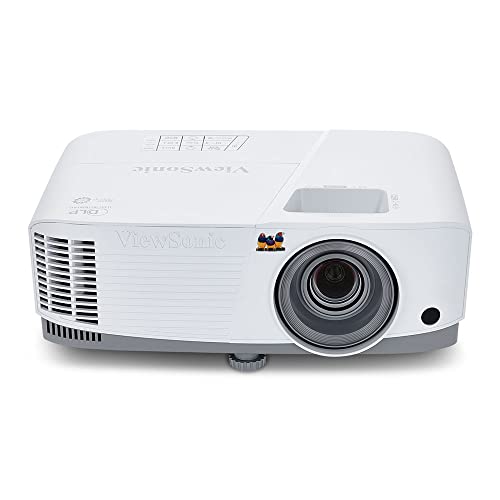
For professionals seeking a reliable projector that excels in bright environments, the ViewSonic 4000 Lumens WXGA Projector (PA503W) stands out. With a WXGA resolution of 1280x800p and 4,000 ANSI lumens, it delivers clear, detailed images. You can project screen sizes from 80 to 150 inches, guaranteeing versatility for any presentation. Its low 16ms input latency and 120Hz refresh rate make it ideal for fast-paced content. Setup is a breeze with a 1.1x optical zoom and vertical keystone adjustment. Plus, its vibrant color reproduction guarantees stunning visuals, making it perfect for both home and office use.
Best For: Professionals and educators seeking a high-brightness projector for presentations in well-lit environments.
Pros:
- Bright 4,000 ANSI lumens for clear visibility in various lighting conditions.
- Low input latency and high refresh rate ideal for fast-paced video content.
- Easy installation with optical zoom and vertical keystone adjustment.
Cons:
- WXGA resolution may not meet the needs of users requiring higher resolutions like Full HD.
- Limited throw distance range may not suit larger venues needing longer projection distances.
- Lack of advanced connectivity options compared to some competing models.
Epson Pro EX9270 Wireless 1080p 3LCD Projector

The Epson Pro EX9270 Wireless 1080p 3LCD Projector stands out as an ideal choice for professionals who demand high-quality presentations in any setting. With an impressive 4,100 lumens of both color and white brightness, it guarantees vibrant visuals even in well-lit rooms. You can project images up to 300 inches, offering exceptional detail through its Full HD 1080p resolution. Thanks to advanced 3LCD technology, color accuracy is superb, eliminating common issues like rainbowing. Plus, it supports wireless streaming via Apple AirPlay and Miracast, making connectivity seamless for your laptops and devices. Elevate your presentations effortlessly!
Best For: Professionals seeking high-quality presentations with vibrant visuals in various lighting conditions.
Pros:
- High brightness: 4,100 lumens for both color and white brightness ensures clear images in well-lit environments.
- Large projection size: Capable of displaying images up to 300 inches, ideal for impactful presentations.
- Seamless connectivity: Supports wireless streaming with Apple AirPlay and Miracast, enhancing versatility with various devices.
Cons:
- Built-in speaker limitations: The built-in speaker may not provide sufficient audio quality for larger audiences.
- Price point: Higher-end features may come at a premium price compared to less advanced models.
- Potential setup complexity: Initial setup and wireless configuration may be challenging for less tech-savvy users.
ViewSonic PS502X Short Throw Projector

Designed with versatility in mind, the ViewSonic PS502X Short Throw Projector is perfect for office environments where space is limited. With a resolution of 1024x768p and a brightness of 4,000 ANSI lumens, you’ll enjoy vibrant images even in well-lit rooms. Its short throw ratio of 0.6 allows you to project large images from just 3.9 feet away, making it ideal for smaller spaces. You can easily adjust the image with vertical keystone correction and digital zoom features. Plus, the quick startup and automatic power control guarantee you’re ready to present without delays.
Best For: The ViewSonic PS502X Short Throw Projector is best for professionals and educators who need a compact and powerful projector for presentations in small to medium-sized spaces.
Pros:
- Bright 4,000 ANSI lumens ensures clear images even in well-lit environments.
- Short throw ratio of 0.6 allows for large image projection from minimal distance.
- Features like vertical keystone correction and digital zoom provide flexible setup options.
Cons:
- Resolution of 1024x768p may not meet the needs of high-definition content.
- Limited throw distance may restrict placement options in larger rooms.
- The reliance on DLP technology may not appeal to users who prefer LCD projectors.
ViewSonic PA503X High Brightness Projector

If you’re in need of a powerful projector for impactful presentations, the ViewSonic PA503X High Brightness Projector stands out with its impressive 4,000 ANSI lumens brightness. With a resolution of 1024x768p, it delivers vibrant images thanks to SuperColor technology. You’ll appreciate the low input latency of 16ms and a 120Hz refresh rate for smooth visuals. It projects images between 80 to 150 inches, with a throw distance of 10.5 to 19.6 feet, making it versatile for various settings. Plus, its installation flexibility and built-in vertical keystone adjustment guarantee effortless setup for any office environment.
Best For: Professionals and educators looking for a high-brightness projector to deliver impactful presentations in various lighting conditions.
Pros:
- Brightness of 4,000 ANSI lumens ensures clear images even in well-lit environments.
- Low input latency of 16ms and a 120Hz refresh rate provide smooth and responsive visuals.
- Versatile projection capabilities with screen sizes from 80 to 150 inches and flexible installation options.
Cons:
- Limited resolution of 1024x768p may not meet the needs of users requiring higher-definition output.
- The reliance on a throw distance of 10.5 to 19.6 feet may limit placement options in smaller rooms.
- Digital zoom capabilities may cause a decrease in image quality compared to optical zoom.
NEBULA Cosmos 4K SE Smart Projector

For professionals seeking a powerful presentation tool, the NEBULA Cosmos 4K SE Smart Projector stands out with its stunning 4K resolution and 1,800 ANSI Lumens brightness, ensuring your visuals pop in any environment. Weighing just 9.92 pounds and with dimensions of 10.26 x 6.5 x 10.33 inches, it’s easy to transport. The innovative HybridBeam Technology enhances brightness and color richness, while the NebulaMaster Image Engine optimizes contrast for smooth visuals. With integrated Google TV, you can stream 4K Netflix effortlessly. Whether for gaming or office presentations, this versatile projector is sure to impress your audience.
Best For: Professionals and enthusiasts seeking a high-quality projector for presentations, gaming, and home theater experiences.
Pros:
- High Brightness: With 1,800 ANSI Lumens, it performs well in various lighting conditions.
- Versatile Streaming: Integrated Google TV allows for easy access to 4K Netflix and personalized content.
- Advanced Technology: Features like HybridBeam Technology and the NebulaMaster Image Engine ensure rich colors and enhanced visuals.
Cons:
- Weight: At 9.92 pounds, it may be heavier than some portable options.
- Price Point: Higher-end features may come with a premium price compared to basic projectors.
- Limited Warranty: Only a 30-day return policy, which may be less reassuring for some buyers.
ONOAYO ONO5Pro 2.0 Smart Movie Projector

The ONOAYO ONO5Pro 2.0 Smart Movie Projector stands out as an exceptional choice for professionals seeking a seamless presentation experience. With dual 40W Dolby Audio, you’ll enjoy room-filling sound that enhances your presentations. The advanced Smart TV Pro OS 2.0 offers instant access to over 1,500 channels and seamless app switching. Visuals pop with true 3000 ANSI brightness, while AI Image Engine Pro guarantees vibrant colors. Auto calibration makes setup a breeze, adapting to various surfaces in seconds. Plus, with dedicated gaming features and robust connectivity, it’s perfect for both work and play. Discover the future of presentations today!
Best For: The ONOAYO ONO5Pro 2.0 Smart Movie Projector is best for professionals and home entertainment enthusiasts looking for high-quality audio-visual experiences.
Pros:
- Exceptional audio quality with dual 40W Dolby Audio, providing clear and loud sound suitable for large spaces.
- Advanced smart features with access to 1,500+ live TV channels and seamless app switching for an all-in-one entertainment hub.
- User-friendly auto calibration that quickly adjusts for optimal viewing on various surfaces.
Cons:
- Higher price point compared to basic projectors, which may not be suitable for budget-conscious buyers.
- Potential overkill for casual users who may not need the advanced features for occasional viewing.
- Limited portability due to its size and setup requirements, making it less convenient for mobile use.
Epson EpiqVision Flex CO-W01 Portable Projector

Looking for a portable projector that delivers stunning visuals and versatility? The Epson EpiqVision Flex CO-W01 is your go-to choice. Featuring 3-Chip 3LCD technology, it projects vibrant images up to 300 inches with 3,000 lumens of brightness, ensuring outstanding color accuracy. Its compact and lightweight design makes it easy to carry in your backpack, perfect for both work and home entertainment. Plus, with built-in HDMI and compatibility with streaming devices like Apple TV and Roku, connecting is a breeze. Enjoy immersive presentations or movie nights with the built-in 5W speaker for an all-in-one experience.
Best For: Those seeking a portable projector that combines stunning visuals and versatility for both work presentations and home entertainment.
Pros:
- Compact and lightweight design makes it easy to transport in a backpack.
- 3,000 lumens brightness ensures vibrant and clear images in various lighting conditions.
- Compatibility with streaming devices like Apple TV and Roku for seamless connectivity.
Cons:
- Built-in 5W speaker may not provide sufficient audio quality for larger spaces.
- Limited to 3LCD technology, which may not appeal to users preferring other display technologies.
- Higher brightness may lead to quicker power consumption, affecting battery life during extended use.
Epson Home Cinema 1100 Wireless 1080p Projector

When it comes to delivering vibrant and clear presentations, the Epson Home Cinema 1100 Wireless 1080p Projector stands out with its impressive 3,400 lumens of color and white brightness. You’ll appreciate the stunning 1080p images, perfect for fast-action sports and gaming, thanks to advanced 3LCD technology ensuring accurate colors without any issues. Its 16,000:1 contrast ratio enhances image depth, making your visuals pop. Plus, wireless streaming via Apple AirPlay and Miracast lets you easily share content from your devices. With two HDMI ports and a USB port, connecting to laptops and streaming devices is seamless, enhancing your presentation experience.
Best For: Those seeking a high-quality projector for sports, gaming, and presentations in various lighting conditions.
Pros:
- Stunning 1080p image quality with vibrant colors and excellent brightness, ideal for fast-action content.
- Wireless streaming capabilities via Apple AirPlay and Miracast for easy sharing of videos and presentations.
- Multiple connectivity options with two HDMI ports and a USB port for seamless integration with various devices.
Cons:
- Limited portability compared to smaller, battery-operated projectors.
- Potential lag in wireless streaming for high-speed gaming or fast-paced sports.
- Higher price point compared to entry-level projectors with fewer features.
Adjustable Projector Stand Tripod with Gooseneck Phone Holder
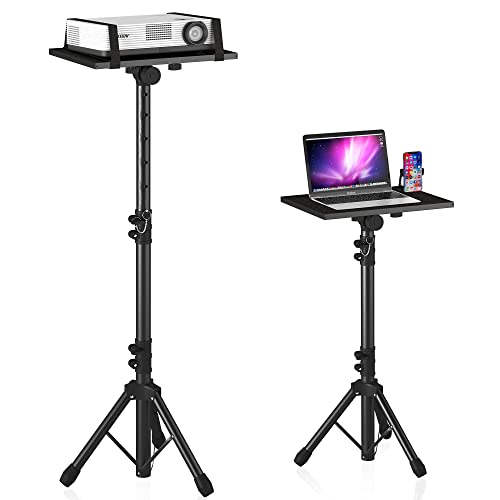
For professionals who need a reliable setup for presentations, the Adjustable Projector Stand Tripod with Gooseneck Phone Holder offers exceptional versatility and stability. Weighing just 5.5 pounds, it easily adjusts from 23.5 to 46.5 inches, ensuring the perfect height for any setting. The 15 x 11-inch top tray tilts 180°, accommodating various devices like projectors and laptops. With a safety latch and a sturdy aluminum design, you won’t have to worry about stability. Plus, it’s portable, disassembling easily for transport and storage in the included carrying bag. This stand is a must-have for impactful presentations.
Best For: Professionals and educators who require a portable and adjustable stand for presentations and multimedia displays.
Pros:
- Versatile Height Adjustment: Easily adjusts from 23.5 to 46.5 inches to suit different user preferences and settings.
- Sturdy and Stable Design: Made of thickened aluminum metal with a safety latch, ensuring reliability during use.
- Portable and Convenient: Disassembles for easy transport and comes with a carrying bag for added convenience.
Cons:
- Weight Limit: Maximum load capacity of 22 pounds may limit the use of heavier equipment.
- Setup Time: Although installation is simple, it may still take 5-10 minutes to set up.
- Limited Tilt Range: While it tilts 180°, some users may desire a greater range for specific viewing angles.
Factors to Consider When Choosing a Professional Office Projector
When choosing a professional office projector, you need to evaluate several key factors. Think about brightness requirements for different lighting environments, resolution options for clear visuals, and connectivity features that suit your devices. Don’t forget to assess image quality technology and the setup and portability of the projector for your specific needs.
Brightness Requirements
Choosing the right brightness level for your office projector is essential to guarantee your presentations are clear and impactful. Aim for a minimum of 3,000 ANSI lumens for standard conference rooms. If you’re in a larger space or one with a lot of ambient light, consider projectors with 4,000 lumens or more. These higher brightness levels make certain everyone can see your content without washed-out colors. Additionally, remember that screen size and throw distance matter; larger screens may need higher lumens to maintain quality. Don’t overlook contrast ratio, too—a higher ratio can enhance visibility, allowing effective presentations even with lower brightness. Make sure you assess these factors to find the perfect projector for your needs.
Resolution Options
Resolution options play an essential role in determining the clarity and effectiveness of your office projector. You’ll encounter various resolutions, with Full HD (1920x1080p) and WXGA (1280x800p) being common choices. If your presentations include intricate graphics or videos, a higher resolution like 4K (3840x2160p) is ideal for capturing details. For basic presentations, lower resolutions such as XGA (1024x768p) might work, but they can lead to less sharp images on larger screens. Always consider the viewing distance; higher resolutions allow for bigger screens without losing image quality, which is beneficial in spacious offices. Finally, keep in mind the aspect ratio, as 16:9 suits widescreen content, while 4:3 is better for traditional presentations.
Connectivity Features
Having a clear and vibrant image is only part of the equation for a successful presentation; the connectivity features of your office projector are just as important. When choosing a professional projector, make certain it has multiple connectivity options like HDMI and USB ports. This guarantees compatibility with various devices. Look for support for wireless features like Apple AirPlay or Miracast, allowing seamless streaming from laptops and mobile devices. The number of HDMI ports matters too—having multiple inputs makes switching between devices easier. Additionally, check for USB-C or VGA ports to accommodate legacy devices. A projector with built-in streaming capabilities can simplify your setup, reduce clutter, and enhance your overall presentation experience.
Image Quality Technology
When it comes to delivering impactful presentations, the technology behind image quality in projectors plays a essential role. You should consider advanced methods like DLP and 3LCD, which enhance color accuracy and brightness, ensuring clearer visuals. A higher contrast ratio, ideally around 16,000:1, markedly improves image depth and detail, making your presentations pop. Look for projectors with low input latency, around 16ms, to minimize delays during fast-paced content, such as video conferencing. Additionally, brightness levels measured in ANSI lumens, ideally 4,000 lumens or more, are critical for visibility in well-lit environments. Technologies like SuperColor expand the color gamut, providing vibrant, true-to-life colors that will captivate your audience and enhance multimedia displays.
Setup and Portability
Choosing the right office projector involves more than just image quality; setup and portability are essential factors that can considerably affect your presentation experience. When selecting a projector, consider its weight and design—lightweight models make it easier to transport between locations. Look for quick setup features like automatic keystone correction and easy connectivity options such as HDMI or USB, which minimize installation time. The throw ratio is also important; short throw projectors work well in smaller meeting rooms. Enhance portability by opting for models with carrying cases or compact designs that fit into bags. Finally, verify the projector offers various mounting options, including ceiling and tripod mounts, to adapt to different office environments effortlessly.
Budget Considerations
After considering setup and portability, it’s time to focus on budget considerations for your office projector. Prices can range from a few hundred to several thousand dollars, so it’s essential to determine your needs. If you’ll present in well-lit environments, high-brightness projectors (4,000 ANSI lumens or more) are worth the investment. Upgrading to higher resolutions like Full HD or WXGA enhances image clarity but increases costs. Don’t forget to account for additional features such as wireless connectivity and built-in speakers, which can also raise the price. Finally, consider potential extra costs like replacement bulbs, installation, and maintenance when calculating your total budget. This will help you make a well-informed decision that fits your needs.