
As virtual meetings become the norm in 2026, choosing the right webcam can greatly impact your online presence. You want a device that not only delivers high-quality video and audio but also enhances your engagement during calls. With so many options available, knowing which webcams truly stand out is essential. Let’s explore the top contenders that can elevate your virtual communication and help you make a lasting impression.
Logitech C920x HD Pro PC Webcam

The Logitech C920x HD Pro PC Webcam is the perfect choice for professionals who demand high-quality video and audio during streaming meetings. You’ll enjoy Full HD 1080p video at 30 fps, ensuring your visuals are crisp and vibrant. With advanced lighting adjustment and autofocus, it performs well even in low-light conditions. The dual microphones capture natural sound, enhancing communication clarity. Plus, it’s compatible with popular platforms like Microsoft Teams and Zoom, making it versatile for any setup. With the added benefit of a 3-month XSplit VCam license, it’s easier than ever to create polished content without a green screen.
Best For: Professionals and streamers seeking high-quality video and audio for video conferencing and content creation.
Pros:
- Full HD 1080p video at 30 fps ensures vibrant and clear visuals.
- Dual microphones provide natural sound and enhance communication clarity.
- Compatible with major platforms like Microsoft Teams, Zoom, and Google Meet.
Cons:
- Limited to 30 fps, which may not satisfy users looking for higher frame rates.
- Requires a stable internet connection for optimal video quality.
- The included software may have a learning curve for new users.
Logitech Brio 101 Full HD 1080p Webcam

For professionals seeking a reliable webcam that enhances video quality during meetings, the Logitech Brio 101 Full HD 1080p Webcam stands out with its impressive image resolution and integrated features. This webcam delivers crystal-clear video with Full HD 1080p resolution and utilizes RightLight technology to boost brightness by up to 50%, minimizing shadows. It includes a built-in microphone, ensuring your audio is crystal clear. Designed for versatility, it’s compatible with major platforms like Zoom and Microsoft Teams, and even works with Nintendo Switch 2’s GameChat mode. Plus, its eco-friendly construction highlights Logitech’s commitment to sustainability, making it a smart choice.
Best For: Professionals and casual users looking for a high-quality webcam for video calls, meetings, and streaming.
Pros:
- Full HD 1080p resolution provides clear and sharp video quality for enhanced communication.
- Built-in microphone ensures clear audio during calls, making conversations more effective.
- Eco-friendly design utilizes 77% post-consumer recycled plastic, reflecting a commitment to sustainability.
Cons:
- Limited compatibility with certain older systems or software may affect usability for some users.
- Privacy shutter may feel slightly flimsy, raising concerns about durability.
- Higher price point compared to basic webcams might not fit all budgets.
Logitech MX Brio Ultra HD 4K Streaming Webcam

Looking for a webcam that excels in video quality and audio clarity? The Logitech MX Brio Ultra HD 4K Streaming Webcam delivers stunning 4K resolution at 30fps or 1080p at 60fps, thanks to its larger pixel sensor. With AI enhancements, it guarantees you look your best even in low light, featuring auto-exposure and noise reduction. You can customize settings like ISO and shutter speed for a tailored experience. Plus, its dual beamforming microphones cut out background noise, providing crystal-clear audio. With a built-in privacy cover and Show Mode for sharing notes, it’s perfect for any virtual meeting.
Best For: Professionals and content creators who require high-quality video and audio for virtual meetings and streaming.
Pros:
- Stunning video quality with 4K resolution at 30fps and 1080p at 60fps.
- AI-enhanced features for better face visibility and performance in low light conditions.
- Customizable settings for lighting and audio ensure a tailored streaming experience.
Cons:
- Higher price point compared to standard webcams.
- Requires compatible software for full customization and control.
- Larger size may not be ideal for portable setups or small workspaces.
EMEET C960 4K Webcam for PC

Capturing stunning visuals with true 4K resolution, the EMEET C960 4K Webcam is perfect for professionals seeking to enhance their virtual meetings. With a 73° field of view, it focuses on you, leaving the background blurred. Its built-in dual omnidirectional microphones guarantee your voice comes through clearly, making it ideal for conference calls. The USB plug-and-play feature simplifies setup, while the privacy cover assures security. Compatible with major platforms and communication software, you can easily switch between 1080P and 4K. Plus, its adjustable design allows for flexible mounting options, adapting to your unique needs effortlessly.
Best For: Professionals and educators looking for high-quality video and audio for virtual meetings and online teaching.
Pros:
- True 4K video quality ensures stunning visuals without false upscaling.
- Built-in dual omnidirectional microphones provide clear audio for improved communication.
- Flexible mounting options with adjustable angles accommodate various user needs.
Cons:
- Default video resolution is 1080P, requiring a switch to access 4K features.
- Limited compatibility with older operating systems (requires at least Windows 7 or macOS 10.14).
- Privacy cover may be easily misplaced, affecting security if lost.
EMEET 1080P Webcam with Microphone (C960)

The EMEET 1080P Webcam with Microphone (C960) stands out as an ideal choice for professionals seeking high-quality video and audio for their remote meetings. With its Full HD 1080P resolution, 90° wide-angle lens, and 5-layer anti-glare lens, you’ll enjoy crystal-clear visuals. The built-in omnidirectional microphones guarantee your voice is captured clearly, enhancing communication. Plus, the automatic low-light correction technology optimizes your appearance in any lighting. Its plug-and-play design means you can connect effortlessly to various devices, including Windows and macOS. With a foldable design and tripod-ready clip, it’s perfect for on-the-go professionals.
Best For: Professionals seeking high-quality video and audio for remote meetings and online communication.
Pros:
- Full HD 1080P resolution and wide-angle lens provide crystal-clear visuals.
- Built-in omnidirectional microphones ensure clear audio capture for effective communication.
- Plug-and-play functionality allows for easy connectivity across various devices without needing drivers.
Cons:
- Not compatible with Windows Hello, TVs, tablets, or game consoles.
- Limited focal length range may not suit all setups or distances.
- Automatic adjustments may occasionally struggle in extreme lighting conditions.
EMEET NOVA 4K Webcam for PC

For professionals seeking exceptional video quality, the EMEET NOVA 4K Webcam stands out with its impressive 4K performance at 30FPS, making it ideal for business meetings and online education. You’ll enjoy unparalleled clarity thanks to its advanced CMOS sensor and fast autofocus, ensuring every detail is sharp. With built-in microphones capturing clear audio up to 8 feet away, your communication remains crystal clear. Plus, its Plug & Play connectivity and privacy cover enhance convenience and security. Whether you’re using Zoom, Teams, or Google Meet, this webcam elevates your virtual presence, making every interaction engaging and professional.
Best For: Professionals and educators seeking high-quality video and audio for virtual meetings and online classes.
Pros:
- 4K resolution at 30FPS ensures exceptional video clarity, perfect for detailed presentations.
- Built-in microphones capture clear audio from a distance, enhancing communication in busy environments.
- Plug & Play connectivity allows for easy setup without the need for drivers, ensuring a hassle-free experience.
Cons:
- Manual focus is not supported, which may limit flexibility for some users.
- Default video resolution is 1080P, requiring a switch to achieve 4K, which may be inconvenient for some.
- Fixed cable length might restrict positioning options depending on the setup.
Logitech Brio 4K Webcam with Noise-Cancelling Mic

Ideal for professionals who demand high-quality visuals during virtual meetings, the Logitech Brio 4K Webcam delivers stunning Ultra HD resolution at 30 fps. With features like autofocus and a 5x digital zoom, you’ll always look sharp. The RightLight 3 technology optimizes exposure and contrast, ensuring you shine in any lighting. Dual omnidirectional microphones with noise-canceling tech capture clear audio from up to 1.2 meters away, minimizing background distractions. Plus, adjustable field of view presets let you customize your frame. With Windows Hello support and a privacy shutter, your security is prioritized, making this webcam a top choice for serious streamers.
Best For: Professionals and serious streamers seeking high-quality video and audio for virtual meetings and broadcasts.
Pros:
- Ultra HD video quality with 4K resolution at 30 fps ensures sharp visuals.
- Noise-canceling microphones provide clear audio by reducing background noise.
- Adjustable field of view presets allow customization for different settings and preferences.
Cons:
- Higher price point compared to basic webcams may not fit all budgets.
- Requires good lighting to fully utilize the RightLight 3 feature for optimal video quality.
- Potential compatibility issues with certain software or older operating systems.
Insta360 Link 2 PTZ 4K Webcam

Looking for a webcam that seamlessly elevates your virtual meetings? The Insta360 Link 2 PTZ 4K Webcam offers stunning 4K image quality and exceptional low-light performance, ensuring you always look your best. With advanced AI noise-canceling, your audio will be crystal clear, free from background distractions. Its True Focus feature guarantees instant, sharp focus, while the AI Tracking keeps you centered in the frame. Plus, you can control it via gestures or your smartphone. With specialized modes like DeskView and Whiteboard, it’s perfect for creative presentations. Enjoy compatibility with major platforms and a privacy mode that enhances security.
Best For: Professionals and content creators seeking high-quality video and audio for virtual meetings and presentations.
Pros:
- Premium 4K image quality with HDR and excellent low-light performance enhances video clarity.
- AI-powered features like tracking and gesture control provide a seamless user experience.
- Versatile modes such as DeskView and Whiteboard cater to various presentation needs.
Cons:
- Not compatible with ARM-based Windows systems or Windows Hello Face Recognition.
- Privacy mode may require manual adjustment for user preferences.
- Potential learning curve for users unfamiliar with advanced features and settings.
OBSBOT Meet 2-4K Webcam for PC

The OBSBOT Meet 2-4K Webcam stands out for its impressive AI technology, making it a top choice for professionals who want seamless video conferencing. With UHD 4K resolution and a 60 FPS frame rate, you’ll experience crystal-clear images and smooth performance. Its AI framing and autofocus dynamically adjust to keep you perfectly centered, while gesture control lets you zoom or frame with simple hand movements. The dual omni-directional microphones cancel out background noise, ensuring clear audio. Lightweight and compact, it’s perfect for on-the-go use. Plug it in via USB-C, and you’re ready to elevate your virtual presence instantly.
Best For: Professionals seeking a high-quality webcam for video conferencing, streaming, and content creation.
Pros:
- Impressive video quality with UHD 4K resolution and 60 FPS for smooth performance.
- AI technology for dynamic framing and autofocus, enhancing user experience.
- Lightweight and portable design, making it easy to use on the go.
Cons:
- May heat up during extended use, which could be a concern for some users.
- Limited advanced features without using OBSBOT Center software.
- Gesture control may take time to get used to for some users.
EMEET C60E Dual-Camera 4K Webcam for Streaming
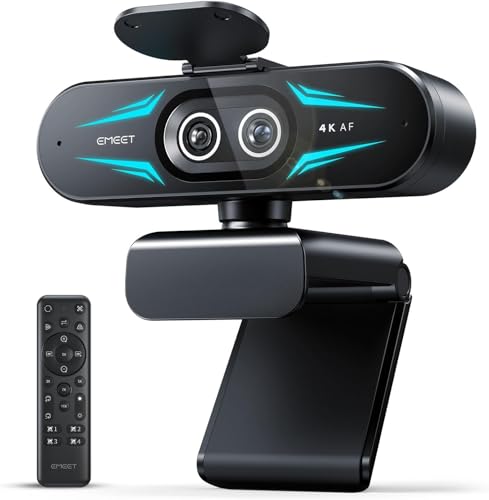
For educators and professionals seeking to elevate their virtual presence, the EMEET C60E Dual-Camera 4K Webcam stands out with its exceptional 4K Dual-Camera Precision. Its left wide-angle camera captures expansive views, while the right telephoto camera zooms in for close-ups, ensuring every detail is crystal clear. With an impressive 11X hybrid zoom and PDAF autofocus, you’ll enjoy smooth shifts and stable focus. The smart dual control via remote allows real-time adjustments, and vibrant RGB lighting adds personality to your setup. Compatible with major platforms, this webcam enhances your streaming experience, making communication seamless and engaging.
Best For: Educators and professionals looking to enhance their virtual presence with high-quality video and sound during online meetings and streaming.
Pros:
- Exceptional 4K Dual-Camera Precision provides clarity for wide-angle and close-up shots.
- Smart dual control via remote allows for real-time adjustments without interrupting streams.
- Vibrant RGB lighting adds aesthetic appeal and helps set the mood during broadcasts.
Cons:
- Zoom capabilities are limited in certain modes, such as 4K and 60FPS.
- May require additional software for full feature utilization.
- Omnidirectional microphones have a limited capturing radius, which may affect sound quality in larger spaces.
Factors to Consider When Choosing a Professional Webcam for Streaming Meetings
When you’re choosing a professional webcam for streaming meetings, several key factors can make a big difference. You’ll want to contemplate video resolution quality, audio clarity, and how well it works with your software. Plus, think about privacy options and how adjustable the mounting is for your setup.
Video Resolution Quality
Choosing a professional webcam for streaming meetings hinges on video resolution quality, which plays a crucial role in how your audience perceives you. Higher resolution webcams, like those offering 4K quality, provide clearer, more detailed video, enhancing your viewing experience. For most professional applications, a Full HD 1080p webcam captures video at 30 frames per second, delivering smooth motion with adequate clarity. Advanced features such as autofocus and low-light correction can greatly improve image quality, ensuring visibility in various lighting conditions. Additionally, consider the field of view; wider angles are beneficial for group settings, while tighter FOVs focus on individual speakers. Combining video resolution with an appropriate frame rate, like 1080p at 60fps, enhances the overall fluidity and professionalism of your streams.
Audio Clarity Features
Audio clarity features are just as essential as video quality when it comes to professional webcams for streaming meetings. Look for models with built-in dual microphones; they capture sound from multiple directions, enhancing clarity during calls. Noise-canceling technology is another must-have, filtering out background noise so your voice stands out. Adjustable audio settings let you customize microphone sensitivity and levels, making it easier to adapt to different environments. If you’re in larger meeting spaces, consider webcams with a broader microphone range that can pick up sound from several feet away. Finally, integrated software that supports audio enhancements can offer echo cancellation and audio equalization, further improving your sound quality and ensuring a professional audio experience.
Compatibility With Software
Selecting a professional webcam for streaming meetings involves verifying compatibility with essential software. You’ll want to choose a webcam that works seamlessly with popular video conferencing platforms like Zoom, Microsoft Teams, and Google Meet. This guarantees smooth meetings without technical hiccups. It’s also important to look for models that support both Windows and Mac operating systems, giving you versatility across different setups.
Additionally, opt for webcams with plug-and-play functionality, making installation a breeze without the hassle of extra drivers. Check whether the webcam supports specific application features like background removal or virtual backgrounds to enhance your streaming experience. Finally, confirm the webcam can connect to various devices such as desktops, laptops, and tablets for maximum flexibility in professional environments.
Privacy and Security Options
How can you guarantee your privacy while using a professional webcam for streaming meetings? Look for models with integrated privacy shutters, which let you block the camera when it’s not in use. Consider webcams with Windows Hello support, allowing secure logins through facial recognition. AI-driven privacy modes can automatically disable the camera or tilt it down after inactivity, safeguarding your privacy without extra effort. Opt for USB plug-and-play technology for a quick setup that reduces security vulnerabilities. Finally, ensure compatibility with privacy-focused software, providing additional layers of data protection and keeping your video streams secure from unauthorized access. These features will help you maintain your privacy while enhancing your virtual presence.
Mounting and Adjustability
When choosing a professional webcam for streaming meetings, it’s important to take into account the mounting and adjustability options available. Look for a tripod thread that lets you position your camera flexibly and stably. Adjustable angles, including vertical and horizontal rotation, help you customize the field of view to suit your space. Some webcams feature a universal joint or swivel design, allowing for quick adjustments without needing to move the entire setup. A stable mounting solution, like a weighted base or adjustable stand, can reduce camera shake, ensuring a professional look. Additionally, check for compatibility with various mounting accessories, like wall mounts or desktop clamps, to maximize your webcam’s versatility in different workspace configurations.