
When you’re gearing up for a conference call, the right webcam can make all the difference in your video quality. With options ranging from full HD to 4K, you can guarantee that you present yourself in the best light possible. But not all webcams are created equal, and understanding which features matter most can be vital. Let’s explore some of the top choices available today and what sets them apart.
Logitech Brio 101 Full HD 1080p Webcam

If you’re looking for a reliable webcam that enhances your video conferencing experience, the Logitech Brio 101 Full HD 1080p Webcam is an excellent choice. With its impressive Full HD resolution, you’ll enjoy crystal-clear video calls, while RightLight technology brightens your image, reducing shadows. The built-in microphone guarantees your voice comes through loud and clear, making every conversation effective. Plus, the integrated privacy shutter gives you peace of mind when the camera’s off. Compatible with various platforms, this webcam fits seamlessly into your setup, whether you’re on a PC or Mac. It’s a smart investment for your virtual meetings.
Best For: Professionals and casual users seeking a high-quality webcam for video conferencing and streaming.
Pros:
- Full HD 1080p resolution ensures clear and detailed video quality for meetings and streaming.
- Built-in microphone enhances audio clarity, making conversations more effective and engaging.
- Integrated privacy shutter provides peace of mind, allowing users to easily manage their privacy when the webcam is not in use.
Cons:
- Limited to 1080p resolution, which may not meet the needs of users wanting higher resolutions.
- Compatibility issues may arise with certain older devices or platforms.
- No advanced features like autofocus or zoom, which may limit versatility for some users.
Logitech MX Brio Ultra HD 4K Streaming Webcam

The Logitech MX Brio Ultra HD 4K Streaming Webcam is the perfect choice for professionals who demand exceptional image clarity during conference calls. With 4K resolution at 30fps or 1080p at 60fps, you’ll enjoy superior video quality. Its AI enhancements improve visibility and detail, even in low light, while integrated noise-reducing microphones guarantee crystal-clear audio. You can customize settings like ISO and shutter speed for the best results. Plus, the Show Mode lets you share notes easily, and the built-in privacy cover keeps your calls secure. Rated 4.5 stars, it’s a top contender for your video conferencing needs.
Best For: Professionals and streamers looking for high-quality video and audio during video calls and live streams.
Pros:
- AI-enhanced image quality provides excellent visibility and detail, even in low-light conditions.
- Customizable settings allow for tailored video adjustments, enhancing video streaming experience.
- Integrated dual microphones effectively reduce background noise for clearer audio capture.
Cons:
- Higher price point compared to standard webcams may not be suitable for casual users.
- Requires Logitech software for full customization options, which may not appeal to everyone.
- Size and weight may be less portable for users needing a compact webcam solution.
Logitech Brio 4K Webcam with Noise-Cancelling Mic

For professionals seeking top-tier video quality, the Logitech Brio 4K Webcam with Noise-Cancelling Mic stands out as an exceptional choice. It delivers ultra HD resolution with 4K support at 30 fps, ensuring your video looks stunning. The autofocus and 5x digital zoom enhance framing, while RightLight 3 optimizes your lighting. Dual omnidirectional microphones capture clear audio from up to 1.2 meters away, effectively reducing background noise. With adjustable field of view options, you can tailor your shot perfectly. Plus, Windows Hello support and an attachable privacy shutter provide extra security. It’s compatible with major platforms, making it a versatile addition to your setup.
Best For: Professionals and content creators seeking high-quality video and audio for streaming, conferencing, or recording.
Pros:
- Ultra HD resolution with 4K support ensures exceptional video clarity.
- Noise-canceling microphones provide clear audio by reducing background noise.
- Adjustable field of view options allow for customizable framing based on your needs.
Cons:
- Requires good lighting to fully utilize the RightLight 3 feature effectively.
- Higher price point compared to standard webcams may not fit all budgets.
- Limited to 30 fps at 4K, which may not be ideal for all video applications.
EMEET C960 4K Webcam for PC

Looking to elevate your conference calls? The EMEET C960 4K Webcam is your go-to solution. With true 4K resolution and a smart CMOS sensor, you’ll enjoy crystal-clear video without any false upscaling. Its automatic focusing and light correction guarantee you always look your best, whether in bright or dim settings. The dual omnidirectional microphones capture your voice clearly, making communication seamless. Setup is a breeze with USB plug-and-play technology, and your privacy is protected with a cover. Compatible with major platforms and software, this webcam adapts to your needs, enhancing your virtual meetings effortlessly.
Best For: Professionals seeking high-quality video and audio for conference calls and remote teaching.
Pros:
- True 4K resolution ensures crystal-clear video quality without upscaling.
- Built-in dual omnidirectional microphones provide clear audio for effective communication.
- Easy setup with USB plug-and-play technology, accommodating users of all tech levels.
Cons:
- Default video resolution is 1080P, requiring manual adjustment to access 4K.
- Limited compatibility with older operating systems and devices.
- Privacy cover may not fit all monitor designs securely.
Insta360 Link 2 PTZ 4K Webcam for PC/Mac

Capturing stunning video quality is essential for professionals who rely on seamless conference calls, and the Insta360 Link 2 PTZ 4K Webcam delivers just that. With its 4K resolution and advanced HDR capabilities, you’ll enjoy crystal-clear visuals even in low light. Thanks to AI noise-canceling technology, your audio stays crisp and clear. The Phase Detection Auto Focus guarantees you’re always in focus, while the natural bokeh effect enhances your video’s professionalism. Plus, with smart AI tracking and easy gesture controls, maintaining engagement is a breeze. Compatible with major platforms, this webcam is a perfect choice for any serious conference call.
Best For: Professionals seeking high-quality video and audio solutions for seamless conference calls and streaming.
Pros:
- Premium 4K image quality with HDR and low-light performance for stunning visuals.
- AI noise-canceling technology ensures clear audio, eliminating background distractions.
- Smart AI tracking and gesture controls make it easy to maintain engagement during calls.
Cons:
- Not compatible with ARM-based Windows systems or Windows Hello Face Recognition.
- Privacy mode auto-tilts down after 10 seconds of inactivity, which may interrupt sessions.
- Limited to major platforms; may not work with all video conferencing software.
Anker PowerConf C200 2K Webcam for PC/Laptop
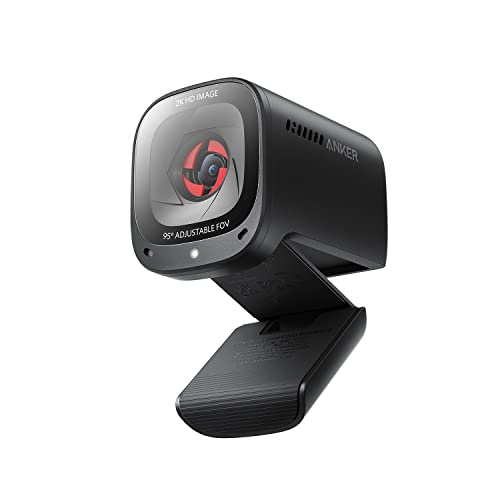
The Anker PowerConf C200 2K Webcam is an excellent choice for professionals who demand high-quality video during virtual meetings. With its 2K ultra-clear resolution, you’ll enjoy sharp images that enhance your presence. The superior low-light performance guarantees crisp visuals even in dim settings. Plus, the dual mics with AI noise cancellation deliver crystal-clear audio, making conversations more immersive. You can customize your field of view to frame the perfect shot, while the built-in privacy cover offers peace of mind. Compatible with various systems, this webcam connects effortlessly to most PCs and laptops, making it a versatile option for any setup.
Best For: Professionals seeking high-quality video and audio for virtual meetings in various lighting conditions.
Pros:
- 2K Ultra-Clear Resolution provides sharp and detailed video for a professional appearance.
- Advanced Audio Clarity with AI Noise Cancellation ensures crystal clear communication even in noisy environments.
- Customizable Field of View allows users to adjust the framing for the perfect shot during video calls.
Cons:
- May require additional software for full customization features.
- Limited to specific operating systems (Windows 7 or later, macOS 10.11 or later).
- The built-in privacy cover may feel less secure compared to physical webcam covers.
Logitech C920e HD 1080p Webcam

For professionals seeking high-quality video during conference calls, the Logitech C920e HD 1080p Webcam stands out with its impressive autofocus and automatic light correction, ensuring you always look your best. With a 78° fixed field of view, it’s perfect for individual users or sharing projects. The dual omnidirectional microphones capture clear audio from up to one meter away. Plus, the attachable privacy screen gives you peace of mind. Compatible with major platforms like Zoom and Microsoft Teams, this webcam integrates seamlessly into your workspace. Weighing just 5.7 ounces, it’s easy to mount on laptops or monitors.
Best For: Professionals seeking high-quality video and audio for conference calls and virtual meetings.
Pros:
- High-quality video with 1080p resolution, autofocus, and automatic light correction for optimal clarity.
- Dual omnidirectional microphones that capture clear audio from a distance of up to one meter.
- Privacy screen provides a simple solution for ensuring lens coverage when not in use.
Cons:
- Fixed field of view may not be suitable for larger groups or more dynamic presentations.
- Weight and dimensions might limit portability for frequent travel.
- No built-in storage for configurations or settings, requiring reliance on external software for management.
Insta360 Link 2C 4K Webcam for PC/Mac

When you need a webcam that excels in both image quality and user interaction, the Insta360 Link 2C 4K Webcam stands out. With its 4K resolution and 1/2″ sensor, you’ll capture crisp, true-to-life visuals in any lighting. The advanced Phase Detection Auto Focus guarantees instant focusing, while the Natural Bokeh effect delivers a professional look. Plus, its AI noise-canceling audio guarantees clear communication, even in noisy environments. You’ll appreciate features like Auto Framing, gesture control, and specialized modes for enhanced functionality. Compatible with major platforms, this webcam is a fantastic choice for seamless conference calls.
Best For: Professionals and content creators seeking high-quality video and audio for virtual meetings and streaming.
Pros:
- 4K resolution and HDR capabilities provide exceptional image quality in various lighting conditions.
- AI noise-canceling technology ensures clear audio even in noisy environments.
- User-friendly features like Auto Framing and gesture control enhance interaction and ease of use.
Cons:
- Not compatible with ARM-based Windows systems or Windows Hello Face Recognition.
- Limited functionality compared to some higher-end dedicated cameras.
- May require additional setup for optimal use with certain software platforms.
Logitech C920S HD Pro Webcam (Full HD 1080p)

Looking for a reliable webcam that delivers exceptional video quality? The Logitech C920S HD Pro Webcam is an excellent choice for your conference calls. With Full HD 1080p video at 30fps, you’ll enjoy crisp visuals thanks to its glass lens and HD autofocus. Whether you’re using Skype, Zoom, or FaceTime, this webcam adapts seamlessly to various devices, including PCs, Macs, and even Xbox. It features stereo audio with dual microphones, ensuring clear sound during your calls. Plus, the included privacy shutter gives you control over your visual privacy, making it a perfect addition to your setup.
Best For: Those seeking a high-quality webcam for professional video calls and streaming across multiple platforms.
Pros:
- Full HD 1080p video quality ensures sharp and vibrant visuals for clear communication.
- Stereo audio with dual microphones captures natural sound, enhancing the audio experience during calls.
- Privacy shutter provides users with control over their visual privacy when the webcam is not in use.
Cons:
- No 3-month XSplit VCam license included, which may limit some users’ video editing capabilities.
- Fixed focus may not suit all environments, particularly if you require varied focal lengths for different setups.
- Limited compatibility with older devices and software that may not support HD video calls.
Acer 4K Webcam for PC/Mac

The Acer 4K Webcam for PC/Mac stands out as an excellent choice for professionals seeking crystal-clear video quality during conference calls. With its UHD 4K resolution and a 12MP Sony sensor, you’ll enjoy exceptional image clarity even in low-light conditions. The all-metal unibody design is both stylish and ultra-portable, weighing just 1.76 ounces. Dual high-sensitivity microphones filter ambient noise, ensuring clear audio from up to 2.5 meters away. Plus, the Phase Detection Autofocus technology keeps you in sharp focus. Simply plug it into your device, and you’re ready to connect with platforms like Zoom and Microsoft Teams effortlessly.
Best For: Professionals and content creators seeking high-quality video and audio for virtual meetings and streaming.
Pros:
- Exceptional UHD 4K video resolution with 12MP clarity for sharp images.
- Dual high-sensitivity microphones with noise reduction for clear audio capture.
- Easy plug-and-play setup compatible with multiple platforms like Zoom and Microsoft Teams.
Cons:
- Limited to USB-A connection, which may require adapters for some devices.
- The lightweight design may feel less sturdy compared to bulkier webcams.
- Privacy cover may not appeal to users who prefer more integrated solutions.
Factors to Consider When Choosing a Webcam for Conference Calls
When you’re choosing a webcam for conference calls, several key factors come into play. You’ll want to take into account resolution and image quality, as well as audio clarity to guarantee everyone can hear you clearly. Don’t forget about compatibility with your software, privacy options, and how easy it is to set up—these can make a big difference in your overall experience.
Resolution and Image Quality
Choosing a webcam that offers high resolution and image quality can make a significant difference in your conference call experience. Look for webcams with at least 1080p resolution, which provides a clear 1920 x 1080 pixel image. If you want the best, consider a 4K webcam that delivers up to 3840 x 2160 pixels for superior detail. Features like autofocus and light correction are essential, too, as they help keep you in focus and well-lit, regardless of your surroundings. Don’t overlook the camera’s sensor size; larger sensors capture more light, enhancing performance in dim conditions. Finally, advanced technologies like HDR improve color accuracy and contrast, making your video calls look vibrant and lifelike.
Audio Clarity and Features
How can you guarantee crystal-clear communication during your conference calls? Focus on audio clarity and features when choosing your webcam. Look for models with dual omnidirectional microphones that capture voices clearly while reducing background noise. This guarantees everyone in the meeting can be heard without distractions. Noise-canceling technology is a must, as it filters out disruptive sounds, enhancing the conversation. Integrated microphones should ideally pick up sound from at least 1.2 meters away, perfect for group discussions. Additionally, consider webcams with AI-enhanced audio features that automatically adjust to minimize interference. Opt for models offering stereo sound capabilities for a more immersive listening experience. With these features, you’ll elevate your conference call experience considerably.
Compatibility With Software
Selecting the right webcam involves more than just picture quality; compatibility with your preferred video conferencing software is essential for a smooth experience. Make certain the webcam works seamlessly with major platforms like Zoom, Microsoft Teams, and Google Meet. Check its compatibility with your operating system, as some models may have limitations with specific versions of Windows or Mac. Look for webcams certified for popular software, enhancing reliability and access to features. Plug-and-play functionality is a plus, simplifying setup and reducing compatibility issues. Finally, consider whether the webcam offers features tailored to the conferencing software you use, such as background effects or virtual backgrounds, to elevate your video calls. Choose wisely to guarantee a hassle-free experience!
Privacy and Security Options
While video quality and software compatibility are key factors in webcam selection, privacy and security options shouldn’t be overlooked. Look for webcams with integrated privacy shutters that you can easily open or close, giving you control over your visual privacy. Some models even have automatic privacy modes that tilt the camera lens down when inactive, ensuring it doesn’t capture anything unintentionally. If security is a priority, consider webcams with Windows Hello support for secure facial recognition during logins. Additionally, check for software controls that let you manage zoom and field of view, limiting what’s visible during calls. Don’t forget about noise-canceling microphones, which enhance audio clarity while minimizing unwanted background noise.
Ease of Setup
When it comes to choosing a webcam for conference calls, ease of setup should be a top priority. Look for models with USB plug-and-play technology, so you can connect quickly without needing extra drivers or software. Verify compatibility with various operating systems like Windows, macOS, and ChromeOS for a seamless experience across devices. Adjustable mounts or clips are also important, as they help you position the webcam for the best viewing angle. Opt for webcams certified for popular video conferencing platforms; this guarantees reliable performance without additional configuration. Finally, consider a built-in privacy cover, which lets you secure the camera quickly when not in use, enhancing convenience and streamlining your setup experience.
Field of View
The field of view (FOV) is an essential factor to take into account in your webcam choice for conference calls. It determines how much of the room is captured, with common angles like 65°, 78°, and 90°. If you’re often in group settings, a wider FOV, such as 90°, is ideal, allowing everyone to fit within the frame without constantly adjusting the camera. Conversely, a narrower FOV, like 65°, suits individual users, keeping focus on the speaker and minimizing distractions. Some webcams even offer adjustable FOV settings, so you can customize the angle based on your needs. Remember, your choice will also affect the overall composition, influencing how professional or personal your video calls appear.
Price and Value
Finding the right balance between price and value is essential when choosing a webcam for conference calls. You’ll want to assess the features offered, as higher-priced models often deliver superior image quality and advanced functionalities. Budget-friendly options typically range from $30 to $100, while premium models can exceed $200, reflecting differences in resolution and audio quality. Consider the long-term value of investing in a pricier webcam that could last longer and enhance performance, saving you from future upgrades. Don’t forget to check customer ratings and reviews for insights into value for money. A solid warranty and reliable customer support can also enhance overall value, ensuring peace of mind and potential cost savings if issues arise.