
As remote work becomes the norm in 2026, having the right tools for virtual meetings is essential. A high-quality USB webcam can greatly enhance your communication and presentation. With options like HD 1080P to 4K resolutions, built-in microphones, and compatibility with platforms like Zoom, choosing the best webcam can make a difference in your professional interactions. Curious about which models stand out this year? Let’s explore the top choices.
Logitech Brio 101 Full HD 1080p Webcam

If you’re looking for a reliable webcam for professional meetings and streaming, the Logitech Brio 101 Full HD 1080p Webcam is an excellent choice. It delivers stunning image quality with Full HD resolution and RightLight technology, enhancing brightness and minimizing shadows. This webcam’s built-in microphone guarantees your voice comes through clearly, making communication seamless. Plus, the integrated privacy shutter allows you to control your privacy with ease. Compatible with various platforms like Zoom and Microsoft Teams, it fits perfectly into any setup, whether you’re using a PC or Mac. With its eco-friendly materials, you can feel good about your purchase, too.
Best For: Professionals and streamers who need a high-quality webcam for video calls and content creation.
Pros:
- Full HD 1080p resolution provides clear and vibrant image quality.
- Built-in microphone ensures audio clarity for seamless communication.
- Eco-friendly design with 77% post-consumer recycled plastic reflects sustainability efforts.
Cons:
- Limited compatibility with certain older video conferencing platforms.
- No advanced features like 4K resolution or auto-focus.
- Privacy shutter may feel flimsy for some users.
Logitech C920x HD Pro PC Webcam

The Logitech C920x HD Pro PC Webcam stands out for its Full HD 1080p video quality at 30 frames per second, making it an excellent choice for professionals who demand crisp, vibrant visuals during video calls. You’ll appreciate the clear audio with stereo dual microphones that capture natural sound, enhancing your communication. This webcam features HD lighting adjustment and autofocus, ensuring peak image quality even in low light. It’s compatible with popular platforms like Microsoft Teams, Zoom, and Google Meet. Plus, you get a 3-month XSplit VCam license for seamless background management, making it perfect for any video conferencing scenario.
Best For: Professionals and content creators seeking high-quality video and audio for video conferencing and streaming.
Pros:
- Full HD 1080p video quality at 30fps ensures crisp and vibrant visuals.
- Dual microphones provide clear and natural audio for enhanced communication.
- Compatible with major video conferencing platforms and includes a 3-month XSplit VCam license for background management.
Cons:
- May require additional software for advanced features beyond basic functionality.
- Limited to 30fps, which may not satisfy users looking for higher frame rates.
- The design may not fit all monitor setups, potentially affecting placement and angle.
Logitech C920e HD 1080p Webcam, Certified for Zoom and Microsoft Teams

For professionals seeking seamless communication, the Logitech C920e HD 1080p Webcam stands out as an excellent choice. With a 78° fixed field of view, it’s perfect for individual use and project sharing. Its dual omnidirectional microphones capture clear audio from up to one meter away. The built-in HD autofocus and automatic light correction guarantee you always look your best. Plus, the attachable privacy screen adds peace of mind. Certified for Zoom and Microsoft Teams, it integrates effortlessly with major video calling apps. Weighing just 5.7 ounces, it’s easy to mount on laptops or monitors. Elevate your virtual meetings today!
Best For: Professionals seeking high-quality video and audio for seamless communication during virtual meetings.
Pros:
- High-quality video with 1080p resolution and automatic light correction ensures you look sharp in any lighting condition.
- Dual omnidirectional microphones capture clear audio from a distance, enhancing communication quality.
- Privacy screen provides added security, allowing users to easily cover the lens when not in use.
Cons:
- Fixed field of view may not be suitable for larger groups or presentations requiring a wider angle.
- Mounting options are limited to laptops or monitors, potentially restricting placement flexibility.
- Weight may feel cumbersome for some users who prefer lighter devices for travel.
Logitech MX Brio Ultra HD 4K Webcam

Equipped with stunning 4K resolution at 30fps, the Logitech MX Brio Ultra HD Webcam is an ideal choice for professionals seeking exceptional video quality in their virtual meetings. With a 70% larger pixel sensor, you’ll enjoy superior image clarity and detail, even in low-light settings. The AI enhancements boost face visibility, while integrated dual beamforming microphones guarantee crystal-clear audio. You can easily customize settings like lighting and white balance with Logitech software. Plus, the Show Mode lets you share notes effortlessly. With a built-in privacy cover, you’ll feel secure when the camera’s not in use.
Best For: Professionals and content creators seeking high-quality video and audio for virtual meetings and streaming.
Pros:
- Enhanced image quality with 4K resolution and a larger pixel sensor for better clarity.
- AI-driven features like noise reduction and auto adjustments for optimal performance in various lighting conditions.
- Customizable settings through Logitech software for a tailored video experience.
Cons:
- Higher price point compared to standard webcams.
- Requires additional software for full customization, which may be a drawback for some users.
- Some users may find the size and weight slightly bulky for portable use.
Acer 4K Webcam for PC/Mac

Acer’s 4K Webcam stands out as an excellent choice for business professionals seeking superior video quality and portability. With its all-metal unibody design and ultra-lightweight build, you can easily take it anywhere. Enjoy stunning UHD 4K resolution thanks to the advanced Sony CMOS sensor, guaranteeing exceptional clarity even in low light. The dual high-sensitivity microphones capture clear audio while filtering out background noise, enhancing your virtual meetings. Plus, the Phase Detection Autofocus technology guarantees sharp focus, and the magnetic privacy cover keeps your conversations secure. Compatible with major platforms, this webcam is a smart addition to your remote work setup.
Best For: Business professionals and content creators seeking high-quality video and audio for virtual meetings and streaming.
Pros:
- Exceptional video quality with UHD 4K resolution and advanced Sony CMOS sensor for clear images in various lighting conditions.
- Lightweight and portable design makes it easy to transport for on-the-go use.
- Dual microphones with noise reduction technology enhance audio clarity by filtering out background noise.
Cons:
- Limited to USB-A connection, which may require adapters for newer devices with USB-C ports.
- No built-in storage or additional features like remote control or advanced settings for customization.
- 30-day return policy may be shorter compared to other products, limiting the trial period for customers.
EMEET 1080P Webcam with Microphone

The EMEET 1080P Webcam with Microphone stands out as an ideal choice for professionals seeking clear communication during virtual meetings. With full HD resolution and a 90° wide-angle lens, you’ll capture every detail. The built-in omnidirectional microphones guarantee your voice is clear, while automatic low-light correction adjusts for best appearance in various settings. Plus, it’s incredibly easy to set up—just plug it in, and you’re ready to go! Compatible with major platforms like Zoom and Teams, this portable webcam also features a foldable design and a tripod-ready clip, making it perfect for your home office or on-the-go meetings.
Best For: Professionals and individuals seeking a high-quality webcam for clear communication during virtual meetings and online calls.
Pros:
- Full HD 1080P resolution ensures sharp and detailed video quality.
- Built-in omnidirectional microphones provide clear audio for effective communication.
- Automatic low-light correction enhances image quality in various lighting conditions.
Cons:
- Not compatible with Windows Hello and certain devices like TVs and game consoles.
- Limited support for older operating systems, only compatible with specific versions.
- Fixed focal length may not suit all setups, as it has a specific range for optimal focus.
Anker PowerConf C200 2K Webcam for PC/Laptop/Mac
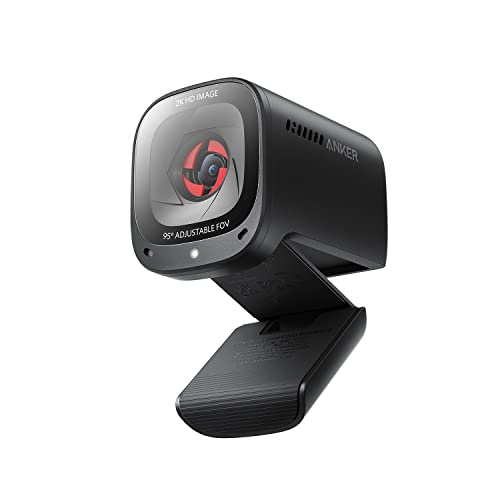
If you’re looking for a webcam that offers professional-grade video quality and exceptional audio clarity, the Anker PowerConf C200 2K Webcam is an excellent choice for remote workers and business professionals. With its 2K Ultra-Clear resolution, you’ll enjoy sharp, detailed visuals during your virtual meetings. The advanced audio clarity, featuring AI noise cancellation and stereo mics, guarantees your voice comes through crystal clear, even in noisy environments. Plus, you can customize the field of view to capture the perfect frame. The built-in privacy cover adds an extra layer of security, making it a smart investment for your home office setup.
Best For: Remote workers and business professionals seeking high-quality video and audio for virtual meetings.
Pros:
- 2K Ultra-Clear Resolution provides sharp and detailed video quality for professional presentations.
- Advanced Audio Clarity with AI noise cancellation ensures crystal clear communication, even in noisy environments.
- Customizable Field of View allows users to select the ideal framing for their video calls.
Cons:
- Limited to Windows 7 or later and macOS 10.11 or later, which may exclude some older operating systems.
- The webcam may require additional software for full customization options, which could be a hassle for some users.
- The built-in privacy cover might feel flimsy to some users, raising concerns about long-term durability.
EMEET NOVA 4K Webcam for PC

For professionals seeking high-quality video quality in their virtual communications, the EMEET NOVA 4K Webcam stands out with its stunning 4K resolution at 30FPS. This webcam utilizes a CMOS sensor for exceptional clarity, perfect for business meetings or online classes. You can switch to 4K via built-in software, while PDAF technology guarantees fast autofocus. With two built-in microphones capturing clear audio up to 8 feet away, you’ll communicate effectively in various environments. Plus, its privacy cover keeps your data secure. Plug and play compatibility makes setup a breeze, allowing you to focus on what matters most: your presentation.
Best For: Professionals and individuals seeking high-quality video and audio communication for business meetings, online education, and personal streaming.
Pros:
- Exceptional 4K resolution at 30FPS ensures high clarity and detail.
- Built-in privacy cover protects against unwanted surveillance.
- Easy plug-and-play setup with wide compatibility across various platforms.
Cons:
- Manual focus is not supported, relying solely on PDAF technology for autofocus.
- Default resolution is 1080P, requiring a switch for 4K usage.
- Limited to USB 2.0 connectivity, which may restrict speed compared to newer standards.
Logitech Brio 4K Webcam

With its ultra HD resolution and support for 4K video at 30 fps, the Logitech Brio 4K Webcam stands out as an ideal choice for professionals seeking high-quality video conferencing. You’ll appreciate the autofocus and 5x digital zoom that guarantees you’re always in focus. Plus, RightLight 3 optimizes your lighting for the best possible image. The dual omnidirectional microphones capture clear audio from a distance, filtering out background noise. You can adjust the field of view to suit your needs, and the privacy shutter adds an extra layer of security. It’s compatible with major platforms, making it a versatile addition to your setup.
Best For: Professionals seeking high-quality video conferencing solutions with advanced audio and visual features.
Pros:
- Ultra HD resolution with support for 4K at 30 fps ensures exceptional video clarity.
- Dual omnidirectional microphones enhance audio quality by reducing background noise.
- Adjustable field of view options allow customization for different settings and needs.
Cons:
- Higher price point compared to standard webcams may not fit all budgets.
- Requires good lighting for optimal performance, despite RightLight 3 adjustments.
- Limited functionality without the Logi Options+ app for advanced controls.
Logitech C920S HD Pro Webcam

The Logitech C920S HD Pro Webcam is an excellent choice for professionals seeking crystal-clear video quality during virtual meetings. With Full HD 1080p at 30fps, you’ll enjoy vibrant visuals thanks to its glass lens and HD autofocus. This webcam adapts to different lighting conditions, ensuring sharp images every time. You’ll also appreciate the stereo audio from dual microphones, capturing natural sound during calls. Plus, the privacy shutter gives you control over your visual privacy when not in use. Although it doesn’t include a 3-month XSplit VCam license, the C920S remains a high-quality option for seamless communication in any setting.
Best For: Professionals and content creators seeking high-quality video and audio for virtual meetings and recordings.
Pros:
- Premium video quality with Full HD 1080p and 30fps for clear visuals.
- Adaptive light correction and HD autofocus ensure sharp images in various lighting conditions.
- Dual microphones provide stereo audio for natural sound capture during calls.
Cons:
- Does not include a 3-month XSplit VCam license for enhanced video effects.
- Limited compatibility with some older devices that may not support HD video.
- Fixed field of view may not suit all users needing a wider angle for group calls.
Factors to Consider When Choosing a USB Webcam for Business
When you’re choosing a USB webcam for your business, several key factors can make a big difference. You’ll want to take into account resolution and image quality, audio clarity, and how well it works with your software. Don’t forget about privacy options and the design’s portability to guarantee it fits your needs.
Resolution and Image Quality
Choosing the right resolution and image quality for your USB webcam can greatly impact your business communications. For most professional settings, Full HD 1080p is the standard, but if you need exceptional clarity, consider webcams with 4K capabilities. These higher resolutions are perfect for detailed presentations and video conferences. Look for features like autofocus, light correction, and HDR, which enhance image quality in different lighting conditions. Larger pixel sensors are also beneficial, capturing more light for clearer images in low-light scenarios. Additionally, advanced features such as noise reduction and adjustable field of view guarantee you’re well-framed and visually appealing during calls. Prioritizing these aspects will elevate your virtual meetings considerably.
Audio Clarity and Features
How can you guarantee crystal-clear audio during your video calls? Start by choosing a webcam with dual microphones or stereo audio capabilities. This assures natural sound capture, making conversations feel more authentic. Look for models featuring noise-canceling technology to cut down on background noise, especially in bustling environments. Omnidirectional microphones are also a great choice, as they capture sound from multiple directions, enhancing the overall audio experience for everyone involved. Additionally, some webcams come with built-in audio features like automatic volume adjustment and sound filters to reduce echo. Finally, verify your webcam is compatible with major video conferencing platforms, as this can greatly influence audio performance during your important business meetings.
Compatibility With Software
To guarantee smooth video meetings, it’s vital to select a USB webcam that’s compatible with the software you regularly use. Confirm the webcam works seamlessly with major platforms like Zoom, Microsoft Teams, and Google Meet for effective communication. Look for models designed to function on both Windows and macOS, providing flexibility for varying user environments. Some webcams offer advanced features like background removal or lighting adjustments, elevating your professional presence during presentations. Additionally, check for certifications like TAA compliance, which signify adherence to standards important for government and enterprise use. Compatibility with various devices, including desktops, laptops, and tablets, ensures you can easily integrate the webcam into different setups without encountering technical issues.
Privacy Options and Security
Selecting a USB webcam for business isn’t just about compatibility with software; you also need to take into account privacy and security features. Look for webcams with integrated privacy shutters or covers that block the lens when not in use, guaranteeing your visual privacy. Some models even offer advanced security options like facial recognition technology, allowing only authorized users to join video calls. Built-in noise-canceling microphones improve audio clarity while reducing background noise, creating a more professional environment. Ascertain the webcam complies with major video conferencing platforms that uphold strict data privacy standards. High-quality models often adjust exposure and lighting automatically, enhancing security by preventing unauthorized viewing in dim conditions. Choose wisely to protect your virtual meetings.
Design and Portability
When you’re choosing a USB webcam for business, design and portability play crucial roles in ensuring it fits seamlessly into your workspace and lifestyle. Consider the webcam’s dimensions and weight; you want it to occupy minimal space on your desk. A foldable or compact design can make it easy to transport between home and office. Look for models with adjustable clips or mounting options that securely attach to laptops and external monitors. Durable materials are essential for withstanding frequent movement, so opt for high-quality construction. Additionally, a design that includes privacy features, like built-in shutters or covers, can enhance your security and provide peace of mind during video calls. Choose wisely to enhance your virtual meetings!
Price and Value Comparison
While price is an important factor in choosing a USB webcam for business, it’s vital to assess the value you’re getting for your investment. Higher-quality options, like 4K at 30fps or 1080p at 60fps, may cost more but offer superior video clarity, essential for professional use. Consider added features such as built-in microphones, privacy shutters, and low-light performance, as these enhance usability and overall value. Check customer ratings and reviews to confirm reliability; well-rated webcams often provide better long-term value, even if they’re pricier. Also, verify compatibility with your operating system and video conferencing platforms for seamless integration. Finally, a solid warranty and support can justify a higher price, offering peace of mind and reliability.