
If you’re looking to upgrade your network setup, the best rackmount switches of 2026 offer a range of options that prioritize both performance and reliability. With features like Power over Ethernet and energy efficiency, these switches cater to businesses of all sizes. As you explore the top models, you’ll find that selecting the right switch can greatly impact your network’s efficiency. What factors should you consider to guarantee you make the right choice?
TP-Link 24 Port Gigabit Ethernet Switch (TL-SG1024S)

The TP-Link 24 Port Gigabit Ethernet Switch (TL-SG1024S) is an ideal choice for small to medium-sized businesses looking to enhance their network capacity without breaking the bank. With 24 ports supporting speeds of 10/100/1000Mbps, you’ll enjoy seamless connectivity. Its energy-efficient design helps lower your power costs, while IEEE 802.3X flow control guarantees reliable data transfer. The fanless design means you won’t have to deal with loud operational noise. Plus, its durable metal casing provides heat dissipation and EMI protection. You can easily set it up with a plug-and-play installation, and it’s backed by a 3-year warranty for peace of mind.
Best For: Small to medium-sized businesses seeking an affordable solution to enhance their network capacity with reliable performance.
Pros:
- Energy-efficient design reduces overall power consumption and costs.
- Fanless operation ensures quiet performance, making it suitable for office environments.
- Easy plug-and-play installation with no software configuration required.
Cons:
- Limited to 24 ports, which may not be sufficient for larger networks.
- Lacks advanced features like VLAN support or management capabilities.
- No built-in redundancy options for power supply or network failover.
NETGEAR 24-Port Gigabit Ethernet Unmanaged Switch (GS324)

If you’re looking for a reliable solution to expand your network without the hassle of complicated setups, the NETGEAR 24-Port Gigabit Ethernet Unmanaged Switch (GS324) is an excellent choice. With 24 Gigabit Ethernet ports, it offers a simple plug-and-play setup—no software or configuration needed. You can install it on your desktop, mount it on the wall, or rackmount it, thanks to the included mounting hardware. Plus, its silent operation makes it perfect for noise-sensitive environments. Compliant with IEEE802.3az standards, it’s energy-efficient too. Backed by a 3-year limited hardware warranty, it’s a solid option for your network needs.
Best For: Small to medium-sized businesses or home users looking for an easy-to-install, reliable networking solution without complex configurations.
Pros:
- Simple plug-and-play setup with no software or configuration needed.
- Versatile installation options including desktop, wall, or rackmount.
- Silent operation, making it suitable for noise-sensitive environments.
Cons:
- Unmanaged switch may lack advanced features for network management.
- Limited to 24 ports, which may not suffice for larger networks.
- Designed for use in the U.S. and Canada, limiting international compatibility.
TP-Link 48 Port Gigabit Ethernet Switch (TL-SG1048)

For businesses seeking a reliable and efficient networking solution, the TP-Link 48 Port Gigabit Ethernet Switch (TL-SG1048) stands out as an excellent choice. This unmanaged, plug-and-play switch features a sturdy metal case, is rackmountable, and operates fanless for quiet performance. With 48 RJ45 ports providing up to 1000 Mbps, it supports a switching capacity of 96Gbps. Energy-efficient technology reduces power consumption, and its auto features simplify setup by eliminating the need for specialized cables. Plus, with a 3-year warranty and impressive customer ratings, you can trust that this switch meets your networking needs effectively.
Best For: Businesses looking for a reliable, high-capacity networking switch that requires minimal setup and maintenance.
Pros:
- High Performance: Offers 48 ports with speeds up to 1000 Mbps and a switching capacity of 96Gbps.
- Energy Efficient: Features innovative technology to reduce power consumption and is environmentally compliant.
- Easy Setup: Plug-and-play functionality with auto features that eliminate the need for specialized cables.
Cons:
- Unmanaged Switch: Lacks advanced features for network management and configuration.
- No PoE Support: Does not provide Power over Ethernet capabilities for connected devices.
- Limited Support Hours: Technical support is only available during specific hours (6am to 6pm PST).
NETGEAR 24-Port PoE+ Gigabit Ethernet Switch (GS324P)

Looking for a reliable switch that won’t break the bank? The NETGEAR 24-Port PoE+ Gigabit Ethernet Switch (GS324P) is your answer. With 24 Gigabit Ethernet ports and 16 PoE+ ports, it offers a total power budget of 190W, making it perfect for businesses, gaming, and multimedia applications. You’ll appreciate its simple plug-and-play setup—no need for software installation. It’s designed for both desktop and rackmount use, plus it runs quietly and efficiently. Backed by a 3-year warranty, this switch boasts a high customer rating of 4.7 stars, proving its reliability and performance in any network environment.
Best For: Businesses, gamers, and multimedia users looking for a cost-effective and reliable networking solution.
Pros:
- Simple plug-and-play setup with no software installation required.
- Energy-efficient design compliant with IEEE802.3az, ensuring lower power consumption.
- Quiet operation suitable for office environments or home use.
Cons:
- Unmanaged switch may lack advanced features for network management.
- Limited to a maximum power budget of 190W, which may not be sufficient for high-demand devices.
- Not suitable for users who require extensive configuration options.
TP-Link TL-SX1008 8 Port 10G Unmanaged Ethernet Switch

The TP-Link TL-SX1008 8 Port 10G Unmanaged Ethernet Switch is an ideal choice for users seeking a reliable and high-performance networking solution without the hassle of complex setup. With eight 10-Gbps ports and a total switching capacity of 160 Gbps, it guarantees fast data transfer. Auto-negotiation supports various speeds, making it compatible with devices like WiFi 6 APs and gaming computers. The robust metal casing and plug-and-play functionality make it user-friendly. Plus, with IEEE 802.3X flow control and smart fan technology, you’ll enjoy quiet operation. Backed by a 3-year warranty, you can count on solid support when needed.
Best For: Users looking for a high-performance, easy-to-use unmanaged Ethernet switch for gaming, NAS, or WiFi 6 applications.
Pros:
- Fast Performance: Offers eight 10-Gbps ports and a total switching capacity of 160 Gbps for rapid data transfer.
- Plug-and-Play: No software installation or configuration is required, making setup straightforward and user-friendly.
- Quiet Operation: Features smart fan technology that adjusts speed for low-noise performance.
Cons:
- Unmanaged Switch: Lacks advanced features and configurability found in managed switches, limiting control over network settings.
- Limited Technical Support Hours: Free technical support is only available Monday to Friday, 6am to 6pm PST.
- Metal Casing Weight: The sturdy metal casing may add weight, making it less portable for some users.
TP-Link TL-SG1024 24 Port Gigabit Ethernet Switch

Designed for seamless integration into any network environment, the TP-Link TL-SG1024 24 Port Gigabit Ethernet Switch is perfect for small to medium-sized businesses needing reliable connectivity. This unmanaged, plug-and-play switch supports 24 10/100/1000M RJ45 ports, offering a non-blocking wire-speed architecture with 96Gbps switching capacity. Its fanless design guarantees quiet operation, while energy-efficient technology reduces power consumption by up to 40%. With easy installation and dynamic LED lights for status monitoring, you’ll enjoy hassle-free performance. Backed by a 3-year warranty and rated 4.6 out of 5 stars, it’s a dependable choice for your networking needs.
Best For: Small to medium-sized businesses looking for reliable and efficient network connectivity solutions.
Pros:
- Plug-and-play installation allows for easy setup without configuration.
- Energy-efficient technology reduces power consumption by up to 40%, saving costs.
- Sturdy metal case and fanless design ensure durability and quiet operation.
Cons:
- Unmanaged switch may not offer advanced features like VLAN support or QoS settings.
- Limited to 24 ports, which may not be sufficient for larger networks.
- No built-in management interface, which could be a drawback for users needing more control.
NETGEAR 16-Port Gigabit Ethernet Unmanaged Switch (GS516)

For small businesses or home offices seeking a reliable networking solution, the NETGEAR 16-Port Gigabit Ethernet Unmanaged Switch (GS516) stands out with its effortless plug-and-play setup. You won’t need any software installation or configuration, making it incredibly user-friendly. With 16 Gigabit Ethernet ports and a data transfer rate of 16 Gbps, it efficiently handles your networking needs. Its energy-efficient design guarantees quiet operation, suitable for various environments. Plus, you’ll benefit from a limited lifetime warranty and 24/7 support. Whether you choose desktop, wall mount, or rackmount placement, this switch delivers performance and reliability you can count on.
Best For: Small businesses or home offices that require a reliable and easy-to-use networking solution.
Pros:
- Simple plug-and-play setup with no software installation or configuration needed.
- 16 Gigabit Ethernet ports with a high data transfer rate of 16 Gbps for efficient networking.
- Energy-efficient design ensures quiet operation, making it suitable for various environments.
Cons:
- Unmanaged switch may lack advanced features for more complex networking needs.
- Limited to 16 ports, which might not be sufficient for larger networks.
- No built-in management interface for monitoring or configuration adjustments.
TP-Link TL-SG1016 16 Port Gigabit Ethernet Switch

If you’re looking for a reliable, high-performance solution for your network setup, the TP-Link TL-SG1016 16 Port Gigabit Ethernet Switch stands out as an excellent choice. This unmanaged, rackmount switch features 16 gigabit ports, guaranteeing fast data transfer with a 32 Gbps switching capacity. Its non-blocking architecture maximizes throughput while supporting IEEE 802.3x flow control for peak performance. Installation is a breeze with its plug-and-play design, and the auto MDI/MDIX feature means you won’t need crossover cables. Plus, the sturdy metal design and fanless operation guarantee durability and quiet performance, backed by a 3-year warranty.
Best For: Small to medium-sized businesses seeking a reliable and efficient networking solution for fast data transfer and easy installation.
Pros:
- Fast Performance: 16 gigabit ports with a 32 Gbps switching capacity ensure quick file transfers.
- Easy Setup: Plug-and-play design with auto MDI/MDIX simplifies installation and eliminates the need for crossover cables.
- Durable and Quiet: Fanless design and sturdy metal chassis provide a durable and noiseless operation.
Cons:
- Unmanaged Switch: Lacks advanced features for network management and monitoring.
- Limited Port Count: Only 16 ports may not suffice for larger networks with more devices.
- No PoE Support: Does not support Power over Ethernet, requiring separate power sources for connected devices.
TP-Link 24 Port Gigabit Switch (TL-SG1024DE)

The TP-Link 24 Port Gigabit Switch (TL-SG1024DE) stands out as an ideal choice for small to medium-sized businesses needing reliable network performance. With 24 gigabit ports, it efficiently handles large file transfers and enhances data flow with 9K jumbo frames. You’ll appreciate its easy smart management features, including port mirroring and cable diagnostics for effective network monitoring. Plus, robust VLAN support allows for traffic segmentation, while IGMP snooping optimizes multicast applications. Its sturdy metal construction guarantees durability, and with plug-and-play setup, you can get started quickly. A 3-year warranty and free technical support further enhance your peace of mind.
Best For: Small to medium-sized businesses seeking reliable and efficient network performance for large file transfers.
Pros:
- Easy smart management features such as port mirroring and cable diagnostics.
- Sturdy metal construction ensures durability in various environments.
- Plug-and-play setup allows for quick and hassle-free installation.
Cons:
- Limited to 24 ports, which may not be sufficient for larger networks.
- Requires some technical knowledge to fully utilize VLAN and QoS features.
- No advanced management features compared to fully managed switches.
NETGEAR 16-Port Gigabit Ethernet Unmanaged PoE Switch (GS116LP)
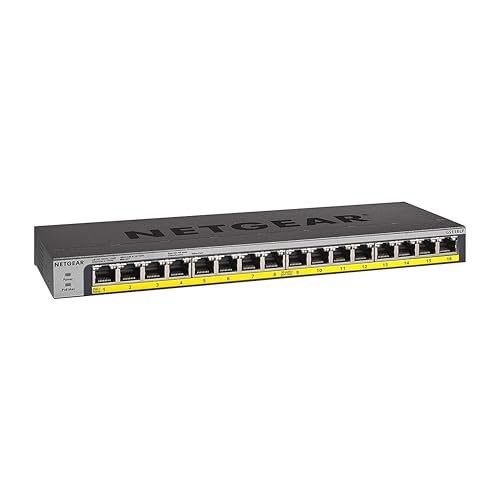
Designed to provide efficient power and connectivity, the NETGEAR 16-Port Gigabit Ethernet Unmanaged PoE Switch (GS116LP) is ideal for small to medium-sized businesses looking to expand their network capabilities. With 16 Gigabit Ethernet ports and a total PoE budget of 76W, you can easily connect multiple devices. Its compact design allows for desktop, wall, or rackmount installation, fitting seamlessly into your workspace. Rated 4.7 out of 5 stars by nearly 3,000 users, this switch offers ProSAFE Lifetime Protection, ensuring reliability. With a full refund policy and excellent customer support, you can invest confidently in your networking needs.
Best For: Small to medium-sized businesses looking to expand their network capabilities with reliable PoE connectivity.
Pros:
- Flexible installation options: Can be set up as desktop, wall, or rackmount, making it suitable for various workspace configurations.
- High customer satisfaction: Rated 4.7 out of 5 stars by nearly 3,000 users, indicating strong performance and reliability.
- ProSAFE Lifetime Protection: Offers peace of mind with a robust warranty and support for long-term investment.
Cons:
- Unmanaged switch: Lacks advanced management features that some users may require for complex network setups.
- No uplink port: Limits options for connecting to other network devices compared to managed switches with dedicated uplink ports.
- Requires additional power module for maximum PoE flexibility: Users may need to purchase a separate power module for expanded PoE capabilities.
Factors to Consider When Choosing a Rackmount Network Switch
When choosing a rackmount network switch, there are several key factors to keep in mind. You’ll want to evaluate the port count, whether you need Power Over Ethernet (PoE), and how energy-efficient the model is. Additionally, think about heat dissipation design and the available mounting options to guarantee a seamless integration into your setup.
Port Count Consideration
Choosing the right port count for your rackmount network switch is vital, especially if you manage a growing network. The port count directly determines how many devices can connect simultaneously, making it imperative for larger setups. Common options range from 8 to 48 ports, allowing you to scale as needed. A higher port count reduces the necessity for multiple switches, simplifying your network management and saving physical space in your server rack. Keep future growth in mind; opting for additional ports beyond your current needs can help you avoid costly upgrades later. Ascertain your choice matches your organization’s bandwidth requirements, as each port typically supports gigabit speeds that greatly impact overall network performance.
Power Over Ethernet (Poe)
As your network grows and you consider port counts, the functionality of those ports becomes increasingly important, particularly with Power over Ethernet (PoE) capabilities. PoE technology simplifies installation by allowing network cables to deliver both data and power, making it ideal for devices like IP cameras and VoIP phones. You’ll find various PoE standards, such as IEEE 802.3af, 802.3at (PoE+), and 802.3bt (PoE++), each offering different power levels—up to 60 watts or more for PoE++. When selecting a PoE switch, consider the total power budget; guarantee the combined output meets the needs of all devices without exceeding the switch’s capacity. Look for switches with power management features to optimize power allocation based on demand.
Energy Efficiency Standards
Understanding energy efficiency standards is essential for selecting a rackmount network switch that aligns with your operational goals. Standards like IEEE 802.3az enable Energy-Efficient Ethernet (EEE), which reduces power consumption by adjusting usage based on link status and activity levels. Many modern switches automatically power down idle ports, cutting energy waste during low usage periods. By implementing these energy-efficient technologies, you can achieve power savings of up to 40%, considerably lowering your operational costs. Compliance with regulations like RoHS not only guarantees energy efficiency but also minimizes environmental impact. Additionally, features like smart fans that adjust their speed based on thermal needs contribute to noise reduction and enhance overall energy savings, making your network more sustainable.
Heat Dissipation Design
Energy efficiency plays a significant role in your selection of rackmount network switches, but it’s equally important to evaluate heat dissipation design. Effective heat dissipation is vital for keeping ideal operating temperatures, preventing overheating, and ensuring reliable performance. Look for models with fanless designs; they reduce noise and minimize dust buildup, extending lifespan and lowering maintenance needs. Metal casings enhance durability while providing better heat dissipation and shielding against electromagnetic interference (EMI). Additionally, consider the internal arrangement of components, as thoughtful design can promote adequate airflow for cooling. Some advanced switches even feature smart fan technology, adjusting speeds based on temperature for efficient cooling and improved power consumption. Prioritize these aspects for a switch that meets your needs.
Mounting Options Available
When selecting a rackmount network switch, the mounting options available can greatly impact your setup and efficiency. Most rackmount switches come in standard sizes like 1U, making them suitable for server racks or cabinets. You’ll find many switches offer versatile mounting options, allowing for installation on desktops, walls, or racks based on your needs and space. Typically, mounting hardware is included, ensuring easy installation in various configurations. Remember, proper ventilation is essential to avoid overheating, so consider fanless designs or adequate spacing. Some switches are specifically designed for rackmount use, ensuring a secure and efficient fit while maintaining accessibility to ports. Choosing the right mounting option can enhance both performance and organization.
Warranty and Support Terms
Evaluating warranty and support terms is essential for guaranteeing you get the most out of your rackmount network switch. Start by checking the warranty period; many switches typically offer a standard three-year warranty. Consider whether the manufacturer provides free technical support during business hours, which can be invaluable for installation and troubleshooting. Lifetime hardware warranties are also worth looking into, as they add long-term value to your investment. Make certain you understand the manufacturer’s policies regarding warranty claims and customer service responsiveness, as these can greatly affect your experience if issues arise. Finally, review customer ratings and feedback on warranty claims and support experiences to gauge the reliability and service quality of the manufacturer.
Performance Specifications Overview
Understanding performance specifications is fundamental for selecting the right rackmount network switch, especially since these factors directly impact your network’s efficiency and reliability. First, consider the switching capacity; higher values mean your switch can handle more data simultaneously, which is essential during peak usage. Next, look at data transfer rates, measured in Mbps or Gbps, as they affect how quickly you can send and receive large files. The number of ports is another critical factor; more ports mean more devices can connect at once, expanding your network’s capabilities. Additionally, features like flow control guarantee reliable data transmission, while support for jumbo frames can boost performance for bandwidth-intensive applications, reducing CPU overhead.
Installation Ease and Setup
Selecting the right rackmount network switch goes beyond performance specifications; installation ease and setup play a significant role in your overall experience. Look for switches with plug-and-play functionality, so you can connect immediately without extra software installation. Auto MDI/MDIX capabilities are a must, as they eliminate the need for crossover cables, simplifying your network setup. Choose devices that come with all necessary mounting hardware, making installation straightforward in any environment—whether it’s desktop, wall, or rackmount. Make sure the switch has a compact, sturdy design that fits your space. Finally, check for dynamic LED lights; these provide real-time status displays, making it easier for you to diagnose connectivity issues quickly and efficiently.