
Right-angle USB extension cables make awkward ports easier to reach while reducing sharp bends and cable clutter. They are especially useful for laptops, TVs, desktops, hubs, and devices mounted close to walls or furniture.
We selected 10 options spanning USB 2.0 and USB 3.0 designs, compact adapters, multi-packs, and different connector orientations so you can match the cable to your setup and performance needs.
Best 10 Right Angle USB Extension Cables Picks for 2026
Best Compact Cable
CableCreation 1FT Right-Angle USB 3.0 Extension

- 90-degree USB-A male connector
- 5 Gbps USB 3.0 performance
- Braided cable with 24-month warranty
Best For: Short extensions in tight spaces
Best Multi-Pack
Jadebones 4-Pack 90-Degree USB 3.0 Extensions

- Four 30 cm extension cables
- Vertical and horizontal angle options
- Up to 5 Gbps with USB 2.0 compatibility
Best For: Multiple devices and spare cables
Best Directional Variety
Antrader 4-Piece Up-and-Down USB Extensions

- Two up-angle and two down-angle cables
- 5 Gbps USB 3.0 transfer support
- Shielded signal-transmission design
Best For: Rear desktop ports needing specific routing
Best Two-Pack
CableCreation 2-Pack 1FT Right-Angle USB 3.0 Cables

- Two 1-foot braided extension cables
- 90-degree design for narrow spaces
- Up to 5 Gbps with USB 2.0 compatibility
Best For: Two short, matching cable extensions
Best Dual-Angle Adapter
Togconn 90-Degree USB 3.0 Adapter 2-Pack

- Up/down 90-degree USB-A male-to-female design
- Up to 5Gbps data and 5V/2.1A charging
- Aluminum housing with 3-year warranty
Best For: Redirecting USB-A connections in tight spaces
Best Premium Combo
Cable Matters Right Angle USB Extension Cable 2-Pack
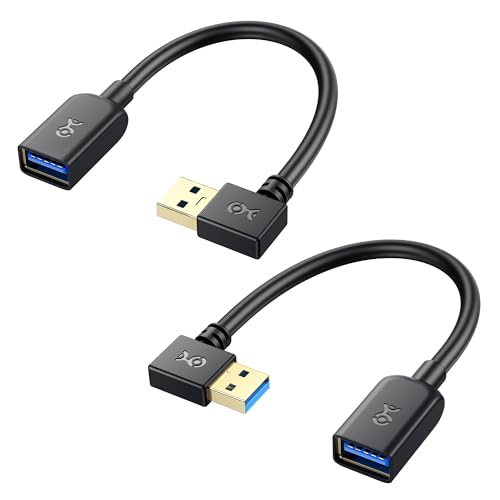
- Includes 90-degree and 270-degree USB-A cables
- 5Gbps USB 3.0 data transfer support
- Shielded conductors and lifetime warranty
Best For: Short, durable extensions for tight indoor setups
Best Left-and-Right Value
Oxsubor SuperSpeed USB 3.0 Angle Cables

- Includes left- and right-angle USB-A cables
- 8-inch extension length for compact setups
- Shielded USB 3.0 design with 24-month replacement warranty
Best For: Directional routing from rear or mounted USB-A ports
Best Flexible Pick
8-Inch USB 2.0 Right-Angle Extension Pair

- Up- and down-angle cables included
- Soft, foldable silicone construction
- Supports USB 2.0 data and power
Best For: Compact everyday USB connections in tight spaces
Best Two-Direction USB 3.0 Pair
Left and Right Angle 8-Inch Cables

- Includes left- and right-angle cables
- Supports USB 3.0 speeds up to 5 Gbps
- Shielded for reduced interference
Best For: Short high-speed connections around computers and hubs
Best Long-Reach Option
GELRHONR 3.3-Foot USB 3.0 Cable

- Provides a 3.3-foot extension length
- Supports USB 3.0 speeds up to 5 Gbps
- Angle design helps manage tight-space connections
Best For: Longer high-speed USB-A extensions for peripherals
Best Compact Cable – CableCreation 1FT Right-Angle USB 3.0 Extension
For tight spaces, this CableCreation model is a practical pick among right angle usb extension cables. Its 90-degree USB-A male connector can help route a connection behind a TV or all-in-one PC, while the 1-foot length avoids adding unnecessary slack.
Best For: Compact setups using USB peripherals, game consoles, VR headsets, printers, scanners, or storage devices.
Pros:
- USB 3.0 supports data transfer rates up to 5 Gbps and works with USB 2.0 devices.
- Nylon braiding and an aluminum-alloy housing are designed for flexible, durable daily use.
- Plug-and-play operation with a 24-month warranty and technical service.
Cons:
- The fixed male-connector direction may not suit every port orientation.
- Its 1-foot length is intended for short extensions rather than longer cable runs.
This is a focused, well-equipped option when you need a short extension and want a braided exterior. Check the connector angle before ordering, especially for ports with limited clearance.
Best Multi-Pack – Jadebones 4-Pack 90-Degree USB 3.0 Extensions
The Jadebones four-pack offers useful flexibility for multiple workstations or devices. These right angle usb extension cables are 30 cm long, support USB 3.0 speeds, and include vertical and horizontal angle options to help redirect connections.
Best For: Users who need several short extensions for PCs, laptops, hubs, chargers, power banks, or vehicle USB connections.
Pros:
- Four 30 cm male-to-female USB 3.0 cables provide spares or multi-device coverage.
- 90-degree angle options can redirect ports in different directions.
- Supports up to 5 Gbps and remains compatible with USB 2.0.
Cons:
- The 30 cm length may be too short for devices positioned farther apart.
- The listing does not specify a braided outer jacket.
Choose this pack when quantity and directional flexibility matter more than having one premium-feeling cable. It is particularly practical for organizing several USB-A connections around a desk or entertainment setup.
Best Directional Variety – Antrader 4-Piece Up-and-Down USB Extensions
Antrader’s four-piece set is designed for more deliberate port routing. It includes two upward 90-degree adapters and two downward versions, making these right angle usb extension cables useful when rear-facing desktop ports need a cleaner path.
Best For: Desktop computers and laptop setups where upward or downward connector orientation affects cable management.
Pros:
- Includes two up-angle and two down-angle USB 3.0 male-to-female cables.
- Supports SuperSpeed transfer rates up to 5 Gbps and USB 2.0 peripherals.
- Shielding and tin-plated oxygen-free copper are intended to support stable signal transmission.
Cons:
- At approximately 23 cm (9 inches), each cable is relatively short.
- The set is more specialized for up/down routing than flexible multi-direction positioning.
This set stands out when you know which direction your ports need to face and want matching spares. Its short length and up/down split are best suited to close-proximity connections rather than general-purpose extension runs.
Best Two-Pack – CableCreation 2-Pack 1FT Right-Angle USB 3.0 Cables
This two-pack suits buyers who want the same compact cable for more than one setup. Each 1-foot extension uses a 90-degree USB-A male connector, supports up to 5 Gbps, and helps manage connections in narrow spaces such as behind TVs or all-in-one PCs.
Best For: Keeping two identical short extensions available for gaming systems, VR equipment, storage devices, printers, or computers.
Pros:
- Includes two braided USB 3.0 male-to-female extension cables.
- Supports up to 5 Gbps while maintaining USB 2.0 compatibility.
- Plug-and-play design with a 24-month warranty and technical service.
Cons:
- The male connector’s fixed angle direction may require checking before purchase.
- At 1 foot, the cables are best for nearby ports and devices.
Compared with a single cable, this pack offers convenient coverage for two locations or a ready spare. It is a strong fit when you prefer braided construction and consistent cable routing across multiple devices.
Best Dual-Angle Adapter – Togconn 90-Degree USB 3.0 Adapter 2-Pack
For tight spaces around computers, monitors, and wall-mounted devices, these right angle usb extension cables alternatives use compact USB-A adapters to redirect an existing cable. The up-and-down 90-degree design helps reduce bending and port strain while retaining USB 3.0 data and charging support.
Best For: USB-A setups that need flexible upward or downward cable routing, including laptops, monitors, keyboards, mice, and wall-mounted devices.
Pros:
- Up-and-down 90-degree orientation helps avoid cable bending and limited-clearance problems.
- Supports USB 3.0 data transfer up to 5Gbps and charging up to 5V/2.1A.
- Aluminum-alloy housing, plug-and-play operation, and a stated 3-year warranty.
Cons:
- This is a male-to-female adapter rather than a complete extension cable.
- The fixed up/down angle may not suit setups requiring left or right routing.
This two-piece adapter set is a practical choice when port orientation matters more than adding cable length. Its USB-A compatibility and stated backward compatibility with USB 2.0 and USB 1.1 make it versatile for everyday peripherals.
Best Premium Combo – Cable Matters Right Angle USB Extension Cable 2-Pack
The Cable Matters combo is a useful pick among right angle usb extension cables when you want short, flexible USB-A extensions for crowded desks, laptops, or wall-mounted equipment. Its two included cable orientations help accommodate connections that need different routing directions.
Best For: Fast USB-A peripheral connections behind TVs, monitors, desktops, and laptops where a short extension helps reduce cable strain.
Pros:
- Includes one 90-degree and one 270-degree USB-A extension cable for flexible routing.
- Supports USB 3.0 transfer speeds up to 5Gbps.
- Bare copper conductors, foil-and-braid shielding, molded strain relief, and a lifetime warranty support durability.
Cons:
- At 0.5 feet, the cables provide limited additional reach.
- The set is intended for indoor use and USB Type-A connections.
Choose this set if you value build details and directional flexibility in a compact format. The combination of short cable length and two angle options works especially well for organizing nearby USB peripherals without creating a large cable loop.
Best Left-and-Right Value – Oxsubor SuperSpeed USB 3.0 Angle Cables
Oxsubor SuperSpeed USB 3.0 Male to Female Extension Data Cable Left and Right Angle 2PCS (20CM,8IN)
Check Price On AmazonThese Oxsubor right angle usb extension cables provide left- and right-angle routing in an 8-inch format. They are designed to extend USB 3.0 ports on PCs, laptops, mounted TVs, and hubs while helping save desk space and reduce accidental stress on the port.
Best For: Rear-facing computer ports, mounted televisions, USB hubs, and other setups that need either left- or right-side cable routing.
Pros:
- Two cables include left- and right-angle connectors for directional flexibility.
- USB 3.0 design supports high-speed data synchronization with shielding to help prevent interference.
- 8-inch length adds reach while keeping the setup relatively compact.
Cons:
- The supplied notes do not specify a maximum data-transfer speed.
- These cables use USB Type-A connectors and may not fit USB-C-only devices.
With both left and right orientations included, this set is well suited to installations where the cable must exit a port in a particular direction. Its 8-inch length offers more reach than an adapter while remaining suitable for space-conscious arrangements.
Best Flexible Pick – 8-Inch USB 2.0 Right-Angle Extension Pair
These right angle usb extension cables are a practical choice when a short, flexible connection is more useful than maximum speed. This two-pack includes one up-angle and one down-angle USB-A male-to-female cable, helping route devices through tight spaces while supporting basic charging and data transfer.
Best For: Compact USB connections for PCs, TVs, laptops, peripherals, and temporary or portable setups.
Pros:
- Includes both up-angle and down-angle cables for flexible routing.
- Soft, foldable silicone construction is designed to resist tangling.
- 26AWG, four-core tinned copper wiring supports power and data transmission.
- Plug-and-play compatibility with many USB devices.
Cons:
- USB 2.0 performance is limited to up to 480 Mbps.
- The 8-inch length may be too short for setups needing substantial reach.
Choose this pair when space savings, flexibility, and having two angle directions matter more than USB 3.0 speeds. It is especially convenient for everyday USB extensions in crowded or narrow areas.
Best Two-Direction USB 3.0 Pair – Left and Right Angle 8-Inch Cables
For faster peripherals in confined setups, these right angle usb extension cables provide USB 3.0 male-to-female connectivity in a two-pack. One left-angle and one right-angle cable make it easier to adapt cable routing around PCs, laptops, TVs, hubs, and other equipment.
Best For: USB 3.0 peripherals, webcams, cameras, hard drives, chargers, and installations requiring a short left- or right-angle connection.
Pros:
- Includes both left-angle and right-angle 8-inch cables.
- Supports USB 3.0 data transfer up to 5 Gbps according to the supplied specifications.
- Shielded construction is intended to help reduce electromagnetic interference.
- Works with a broad range of computers, TVs, PS4 systems, hubs, and peripherals.
Cons:
- The 8-inch length limits reach in larger setups.
- USB Type-A connectors are not suitable for devices that require another connector type.
This pair is a useful middle ground for shoppers who want high-speed USB 3.0 capability and angle flexibility without buying separate cables. The two orientations are particularly helpful when port access varies from one device to another.
Best Long-Reach Option – GELRHONR 3.3-Foot USB 3.0 Cable
This 3.3-foot GELRHONR cable combines a 90-degree USB-A design with USB 3.0 performance, making it one of the more versatile right angle usb extension cables for setups that need extra reach. Its angle options help route connections in narrow spaces while reducing sharp bends near the port.
Best For: Extending USB 3.0 connections to hard drives, cameras, hubs, printers, scanners, TVs, and other Type-A peripherals.
Pros:
- Offers a longer 3.3-foot reach than the shorter alternatives in this roundup.
- Supports SuperSpeed data transfer up to 5 Gbps.
- Right- and left-angle designs support cable management in tight spaces.
- Backward compatible with USB 2.0 and USB 1.1 devices.
Cons:
- Only one cable is included.
- It uses USB Type-A male-to-female connectors, limiting compatibility with other connector formats.
- The supplied listing identifies the color as black-left angle, so orientation should be checked before ordering.
Pick this model when a short 8-inch extension is not enough and USB 3.0 speed is important. Its longer length and angle-focused design make it well suited to routing peripherals away from crowded ports.
How We Picked the Best Right Angle USB Extension Cables
We focused on USB Type-A male-to-female extension cables and adapters designed for cramped or difficult-to-reach ports. The comparison considers USB generation, advertised transfer speed, cable length, connector direction, pack size, flexibility, and compatibility. We also included both conventional cables and short right-angle adapters because each solves a different cable-management problem.
Specifications such as “5Gbps” describe the USB 3.0 standard and represent theoretical maximum bandwidth. Actual performance depends on the host port, connected device, cable quality, and file-transfer conditions.
Quick Comparison
- Best for most setups: A USB 3.0 cable with a clearly specified orientation and a practical length.
- Best for multiple devices: A two- or four-pack, particularly when several ports need repositioning.
- Best for very tight spaces: A short adapter or compact 0.5- to 1-foot cable.
- Best for flexible placement: A cable offering left- and right-angle options rather than a fixed single direction.
- Best for basic peripherals: USB 2.0 can be sufficient for keyboards, mice, printers, and some low-bandwidth accessories.
Key Buying Factors for Right-Angle USB Extension Cables
USB Version and Speed
Choose USB 3.0 when you plan to use external storage, cameras, hubs, or other devices that benefit from faster transfers. USB 2.0 is usually adequate for input devices and basic accessories, but it should not be selected for demanding data-transfer workloads unless cost or compatibility is the priority.
Connector Direction
“Up,” “down,” “left,” and “right” describe how the plug turns after insertion. Check the orientation of your device’s port before ordering. A cable that turns in the wrong direction may block a neighboring port or add more strain instead of reducing it.
Length and Physical Clearance
Short cables keep connections tidy and minimize slack, while longer extensions are better when the device must sit away from the port. Measure the available space, including room for the plug housing and the cable’s bend, not just the distance between devices.
Build and Compatibility
Look for firmly molded connectors, strain relief, and clear male-to-female specifications. These cables extend USB Type-A connections; they do not automatically convert USB-A to USB-C, HDMI, or another interface. For reliable performance, connect them to compatible USB ports and avoid stacking excessive extensions.
Who Should Buy Which Right Angle USB Extension Cables?
Choose a compact single cable if one port needs a cleaner route behind a desk or entertainment center. A multi-pack makes more sense for households with several devices or for users who want spare orientations available. Pick a USB 3.0 model for storage and high-speed peripherals, and consider USB 2.0 only for simpler accessories. If port direction is uncertain, choose a left-and-right or up-and-down set to improve installation flexibility.