
The right USB adapter can add reliable wireless connectivity to a Linux desktop, Raspberry Pi, or older laptop without replacing internal hardware. Compatibility, chipset support, antenna design, and driver availability matter just as much as advertised speed.
We selected 10 WiFi adapters for Linux across affordable dual-band models, Linux-focused options, and newer WiFi 6 and WiFi 6E adapters. Use the guide below to match performance, portability, and system support to your setup.
Best 10 Wifi Adapters for Linux Picks for 2026
Best WiFi 6E Pick

- Tri-band WiFi 6E with 6 GHz support
- Dual adjustable antennas
- USB 3.0 and WPA3 security
Best For: Linux users with compatible WiFi 6E routers
Best High-Gain Budget Option

- 6dBi omnidirectional antenna
- WiFi 6 dual-band support
- AP mode for up to eight devices
Best For: Windows users seeking extra reception and easy setup
Best Simple Dual-Band Adapter

- Dual-band 802.11ac connectivity
- Adjustable 5dBi antenna
- Up to 433 Mbps on 5 GHz
Best For: Windows or macOS users wanting basic dual-band WiFi
Best Plug-and-Play Pick
BrosTrend AC1200 Linux WiFi Adapter
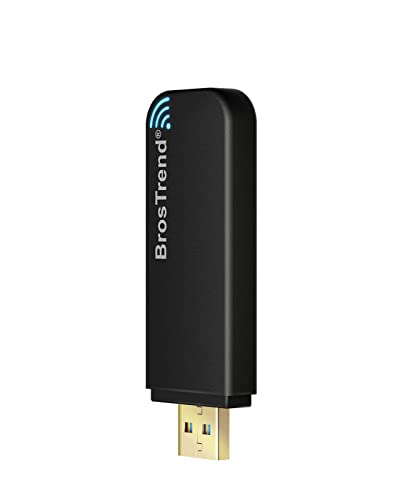
- Kernel 6.2+ plug-and-play support
- Up to 867 Mbps on 5 GHz
- USB 3.0 with dual internal antennas
Best For: Modern Linux PCs and Raspberry Pi systems needing higher dual-band speeds
Best Budget-Friendly Option
Nipeal AC600 Dual-Band USB Adapter

- Dual-band speeds up to 600 Mbps
- External antenna and soft AP mode
- Supports selected Ubuntu and Armbian setups
Best For: Budget users with a compatible Linux system who prefer an external antenna
Best Long-Range Value
BrosTrend AC650 Linux WiFi Adapter

- Adjustable 5 dBi external antenna
- Broad Linux distribution support
- Up to 433 Mbps on 5 GHz
Best For: Linux users seeking stable everyday WiFi with flexible antenna positioning
Best with Extra Features

- MediaTek MT7601U supports Linux kernels 4.2+
- Compatible with Tails and major Linux distributions
- 2.4GHz performance up to 150 Mbps
Best For: Straightforward Linux and Tails connectivity
Best Long-Range Pick
AC1200 Dual-Band Linux Adapter
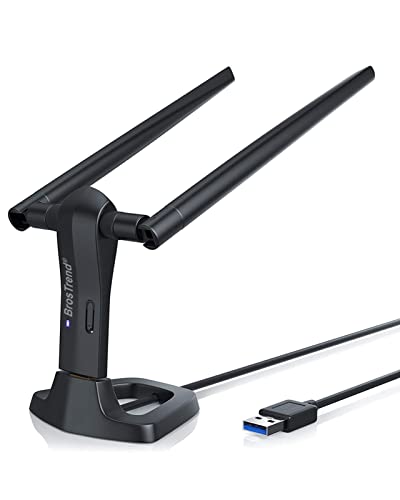
- Up to 867 Mbps on 5GHz and 300 Mbps on 2.4GHz
- Two adjustable 5dBi antennas improve range
- Supports Linux PCs, Raspberry Pi, and Odroid
Best For: High-throughput and range-focused Linux desktops
Best Compact WiFi 6 Pick

- WiFi 6 dual-band speeds up to 600 Mbps
- Tiny design fits without blocking nearby ports
- Supports many Debian-based Linux systems
Best For: Portable Linux setups with a supported distribution
Best WiFi 6E Pick – Panda Wireless PAU0F AXE3000
The Panda Wireless PAU0F is a strong choice among wifi adapters for linux if you want access to the newer 6 GHz band. It connects through USB 3.0, uses dual adjustable antennas, and supports several popular Linux distributions, including Ubuntu, Mint, Fedora, Kali, and Raspbian.
Best For: Linux users with a WiFi 6E router who want lower-interference 6 GHz connectivity.
Pros:
- Supports WiFi 6E across 2.4 GHz, 5 GHz, and 6 GHz bands on compatible Linux systems.
- Dual adjustable antennas help locate a stronger connection and improve signal range.
- Supports WEP, WPA, WPA2, and WPA3 security standards.
- Compatible with desktops, laptops, Raspberry Pi systems, and smartphones.
Cons:
- 6 GHz use on Windows is limited to Windows 11, not Windows 10.
- Virtual-machine guest OS use may require contacting Panda Wireless for additional information.
The PAU0F stands out for Linux users who specifically need WiFi 6E and 6 GHz support. Check your distribution and router compatibility before buying.
Best High-Gain Budget Option – Tenda U11 Pro AX900
The Tenda U11 Pro is a practical option for shoppers comparing wifi adapters for linux, but its supplied compatibility is limited to Windows. Its 6dBi omnidirectional antenna is designed to improve reception, while AP mode can turn a PC into a hotspot for up to eight devices.
Best For: Windows desktop users who prioritize antenna gain, simple setup, and hotspot functionality.
Pros:
- 6dBi omnidirectional antenna is designed for stronger reception in areas with interference.
- Supports WiFi 6 on both 5 GHz and 2.4 GHz bands.
- Built-in driver is designed for plug-and-play installation on supported Windows versions.
- AP mode supports up to eight devices on 5 GHz, with MU-MIMO support.
Cons:
- The supplied specifications list Windows 7, 10, and 11 compatibility, not Linux support.
- Uses a USB 2.0 interface rather than USB 3.0.
The U11 Pro may offer useful range and convenience for Windows PCs, but it is not a confirmed Linux pick based on the supplied information. Linux buyers should choose a model with explicit distribution support instead.
Best Linux Speed Upgrade – BrosTrend AXE5400 WiFi 6E
The BrosTrend AXE5400 is one of the most capable wifi adapters for linux in this lineup, offering tri-band WiFi 6E speeds and explicit support for many Debian-based distributions. It includes dual adjustable antennas and a USB 3.0 interface, but requires the Linux driver to be installed before plugging in the adapter.
Best For: Linux desktop, laptop, and Raspberry Pi users needing high throughput for large transfers or latency-sensitive workloads.
Pros:
- Tri-band WiFi 6E supports up to 2402 Mbps on both 6 GHz and 5 GHz, plus 574 Mbps on 2.4 GHz.
- Supports numerous Debian-based systems, including Ubuntu, Debian, Mint, Zorin, MX Linux, and Raspberry Pi OS.
- Dual adjustable antennas can improve reception and link quality.
- Supports WPA3, OFDMA, MU-MIMO, and USB 3.0.
Cons:
- Driver installation is required before connecting the adapter, and internet access is needed.
- It is currently listed as incompatible with Arch, Fedora Workstation, Kali, Manjaro, openSUSE Leap, and several other distributions.
- 6 GHz requires a recent Linux distribution.
This is an excellent Linux-focused option when your distribution appears on BrosTrend’s supported list. Its broad Debian-family support and AXE5400 performance make it especially appealing for demanding network tasks.
Best Simple Dual-Band Adapter – TP-Link Archer T2U Plus AC600
The TP-Link Archer T2U Plus is a straightforward dual-band adapter for users who need basic 802.11ac connectivity. Its 5dBi high-gain antenna can be rotated toward the router, but the supplied specifications list Windows and macOS rather than Linux support.
Best For: Windows or macOS users seeking an affordable dual-band adapter with a directional high-gain antenna.
Pros:
- Provides up to 433 Mbps on 5 GHz and 200 Mbps on 2.4 GHz under stated conditions.
- 5dBi adjustable antenna can improve reception when aimed toward the router.
- Supports dual-band connectivity and common WEP, WPA, and WPA2 security standards.
- Compact USB design is suitable for desktops and laptops.
Cons:
- The supplied operating-system details do not confirm Linux compatibility.
- Requires downloading the appropriate driver before installation.
- It uses older WiFi 5 technology rather than WiFi 6 or WiFi 6E.
The Archer T2U Plus is a sensible basic networking upgrade for supported Windows and macOS systems, but Linux shoppers should verify current driver availability before purchasing.
Best Plug-and-Play Pick – BrosTrend AC1200 Linux WiFi Adapter
For shoppers comparing wifi adapters for linux, the BrosTrend AC1200 is a strong option when you want broad distribution support and high dual-band speeds. Linux distributions using kernel 6.2 or newer can use the built-in driver, while a manual installer is available for supported Debian-based systems on older kernels.
Best For: Linux desktop users, Raspberry Pi owners, and anyone prioritizing faster 5 GHz performance and straightforward setup.
Pros:
- Supports many Linux distributions, including Ubuntu, Mint, Debian, Kali, Fedora, Arch, and Manjaro.
- Offers up to 867 Mbps on 5 GHz and 300 Mbps on 2.4 GHz.
- Uses USB 3.0 and includes two internal antennas with independent power amplifiers for improved 5 GHz signal strength.
- Supports x86 and ARM-based hardware, including Raspberry Pi 2 and newer.
Cons:
- Built-in plug-and-play support requires Linux kernel 6.2 or newer.
- Older-kernel driver installation is specifically supported for Debian-based distributions.
- Bluetooth is not supported.
The AC1200 combines the highest stated throughput in this roundup with wide Linux compatibility. It is especially appealing if your system has a modern kernel and a USB 3.0 port.
Best Budget-Friendly Option – Nipeal AC600 Dual-Band USB Adapter
The Nipeal AC600 is a basic choice among wifi adapters for linux, offering both 2.4 GHz and 5 GHz connectivity with an external antenna. It supports selected Linux environments along with Windows and older Mac versions, but setup may require installing drivers from the included mini CD or obtaining a download link.
Best For: Budget-conscious users who need an external-antenna adapter for a compatible Linux desktop, laptop, or Raspberry Pi setup.
Pros:
- Supports dual-band 2.4 GHz and 5 GHz WiFi with speeds up to 600 Mbps.
- Includes an external antenna and soft AP hotspot functionality.
- Lists compatibility with Ubuntu 22.04, kernel 6.6.6, Armbian, and selected Raspberry Pi-related setups.
- Includes a mini CD with drivers.
Cons:
- Linux compatibility details are narrower and less extensive than the BrosTrend models.
- Driver installation may be required, and the supplied mini CD may not suit computers without an optical drive.
- Uses USB 2.0 and has a stated one-month warranty.
This adapter can make sense when an external antenna and low cost matter more than maximum Linux support or USB 3.0 performance. Confirm your distribution and kernel before buying.
Best Long-Range Value – BrosTrend AC650 Linux WiFi Adapter
If signal stability and antenna positioning are priorities, the BrosTrend AC650 is a practical contender among wifi adapters for linux. It supports many popular distributions, works out of the box on kernel 6.2 or newer, and includes a flexible 5 dBi external antenna for helping optimize reception.
Best For: Linux users who need a compact, affordable adapter with an adjustable antenna and dependable everyday dual-band connectivity.
Pros:
- Supports Ubuntu, Mint, Debian, Raspberry Pi OS, Kali, Fedora, Arch, Manjaro, and other Linux distributions.
- Provides up to 433 Mbps on 5 GHz and 200 Mbps on 2.4 GHz.
- Includes a 5 dBi high-gain adjustable external antenna.
- Supports x86 and ARM architectures, including Raspberry Pi 2 and newer.
Cons:
- Uses USB 2.0 rather than USB 3.0.
- Has lower stated speeds than the AC1200 model.
- Plug-and-play Linux support requires kernel 6.2 or newer; older-kernel installation is limited to supported Debian-based systems.
The AC650 is a sensible middle ground for everyday browsing, streaming, and systems where antenna placement can improve connection reliability. Choose the AC1200 instead if maximum throughput is more important.
Best with Extra Features – Simple Linux WiFi Adapter
If you want one of the simplest wifi adapters for linux, this 2.4GHz USB dongle is built around the MediaTek MT7601U chipset and supports Linux kernels 4.2 and newer. Its plug-and-play focus makes it a practical choice for common distributions, while Tails compatibility adds flexibility for privacy-focused setups.
Best For: Linux users who want straightforward 2.4GHz connectivity, Tails support, and broad device compatibility.
Pros:
- Native driver support for Linux kernels 4.2 and newer.
- Works with Ubuntu, Debian, Fedora, Mint, Arch, and other distributions.
- Compatible with Tails, Windows, older macOS versions, Android via OTG, and Raspberry Pi.
- Includes an antenna and supports up to 150 Mbps on 2.4GHz networks.
Cons:
- Limited to 2.4GHz WiFi and up to 150 Mbps.
- Older macOS versions may require drivers.
- Uses USB 2.0 and supports encryption through WPA2 rather than newer WPA3.
This adapter prioritizes compatibility and easy setup over maximum speed. It is a sensible low-complexity option for everyday browsing, older hardware, Raspberry Pi projects, or Tails-based use.
Best Long-Range Pick – AC1200 Dual-Band Linux Adapter
For demanding wireless use, this AC1200 model is one of the more capable wifi adapters for linux, with dual-band connectivity, two adjustable 5dBi antennas, and support for speeds up to 867 Mbps on 5GHz. It is designed for compatible newer Linux kernels and also supports Raspberry Pi and Odroid hardware.
Best For: Linux desktop users who need stronger range, dual-band performance, and support for streaming, gaming, or large downloads.
Pros:
- Dual-band speeds up to 867 Mbps on 5GHz and 300 Mbps on 2.4GHz.
- Two rotatable 5dBi antennas help extend range and improve stability.
- Supports x86 and ARM architectures, including Raspberry Pi 2+ and Odroid devices.
- Includes WPA3-SAE support and a 5-foot USB 3.0 extension cradle.
Cons:
- Requires Linux kernel 6.2 or newer for the listed broad distribution support.
- Not currently compatible with some older RHEL, CentOS, and openSUSE Leap installations.
- The external antenna design is less compact than a mini adapter.
With higher throughput and external antennas, this is the strongest choice here for range-sensitive setups. Check your kernel and distribution before buying, particularly if you use an older enterprise Linux release.
Best Compact WiFi 6 Pick – AX900 Mini Linux Adapter
This compact AX900 dongle brings WiFi 6 features to supported Linux systems without taking up much space. Among wifi adapters for linux, it stands out for its mini 1.4-by-0.7-by-0.3-inch design, dual-band operation, and support for speeds up to 600 Mbps on 5GHz.
Best For: Users with supported Debian-based distributions who want a discreet adapter for laptops, desktops, or Raspberry Pi systems.
Pros:
- WiFi 6 features include 1024-QAM, MU-MIMO, BSS Color, and beamforming.
- Offers up to 600 Mbps on 5GHz and 286 Mbps on 2.4GHz.
- Small design helps avoid blocking nearby USB ports and is easy to carry.
- Supports several Debian-based systems, Raspberry Pi OS versions, and Linux kernels up to 7.0.
Cons:
- Not compatible with Arch Linux, Fedora Workstation, Kali Linux, Tails, and several other listed distributions.
- Internet access is required during driver installation.
- Uses a USB 2.0 interface, although it is backward compatible with USB 3.0 ports.
This is a good portability-focused option when your distribution is on the supported list. Its WiFi 6 features and small footprint are appealing, but compatibility checks are essential because unsupported distributions are explicitly excluded.
How We Picked the Best Wifi Adapters for Linux
We focused on USB adapters that clearly target Linux users or are widely used with Linux-compatible hardware. The lineup covers Ubuntu, Mint, Debian-based distributions, Raspberry Pi OS, Kali, Tails, and other popular systems, while recognizing that support can vary by kernel version and chipset.
We also considered wireless generation, dual- or tri-band support, USB interface, antenna configuration, compactness, and the likely needs of desktop, laptop, and single-board-computer users. Advertised throughput is a theoretical maximum; real-world results depend on router capability, distance, interference, and Linux drivers.
Quick Comparison
- Best for WiFi 6E performance: Panda Wireless PAU0F AXE3000 and BrosTrend AXE5400.
- Best for affordable WiFi 6: Tenda AX900 and BrosTrend AX900 Mini.
- Best for broad value: TP-Link AC600 and the other AC600 dual-band adapters.
- Best for Linux-focused compatibility: BrosTrend AC1200 and 650Mbps models.
- Best for compact, simple upgrades: Mini and low-profile USB designs.
Key Buying Factors for Wifi Adapters for Linux
Chipset and Driver Support
Linux compatibility depends heavily on the chipset rather than the brand name. Check the manufacturer’s support notes, community reports, and your distribution’s kernel support before buying. Some adapters work immediately, while others may require DKMS packages, a third-party driver, or manual installation after kernel updates.
Wireless Standard and Bands
AC600 and AC1200 adapters use WiFi 5 and can be sufficient for browsing, streaming, and typical home networks. WiFi 6 models can improve efficiency on busy networks, while WiFi 6E adds access to the 6GHz band when both your router and Linux setup support it. The 6GHz band generally offers lower congestion but shorter range.
USB Port, Antennas, and Placement
USB 3.0 is preferable for faster adapters, but physical placement also affects performance. External antennas or a USB extension cable can help position the adapter away from a metal desktop case and reduce interference. Confirm that your computer or Raspberry Pi has the required USB port and enough clearance.
Security and Ongoing Support
Choose an adapter that works with modern WPA2 or WPA3 networks and receives usable documentation or community support. For specialized distributions such as Kali or Tails, verify monitor-mode or injection requirements separately; ordinary internet connectivity does not guarantee those features.
Who Should Buy Which Wifi Adapters for Linux?
Choose a WiFi 6E adapter if you have a compatible 6GHz router and want the highest potential throughput. Pick a WiFi 6 model for a newer, busy home network without needing 6GHz. An AC1200 adapter is a sensible middle ground for desktops that need stronger dual-band performance, while an AC600 model suits basic browsing, office work, and streaming at a lower cost.
For Raspberry Pi or Odroid systems, prioritize confirmed Linux support, manageable power requirements, and a compact or well-positioned design. If you want the least troubleshooting, favor a model with clear distribution compatibility and current community-tested drivers over the highest advertised speed.