
In an age where digital security is paramount, choosing the right secure external SSD with encryption is essential for protecting your sensitive information. From the Kingston IronKey Vault Privacy 80 to the SanDisk Extreme PRO, the options available in 2026 are designed with advanced features tailored for both professionals and everyday users. Understanding what to look for in these devices could greatly impact your data safety. Let’s explore the top contenders.
SanDisk 1TB Extreme Portable SSD

The SanDisk 1TB Extreme Portable SSD is perfect for professionals and creatives who need fast, reliable storage on the go. With NVMe solid-state performance, you’ll enjoy impressive speeds of up to 1050MB/s for reading and 1000MB/s for writing. Plus, it’s built tough, offering 3-meter drop protection and IP65 water and dust resistance. You can keep your files secure with 256-bit AES hardware encryption and password protection. Convenience is key, too, with a handy carabiner loop for easy attachment to your gear. For seamless file management, the SanDisk Memory Zone app helps you organize and free up space effortlessly.
Best For: Professionals and creatives seeking fast, durable, and portable storage solutions for their data.
Pros:
- High-speed performance with up to 1050MB/s read and 1000MB/s write speeds.
- Robust durability featuring 3-meter drop protection and IP65 water and dust resistance.
- Enhanced security with 256-bit AES hardware encryption and password protection.
Cons:
- Performance may vary depending on the host device and other factors.
- Higher price point compared to traditional external hard drives.
- Limited storage capacity of 1TB may not suffice for users with extensive data needs.
Kingston IronKey Vault Privacy 80 960GB External SSD
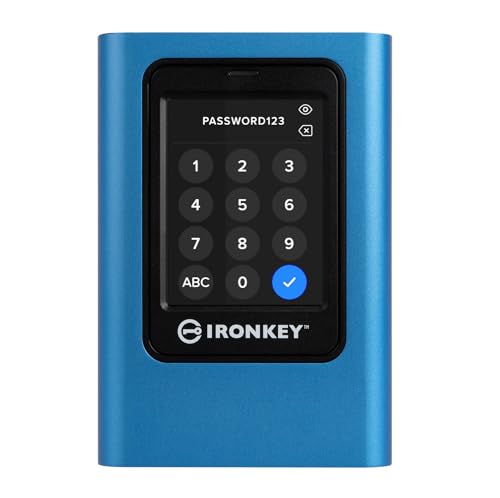
For professionals and organizations that prioritize data security, the Kingston IronKey Vault Privacy 80 960GB External SSD stands out as a reliable choice. With a robust 960GB capacity, it employs FIPS 197 certified XTS-AES 256-bit encryption to safeguard your data. You can easily manage access with multi-password options and configurable password rules. The intuitive touch-screen interface offers both PIN and passphrase modes for quick access. Additionally, its dual read-only modes and built-in malware protection guarantee your data remains safe from unauthorized access and threats. Choose this SSD for a secure, user-friendly experience in data protection.
Best For: Professionals and organizations that require high-level data security and protection for sensitive information.
Pros:
- FIPS 197 certified for enhanced security compliance.
- Intuitive touch-screen interface for easy navigation and access.
- Dual read-only modes and built-in malware protection ensure data integrity.
Cons:
- Higher price point compared to standard external SSDs.
- Limited storage options beyond 960GB may not meet all needs.
- Requires users to remember multiple password configurations for access.
WD 1TB My Passport SSD Portable External Solid State Drive
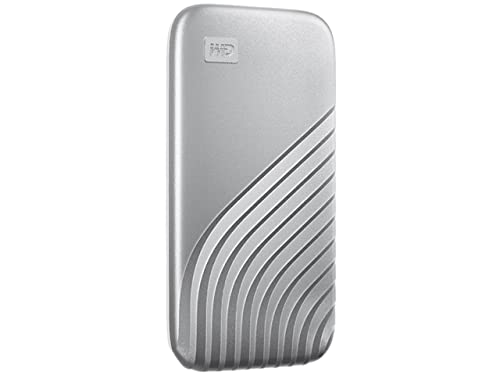
Looking for a reliable solution to keep your data safe while on the go? The WD 1TB My Passport SSD is an excellent choice. With NVMe technology, it offers impressive read speeds up to 1050MB/s and write speeds up to 1000MB/s. You’ll appreciate the password-enabled 256-bit AES hardware encryption, ensuring your files stay secure. Plus, it’s shock and vibration resistant and can withstand drops up to 6.5ft. This SSD is cross-compatible with USB 3.2 Gen-2 and USB-C, and it even supports USB-A for older systems. Stay secure and efficient with this portable powerhouse for your data!
Best For: Individuals who need a portable and secure storage solution for their data while traveling or on the go.
Pros:
- High performance: Offers read speeds up to 1050MB/s and write speeds up to 1000MB/s, making data transfers quick and efficient.
- Robust security: Features password-enabled 256-bit AES hardware encryption to keep files safe from unauthorized access.
- Durable design: Shock and vibration resistant, with drop resistance up to 6.5ft, ensuring reliability in various conditions.
Cons:
- Limited storage capacity: At 1TB, it may not be sufficient for users with extensive data storage needs.
- Price point: Higher cost compared to traditional HDDs may deter budget-conscious consumers.
- Dependency on USB compatibility: Requires compatible USB ports, which might limit usability with older systems without adapters.
Samsung T5 Portable SSD 1TB
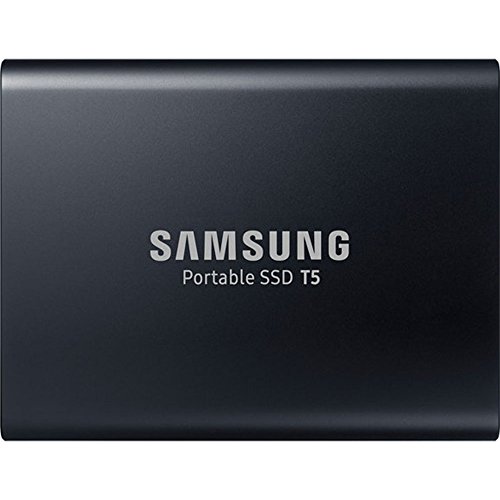
Compact and powerful, the Samsung T5 Portable SSD 1TB is perfect for professionals who need fast and secure data storage on the go. With read/write speeds up to 540MB/s, it’s up to 4.9 times faster than traditional external HDDs, making it ideal for transferring large files like 4K videos and high-resolution photos. Its sleek, shock-resistant metal casing fits easily in your palm or pocket. Plus, you can enhance your data security with optional password protection and AES 256-bit hardware encryption. With USB Type-C and Type-A connectivity, it’s compatible with various devices, ensuring convenience wherever you are.
Best For: Professionals and creatives who require fast and secure data storage for large files on the go.
Pros:
- Ultra-fast data transfer speeds of up to 540MB/s, significantly faster than traditional external HDDs.
- Compact and portable design that easily fits in your palm or pocket, making it convenient for travel.
- Enhanced data security with optional password protection and AES 256-bit hardware encryption.
Cons:
- Higher price point compared to standard external hard drives.
- Limited storage options available (1TB may not be sufficient for some users).
- Potential compatibility issues with older devices that lack USB Type-C ports.
SanDisk 2TB Extreme PRO Portable SSD

With its powerful password protection and 256-bit AES hardware encryption, the SanDisk 2TB Extreme PRO Portable SSD is ideal for professionals and creatives who need to keep sensitive data secure on the go. You’ll enjoy lightning-fast read/write speeds of up to 2000MB/s, thanks to the USB-C interface and NVMe technology. Its rugged design offers IP65 water and dust resistance, along with 3-meter drop protection. The SanDisk Memory Zone app simplifies file management, automatically freeing up space. Weighing just 2.72 ounces, this compact SSD is a reliable companion for safeguarding your important files wherever you are.
Best For: Professionals and creatives who need secure, high-speed storage for sensitive data on the go.
Pros:
- Up to 2000MB/s read/write speeds for efficient data transfer.
- IP65 water and dust resistance along with 3-meter drop protection for durability.
- Integrated password protection and 256-bit AES hardware encryption for enhanced security.
Cons:
- Requires the SanDisk Memory Zone app for optimal file management functionality.
- Slightly heavier compared to other portable SSDs in the market.
- Higher price point compared to traditional external hard drives.
Samsung T7 Portable SSD (1TB)

For professionals in video editing, photography, and gaming, the Samsung T7 Portable SSD (1TB) stands out as a reliable choice. With read speeds up to 1,050MB/s and write speeds of 1,000MB/s, it’s almost twice as fast as its predecessor, the T5. Its compact, shock-resistant design guarantees durability, protecting your data from falls of up to 6 feet. Plus, it’s compatible with both PCs and mobile phones, making it versatile for heavy-duty applications. As the world’s #1 flash memory brand, Samsung assures trusted performance, giving you peace of mind while storing your most important files securely.
Best For: Professionals in video editing, photography, and gaming who need fast and reliable external storage.
Pros:
- Fast read/write speeds of up to 1,050MB/s and 1,000MB/s, enhancing workflow efficiency.
- Compact and durable design with shock resistance and fall protection up to 6 feet, ensuring data safety.
- Wide compatibility with PCs and mobile phones, making it versatile for various applications.
Cons:
- Higher price point compared to traditional external hard drives, which may not suit all budgets.
- Limited to USB 3.2 Gen 2 connectivity, which could be a drawback for those with older USB interfaces.
- Not waterproof, meaning additional care is needed in wet environments to protect the device.
Crucial X10 2TB Portable SSD

The Essential X10 2TB Portable SSD stands out as an excellent choice for busy professionals and creative individuals who need reliable, high-speed storage on the go. With read speeds reaching up to 2,100MB/s, you’ll experience considerably faster performance than traditional hard drives. Its IP65 rating guarantees it’s dust and water-resistant, while being drop-resistant up to 9.8 ft, making it perfect for travel. You can connect it to various devices, including Windows, Mac, and gaming consoles, thanks to USB-C and USB-A compatibility. Plus, you get three months of Mylio Photos Plus and Acronis True Image software to enhance your storage experience.
Best For: Busy professionals and creative individuals seeking high-speed, portable storage solutions.
Pros:
- Fast read speeds of up to 2,100MB/s, significantly outperforming traditional hard drives.
- Durable design with IP65 dust and water resistance and drop resistance up to 9.8 ft, ideal for travel.
- Wide compatibility with various devices including Windows, Mac, gaming consoles, and mobile devices via USB-C and USB-A.
Cons:
- The high-speed performance may not be fully utilized on older devices with slower USB interfaces.
- Limited storage capacity of 2TB may not be sufficient for users with extensive data needs.
- Bonus software is only available for three months, requiring additional purchases for long-term use.
WD 6TB My Passport Portable External Hard Drive

Designed for users who prioritize security and portability, the WD 6TB My Passport Portable External Hard Drive stands out with its built-in hardware encryption and password protection features. Weighing only 7.4 ounces and measuring 4.21 x 0.81 x 2.95 inches, it’s easy to carry your important files wherever you go. With a capacity of 6TB, it’s the world’s first 2.5” portable hard drive of its kind. Plus, it includes Acronis True Image software for secure backups and ransomware protection to keep your data safe. With a solid 4.5-star rating, this drive is a reliable choice for your storage needs.
Best For: Users seeking a high-capacity, portable external hard drive with robust security features for data protection and backup.
Pros:
- High Capacity: Offers an impressive 6TB of storage, making it ideal for large files and backups.
- Security Features: Equipped with hardware encryption and password protection to safeguard sensitive data.
- Portable Design: Lightweight and compact, perfect for on-the-go use.
Cons:
- Mechanical Hard Disk: Slower performance compared to SSDs due to its 5400 RPM rotational speed.
- USB Compatibility: While it supports USB 2.0/3.0 and is USB 3.1 compatible, users may need adapters for newer devices.
- Limited Warranty Information: Warranty details are not specified upfront and may require customer service contact for clarification.
iStorage diskAshur M2 1TB Portable SSD
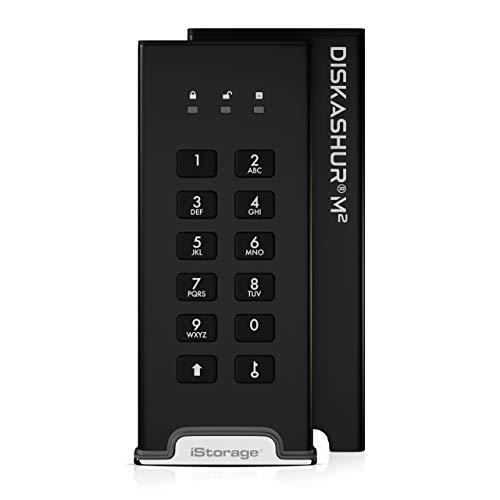
If you prioritize security and portability in your data storage, the iStorage diskAshur M2 1TB Portable SSD is an excellent choice. This lightweight, rugged SSD features a PIN authentication system and AES-XTS 256-bit hardware encryption, ensuring your data remains secure without any software. It can endure drops from 4 meters and withstand 2.7 tons of weight. With USB 3.2 speeds reaching up to 370MB/s, you’ll enjoy quick access to your files. It’s compact enough to fit in your pocket and compatible with Linux, Mac, and PC, making it versatile for all your storage needs.
Best For: Individuals or businesses that require secure, portable data storage with rugged durability and fast transfer speeds.
Pros:
- Highly secure with PIN authentication and AES-XTS 256-bit hardware encryption.
- Durable design that can withstand drops, crushing weight, and is waterproof and dustproof (IP68).
- Fast data transfer speeds of up to 370MB/s with USB 3.2 compatibility.
Cons:
- Limited storage capacity of 1TB may not meet the needs of users requiring larger storage options.
- Customer reviews indicate mixed satisfaction, with an average rating of 3.8 out of 5 stars.
- Slightly heavier than some other portable SSDs, especially with the protective sleeve (86 grams).
Samsung T5 Portable SSD 500GB

For professionals on the go, the Samsung T5 Portable SSD 500GB stands out as an ideal choice with its impressive speed and robust security features. You’ll enjoy data transfer speeds of up to 540MB/s, making it considerably faster than traditional external HDDs. Its compact design fits snugly in your hand, easily slipping into your pocket or purse. Plus, the shock-resistant metal exterior guarantees it withstands drops of up to 2 meters. With optional password protection and AES 256-bit hardware encryption, your data remains secure. Compatible with various devices, it’s a reliable, high-rated option for safeguarding your important files.
Best For: Professionals and individuals who need fast, portable, and secure storage solutions for their important files.
Pros:
- High-speed data transfer of up to 540MB/s, significantly faster than traditional external HDDs.
- Durable design with a shock-resistant metal exterior that can withstand drops of up to 2 meters.
- Robust security features including optional password protection and AES 256-bit hardware encryption.
Cons:
- Limited capacity of 500GB may not be sufficient for users with large data storage needs.
- Requires specific operating systems (Windows 7, Mac OS X 10.9 or higher, Android 4.4 or higher) for compatibility.
- Higher price point compared to traditional external HDDs may deter budget-conscious consumers.
Factors to Consider When Choosing a Secure External SSD with Encryption
When you’re choosing a secure external SSD with encryption, there are several key factors to keep in mind. You’ll want to evaluate the encryption standards and types, as well as the durability and resistance ratings. Additionally, think about speed, compatibility with your devices, and the overall design for portability.
Encryption Standards and Types
Choosing the right encryption standards for your external SSD is essential, as it directly impacts the security of your sensitive data. Look for devices that utilize AES (Advanced Encryption Standard) encryption, especially AES 256-bit, as it provides robust protection. Additionally, consider SSDs with FIPS (Federal Information Processing Standards) certification, which assures you that the encryption methods have been validated by the U.S. government. Multi-password options enhance security by allowing admin/user distinctions, giving you better control over data access. Configurable password rules, like minimum length and complexity, help you create stronger passwords to defend against unauthorized access. Ultimately, opt for hardware encryption, which encrypts data directly on the drive, ensuring better protection in case of loss or theft.
Durability and Resistance Ratings
While it’s easy to focus solely on encryption standards, durability and resistance ratings are just as important when selecting a secure external SSD. Look for SSDs with drop protection; some can withstand falls from up to 9.8 feet (3 meters). Check for water and dust resistance ratings like IP65 or IP68, which offer varying levels of protection against the elements. Shock resistance is essential too, as rugged designs can endure impacts and vibrations during transport. Pay attention to materials; aluminum chassis and crushproof cases enhance resilience against physical damage. Ensuring your SSD has these durability features is significant, especially if you need reliable performance in demanding conditions like outdoor or travel use.
Speed and Performance Metrics
Speed plays a pivotal role in your selection of a secure external SSD with encryption. Top models can offer read speeds up to 2000MB/s and write speeds around 1000MB/s, ensuring efficient data transfer. The technology used matters, too; NVMe drives provide faster data access compared to traditional SATA interfaces. Keep in mind that performance can vary based on your host device, cable type, and usage conditions, so your setup plays a essential role. If you’re tackling tasks like video editing or gaming, opting for an SSD with high read/write speeds over 1000MB/s can greatly enhance your workflow. While speed is critical, consider how drive capacity and encryption efficiency also affect overall performance.
Compatibility With Devices
When it comes to selecting a secure external SSD with encryption, ensuring compatibility with a range of devices is essential. You’ll want an SSD that works seamlessly across various operating systems, including Windows, macOS, and Linux, to maximize usability. Check for connections like USB Type-C and USB-A, which allow you to connect with both modern and older devices effortlessly. If you plan to transfer files between computers and mobile devices, make sure the SSD supports smartphones and tablets. Additionally, if gaming or media streaming is on your agenda, look for drives that mention cross-compatibility with gaming consoles. Finally, verify that the encryption software is compatible with your chosen operating systems to manage your data securely.
Portability and Design Features
After ensuring compatibility with your devices, consider how portability and design features impact your choice of a secure external SSD with encryption. Look for smaller, lighter designs that easily fit in your pocket or bag. Rugged models with shock resistance and drop protection can withstand falls from heights up to 9.8 feet, ensuring your data remains safe. A durable casing, like a shock-resistant metal exterior, adds extra protection during travel. Features like a carabiner loop allow you to secure the SSD to your belt or backpack, enhancing convenience. Finally, evaluate connectivity options such as USB Type-C and USB-A support to improve compatibility and ease of use when transferring files across different devices.
User Authentication Methods
Choosing the right user authentication method is essential for maximizing the security of your external SSD with encryption. Look for models that offer PIN and passphrase modes, letting you create your own access codes for extra protection. Multi-password options can also be beneficial, allowing for both admin and user access, which helps control who can view sensitive data. Consider devices with touch-screen interfaces that make the authentication process straightforward without compromising security. Additionally, configurable password rules enable you to set specific complexity requirements, thwarting unauthorized access. Pairing these methods with hardware encryption, like AES 256-bit encryption, guarantees your data stays secure even if your device is lost or stolen.
Backup and Recovery Options
Selecting the right backup and recovery options can greatly enhance the security and usability of your encrypted external SSD. Look for models that include backup software, like Acronis True Image, to make secure data backup and recovery easier. Automatic file management features can help you organize your data, guaranteeing efficient backups. Consider if the SSD offers free software subscriptions, such as Mylio Photos Plus, which can provide extra recovery options for specific file types, especially photos and videos. Dual read-only modes are essential too, as they protect against accidental deletions during backups. Finally, verify the device is compatible with various operating systems and devices to maintain seamless integration into your existing backup workflow.
Price and Warranty Terms
When evaluating secure external SSDs with encryption, price and warranty terms play a significant role in your decision-making process. You should compare prices across different brands and models, as costs can vary based on features and storage capacities. Don’t overlook the warranty terms; many manufacturers offer limited warranties ranging from one to five years, which affect your investment’s long-term value. Research the brand’s reputation for warranty claims, since some companies provide better customer service and support than others. Look for SSDs with data recovery options included in their warranty for added peace of mind. Finally, consider the potential costs of repair or replacement after the warranty expires, as this will influence your total cost of ownership over time.