
If you’re looking to enhance your productivity while keeping noise to a minimum, silent mice might be just what you need. These devices offer a blend of comfort, functionality, and quiet operation that can transform your workspace. With various options available, it’s important to find one that suits your specific needs and preferences. Let’s explore the top contenders that can help you stay focused and efficient without the distraction of clicking sounds.
Logitech M330 Silent Wireless Mouse (Black)

If you’re looking for a mouse that keeps your workspace quiet, the Logitech M330 Silent Wireless Mouse is an excellent choice. With Logitech’s SilentTouch Technology, it reduces over 90% of clicking sounds, ensuring a peaceful environment. This ergonomically designed mouse features contoured plastic grips for comfort during long hours. Its impressive 18-month battery life, coupled with a power-saving auto-sleep mode, means you won’t have to worry about frequent changes. Plus, with a wireless range of up to 33 feet and compatibility with multiple operating systems, it’s perfect for any setup. Enjoy a quieter, more efficient workspace with this stellar device.
Best For: Those seeking a quiet and comfortable mouse for long hours of work or study in a variety of settings.
Pros:
- Reduces over 90% of clicking sounds for a quieter workspace.
- Ergonomic design with contoured grips enhances comfort during extended use.
- Long battery life of 18 months with auto-sleep mode minimizes maintenance.
Cons:
- Limited to right-handed users due to its design.
- Wireless range may be affected by interference in crowded environments.
- Upgrade to Signature M650 may be required for additional features.
VssoPlor Wireless Slim Portable Mouse

The VssoPlor Wireless Slim Portable Mouse is an ideal choice for professionals seeking a quiet workspace. Its silent clicking guarantees you won’t disturb colleagues during important meetings or focus sessions. With 2.4 GHz wireless technology, you’ll enjoy stable connections and fast transmission speeds, effective up to 10 meters. Designed for portability, its ergonomic shape and lightweight construction make it easy to carry wherever you go. Plus, the intelligent sleep mode extends battery life, automatically activating after just five minutes of inactivity. Available in sleek Black and Gold, this mouse combines style and functionality for your office needs.
Best For: Professionals and students seeking a quiet and portable mouse for work or study environments.
Pros:
- Silent clicking allows for undisturbed work sessions, ideal for shared spaces.
- Lightweight and compact design makes it easy to carry for travel or commuting.
- Intelligent sleep mode helps conserve battery life, extending usage time between charges.
Cons:
- Limited effective range of 10 meters may not be suitable for larger workspaces.
- Compatibility issues may arise with older operating systems not listed.
- No customizable buttons might limit functionality for advanced users.
USB Wired Optical Mouse, Silent Click, Ergonomic Shape

For professionals seeking a quiet workspace, the Censprin USB Wired Optical Mouse stands out with its silent click feature, ensuring minimal disruption during important meetings or focused tasks. This 3-button mouse boasts an ergonomic shape, which fits comfortably in your hand, reducing strain during long hours of use. Weighing just 3.35 ounces, it’s lightweight and easy to maneuver. Compatible with Windows computers, Macs, iPads, PCs, and laptops, it offers versatility for any setup. With a solid customer rating of 4.4 out of 5 stars from 797 reviews, it’s a reliable choice for boosting productivity without the noise.
Best For: Professionals seeking a quiet and comfortable mouse for extended use in a variety of work environments.
Pros:
- Silent Click: Minimizes noise, making it ideal for quiet workspaces or meetings.
- Ergonomic Design: Provides comfort and reduces strain during prolonged use.
- Wide Compatibility: Works seamlessly with Windows, Macs, iPads, PCs, and laptops.
Cons:
- Wired Connection: Limits mobility compared to wireless options.
- Basic Features: Lacks advanced functionalities found in high-end gaming mice.
- Weight: Some users may prefer a lighter mouse for even easier maneuverability.
HP 280 Silent Wireless Mouse – Ergonomic Design
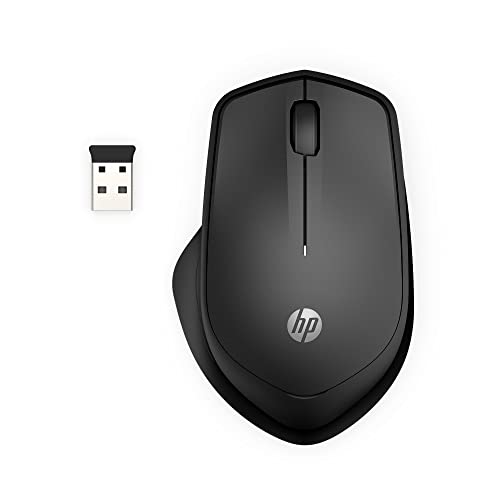
Designed specifically for professionals who value a quiet workspace, the HP 280 Silent Wireless Mouse combines ergonomic comfort with advanced noise reduction technology. With a 2.4GHz USB-A connection and a range of up to 32.8 feet, you’ll enjoy seamless wireless use. The mouse features up to 90% noise reduction on clicks, making it perfect for quiet environments. Its ergonomic right-handed design guarantees all-day comfort, while the three-button navigation and integrated scroll wheel enhance usability. Plus, the 1600 DPI optical sensor assures precision on any surface. With an impressive 18-month battery life, this mouse is built for durability and extended performance.
Best For: Professionals and individuals who work in quiet environments and seek an ergonomic, noise-reducing mouse.
Pros:
- Up to 90% noise reduction on button clicks, making it ideal for quiet workspaces.
- Ergonomic design ensures comfort during long periods of use.
- Long battery life of up to 18 months on a single AA battery enhances convenience.
Cons:
- Limited to right-handed users due to its design.
- Dependence on a USB-A port, which may require an adapter for newer devices with only USB-C ports.
- Lack of customizable buttons, which may limit functionality for advanced users.
Logitech M240 Silent Bluetooth Mouse

If you’re looking for a quiet yet efficient mouse for your office environment, the Logitech M240 Silent Bluetooth Mouse is an excellent choice. This compact and portable mouse connects seamlessly via Bluetooth, eliminating the need for dongles. With a 90% reduction in click sound, you can work with minimal distractions. Its ergonomic design guarantees comfort during long sessions, while the auto sleep feature helps prolong battery life, lasting up to 18 months on a single AAA battery. Weighing just 2.6 ounces, it’s perfect for on-the-go productivity. Plus, it’s made with recycled materials, making it an eco-friendly option.
Best For: Those seeking a quiet, portable mouse for office use or travel with a comfortable ergonomic design.
Pros:
- Bluetooth Connectivity: Allows for easy pairing without the need for a dongle.
- Noise Reduction: Provides 90% less click sound, ideal for quiet environments.
- Eco-Friendly: Made with recycled materials, appealing to environmentally conscious users.
Cons:
- Limited Customization: May lack advanced features found in high-end gaming mice.
- Battery Replacement: Requires a AAA battery, which may need periodic replacement.
- Range Limitations: Effective use is limited to a 10m/33 feet range from the computer.
TECKNET Wireless Mouse (Rechargeable, 4800 DPI, Grey)

The TECKNET Wireless Mouse stands out as an ideal choice for professionals who need a quiet, efficient tool for their office setup. With a rechargeable battery that lasts up to three months, you won’t have to worry about constant charging. It features a dual-device connection, allowing you to switch seamlessly between devices using Bluetooth or USB. You’ll appreciate the six adjustable DPI settings, enabling you to customize your performance. Plus, its silent operation makes it perfect for libraries or shared workspaces. Weighing just 5.1 ounces, it’s lightweight and portable, ensuring your productivity stays uninterrupted.
Best For: Professionals looking for a quiet and efficient mouse for office use or shared workspaces.
Pros:
- Dual-device connectivity via Bluetooth and USB, allowing seamless switching between devices.
- Long battery life of up to three months with a quick recharge time of 1.5 to 2 hours.
- Silent operation, making it ideal for quiet environments like libraries and offices.
Cons:
- Side buttons are not compatible with macOS, limiting functionality for Mac users.
- Some users may find the weight of 5.1 ounces slightly heavier compared to other wireless mice.
- The need for battery recharging may be inconvenient for users who prefer a traditional wired mouse.
Logitech Wireless Mouse Signature M650 L – Large Hand Size, Bluetooth

For those with larger hands seeking comfort during long work sessions, the Logitech Wireless Mouse Signature M650 L is an excellent choice. Its ergonomic design and soft thumb area guarantee you stay comfortable even during extended use. This mouse offers silent clicks, thanks to its SilentTouch technology, reducing noise by 90%—perfect for maintaining focus in quiet environments. You can easily connect via Bluetooth or Logi Bolt USB receiver, making it compatible with PCs, Macs, and Chromebooks. Plus, customize the side buttons using Logitech Options Plus for shortcuts, enhancing your productivity without the distraction of loud clicks.
Best For: Individuals with larger hands looking for a comfortable and quiet mouse for extended work sessions.
Pros:
- Ergonomic design provides comfort for long periods of use.
- SilentTouch technology reduces click noise by 90%, ideal for quiet environments.
- Customizable side buttons enhance productivity through shortcut options.
Cons:
- Limited to right-handed users, as it is specifically designed for that hand orientation.
- Larger size may not be suitable for users with smaller hands.
- Customization features require Logitech Options Plus, which may not be compatible with all systems.
Logitech Signature M550 L Wireless Mouse for Large Hands

Designed specifically for users with larger hands, the Logitech Signature M550 L Wireless Mouse offers unmatched comfort and functionality. Its contoured shape, soft thumb area, and rubber side grips guarantee you can work for hours without discomfort. You’ll appreciate the silent clicks, thanks to SilentTouch technology that reduces noise by 90%. Plus, it connects easily via Bluetooth or the Logi Bolt USB receiver, making it compatible with multiple platforms, including Windows 11. With a remarkable 24-month battery life on a single AA battery, this mouse also features a SmartWheel for precise scrolling, making it perfect for both office and home use.
Best For: Users with larger hands seeking a comfortable and quiet wireless mouse for extended use.
Pros:
- SilentTouch technology reduces click noise by 90%, making it ideal for quiet environments.
- Long battery life of 24 months on a single AA battery minimizes the need for frequent replacements.
- Multi-device compatibility allows seamless switching between various operating systems, including Windows 11.
Cons:
- Designed specifically for larger hands, which may not be suitable for users with smaller hands.
- Limited color options available, only offered in black.
- Some users may prefer a more traditional design rather than the contoured shape.
Uiosmuph LED Wireless Mouse (G12 Slim Rechargeable)
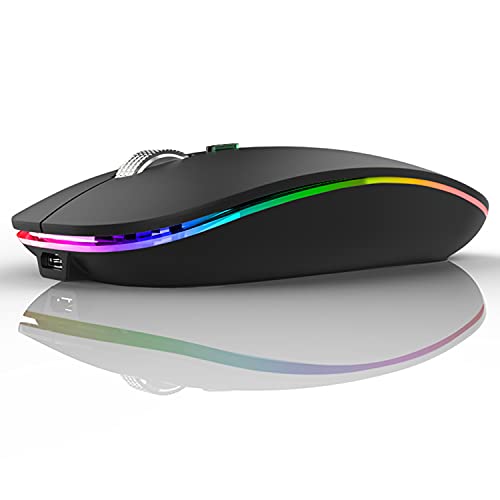
Looking for an office mouse that won’t disrupt your workflow? The Uiosmuph LED Wireless Mouse (G12 Slim Rechargeable) is a fantastic choice. This sleek, matte black mouse measures just 4.4 x 2.2 x 0.79 inches, making it easy to carry in your laptop bag. With a built-in rechargeable battery, you won’t have to worry about changing batteries, and it even goes to sleep after 8 minutes of inactivity. Enjoy a cool atmosphere with its 7 random LED color changes. Plus, it’s compatible with various devices, ensuring seamless connectivity for all your office needs.
Best For: Those seeking a portable and stylish mouse that enhances productivity without the hassle of battery changes.
Pros:
- Built-in rechargeable battery eliminates the need for constant battery replacements.
- Slim and lightweight design makes it perfect for travel and easy storage in laptop bags.
- 7 vibrant LED color changes add a fun and soothing atmosphere to any workspace.
Cons:
- The mouse may not be ideal for users who prefer a more traditional design with fewer lighting effects.
- Limited battery life may require frequent recharging, especially with heavy usage.
- The small size might not be comfortable for users with larger hands.
TECKNET Wireless Bluetooth Mouse (Rechargeable, Ergonomic)

The TECKNET Wireless Bluetooth Mouse stands out as an ideal choice for professionals who juggle multiple devices in their office environment. With support for two Bluetooth connections and 2.4GHz USB-A, you can connect up to three devices and switch between them effortlessly. Its ergonomic design guarantees comfort during long hours, while silent clicks keep your workspace disturbance-free. Enjoy high-precision control with six DPI settings, perfect for any task. Plus, the rechargeable battery lasts up to three months on a full charge. With compatibility across various operating systems and a 36-month warranty, this mouse is a reliable productivity tool.
Best For: Professionals who need to efficiently multitask across multiple devices in an ergonomic and quiet workspace.
Pros:
- Supports multiple connections: Connects up to three devices simultaneously across Bluetooth and USB-A.
- Ergonomic design: Provides comfort for extended use with silent clicks to minimize distractions.
- Long battery life: Rechargeable battery lasts up to three months with regular usage.
Cons:
- Limited side scroll compatibility: Side scroll feature is not supported on macOS.
- Initial charging time: Takes 1.5 to 2 hours for a full charge.
- Auto sleep feature: May require waking the mouse after inactivity, which could interrupt workflow.
Factors to Consider When Choosing Silent Mouse for Office
When picking a silent mouse for your office, you should consider several important factors. Noise reduction technology, ergonomic design, and battery life all play an essential role in your comfort and productivity. Additionally, verify the mouse has the right connectivity options and compatibility with your devices.
Noise Reduction Technology
Choosing a silent mouse for your office can greatly enhance your work environment, especially if noise is a concern. Noise reduction technology in these mice typically reduces clicking sounds by over 90%, fostering a quieter space that boosts focus and productivity. Many models utilize proprietary technologies, like SilentTouch, ensuring you still get the tactile feel of traditional clicks without the disruptive noise. However, effectiveness can vary, so it’s wise to check user reviews and specifications before deciding. Additionally, features like sleep modes and power-saving options help minimize unnecessary sounds from idle devices, further enhancing your serene workspace. Investing in a silent mouse is a smart move towards a more productive and peaceful office experience.
Ergonomic Design Features
A well-designed silent mouse can make a significant difference in your comfort and productivity at work. Look for ergonomic features that fit the natural curve of your hand, promoting comfort during long hours of use. Many models include soft thumb areas and rubber side grips, enhancing your grip and reducing hand fatigue. While most ergonomic silent mice cater to right-handed users, some options are available for left-handed individuals as well. Adjustable DPI settings allow you to customize sensitivity for varying tasks, enhancing precision and comfort. Additionally, a lightweight construction guarantees portability, making it easy to take your silent mouse from the office to your next meeting or trip. Prioritize these ergonomic features to improve your daily workflow.
Battery Life Considerations
Battery life is one of the most critical factors to contemplate for silent mice in an office setting. Many models boast extended usage, with some lasting up to 18 months on a single AA battery. Look for features like auto-sleep mode; this helps conserve energy by putting your mouse into a low-power state after inactivity. If you prefer rechargeable options, you can find mice that fully charge in just 1.5 to 2 hours, eliminating the hassle of constant battery replacements. Keep in mind that the operational range can affect battery consumption, especially if you’re using it farther away from your device. Always check user ratings and specifications to guarantee you’re choosing a model with reliable battery performance.
Connectivity Options Available
When it comes to selecting a silent mouse for office use, connectivity options play an essential role in your overall experience. You have several choices to evaluate. For a wireless option, Bluetooth can connect without a USB receiver, which is great for devices lacking USB ports. Alternatively, many silent mice use 2.4GHz technology, offering stable connections up to 33 feet away. If you prefer a wired solution, USB-A is common, allowing for quick plug-and-play with PCs, Macs, and laptops. Some models even support dual connectivity, letting you connect to multiple devices simultaneously—perfect for multitasking. Make sure to choose a mouse that fits your specific needs for seamless productivity in your workspace.
Compatibility With Devices
Selecting the right silent mouse for your office setup involves guaranteeing compatibility with your devices. First, check that the mouse supports the operating systems you use, like Windows, macOS, Linux, or ChromeOS, to prevent any connectivity issues. You’ll also want to verify the required connection types—whether you need a USB-A receiver, Bluetooth, or both—to match your device’s ports. If you often switch between different computers, tablets, or laptops, consider a mouse that supports multi-device connectivity. Additionally, guarantee it offers plug-and-play functionality for hassle-free setup without extra software. Finally, review compatibility notes for specific features, like side buttons or scrolling functions, as these can vary by operating system.