
If your studio runs on large files, multiple displays, and constant device swaps, the right dock can save real time every day. The best Thunderbolt docks for creative offices make it easier to connect monitors, drives, Ethernet, and power through one cable.
Below, we focus on practical options for Mac and Windows workflows, with an emphasis on display support, charging, port variety, and office-ready reliability.
Best 10 Thunderbolt Docks for Creative Offices Picks for 2026
Best for Dual 4K Workflows
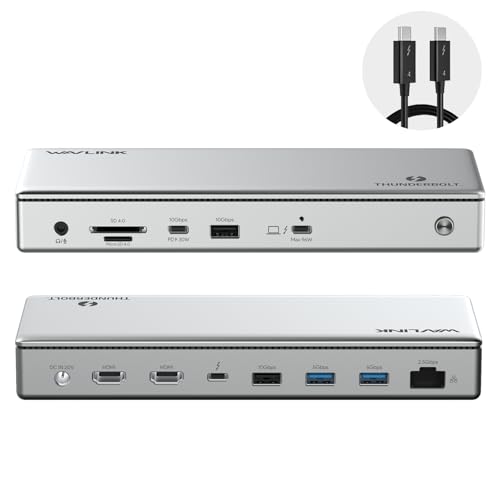
- Dual 4K@60Hz HDMI or single 8K support
- Up to 96W charging with 40 Gbps Thunderbolt 4
- 2.5G Ethernet and SD/MicroSD card reader
Best For: Creative teams that need a dual-monitor dock with fast media access and strong wired networking.
Best for Heavy Media Workflows
Anker Prime TB5 Docking Station

- TB5 speeds up large file transfers
- 14-in-1 port selection for busy desks
- 140W charging with active cooling
Best For: Creative teams handling large media files, fast charging, and multi-display setups.
Best for Dual 4K Mac Workflows
Plugable 16-in-1 Thunderbolt 4 Dock

- Dual 4K 60Hz output via HDMI or DisplayPort
- 100W charging with 2.5GbE and 7 USB ports
- Works with Thunderbolt 5, TB4, USB4, and USB-C
Best For: Creative professionals who want a clean dual-monitor dock for Mac or Windows workstations.
Best for Multi-Display Mac Workflows
UGREEN 8-in-1 Thunderbolt 4 Dock

- 3x Thunderbolt 4 ports with 40Gbps bandwidth
- Dual 4K@60Hz support on compatible systems
- 85W charging with included 140W GaN power adapter
Best For: Creative teams and Mac users who need a fast Thunderbolt 4 dock for dual displays and peripherals.
Best for Reliable Dell Workflows
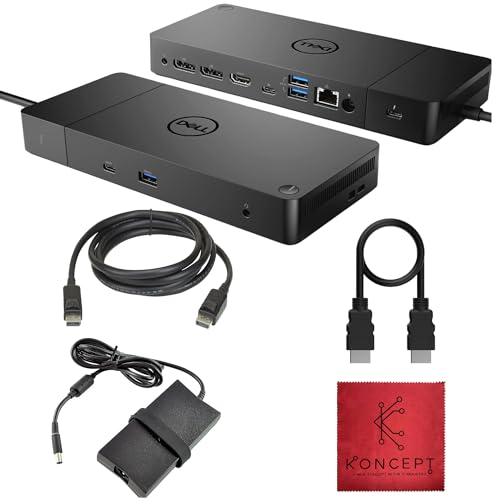
- Dual-monitor support with DisplayPort, HDMI, and USB-C video
- Strong port selection for peripherals, audio, and Ethernet
- Includes power adapter plus HDMI and DisplayPort cables
Best For: Creative teams using Dell laptops or USB-C workstations that need a reliable one-cable dock.
Best for Multi-Monitor Workflows
Dell WD22TB4 Thunderbolt 4 Dock

- 13 ports for USB-C, USB-A, HDMI, DisplayPort, and Ethernet
- Up to 130W power delivery for single-cable laptop charging
- Strong Windows multi-monitor support, including up to four 4K displays
Best For: Creative teams that need a reliable Thunderbolt dock for dual- or multi-monitor desks.
Best for Dual-Display Creatives
Plugable Thunderbolt 5 Dock TBT-UDH2

- Dual HDMI 2.1 for high-resolution creative workflows
- Six USB-C ports plus 140W charging
- Fanless, driverless, and office-friendly
Best For: Creative offices that need dual displays, fast USB-C connectivity, and a clean plug-and-play dock.
Best for Multi-Monitor Studios
Dell WD22TB4 Thunderbolt 4 Dock
- 13 ports for mixed USB-C, USB-A, video, and Ethernet connections
- Up to 130W power delivery for a cleaner single-cable desk setup
- 4K 60Hz multi-display support suits demanding Windows workflows
Best For: Creative offices that need a versatile Thunderbolt dock for multi-monitor editing and everyday connectivity.
Best for Mac Creators
Plugable Thunderbolt 4 Dock for MacBook Air & Pro

- 100W charging for MacBook Air and Pro
- Dual 4K or single 6K display support
- 6 USB ports plus SD and Ethernet
Best For: Mac-based creative teams needing a driverless dock with strong charging and display flexibility.
Best for Dual 4K Workflows – WAVLINK Thunderbolt 4 Dock
If you need one of the more capable thunderbolt docks for creative offices, this WAVLINK model is built for heavy multitasking with dual 4K displays, fast file transfers, and solid wired networking. It is a practical fit for editors, designers, and hybrid workstations that need one cable to handle monitors, storage, and charging.
Best For: Creative teams that want dual-monitor support, fast card access, and a cleaner desk setup on Windows or compatible Mac systems.
Pros:
- Dual 4K@60Hz HDMI output or single 8K support for high-resolution creative work
- Thunderbolt 4 certified with 40 Gbps bandwidth and up to 96W laptop charging
- Includes 2.5G Ethernet plus SD/MicroSD reader for faster media ingest
- Driverless setup keeps deployment simple for office and shared desk use
Cons:
- Mac external display support depends on chip generation and may require mixed outputs
- Some users may not need the 8K and 2.5G networking extras
Overall, this dock stands out for creative offices that want strong display flexibility without a complicated setup. Among thunderbolt docks for creative offices, it offers a useful mix of monitor support, charging, and media-friendly I/O that suits modern production desks.
Best for Heavy Media Workflows – Anker Prime TB5 Docking Station
If your desk setup moves huge video files, RAW image batches, or multi-display projects every day, this is one of the more capable thunderbolt docks for creative offices. The Anker Prime TB5 Dock brings Thunderbolt 5 speed, strong 140W charging, and a cooling system designed to keep performance steady during long work sessions.
Best For: Creative teams and power users who need fast file transfers, high-watt charging, and flexible display support from a single dock.
Pros:
- Thunderbolt 5 support with up to 120Gbps transfer speeds for fast large-file workflows
- 14-in-1 layout covers displays, storage, SD/TF cards, Ethernet, audio, and charging
- 140W upstream charging is strong enough for demanding laptops
- Active cooling helps maintain performance under heavier loads
Cons:
- Full dual-display support depends on your laptop’s Thunderbolt 5 compatibility
- Not the simplest option if you only need basic peripherals and one monitor
- USB-A hub chaining is not supported
For creative offices that regularly juggle big media files and external monitors, this dock delivers the kind of speed and connectivity that can reduce workflow bottlenecks. It’s especially compelling if you want a future-ready centerpiece rather than a basic port expander.
Best for Dual 4K Mac Workflows – Plugable 16-in-1 Thunderbolt 4 Dock
If you need one of the most practical thunderbolt docks for creative offices, this Plugable 16-in-1 setup is built around dual 4K 60Hz displays, fast charging, and plenty of everyday connectivity. It suits teams that want a clean desk setup for editing, design, and multitasking without relying on drivers or adapters.
Best For: Creative professionals using MacBook Air/Pro or Windows laptops who need a simple dual-monitor dock with strong peripheral support.
Pros:
- Drives two 4K 60Hz monitors over HDMI or DisplayPort with plug-and-play setup.
- Includes 100W charging, 2.5GbE, SD/microSD slots, and 7 USB ports.
- Compatible with Thunderbolt 5, Thunderbolt 4, USB4, and USB-C laptops.
Cons:
- More dock than casual users need if you only connect a few accessories.
- Best value depends on whether your workflow really uses dual displays.
For creative offices that prioritize display expansion and cable cleanup, this dock hits a very useful balance of power and simplicity. It is especially appealing if you want one of the more capable thunderbolt docks for creative offices without extra setup friction.
Best for Multi-Display Mac Workflows – UGREEN 8-in-1 Thunderbolt 4 Dock
If you need one dock that can handle fast storage, multiple peripherals, and serious external-display output, this UGREEN model is a strong fit for thunderbolt docks for creative offices. It combines Thunderbolt 4 bandwidth, USB-A expansion, gigabit Ethernet, and laptop charging in a compact setup that suits editing bays, design desks, and hot-desk workstations.
Best For: Creative teams and Mac users who want a high-speed Thunderbolt 4 dock with strong dual-monitor support.
Pros:
- Three Thunderbolt 4 ports plus three USB-A 3.2 ports for flexible, high-speed expansion
- Supports dual 4K@60Hz displays on compatible systems, or up to a single 8K display on Windows
- 85W laptop charging with the included 140W GaN adapter reduces cable clutter
- Gigabit Ethernet adds stable wired networking for large files and shared office setups
Cons:
- Must stay connected to the included power adapter to operate
- Mac systems with base M-chips are limited to one external display
- Higher-end than basic USB-C docks, so it may be overkill for simple setups
For teams prioritizing display flexibility and high-bandwidth connectivity, this is one of the more capable thunderbolt docks for creative offices. It is especially appealing if your workflow depends on fast transfers, external monitors, and a cleaner desk setup.
Best for Reliable Dell Workflows – Dell WD19TB Thunderbolt Dock
If you need a dependable dock for thunderbolt docks for creative offices, the Dell WD19TB is built for straightforward dual-monitor expansion, fast peripheral access, and easy desk cleanup. It’s especially practical for teams using Dell laptops or mixed USB-C systems that need one cable to handle displays, networking, and accessories.
Best For: Creative teams that want a proven Thunderbolt dock with strong display support, Ethernet, and plenty of ports for everyday office workflows.
Pros:
- Dual-monitor-friendly output with 2x DisplayPort, HDMI 2.0, and USB-C video support
- Useful port mix for creative desks: USB-A, USB-C, audio, Gigabit Ethernet, and Thunderbolt 3
- Includes power supply, HDMI cable, and DisplayPort cable for quicker setup
- No-driver plug-and-play convenience, especially with Dell systems
Cons:
- Renewed condition may not appeal to buyers wanting brand-new hardware
- Best features are strongest with Dell devices, so universal use can be less ideal
- Older Thunderbolt 3 design may not match the newest dock standards
For offices balancing editing, design, and general productivity, this dock delivers a practical mix of display flexibility and wired reliability. Among thunderbolt docks for creative offices, it stands out as a sensible workstation hub rather than a flashy premium pick.
Best for Mixed Mac/Windows Teams – Plugable Thunderbolt 4 Dock
If you need one of the more flexible thunderbolt docks for creative offices, this Plugable Thunderbolt 4 dock is built to standardize multi-device desks without sacrificing speed. It combines 40Gbps Thunderbolt 4 performance, 100W charging, and dual HDMI outputs, so editors, designers, and hybrid teams can move between laptops and peripherals with less cable clutter.
Best For: Creative teams and IT-managed offices that want a driverless Thunderbolt dock for mixed Windows and Mac workstations.
Pros:
- Dual 4K 60Hz HDMI support, or a single 8K display on compatible systems
- 13 ports cover charging, storage, Ethernet, SD/microSD, and audio
- 100W power delivery helps keep modern laptops charged through the workday
- Works well as a standardized dock for mixed-device office deployments
Cons:
- Display support is limited on some USB-C, Thunderbolt 3, and base Mac models
- Dual-monitor setup depends heavily on host laptop compatibility
For creative offices that value consistency, strong port selection, and dependable dual-display support, this is a practical dock to shortlist. It fits especially well where thunderbolt docks for creative offices need to serve both Mac and Windows users from the same desk setup.
Best for Multi-Monitor Workflows – Dell WD22TB4 Thunderbolt 4 Dock
Dell WD22TB4 Thunderbolt 4 Docking Station, 40Gbps, USB-C and USB-A, Dual 4K Display, Black
Check Price On AmazonIf your studio needs one dock to handle charging, peripherals, and multiple displays, the Dell WD22TB4 is a strong fit for thunderbolt docks for creative offices. It combines Thunderbolt 4 bandwidth, broad USB connectivity, and wired Ethernet in a single-cable setup that helps keep editing bays and shared desks tidy.
Best For: Creative teams that want a reliable, Dell-friendly Thunderbolt dock for dual- or multi-monitor desks, fast wired networking, and a clean one-cable workstation.
Pros:
- 13 ports cover Thunderbolt, USB-C, USB-A, HDMI, DisplayPort, Ethernet, and audio
- Up to 130W power delivery helps charge productivity laptops through one cable
- Strong monitor support for Windows workflows, including up to four 4K displays
- Gigabit Ethernet is ideal for stable uploads, downloads, and collaboration
Cons:
- macOS display support is more limited than Windows, especially on some Macs
- Best results are most likely with Thunderbolt or USB-C systems that support its full feature set
For creative offices that need dependable expansion without a lot of clutter, the WD22TB4 delivers the right mix of port density and display flexibility. It’s especially appealing when thunderbolt docks for creative offices need to support mixed peripherals, wired networking, and a polished desk setup.
Best for Dual-Display Creatives – Plugable Thunderbolt 5 Dock TBT-UDH2
If your studio or edit bay needs clean dual-monitor output, lots of USB-C, and simple plug-and-play expansion, this is one of the most capable thunderbolt docks for creative offices. The Plugable TBT-UDH2 pairs Thunderbolt 5 bandwidth with native Dual HDMI 2.1, 140W charging, and 2.5GbE, so it can handle demanding laptop setups without a stack of adapters.
Best For: MacBook Pro, MacBook Air, and Windows teams that want a high-bandwidth dock for dual displays, fast peripherals, and tidy desk setups.
Pros:
- Dual HDMI 2.1 supports up to 8K 60Hz or 4K 144Hz with Thunderbolt 5 hosts
- Six USB-C ports, including two front-facing 30W charging ports, reduce adapter clutter
- 140W laptop charging and 2.5GbE make it strong for modern creative workstations
- Driverless, fanless, and TAA-compliant for easier deployment in offices
Cons:
- Dual-display support depends on host compatibility, especially on some Mac chips
- Overkill if you only need basic USB expansion and one monitor
For creative teams that care about display quality, port variety, and low-fuss setup, this dock is a standout. It hits the sweet spot for thunderbolt docks for creative offices that need serious connectivity without making the desk feel complicated.
Best for Multi-Monitor Studios – Dell WD22TB4 Thunderbolt 4 Dock
If your workspace needs one cable to handle displays, peripherals, and power, this WD22TB4 is a strong fit for thunderbolt docks for creative offices. It brings plenty of legacy and modern ports, supports high-res multitasking, and is designed to keep a laptop setup cleaner at the desk.
Best For: Creative teams and solo editors who want a capable Thunderbolt 4 dock for dual- or multi-monitor workstations with wired networking and lots of I/O.
Pros:
- 13-port layout covers USB-C, USB-A, HDMI, DisplayPort, Ethernet, and audio
- Supports up to 4K 60Hz displays for demanding multi-screen workflows on Windows
- Up to 130W power delivery helps charge larger laptops over a single cable
- Gigabit Ethernet adds a stable wired connection for collaboration and uploads
Cons:
- macOS display support is more limited than Windows
- Renewed condition may not appeal to buyers wanting brand-new hardware
- Not the simplest option if you only need a basic single-monitor dock
For creative offices that live in Adobe apps, timelines, and reference monitors, this dock offers the right mix of bandwidth, power, and ports. It is especially appealing if you want a workstation hub that scales better than entry-level thunderbolt docks for creative offices.
Best for Mac Creators – Plugable Thunderbolt 4 Dock for MacBook Air & Pro
If you want one of the more capable thunderbolt docks for creative offices, this Plugable Thunderbolt 4 dock is built around MacBook Air and Pro workflows with 100W charging, dual 4K display support, and plenty of wired expansion. It’s a practical choice for desks that need fast single-cable docking without a lot of setup friction.
Best For: Mac-based creative teams that want a driverless Thunderbolt 4 dock with strong charging, display support, and lots of USB connectivity.
Pros:
- 100W laptop charging helps keep MacBook Air and Pro setups powered through the workday
- Supports dual 4K displays or a single 6K display for editing and content review
- Offers 6 USB ports, SD card access, Ethernet, and Thunderbolt expansion
- Driverless setup makes it easier to deploy across office workstations
Cons:
- Mac-focused feature set may be less compelling for mixed Windows-heavy offices
- Full display and port performance depends on the laptop and monitor configuration
For creative offices that value clean desks, fast peripheral access, and reliable monitor support, this dock covers the essentials without extra complexity. It stands out among thunderbolt docks for creative offices because it pairs strong power delivery with flexible display and storage connectivity in a straightforward package.
How We Picked the Best Thunderbolt Docks for Creative Offices
For Thunderbolt Docks for Creative Offices, we prioritized docks that support demanding workflows without adding friction. That means strong display output, fast data transfer, enough power delivery for work laptops, and a port mix that fits real production setups.
We also favored models with straightforward setup, broad compatibility, and office-friendly features such as Ethernet, multiple video outputs, and enough downstream ports for drives, tablets, card readers, and peripherals.
Quick Comparison
Think of this category in three broad tiers: Thunderbolt 4 docks for dependable dual-4K workstations, higher-port-count docks for teams that need more connections, and Thunderbolt 5 docks for users who want the latest bandwidth and display headroom. If your workflow centers on editing, design, motion graphics, or content review, display support and charging capacity usually matter more than raw port count alone.
Key Buying Factors for Thunderbolt Docks for Creative Offices
Display Support
Check whether the dock handles dual 4K at 60Hz, single 8K, or newer high-refresh options. Creative teams often need consistent monitor output more than occasional peak specs.
Power Delivery
Choose a dock that can charge your laptop and still leave headroom for accessories. Many office users will be best served by 85W to 100W, while larger laptops may benefit from 140W.
Port Selection
Look for the mix you actually use: HDMI, DisplayPort, USB-A, USB-C, Ethernet, and sometimes SD or audio. A dock with the right ports reduces adapter clutter and desk resets.
Compatibility and Deployment
Driverless docks are easier to roll out across teams, especially in mixed Mac and Windows environments. If your office standardizes on one platform, confirm support for your exact laptop and monitor combination before buying.
Thermals and Reliability
Creative workstations can stay connected for long sessions, so cooling design and stable performance matter. Fanless designs can be attractive for quiet studios, while actively cooled units may better handle heavier loads.
Who Should Buy Which Thunderbolt Docks for Creative Offices?
If you need a straightforward office dock for dual monitors and everyday peripherals, a solid Thunderbolt 4 model is usually the best value. If your setup includes more displays, faster external storage, or a newer laptop that can take advantage of extra bandwidth, consider Thunderbolt 5.
Mac-focused creative teams should verify dual-display behavior carefully, especially on MacBook Air and Pro models. Windows users with desk-based production rigs may prefer docks with more video options, higher charging output, and extra USB ports for a more permanent workstation setup.