
Hybrid work is easier when one dock handles power, displays, networking, and peripherals without constant replugging. The right Thunderbolt dock can turn a laptop into a full desk setup in seconds.
This roundup focuses on the best options for fast charging, stable multi-monitor support, and broad compatibility across Windows, Mac, and Surface devices.
Best 10 Thunderbolt Docks for Hybrid Workers Picks for 2026
Best for Fast Wired Networking
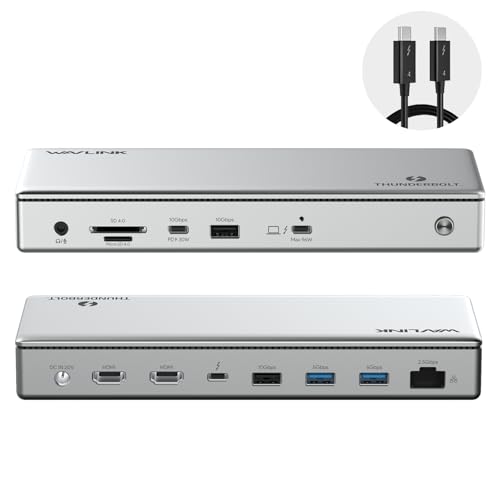
- Thunderbolt 4 certified, driverless setup
- Dual 4K/60Hz or single 8K display support
- Up to 96W charging with 2.5G Ethernet
Best For: Hybrid workers who want a simple Thunderbolt dock with strong display support and faster wired networking.
Best for Microsoft 365 Setups
Microsoft Surface Thunderbolt 4 Dock

- Thunderbolt 4 for fast data and charging
- Supports up to two 4K monitors
- 3 USB-C, 3 USB-A, 2.5G Ethernet, and audio jack
Best For: Surface users and hybrid workers who want a clean, reliable single-cable dock.
Best for Multi-Display Setups
Dell Pro Thunderbolt 4 Smart Dock SD25TB4

- Up to 4 x 4K monitor support
- 130W charging for Dell laptops
- Remote Wi-Fi management and 2.5GbE
Best For: Hybrid workers who need a high-end dock for multiple displays and business-grade connectivity.
Best for Compact Thunderbolt 4 Power
Belkin Connect TB4 5-in-1 Dock

- 96W charging for workday laptop support
- Dual 4K or single 8K display output
- Compact 5-in-1 Thunderbolt 4 hub
Best For: Hybrid workers who want a compact Thunderbolt 4 dock with strong charging and dual-monitor support.
Best for High-Bandwidth Hybrid Setups
Lenovo ThinkPad Thunderbolt 5 Smart Dock 7500

- 120Gbps data transfer for fast peripherals and workflows
- 180W power delivery for capable laptop charging
- 2.5Gbps Ethernet and multi-display support
Best For: Hybrid professionals needing a high-performance dock for a main desk or shared office setup.
Best for Thunderbolt 5 Power Users

- Thunderbolt 5 with up to 120Gbps max transfer
- 140W max charging for laptops and peripherals
- 14-in-1 port mix with dual-display support
Best For: Hybrid workers with Thunderbolt 5 laptops who want top-speed docking and strong charging.
Best for Triple-Monitor Workstations
StarTech.com Hybrid Docking Station

- Triple 4K 60Hz monitor support
- 85W charging for USB-C/Thunderbolt laptops
- Works with USB-C, Thunderbolt, and USB-A
Best For: Hybrid workers who need a flexible dock for multi-monitor desk setups across different laptops.
Best for Dual Displays
Plugable Thunderbolt 4 Dock for Mac

- Dual 4K 60Hz HDMI on supported M-series Macs
- 100W charging with 13 total ports
- Thunderbolt 4 certified and driverless setup
Best For: Hybrid Mac users who want dual monitors, fast charging, and a clean single-cable dock.
Best for Fast Wired Networking – WAVLINK Thunderbolt 4 Dock
If you want a no-driver dock that keeps a hybrid desk organized, this WAVLINK option is a strong fit for thunderbolt docks for hybrid workers who need reliable dual-monitor output, fast charging, and better wired networking in one unit.
Best For: Remote and hybrid users who move between a Thunderbolt 4 laptop and a docked workstation and want dependable displays, power, and Ethernet.
Pros:
- Thunderbolt 4 certified with true 40Gbps performance and driverless setup.
- Supports dual 4K/60Hz displays on Windows or a single 8K display.
- Up to 96W laptop charging plus 2.5G Ethernet for faster wired connections.
- Includes SD/MicroSD reader, audio, and four USB ports for peripherals.
Cons:
- Mac dual-monitor support is more limited and depends on chip/model.
- Full dual-display flexibility is mainly strongest on compatible Windows systems.
For hybrid setups that need a clean one-cable desk and strong connectivity, this dock hits the practical essentials without extra software hassles. It is especially appealing if thunderbolt docks for hybrid workers should prioritize display support, charging, and faster-than-gigabit networking.
Best for Microsoft 365 Setups – Microsoft Surface Thunderbolt 4 Dock
If you want a dock that feels especially well-matched to a modern Surface-based desk, this Microsoft Surface Thunderbolt 4 Docking Station delivers the right mix of speed, display support, and everyday ports. It’s a strong option for thunderbolt docks for hybrid workers who split time between home and office but still need a tidy, reliable connection point.
Best For: Surface users and hybrid workers who want fast charging, dual-monitor support, and a clean single-cable workstation.
Pros:
- Thunderbolt 4 connectivity supports fast data transfer and charging
- Connects up to two 4K monitors for a more productive desk setup
- Includes 3 USB-C, 3 USB-A, 2.5G Ethernet, and a 3.5mm audio jack
- Raised tactile port markers make daily plug-ins easier
Cons:
- Best value is strongest if you already use Surface hardware
- Not the most compact dock if you want an ultra-small travel option
This is a practical pick if you want one dock that can anchor a home setup and still travel well enough for office days. Among thunderbolt docks for hybrid workers, it stands out for Microsoft-friendly integration, strong port variety, and straightforward multi-monitor support.
Best for Multi-Display Setups – Dell Pro Thunderbolt 4 Smart Dock SD25TB4
If you need thunderbolt docks for hybrid workers that can handle a desk full of screens, the Dell Pro Thunderbolt 4 Smart Dock SD25TB4 is built for serious multitasking. It combines 130W USB-C charging, dual Thunderbolt 4 ports, 2.5GbE, and remote management tools in a compact business dock that should fit both home office and shared workplace setups.
Best For: Hybrid professionals who want one dock for multi-monitor productivity, fast charging, and IT-friendly management.
Pros:
- Supports up to 4 x 4K displays for dense productivity workflows
- Delivers up to 130W charging for Dell systems and 96W for other laptops
- Thunderbolt 4 connectivity with dual data/video support and daisy-chaining
- Includes remote Wi-Fi management, security features, and 2.5GbE
Cons:
- More dock than many casual users need
- 4K multi-display setups depend on laptop and OS compatibility
- Premium business features likely push the price above basic USB-C docks
For thunderbolt docks for hybrid workers, this model stands out when you want a single, reliable hub for mixed home-and-office use. It is especially appealing if your workflow depends on multiple 4K monitors, strong wired networking, and the kind of manageability IT teams appreciate.
Best for Compact Thunderbolt 4 Power – Belkin Connect TB4 5-in-1 Dock
Belkin’s compact dock is a practical pick for thunderbolt docks for hybrid workers who want a small footprint without giving up fast charging or multi-display support. It keeps a laptop powered, handles desk peripherals, and is built to move between home and office setups with minimal fuss.
Best For: Hybrid workers who want a compact Thunderbolt 4 dock with strong charging, reliable display output, and simple everyday connectivity.
Pros:
- 96W Power Delivery helps keep modern laptops charged during long workdays
- Supports dual 4K displays at 60Hz or a single 8K display for flexible setups
- Thunderbolt 4 ports enable fast 40Gbps transfers and daisy-chaining
- Compact 5-in-1 design is easier to fit into a shared or mobile workspace
Cons:
- Only offers five total ports, so heavier accessory users may want more expansion
- Full display performance depends on device and monitor compatibility
Overall, this is a well-rounded choice for thunderbolt docks for hybrid workers who prioritize charging power, dual-monitor support, and a tidy desk over maximum port count.
Best for High-Bandwidth Hybrid Setups – Lenovo ThinkPad Thunderbolt 5 Smart Dock 7500
If you need a dock that can handle a busy desk and frequent laptop swaps, this Lenovo option stands out among thunderbolt docks for hybrid workers. With Thunderbolt 5-level bandwidth, 180W power delivery, multi-display support, and 2.5Gbps Ethernet, it is built for people who want a single-cable setup that still feels fast under real workday pressure.
Best For: Hybrid professionals who want a high-performance Thunderbolt dock for a primary workstation or shared office setup.
Pros:
- Very high 120Gbps data transfer for demanding peripherals and fast workflows
- 180W power delivery helps charge capable laptops through one cable
- 2.5Gbps Ethernet is a strong fit for reliable office networking
- Multiple display support makes dual- or multi-monitor setups easier
Cons:
- Likely more dock than casual users need
- May be overkill if your laptop and accessories are basic
- Premium capabilities usually come with a premium price
For hybrid workers who split time between home and office, this dock is best when you want one setup that stays connected, charged, and ready for high-bandwidth work. It is a strong fit for thunderbolt docks for hybrid workers who prioritize speed, display flexibility, and wired reliability over simplicity.
Best for Mixed-Device Teams – Plugable Thunderbolt 4 Dock, Dual HDMI
If you need one dock that can standardize a home office or shared desk setup, this Plugable model is a strong fit for thunderbolt docks for hybrid workers. It combines Thunderbolt 4 speed, 100W laptop charging, and dual HDMI outputs in a driverless design that works across Windows and Mac systems with fewer setup headaches.
Best For: Hybrid workers who switch between Windows and Mac laptops and want a reliable, high-port-count dock for dual monitors and daily peripherals.
Pros:
- 40Gbps Thunderbolt 4 performance with 100W charging keeps a busy workstation powered.
- Dual HDMI and up to single 8K output make it flexible for office or home desk setups.
- 13 total ports cover Ethernet, SD/microSD, audio, and multiple USB accessories.
- Driverless operation simplifies deployment across mixed-device environments.
Cons:
- Mac display support is limited on some base M-series models.
- Thunderbolt and USB4 systems get the full dual-display experience; older USB-C setups are more limited.
For hybrid workers who want a dependable, future-facing dock without juggling adapters, this Plugable stands out as a practical standardization pick. It’s especially appealing when the goal is clean desk connectivity and broad compatibility, which is exactly what many thunderbolt docks for hybrid workers are expected to deliver.
Best for Thunderbolt 5 Power Users – Anker Prime TB5 14-in-1 Dock
If you need a high-end hub for thunderbolt docks for hybrid workers, the Anker Prime TB5 is built for fast file transfers, strong charging, and a clean multi-monitor setup. It combines Thunderbolt 5 bandwidth, 140W upstream power, and a wide port selection in one desktop dock.
Best For: Hybrid workers who move large files, charge a laptop fast, and want a future-ready Thunderbolt 5 dock for dual-display use.
Pros:
- Thunderbolt 5 support with up to 120Gbps max transfer for demanding workflows
- 140W upstream charging plus additional USB-C power for accessories
- 14-in-1 layout includes Ethernet, SD/TF, audio, USB-A, and HDMI/DisplayPort options
- Active cooling helps keep performance steady under heavy use
Cons:
- Overkill if you only need basic monitor and USB expansion
- Best dual-display support depends on a Thunderbolt 5 laptop
- Cannot support external USB-A hubs
For hybrid workers who want one dock to handle charging, storage, and dual displays without compromise, this is a strong premium pick. It makes the most sense if your setup can actually take advantage of Thunderbolt 5 and you value top-tier speed over budget pricing for thunderbolt docks for hybrid workers.
Best for Dell and Mixed-OS Workspaces – Dell WD22TB4 Thunderbolt 4 Dock 180W
If you need one dock that can handle a busy desk, the Dell WD22TB4 is a strong pick for thunderbolt docks for hybrid workers. It combines Thunderbolt 4 connectivity, broad OS support, and enough video/output options to build a clean dual- or triple-monitor setup at home or in the office.
Best For: Hybrid workers using Dell laptops or other USB-C/Thunderbolt systems who want a reliable all-in-one dock with strong display support.
Pros:
- Thunderbolt 4 with up to 130W host charging and a 180W adapter included
- Plenty of ports, including dual Thunderbolt 4, HDMI 2.0, DisplayPort 1.4, Ethernet, and USB-A/USB-C
- Works across Windows, Ubuntu, Chrome OS, and supported macOS systems
- Good fit for multi-monitor desks, including 4K display setups
Cons:
- macOS dual-monitor support may require DisplayLink depending on the Mac
- More dock than casual users need if you only want basic charging and one display
For thunderbolt docks for hybrid workers, this model stands out as a practical, office-ready hub with strong expandability and cross-platform compatibility. It is especially appealing if you want a single dock to move between a home setup and a corporate desk without giving up wired networking or multiple monitors.
Best for Triple-Monitor Workstations – StarTech.com Hybrid Docking Station
If you need one of the more flexible thunderbolt docks for hybrid workers, this StarTech.com hybrid dock is built around desk-to-desk versatility. It supports USB-C, Thunderbolt 3/4, and even older USB-A laptops, while giving you up to triple 4K 60Hz displays, 85W charging, and a deep set of USB, Ethernet, and audio ports for a full workstation setup.
Best For: Hybrid workers who switch between Mac, Windows, and Chromebook devices and want a dock that can drive multiple 4K monitors with minimal compromise.
Pros:
- Supports dual or triple external displays up to 3x 4K 60Hz
- 85W Power Delivery for charging USB-C and Thunderbolt laptops
- Works with USB-C, Thunderbolt, and older USB-A systems
- Includes 10Gbps USB ports, Gigabit Ethernet, and headset support
Cons:
- Driver installation is required on Windows and macOS
- Older USB-A laptops are limited compared with USB-C/Thunderbolt systems
- Bulkier than a simple travel dock
This is a strong pick if your priority is turning a laptop into a serious desk setup without locking yourself into one brand or port standard. For thunderbolt docks for hybrid workers, it stands out for broad compatibility and a rare triple-monitor ceiling.
Best for Dual Displays – Plugable Thunderbolt 4 Dock for Mac
If you want a no-drama desktop upgrade, this Plugable dock is one of the more capable thunderbolt docks for hybrid workers who split time between home, office, and hot-desks. It combines 100W charging, dual 4K HDMI output, and a broad mix of USB, storage, and network ports in a driverless Thunderbolt 4 design for Mac and Windows setups.
Best For: MacBook users who need reliable dual-monitor support, fast charging, and a single-cable desk setup that travels well between work locations.
Pros:
- Dual 4K 60Hz HDMI support on compatible M-series Macs without driver installs
- 100W laptop charging plus 13 total ports for a clean one-cable workspace
- Thunderbolt 4 certified with Ethernet, SD/microSD, audio, and multiple USB ports
Cons:
- Base M1 and M2 Macs are limited to a single external display
- Base M3 Macs need clamshell mode for dual-display use
- More dock than some casual users need if you only want basic peripherals
For hybrid professionals who move between locations but still need a consistent, high-performance desk setup, this dock is a strong fit. It stands out among thunderbolt docks for hybrid workers who prioritize display flexibility, charging power, and simple plug-and-play use over extra software features.
How We Picked the Best Thunderbolt Docks for Hybrid Workers
We prioritized Thunderbolt Docks for Hybrid Workers that balance performance, port selection, and real-world convenience. The best models in this group support reliable charging, at least one strong display configuration, and enough downstream connectivity for keyboards, storage, webcams, and Ethernet. We also favored docks that reduce friction for moving between home and office.
Quick Comparison
In broad terms, Thunderbolt 4 docks are the safest all-around choice for most users because they offer wide compatibility and consistent performance. Thunderbolt 5 docks raise the ceiling on bandwidth and charging, which can help power users, but they are most useful if your laptop can take advantage of the newer standard. Hybrid docks and USB-C-based options are better when you need broader device compatibility more than maximum speed.
Key Buying Factors for Thunderbolt Docks for Hybrid Workers
Charging Output
Match dock power delivery to your laptop. Many ultrabooks are fine with 85W to 100W, while larger work laptops may benefit from 120W to 180W. If your dock underpowers the machine, you may see slow charging or performance limits under load.
Display Support
Check whether the dock supports one 4K display, dual 4K displays, or higher-res setups such as 8K. Make sure the port layout fits your monitors, since some docks use HDMI, others DisplayPort, and some mix both.
Compatibility
Not every dock behaves the same across Mac, Windows, and Surface systems. If you switch laptops often, choose a dock with driverless operation and clear support for your platform. Mac users should pay close attention to display limitations, especially with dual-monitor setups.
Port Mix and Networking
A good hybrid dock should include enough USB-A and USB-C ports for legacy and modern accessories, plus Ethernet for more stable video calls and file transfers. Extras like front-facing ports, memory card slots, or fast upstream connections can make daily use smoother.
Who Should Buy Which Thunderbolt Docks for Hybrid Workers?
Choose Thunderbolt 4 if you want the most dependable all-purpose option for work travel, home offices, and shared desks. Choose Thunderbolt 5 if you need the newest performance headroom for demanding workflows and future-proofing. Choose a universal or hybrid dock if your environment includes mixed laptops and you value compatibility over raw speed. For most buyers building a flexible workspace, the best Thunderbolt Docks for Hybrid Workers are the ones that simplify setup without locking you into a single device ecosystem.