
Choosing the right time clock is about more than punching in and out. For many small businesses, badge-based systems offer a simple mix of speed, reliability, and easy employee adoption.
Below, we focus on the best time clocks with badge cards for 2026, with options for basic punch-card setups, RFID badge systems, and smarter attendance tools.
Best 10 Time Clocks with Badge Cards Picks for 2026
Starter Bundle
uPunch HN1500 Starter Time Clock Bundle

- Includes clock, cards, rack, ribbon, and keys
- AutoAlign helps improve punch accuracy
- Plug-and-play setup for quick deployment
Best For: Small businesses wanting a complete time clock starter kit
Badge Refill Pack
20 Proximity Badges for Icon Time Systems

- 20 pre-coded proximity badges included
- Reusable and can be reassigned
- Works with select TotalPass and PROX models
Best For: Existing users needing extra badges for compatible clocks
Touch-Free Badge System
Lathem PCEXPRESS Wi-Fi Time Clock

- Proximity badge reader with 15-badge starter kit
- Wi-Fi/Ethernet setup for easier installation
- Works with PayClock Online software
Best For: Teams wanting a touch-free badge clock with online software
RFID Badge Card Pack
Compatible Proximity Cards for Popular Time Clocks

- 20-pack of pre-encoded 125kHz RFID badge cards
- Compatible with several NGTeco, HapAttend, uAttend, uPunch, and Amano clocks
- Printed badge numbers help with employee assignment
Best For: Businesses needing extra cards for supported proximity time clocks
Standalone Fingerprint Clock

- Fingerprint and PIN check-in with true standalone operation
- USB export creates Excel-ready attendance reports
- Supports up to 500 users and 50,000 punch records
Best For: Small businesses wanting a self-contained, no-fee time clock
Proximity Time Clock System
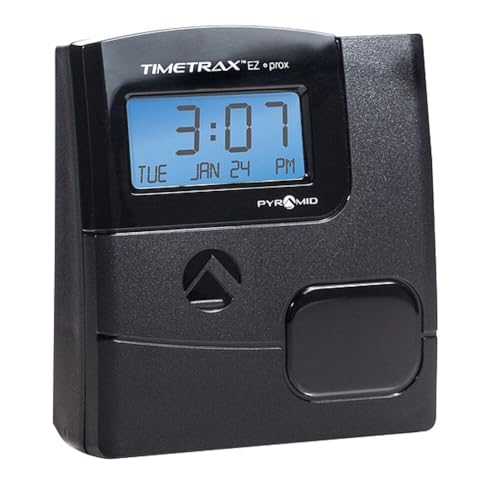
- No-touch punch-in using proximity badges
- Includes payroll editing, reporting, and exporting software
- Expandable from 50 employees up to 500
Best For: Small to growing teams wanting badge-based attendance with software
Standalone Badge Card Time Clock
Fingerprint Clock with 5 RFID Cards

- No WiFi needed; data stays local via USB.
- Automatically totals hours with no monthly fees.
- Includes 5 RFID cards for quick setup.
Best For: Small businesses wanting offline badge card attendance with fingerprint backup
3-in-1 RFID Attendance Clock

- Fingerprint, RFID badge, and PIN punch support.
- Exports Excel reports by USB with no cloud needed.
- Includes 5 RFID badges and no monthly fee.
Best For: Small offices needing multiple punch options and USB attendance reports
Starter Bundle – uPunch HN1500 Starter Time Clock Bundle
If you’re comparing time clocks with badge cards for a small business, this uPunch bundle is a straightforward way to get started. It includes the clock, 100 time cards, a card rack, ribbon, and keys, so you can begin tracking punches right away with minimal setup.
Best For: Small businesses that want an all-in-one punch clock system with starter supplies included.
Pros:
- Complete starter kit with clock, 100 time cards, rack, ribbon, and keys
- AutoAlign technology helps keep punches accurate and easy to read
- Plug-and-play setup is designed to get tracking started quickly
- Two-year warranty with unlimited weekday customer support
Cons:
- Uses physical time cards rather than badge-based entry
- Additional accessories may be needed as the employee count grows
Overall, this is a practical choice if you want a traditional punch-clock package with the essentials already in the box. The included supplies and simple setup make it especially appealing for buyers who value convenience over advanced software features.
Badge Refill Pack – 20 Proximity Badges for Icon Time Systems
For businesses already using compatible Icon Time Systems clocks, these time clocks with badge cards add a simple way to keep employees punching in with reusable proximity badges. The pack is made for specific TotalPass, PROX, PROXe, SB100 PRO, and certain RTC-1000 models, so it works best as a replacement or expansion set.
Best For: Teams that need extra reusable proximity badges for compatible Icon Time Systems time clocks.
Pros:
- Compatible with multiple TotalPass, PROX, PROXe, SB100 PRO, and RTC-1000 models
- Includes 20 proximity badges total
- Badges are pre-coded, durable, reusable, and can be reassigned
- Useful as a refill pack for existing badge-based systems
Cons:
- Only works with listed compatible time clock models
- Does not include a time clock unit
This is a focused accessory pack rather than a full system, which makes it ideal if your current setup already supports proximity badges. If you need compatibility-checked replacements, this pack keeps badge-based punch-in simple.
Cloud Multi-Mode Clock – NGTeco TC1 Cloud Time Clock
If you want time clocks with badge cards plus multiple check-in options, this NGTeco unit combines RFID with face, fingerprint, and PIN entry. It also adds cloud access, so you can review punch data remotely and keep attendance records moving even when the office is off-site.
Best For: Small businesses that want a cloud-connected clock with several check-in methods and no monthly fee.
Pros:
- Supports face, fingerprint, RFID, and PIN check-in
- Free cloud service with real-time punch access and auto reports
- Supports up to 200 users and 30,000 logs
- Offline punches sync automatically once the network is restored
Cons:
- Employee app features require a separate TimeEntrix subscription
- May be more complex than a basic punch clock for very small teams
As a feature-rich option, this clock suits buyers who want flexibility and remote visibility more than a simple standalone terminal. The included 10 cards and free core software make it a strong value if you need modern attendance tracking without recurring core fees.
Touch-Free Badge System – Lathem PCEXPRESS Wi-Fi Time Clock
This Lathem system is a solid fit if you’re shopping for time clocks with badge cards and want touch-free employee punching. It pairs a proximity badge reader with a color touchscreen, Wi-Fi connectivity, and online software integration for more complete attendance tracking.
Best For: Businesses that want a badge-based clock with Wi-Fi and web-based time tracking.
Pros:
- Includes a proximity badge reader and 15-badge starter kit
- Built-in Wi-Fi or Ethernet connection simplifies setup
- Works with Lathem PayClock Online software
- Supports badge use or PIN entry, plus punch editing and department transfers
Cons:
- Requires an active PayClock Online subscription
- Additional badges or key fobs are sold separately
For buyers who want a more modern badge-based time clock, this model offers a good mix of convenience and software-backed attendance tools. The included starter badges make it easier to launch, though the subscription requirement should be factored into the total cost.
RFID Badge Card Pack – Compatible Proximity Cards for Popular Time Clocks
If your business uses time clocks with badge cards, this 20-pack of RFID proximity cards is a simple replacement or expansion option. These white PVC cards are pre-encoded with printed badge numbers and use 125kHz RFID, so they’re aimed at quick assignment to employees after following your clock’s user guide.
Best For: Businesses already using compatible proximity badge time clocks and needing extra employee cards.
Pros:
- Works with a wide range of listed time clocks from NGTeco, HapAttend, uAttend, uPunch, and Amano
- Pre-encoded with badge numbers printed on each card for easier tracking
- Standard credit-card size and 0.8 mm thickness make them easy to carry and store
- 20 cards per pack for straightforward team expansion
Cons:
- Compatibility is limited to supported time clock models
- Cards must be linked or assigned to employees using the time clock’s instructions
- No clock hardware or software is included
For teams that already rely on supported RFID systems, this pack gives you a practical way to add badges without changing your attendance setup. It’s a utility purchase, not a full system upgrade.
Standalone Fingerprint Clock – No Software, No Monthly Fees
This NGTeco option is a practical pick if you want time clocks with badge cards alternatives that skip cards entirely. It uses fingerprint and PIN check-in, runs standalone with no WiFi or software required, and exports attendance data through USB for Excel-based payroll use.
Best For: Small businesses that want a self-contained attendance clock without monthly software fees.
Pros:
- True standalone operation with no WiFi or complex setup
- USB export supports ready-to-use Excel reports for payroll integration
- Memory for up to 500 users and 50,000 punch records
- Built-in backup system helps preserve punches during power loss
Cons:
- Does not use badge cards for check-in
- Requires manual USB export rather than cloud connectivity
- Best suited to smaller teams rather than larger enterprise deployments
Overall, this is a good choice when you want reliable attendance tracking without badge supplies, subscriptions, or software maintenance. It keeps the workflow simple for small teams that value offline control.
Proximity Time Clock System – RFID Attendance with Software
This Pyramid Time Systems model fits businesses looking for time clocks with badge cards and a more automated attendance workflow. It records arrivals, breaks, lunches, overtime, and departures using proximity badges, and the included software supports payroll editing, reporting, and exporting without monthly fees.
Best For: Small to growing teams that want badge-based time tracking with included software.
Pros:
- Uses proximity badges for no-touch employee punch in
- Includes software for payroll editing, reporting, and exporting
- Supports 50 employees out of the box and up to 500 with expansion
- Ethernet setup is designed to be quick and simple
Cons:
- Includes 15 badges, so larger teams may need extras
- Expansion requires additional badges and terminals
- Designed for indoor tabletop use rather than flexible mounting
This is a strong middle ground if you want badge-card attendance with software support but no subscription costs. It’s best suited to businesses that want a conventional proximity system that can grow over time.
Standalone Badge Card Time Clock – Fingerprint Clock with 5 RFID Cards
If you want time clocks with badge cards that keep attendance simple and local, this HapAttend model is built for small teams that do not need WiFi or cloud software. It handles time tracking on-device, automatically totals hours, and avoids monthly fees or paper-card hassles.
Best For: Small businesses that want a standalone, privacy-minded clock with badge card support and no internet dependency.
Pros:
- No WiFi or network setup required; data stays local and transfers by USB.
- Automatically calculates working hours to reduce manual payroll work.
- Includes 5 RFID cards, so employees can start using it right away.
- Supports multiple languages, including English, Spanish, German, French, and Italian.
Cons:
- Requires USB transfer instead of cloud-based syncing.
- Designed for small and mid-sized businesses rather than large enterprise workflows.
Overall, this is a practical pick if you want a simple, secure attendance device with badge-card backup and minimal setup. It focuses on offline reliability, easy use, and low ongoing cost.
3-in-1 RFID Attendance Clock – USB Report Time Clock
This is one of the more flexible time clocks with badge cards for small businesses that want fingerprint, RFID, and PIN options in a single device. It is built for offline use, so attendance can be managed without WiFi, cloud subscriptions, or extra software.
Best For: Small offices that want a badge-card time clock with multiple punch methods and easy USB reporting.
Pros:
- Supports fingerprint, RFID badge, and PIN punch methods.
- IN/OUT buttons help reduce duplicate punches.
- Exports attendance reports to Excel via USB.
- Includes 5 RFID badges and has no monthly fee.
Cons:
- No WiFi or network-based syncing; reporting is USB-driven.
- Screen and setup are geared toward straightforward attendance use, not advanced software workflows.
For teams that want a dependable badge-card clock without recurring costs, this model covers the basics well. Its combination of offline operation, report export, and multiple punch methods makes it a strong practical choice.
App-Managed RFID Time Clock – 4-in-1 Shift Attendance System
If you need time clocks with badge cards plus more flexible verification methods, this NGTeco model adds face, fingerprint, RFID, and PIN check-in. It also supports app-based management on the same local network, making it a better fit for teams that want digital oversight without monthly fees.
Best For: Growing businesses that want badge card check-in, app control, and flexible shift management.
Pros:
- Offers four check-in modes: face, fingerprint, RFID card, and PIN.
- Free app control allows attendance checks, shift adjustments, and report export.
- Supports flexible scheduling and night shift settings.
- Stores offline data during weak connections and syncs later automatically.
Cons:
- App management requires the same local network.
- Depends on 2.4G WiFi or LAN for full remote features.
This is a strong upgrade if your team has outgrown basic badge-only attendance tools. It blends card access, multiple identity checks, and shift management in a package designed for steady everyday use.
How We Picked the Best Time Clocks with Badge Cards
We prioritized badge-friendly systems that are practical for small-business attendance tracking, with a focus on setup simplicity, pricing transparency, and day-to-day reliability. We also looked for models that support real-world workflows, including mixed check-in methods, exportable reports, and flexible badge or card compatibility.
Quick Comparison
Traditional punch-card bundles are best if you want a familiar, low-tech system with minimal training. RFID badge systems are faster at the door and reduce wear from physical cards. Cloud-connected and app-based models are a better fit if you need remote access, multiple locations, or easier payroll workflow. If your team is small and your budget is tight, a standalone clock with badge support is often the simplest path.
Key Buying Factors for Time Clocks with Badge Cards
Badge Type and Compatibility
Check whether the system uses proximity badges, RFID cards, or printed time cards. Not all badges work across brands, so compatibility matters if you plan to replace or expand your cards later.
Attendance Features
Some Time Clocks with Badge Cards do more than record punch times. Look for overtime calculation, PIN backup, biometric verification, and USB or cloud reporting if you need better accuracy or easier payroll prep.
Deployment Style
Choose a system that matches your workplace. A standalone clock may be enough for a single location, while Wi-Fi or cloud-enabled models make more sense for managers who need access from anywhere.
Admin and Maintenance
Consider how often you want to manage cards, update software, or replace ribbons and supplies. Lower-maintenance systems can save time, especially if you do not have dedicated HR or IT support.
Who Should Buy Which Time Clocks with Badge Cards?
If you want the simplest setup, a basic bundle with cards and a rack is a strong choice. If speed and convenience matter most, choose an RFID or proximity badge clock. If you need more oversight, cloud or app-based models are better for remote management and broader reporting. For growing teams, a hybrid clock that supports badge cards plus fingerprint or PIN entry gives you the most flexibility as your needs change.