
Choosing the right time clock can make attendance tracking faster, cleaner, and far less error-prone for hourly teams. The best options now range from simple punch-card machines to cloud-connected systems with scheduling and reporting.
Below, we focus on practical picks that help small businesses reduce payroll mistakes, improve accountability, and fit different workplace setups.
Best 10 Time Clock Machines for Hourly Workers Picks for 2026
Auto-Aligning Bundle

- Auto-aligning prints make punches easy to read.
- Includes 100 cards, ribbons, rack, and keys.
- Handles DST, short months, and 12/24-hour formats.
Best For: Small businesses that want a ready-to-use punch clock bundle
Cloud Reporting
T528 Wi-Fi Employee Time Clock
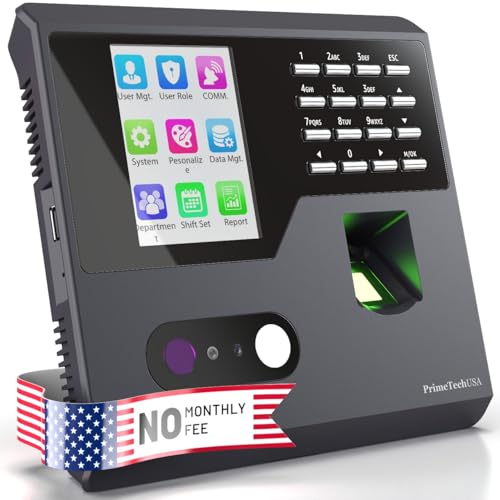
- Wi-Fi time clock with real-time team tracking.
- No monthly software fees included.
- Exports clear hours and attendance reports.
Best For: Businesses that want digital attendance tracking without monthly fees
SmartSite Bundle
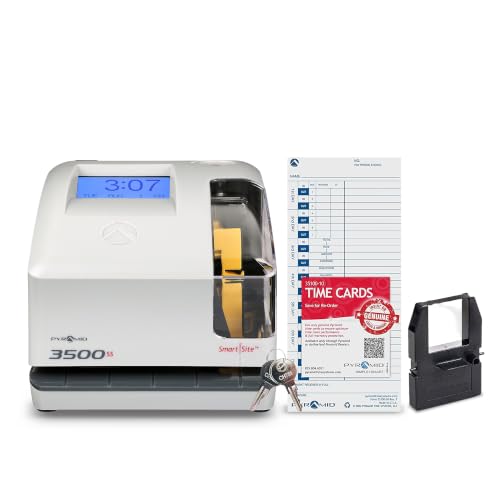
- SmartSite guidance helps with accurate punch alignment.
- Works for payroll, attendance, and document stamping.
- Includes cards, ribbon, and security keys.
Best For: Businesses needing a durable clock for payroll and attendance
Cloud Biometrics

- Fingerprint punch-in with remote app/web access.
- Dual-band Wi-Fi and cloud storage support syncing.
- Battery backup helps during power outages.
Best For: Managers who want biometric check-in and remote attendance access
Punch-Card Auto Totaller
Pyramid Model 4000 Auto-Totaling Punch Clock

- Automatically totals worked hours
- Includes 25 time cards and ribbon
- Supports rounding and 12/24-hour time
Best For: Small businesses needing simple punch-card attendance tracking
Biometric App Time Clock
NGTeco WiFi Fingerprint/PIN Time Clock

- Fingerprint or PIN clock-ins
- App control with WiFi support
- Exports timesheets via email or USB
Best For: Businesses wanting biometric clock-ins and flexible scheduling
Multi-Time-Zone Punch Recorder
TIMOZIA 6-Time-Zone Punch Card Time Clock

- Supports 6 U.S. time zones
- Automatic daylight saving time updates
- Includes 50 time cards and 2 ribbons
Best For: Multi-location teams using punch cards across time zones
Simple Auto-Calculating Punch Clock
Pyramid Model 5000 Auto Totaling Time Clock

- Auto-calculates daily and pay-period totals
- Supports breaks, lunch punches, and rounded time
- Includes cards, ribbon, keys, and guide
Best For: Small businesses wanting a low-maintenance punch clock with no monthly fees
Complete Punch-Clock Starter Kit
Auto-Align Time Clock Bundle with Cards and Racks

- Includes clock, cards, ribbons, racks, and keys
- Auto-feeds and auto-aligns time cards
- Tracks multiple pay periods with two-color printing
Best For: Businesses wanting a full time clock bundle with spare supplies
Auto-Aligning Bundle – Pyramid 2500 Time Clock Kit
If you need time clock machines for hourly workers that are straightforward to deploy, this Pyramid bundle is built for quick setup and low-friction daily punching. It supports accurate time entries with auto-aligning printouts, a backlit display, and automatic handling for Daylight Saving Time and short months, which makes it practical for small businesses that want dependable tracking without a complicated system.
Best For: Small businesses that want a simple, all-in-one punch clock bundle for daily hourly time tracking.
Pros:
- Quick setup, usually in under two minutes.
- Auto-aligning punches help keep entries easy to read.
- Includes 100 time cards, 2 ribbon cartridges, a 10-slot rack, and security keys.
- Supports arrival, break, lunch, and departure tracking in 12- or 24-hour formats.
Cons:
- Uses physical time cards and ribbons, so it requires ongoing consumables.
- Designed for up to three daily punches, which may not suit more complex scheduling needs.
Overall, this is a practical starter option for hourly teams that need clear punch records and a complete bundle to begin tracking right away.
Cloud Reporting – T528 Wi-Fi Employee Time Clock
For buyers comparing time clock machines for hourly workers, this T528 focuses on simple setup, real-time visibility, and report generation without monthly fees. It connects over Wi-Fi, lets you track hours and breaks in software, and is aimed at small businesses that want a digital system with clear oversight and easy payroll support.
Best For: Small businesses that want a no-monthly-fee digital time clock with real-time reporting.
Pros:
- Step-by-step guided setup is designed to be easy to learn and use.
- No monthly fees for the included software access.
- Tracks teams in real time by department.
- Exports hours, break, and attendance reports for payroll use.
Cons:
- Requires Wi-Fi and electrical power to operate.
- Best suited to businesses that want software-based tracking rather than a paper card system.
In practice, the T528 is a strong fit if you want digital attendance tracking with instant syncing and report tools, while avoiding recurring software charges.
SmartSite Bundle – Pyramid 3500SS Payroll Clock
This Pyramid 3500SS is a solid choice if you want time clock machines for hourly workers that can also help with payroll tracking and attendance management. It uses SmartSite alignment, dual-view windows, and automatic adjustments for daylight saving, leap years, and short months, making it a dependable option for businesses that want consistent punch records and flexible document-stamping use.
Best For: Small businesses that want a durable punch clock for attendance, payroll, and basic document stamping.
Pros:
- Plug-and-play setup with SmartSite LED guidance.
- Auto-adjusts for daylight saving, leap years, and short months.
- Works as a time card machine, punch clock, and document stamp machine.
- Includes 25 time cards, ribbon, and security keys.
Cons:
- Includes only 25 time cards, so consumables may need replenishment sooner.
- Uses a physical card-based workflow rather than app-based tracking.
For teams that want a durable, multi-purpose clock with straightforward setup, the 3500SS offers practical timekeeping features without overcomplicating daily use.
Cloud Biometrics – NGTeco Fingerprint Time Clock
If your search for time clock machines for hourly workers points toward remote oversight and digital attendance, the NGTeco cloud model adds fingerprint check-in, Wi-Fi syncing, and cloud reporting. It is built for managers who want to monitor clock-ins from a phone or web portal, while keeping data protected with AWS cloud storage and a backup battery for outage protection.
Best For: Small businesses that want remote access, biometric punch-in, and cloud-based attendance tracking.
Pros:
- Remote mobile app and web portal access for monitoring from anywhere.
- Fingerprint recognition speeds up punch-in and punch-out.
- Dual-band 2.4GHz/5GHz Wi-Fi supports stable connectivity.
- Built-in battery helps keep tracking running during power outages.
Cons:
- Full app features require a separate TimeEntrix subscription.
- Best suited to businesses that want a cloud workflow, not a traditional paper time card system.
Overall, this model is a good fit for businesses that want modern attendance controls, remote access, and biometric punch-ins in one compact system.
Punch-Card Auto Totaller – Pyramid Model 4000 Auto-Totaling Punch Clock
If you want time clock machines for hourly workers that stay simple and accurate, the Pyramid Time Systems Model 4000 is built for straightforward punch-in and punch-out tracking. It automatically totals hours worked, supports up to 50 employees, and handles rounding options for easier payroll processing.
Best For: Small businesses that want a basic, reliable punch card time clock with automatic totaling.
Pros:
- Automatically calculates hours worked and supports weekly totals, breaks, and lunches.
- Includes 25 time cards, ribbon, two security keys, and a user guide.
- Offers 0, 5, 10, and 15-minute rounding rules plus 12-hour or 24-hour time.
- Auto-aligns cards and resets for short months, leap years, and daylight saving time.
Cons:
- Uses punch cards rather than digital app-based tracking.
- No connectivity features for exporting timesheets by email or USB.
Overall, this is a practical choice for employers who prefer a wall-mountable, tamper-resistant time clock with automatic hour calculations and included starter supplies. It fits best when you want dependable basics without software complexity.
Biometric App Time Clock – NGTeco WiFi Fingerprint/PIN Time Clock
NGTeco Time Clock for Small Business, APP Control | 2.4GHz WiFi, No Monthly Fees
Check Price On AmazonFor time clock machines for hourly workers that cut down on manual entry, the NGTeco time clock uses fingerprint or PIN clock-ins with app control and WiFi support. It is designed for flexible shift management, real-time sync, and quick attendance edits, which makes it a strong fit for teams that need faster payroll prep.
Best For: Small businesses that want biometric clock-ins with app-based attendance management.
Pros:
- Fingerprint sensor authenticates wet or dry prints in about 0.5 seconds.
- Supports flexible shift management, including overnight schedules.
- Exports timesheets via email or USB for payroll processing.
- Includes built-in backup to protect attendance records during power outages.
Cons:
- Real-time app sync requires the same local network.
- Uses corded power, so it is not a battery-operated option.
This model stands out if you want a modern attendance system with fingerprint security and fewer paper-based steps. It is especially appealing when fast clock-ins and easy payroll exports matter more than a traditional punch-card workflow.
Multi-Time-Zone Punch Recorder – TIMOZIA 6-Time-Zone Punch Card Time Clock
If you need time clock machines for hourly workers across different regions, this TIMOZIA punch card recorder adds 6 U.S. time zones and automatic daylight saving updates. It tracks start times, breaks, lunches, and up to 6 punches per day, making it useful for businesses that still prefer card-based attendance records.
Best For: Multi-location businesses that need a punch card clock with automatic time zone and DST handling.
Pros:
- Supports six U.S. time zones and automatic daylight saving time changes.
- Large 4-inch LED screen improves visibility.
- Tracks up to 6 entries per day and uses dual-color printing for attendance status.
- Includes 50 time cards and 2 ribbons in the bundle.
Cons:
- Total workdays, late entries, leaves, and salary summaries must be calculated manually from the card.
- Uses punch cards instead of automatic digital timesheets.
This is a solid fit for teams that want a traditional time recorder but need better support for time zones and DST than many basic punch clocks provide. The included app helps with setup, though payroll math still stays manual.
Simple Auto-Calculating Punch Clock – Pyramid Model 5000 Auto Totaling Time Clock
If you’re comparing time clock machines for hourly workers, the Pyramid Model 5000 is a straightforward pick for teams that want punch-card tracking without software or subscriptions. It auto-calculates daily and pay-period totals, supports clock-ins, clock-outs, breaks, and lunch punches, and is built for fast setup in a small business setting.
Best For: Small businesses that want a reliable, no-fee punch clock with automatic totaling.
Pros:
- Automatically totals hours for daily and pay-period tracking.
- Supports 12- or 24-hour formats plus actual or rounded time.
- Includes 25 time cards, ribbon, security keys, and guide.
- Compact design works on a desktop or wall-mounted setup.
Cons:
- Uses physical time cards rather than cloud-based attendance.
- Limited to the included bundle, so larger teams may need more cards.
Overall, this is a practical analog option for payroll-focused businesses that want accurate punches and simple operation. It fits well if you prefer a traditional employee time tracker that starts working quickly and keeps ongoing costs low.
Cloud-Connected Attendance Management – TimeRalo WiFi Fingerprint Cloud Time Clock
Among time clock machines for hourly workers, this cloud-connected model stands out for managers who need remote attendance visibility and payroll-ready reporting. It combines fingerprint punch-in, WiFi syncing, and automatic calculations for overtime and lunch deductions, making it useful for busy teams with changing schedules.
Best For: Businesses that need remote access, smart scheduling, and automated attendance reports.
Pros:
- Remote access through the TimeRalo mobile app for viewing and correcting records.
- Automatically calculates regular hours, overtime, and lunch/break deductions.
- Supports fixed, rotating, flexible, and night shifts.
- Works online with 2.4GHz WiFi and also keeps offline attendance records.
Cons:
- Requires app-based management rather than a simple standalone punch system.
- Designed for indoor use and corded power only.
This is a strong upgrade path for small businesses that want more than basic time punches. If you need cloud access, automated reports, and shift flexibility, it offers a modern attendance workflow without recurring fees.
Complete Punch-Clock Starter Kit – Auto-Align Time Clock Bundle with Cards and Racks
If you’re shopping for time clock machines for hourly workers and want the accessories bundled in, this kit is built for getting started quickly. It includes the clock, time cards, ink ribbons, card racks, and keys, while also supporting auto-feed, automatic card alignment, and multiple pay-period formats.
Best For: Small businesses that want a complete punch-clock bundle with storage and replacement supplies.
Pros:
- Includes 200 time cards, 4 ink ribbons, racks, and security keys.
- Auto-aligns and auto-feeds cards for easier employee use.
- Tracks clock-ins, breaks, and lunch times across several pay periods.
- Offers 12-hour or 24-hour display options with clear two-color printing.
Cons:
- Focused on physical time cards rather than digital reporting.
- May be more bundle than some very small teams need.
This kit makes sense if you want one purchase to cover both the machine and the consumables. It is especially useful for businesses that prefer a traditional time card system but still want automatic alignment and clear punch records.
How We Picked These Time Clock Machines for Hourly Workers
We prioritized tools that are easy to set up, reliable for daily use, and useful for real payroll workflows. That means looking at clock-in methods, reporting features, shift flexibility, and whether the system works well for small businesses without adding unnecessary complexity.
We also favored models with clear timekeeping, dependable hardware, and features that help reduce buddy punching, missed punches, and manual timesheet cleanup.
Quick Comparison: What Matters Most
When comparing Time Clock Machines for Hourly Workers, think first about your team size and how you process payroll. Basic punch-card clocks are usually the simplest and most affordable, while biometric or cloud-based systems offer stronger controls and more detailed records.
If you need a low-maintenance setup, choose a machine with automatic time updates, daylight saving support, and easy card alignment. If you need better oversight, look for fingerprint, PIN, app, or cloud access with auto-generated reports.
Key Buying Factors for Time Clock Machines for Hourly Workers
Clock-In Method
Traditional time cards are familiar and low cost. Fingerprint and PIN systems can improve accountability. Cloud-connected clocks are best when you want remote access, flexible scheduling, or easier payroll exports.
Payroll and Reporting
Auto-totaling, attendance summaries, overtime tracking, and report export can save significant admin time. If your payroll process is manual, choose a clock that makes totals easy to review at a glance.
Shift Flexibility
Businesses with variable schedules should look for support for multiple shifts, lunch breaks, and different job sites. That helps reduce corrections later and keeps records more accurate.
Durability and Ease of Use
For busy break rooms or shop floors, a simple interface matters. The best machines are easy for employees to use correctly every day, even during rush periods or shift changes.
Who Should Buy Which Time Clock Machines for Hourly Workers?
Choose a basic punch-card machine if you want the lowest upfront cost and a familiar system for a small crew. Pick an automatic totaling model if you want faster payroll prep with less manual math. Go with fingerprint or cloud-based Time Clock Machines for Hourly Workers if you need stronger attendance control, remote oversight, or more detailed reporting.
If you are shopping for a growing business, the best choice is usually the one that balances ease of use today with enough reporting and control to scale later.