
Choosing the right time clock can save hours of payroll cleanup and help reduce buddy punching. For growing teams, the best systems balance accuracy, ease of use, and the features your workflow actually needs.
This roundup covers biometric time clocks for businesses across cloud-connected, standalone, and multi-method models so you can compare options quickly and choose with confidence.
Best 10 Biometric Time Clocks for Businesses Picks for 2026
Cloud-Connected Multi-Check-In

- Face, fingerprint, RFID, and PIN options
- Free cloud access with real-time reports
- Supports up to 200 users and 30,000 logs
Best For: small teams wanting flexible cloud attendance with no core monthly fee
Payroll-Focused Biometric Tracker
RE2000 Fingerprint + PIN Time Clock
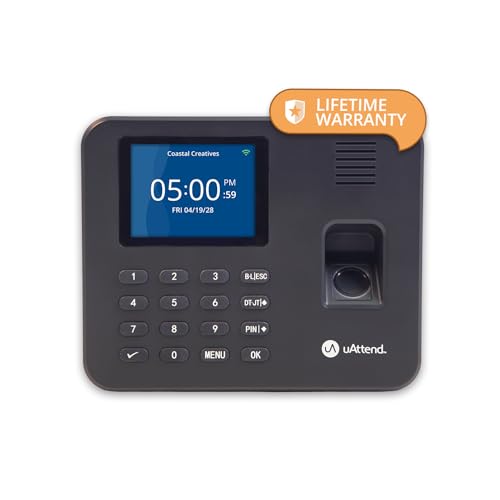
- Fingerprint + PIN helps reduce buddy punching
- Cloud dashboard tracks hours, breaks, and overtime
- Lifetime storage and U.S.-based support included
Best For: small businesses that prioritize payroll accuracy and cloud reporting
Dual-Band Cloud Clock with Backup

- Remote app and web portal access
- Dual-band WiFi and 2000mAh backup battery
- Fingerprint punch-in with secure AWS storage
Best For: small businesses needing remote management and outage protection
Standalone Offline Fingerprint Clock
Pin-Enabled Time Clock for Employees

- Works offline with no WiFi or monthly fees
- Fingerprint and PIN help stop buddy punching
- USB export and auto hour calculation
Best For: offices and warehouses that want a simple offline biometric clock
Offline Biometric Simplicity
ANVIZ CX3 Offline Fingerprint Clock

- No software, internet, or monthly fee
- Fingerprint, PIN, and RFID support
- USB export for payroll and record review
Best For: Businesses that want a simple offline clock with multiple punch options
Offline App-Controlled Tracking

- Pairs to app in 5 seconds, offline
- Auto-calculates overtime and deductions
- Fingerprint, IC card, and PIN access
Best For: Shift-heavy teams needing app review and custom payroll rules
Standalone USB Time Tracking
NGTeco Standalone Biometric Time Clock

- No WiFi, software, or monthly fees
- USB export with Excel-ready reports
- Stores up to 500 users and 50,000 punches
Best For: Small businesses needing simple offline attendance tracking
Auto Hours Calculator
HapAttend H3 Biometric Time Clock

- Automatically calculates employee hours
- No WiFi, software, or monthly fees
- USB transfer keeps data local and secure
Best For: Teams wanting automatic hours calculation in an offline clock
4-in-1 Multi-Biometrics
KUIIYER 4-in-1 Biometric Time Clock

- Face, palm, fingerprint, and PIN punch-in
- Supports up to 1,000 users and 160,000 records
- USB reports with no app, network, or monthly fee
Best For: Businesses that want the most flexible biometric sign-in options
Cloud-Connected Multi-Check-In – NGTeco TC1 for Small Business
If you want biometric time clocks for businesses that can handle more than just fingerprints, the NGTeco TC1 is built for flexible attendance tracking. It supports face, fingerprint, RFID, and PIN check-ins, plus cloud access through the NGTeco Office software and app for real-time punch data and automatic reports.
Best For: Small businesses that want a cloud-managed time clock with multiple punch methods and no monthly fee on core features.
Pros:
- Supports face, fingerprint, RFID, and PIN check-ins for flexible use.
- Free cloud service includes real-time access, hour calculations, and auto reports.
- Handles up to 200 users and 30,000 logs, with offline punches syncing later.
- No monthly fees for core features, plus US-based support and a 1-year warranty.
Cons:
- Full employee app features require a separate TimeEntrix subscription.
- Designed for 2.4GHz WiFi or LAN, so network setup matters.
- Best suited to businesses that can use cloud tools rather than a purely standalone unit.
This is a strong pick if you want a feature-rich system that balances convenience, storage, and remote management. The TC1 is especially appealing for teams with mixed schedules or multiple check-in preferences.
Payroll-Focused Biometric Tracker – RE2000 Fingerprint + PIN Time Clock
For businesses comparing biometric time clocks for businesses, the RE2000 focuses on cleaner payroll and fewer punch errors. Its fingerprint plus PIN check-ins help reduce buddy punching, while the cloud dashboard lets you review hours, breaks, overtime rules, and job codes from anywhere.
Best For: Small businesses that want a cloud time clock built around payroll accuracy and straightforward employee tracking.
Pros:
- Fingerprint + PIN punch-ins help cut time theft and payroll mistakes.
- Cloud dashboard shows hours, breaks, overtime rules, and job codes.
- Mobile app support makes it easier to approve timecards and run reports on the go.
- Lifetime data storage, hardware warranty, and U.S.-based support are included.
Cons:
- Requires a month-to-month subscription.
- Only supports fingerprint and PIN, not face or RFID check-in.
- Best fit for buyers who want software-managed tracking rather than a no-subscription system.
The RE2000 is a practical choice if your priority is cleaner payroll processing instead of extra punch methods. It keeps the system focused on time accuracy, cloud access, and easy report exports.
Dual-Band Cloud Clock with Backup – NGTeco TC2 for Small Business
This NGTeco model is a useful option if you want biometric time clocks for businesses with cloud access and backup power. It combines fingerprint punch-in, remote app and web portal management, dual-band WiFi, and a built-in 2000mAh battery for better continuity during outages.
Best For: Small businesses that want remote attendance management, fast connectivity, and power-outage backup in one device.
Pros:
- Remote app and web portal access make it easy to manage attendance from anywhere.
- Dual-band 2.4GHz/5GHz WiFi supports more stable connectivity.
- Fingerprint recognition offers quick, accurate check-ins.
- 2000mAh battery helps keep tracking going during power cuts.
Cons:
- Full employee app features require a separate TimeEntrix subscription.
- Works best for teams that can use cloud tools and WiFi connectivity.
- Designed around fingerprint and app-based management rather than multiple on-device punch methods.
If you need a cloud clock that stays usable when the power or network gets less predictable, this one is well equipped. It is a balanced choice for small offices that value remote oversight and dependable uptime.
Standalone Offline Fingerprint Clock – Pin-Enabled Time Clock for Employees
For businesses that prefer simple on-premise tools, this biometric time clock for businesses works without WiFi and keeps attendance tracking local. It uses fingerprint and PIN punch-in, automatically calculates regular hours, breaks, and overtime, and exports reports by USB for payroll.
Best For: Offices or warehouses that want a no-WiFi, no-monthly-fee time clock with basic biometric controls.
Pros:
- Works offline with no WiFi needed and zero monthly fees.
- Fingerprint and PIN punches help prevent buddy punching.
- Automatically calculates hours, breaks, and overtime.
- USB export makes payroll reporting easier.
Cons:
- Does not offer cloud access or remote app management.
- Limited to fingerprint and PIN check-ins.
- Best suited to teams that are comfortable with local USB-based reporting.
This is the most straightforward option in the group for buyers who want an offline system with minimal ongoing cost. It is a solid fit when simplicity, privacy, and plug-and-play setup matter more than cloud features.
Fast, Simple Attendance – NGTeco Fingerprint Time Clock
If you need biometric time clocks for businesses that keep setup straightforward, this NGTeco model focuses on fast fingerprint punches, app-based edits, and automatic time tracking. It’s a practical fit for small teams that want shift management without monthly fees or complicated software.
Best For: Small businesses that want flexible scheduling, quick punch-ins, and easy payroll export without a subscription.
Pros:
- Fingerprints are recognized in about 0.5 seconds, including wet or dry prints.
- Supports flexible shift management, including overnight schedules and auto-calculated hours.
- Export timesheets by email or USB for weekly, bi-weekly, or monthly payroll.
- Built-in backup helps protect attendance records during power outages.
Cons:
- App editing requires the same local network for instant sync.
- It is designed for indoor use only.
Overall, this is a strong choice if you want a fingerprint clock that balances speed, scheduling flexibility, and payroll convenience. It’s geared toward businesses that value simple attendance control and low ongoing costs.
Offline Biometric Simplicity – ANVIZ CX3 Offline Fingerprint Clock
For businesses looking at biometric time clocks for businesses without wanting software subscriptions or internet dependency, the ANVIZ CX3 keeps things direct. It works right out of the box with fingerprint, PIN, and RFID punching, then transfers logs by USB for simple processing.
Best For: Small businesses that want a no-frills, offline time clock with multiple punch methods and USB reporting.
Pros:
- No software or internet connection is required.
- Supports fingerprint, PIN code, RFID badge, and key fob punching.
- Transfers time logs by USB and works with common payroll cycles.
- Stores up to 50,000 punch records and supports up to 300 employees.
Cons:
- Records cannot be modified on the device.
- Flexible scheduling is not supported.
- Older records are overwritten once storage limits are reached.
The CX3 is a good fit when ease of use matters more than advanced customization. It’s especially appealing for teams that want a dependable offline clock with minimal setup and no recurring fees.
Offline App-Controlled Tracking – Custom Rules Biometric Clock
This model is built for businesses that want biometric time clocks for businesses with app convenience but without Wi-Fi or cloud subscriptions. It syncs to a phone in seconds, then handles overtime, break deductions, and overnight shifts with automatic calculations.
Best For: Teams that need offline attendance tracking with app review, custom payroll rules, and flexible shift handling.
Pros:
- Pairs with a phone app in about 5 seconds and works 100% offline.
- Automatically handles multi-level overtime, lunch deductions, and break time rules.
- Supports fingerprint, IC card, and PIN/password punching.
- Tracks cross-day schedules, department transfers, and custom shifts.
Cons:
- No Wi-Fi or cloud syncing is available.
- Best suited to local, device-based record management.
For owners who need more payroll logic than a basic punch clock but still want local data control, this is a compelling option. It combines fast access methods with practical reporting features for shift-heavy operations.
Standalone USB Time Tracking – NGTeco Standalone Biometric Time Clock
If you want biometric time clocks for businesses without the hassle of WiFi or monthly software costs, this NGTeco model keeps attendance tracking simple. It runs as a true standalone unit, stores punches locally, and lets you export records through USB for quick payroll processing.
Best For: Small businesses that want an easy, offline fingerprint time clock with USB export.
Pros:
- No WiFi or software required, so setup stays straightforward.
- USB export supports ready-to-use Excel attendance reports.
- Memory for up to 500 users and 50,000 punch records.
- Backup system helps preserve data during power loss.
Cons:
- Limited to fingerprint and PIN check-in, with no facial recognition.
- Designed for standalone use, so it is not built around cloud-based management.
This is a practical fit for businesses that value low maintenance and local data handling over advanced software features. Its compact, durable build also makes it easy to place in offices, retail counters, warehouses, and other indoor workplaces.
Auto Hours Calculator – HapAttend H3 Biometric Time Clock
This option stands out among biometric time clocks for businesses that want automatic hours tracking without internet dependence. The HapAttend H3 works as a standalone fingerprint time clock, keeps data local, and transfers records by USB with no monthly fees.
Best For: Small and mid-sized businesses that want automatic time calculation and simple offline use.
Pros:
- Automatically totals working hours to reduce manual calculation.
- No WiFi, network setup, software installation, or monthly fees.
- USB transfer keeps attendance data local and secure.
- Supports multiple languages, including English, Spanish, German, French, and Italian.
Cons:
- Setup guidance may rely on a YouTube tutorial rather than a more traditional onboarding process.
- Includes 5 RFID cards, but the core experience is still centered on standalone operation.
Overall, this is a strong fit if you want a low-friction clock-in system that handles time totals for you. The lifetime support and one-year warranty add peace of mind for teams that need a dependable, no-subscription solution.
4-in-1 Multi-Biometrics – KUIIYER 4-in-1 Biometric Time Clock
For businesses comparing biometric time clocks for businesses, this KUIIYER model offers the widest range of sign-in methods in the group. It combines face, fingerprint, palm print, and PIN punch-in options, all in a standalone device that exports reports by USB without needing an app or network.
Best For: Small to medium-sized businesses that want flexible biometric options and higher-capacity attendance tracking.
Pros:
- Four punch methods: face, palm, fingerprint, and PIN.
- Fast recognition, with face/palm in 0.6 seconds and fingerprint in 0.5 seconds.
- Large capacity for up to 1,000 users and 160,000 records.
- USB reporting, no app or network required, and no monthly fees.
Cons:
- USB flash drive is not included.
- More features may mean a more involved setup than a basic fingerprint-only clock.
This is the most feature-rich choice here if you want multiple identification methods and broad shift management tools. Its color display, multi-language support, and power-loss protection make it well suited to busy workplaces that need flexibility and reliable recordkeeping.
How We Picked These Biometric Time Clocks for Businesses
We focused on practical features that matter in day-to-day use: biometric reliability, setup simplicity, employee capacity, data export options, and whether the system works with or without a subscription. We also prioritized models with useful backup methods such as PIN or RFID, since no single authentication method is ideal for every workplace.
Quick Comparison
Broadly speaking, these options split into three groups: cloud-connected clocks for remote access and flexible reporting, standalone units for low-maintenance time tracking, and multi-biometric systems for businesses that want the most verification choices. If your team is mobile or has multiple locations, cloud tools may be the best fit. If you want the lowest ongoing cost, standalone systems are often the simplest choice.
Key Buying Factors for Biometric Time Clocks for Businesses
Biometric Method
Fingerprint scanners are the most common and usually the easiest to deploy. Face recognition, palm print, RFID, and PIN entry can add flexibility, but the right mix depends on your environment, privacy preferences, and the speed you need at clock-in.
Connectivity and Storage
Cloud access is useful for managers who need remote visibility, while offline storage protects attendance data during outages. If your internet is unreliable, look for local memory and USB export support.
Payroll and Reporting
Good attendance hardware should make payroll easier, not harder. Look for automatic hour calculation, shift rules, and exportable reports that reduce manual correction.
Fees and Software Requirements
Some Biometric Time Clocks for Businesses require monthly software fees, while others are fully standalone. Choose based on your long-term budget, not just the upfront price.
Ease of Deployment
Consider how quickly employees can enroll and whether the device can be installed at one entrance or multiple points. Simple admin controls matter more than extra features if your team is small.
Who Should Buy Which Biometric Time Clocks for Businesses?
Small offices and startups: Choose a fingerprint or fingerprint-plus-PIN model with no monthly fee for straightforward attendance tracking.
Teams with remote management needs: Pick a cloud-enabled system with app control and reporting tools so supervisors can review time data from anywhere.
Businesses with higher security needs: Consider multi-modal units with face, palm, fingerprint, and PIN options to reduce false clock-ins.
Budget-conscious buyers: Standalone clocks with local storage and payroll exports usually deliver the best long-term value.
In the end, the best choice is the one that fits your attendance workflow, staffing size, and budget without adding admin work.