
Finding a comfortable trackball can be difficult when standard mice feel oversized or force your hand into an awkward position. The right compact model can reduce reaching, improve control, and make long work sessions easier.
We selected 10 trackballs for small hands across thumb-controlled, finger-controlled, wired, wireless, compact, and adjustable-angle designs, so you can match the shape and features to your setup.
Best 10 Trackballs for Small Hands Picks for 2026
Flexible Wireless Control

- Thumb-controlled ergonomic design
- Bluetooth and USB support for up to three devices
- Four DPI levels and rechargeable battery
Best For: Right-handed users with compact, multi-device setups
Compact Wired Precision

- Ambidextrous compact design
- Precise 40mm optical tracking
- Wired USB operation with no battery changes
Best For: Simple wired setups and shared workstations
Comfortable Everyday Tracking

- Sculpted ergonomic shape with thumb control
- Bluetooth and Logi Bolt wireless connections
- Up to 18 months of AA battery life
Best For: Right-handed users wanting quiet, space-saving comfort
Wireless Scrolling Flexibility
Kensington Orbit with Scroll Ring

- Ambidextrous design for either hand
- Scroll ring for convenient page navigation
- Bluetooth and 2.4GHz connectivity with four DPI settings
Best For: Users who scroll frequently and share a workspace
Adjustable Comfort Pick

- Flat or 15° adjustable tilt
- 2.4GHz and Bluetooth connectivity
- USB-C rechargeable with 90-day standby
Best For: Adjustable posture and quiet everyday use
Space-Saving Everyday Pick

- Thumb control frees desk space
- Bluetooth and Logi Bolt connectivity
- Up to 18 months from one AA battery
Best For: Compact setups and low-maintenance daily use
Finger-Control Precision Pick
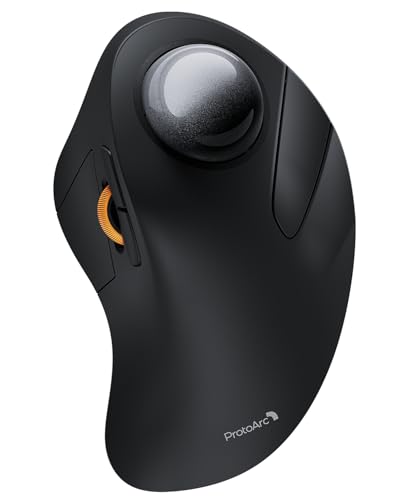
- 44mm index-finger trackball
- Connects with up to three devices
- Rechargeable battery lasts up to 60 days
Best For: Multi-device users who prefer index-finger control
Best Adjustable Angle
Rechargeable Ergonomic Trackball

- Adjustable 0° or 18° tilt
- Bluetooth and 2.4GHz for three devices
- 800–4800 DPI and quiet clicks
Best For: Right-handed users seeking adjustable positioning and rechargeable power
Best Compact Design
ELECOM BITRA Wireless Trackball

- About 30% smaller than the prior generation
- 25mm ball with tilted scroll wheel
- Silent clicks and dual wireless modes
Best For: Small-handed right-handed users who travel or work in quiet spaces
Flexible Wireless Control – Nulea M501
For shoppers comparing trackballs for small hands, the Nulea M501 is a practical wireless option for compact or cluttered workspaces. Its thumb-controlled ball, adjustable DPI, and rechargeable battery help reduce the need for broad wrist and arm movement.
Best For: Right-handed users who want multi-device wireless control in a narrow workspace.
Pros:
- Thumb control helps limit wrist and arm movement.
- Connects with Bluetooth or the included USB receiver to up to three devices.
- Offers four DPI levels and a rechargeable battery.
- Includes back and forward buttons for convenient navigation.
Cons:
- Designed for right-handed use only.
- Buttons are not programmable.
- Requires the included cable or a standard 5V USB source for charging; fast chargers should not be used.
The M501 stands out when desk space and cable freedom matter. Its feature set is useful for productivity, though users seeking extensive button customization will need another model.
Compact Wired Precision – Kensington Orbit Trackball
The Kensington Orbit is a straightforward choice for shoppers seeking trackballs for small hands and limited desk space. Its compact, ambidextrous design uses a 40mm ball and a wired USB connection for consistent, battery-free operation.
Best For: Left- or right-handed users who prefer a simple wired trackball for an office computer.
Pros:
- Compact design uses less desk space than a conventional mouse.
- Ambidextrous shape accommodates either hand.
- Red optical tracking is designed for precise cursor movement.
- USB setup requires no batteries.
Cons:
- Wired connectivity limits placement flexibility.
- Does not include a scroll ring.
- Only two buttons are provided.
The Orbit favors simplicity over wireless features and extra controls. It is a sensible compact workstation pick if a cable is acceptable and scrolling can be handled through the keyboard or software.
Comfortable Everyday Tracking – Logitech ERGO M575S
The Logitech ERGO M575S is a strong candidate among trackballs for small hands when you want a sculpted, space-saving shape and quiet clicks. Its thumb control keeps the mouse stationary while Bluetooth or Logi Bolt connectivity supports flexible desk setups.
Best For: Right-handed users seeking an ergonomic everyday mouse with long battery life.
Pros:
- Sculpted shape supports a relaxed hand and improved forearm posture.
- Thumb control works well in small or space-saving setups.
- Connects through Bluetooth or the included Logi Bolt USB receiver.
- Included AA battery is rated for up to 18 months of use.
Cons:
- Designed for right-handed users.
- Customization is centered on three customizable buttons and Logi Options+ software.
- Uses a replaceable AA battery rather than a rechargeable internal battery.
The M575S balances comfort, quiet operation, and low-maintenance wireless use. It is particularly appealing for compact desks, though users wanting a rechargeable design or ambidextrous layout should consider alternatives.
Wireless Scrolling Flexibility – Kensington Orbit with Scroll Ring
The Kensington Orbit with Scroll Ring is worth considering when comparing trackballs for small hands and you want easy document navigation without moving the mouse. Its ambidextrous layout, wireless connectivity, scroll ring, and four DPI settings provide flexible control for everyday work.
Best For: Left- or right-handed users who regularly scroll through documents and web pages.
Pros:
- Ambidextrous design works for both left- and right-handed users.
- Dedicated scroll ring makes moving through pages and documents easy.
- Offers Bluetooth and 2.4GHz wireless connectivity.
- Four DPI settings support precision work or faster browsing.
Cons:
- Requires two AA batteries.
- Software does not currently support Windows ARM-based computers.
- Maximum sensitivity is 1,600 DPI.
The Orbit with Scroll Ring is a versatile choice for users who prioritize scrolling and hand flexibility. Its wireless options are convenient, while the DPI range lets you tune cursor behavior for different tasks.
Adjustable Comfort Pick – ProtoArc EM02
The ProtoArc EM02 is a practical option among trackballs for small hands, especially if you want to adjust the mouse angle to suit your preferred posture. Its stationary ball, compact-workspace design, quiet clicks, and adjustable DPI make it adaptable for everyday work.
Best For: Users who want adjustable tilt, quiet operation, and wireless flexibility in a right-handed trackball.
Pros:
- Switches between flat 0° and tilted 15° positions for customizable comfort.
- Supports 2.4GHz wireless and Bluetooth connections with one-button device switching.
- Rechargeable via USB-C, with up to 90 days of standby time.
- Offers five DPI settings and quiet-touch buttons.
Cons:
- Forward and backward buttons are not compatible with Mac OS.
- Right-handed design may not suit left-handed users.
- Requires a short learning period and occasional ball-and-roller cleaning.
The EM02 stands out for its adjustable hinge and long standby time. It is a strong fit if posture customization matters more to you than a highly compact, ambidextrous shape.
Space-Saving Everyday Pick – Logitech ERGO M575S
Logitech Ergo M575S Wireless Ergonomic Trackball Mouse, Black/Blue (910-007026)
Check Price On AmazonThe Logitech ERGO M575S is a dependable choice among trackballs for small hands and space-saving desks because the thumb-controlled ball lets you move the cursor without moving the mouse. Its ergonomic shape is designed to support most hand sizes while working on virtually any surface.
Best For: Users seeking a familiar ergonomic design, long battery life, and a trackball for compact or cluttered workspaces.
Pros:
- Thumb control keeps the mouse stationary and saves desk space.
- Connects through Bluetooth or the included Logi Bolt USB receiver.
- Runs for up to 18 months on one included AA battery.
- Includes three customizable buttons and supports Smart Actions.
Cons:
- The thumb-ball layout may require an adjustment period.
- Its ergonomic shape is right-oriented rather than ambidextrous.
- Listed compatibility details specify Windows 10 or later as the minimum Windows requirement.
The M575S keeps the feature set straightforward while adding useful customization and excellent battery life. Choose it for a low-maintenance setup where desk space and a supported hand posture are priorities.
Finger-Control Precision Pick – ProtoArc EM03 NL
The ProtoArc EM03 NL takes a different approach to trackballs for small hands by placing a large 44mm ball under the index finger. It stays fixed on the desk, making it useful in cramped work areas, while its rechargeable battery, quiet clicks, and multi-device support add everyday convenience.
Best For: Users who prefer index-finger control, need precise stationary navigation, and switch between several devices.
Pros:
- 44mm index-finger trackball supports precise control without wrist or arm movement.
- Connects to up to three devices through Bluetooth and the USB receiver.
- Rechargeable 930mAh battery provides up to 60 days of power on a full charge.
- Includes quiet clicks and five adjustable DPI levels.
Cons:
- Right-handed design limits suitability for left-handed users.
- Auto-sleep mode activates after inactivity, requiring a click to resume.
- Its index-finger control style may take time to learn.
The EM03 NL is the most distinctive option here, combining a large finger-controlled ball with three-device connectivity. It is especially compelling when desk space is limited and you want to minimize wrist movement.
Best Adjustable Angle – Rechargeable Ergonomic Trackball
For shoppers comparing trackballs for small hands, the SABLUTE MAM1 Pro offers an adjustable 0° or 18° angle and a thumb-operated ball. Its wireless multi-device support, rechargeable battery, and adjustable DPI make it a flexible option for desk work, studying, and compact workspaces.
Best For: Right-handed users who want adjustable wrist positioning, rechargeable power, and connections for up to three devices.
Pros:
- 0° and 18° tilt settings let you choose a preferred hand position.
- Bluetooth and 2.4GHz connectivity support up to three devices.
- Five DPI levels from 800 to 4800 accommodate different screens and tasks.
- Quiet buttons, USB-C charging, and optional ambient backlighting suit shared spaces.
Cons:
- Designed for right-handed use only.
- The thumb-trackball design may require a one- to two-week adjustment period.
- The downloadable driver is not compatible with Mac OS.
The adjustable angle is the main differentiator here, especially for users who want to experiment with wrist posture. It is less compact than the dedicated travel models, but its rechargeable design and broad wireless compatibility add everyday convenience.
Best Compact Design – ELECOM BITRA Wireless Trackball
The ELECOM BITRA is a strong candidate among trackballs for small hands because its compact body is about 30% smaller than the previous generation. It combines a 25mm thumb-operated ball with silent buttons, dual wireless connectivity, and a travel pouch.
Best For: Right-handed users with smaller hands who need a compact trackball for offices, travel, or shared workspaces.
Pros:
- Compact 3.5-by-2.9-inch design is sized for smaller hands.
- Bluetooth LE and USB 2.4GHz connections can be switched without re-pairing.
- Silent switches are suitable for meetings, offices, and quiet work areas.
- Includes a storage pouch, spare-battery compartment, and receiver storage.
Cons:
- It uses a replaceable AAA battery rather than a rechargeable battery.
- The 750 DPI maximum is lower than the adjustable range offered by some alternatives.
- Designed for right-handed use.
Small dimensions, a 25mm ball, and a tilted scroll wheel make the BITRA particularly relevant for compact-hand shoppers. Its included pouch also makes it the most travel-oriented option in this group.
Best Handheld Option – Welspo Wireless Finger Trackball
The welspo Wireless Finger Trackball takes a different approach to trackballs for small hands: it is held rather than used on a desk. Its thumb-operated roller, USB receiver, and ambidextrous shape allow pointer control away from the table, while a trigger button supports presentation use.
Best For: Users who want an ambidextrous handheld pointer for presentations, limited desk space, or off-table control.
Pros:
- Ambidextrous design works in either hand or between both hands.
- Handheld operation avoids dependence on a clear desk surface.
- Plug-and-play USB connection requires no software installation.
- Includes a USB receiver and carrying bag.
Cons:
- Uses a replaceable AAA battery, and users are advised to supply their own batteries.
- Compatibility details focus on Windows XP, Linux, and Unix rather than newer operating systems.
- The handheld form may be less suitable for conventional desk-based mouse use.
This model is best understood as a portable presentation and pointer tool rather than a conventional desktop trackball. Its ambidextrous shape and off-table operation are useful when flexibility matters more than advanced wireless features.
How We Picked the Best Trackballs for Small Hands
We focused on the features that matter most for smaller users: overall footprint, ball placement, button reach, grip comfort, connection options, and adjustment range. We also considered whether each model suits office work, travel, creative tasks, or users who prefer a traditional mouse alternative.
Because hand size and control preferences vary, this list includes both thumb-operated and finger-operated trackballs. Compact dimensions alone do not guarantee comfort, so the best choice is the one that lets you reach the buttons and move the ball without stretching or pressing your palm against the shell.
Quick Comparison
| Best For | What to Look For |
|---|---|
| Everyday office work | Comfortable thumb control, reliable wireless connectivity, and programmable or well-placed buttons |
| Very small hands | Compact housing, short button reach, and a smaller ball that is easy to move precisely |
| Travel | Lightweight construction, Bluetooth or dual connectivity, and a protective or compact design |
| Wrist comfort | Adjustable tilt, a stable palm rest, and low-effort cursor control |
| Quiet environments | Silent or low-noise switches and smooth ball movement |
Key Buying Factors for Trackballs for Small Hands
Size, Shape, and Button Reach
Check the mouse width and the distance from the palm rest to the primary buttons. A compact body is useful only if your thumb or fingers can reach the controls without shifting your hand. Models with a smaller ball may also feel easier to control, especially for users with limited finger span.
Thumb or Finger Control
Thumb-operated trackballs feel familiar to many mouse users and keep the fingers available for clicking. Finger-controlled designs can offer finer movement and may reduce repeated thumb motion. If you have thumb discomfort, compare finger-controlled options before choosing by size alone.
Angle and Wrist Position
An adjustable 0- or 15-to-18-degree tilt can reduce wrist rotation and help your hand rest naturally. However, a steeper angle can change how easily you reach the buttons, so test the position with your normal grip.
Connectivity, Power, and Compatibility
Bluetooth is convenient for laptops and tablets, while a USB receiver can provide simple plug-and-play use. Dual-mode models offer more flexibility. Confirm operating-system support, battery type, charging behavior, and whether the receiver can remain stored with the device.
Who Should Buy Which Trackballs for Small Hands?
Choose a compact thumb-operated model if you want the most familiar transition from a conventional mouse. Pick a finger-controlled trackball if precise cursor movement or reduced thumb use is your priority. An adjustable-angle design makes sense for users focused on wrist posture, while a Bluetooth and 2.4GHz model is better for switching between computers. For travel or tight desks, prioritize the smallest body that still gives you dependable button access and a stable grip.