
If you’re looking to boost your productivity, investing in an ultrawide monitor could be a game-changer. These monitors offer expansive screen real estate, allowing for seamless multitasking. From high resolutions to curved designs, each option has unique features that cater to both professionals and gamers. Curious about which models stand out in today’s market? Let’s explore the top contenders that can help you transform your workspace.
LG 34WR55QK-B 34-inch UltraWide Curved Computer Monitor

If you’re a multitasker who thrives on efficiency, the LG 34WR55QK-B 34-inch UltraWide Curved Computer Monitor is your perfect companion. With its 21:9 UltraWide WQHD resolution, you’ll enjoy stunning visuals, enhanced by HDR10 and a 99% sRGB color gamut. The OnScreen Control feature lets you customize your workspace, while Picture-by-Picture mode lets you view two sources simultaneously—perfect for streaming or multitasking. Its ergonomic design guarantees comfort, and with multiple connectivity options, including USB Type-C, you can easily charge devices. Plus, the sleek, borderless design elevates your desktop’s aesthetic. This monitor truly maximizes your workspace efficiency.
Best For: Multitaskers and professionals seeking an efficient and visually stunning workspace.
Pros:
- Wide screen real estate allows for effective multitasking with Picture-by-Picture capability.
- High-quality visuals with HDR10 and up to 99% sRGB color gamut enhance viewing experiences.
- Ergonomic design with adjustable height and tilt ensures comfort during long usage periods.
Cons:
- Limited native resolution may not be sufficient for highly detailed graphic design or gaming.
- Curved screen may not appeal to everyone and could affect viewing angles for some users.
- Higher price point compared to traditional monitors may not fit all budgets.
Sceptre 34-Inch Curved Ultrawide WQHD Monitor (C345B-QUT168)

The Sceptre 34-Inch Curved Ultrawide WQHD Monitor (C345B-QUT168) is perfect for professionals and gamers alike, offering an expansive 3440 x 1440 resolution that enhances productivity and immersion. With a stunning 21:9 aspect ratio, you’ll enjoy 30% more screen space compared to standard monitors. The impressive 180Hz refresh rate and 1ms response time guarantee smooth visuals, eliminating ghosting during intense gaming sessions. Plus, the 99% sRGB color gamut delivers vibrant, accurate colors for an immersive experience. Built-in speakers and a sleek curved design add to its appeal, making it an ideal choice for multitasking and media consumption.
Best For: Professionals and gamers seeking an immersive and expansive viewing experience with high performance and vibrant colors.
Pros:
- High refresh rate of up to 180Hz ensures smooth gameplay and responsiveness.
- 1ms response time eliminates ghosting, providing clarity during fast-paced action.
- 99% sRGB color gamut offers vibrant and accurate colors for an enhanced visual experience.
Cons:
- Limited connectivity options with only two DisplayPort inputs may not accommodate all users’ needs.
- Curved design may not appeal to everyone, especially those who prefer flat screens.
- Built-in speakers may lack the audio quality expected by audiophiles or serious gamers.
LG 34U530A-W 34-inch UltraWide Computer Monitor

For those seeking an effective multitasking solution, the LG 34U530A-W 34-inch UltraWide Computer Monitor stands out with its impressive 21:9 aspect ratio. With a resolution of 2560 x 1080 and a 100Hz refresh rate, you’ll enjoy crisp visuals and smooth performance. Its borderless design enhances your viewing experience, while the adjustable stand guarantees peak comfort. Connectivity options like USB Type-C and HDMI help reduce cable clutter. Plus, the VESA DisplayHDR 400 elevates brightness and detail, making it ideal for video calls, streaming, or gaming. With great customer feedback, this monitor is a solid choice for boosting productivity.
Best For: Those looking for an efficient multitasking monitor that enhances productivity through its ultra-wide screen and versatile connectivity options.
Pros:
- High Resolution: UltraWide WFHD (2560 x 1080) provides crisp visuals for gaming, streaming, and productivity tasks.
- Ergonomic Design: Adjustable height, tilt, and swivel features ensure optimal viewing comfort.
- Connectivity Options: Multiple ports including USB Type-C help reduce cable clutter and enhance versatility.
Cons:
- Limited Color Accuracy: While it supports up to 99% sRGB, professional graphics work may require higher color fidelity.
- Built-in Speakers: Audio quality from the built-in speakers may not meet the needs of audiophiles or serious gamers.
- Size: The 34-inch size may be too large for smaller desks or limited workspace setups.
LG 34-inch QHD Curved Smart Monitor

Designed for professionals and multitaskers, the LG 34-inch QHD Curved Smart Monitor brings an expansive 21:9 aspect ratio to your workspace, allowing you to run multiple applications side by side effortlessly. With a stunning QHD resolution of 3440×1440 and a 1800R curve, you’ll enjoy immersive visuals whether you’re working or streaming. Built-in webOS23 gives you access to popular platforms like Netflix and Disney+, while the 99% sRGB color gamut guarantees vibrant displays. Connectivity options include two HDMI ports and three USB ports, making it easy to connect devices. Plus, its sleek, frameless design enhances any setup.
Best For: Professionals and multitaskers seeking an expansive workspace and immersive viewing experience for both work and entertainment.
Pros:
- Wide 21:9 aspect ratio allows for efficient multitasking and enhanced productivity.
- Built-in webOS23 provides easy access to popular streaming services and over 300 free channels.
- Sleek, virtually frameless design enhances aesthetic appeal and maximizes screen space.
Cons:
- Limited refresh rate of 100Hz may not be sufficient for hardcore gamers seeking ultra-smooth performance.
- Curved design may not be ideal for all users, particularly those who prefer flat screens.
- Potential compatibility issues with certain devices due to specific connectivity options.
SANSUI 34 Inch Ultrawide Curved Gaming Monitor

With a stunning UWQHD resolution of 3440×1440 and a rapid 240Hz refresh rate, the SANSUI 34 Inch Ultrawide Curved Gaming Monitor is perfect for gamers and multitaskers alike. Its 1500R curvature immerses you in your tasks, while the fast 1ms response time guarantees fluid visuals. Enjoy vibrant colors with HDR400 and an impressive sRGB 130% color gamut. The ergonomic stand allows for comfortable viewing angles, and connectivity options like HDMI 2.1 and DP 1.4 keep you versatile. With a solid 4.5-star rating from thousands of users, it’s a reliable choice for enhancing your workspace efficiency.
Best For: Gamers and multitaskers seeking an immersive experience with high refresh rates and vibrant visuals.
Pros:
- High UWQHD resolution (3440×1440) paired with a rapid 240Hz refresh rate for fluid gaming.
- Versatile connectivity options including HDMI 2.1 and DP 1.4 for multiple device support.
- Ergonomic design with a wide viewing angle and adjustable stand for comfortable use.
Cons:
- The 1500R curvature may not be ideal for all users, especially those who prefer flat screens.
- Limited VRR support for consoles only via HDMI2.1, which may restrict compatibility.
- Some users may find the brightness of 450 nits insufficient for very bright environments.
Sceptre 34-Inch Curved Ultrawide WQHD Monitor (C345B-QUT168 Series)
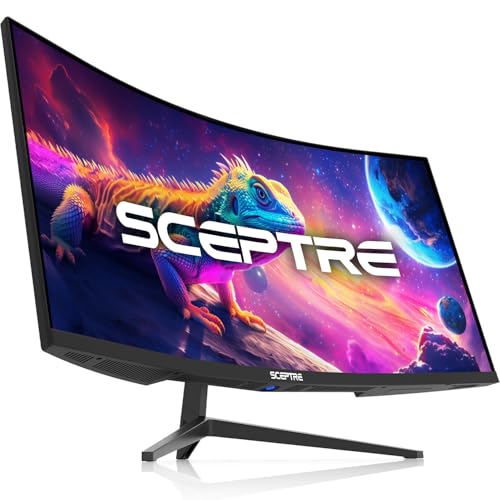
The Sceptre 34-Inch Curved Ultrawide WQHD Monitor (C345B-QUT168 Series) is an ideal choice for gamers and professionals seeking an immersive experience. With a stunning WQHD resolution of 3440 x 1440 and a refresh rate of up to 180Hz, you’ll enjoy crisp visuals and smooth gameplay. The 21:9 aspect ratio provides 30% more screen space, enhancing productivity. Plus, its 1ms response time eliminates ghosting, ensuring precise imagery. Multitasking is a breeze with Picture-by-Picture and Picture-in-Picture features. The curved design not only boosts immersion but also adds a modern touch with its luminous backcover lights.
Best For: Gamers and professionals seeking an immersive ultrawide experience with high-resolution visuals and smooth performance.
Pros:
- Exceptional WQHD resolution (3440 x 1440) for detailed imagery.
- High refresh rate of up to 180Hz for smooth gameplay.
- Curved design enhances immersion and visual comfort.
Cons:
- Limited connectivity options with only 2 DisplayPort inputs.
- Built-in speakers may not provide the best audio quality.
- Larger footprint may require more desk space compared to standard monitors.
Alienware 34 Curved Gaming Monitor (AW3425DWM)

For gamers seeking an immersive experience, the Alienware 34 Curved Gaming Monitor (AW3425DWM) stands out with its stunning 34-inch WQHD display and 1500R curve. You’ll enjoy vibrant visuals thanks to 95% DCI-P3 color coverage and VESA DisplayHDR 400 certification. With a 180Hz refresh rate and 1ms response time, smooth gameplay is guaranteed, enhanced by AMD FreeSync Premium and VESA Adaptive Sync technology. Designed for marathon sessions, its dedicated console mode and low blue light solution help reduce eye strain while keeping colors accurate. Immerse yourself in expansive worlds and tackle challenges with clarity and comfort.
Best For: Gamers looking for an immersive experience with vibrant visuals and smooth performance during extended gaming sessions.
Pros:
- Supports a 180Hz refresh rate and 1ms response time for smooth gameplay.
- Features a 1500R curve and WQHD resolution for enhanced immersion and clarity.
- Includes a dedicated console mode and low blue light solution for eye comfort during long gaming sessions.
Cons:
- The price point may be higher compared to non-curved monitors.
- Limited adjustability options for height and tilt may affect ergonomics for some users.
- Potential compatibility issues with older graphics cards not supporting high refresh rates or adaptive sync technologies.
Samsung Viewfinity S65UA 34-Inch Ultrawide QHD Curved Monitor
Imagine boosting your productivity with the Samsung Viewfinity S65UA 34-Inch Ultrawide QHD Curved Monitor, designed specifically for multitaskers. Its 21:9 aspect ratio and ultra WQHD resolution provide ample screen real estate for multiple applications. The 1000R curvature aligns with your field of vision, reducing eye strain, while TUV certification guarantees smart eye care. With a 100Hz refresh rate, you’ll enjoy smoother navigation and gameplay. Plus, the virtually borderless design minimizes distractions. Connectivity is a breeze with a USB Type-C port that delivers 90W charging. Elevate your workspace efficiency with this powerful multitasking tool!
Best For: Professionals and gamers seeking an immersive multitasking experience with reduced eye strain.
Pros:
- Ultra WQHD resolution provides expansive screen space for enhanced productivity.
- 1000R curvature aligns with the human field of vision, minimizing eye fatigue.
- USB Type-C connectivity allows for easy connection and charging of devices with a single cable.
Cons:
- The ultrawide aspect ratio may not be suitable for all types of content or applications.
- Limited adjustability in terms of height and tilt compared to some other monitors.
- Higher price point compared to traditional monitors, which might not fit all budgets.
LG 34″ UltraWide Monitor (FHD, 100Hz, HDR 400)

Looking to enhance your multitasking capabilities? The LG 34″ UltraWide Monitor is your answer. With a stunning FHD resolution and a 21:9 IPS display, you’ll enjoy vibrant colors and smooth visuals thanks to its 100Hz refresh rate and 5ms response time. Its extra horizontal screen space allows you to view multiple windows seamlessly, while the intuitive on-screen software makes screen splitting effortless. The sleek, virtually borderless design fits any workspace, and the tilt-adjustable stand guarantees comfort. Plus, Reader Mode reduces blue light for eye comfort, making it perfect for long hours of productivity. Transform your workflow today!
Best For: Professionals and multitaskers seeking an immersive workspace with enhanced productivity through a wide display.
Pros:
- Stunning visuals with FHD resolution and 99% sRGB color coverage for vibrant colors.
- Smooth performance featuring a 100Hz refresh rate and 5ms response time, ideal for fast-paced tasks.
- Intuitive multitasking capabilities with screen splitting software and extra horizontal space for multiple applications.
Cons:
- Limited vertical resolution (2560 x 1080) may not be ideal for users requiring higher detail in vertical dimensions.
- Potentially larger footprint due to the ultra-wide design, which may not fit in compact workspaces.
- HDR performance limited to VESA DisplayHDR 400, which may not satisfy advanced HDR users.
Gawfolk 49 Inch Curved Gaming Monitor

The Gawfolk 49 Inch Curved Gaming Monitor is perfect for gamers and multitaskers who crave an immersive experience. With its stunning 5120×1440 Dual QHD resolution and a 32:9 aspect ratio, you’ll enjoy crystal-clear visuals across its expansive 49-inch curved screen. The smooth 120Hz refresh rate, combined with AMD FreeSync Premium technology, guarantees fluid gameplay without screen tearing. Ergonomically designed, it offers height adjustment and low blue light features to reduce eye strain during long sessions. Plus, multiple connectivity options make it compatible with various devices, enhancing your workspace efficiency effortlessly. Experience gaming and multitasking like never before!
Best For: Gamers and multitaskers seeking an immersive visual experience with a large, high-resolution curved display.
Pros:
- Immersive 49-inch panoramic ultra-wide curved screen enhances gaming and multitasking experiences.
- Smooth 120Hz refresh rate and AMD FreeSync Premium technology provide fluid gameplay without screen tearing.
- Ergonomic design with height adjustment and eye-care features reduces strain during extended use.
Cons:
- Large size may require significant desk space and proper mounting for optimal viewing.
- Higher price point compared to standard monitors may not fit all budgets.
- Limited portability due to its weight and dimensions, making it less ideal for mobile setups.
Factors to Consider When Choosing an Ultrawide Monitor for Multitasking
When you’re picking an ultrawide monitor for multitasking, several factors matter. You’ll need to evaluate resolution for clarity, refresh rates for smooth performance, and the connectivity options that fit your setup. Don’t forget about ergonomic design and software support to enhance your productivity.
Resolution and Clarity
Choosing the right resolution and clarity for your ultrawide monitor can greatly enhance your multitasking experience. A higher resolution, like WQHD (3440 x 1440), gives you more screen real estate and sharper images, essential for juggling multiple applications. Look for displays that support a wide color gamut, such as 99% sRGB, to enjoy vibrant visuals that elevate your viewing experience. The 21:9 aspect ratio allows you to view multiple windows side by side without losing clarity. Pay attention to pixel density; a 3440 x 1440 display maintains sharpness, even with detailed content. Ultimately, opting for HDR capabilities can boost contrast and detail, making it easier to navigate through various open applications or documents seamlessly.
Refresh Rate Importance
While multitasking on an ultrawide monitor, refresh rate plays an essential role in ensuring smooth visuals and quick responsiveness. A higher refresh rate, like 100Hz or more, enhances the fluidity of your experience, especially when rapidly switching between applications or windows. Monitors with rates of 165Hz to 180Hz provide an even smoother experience, reducing motion blur and ensuring fluid movement during demanding tasks like gaming or video editing. On the flip side, low refresh rates, typically around 60Hz, can lead to stuttering and lag, which negatively impacts your productivity. For gamers or professionals working with visually intensive applications, aiming for a monitor with at least a 100Hz refresh rate is vital to maintain clarity and performance in your multitasking workflow.
Connectivity Options Available
To maximize your multitasking efficiency, it’s essential to evaluate the connectivity options available on an ultrawide monitor. Look for models with multiple ports, such as HDMI, DisplayPort, and USB Type-C, ensuring compatibility with various devices while minimizing cable clutter. USB Type-C can be particularly beneficial, allowing data transfer and power delivery to charge your laptop or mobile devices simultaneously. Additionally, consider monitors that support Picture-by-Picture (PbP) and Picture-in-Picture (PiP) functionalities, enabling you to view content from different sources at once. Make sure there are enough ports for peripherals and check for features like built-in speakers. Compatibility with advanced options like Apple AirPlay can further enhance your multitasking capabilities by reducing cable dependency.
Ergonomic Design Features
When considering an ultrawide monitor for multitasking, it’s crucial to prioritize ergonomic design features that enhance your comfort and productivity. Look for adjustable height and tilt options, as these allow you to customize your viewing position for long hours of use. A virtually borderless design can also help you maintain focus while reducing distractions, creating a more immersive experience. Additionally, a slim stand can save desk space and keep your workspace organized. Ergonomic stands with swivel capabilities enable you to adjust the monitor easily for collaborative work or presentations, preventing neck strain. Finally, consider models with eye-care features like blue light reduction and flicker-free technology to minimize eye strain during extended viewing sessions.
Multitasking Software Support
A comfortable ergonomic setup lays the groundwork for effective multitasking, but the right software support makes all the difference in maximizing your ultrawide monitor’s potential. Look for features like Picture-by-Picture (PbP) and Picture-in-Picture (PIP), which let you view multiple sources side by side. Software solutions like OnScreen Control can help you customize layouts, dividing your screen for better productivity across applications. Some monitors even include intuitive screen-splitting software to manage various tasks efficiently. High resolutions, such as WQHD (3440 x 1440), provide ample space without sacrificing clarity. Finally, pay attention to adjustable refresh rates and low response times, as these enhance smooth changes and interactions, making your multitasking experience seamless and effective.