
Long USB runs can cause dropped connections, slow transfers, or unreliable peripherals when a standard cable is pushed beyond its practical range. The right extension balances distance, USB speed, signal integrity, and the power needs of your device.
We’ve gathered 10 USB extension cables covering everyday 10-foot setups through active 50-foot solutions. Use the guide below to match the cable type and length to your equipment and installation.
Best 10 USB Extension Cables for Long Runs Picks for 2026
Best Overall
Cable Matters 10ft USB 3.0 Extension

- Up to 5 Gbps USB 3.0 transfers
- Backward compatible with USB 2.0 and 1.x
- Shielded construction with durable connectors
Best For: Everyday high-speed peripheral extensions up to 10 feet
Best for Extra-Long USB 3.0 Runs

- 30-foot USB 3.0 reach
- Two amplification chipsets support signal continuity
- Optional Y-cable power support for higher-draw devices
Best For: Room-spanning USB 3.0 connections and VR setups
Best Durable 10ft Pick
ITD ITANDA Braided USB 3.0 Cable

- 5 Gbps USB 3.0 data transfer
- Braided nylon jacket with reinforced joints
- Tested for more than 10,000 bends
Best For: Durable desk, TV, office, and gaming connections
Best for 50ft USB 2.0 Runs
Active USB 2.0 50ft Extension Cable

- 50-foot active extension design
- Two amplifiers support up to 480 Mbps
- Designed for standard USB 2.0 data peripherals
Best For: Very long printer, scanner, camera, and accessory runs
Best Everyday Reach
AINOPE 10FT USB 3.0 Extension Cable

- 10-foot USB-A male-to-female reach
- Up to 5Gbps USB 3.0 data transfer
- Braided cable with cable-management buckles
Best For: Everyday USB-A accessories and compatible surveillance cameras
Best for Extra-Long Active Runs
25FT Active USB 3.0 Extension Cable

- 25-foot USB-A extension for wide room coverage
- Signal-booster chipset supports long runs
- Up to 5Gbps with broad OS compatibility
Best For: Long indoor connections to webcams, consoles, storage, and VR devices
Best Heavy-Duty 20FT Option
USB 3.0 20FT Heavy-Duty Extension Cable

- 20-foot room-spanning USB-A connection
- 22AWG conductors and reinforced joints
- Triple shielding with up to 5Gbps transfer
Best For: Printers, webcams, scanners, and sheltered camera setups
Best Long Braided Cable

- 20-foot male-to-female reach
- Braided cable with reinforced metal connectors
- Up to 5Gbps; backward compatible
Best For: Long indoor runs to printers, cameras, and computer peripherals
Best for Extra-Long Runs
MutecPower 32ft Active USB 3.0 Cable
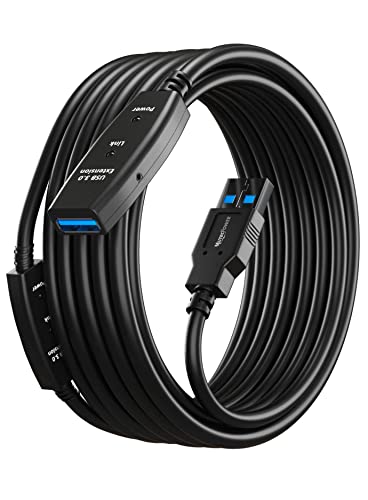
- 32-foot active repeater cable
- Designed for USB 3.0 and 2.0 peripherals
- Shielded construction with molded strain relief
Best For: Very long connections to remote USB devices
Best Two-Cable Value
JSAUX Dual 10ft USB 3.0 Extensions

- Two 10-foot cables included
- Up to 5Gbps with USB 2.0/1.1 compatibility
- Braided, shielded, and broadly compatible
Best For: Flexible setups needing two moderate-length extensions
Best Overall – Cable Matters 10ft USB 3.0 Extension
For everyday USB extension cables for long runs, the Cable Matters 10-foot model balances speed, compatibility, and durability. Its USB 3.0 connection supports transfers up to 5 Gbps while remaining compatible with USB 2.0 and USB 1.x devices.
Best For: Extending external drives, hubs, printers, VR headsets, keyboards, mice, and other USB peripherals across a desk or room.
Pros:
- Supports USB 3.0 transfer rates up to 5 Gbps.
- Works with USB 2.0 and USB 1.x devices.
- Gold-plated connectors, copper conductors, and foil-and-braid shielding support reliable transmission.
- Molded strain relief and grip treads improve everyday handling.
Cons:
- The 10-foot length may not be enough for larger room-scale setups.
- It is a standard passive extension, rather than an amplified long-distance cable.
This is a strong general-purpose choice when a 10-foot reach is sufficient and high-speed USB 3.0 performance matters. For substantially longer runs, an active extension may be more suitable.
Best for Extra-Long USB 3.0 Runs – GEARit Active 30ft Extension
The GEARit Active USB 3.0 cable is designed for USB extension cables for long runs where a basic passive cable may not provide enough reach. At 30 feet, it uses two amplification chipsets to help maintain USB 3.0 data transmission across a room.
Best For: Long-distance connections to VR headsets, webcams, external hard drives, USB hubs, and other USB peripherals requiring a 30-foot extension.
Pros:
- Provides a 30-foot reach with USB 3.0 speeds up to 5 Gbps.
- Built-in amplification chipsets help support uninterrupted data transmission.
- Backward compatible with other USB standard devices.
- Includes a Y-cable option for additional power when paired with a separate 5V/2A USB charger.
Cons:
- The required 5V/2A charger for the booster Y-cable is not included.
- Active electronics make it more involved than a basic passive extension.
For a 30-foot USB 3.0 run, the active design is the key advantage. Keep the optional power requirement in mind, particularly with higher-draw devices such as some VR headsets.
Best Durable 10ft Pick – ITD ITANDA Braided USB 3.0 Cable
The ITD ITANDA 10-foot cable is a practical option for USB extension cables for long runs around a desk, entertainment center, or office. It combines USB 3.0 speeds up to 5 Gbps with a braided nylon jacket and reinforced connectors for regular handling.
Best For: Extending keyboards, mice, printers, cameras, game consoles, flash drives, hard drives, and other USB 3.0 or USB 2.0 peripherals.
Pros:
- Supports data transfer rates up to 5 Gbps.
- Braided nylon construction and an aluminum alloy case add physical durability.
- Rated for more than 10,000 bend tests.
- Compatible with a broad range of USB 3.0 and USB 2.0 devices.
Cons:
- The 10-foot length is shorter than active long-run alternatives.
- It is not designed as a signal-amplified extension.
This cable stands out when durability and flexible everyday use are priorities. It is well suited to moderate-distance setups, but users needing a 30- or 50-foot run should consider an active model instead.
Best for 50ft USB 2.0 Runs – Active USB 2.0 50ft Extension Cable
When you need USB extension cables for long runs, this 50-foot active USB 2.0 cable prioritizes reach and stable peripheral connectivity. Its two signal amplifiers are designed to maintain up to 480 Mbps across the extended connection.
Best For: Long-distance data connections to printers, scanners, keyboards, mice, security cameras, VR headsets, and other standard USB 2.0 peripherals.
Pros:
- Offers a 50-foot reach for room-to-room or installation-style setups.
- Two active signal amplifiers support stable USB 2.0 transmission.
- Triple-layer shielding and high-purity copper cores help reduce interference.
- Supports Windows, Mac, Linux, and Chrome OS.
Cons:
- USB 2.0 speed is limited to 480 Mbps, well below USB 3.0.
- It is intended for data transfer, not charging or high-power devices.
- The supplied listing describes the length inconsistently, so buyers should verify the package specifications.
This is the reach-focused choice in the group, especially for standard USB 2.0 peripherals. It is less appropriate for high-speed storage or devices that require substantial power.
Best Everyday Reach – AINOPE 10FT USB 3.0 Extension Cable
For USB extension cables for long runs that stay manageable, the AINOPE 10-foot model offers a practical middle ground. Its USB-A male-to-female design supports USB 3.0 data transfer up to 5Gbps and works with USB 2.0 and 1.1 devices, making it suitable for webcams, printers, keyboards, flash drives, and compatible surveillance cameras.
Best For: Everyday room-to-desk extensions, webcams, charging access, and compatible USB-A surveillance cameras.
Pros:
- 10-foot length adds useful reach without the bulk of a very long cable.
- USB 3.0 supports data transfer up to 5Gbps and is backward compatible.
- Nylon-braided construction, reinforced joints, and included sticky buckles help with durability and cable management.
- Gold-plated connectors and multilayer shielding are designed to support signal clarity.
Cons:
- Its 10-foot length may not be enough for across-room or more distant installations.
- It uses USB-A connectors, so it is not a direct USB-C extension.
This is a sensible choice when you want extra reach for common USB-A accessories without moving to an active, extra-long extension. The braided finish and included buckles are especially useful for frequently rearranged setups.
Best for Extra-Long Active Runs – 25FT Active USB 3.0 Extension Cable
When USB extension cables for long runs need to cover substantial distance, this 25-foot active USB 3.0 cable uses a signal-enhancement chipset to help compensate for attenuation. It connects USB-A devices to a computer or other host, supports transfer rates up to 5Gbps, and is compatible with USB 2.0 and USB 1.1 peripherals.
Best For: Long connections to webcams, printers, storage devices, game consoles, and VR equipment such as Oculus Quest 3 and Pico 4.
Pros:
- 25-foot length provides substantially more reach than standard passive extensions.
- Built-in signal booster is designed to help maintain USB connectivity over the longer run.
- Supports USB 3.0 speeds up to 5Gbps and backward compatibility with USB 2.0 and 1.1.
- Plug-and-play compatibility is listed for Windows, Mac OS, Linux, and Chrome OS.
Cons:
- It is limited to USB-A male-to-female connections.
- The 25-foot cable is heavier and less convenient to route than a shorter extension.
- It is specified for indoor use.
The active design makes this the most appropriate option in the group when a 25-foot path is necessary. It is a strong fit for peripherals positioned far from a computer, provided the installation stays indoors and uses compatible USB-A ports.
Best Heavy-Duty 20FT Option – USB 3.0 20FT Heavy-Duty Extension Cable
For USB extension cables for long runs in a home office or media setup, this 20-foot USB-A male-to-female cable emphasizes durability and shielding. It supports USB 3.0 transfer rates up to 5Gbps and is intended for printers, scanners, webcams, security cameras, keyboards, mice, hubs, and other compatible peripherals.
Best For: Room-spanning printer, webcam, scanner, streaming-camera, and security-camera connections.
Pros:
- 20-foot length helps connect devices across a room or between a desk and wall-mounted equipment.
- Heavy-duty 22AWG conductors, reinforced joints, and a round cable are designed for repeated use.
- Triple-layer shielding and gold-plated connectors support reliable USB 3.0 data transfer.
- Indoor/outdoor-rated construction is suitable for sheltered outdoor applications, including listed camera uses.
Cons:
- The supplied guidance advises against direct burial without conduit.
- It is not recommended for VR headsets, high-speed SSDs, or rapid charging.
- For best results, it should connect directly to a PC rather than cascade through hubs.
This cable is a good fit when physical toughness and a 20-foot reach matter more than fast charging or specialized VR use. Its stated limitations make it better suited to conventional peripherals and camera installations than demanding storage or headset applications.
Best Long Braided Cable – 20ft USB 3.0 Extension Cable
For USB extension cables for long runs, this 20-foot USB 3.0 male-to-female cable offers useful reach for home offices, cameras, printers, and peripherals positioned away from a computer. Its braided construction and reinforced connectors are designed for regular indoor use, while USB 3.0 support enables data transfers up to 5Gbps.
Best For: Extending USB devices across a room or creating a more flexible desk, camera, or home-office setup.
Pros:
- 20-foot length provides substantial reach for longer indoor connections.
- Nylon braiding, all-metal shells, aluminum-alloy connectors, and reinforced joints support durability.
- Supports USB 3.0 speeds up to 5Gbps and remains backward compatible with USB 2.0 and 1.1 devices.
- Works with peripherals including printers, webcams, storage devices, scanners, keyboards, and gaming controllers.
Cons:
- The manufacturer recommends connecting it directly to a rear motherboard USB port rather than through a hub.
- Longer runs can experience voltage attenuation, so some higher-demand devices may not work reliably.
- It is optimized for indoor use.
This is a strong choice when you want a durable, full 20-foot run and broad peripheral compatibility. For the most dependable results, follow the direct-motherboard connection guidance, especially with devices that draw more power.
Best for Extra-Long Runs – MutecPower 32ft Active USB 3.0 Cable
Among USB extension cables for long runs, the MutecPower USB303 stands out with a 32-foot length and active repeater chipsets intended to extend USB connections farther than a standard passive cable. It supports USB 3.0 and USB 2.0 peripherals such as storage devices, hubs, printers, keyboards, and mice.
Best For: Reaching USB peripherals located unusually far from a computer in indoor or outdoor setups.
Pros:
- 32-foot length is the longest option in this roundup.
- Active extension design uses two signal-booster chipsets for extended reach.
- Supports USB 3.0 transmission speeds up to 5Gbps and backward compatibility with USB 2.0.
- Gold-plated connectors, bare copper conductors, shielding, and molded strain relief support reliable operation and durability.
Cons:
- The extra-long cable is heavier, with a listed item weight of 1.5 pounds.
- Its listed data-rate details are inconsistent, so buyers should verify the expected performance for their specific setup.
- It is a single 32-foot cable, offering less placement flexibility than a two-cable bundle.
The active repeater design makes this the most purpose-built option for maximum distance. Choose it when 20 feet is not enough and you need one continuous cable to reach a remote USB peripheral.
Best Two-Cable Value – JSAUX Dual 10ft USB 3.0 Extensions
This two-pack gives you a pair of 10-foot USB 3.0 extension cables, making it a practical choice for USB extension cables for long runs when you need reach in more than one location. Each male-to-female cable supports transfers up to 5Gbps and works with devices ranging from webcams and printers to consoles, storage drives, hubs, keyboards, and mice.
Best For: Users who need two separate 10-foot extensions for flexible desk, entertainment, or peripheral setups.
Pros:
- Includes two 10-foot cables for multi-device or multi-room flexibility.
- Supports USB 3.0 speeds up to 5Gbps and is backward compatible with USB 2.0 and 1.1.
- Nylon braiding, gold-plated connectors, shielding, and molded joints provide a durable design.
- Compatible with computers, hubs, printers, cameras, game consoles, hard drives, keyboards, and mice.
Cons:
- Each cable is only 10 feet long, so neither individual cable matches the reach of the 20-foot or 32-foot options.
- The product is supplied as two separate cables rather than one continuous extra-long cable.
- Like other long USB extensions, actual performance can depend on the connected device and setup.
The JSAUX bundle is a sensible pick when versatility matters more than maximum single-cable distance. Two separate extensions can simplify cable management and protect original device ports by reducing repeated plugging and unplugging.
How We Picked the Best USB Extension Cables for Long Runs
We focused on USB-A male-to-female extension cables suited to common long-run setups, including webcams, keyboards, mice, game consoles, printers, cameras, and external storage. The selection includes passive USB 3.0 cables for shorter distances, active repeater cables for extended runs, and a USB 2.0 option where maximum distance matters more than transfer speed.
We compared advertised data rates, cable lengths, signal-boosting hardware, construction details, compatibility claims, and overall usefulness for typical home-office, gaming, and media setups. Because real-world performance depends on the host port, connected device, cable routing, and power draw, treat stated speeds as maximum ratings rather than guarantees.
Quick Comparison
- Best for short, fast extensions: Choose a 10-foot USB 3.0 cable with a 5Gbps rating.
- Best for longer USB 3.0 runs: Select an active repeater cable with an integrated chipset or signal booster.
- Best for maximum reach: A 30- to 50-foot active cable can extend placement, but USB 2.0 models may trade speed for distance.
- Best for flexible setups: A two-pack or braided cable can simplify routing between multiple peripherals.
Key Buying Factors for USB Extension Cables for Long Runs
Length and Signal Boosting
Passive cables are generally the simplest choice at shorter lengths. For runs beyond roughly 10 feet, active USB extension cables are usually more dependable because repeater circuitry helps restore the signal. Very long runs may still require testing, especially with cameras, storage drives, or other power-hungry devices.
USB Version and Transfer Speed
USB 3.0 extensions are commonly rated up to 5Gbps and are preferable for external drives, cameras, and other high-bandwidth equipment. USB 2.0 cables top out at 480Mbps, but they can be suitable for keyboards, mice, printers, and basic input devices. The entire connection—including the computer port and attached device—must support the desired standard.
Power and Compatibility
USB extension cables do not automatically solve power limitations. Bus-powered drives, hubs, LED accessories, and webcams may be more sensitive to voltage drop over distance. Check whether the cable supports your device and avoid assuming that an extension will provide the same performance as a direct connection.
Construction and Installation
Look for sturdy connectors, strain relief, shielding, and a jacket suited to the installation. Braided exteriors can improve handling, while active cables may require a specific orientation and should not be sharply bent near the repeater housing.
Who Should Buy Which USB Extension Cables for Long Runs?
Choose a 10-foot passive USB 3.0 cable for a desk setup, keyboard, mouse, printer, or nearby webcam. Choose a 20- to 32-foot active USB 3.0 cable when a camera, console, or peripheral must be positioned across a room while retaining higher bandwidth. Choose a 50-foot USB 2.0 active cable for basic peripherals where reach is the priority and high-speed transfers are unnecessary. If you need to connect several devices or rearrange a workspace, a two-pack may offer more practical coverage than one extra-long cable.