
Vertical monitor stands can make a busy desk feel larger, cleaner, and easier to use. For office work, the right stand improves comfort, helps align screens, and keeps your setup stable.
Below, we focus on options that suit real-world productivity needs: fit, adjustability, weight support, and desk footprint.
Best 10 Vertical Monitor Stands for Office Setup Picks for 2026
Best for Stacked Productivity
HUANUO Vertical Dual Monitor Mount

- Stacked dual-monitor design saves desk space
- Fits 17- to 32-inch displays up to 17.6 lbs each
- Strong adjustability for ergonomic office viewing
Best For: Office workers who want a space-saving stacked mount for two monitors.
Best for Stacked Ultrawides

- Holds two ultrawide monitors up to 34 inches each
- Freestanding base with strong stability for office use
- Full adjustment for tilt, swivel, rotation, and height
Best For: People who want a stable stacked dual-monitor setup for ultrawide office displays.
Best for Tall Portrait Screens
MOUNTUP Single Freestanding Monitor Stand
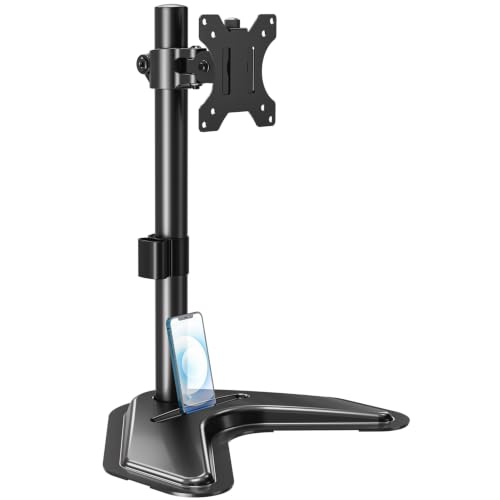
- Portrait or landscape orientation with flexible adjustment
- Freestanding steel base supports up to 17.6 lbs
- Easy way to raise a monitor and clear desk space
Best For: People who want a sturdy, adjustable single-monitor stand for portrait work.
Best for Vertical Stacking
Dual Monitor Vertical Stack Stand

- Stacks two 13" to 34" monitors
- Swivel, tilt, and height adjustable
- Free-standing base saves desk space
Best For: People who want a flexible vertical dual-monitor stand for a cleaner office desk.
Best for Heavy Monitors
Freestanding 27-43in Monitor Arm with Glass Base
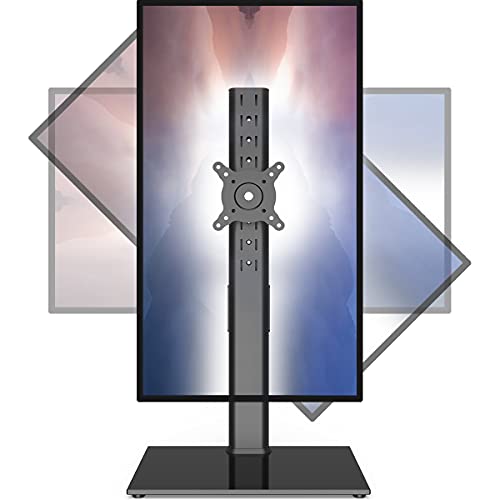
- Supports large 27-43 inch monitors
- 77 lb capacity for heavier displays
- Tempered glass base with full motion adjustment
Best For: People with larger, heavier monitors who want a stable freestanding setup.
Best for Tall Dual-Monitor Layouts

- Vertically stacks two screens to save desk space
- Supports 13" to 34" monitors with up to 44 lbs total capacity
- Offers 13 height settings, tilt, swivel, and rotation
Best For: People building a tall, flexible dual-monitor office setup.
Best for Tall Adjustability
Single LCD Monitor Stand Riser 13-32

- Wide 13-32 inch VESA compatibility
- Tilt, swivel, and 360° rotation
- Tempered glass base with 77 lb capacity
Best For: Users who want a sturdy single-monitor stand with generous height adjustment for an office desk.
Best for Dual Screens
HUANUO 17-32 Inch Dual Monitor Stand

- Holds two 17-32 inch monitors with VESA 75x75/100x100 support
- Adjustable tilt, swivel, and 360° rotation for ergonomic positioning
- C-clamp or grommet mount with built-in cable management
Best For: Users who want a vertical dual-monitor arm for a cleaner, more ergonomic office setup.
Best for Stacked Screens
MOUNT PRO Vertical Dual Monitor Stand

- Stacks two monitors to save desk space
- 31-inch pole helps set a comfortable screen height
- Tilt, swivel, and rotation support flexible positioning
Best For: Office users who want a stacked dual-monitor mount with broad compatibility.
Best for Stacked Productivity – HUANUO Vertical Dual Monitor Mount
If you want to maximize desk space while keeping two screens at an ergonomic height, this HUANUO option is a strong pick for vertical monitor stands for office setup. Its stacked layout is ideal for long workdays, and the wide range of tilt, swivel, and rotation makes it easier to dial in a comfortable viewing angle.
Best For: Users who want a stable stacked dual-monitor mount for a cleaner, more efficient office workspace.
Pros:
- Holds two 17- to 32-inch monitors in a vertical stacked configuration
- Adjustable tilt, swivel, and 360-degree rotation help fine-tune viewing comfort
- Supports up to 17.6 lbs per screen with VESA 75x75mm and 100x100mm compatibility
- Clamp or grommet mounting helps free up valuable desk space
Cons:
- Requires a desk with enough depth and thickness for secure mounting
- Not suitable for ultrawide or very heavy monitors outside the weight limit
Overall, this is a practical choice if you need vertical monitor stands for office setup and care more about organization, ergonomics, and dual-screen efficiency than a minimalist single-arm look.
Best for Easy Vertical Switching – Perlegear Single Monitor Stand
Perlegear’s single monitor stand is a practical pick for vertical monitor stands for office setup when you need quick rotation, solid support, and a cleaner desk footprint. It fits 13- to 34-inch screens, supports up to 44 lbs, and gives you the flexibility to switch between landscape and portrait without a complicated mount.
Best For: Office users, remote workers, and anyone who wants an easy-to-adjust freestanding stand for a single vertical monitor.
Pros:
- 360° rotation makes portrait mode fast and convenient for documents, coding, and spreadsheets.
- 5 height settings help raise the screen to a more ergonomic eye line.
- Low-profile steel base and cable clips save desk space and reduce clutter.
- Supports flat and curved displays up to 44 lbs with VESA 50×50 and 100×100 compatibility.
Cons:
- Only works with monitors that match the supported VESA patterns and weight limit.
- Not ideal if you need dual-monitor support.
- The manual setup may take a little time compared with simpler fixed stands.
This is a strong fit if you want vertical monitor stands for office setup that prioritize flexibility over bulk. The swivel, tilt, and height adjustments make it easier to dial in a comfortable viewing angle while keeping a compact workspace.
Best for Stacked Ultrawides – VIVO Dual Monitor Desk Stand
If you need vertical monitor stands for office setup and want to stack two larger displays without drilling into your desk, this VIVO freestanding mount is a practical fit. It supports two ultrawide screens up to 34 inches each, offers broad adjustment, and keeps the footprint relatively compact for a dual-monitor workspace.
Best For: Users who want a stable, freestanding stacked dual-monitor setup for ultrawide or standard office displays.
Pros:
- Supports two 13″ to 34″ monitors up to 22 lbs each
- Flexible tilt, swivel, rotation, and height adjustment for better ergonomics
- Heavy base adds stability while the cable management keeps the desk tidier
- Works well in portrait or landscape orientation
Cons:
- Not ideal for very heavy monitors or non-VESA displays
- Freestanding base takes up more desk space than clamp-style mounts
- Stacked configuration may feel tall for lower shelves or shallow workstations
For office buyers comparing vertical monitor stands for office setup, this VIVO model stands out for its simple installation and support for larger ultrawides. It is a strong option if you want a clean, flexible dual-screen arrangement without committing to a permanent desk mount.
Best for Tall Portrait Screens – MOUNTUP Single Freestanding Monitor Stand
If you want vertical monitor stands for office setup that can quickly switch between portrait and landscape use, this freestanding MOUNTUP stand is a practical pick. It supports 13″ to 32″ screens, gives you height adjustment, and helps keep a single display positioned more comfortably for long work sessions.
Best For: Remote workers, writers, coders, and anyone who wants a sturdy single-monitor stand with flexible portrait positioning.
Pros:
- Supports portrait or landscape orientation with wide tilt, swivel, and rotation adjustment.
- Heavy-duty freestanding steel base handles monitors up to 17.6 lbs.
- Height adjustment and cable management help free up desk space.
- Simple assembly with included hardware and tools.
Cons:
- Designed for a single monitor only, so it is not ideal for dual-screen setups.
- Freestanding base takes up more desk footprint than clamp mounts.
- Weight limit may exclude some larger, heavier displays.
For buyers comparing vertical monitor stands for office setup, this model stands out for its sturdy base and flexible portrait-friendly adjustments without requiring a clamp or permanent installation.
Best for Vertical Stacking – Dual Monitor Vertical Stack Stand
If you want one of the more practical vertical monitor stands for office setup, this dual-screen riser is designed to stack two monitors in a space-saving column while still giving you tilt, swivel, and height adjustments for a more comfortable viewing angle.
Best For: Users who want a free-standing dual monitor solution with strong adjustability and a cleaner desktop layout.
Pros:
- Supports two 13″ to 34″ monitors up to 44 lbs each
- Offers swivel, tilt, and 12 levels of height adjustment
- Free-standing design helps save desk space
- Built-in cable management keeps the setup tidier
Cons:
- Only works with VESA-compatible monitors
- Vertical stacking may not suit users who prefer side-by-side screens
Overall, this is a strong pick for vertical monitor stands for office setup if you want a straightforward, adjustable way to stack two displays without taking over your desk.
Best for Heavy Monitors – Freestanding 27-43in Monitor Arm with Glass Base
If you want one of the more stable vertical monitor stands for office setup, this freestanding arm is worth a look. It supports larger 27-43 inch displays, includes a tempered glass base, and gives you broad motion control for adjusting height, tilt, swivel, and rotation without drilling into your desk.
Best For: Users with heavier or larger monitors who want a freestanding vertical mount with flexible positioning and a clean office footprint.
Pros:
- High 77 lb weight capacity for heavier displays
- Tempered glass base adds stability and a premium look
- Full motion adjustment: tilt, swivel, and 360° rotation
- Freestanding design avoids clamp or grommet installation
Cons:
- Large footprint may take up more desk space than clamp mounts
- Heavier build is less portable than lighter stands
- Best fit is for users who prioritize stability over minimalism
For shoppers comparing vertical monitor stands for office setup, this model stands out for its load capacity and flexible viewing angles rather than a compact profile. It is a practical choice if you need a sturdy, no-drill solution for a bigger screen and want reliable adjustability throughout the workday.
Best for Tall Dual-Monitor Layouts – HUANUO Dual Monitor Stand
If you need vertical monitor stands for office setup that can stack two screens cleanly and still feel stable, this HUANUO mount is a practical choice. It supports 13″ to 34″ displays, gives you broad height adjustment, and lets you tilt, swivel, and rotate for a more ergonomic desk arrangement.
Best For: Users who want a freestanding dual monitor stand for a tall, space-saving office layout with flexible positioning.
Pros:
- Stacks two monitors vertically to free up desk space
- Wide compatibility for 13″ to 34″ screens with up to 44 lbs total capacity
- 13 height settings plus tilt, swivel, and 360° rotation for smaller displays
- Sturdy steel frame and tempered glass base help keep it stable
Cons:
- Best suited to desks with enough depth for a tall stacked setup
- Freestanding design may not feel as locked in as a clamp mount
For buyers comparing vertical monitor stands for office setup, this model stands out for its mix of flexibility, stability, and easy repositioning. It’s especially appealing if you want a cleaner, more ergonomic dual-screen workspace without mounting hardware.
Best for Tall Adjustability – Single LCD Monitor Stand Riser 13-32
If you want one of the more flexible vertical monitor stands for office setup, this free-standing riser is built to lift a single screen, add ergonomic height, and support portrait-or-landscape use on a desk without clamping to the edge.
Best For: Office workers, home-office users, and anyone who wants a sturdy single-monitor stand with strong adjustment range and easy desk placement.
Pros:
- Fits a wide range of 13- to 32-inch monitors with 75×75 and 100×100 VESA patterns
- Offers tilt, swivel, 360° rotation, and four height settings for flexible positioning
- Tempered glass base and 77 lb capacity provide a stable feel for heavier displays
- Built-in cable management helps keep an office desk cleaner
Cons:
- Supports only one monitor, so it is not ideal for dual-screen setups
- Height adjustment is limited to the center tube settings rather than full continuous movement
- Bulky glass base may take up more desk space than a clamp mount
This is a practical pick if you need vertical monitor stands for office setup and care more about stability, VESA compatibility, and posture-friendly height than a minimal footprint.
Best for Dual Screens – HUANUO 17-32 Inch Dual Monitor Stand
If you want one of the more practical vertical monitor stands for office setup, this HUANUO dual monitor arm gives you stacked-screen flexibility without taking over your desk. It supports two 17-32 inch monitors, offers strong ergonomic adjustment, and includes cable management for a cleaner workspace.
Best For: Office workers, remote professionals, and multitaskers who want a vertical dual-monitor mount with solid adjustability and a tidy desk footprint.
Pros:
- Supports two monitors up to 32 inches with 75x75mm or 100x100mm VESA mounts
- Extra 17-inch extension helps raise screens closer to eye level for better posture
- Full-motion adjustment with tilt, swivel, and 360° rotation
- C-clamp or grommet installation keeps the setup versatile for many desks
Cons:
- Only works with VESA-compatible monitors in the supported weight range
- Not suitable for glass desks
- Stacked dual-monitor setups can feel bulky on smaller workstations
Overall, this is a strong pick if you want vertical monitor stands for office setup that prioritize ergonomics and desk organization over minimalist design. It’s especially appealing for users who need a stable, adjustable dual-screen layout for work, study, or content creation.
Best for Stacked Screens – MOUNT PRO Vertical Dual Monitor Stand
If you want one of the more practical vertical monitor stands for office setup, this MOUNT PRO arm is built for stacking two screens, saving desk space, and keeping both displays at a comfortable viewing height. It’s a strong fit for users who need a simple dual-monitor layout for work, analysis, or multitasking.
Best For: Office users who want a stacked dual-monitor mount with broad compatibility and easy height adjustment.
Pros:
- Stacks two monitors vertically to free up desktop space
- 31-inch center pole gives you plenty of height adjustment
- Supports tilt, swivel, and portrait/landscape rotation
- Fits many common monitor sizes up to 32 inches
Cons:
- Each arm tops out at 17.6 lbs, so heavier displays won’t work
- Best results depend on VESA compatibility
- Stacked layout may take some dialing in for ideal ergonomics
For buyers comparing vertical monitor stands for office setup, this model stands out for its stacked design, wide size support, and straightforward adjustability. It’s a good value if you want a cleaner desk and a more efficient two-screen workflow.
How We Picked the Best Vertical Monitor Stands for Office Setup
We prioritized stands that work well in daily office use rather than just looking good on paper. That means solid construction, dependable VESA compatibility, useful height and tilt adjustments, and a footprint that fits typical desks. We also favored models that support stacked layouts without making cable management or screen alignment overly difficult.
Quick Comparison
In this category, the biggest differences usually come down to single-screen versus dual-screen support, free-standing base style, and the range of motion offered. Single monitor stands are often the simplest choice for smaller desks or one primary display, while dual vertical stacks are better for users who want more screen space without widening the setup.
Key Buying Factors for Vertical Monitor Stands for Office Setup
Screen Size and Weight Limits
Check both the size range and the load rating. A stand may fit the diagonal size of your monitor but still be underbuilt for the actual weight, especially with ultrawide or curved displays.
Desk Space and Base Design
Freestanding bases are easier to place and move, while tempered glass or heavier steel bases can add stability. Make sure the base depth will not interfere with keyboards, drawers, or cable access.
Adjustability
Look for height adjustment, tilt, swivel, and rotation if you want better ergonomics. For vertical stacks, fine height control is especially important so both screens line up comfortably.
VESA Compatibility
Most office monitor mounts use standard VESA patterns, but not all displays do. Confirm your monitor’s mounting pattern before buying, especially if you use a nonstandard or very lightweight panel.
Stability and Ease of Setup
Office users should favor stands that stay steady during typing, desk movement, or frequent screen repositioning. Clear assembly instructions and accessible adjustment points can save time during installation.
Who Should Buy Which Vertical Monitor Stands for Office Setup?
If you want a simple, single-display solution, choose a free-standing single monitor stand with broad adjustment. If you need two monitors in a stacked layout, a dual vertical mount is the better fit for maximizing height rather than width. For ultrawide or curved screens, prioritize stronger bases and higher weight support. For shared or changing workspaces, the most adjustable models tend to be the most forgiving.
For most buyers, the best Vertical Monitor Stands for Office Setup are the ones that balance stability, adjustability, and a compact footprint without adding unnecessary complexity.