
Choosing the right video switcher for church can make live worship, sermons, announcements, and online services easier to produce and more reliable to stream. The best fit depends on your camera inputs, video resolution, audio workflow, operators, and budget.
We’ve gathered 10 options ranging from compact HDMI switchers to larger HDMI/SDI systems with PTZ control, multiview monitoring, recording, and streaming features.
Best 10 Video Switcher for Church Picks for 2026
Best All-Around Value

- Four HDMI inputs with multiview
- Built-in streaming and recording
- Integrated audio mixer and effects
Best For: Churches needing a compact four-camera HDMI workflow
Best for Solo Operators

- 14-channel audio mixer built in
- Four-layer effects and keying
- Eight presets for quick recalls
Best For: Small teams managing church video and audio together
Best PTZ Production Hub
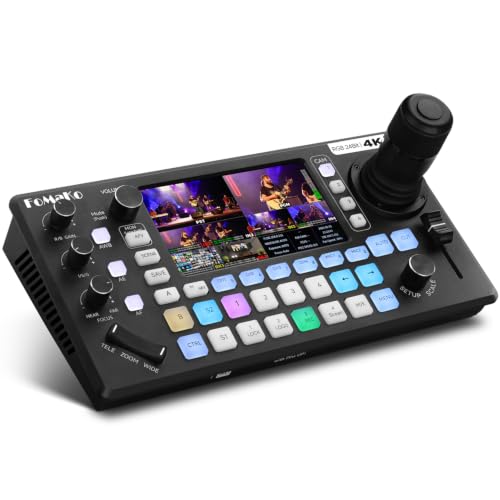
- Controls up to four PTZ cameras
- 4K HDMI inputs and AI tracking
- XLR mixing plus USB/SD recording
Best For: Churches building an integrated PTZ worship system
Best Audio-Video Integration

- Six HDMI and USB video sources
- Two studio-grade combo audio inputs
- Scenes, overlays, streaming, and ISO recording
Best For: Churches prioritizing integrated audio and video production
Best All-in-One Control

- Four HDMI inputs plus dual outputs for MultiView
- Records to SD card or USB SSD
- Streams to up to three platforms
Best For: Churches needing integrated HDMI switching, audio, recording, and streaming
Best Touchscreen Operation
FEELWORLD L4 10.1-Inch Switcher

- Large touchscreen with real-time preview
- Four HDMI and one SDI input
- Chroma key and logo overlay support
Best For: Churches wanting simple hands-on control with HDMI and SDI cameras
Best Hybrid Camera Support

- Four SDI and four HDMI inputs
- Supports NDI HX and media playback
- Streams to up to three platforms
Best For: Churches with mixed-camera systems and expanding production needs
Best Solo-Operator Pick

- Four 4K HDMI inputs with 1080p program output
- Touchscreen, joystick, PTZ control, and four presets
- Built-in chroma key and 14 transition effects
Best For: Volunteer-led, multi-camera church worship streams
Best Professional Production Hub

- Four HDMI and four SDI inputs
- Records eight ISO feeds plus program output
- Built-in XLR audio and triple RTMP streaming
Best For: Larger churches with mixed cameras and broadcast workflows
Best Compact Monitoring Option

- Four HDMI inputs and built-in 4-inch multi-view screen
- 30 transitions and four scene presets
- PTZ control, keying, PIP, DSK, and logo overlay
Best For: Portable, HDMI-based church productions with small teams
Best All-Around Value – Blackmagic ATEM Mini Pro
The Blackmagic Design ATEM Mini Pro is a practical video switcher for church services that need four HDMI camera inputs, multiview monitoring, and built-in streaming. Its compact design and integrated audio mixer help simplify a multicamera worship setup.
Best For: Churches seeking an accessible four-camera HDMI switcher with built-in streaming, recording, and multiview.
Pros:
- Supports four HDMI camera inputs and a multiview output.
- Includes transitions, upstream keys, and a downstream keyer for presentations and overlays.
- Built-in six-input, two-channel audio mixer, streaming, and USB-C recording support.
Cons:
- HDMI inputs are limited to four cameras.
- Its feature set may require operator training for volunteers unfamiliar with live production.
For many congregations, the ATEM Mini Pro offers a strong balance of switching features, audio control, and streaming connectivity without requiring a large production system.
Best for Solo Operators – Roland V-1HD+
The Roland V-1HD+ combines an HD video switcher with a 14-channel audio mixer, making it a flexible video switcher for church teams handling live production and sound from one compact unit. Its familiar controls and memory presets can help speed up service setup.
Best For: Solo operators or small church production teams that need integrated audio, video effects, and portable operation.
Pros:
- Combines standalone video switching with a 14-channel audio mixer.
- Offers four-layer effects and keying for graphics, lower thirds, and social callouts.
- Includes automatic video switching assistance and eight memory presets.
Cons:
- It is an HD switcher rather than a 4K-focused solution.
- The unit weighs 5.2 pounds and has a larger footprint than some compact switchers.
The V-1HD+ is especially appealing when one operator must manage both presentation visuals and audio, while remote control through the V-1HD+ Remote application adds operational flexibility.
Best PTZ Production Hub – FoMaKo KC800
The FoMaKo KC800 is an all-in-one video switcher for church worship productions that combines four 4K HDMI inputs, PTZ camera control, AI tracking, audio mixing, recording, and streaming. Its integrated joystick can reduce the amount of extra equipment needed for a multi-camera setup.
Best For: Churches using PTZ cameras and wanting integrated camera control, audio, recording, and multichannel streaming.
Pros:
- Controls up to four PTZ cameras with a 4D joystick, presets, and AI tracking.
- Provides four 4K HDMI inputs, three HDMI outputs, and UVC connectivity.
- Includes XLR audio inputs with 48V phantom power, USB/SD recording, and streaming to multiple platforms.
Cons:
- Its extensive feature set may be more than a small church needs.
- PTZ control benefits most when the church already uses compatible VISCA or VISCA-over-IP cameras.
With camera control and production functions in one chassis, the KC800 is a compelling choice for worship spaces building a PTZ-based workflow and seeking PC-free recording or flexible streaming options.
Best Audio-Video Integration – RØDECaster Video
The RØDE RØDECaster Video is a professional video switcher for church productions that need video switching and high-quality audio control in one interface. It handles up to six sources, supports custom scenes and overlays, and can stream or record directly.
Best For: Churches that want integrated XLR audio, HDMI and USB source switching, custom scenes, and direct streaming.
Pros:
- Switches four HDMI and two USB video sources, with seven customizable scenes.
- Includes two Neutrik combo inputs with high-gain Revolution Preamps.
- Supports overlays, chroma keying, direct streaming, USB recording, and isolated recording.
Cons:
- Its extensive production features may require time to configure and learn.
- The supplied notes do not specify 4K support; the listed highlight is 1080p60.
The RØDECaster Video stands out when audio quality and flexible scene-based production matter as much as camera switching, particularly for churches producing both live services and edited recordings.
Best All-in-One Control – Osee GoStream Deck HDMI Pro
If you need a versatile video switcher for church streaming, the Osee GoStream Deck combines four HDMI inputs with recording, audio control, overlays, and direct streaming. Its built-in control panel can handle production without a computer, while USB output supports software such as OBS or vMix.
Best For: Churches running HDMI-based worship broadcasts, multi-camera services, and live events that need integrated audio, recording, and streaming controls.
Pros:
- Four HDMI inputs and two HDMI outputs support multiple sources and MultiView monitoring.
- Records to an SD card or USB SSD and supports MP4 playback for intros or breaks.
- Streams to up to three platforms and supports landscape or portrait formats.
- Includes audio effects, graphics overlays, chroma key, PIP, and lower-third support.
Cons:
- Its primary camera inputs are HDMI rather than SDI.
- The range of controls and production features may require setup time for new operators.
The GoStream Deck is a strong choice when a church wants a self-contained switcher with broad production features. It is especially practical for teams that want to manage switching, audio, recording, and streaming from one compact unit.
Best Touchscreen Operation – FEELWORLD L4 10.1-Inch Switcher
The FEELWORLD L4 is a practical video switcher for church teams that want an easy-to-read control surface. Its 10.1-inch touchscreen provides a real-time preview and menu interface, while the T-bar and physical buttons offer alternate ways to switch between cameras.
Best For: Churches using a mix of HDMI and SDI cameras that prioritize touchscreen control, real-time previews, and straightforward live streaming.
Pros:
- 10.1-inch touchscreen provides an intuitive operating interface and real-time preview.
- Supports up to five camera inputs, including four HDMI and one SDI.
- Offers HDMI, SDI, and USB 3.0 outputs for displays and streaming software.
- Includes chroma key and logo overlay functions.
Cons:
- The supplied notes do not mention onboard recording or direct platform streaming.
- Input and output compatibility depends on matching supported video formats.
For a church upgrading from basic software switching, the L4 offers a visible, hands-on workflow with both HDMI and SDI support. Its touchscreen and T-bar make it a sensible fit for volunteer operators who need a clear switching interface.
Best Hybrid Camera Support – Osee GoStream Duet SDI/HDMI
Osee GoStream Duet Multiple Camera SDI and HDMI Live Stream Video Mixer Switcher
Check Price On AmazonThe Osee GoStream Duet is a flexible video switcher for church productions that use both SDI and HDMI equipment. It supports four SDI inputs, four HDMI inputs, USB-C, NDI HX, and media playback, giving growing production teams multiple ways to bring sources into a live service.
Best For: Churches with mixed SDI and HDMI camera systems that want expanded source options, flexible control, and multi-platform streaming.
Pros:
- Supports four SDI, four HDMI, USB-C, NDI HX, and SD/SSD playback sources.
- Provides multiple control methods through its built-in GUI, Mac and Windows software, and Bitfocus Companion.
- Includes Multisource, chroma key, PIP, DSK, and several transition effects.
- Can stream to up to three platforms through Ethernet or compatible software.
Cons:
- NDI HX requires downloading the latest firmware to unlock the included license.
- The broader source and control options may be more than a small, simple church setup needs.
The GoStream Duet stands out for churches planning around multiple camera standards or future expansion. Its SDI/HDMI flexibility and software-control options make it well suited to more advanced worship broadcasts and live productions.
Best Solo-Operator Pick – RGBlink Mini-pro
If you need a video switcher for church worship, the RGBlink Mini-pro is designed for a compact, volunteer-friendly setup. It accepts four 4K HDMI inputs, provides dual HDMI and USB 3.0 output, and integrates with OBS and vMix for streaming workflows.
Best For: Churches running multi-camera worship streams with one operator and PTZ cameras.
Pros:
- Four 4K HDMI inputs with preview and program monitoring.
- Touchscreen and joystick simplify switching, PTZ control, layering, and chroma key.
- Supports VISCA PTZ control with four saved camera presets.
- Includes chroma key and 14 onboard transition effects.
Cons:
- Outputs and streaming workflow are centered on 1080p program production.
- Requires a firmware update before use for optimal operation.
- Needs a 35W-or-higher USB-C power adapter for stable UVC streaming.
The Mini-pro is a practical choice when ease of operation and PTZ control matter more than extensive connectivity. Its HDMI-only design may be limiting for churches with SDI cameras, but it offers a capable feature set for compact worship broadcasts.
Best Professional Production Hub – Osee GoStream Duet 8 ISO
For churches building a more advanced video switcher for church production, the Osee GoStream Duet 8 ISO combines HDMI and SDI connectivity with professional audio, ISO recording, and network streaming. It can serve mixed camera systems without requiring separate converters for every source.
Best For: Churches with larger productions, mixed HDMI and SDI cameras, and a need for recording and flexible audio control.
Pros:
- Combines four HDMI 2.0 and four 3G-SDI inputs in one switcher.
- Records eight ISO feeds plus the program output in H.264 or H.265.
- Provides XLR and 3.5mm audio inputs with phantom power and audio processing.
- Supports NDI|HX, SRT, RTMP, USB UVC, and streaming to up to three RTMP destinations.
Cons:
- Its extensive broadcast feature set may be more than a small volunteer team needs.
- Program output is specified as 1080p even though HDMI inputs support up to 4K60.
- Requires a more involved setup than a compact HDMI-only switcher.
The GoStream Duet 8 ISO is the strongest fit for a church treating live production as a repeatable broadcast workflow. Its ISO recording, XLR audio, hybrid inputs, and network features provide useful flexibility for worship, events, and post-production.
Best Compact Monitoring Option – CINETREAK Mixer Plus
The CINETREAK Mixer Plus is a compact video switcher for church teams that want local monitoring without adding a separate display. Its four HDMI inputs, built-in 4-inch screen, and multi-view layout support straightforward multi-camera switching for worship, classes, and events.
Best For: Small church teams needing a portable HDMI switcher with built-in multi-view monitoring.
Pros:
- Built-in 4-inch display provides real-time multi-view monitoring.
- Four HDMI inputs support multi-camera switching with zero-latency switching.
- Includes 30 transition effects and four user-defined scene presets.
- Offers VISCA-over-IP PTZ control, chroma key, luma key, PIP, DSK, and logo overlay.
Cons:
- Connectivity is limited to HDMI inputs and outputs.
- Its headphone audio output may not replace a separate church audio workflow.
- The compact built-in screen may be less comfortable for detailed monitoring than a larger external display.
Mixer Plus balances portability with useful production controls. It is a sensible choice for smaller HDMI-based setups where an integrated preview screen and flexible AUX output are more important than SDI, extensive recording, or advanced network streaming.
How We Picked the Best Video Switcher for Church
We selected models that suit common church production needs, including worship services, sermons, conferences, youth events, and hybrid gatherings. Our evaluation focuses on input and output formats, switching speed, multiview visibility, audio integration, streaming support, portability, and ease of operation.
Because church systems vary widely, this list includes simple HDMI units for volunteer crews as well as more advanced switchers with SDI support, ISO recording, PTZ control, built-in displays, and professional audio connections.
Quick Comparison
| Best For | Look For | Recommended Type |
|---|---|---|
| Simple sermon streaming | Easy HDMI switching and direct streaming | Compact HDMI switcher |
| Multi-camera worship | At least four inputs and multiview | HDMI or HDMI/SDI mixer |
| PTZ camera systems | Joystick control and camera integration | Switcher with PTZ control |
| Professional audio | XLR inputs, audio mixing, or audio-interface features | Switcher with integrated audio workflow |
| Post-service editing | ISO recording or multiple outputs | Advanced production switcher |
Key Buying Factors for a Video Switcher for Church
Inputs and Camera Compatibility
Count your current cameras first, then allow room for expansion. HDMI works well for short cable runs and compact setups, while SDI is generally better for longer runs and permanent installations. Confirm that the switcher supports your cameras’ resolution and frame rate.
Multiview and Operator Visibility
A multiview output lets the operator see every source, the program feed, preview selections, audio meters, and streaming status at once. Built-in screens are useful in portable setups, but a dedicated monitor may provide a larger and clearer workspace.
Audio Routing
Church services often combine a mixing-console feed, microphones, playback, and presentation audio. Check whether the switcher accepts embedded HDMI audio, analog inputs, XLR connections, or USB audio. Make sure it can receive a clean feed from your existing sound system without creating delay or feedback problems.
Streaming, Recording, and Outputs
If the switcher streams directly, verify compatibility with your platform and network setup. HDMI, USB, and network outputs can support different combinations of livestreaming, in-room displays, recording, and overflow rooms. ISO recording is valuable when you want to edit individual camera feeds later.
Ease of Use and Reliability
Volunteer operators benefit from clearly labeled controls, dependable presets, tactile buttons, and simple signal monitoring. For a fixed church installation, prioritize stable connections and serviceable cabling. For mobile ministry teams, consider weight, built-in screens, power requirements, and setup time.
Who Should Buy Which Video Switcher for Church?
Choose a Compact HDMI Model for Small Teams
A compact HDMI switcher is a practical choice for one operator, two to four cameras, sermon streaming, and occasional events. It minimizes setup complexity and can often connect directly to a streaming platform or computer.
Choose an Advanced HDMI or SDI Model for Worship Productions
Churches running several cameras, stage displays, PTZ cameras, or long cable runs should consider a switcher with more inputs, multiview, stronger output options, and SDI support where appropriate.
Choose ISO Recording or Integrated Audio for Growing Ministries
If your team produces edited sermons, podcasts, social clips, or recorded worship content, prioritize ISO recording and flexible audio routing. These features cost more but can reduce post-production time and improve consistency.
The best Video Switcher for Church is the one that matches your cameras, audio console, streaming workflow, and operator experience without adding unnecessary complexity. Confirm compatibility with every existing component before purchasing.