
Choosing among the best video switchers with SDI means balancing camera inputs, output formats, streaming tools, recording options, and the production workflow you actually use. SDI connectivity is especially valuable for reliable long-distance cabling in studios, venues, houses of worship, and live events.
This roundup compares 10 options ranging from compact hybrid HDMI/SDI mixers to advanced switchers with ISO recording, multiview monitoring, PTZ control, and professional audio support.
Best 10 Video Switchers with Sdi Picks for 2026
Best All-in-One Mixer

- Four SDI and four HDMI inputs
- Keying, PIP, DSK, and varied transitions
- Streams to up to three platforms
Best For: Multicamera streaming with mixed video sources
Best Simple SDI Selector

- Four SDI inputs and one output
- Supports SD, HD, and 3G-SDI
- Recalls the last input after restart
Best For: Basic SDI source routing and television setups
Best for ISO Recording
Blackmagic ATEM SDI Extreme ISO

- Eight 3G-SDI inputs
- Records nine H.264 streams simultaneously
- Advanced keying and multiview features
Best For: Multicamera productions needing isolated recordings
Best for PTZ Production

- Four SDI and four HDMI inputs
- Controls up to four PTZ cameras
- Streams, records, and mixes audio
Best For: PTZ-based events with mixed camera inputs
Best Compact SDI Switcher
ATEM SDI Live Production Switcher
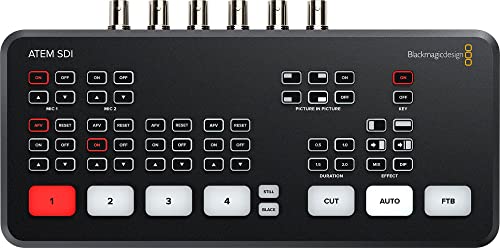
- Four 3G-SDI inputs with 10-bit HD support
- Built-in frame-rate and format conversion
- USB-C webcam output and six-input audio mixer
Best For: Compact HD live productions and streaming setups
Best Hybrid SDI Switcher

- Four HDMI and four 3G-SDI inputs
- Records eight ISO feeds plus program output
- XLR audio, network video, and triple streaming
Best For: Mixed-camera events and advanced live streaming
Best SDI Switcher for ISO Streaming

- Four 3G-SDI inputs with real-time conversion
- Ethernet and USB-C mobile-internet streaming
- Built-in and Mac/Windows software control
Best For: Four-camera HD streaming and compact production teams
Best All-in-One SDI Production Hub

- Four SDI and four HDMI inputs
- PTZ, NDI|HX3, recording, and streaming support
- Built-in 5.5-inch screen with configurable outputs
Best For: Feature-rich multi-camera productions and live events
Best Straightforward SDI Streaming Switcher
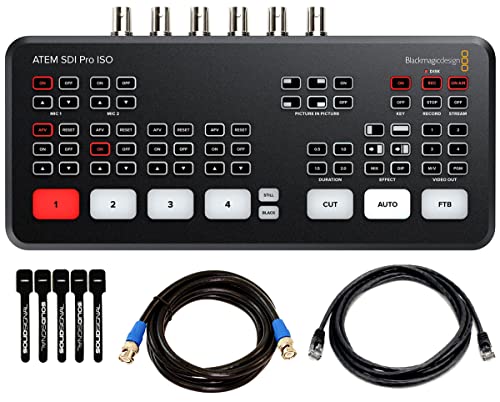
- Four 3G-SDI HD camera inputs
- Built-in transitions, keying, audio mixing, and multiview
- Ethernet streaming plus USB-C recording and webcam output
Best For: HD multicamera streaming and broadcast-style productions
Best SDI Switcher for Audio-Heavy Productions

- Four 3G-SDI and four 4K HDMI inputs
- Eight-channel audio mixing with multiple audio sources
- PTZ control, UVC, NDI|HX2, and web-server operation
Best For: Podcasts, worship, hybrid meetings, and live events
Best All-in-One Mixer – Osee GoStream Duet
Osee GoStream Duet Multiple Camera SDI and HDMI Live Stream Video Mixer Switcher
Check Price On AmazonIf you need video switchers with SDI that can also handle HDMI, USB-C, NDI HX, and media playback, the Osee GoStream Duet is a versatile option. It combines four SDI inputs, four HDMI inputs, and multiple control methods in a compact chassis, with support for landscape or portrait production and up to three simultaneous streaming platforms.
Best For: Multicamera streamers and small production teams needing broad input support, built-in effects, and flexible streaming control.
Pros:
- Accepts four SDI, four HDMI, USB-C, NDI HX, and SD/SSD playback sources.
- Offers chroma key, luma key, pattern key, PIP, DSK, and multiple transition types.
- Supports GUI, computer software, and Bitfocus Companion control.
- Can stream to up to three platforms through Ethernet or a smartphone hotspot.
Cons:
- The free NDI HX license requires the latest firmware download to unlock.
- Its extensive feature set may require more setup than a basic SDI switcher.
The GoStream Duet is a strong fit when your workflow mixes SDI and HDMI cameras and you want streaming, keying, playback, and remote-control options in one affordable professional unit.
Best Simple SDI Selector – Wiistar 4×1 SDI Switcher
The Wiistar 4×1 is a straightforward choice among video switchers with SDI for routing one of four SDI sources to a single output. Its reclocking, input/output equalization, and support for SD, HD, and 3G-SDI make it suitable for installations that prioritize signal handling over production effects.
Best For: Television and AV setups that need basic four-source SDI selection across standard and high-definition formats.
Pros:
- Provides four BNC SDI inputs and one BNC SDI output.
- Automatically switches between SD, HD, and 3G-SDI standards.
- Supports resolutions from SD formats through 1080p at up to 60Hz.
- Memory function recalls the last selected input after restarting.
Cons:
- Has only SDI connectivity, with no HDMI, streaming, or recording features listed.
- Provides one output, limiting more complex distribution workflows.
This Wiistar model is best viewed as a focused SDI routing tool rather than a live-production mixer. It is a practical pick when you need dependable source selection and broad SDI format compatibility without added production features.
Best for ISO Recording – Blackmagic ATEM SDI Extreme ISO
Blackmagic Design ATEM SDI Extreme ISO Live Stream Switcher (SWATEMMXEPCEXTISO)
Check Price On AmazonFor demanding multicamera workflows, the Blackmagic Design ATEM SDI Extreme ISO combines eight 3G-SDI inputs with live switching, streaming, multiview, and isolated recording. It supports frame-rate and format conversion on inputs, multiple keyers, phone connectivity, and real-time recording of nine separate H.264 streams.
Best For: Broadcasters, educators, event producers, and streamers who need SDI switching plus ISO recording and network production control.
Pros:
- Offers eight 3G-SDI inputs and four 3G-SDI outputs.
- Records nine separate H.264 video streams in real time.
- Includes four upstream keyers, two downstream keyers, and multiview support for up to 16 screens.
- Provides Ethernet, USB-C recording, webcam output, and 4G/5G phone support.
Cons:
- Its advanced ISO and keying features may be more than a simple switching setup requires.
- Connectivity is centered on SDI, Ethernet, USB-C, and analog audio rather than HDMI inputs.
The ATEM SDI Extreme ISO stands out when post-production flexibility matters. Its isolated recordings and extensive keying make it a capable centerpiece for multicamera productions that need both live output and editable source files.
Best for PTZ Production – FEELWORLD L3 PRO
The FEELWORLD L3 PRO is a flexible choice among video switchers with SDI, combining four 3G-SDI inputs, four HDMI inputs, and UVC or media sources. It adds multiview monitoring, PTZ control, audio mixing, USB-C streaming, RTMP output, recording, and production effects for live events and presentations.
Best For: Churches, educators, event teams, and creators producing PTZ-based shows with mixed SDI and HDMI cameras.
Pros:
- Supports four 3G-SDI, four HDMI, and UVC/media inputs.
- Includes PTZ control for up to four cameras using IP VISCA.
- Provides chroma key, luma key, PIP, logo overlay, and up to 16 transition effects.
- Offers seven-channel audio mixing, USB-C UVC output, RTMP streaming, and USB recording.
Cons:
- The feature-rich workflow may take time to configure for first-time users.
- The supplied notes list two HDMI outputs but do not specify additional output formats.
The L3 PRO is a well-rounded production hub for teams that want more than basic switching. Its PTZ joystick, audio tools, streaming options, and mixed-input design make it especially useful for repeatable live-event workflows.
Best Compact SDI Switcher – ATEM SDI Live Production Switcher
If you need video switchers with sdi for a streamlined HD production, the Blackmagic Design ATEM SDI Live Production Switcher combines four 3G-SDI inputs with built-in conversion, USB-C webcam output, and practical audio controls. Its compact, corded design suits productions that prioritize straightforward operation and reliable wired connectivity.
Best For: Small live productions, streaming setups, and users working with multiple HD SDI sources.
Pros:
- Four 3G-SDI inputs support 10-bit HD video.
- Frame-rate and format converters are built into all four SDI inputs.
- USB-C output simplifies webcam-style streaming.
- Six-input audio mixer includes compressor, gate, and EQ controls.
Cons:
- Designed around HD 3G-SDI workflows rather than higher-bandwidth SDI formats.
- It does not offer the hybrid HDMI/SDI input flexibility of some larger switchers.
This is a sensible choice when you want dependable SDI switching, hardware-based processing, and basic streaming output without adding a more elaborate production system.
Best Hybrid SDI Switcher – GoStream Duet 8 ISO
For productions that combine professional SDI cameras with HDMI sources, the Osee GoStream Duet 8 ISO is one of the more flexible video switchers with sdi. It provides four HDMI 2.0 and four 3G-SDI inputs, along with ISO recording, XLR audio, network video options, and direct streaming features.
Best For: Churches, event crews, podcasts, panels, and mixed-camera productions needing recording and streaming flexibility.
Pros:
- Combines four HDMI 2.0 inputs and four 3G-SDI inputs.
- Records eight ISO feeds plus the program output.
- Includes XLR and 3.5mm audio connections with processing and phantom power in XLR Mic mode.
- Supports NDI|HX, SRT, RTMP, USB UVC output, and up to three RTMP destinations.
Cons:
- Its broader feature set may require more setup than a basic switcher.
- HDMI inputs accept up to 4K60, but the listed output capability is 1080p.
- At three pounds, it is less lightweight than compact SDI-only options.
The GoStream Duet 8 ISO is the strongest fit here for hybrid workflows and production safety. ISO recording, layered graphics, audio processing, and multiple streaming paths give it room to grow with a more demanding setup.
Best SDI Switcher for ISO Streaming – ATEM SDI Pro ISO
The Blackmagic Design ATEM SDI Pro ISO is a practical option among video switchers with sdi when you want four-camera HD switching plus direct streaming and ISO-focused production features. It adds Ethernet or USB-C-connected mobile internet support, software control, and Fairlight audio tools in a compact unit.
Best For: Streamers and small production teams that need four SDI inputs, direct RTMP streaming, and flexible control.
Pros:
- Four 3G-SDI inputs include frame-rate and format converters.
- Supports direct Ethernet streaming and shared mobile internet through USB-C.
- Can be controlled from the built-in panel or ATEM Software Control on Mac and Windows.
- Six-input audio mixer provides compressor, gate, EQ, and adjustable analog delay.
Cons:
- Limited to four SDI inputs and SDI camera connectivity.
- Uses 3G-SDI HD inputs rather than a higher-bandwidth format.
- Its advanced controls may be more than needed for simple switching.
Choose this model when direct streaming and software-based control matter as much as SDI switching. It offers a focused four-input workflow with useful audio processing and low-latency hardware conversion.
Best All-in-One SDI Production Hub – Tenveo PC500
The Tenveo PC500 is a versatile choice for buyers comparing video switchers with SDI for larger, feature-heavy productions. It combines four SDI inputs with four HDMI inputs, PTZ control, recording, multiview monitoring, and built-in streaming tools in one unit.
Best For: Churches, studios, events, conferences, classrooms, and other multi-camera productions needing SDI, HDMI, PTZ, recording, and streaming capabilities.
Pros:
- Provides four SDI and four HDMI inputs, including two HDMI inputs supporting 4K60FPS.
- Supports PTZ camera control, NDI|HX3, web-browser control, and multiple streaming protocols.
- Offers USB and SD-card recording, replay-oriented auxiliary playback, and dual recording support.
- Includes a 5.5-inch FHD screen and configurable program, auxiliary, and multiview outputs.
Cons:
- Its broad feature set may be more than smaller or simpler streaming setups require.
- Although it accepts 4K60FPS input, listed video outputs are up to 1080P60FPS.
The PC500 stands out when SDI connectivity is only one part of the workflow. Its PTZ integration, recording options, and support for UVC, SRT, RTMP, RTSP, and NDI|HX3 make it a strong fit for operators who want to consolidate production and streaming tasks.
Best Straightforward SDI Streaming Switcher – Blackmagic ATEM SDI Pro ISO
The Blackmagic Design ATEM SDI Pro ISO is a focused option for buyers seeking video switchers with SDI for multicamera streaming and broadcast-style workflows. It provides four 3G-SDI camera inputs, built-in transitions and keying, audio mixing, multiview, and USB-C recording in a compact setup.
Best For: Education, business presentations, esports, internet streaming, and productions using several HD-SDI cameras.
Pros:
- Includes four switchable 3G-SDI inputs with 10-bit HD support and input resynchronization and conversion features.
- Offers Cut, Mix, Dip, Wipe, DVE, multiple keyers, and a downstream keyer for more polished switching.
- Features a built-in six-input, two-channel audio mixer and four-camera multiview.
- Supports Ethernet streaming and control, plus USB-C external-drive recording and webcam output.
Cons:
- Its SDI inputs are designed for HD 3G-SDI sources rather than 4K SDI production.
- The package has fewer SDI inputs than some larger production switchers.
- It does not list integrated PTZ camera control in the supplied specifications.
This ATEM model is a practical choice when dependable HD-SDI switching matters more than extensive input variety. Its included cables and cable ties add convenience, while the built-in effects, audio tools, streaming, and recording features cover common live-production needs.
Best SDI Switcher for Audio-Heavy Productions – RGBlink mini-edge SDI
The RGBlink mini-edge SDI is a flexible pick among video switchers with SDI for creators who need both video routing and substantial audio control. It combines four 3G-SDI inputs, four 4K HDMI inputs, PTZ control, NDI|HX2, UVC streaming, and an eight-channel audio mixer.
Best For: Podcasts, worship services, live events, hybrid meetings, studios, and content creators mixing multiple cameras with microphones or other audio sources.
Pros:
- Accepts four 3G-SDI inputs and four 4K HDMI inputs for mixed-camera workflows.
- Provides PTZ pan, tilt, zoom, and preset control over a LAN connection.
- Combines Line In, Mic In, UAC, Bluetooth, and an eight-channel audio mixer.
- Supports dual 2K HDMI outputs, UVC streaming, RTMP/RTMPS, NDI|HX2, and web-server control.
Cons:
- The supplied notes recommend updating to the newest firmware before use.
- Its SDI inputs are specified as 3G SDI, while 4K support is listed for HDMI inputs.
- The product’s many audio, video, and network features may require setup time.
The mini-edge SDI is especially compelling when synchronized sound is central to the production. It offers a broad mix of physical inputs and network features, while remote control and PTZ support make it adaptable for fixed studios and on-site productions.
How We Picked These Video Switchers with Sdi
We focused on switchers that include SDI inputs or routing and support practical multicamera production tasks. The selection spans entry-level SDI distribution, hybrid HDMI/SDI mixing, streaming-focused systems, and more advanced live production switchers. We considered input flexibility, supported resolutions and frame rates, switching features, recording and streaming tools, audio connectivity, monitoring, portability, and overall workflow value.
Because specifications vary significantly, verify the exact model number, firmware requirements, connector configuration, and regional power accessories before buying. Some products share similar names but offer different ISO, streaming, or output capabilities.
Quick Comparison
| Best For | Prioritize | Typical Advantage |
|---|---|---|
| Simple SDI routing | Reliable SDI switching and reclocking | Lower cost and straightforward operation |
| Hybrid camera setups | Both HDMI and SDI inputs | Works with mixed consumer and professional cameras |
| Streaming productions | USB, network streaming, and multiview | Faster production with fewer external devices |
| Postproduction flexibility | ISO recording and project export | Allows individual camera editing after the event |
| Advanced venues | 4K support, PTZ, NDI, and robust audio | Scales to more demanding workflows |
Key Buying Factors for Video Switchers with Sdi
Inputs, Standards, and Cabling
Count the cameras and sources you need today, then leave room for expansion. Check whether the switcher accepts 3G-SDI, 6G-SDI, or another standard, and confirm that all inputs can operate at your preferred resolution and frame rate. Reclocking can help maintain signal integrity, while SDI is generally better suited than HDMI for long cable runs.
Output and Streaming Requirements
Look for the outputs your system requires, such as SDI program feeds, HDMI monitoring, USB webcam output, or network streaming. A built-in multiview can reduce the need for a separate monitor, but check its resolution and layout options. If you stream directly, review supported platforms, encoding settings, and network connectivity.
ISO Recording, Audio, and Control
ISO recording is useful when you want to revise a live production later, but it requires sufficient storage and may increase workflow complexity. For audio, check for XLR inputs, embedded SDI audio, mixing controls, delay, and headphone monitoring. PTZ control, macros, keying, transitions, and tally support can also save time during a live show.
Resolution and Portability
Do not assume that a 4K-capable input means every output, recording, or streaming function operates in 4K. Confirm the complete signal path. For mobile productions, compare dimensions, screen availability, power requirements, and whether controls remain usable without a computer.
Who Should Buy Which Video Switchers with Sdi?
Choose a basic SDI switcher if you mainly need dependable source selection or signal distribution. A hybrid HDMI/SDI model is the better fit for creators combining mirrorless cameras, camcorders, computers, and professional SDI cameras. Streamers and small event teams should prioritize integrated USB or network output, multiview, and simple audio controls.
Choose an ISO-capable production switcher when recordings may be edited after the event or when you need backup camera files. Larger studios, venues, and corporate production teams should favor expanded SDI capacity, standards compatibility, robust monitoring, and control features over the lowest purchase price. Finally, match the switcher to your cameras and cabling first; extra features are useful only when they fit the rest of your production system.