
Choosing a video switcher with recording can simplify a multicamera production by combining source switching, streaming, monitoring, and capture in one workflow.
These 10 models cover compact HDMI setups, professional SDI systems, PTZ production, onboard recording, and hybrid audio-video live production. The right choice depends on your inputs, output resolution, recording needs, and room to expand.
Best 10 Video Switcher with Recording Picks for 2026
Best All-in-One Streaming Hub

- Records to SD card while streaming over USB
- Streams to up to three platforms via Ethernet
- Four HDMI inputs plus USB camera support
Best For: Churches, schools, and live event teams
Best Audio-Video Production Console

- Handles six HDMI and USB video sources
- Records to USB storage with ISO options
- Includes two studio-grade XLR combo inputs
Best For: Studio creators and post-production-focused teams
Best Advanced Orientation Switching

- Records Full HD video with instant playback
- Supports dual RTMPS streaming destinations
- Adds PTZ control and landscape or portrait output
Best For: Advanced multi-format live productions
Best Compact HDMI Streaming Switcher

- Records to an external USB-C drive
- Switches four HDMI sources with multiview
- Includes transitions, keyers, and audio mixing
Best For: Education, business presentations, and four-camera streams
Professional Production Hub

- HDMI, SDI, USB, NDI|HX3, and PTZ support
- Dual recording to SD, USB disk, or HDD
- Two-platform streaming with 1080p60 output
Best For: Professional multi-camera productions and PTZ-based live events
ISO Recording Specialist

- Records 8 ISO feeds plus the live program
- Combines 4 HDMI and 4 SDI inputs
- Includes XLR audio and triple RTMP streaming
Best For: Hybrid HDMI/SDI productions needing extensive recording flexibility
Solo Operator Choice
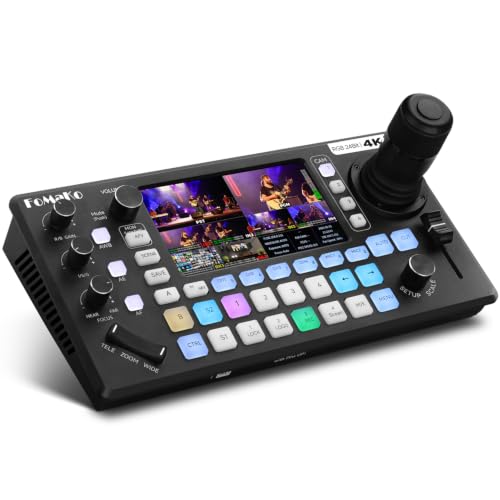
- Integrated 4D joystick and AI PTZ tracking
- USB/SD recording without a PC
- Four 4K HDMI inputs and 6-channel audio
Best For: Solo operators running PTZ-based church, event, or live-stream productions
Portable Production Kit

- Four HDMI/SDI inputs with dual HDMI outputs
- Includes 14-inch monitor and mounting plates
- Supports AC, DC, and USB power-bank operation
Best For: Mobile live streaming and event production
Compact Touchscreen Switcher

- Four HDMI inputs with touchscreen and T-bar control
- UVC webcam mode plus dual HDMI outputs
- USB recording available with optional activation
Best For: Compact multi-camera streaming and desktop production
Advanced Recording Mixer

- Records simultaneously to USB and SD cards
- Adds audio mixing, PTZ control, and remote management
- Supports 4K inputs, streaming, and extensive transitions
Best For: Multi-camera events and advanced live production
Best All-in-One Streaming Hub – GoStream Deck Pro
The Osee GoStream Deck Pro is a practical video switcher with recording for teams that need local SD card backups alongside USB or direct Ethernet streaming. Its four HDMI inputs, USB camera input, multiview layouts, and hardware macro buttons support flexible live production without requiring a separate streaming computer for Ethernet broadcasts.
Best For: Churches, schools, and live event teams needing recording, multistreaming, and tactile controls.
Pros:
- Records high-bitrate MP4 video directly to an SD card while streaming through USB.
- Can stream to up to three platforms simultaneously through its built-in Ethernet encoder.
- Supports four HDMI sources plus a USB camera and flexible picture-in-picture layouts.
- Eight physical macro buttons provide quick access to switching, overlays, and transitions.
Cons:
- The product notes do not specify recording resolution, SD card capacity limits, or supported streaming platforms by name.
- Its input selection is more limited than larger production systems, with four HDMI inputs plus one USB camera input.
Choose this model when simultaneous local recording and direct network streaming are priorities. Ethernet control and programmable buttons also make it appealing for repeatable event workflows.
Best Audio-Video Production Console – RØDECaster Video
The RØDE RØDECaster Video combines a video switcher with recording and a two-input audio interface. It handles up to six HDMI and USB video sources, custom scenes, overlays, transitions, direct streaming, and recording to external USB storage, including isolated recordings for more flexible post-production.
Best For: Creators and production teams that want integrated studio-quality audio, video switching, and ISO recording.
Pros:
- Switches up to six video sources and supports seven customizable multi-source scenes.
- Records directly to external USB storage, including isolated recordings for post-editing.
- Provides two Neutrik combo inputs with Revolution Preamps for XLR microphones and other sources.
- Includes graphic overlays, chroma keying, transitions, media playback, and automatic switching options.
Cons:
- It is a comparatively feature-dense console, which may be more than basic single-camera setups require.
- The supplied dimensions are listed as 30.59 by 13.25 by 6.14 inches, so buyers should verify available workspace.
- The notes do not identify the supported external USB storage capacities.
This is a strong fit when audio quality and post-production flexibility matter as much as live switching. ISO recording is especially useful for refining individual sources after a broadcast.
Best Advanced Orientation Switching – CINETREAK Stream 1
The CINETREAK Stream 1 is a video switcher with recording designed for more advanced broadcasts. Along with four HDMI inputs and an AUX media channel, it offers Full HD recording and playback, dual RTMPS streaming, PTZ control, keying tools, customizable picture-in-picture layouts, and both landscape and 9:16 portrait production.
Best For: Producers who need PTZ control, dual-destination streaming, portrait broadcasts, and studio-style effects.
Pros:
- Records high-bitrate Full HD video and supports instant playback.
- Can stream through RTMPS to two destinations simultaneously.
- Controls up to four PTZ cameras through VISCA, with wireless IP control from a computer or smartphone.
- Supports chroma and luma keying, more than 30 transitions, adjustable PIP, and portrait orientation.
Cons:
- The notes do not specify the recording storage medium or maximum recording capacity.
- Its advanced PTZ, keying, and orientation features may be unnecessary for simpler productions.
- NDI is described as updatable, so buyers should confirm current NDI availability and requirements.
Consider Stream 1 if your production needs extend beyond basic camera switching. Its combination of recording, PTZ management, dual streaming, and portrait support makes it particularly adaptable for modern multi-format broadcasts.
Best Compact HDMI Streaming Switcher – ATEM Mini Pro
The Blackmagic Design ATEM Mini Pro is a compact video switcher with recording for four-camera live productions. It combines HDMI switching, multiview, built-in streaming, external-drive recording through USB-C, transitions, keyers, and a six-input audio mixer in a small desktop unit.
Best For: Educators, businesses, esports streamers, and presenters building a straightforward four-camera setup.
Pros:
- Records to an external drive through USB-C while supporting built-in internet streaming.
- Provides four HDMI camera inputs and a four-camera multiview.
- Includes cut, mix, dip, wipe, and DVE transitions plus multiple keying options.
- Built-in six-input, two-channel audio mixer supports HDMI and analog audio sources.
Cons:
- It has four HDMI inputs, so it offers less source capacity than six-input models.
- Recording requires an external drive connected through USB-C rather than an internal or specified SD recording system.
- The supplied notes do not specify recording resolution or drive compatibility details.
The ATEM Mini Pro is a sensible choice for buyers who want a compact, established workflow for four HDMI sources. Its multiview and integrated controls keep camera switching, audio mixing, streaming, and recording together without a large production console.
Professional Production Hub – Tenveo PC500 Video Switcher
The Tenveo PC500 is a feature-rich video switcher with recording for multi-camera productions that need HDMI, SDI, PTZ, streaming, and monitoring in one system. It accepts up to four HDMI and four SDI sources, records through USB or SD storage, and outputs the program in up to 1080p60.
Best For: Churches, studios, conferences, stage events, sports, classrooms, podcasts, and other professional live productions using PTZ or NDI cameras.
Pros:
- Combines HDMI, SDI, USB, NDI|HX3, PTZ control, switching, streaming, and recording.
- Supports dual recording to SD card, USB disk, or HDD, with recorded program files suitable for production use.
- Can stream to two platforms simultaneously using UVC, SRT, RTMP, RTSP, or NDI|HX3.
- Includes a 5.5-inch FHD screen and web-browser control.
Cons:
- 1080p60 is the stated maximum output, despite supporting 4K60 inputs.
- The extensive feature set may require more setup and operator training than a basic switcher.
The PC500 stands out when you need a central production console rather than a simple HDMI switch. Its flexible inputs, PTZ management, network streaming, and recording options make it well suited to complex or recurring productions.
ISO Recording Specialist – Osee GoStream Duet 8 ISO
The Osee GoStream Duet 8 ISO is a video switcher with recording designed to preserve both the live program and individual camera feeds. With four HDMI 2.0 inputs, four 3G-SDI inputs, 8 ISO recording plus PGM recording, and built-in audio processing, it is built for productions where post-production flexibility matters.
Best For: Broadcast-style events, churches, podcasts, panels, interviews, and crews combining HDMI and SDI cameras.
Pros:
- Records eight individual ISO feeds alongside the program output.
- Mixes four HDMI inputs and four SDI inputs without requiring separate converters.
- Provides XLR and 3.5mm audio connections with phantom power and detailed processing tools.
- Supports NDI|HX, SRT, RTMP, UVC, media playback, and streaming to up to three RTMP destinations.
Cons:
- The 4K input capability is paired with a stated 1080p output.
- Its advanced ISO, layering, audio, and network features may be more than smaller productions need.
If retaining every camera angle is a priority, the GoStream Duet 8 ISO offers a particularly strong workflow. Its combination of ISO recording, hybrid inputs, professional audio, and direct streaming makes it a capable choice for productions that need recovery and editing options after the event.
Solo Operator Choice – FoMaKo KC800 PTZ Switcher
The FoMaKo KC800 is an all-in-one video switcher with recording that combines four 4K HDMI inputs, PTZ camera control, AI tracking, audio mixing, and PC-free recording. Its integrated 4D joystick and shortcut controls are aimed at operators who want to manage a multi-camera production from one console.
Best For: Church services, weddings, corporate events, live streams, and other productions operated by one person.
Pros:
- Controls up to four PTZ cameras with VISCA or VISCA-over-IP, presets, and AI tracking.
- Records to USB or SD card in MP4 or TS format without a computer.
- Offers four 4K HDMI inputs, three HDMI outputs, UVC connectivity, and a 6-channel audio mixer.
- Can stream to three platforms plus one UVC feed, with web-based management.
Cons:
- Its stated output is up to 1080p60, rather than 4K output.
- Recording is limited to a stated maximum of 16Mbps.
- The feature-rich control layout may take time to learn.
The KC800 is a practical fit when a small crew or solo operator needs camera control, audio, switching, streaming, and recording in one unit. It is especially compelling for PTZ-based setups that benefit from joystick control and quick-access shortcuts.
Portable Production Kit – Osee GoStream Duet Kit
If you need a video switcher with recording for mobile, multi-camera productions, the Osee GoStream Duet Kit combines switching hardware, monitoring, mounting plates, and power flexibility in one package. Its four HDMI/SDI inputs and dual HDMI outputs support a practical portable workflow.
Best For: Mobile live streaming, event production, and creators who want an integrated monitor-and-switcher kit.
Pros:
- Includes the switcher, 14-inch 1080×1920 monitor, silent fan, and three expandable cheese plates.
- Accepts four HDMI/SDI inputs and provides two HDMI outputs for program and multiview monitoring.
- Supports AC, DC, or USB power-bank operation, with USB 5V output for powering additional devices.
- Provides USB connectivity for a camera and software such as OBS, vMix, or Zoom.
Cons:
- At about 5 kg, it is portable but not an ultra-light setup.
- The integrated kit may be more equipment than a simple single-camera stream requires.
The Duet Kit stands out when portability and a ready-to-deploy production setup matter more than minimizing size. Its flexible power options and built-in display are especially useful for field work.
Compact Touchscreen Switcher – RGBlink Mini V3
The RGBlink Mini V3 is a compact video switcher with recording aimed at multi-camera streaming and entry-level production. It combines four HDMI inputs, a 2.1-inch touchscreen, dual HDMI outputs, UVC webcam mode, and optional recording features in a lightweight unit.
Best For: Compact desk-based streaming setups, presentations, and creators who want touchscreen control and optional production upgrades.
Pros:
- Offers four HDMI inputs, dual 1080p HDMI outputs, and a professional T-bar.
- Supports UVC webcam mode for recognition by platforms such as YouTube and Facebook.
- Can record to USB drives up to 2TB when the recording feature is activated.
- Includes PIP layouts, chroma key, logo overlay, and 15 transition effects through the available feature set.
Cons:
- Recording and selected advanced functions require optional TAO Cloud activation.
- Setup requires a firmware update, internet connection, and TAO Cloud binding for activation.
- A 35W or higher USB-C power adapter is recommended for stable performance.
This is a flexible choice for buyers who value a small footprint and upgradeable features. Check the licensing requirements carefully if built-in recording is essential to your workflow.
Advanced Recording Mixer – FoMaKo M1 4K Video Mixer
For demanding live productions, the FoMaKo M1 is a video switcher with recording that combines multi-format inputs, audio control, PTZ support, streaming, and simultaneous USB and SD recording. It is built for productions that need more than basic source switching.
Best For: Weddings, concerts, music videos, and multi-camera streams requiring recording, audio mixing, and remote control.
Pros:
- Supports 4K HDMI inputs, 1080p HDMI sources, USB devices, webcam input, and optional NDI HX input.
- Can record simultaneously to USB and SD cards and stream through USB or IP to two platforms.
- Provides two mic inputs, audio mixing and delay adjustment, ALC, noise reduction, and a dedicated line output.
- Includes PTZ control, web-based remote operation, PIP, chroma key, logo insertion, DSK, and up to 30 transitions.
Cons:
- NDI functionality is upgradeable rather than necessarily included by default.
- The broad feature set may require more setup and learning than a basic switcher.
- Some advanced workflows depend on compatible cameras, storage, and streaming equipment.
The M1 is the strongest fit here for a full production workflow, especially when reliable recording, audio handling, PTZ cameras, and remote management are priorities. Its feature density makes it better suited to planned event setups than casual streaming.
How We Picked the Best Video Switcher with Recording
We focused on features that matter during real live productions: input compatibility, switching responsiveness, recording options, streaming support, monitoring, audio connectivity, and control flexibility. The lineup includes compact HDMI units for creators, larger HDMI-and-SDI switchers for event teams, and models with PTZ control, chroma keying, playback, or ISO-style workflows.
Specifications can vary by firmware, storage device, and connected cameras, so confirm current manufacturer documentation before buying. In particular, check whether recording is program-only or includes isolated camera feeds, and verify supported frame rates at your preferred resolution.
Quick Comparison
| Best For | Look For |
|---|---|
| Solo creators and small studios | Compact HDMI design, direct USB output, simple controls |
| Multicamera events | More inputs, multiview monitoring, reliable recording, SDI support |
| PTZ camera systems | Joystick control, camera presets, tracking, and network control |
| Podcast and presentation production | Integrated audio mixing, video switching, and streaming controls |
| Postproduction flexibility | ISO recording, playback, external storage, and higher input capacity |
Key Buying Factors for a Video Switcher with Recording
Inputs and Signal Format
Count your current cameras and leave room for expansion. HDMI is common in consumer and mirrorless-camera setups, while SDI is better suited to longer cable runs and professional environments. Mixed HDMI/SDI support can prevent an expensive camera replacement.
Recording and Storage
Determine whether you need a program recording, playback for clips, or separate recordings from multiple sources. Check the recording resolution, frame-rate limits, supported USB or SD media, file formats, and whether storage is included. Fast, reliable media is essential for uninterrupted capture.
Streaming and Output
Look for the streaming platforms and protocols you use, such as RTMP, plus the required network connection. Confirm the output resolution: many switchers accept 4K inputs but produce a 1080p program stream. That may be ideal for streaming, but it should match your production plan.
Audio and Monitoring
Integrated audio controls can reduce equipment and setup time. Check for XLR, 3.5mm, HDMI embedded audio, phantom power, delay, and independent level control. A clear multiview display makes it easier to catch framing, audio, and connection problems before they reach the audience.
Who Should Buy Which Video Switcher with Recording?
Choose a compact HDMI switcher if you stream from a home studio, classroom, gaming setup, or small venue. Choose a unit with SDI and more inputs for conferences, worship spaces, sports, and productions that use cameras positioned far from the control desk. PTZ-focused models suit presenters and operators who want camera movement, presets, or tracking from the switcher. If editing flexibility matters most, prioritize ISO recording and playback features. For audio-heavy shows, podcasts, and interviews, an integrated audio interface can make the entire setup faster to operate.