Wireless video transmitters can simplify live production by sending camera footage to an encoder, switcher, monitor, or streaming computer without a long HDMI cable. The right system can improve setup flexibility while preserving dependable image quality and low latency.
Our selection includes compact UVC-ready transmitters, HDMI and SDI systems, 4K-capable models, and kits designed for multiple receivers. Use the guide below to match range, resolution, connectivity, and monitoring features to your streaming workflow.
Best 10 Video Transmitters for Live Streaming Picks for 2026
Best Professional Crew Pick

- Dual-band 1,200-foot transmission
- UVC output for computer streaming
- Supports up to four monitoring devices
Best For: Professional crews and multi-person event production
Best for Pocket 3 Creators

- Direct USB-C connection for DJI Pocket 3
- UVC and HDMI receiver outputs
- 1,640-foot line-of-sight range
Best For: Pocket 3-based mobile streaming and production
Best Plug-and-Play Value

- No Wi-Fi, Bluetooth, or app required
- Supports 4K at 30Hz receiver output
- Includes mini- and micro-HDMI adapters
Best For: Simple home, classroom, and meeting-room HDMI streaming
Best 4K Production System

- 4K30 transmission with HDMI loop-out
- 1,300-foot range and 60ms latency
- Supports up to four receivers
Best For: Professional filming, broadcasting, and collaborative monitoring
Best for Easy Setup
Long-Range UVC HDMI Transmitter

- Driver-free UVC streaming to PC or Mac
- 1080p60 transmission up to 1,312 feet line of sight
- HDMI loop-out and support for up to five receivers
Best For: Solo operators and event videographers needing simple, long-range 1080p streaming
Best All-in-One Monitoring Kit
Wireless HDMI System with 7-Inch Monitor
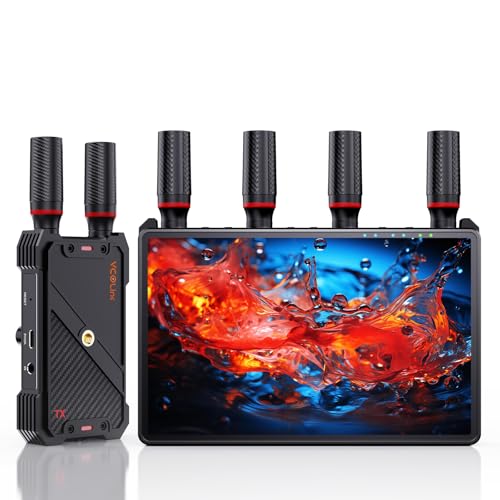
- Built-in 7-inch receiver monitor
- 1-to-5 receiver support for collaborative viewing
- 1080p60 transmission with loop-out and IR control
Best For: Production teams wanting built-in monitoring and flexible display options
Best Professional 4K Option
Hollyland Pyro Ultra Wireless Video System

- 4K60 HDMI and HDMI/SDI connectivity
- Up to 20 receivers and 4,900-foot line-of-sight range
- UVC capture and RTMP streaming built in
Best For: Professional film and live-production crews needing 4K, SDI, and scalable monitoring
Long-Range HDMI Link

- 1080p/60Hz video with about 0.05s latency
- Up to 1,300 feet in open areas
- Loop-out, dual HDMI output, and IR support
Best For: Full HD live streaming and multi-screen monitoring
Production-Ready 4K System

- 4K30Hz transmission with about 0.1s latency
- UVC streaming to a computer at up to 1080p/60Hz
- 20 channels and support for up to five receivers
Best For: OBS streaming and professional wireless monitoring
Pocket 3 Streaming Specialist

- Built-in Type-C transmitter for Osmo Pocket 3
- UVC output supports 1080p/60Hz computer streaming
- 20 channels, loop-out, and up to five receivers
Best For: DJI Osmo Pocket 3 live streaming and monitoring
Best Professional Crew Pick – Accsoon CineView HE
For demanding video transmitters for live streaming, the Accsoon CineView HE combines dual-band connectivity, low latency, and a receiver with UVC output. It is designed for HDMI cameras and supports monitoring on multiple devices without requiring a separate capture device for computer-based streaming.
Best For: Professional crews, weddings, events, and multi-person on-set monitoring.
Pros:
- 2.4GHz and 5GHz dual-band transmission with up to 1,200 feet of range.
- UVC output supports streaming to platforms such as OBS and YouTube through a computer.
- One transmitter can connect with up to four receivers or mobile devices.
- HDMI loop-out and multiple power options add setup flexibility.
Cons:
- Battery and charging cables are not included.
- Its professional feature set may be more than casual users need.
The CineView HE is a strong choice when stable wireless monitoring and direct computer streaming matter more than a simple plug-and-play home setup. Its long range, low latency, and multi-device support suit collaborative productions.
Best for Pocket 3 Creators – Wireless HDMI Creator Combo
Creators using the DJI Osmo Pocket 3 will find this system especially practical for video transmitters for live streaming. Its direct USB-C connection turns the Pocket 3 into a wireless webcam, while the receiver offers both UVC and HDMI outputs for computers, displays, and production equipment.
Best For: DJI Osmo Pocket 3 users, mobile productions, events, and OBS streaming.
Pros:
- Direct plug-in USB-C transmitter for DJI Osmo Pocket 3 use without extra adapters.
- UVC and HDMI outputs support computers, OBS, projectors, switchers, and displays.
- Offers up to 1,640 feet of line-of-sight range with 0.05-second latency.
- Reverse charging can help keep the Pocket 3 powered during extended filming.
Cons:
- Designed for horizontal video rather than vertical video.
- Walls, metal, brick, and glass can reduce the stated transmission range.
This is a focused solution for Pocket 3 owners who want to move beyond basic vlogging. The built-in display, selectable channels, and flexible power options are useful in crowded venues and longer shoots.
Best Plug-and-Play Value – AIMIBO Wireless HDMI Kit
The AIMIBO kit is a straightforward option among video transmitters for live streaming when ease of setup is a priority. It uses a transmitter-and-receiver design with no Wi-Fi, Bluetooth, or app required, and it can handle HDMI sources including cameras, laptops, game consoles, and set-top boxes.
Best For: Home theaters, classrooms, meetings, presentations, and basic wireless HDMI streaming.
Pros:
- Plug-and-play setup without Wi-Fi, Bluetooth, or apps.
- Supports up to 4K at 30Hz for the receiver and 1080p at 60Hz for transmission.
- Dual-band operation provides up to 165 feet in unobstructed conditions.
- Includes mini-HDMI and micro-HDMI adapters for broader device compatibility.
Cons:
- Range can drop to about 32 feet through walls or floors.
- Its 0.1-second latency is higher than the other listed systems.
- It is better suited to general HDMI sharing than advanced multi-camera production.
Choose the AIMIBO when simple screen sharing and broad HDMI compatibility are more important than maximum range or the lowest possible delay. Its adapter bundle also makes it convenient for mixed-device households and classrooms.
Best 4K Production System – Hollyland Pyro H
The Hollyland Pyro H is a versatile choice for video transmitters for live streaming, combining 4K30 transmission, dual-band operation, UVC streaming, and professional HDMI connectivity. Its smart channel scan and support for up to four receivers make it well suited to productions where several people need a reliable live camera feed.
Best For: Film crews, live broadcasters, ENG/EFP teams, and multi-user monitoring.
Pros:
- Transmits up to 4K at 30fps and 1080p at 60fps through HDMI.
- Provides up to 1,300 feet of range with 60ms latency.
- Smart channel scan helps identify a suitable frequency across 2.4GHz and 5GHz bands.
- UVC support enables plug-and-play computer streaming, while HDMI loop-out supports local monitoring.
Cons:
- It is a more specialized system than basic wireless HDMI kits.
- The listed package includes one transmitter and one receiver, despite support for additional receivers.
The Pyro H stands out for teams that need higher-resolution feeds, collaborative monitoring, and a practical route to computer-based streaming. Its connectivity and channel-management features make it a strong fit for dynamic professional shoots.
Best for Easy Setup – Long-Range UVC HDMI Transmitter
If you want video transmitters for live streaming without adding a capture card or installing software, this wireless HDMI kit is a practical choice. Its receiver connects to a PC or Mac over USB-C and provides UVC output for platforms such as OBS, Zoom, YouTube Live, and TikTok Live.
Best For: Solo operators, event videographers, and streamers who need long-range 1080p60 transmission with straightforward computer connectivity.
Pros:
- Plug-and-play UVC output works without drivers, software, or a separate capture card.
- Transmits 1080p60 up to 1,312 feet line of sight with under 50 ms latency.
- HDMI loop-out, IR control, and support for up to five receivers add production flexibility.
- Can run from NP-F batteries, USB-C adapters, or power banks.
Cons:
- NP-F batteries and power banks are not included.
- Range decreases to about 330 feet when all five receivers are connected.
This AuxCas system covers the core needs of mobile live production while keeping the streaming setup simple. It is especially appealing when UVC compatibility and distant camera placement matter more than 4K resolution.
Best All-in-One Monitoring Kit – Wireless HDMI System with 7-Inch Monitor
For live streaming teams that want monitoring built into the wireless receiver, this kit combines a 7-inch screen with HDMI output and multi-receiver support. It delivers 1080p60 video over a claimed 1,312-foot line-of-sight range, while the built-in display reduces the need to carry a separate monitor.
Best For: Film crews, directors, and event teams that need private monitoring, external display output, and flexible on-set placement.
Pros:
- Built-in 7-inch monitor supports real-time viewing without an extra screen.
- A single transmitter can send the feed to up to five receivers.
- Offers HDMI loop-out, remote control, headphone monitoring, and sleep mode.
- Supports NP-F batteries, power banks, or USB-C power and includes a 1/4-inch mounting point.
Cons:
- An HDMI cable for the external monitor is not included.
- Smartphone or tablet use requires a Type-C-to-HDMI cable.
The integrated monitor makes this a convenient choice when portability and quick setup are priorities. It is more monitoring-focused than a basic transmitter, giving each receiver the option of a private screen or larger HDMI display.
Best Professional 4K Option – Hollyland Pyro Ultra Wireless Video System
Among video transmitters for live streaming, the Hollyland Pyro Ultra is aimed at professional workflows that require 4K60, HDMI and SDI connectivity, and extensive receiver distribution. Its built-in UVC and RTMP functions support direct capture and streaming, while TWiFi technology is designed for long-range multi-monitor production environments.
Best For: Film productions, broadcast crews, and live-streaming teams that need 4K60 transmission, SDI support, focus-oriented latency modes, and multiple receivers.
Pros:
- Supports 4K60 video over HDMI and includes HDMI and SDI inputs and outputs.
- Broadcast Mode can distribute video to up to 20 receivers with a claimed 4,900-foot line-of-sight range.
- Focus Mode offers approximately 20 ms latency at 1080p25/30 and supports multiple enabled receivers.
- Built-in UVC capture supports up to 4K60, while RTMP streaming supports up to 1080p60.
Cons:
- Its 7.35-pound weight and professional feature set may be excessive for basic streaming setups.
- RTMP streaming is limited to 1080p60 rather than 4K60.
Pyro Ultra is the strongest fit here for demanding productions that need resolution, SDI integration, and scalable monitoring. Its advanced capabilities make it better suited to professional crews than casual or single-camera streamers.
Long-Range HDMI Link – 1080p Wireless Streaming Kit
For shoppers comparing video transmitters for live streaming, this Vrriis system is a practical 1080p option for sending HDMI video wirelessly between a camera, laptop, set-top box, TV, or projector. Its loop-out, IR support, and multiple power options make it useful for monitoring and flexible installations.
Best For: Full HD live streams, sports or event monitoring, and multi-screen setups where long open-area range is useful.
Pros:
- Supports up to 1080p at 60Hz with approximately 0.05-second latency.
- Advertised transmission range reaches 1,300 feet in an unobstructed area.
- Includes transmitter loop-out, dual HDMI output on the receiver, and IR remote support.
- Can use NP-F batteries, USB-C power, adapters, or compatible portable power banks.
Cons:
- Walls, brick, metal, and glass can significantly reduce the range.
- Batteries are not included.
- Adding more receivers can reduce the wireless transmission distance.
This is a strong fit when dependable 1080p monitoring matters more than 4K output. The low stated latency and flexible power choices suit live production, while the real-world range will depend heavily on obstructions and interference.
Production-Ready 4K System – 4K UVC Wireless Transmitter
This Vrriis model stands out among video transmitters for live streaming because its receiver provides UVC output for direct computer connection. It combines 4K30Hz HDMI transmission, adjustable 5GHz channels, local loop-out monitoring, and support for streaming through OBS or similar software without a separate capture card.
Best For: Live production teams, outdoor filming, and creators who need 4K wireless monitoring plus direct USB streaming to a computer.
Pros:
- Supports 4K at 30Hz using H.265, with approximately 0.1-second latency.
- UVC output enables computer-based streaming at up to 1080p/60Hz without a capture card.
- Offers 20 selectable 5GHz channels to help manage interference.
- One transmitter can connect with up to five receivers and includes transmitter loop-out.
Cons:
- The approximately 0.1-second latency is not recommended for high-responsiveness gaming.
- Wireless range can vary with obstacles and conditions despite the advertised 1,500-foot maximum.
- Batteries are not included.
The WL096 PRO is the most production-oriented option here, especially for OBS workflows and multi-camera monitoring. Its LCD status displays and channel controls add useful visibility, although users needing very low latency should choose a faster system.
Pocket 3 Streaming Specialist – 1080p Wireless Video Link
Designed around the DJI Osmo Pocket 3, this Vrriis system is a specialized choice among video transmitters for live streaming. Its built-in Type-C transmitter connection, UVC receiver output, 20-channel selection, and low stated latency make it suitable for sending Pocket 3 footage to a computer, monitor, or TV.
Best For: DJI Osmo Pocket 3 users who want direct 1080p/60Hz streaming to OBS or another computer-based platform.
Pros:
- Supports UVC output up to 1080p/60Hz without requiring a separate capture device.
- Offers approximately 0.05-second latency and an advertised 1,640-foot line-of-sight range.
- Includes 20 adjustable channels with LCD status information for connection, signal, resolution, and battery details.
- Supports up to five receivers, HDMI loop-out, reverse charging, and 1/4-inch mounting.
Cons:
- It is optimized for the Osmo Pocket 3, so compatibility should be checked for other source devices.
- Walls, brick, glass, and especially metal can severely reduce signal coverage.
- NP-F batteries must be purchased separately.
This is the most targeted pick for Pocket 3 owners who want to turn the camera into a more flexible live-streaming source. It also supports broader HDMI workflows, but its main value is the integrated Type-C and UVC design for computer streaming.
How We Picked the Best Video Transmitters for Live Streaming
We evaluated these systems by focusing on the specifications that matter during an actual broadcast: supported resolution and frame rate, wireless range, latency, connection options, receiver capacity, and setup flexibility. We also considered whether a transmitter provides UVC output for direct connection to a computer or works primarily with HDMI, SDI, monitors, or switchers.
Advertised range is measured under favorable conditions, so walls, interference, crowded Wi-Fi environments, and line-of-sight obstructions can reduce performance. A practical live-streaming setup should prioritize a stable connection over the longest headline distance.
Quick Comparison
- Best for direct computer streaming: Choose a model with UVC output, which can often appear as a video source in OBS or compatible streaming software.
- Best for professional production: Consider systems with HDMI and SDI support, multiple receivers, loop-through output, or advanced monitoring features.
- Best for 4K workflows: Select a transmitter and receiver pair that supports your required 4K frame rate, while confirming that the receiver and display or capture device match.
- Best for compact cameras: Pocket-friendly kits designed for devices such as the DJI Osmo Pocket 3 can reduce cabling and simplify mobile setups.
Key Buying Factors for Video Transmitters for Live Streaming
Resolution, Frame Rate, and Latency
1080p60 is usually sufficient for livestreams and offers a useful balance between image quality, bandwidth, and reliability. If you produce 4K content or want a sharper local feed, verify whether 4K is supported at 30 or 60 frames per second. Low latency is especially important for presenters, remote camera operators, and events where audio and video must remain closely synchronized.
Outputs and Device Compatibility
UVC output is valuable when your computer, OBS setup, or encoder accepts USB video devices. HDMI is more useful for cameras, monitors, and switchers, while SDI can better suit longer professional cable runs and production equipment. Check connector types, power requirements, HDCP limitations, and whether the transmitter works with your camera’s output format before purchasing.
Range, Interference, and Receiver Capacity
Long-range ratings are most realistic with clear line of sight. For venues with crowds or wireless congestion, dual-band operation and adjustable channels may help. If several people need to monitor the same camera, look for systems supporting multiple receivers, loop-out, or bundled monitor receivers.
Who Should Buy Which Video Transmitters for Live Streaming?
Solo creators and remote streamers should favor compact UVC models with simple pairing and 1080p60 support. Event and wedding videographers may benefit from dual-band systems with longer range, low latency, and multiple receiver support. Studio and broadcast teams should prioritize HDMI/SDI compatibility, 4K capability, loop-through monitoring, and dependable channel management. DJI Osmo Pocket 3 users should choose a model specifically designed for the camera’s output and mounting needs.