
Wireless video receivers can simplify presentations, multi-screen viewing, live production, and home entertainment by sending HDMI signals without long cable runs. The right system depends on more than advertised range: resolution, latency, receiver capacity, wireless-band performance, and connection options all matter.
We selected 10 wireless HDMI systems covering compact plug-and-play extenders, multi-receiver kits, live-streaming setups, and higher-end 4K solutions. Use the guide below to narrow the choices by compatibility, viewing distance, and intended workload.
Best 10 Wireless Video Receivers Picks for 2026
Best Professional Pick

- 4K30 HDMI transmission with 60ms latency
- Up to 1,300 feet line of sight
- Supports up to four receivers and UVC streaming
Best For: Professional filming, broadcasting, and multi-user monitoring
Best Multi-Screen Value

- Includes two receivers and supports up to six
- Up to 165 feet in open environments
- Dual-band 2.4GHz/5.8GHz transmission
Best For: Multi-TV setups in homes, offices, classrooms, and venues
Best for Live Streaming
Vrriis UVC Wireless Video System
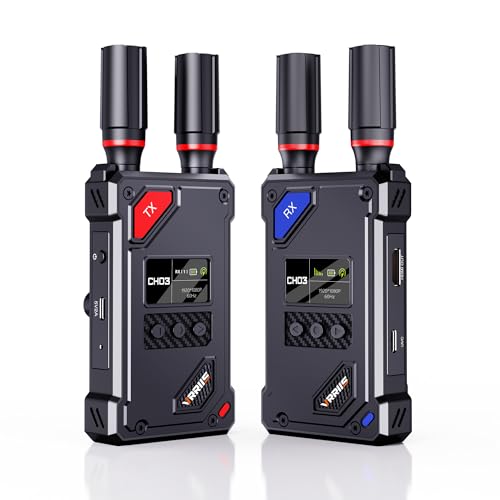
- UVC output supports streaming without a capture device
- 20 manually selectable channels
- 1080p60 with HDMI loop-out and flexible power
Best For: Streaming, camera monitoring, and OBS-based production
Best for Easy Multi-Display Setup
4K Input Wireless HDMI Extender

- 4K input with 1080p60 output
- Includes two receivers and supports up to six
- LED display simplifies setup and troubleshooting
Best For: Presentations, home theaters, gaming, and multi-screen displays
Multi-Screen Conference Pick

- One transmitter supports two receivers
- 4K input with 1080p/60Hz output
- Up to 350 feet in open spaces
Best For: Classrooms, conferences, and multi-display setups
Long-Range Production Pick

- Up to 1,300 feet in open fields
- Loop-out and dual HDMI receiver outputs
- Supports IR control and multiple power sources
Best For: Camera monitoring and long-distance AV setups
Flexible Switching Pick
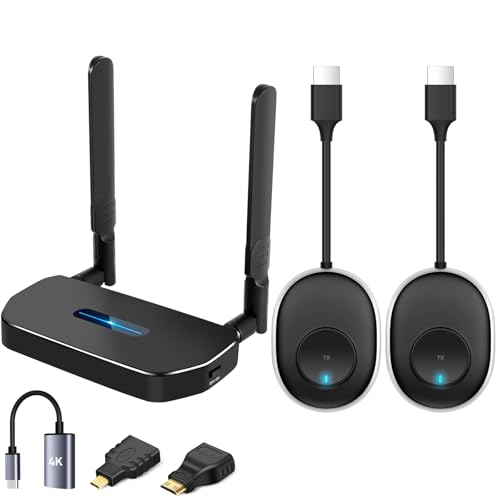
- Two transmitters pair with one receiver
- Pre-paired, app-free plug-and-play setup
- Dual-band 2.4GHz/5.8GHz operation
Best For: Switching between two computers or HDMI sources
Best On-Set Monitoring System
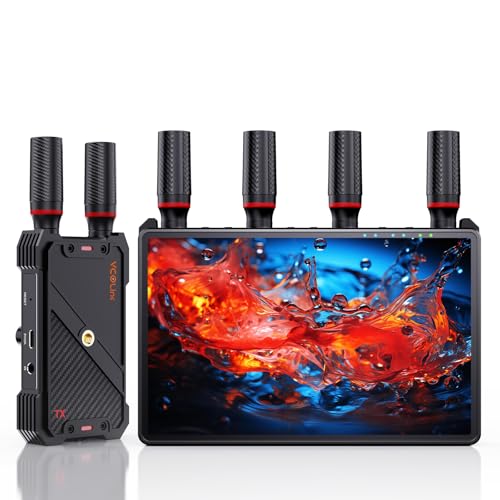
- Built-in 7-inch HD monitoring screen
- Supports up to five receivers
- 1080p/60Hz transmission up to 1,312 feet
Best For: Film crews and multi-viewer production monitoring
Best Plug-and-Play Pick
BovBox 1,312ft Wireless HDMI Extender

- Pre-paired for simple installation
- Up to about 1,312 feet of transmission
- Loop-out and IR remote support
Best For: Presentations, home entertainment, and portable setups
Best Value Multi-Screen Option
BovBox 820ft 1080p Wireless HDMI
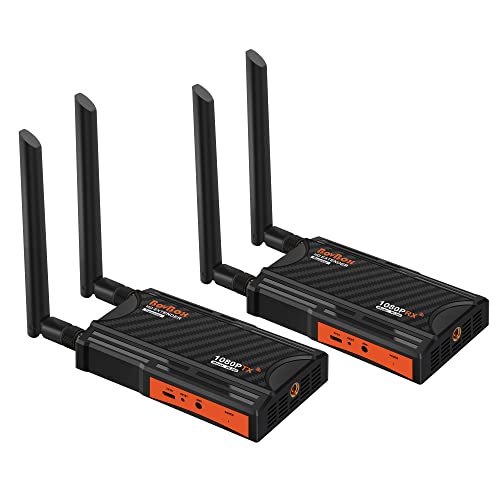
- 1080p/60Hz wireless transmission
- Supports up to four receivers
- Loop-out and IR remote included
Best For: Multi-screen home, office, and projection setups
Best Professional Pick – Hollyland Pyro H
The Hollyland Pyro H is a strong choice among wireless video receivers for professional monitoring, live production, and camera workflows. It supports up to 4K30 transmission, dual-band operation, a 1,300-foot line-of-sight range, and 60ms latency.
Best For: Film crews, live broadcasters, and teams needing multi-receiver monitoring with app support.
Pros:
- Transmits up to 4K30 over HDMI.
- Supports up to four receivers for collaborative monitoring.
- Includes UVC output for computer-based live streaming.
- Smart Channel Scan helps select a suitable 2.4GHz or 5GHz channel.
Cons:
- The listed kit includes only one transmitter and one receiver.
- Its professional feature set may be more than casual users need.
Choose the Pyro H when range, low latency, higher-resolution transmission, and scalable monitoring matter more than keeping the setup simple and inexpensive.
Best Multi-Screen Value – Wireless HDMI 2-Receiver Kit
This wireless HDMI kit is designed for shoppers who want wireless video receivers for multiple TVs, projectors, or monitors without running long HDMI cables. It includes two receivers, supports expansion up to six, and offers dual-band transmission over distances up to 165 feet in open environments.
Best For: Home theaters, conference rooms, classrooms, restaurants, churches, and other multi-display spaces.
Pros:
- Includes one transmitter and two receivers.
- Can support up to six large screens with additional receivers.
- Includes USB-C-to-HDMI, Micro HDMI, and Mini HDMI accessories.
- Supports 2.4GHz and 5.8GHz wireless transmission.
Cons:
- Range can decrease to about 50 feet through walls.
- It cannot transmit from one TV to another TV.
- Apple TV use requires adjusting output to 1080p at 60Hz.
This is a practical option for distributing one source to several displays, especially where plug-and-play setup and broad connector compatibility are priorities.
Best for Live Streaming – Vrriis UVC Wireless Video System
The Vrriis WL087 stands out among wireless video receivers for creators who want direct computer streaming without a separate capture device. It provides 1080p60 transmission, UVC output, HDMI loop-out, 20 manually selectable channels, and a stated 1,500-foot line-of-sight range.
Best For: Camera operators, event teams, and streamers using OBS or another computer-based streaming platform.
Pros:
- UVC output works with a computer for live streaming.
- HDMI loop-out allows local monitoring at the transmitter.
- Offers 20 adjustable channels with signal and interference information.
- Supports NP-F batteries or USB-C power, though batteries are not included.
Cons:
- Maximum resolution is Full HD 1080p at 60Hz.
- Walls, metal, brick, and glass can significantly reduce coverage.
- Adding receivers can reduce transmission distance.
For a 1080p production workflow, the WL087 combines useful channel control, flexible power options, and computer-ready UVC streaming in one kit.
Best for Easy Multi-Display Setup – 4K Input Wireless HDMI Extender
This wireless HDMI extender is a straightforward option for shoppers comparing wireless video receivers for presentations, entertainment, and synchronized displays. It accepts 4K input, outputs 1080p at 60Hz, includes two receivers, and can connect one transmitter to up to six receivers.
Best For: Home entertainment, office presentations, gaming, classrooms, and commercial screens that need simple multi-display distribution.
Pros:
- Includes one transmitter and two receivers.
- Supports up to six receivers for multiple screens.
- LED displays show connection status, signal strength, output mode, and power information.
- Includes a carrying case and supports common HDMI source and display devices.
Cons:
- Output resolution is limited to 1080p at 60Hz despite 4K input support.
- Both transmitter and receivers require wired power of at least 5V/2A.
- Walls and other obstacles can reduce range and transmission speed.
The built-in status display and plug-and-play design make this a convenient choice for users who want quick setup and clear operating feedback rather than advanced production controls.
Multi-Screen Conference Pick – Coolpie Wireless HDMI Kit
For buyers comparing wireless video receivers for meetings, classrooms, or home entertainment, the Coolpie kit stands out for its included two-receiver setup and straightforward operation. It supports 4K input with 1080p at 60Hz output, and it works without apps, Wi-Fi, or Bluetooth pairing.
Best For: Multi-display presentations, classrooms, conference rooms, home theaters, and other setups needing one transmitter for two screens.
Pros:
- Includes one transmitter and two receivers for multi-screen casting.
- Supports 4K decoding with 1080p at 60Hz output.
- Rated for up to 350 feet in open spaces and about 50 meters through solid barriers.
- Aluminum-alloy housing and ventilation design support extended use.
Cons:
- Requires a power supply.
- Uses 5.8GHz single-band transmission rather than dual-band connectivity.
- Its stated long range applies to open spaces; obstacles reduce coverage.
This is a practical choice when easy setup and multi-screen output matter more than wireless network features. The included warranty and responsive support add reassurance for office or classroom installations.
Long-Range Production Pick – Vrriis 1080p HDMI System
This Vrriis system is one of the more flexible wireless video receivers for camera, laptop, set-top box, and projector workflows. It combines 1080p at 60Hz transmission with loop-out, dual HDMI output, IR control, and several power options.
Best For: Long-distance video monitoring, DSLR or camera setups, live events, sports viewing, and installations that need local and remote displays.
Pros:
- Claims transmission up to 1,300 feet in an open field without interference.
- Offers 0.05-second latency and 1080p at 60Hz support.
- Transmitter loop-out and receiver dual HDMI outputs support multiple screens.
- Supports NP-F batteries, USB-C power, adapters, and portable rechargeable sources.
Cons:
- Walls, metal, brick, and glass can substantially reduce range.
- Batteries are not included.
- Adding more receivers can reduce transmission distance.
The combination of long-range claims, IR expansion, and flexible power makes this a strong fit for mobile or production-oriented use. Buyers should plan around line-of-sight conditions and the need to supply compatible batteries separately.
Flexible Switching Pick – Dual-Transmitter HDMI Kit
Among wireless video receivers for switching between source devices, this kit is designed around two transmitters and one receiver. The pre-paired units support 1080p Full HD and 720p signals, letting users change between computers or other sources without repeatedly moving HDMI cables.
Best For: Home offices, meetings, presentations, gaming, and households that need to switch between two source devices.
Pros:
- Includes two transmitters and one receiver for source switching.
- Pre-paired plug-and-play design requires no app, Bluetooth, or Wi-Fi connection.
- Supports 5.8GHz and 2.4GHz dual-band operation.
- Offers up to 164 feet or 50 meters in an open field.
Cons:
- Concrete walls or different floors can reduce range to roughly 3–5 meters.
- Its listed video support is up to 1080p rather than 4K output.
- The supplied notes do not specify outputs for multiple receivers.
This kit makes the most sense when convenient switching between two HDMI sources is the priority. Its dual-band operation and simple pre-paired setup are useful, but room construction will have a major effect on real-world range.
Best On-Set Monitoring System – 7" Monitor Wireless HDMI Kit
For production teams comparing wireless video receivers, this kit stands out by combining a built-in 7-inch monitor with HDMI output and support for up to five receivers. It sends 1080p video at 60Hz over distances up to 1,312 feet in line-of-sight conditions, with claimed latency below 0.05 seconds.
Best For: Film crews, live productions, and multi-viewer on-set monitoring.
Pros:
- Built-in 7-inch HD screen reduces the need for a separate monitoring display.
- Supports one transmitter to as many as five receivers for team collaboration.
- Offers HDMI loop-out, IR remote control, and headphone monitoring.
- Supports NP-F batteries, power banks, and USB-C power, plus 1/4-inch mounting.
Cons:
- An HDMI cable is not included for connecting the receiver to an external display.
- Smartphone and tablet use requires a Type-C-to-HDMI cable.
- Its production-focused feature set may be more than casual home users need.
The integrated monitor is the key advantage here, especially when a camera operator or director needs a portable, private view without adding another screen. Choose it when collaboration and flexible on-set power matter more than keeping the setup minimal.
Best Plug-and-Play Pick – BovBox 1,312ft Wireless HDMI Extender
This BovBox kit is a practical choice among wireless video receivers when straightforward setup and long-range connectivity are priorities. It arrives paired, supports 1080p output at 60Hz, and works with HDMI sources such as laptops, cameras, PCs, and set-top boxes.
Best For: Presentations, home entertainment, classrooms, churches, and mobile video setups.
Pros:
- Plug-and-play pairing avoids software or system installation.
- Dual-band transmission reaches up to about 1,312 feet under suitable conditions.
- Includes transmitter HDMI loop-out and IR remote-control support.
- Can use USB-C, a power bank, or NP-F batteries for flexible placement.
Cons:
- NP-F batteries are not included.
- Adding receivers can shorten the available transmission distance.
- The listed 4K support is decoding; output is specified at 1080p/60Hz.
Its paired-out-of-the-box design makes this one of the easier wireless HDMI options to deploy, while loop-out helps users keep a local display at the source. It is a strong general-purpose pick if you want long range and broad HDMI compatibility without a complicated installation.
Best Value Multi-Screen Option – BovBox 820ft 1080p Wireless HDMI
If you need wireless video receivers for a multi-screen installation but do not require the longest range in this roundup, this BovBox extender offers 1080p/60Hz transmission across up to 820 feet in open line-of-sight conditions. It also includes HDMI loop-out, IR control, and plug-and-play setup.
Best For: Home entertainment, office presentations, church projection, and distributing one source to multiple displays.
Pros:
- Supports 1080p/60Hz video over dual-band 2.4GHz and 5GHz channels.
- Can expand from one transmitter to up to four receivers.
- HDMI loop-out provides a local monitoring display at the transmitter.
- Works with cameras, laptops, projectors, TVs, and other HDMI devices.
Cons:
- Gaming may experience approximately 0.06 seconds of delay.
- Maximum range decreases as more receivers are added, reaching a listed 623 feet with four receivers.
- The 820-foot range assumes favorable open line-of-sight conditions.
This model balances useful range, multi-receiver support, and a relatively simple installation. It makes sense for users distributing a single HDMI source to several screens, provided they account for reduced range when expanding the receiver count.
How We Picked These Wireless Video Receivers
We focused on the features that most affect real-world setup and performance: supported input and output resolutions, claimed transmission range, latency, receiver expansion, loop-out functionality, wireless-band support, and ease of pairing. We also considered whether each kit is better suited to everyday presentations, home entertainment, classroom distribution, conference rooms, or live video workflows.
Advertised range is measured in ideal conditions. Walls, crowded Wi-Fi environments, metal equipment racks, and competing 2.4GHz or 5GHz signals can reduce performance, so we favored products with clear connection features and practical installation flexibility.
Quick Comparison
| What to Compare | Why It Matters |
|---|---|
| Resolution | Determines whether the system can preserve 4K input or delivers 1080p output. |
| Transmission range | Helps match the receiver to room size and placement distance. |
| Latency | Important for gaming, monitoring, live production, and interactive presentations. |
| Receiver capacity | Shows how many displays can receive one source simultaneously. |
| Loop-out and UVC | Useful for local monitoring, capture cards, streaming, and production systems. |
Key Buying Factors for Wireless Video Receivers
Resolution and Compatibility
Check both the transmitter input and receiver output. A product may accept a 4K signal but output only 1080p. Confirm HDMI version, refresh-rate support, HDCP compatibility, and whether your source and display use compatible formats.
Range, Interference, and Latency
Choose a claimed range with margin rather than treating the maximum as guaranteed. Dual-band designs can help in busy environments, while low latency is especially valuable for camera monitoring, gaming, and live events. For ordinary slides or video playback, a modest delay may be acceptable.
Multi-Receiver and Switching Features
If one source must feed several screens, verify the maximum number of receivers and whether additional units are included or sold separately. Kits with multiple transmitters or manual switching can support more flexible classroom, conference, and signage setups.
Ports and Installation
Loop-out lets you keep a wired local display while transmitting to a remote screen. UVC output can simplify computer-based streaming, but it is not universal. Also check power requirements, included cables, remote controls, IR support, ventilation, and the space available around each HDMI port.
Who Should Buy Which Wireless Video Receivers?
For Home Theater and Everyday Streaming
Look for a plug-and-play 1080p kit with dependable range, simple pairing, and loop-out if you want to keep a nearby television connected. A 4K-capable model makes more sense when your source chain requires 4K input, even if the remote display is 1080p.
For Classrooms and Conference Rooms
Prioritize easy switching, multiple receivers, stable operation, and straightforward status indicators. Multi-screen kits are useful when several displays need the same presentation without running new HDMI cable.
For Live Production and Monitoring
Choose a system with low latency, manual channel control, UVC or capture-friendly output, and loop-out monitoring. Confirm that its supported resolution and frame rate match your cameras before purchase.
For Large or Challenging Spaces
Favor generous range ratings, dual-band operation, and a clear line of sight. If walls or interference are unavoidable, test placement before permanently mounting equipment; wired HDMI, HDBaseT, or a dedicated professional video link may be more dependable for critical installations.