
Choosing the right webinar recording setup can make a bigger difference than upgrading your software. Clear audio, stable framing, and reliable connectivity help business presentations feel polished and easier to follow.
Below, we’ve focused on practical webinar recording equipment for businesses that need dependable performance for solo hosts, remote teams, and multi-speaker sessions.
Best 9 Webinar Recording Equipment for Businesses Picks for 2026
Best for AI Auto-Tracking
Tenveo 4K AI PTZ Conference Camera

- AI tracking keeps presenters centered automatically
- 3X optical zoom with wide pan/tilt coverage
- USB 3.0 and HDMI suit common webinar setups
Best For: Businesses that want hands-free speaker tracking for webinars, meetings, and live-streamed training.
Best for Simple Monitoring

- Easy setup with included installation software
- Universal monitor clip for flexible placement
- Good for basic webinars and business calls
Best For: Small teams needing a simple webcam for webinars, meetings, and training videos.
Best for Multi-Camera Webinars

- Three 4K NDI PTZ cameras for multi-angle coverage
- Joystick controller with real-time preview
- Switch, record, and stream from one bundled kit
Best For: Businesses that want a professional multi-camera webinar and live-streaming setup.
Best for Simple Plug-and-Play Calling
Callez Wired Computer Headset with Mic

- Noise-canceling mic for clearer speech
- 3.5mm and USB-C adapter support
- Lightweight, comfortable wired design
Best For: Teams needing a simple wired headset for webinars, calls, and voice recording.
Best for Secure Pro Recording
HP 625 Webcam for 1080p Webinars

- 1080p capture at 60 fps for smooth recordings
- 92° field of view with AI face framing
- Windows Hello, privacy cover, and dual mics
Best For: Business teams that need a secure, easy-to-use webcam for webinars and training videos.
Best for Simple USB Calls

- Noise-cancelling mic improves voice clarity
- USB plug-and-play for PC and Mac
- Inline mute and volume controls
Best For: Teams and presenters who want a simple wired headset for webinars, meetings, and training.
Best for Presenter Tracking

- AI tracking keeps speakers centered automatically
- 4K Sony sensor with HDR boosts image clarity
- Dual noise-canceling mics help reduce background noise
Best For: Teams that want an easy webcam for webinars, presentations, and meetings with moving speakers.
Best for Easy Setup
FIFINE USB Podcast Mic Kit with Boom Arm
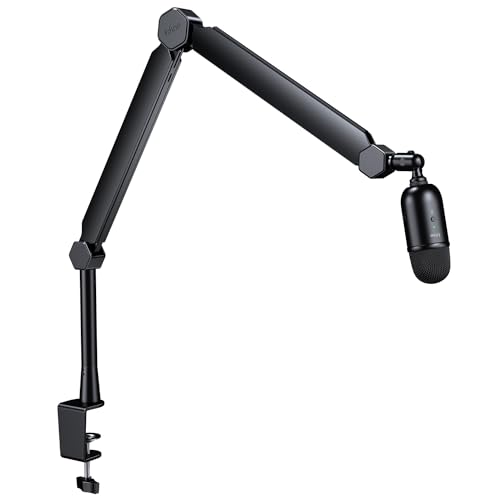
- Cardioid condenser mic for focused voice pickup
- USB plug-and-play setup for Windows and Mac
- Boom arm, mute button, and gain control included
Best For: Businesses and presenters who want a quick, tidy mic setup for webinars and recordings.
Best for Simple Teams
Microsoft LifeCam Cinema 720p Webcam

- 720p HD video with a sharp glass lens
- Noise-canceling mic and light correction
- Easy USB webcam for Teams and Zoom
Best For: Small teams and businesses needing a simple, affordable webcam for basic webinar recording.
Best for AI Auto-Tracking – Tenveo 4K AI PTZ Conference Camera
If you need webinar recording equipment for businesses that can keep a speaker centered without constant manual camera work, this Tenveo PTZ camera is a strong fit. It combines 4K capture, AI tracking, and wide-room coverage, making it useful for polished internal webinars, training sessions, and live presentations.
Best For: Businesses that want hands-free speaker tracking for webinars, meetings, and live-streamed training.
Pros:
- AI human and face tracking helps keep presenters framed automatically
- 3X optical zoom plus 350° pan and 180° tilt support versatile room coverage
- USB 3.0 and HDMI outputs make it easy to connect to common platforms
- Preset positions speed up switching between speaking angles
Cons:
- No built-in microphone, so you’ll need separate audio gear
- USB output tops out at 1080P30, not full 4K
For teams building webinar recording equipment for businesses, this camera stands out when smooth presenter tracking matters more than all-in-one simplicity. It is especially appealing for organizations that want a more professional live video setup without needing a dedicated camera operator.
Best for Simple Monitoring – Logitech B910 HD Webcam
If you need straightforward webinar recording equipment for businesses, the Logitech B910 HD Webcam is a practical pick for basic face-to-camera video, staff training sessions, and internal presentations. It keeps setup simple with a universal monitor clip and included installation software, making it easy to get running on a desktop or laptop.
Best For: Small teams that want an easy-to-use webcam for budget-friendly webinar recording and everyday business video calls.
Pros:
- Simple plug-and-set-up approach with included installation CD
- Universal monitor clip makes placement quick and flexible
- Good fit for basic webinar, meeting, and training video needs
Cons:
- Older webcam design compared with newer business cameras
- Limited advanced features for higher-end production needs
For businesses that want dependable, no-fuss webinar recording equipment for businesses rather than a feature-heavy studio setup, this webcam offers a simple path to getting video online. It is best viewed as a utility camera for clear communication, not a premium content-creation device.
Best for Multi-Camera Webinars – Tenveo 4K PTZ Bundle with NDI
If you need webinar recording equipment for businesses that can handle polished multi-camera production, this Tenveo bundle gives you a lot in one package. It combines three 4K PTZ cameras, a live switcher, a joystick controller, and an 8-port PoE switch, so you can build a more broadcast-style setup without piecing everything together separately.
Best For: Businesses, churches, schools, and teams that want a managed multi-camera webinar and live-streaming setup with PTZ control.
Pros:
- Three 4K NDI PTZ cameras support flexible angles and smoother event coverage
- Joystick controller with live preview makes camera operation easier during shows
- Video switcher adds multi-input production, recording, and streaming flexibility
- PoE networking helps simplify installation and cable management
Cons:
- More system complexity than a simple webcam or single-camera kit
- Overkill for small teams that only need basic webinar recording
- Requires some setup knowledge to get the most from all components
For organizations building webinar recording equipment for businesses around recurring presentations, training sessions, or hybrid events, this is a strong all-in-one production bundle. It shines when you want professional camera control, reliable switching, and room to scale into more advanced live streaming workflows.
Best for Simple Plug-and-Play Calling – Callez Wired Computer Headset with Mic
If you need straightforward, reliable webinar recording equipment for businesses, this wired Callez headset is a practical choice for voice capture and live meetings. It focuses on clear communication, comfort, and zero-battery operation, making it useful for small teams, remote workers, and support staff who want an easy setup.
Best For: Businesses that want an affordable wired headset for webinars, Zoom/Teams calls, and everyday recording without charging or pairing hassles.
Pros:
- Noise-canceling mic helps keep voice pickup clear in meetings and recordings
- 3.5mm plus USB-C adapter support broad device compatibility
- Lightweight design and soft ear cushions improve all-day comfort
- In-line controls make volume and call handling quick and simple
Cons:
- Wired design limits mobility compared with wireless headsets
- Older iPhone models need Apple’s Lightning adapter, sold separately
For teams assembling webinar recording equipment for businesses on a budget, this headset is strongest as a dependable audio accessory rather than a full recording system. It’s a solid fit when clear speech, compatibility, and hassle-free daily use matter more than advanced studio features.
Best for Secure Pro Recording – HP 625 Webcam for 1080p Webinars
If you want webinar recording equipment for businesses that doubles as a secure, polished conferencing camera, the HP 625 Webcam is a strong fit. Its 1080p image, 60 fps capture, auto-focus, and wide 92° field of view help keep presenters sharp and framing flexible for solo demos or small team sessions.
Best For: Business teams that want a secure, Windows Hello-compatible webcam for webinars, training sessions, and internal presentations.
Pros:
- 1080p at 60 fps keeps motion looking smooth on recorded webinars
- 92° field of view plus AI face framing gives you more control over framing
- Built-in microphones, backlight correction, and auto-focus help simplify setup
- Windows Hello support and a privacy cover add useful business-friendly security
Cons:
- Not a dedicated studio camera with advanced broadcast controls
- Best results still depend on lighting and webcam placement
For businesses that need dependable webinar recording equipment for businesses without moving up to a more complex production setup, the HP 625 offers a practical mix of image quality, security, and easy day-to-day use. It is especially appealing if you want one webcam for both live meetings and recorded presentations.
Best for Simple USB Calls – EPOS PC 8 USB Stereo Headset
If you need straightforward webinar recording equipment for businesses, this EPOS USB headset is a practical pick for clear voice capture and dependable everyday use. It keeps setup simple for PC and Mac users while giving presenters a noise-cancelling mic, inline controls, and comfortable all-day wear.
Best For: Teams, solo presenters, and remote workers who want an easy plug-and-play headset for webinars, meetings, and training sessions.
Pros:
- Noise-cancelling microphone helps reduce background distractions in recorded webinars and calls.
- USB plug-and-play design works with PC and Mac without driver installation.
- Inline volume and mute controls make live adjustments quick and convenient.
- Lightweight build is comfortable for longer meetings and training sessions.
Cons:
- Wired on-ear design is less flexible than a wireless headset.
- Best suited for voice clarity, not for high-end audio production.
For businesses building webinar recording equipment for businesses on a budget, this headset is a sensible choice when ease of use matters more than advanced studio features. It’s especially appealing for recurring meetings, internal training, and basic remote presentation workflows.
Best for Presenter Tracking – Angetube 4K AI Webcam
If you need webinar recording equipment for businesses that can keep a speaker centered without constant manual adjustments, the Angetube 4K AI Webcam is built for that kind of workflow. Its 4K Sony sensor, auto-framing, and dual noise-canceling mics make it a practical choice for polished internal trainings, client demos, and live presentations.
Best For: Businesses that want an easy-to-use webcam for webcam-based webinars, presenter tracking, and clear audio in small meeting rooms.
Pros:
- AI tracking and auto-framing help keep presenters centered during movement.
- 4K Sony sensor with HDR delivers sharp, business-friendly video quality.
- Dual AI noise-canceling microphones improve voice clarity for calls and recordings.
- USB 3.0 plug-and-play setup works with Zoom, Teams, and Webex.
Cons:
- Digital zoom is not the same as optical zoom and may reduce detail when used heavily.
- AI tracking may be more than some one-speaker desktop setups need.
- Best results depend on keeping the camera positioned well in the room.
Overall, this is a strong fit if you want webinar recording equipment for businesses that simplifies solo presentations and small-group meetings while still delivering a sharp, modern image. It stands out more for automated framing and convenience than for a traditional studio-style camera setup.
Best for Easy Setup – FIFINE USB Podcast Mic Kit with Boom Arm
If you need webinar recording equipment for businesses that’s simple to deploy on a desk, this FIFINE USB mic kit is a practical pick. It combines a cardioid condenser mic, boom arm, and plug-and-play USB connection for clear voice capture without a complicated audio chain.
Best For: Teams, solo presenters, and small businesses that want a straightforward mic setup for webinars, Zoom calls, and recordings.
Pros:
- Cardioid pickup helps focus on your voice and reduce room noise.
- USB plug-and-play setup works with Windows and Mac for fast deployment.
- Boom arm and extension tube help position the mic neatly above monitors.
- Built-in mute button and gain control make live adjustments easy.
Cons:
- Not compatible with Xbox, phones, or iPads.
- As a condenser mic, it may still pick up some ambient room sound.
For businesses building webinar recording equipment for businesses on a budget and without an audio interface, this bundle hits a useful middle ground: easier than pro studio gear, but more polished than a basic laptop mic.
Best for Simple Teams – Microsoft LifeCam Cinema 720p Webcam
If you need straightforward webinar recording equipment for businesses without a steep learning curve, the Microsoft LifeCam Cinema is a practical pick. It delivers 720p HD video, TrueColor light correction, and a noise-canceling mic to help small teams look and sound clearer on everyday Zoom or Teams recordings.
Best For: Small businesses that want an easy, budget-conscious webcam for internal webinars, training sessions, and basic live presentations.
Pros:
- 720p HD video with a glass lens for a clean, usable image
- TrueColor technology helps keep faces brighter in mixed lighting
- Built-in noise-canceling microphone supports clearer spoken audio
- 360° rotation makes it easier to position on different monitors
Cons:
- 720p resolution is fine for basics, but not ideal for polished studio-style webinars
- Older webcam design lacks the advanced controls newer business models offer
- Best suited to simple setups rather than multi-camera production
For businesses assembling webinar recording equipment for businesses on a tighter budget, this webcam covers the essentials well: decent video, workable audio, and easy USB connectivity. It’s a sensible choice when reliability and simplicity matter more than high-end creator features.
How We Picked Webinar Recording Equipment for Businesses
We looked for gear that helps teams record cleaner webinars with less setup friction. Priority went to strong audio capture, dependable video quality, platform-friendly connections, and features that support recurring business use such as autofocus, noise reduction, zoom control, and USB or HDMI connectivity.
We also favored options that fit different production levels, from simple desktop recording to more advanced camera setups for polished presentations.
Quick Comparison
For straightforward internal webinars and one-person presentations, a good webcam or USB microphone can be enough. For executive broadcasts, product demos, or larger virtual events, PTZ cameras and bundled systems offer more control, better framing, and a more professional look. Headsets are useful when the priority is speaker clarity and minimizing room noise.
Key Buying Factors for Webinar Recording Equipment for Businesses
Audio Quality First
Viewers tolerate average video more easily than poor sound. Look for noise-cancelling microphones, condenser mics for fuller voice capture, or headsets when open-office noise is a problem.
Video Resolution and Framing
1080p is still a practical baseline, while 4K can help if you crop, zoom, or want a more future-ready setup. Auto-tracking and PTZ controls are valuable when presenters move around or when you need to switch between speakers.
Connectivity and Compatibility
USB is the easiest choice for most teams, while HDMI, SDI, LAN, and NDI become more useful in dedicated webinar rooms or multi-camera workflows. Make sure the equipment works smoothly with your conferencing software and operating system.
Lighting, Focus, and Room Conditions
Auto-focus, light correction, and wider field-of-view options can improve results in standard offices without requiring a studio. If your space has changing light or multiple people on screen, these features matter more.
Who Should Buy Which Webinar Recording Equipment for Businesses?
If you need a simple plug-and-play setup, a webcam and USB microphone are usually the best starting point. If your presenters are often on camera for sales demos, training, or leadership updates, a PTZ camera with zoom and tracking is a smarter investment. For panel sessions or noisy environments, headsets can be the most reliable choice. Businesses building a repeatable webinar studio should consider bundled systems that combine camera control, multi-output support, and easier production management.
In short, the best Webinar Recording Equipment for Businesses depends on whether your priority is ease, audio clarity, or a more broadcast-style presentation. Match the gear to your room, team size, and recording goals to get the best return.