
Choosing the right switcher can make company webinars feel polished, reliable, and easier to run. The best models help you move between cameras, slides, and remote content without awkward delays.
Below, we focus on livestream switchers for company webinars that balance ease of use, clean output, and the connectivity teams actually need.
Best 10 Livestream Switchers for Company Webinars Picks for 2026
Best for Quick Webinar Switching
Blackmagic Design ATEM Mini Pro

- Fast HDMI source switching
- Direct livestreaming support
- Compact for office webinar setups
Best For: Small teams running polished webinars, demos, and executive presentations.
Best for Hybrid Event I/O
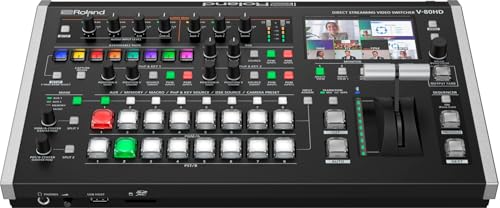
- 8-channel switching with SDI and HDMI inputs
- USB-C streaming and LAN RTMP/SRT output
- PTZ control and built-in audio mixing
Best For: Hybrid webinar teams and event producers who need pro-level switching in a compact unit.
Best for Recording Replays
Blackmagic ATEM Mini Pro ISO Bundle

- Records program and separate ISO feeds for editing later.
- 4 HDMI inputs with multiview, keying, and transitions.
- Bundle includes HDMI, Cat5e, and cable ties for setup.
Best For: Companies that want a webinar switcher with recording and multicamera production features.
Best for Multi-Platform Live Production

- All-in-one 4K switcher, encoder, recorder, and touchscreen monitor
- 4 HDMI inputs plus USB support for multi-camera webinars
- Streams in horizontal or vertical formats with RTMP, NDI, and SRT
Best For: Teams that want a portable all-in-one live production box for webinars and multi-platform streaming.
Best for Hybrid I/O Webinars
Osee GoStream Duet SDI/HDMI Switcher

- Mixes SDI, HDMI, USB-C, and NDI HX in one unit
- Supports portrait and landscape workflows for flexible webinar layouts
- Offers layered effects, transitions, and multi-platform streaming
Best For: Teams that need a versatile webinar switcher for mixed camera and laptop sources.
Best for Large Multicam Webinars
YoloLiv YoloBox Extreme 4K Switcher

- 8 HDMI inputs plus USB and NDI sources for complex webinar setups
- ISO recording and 4K workflow help with editing and post-event polish
- Large OLED touchscreen and battery power support portable productions
Best For: Teams producing large, polished webinars with multiple cameras, slides, and remote sources.
Best for Multi-Camera Webinars

- 4 HDMI inputs with dual HDMI outputs for monitoring
- Streams via Ethernet, USB, and NDI HX with multi-platform support
- Includes audio tools, overlays, macros, and direct recording
Best For: Webinar teams that need hardware switching, live overlays, and flexible streaming options.
Best for Small Teams
FEELWORLD LIVEPRO L1 V1 4-Input HDMI Switcher

- 4 HDMI inputs for multi-camera webinar setups
- USB 3.0 output works like a webcam for streaming
- Compact, single-operator-friendly design
Best For: Small webinar teams that need an easy multi-camera switcher with USB streaming.
Best Portable All-in-One
Osee GoStream Duet 4 HDMI/SDI Kit

- 14-inch integrated monitor for easier multiview control
- 4 HDMI/SDI inputs with dual HDMI outputs and 2 USB ports
- AC, DC, and USB power bank support for mobile use
Best For: Small teams and webinar hosts who want a portable all-in-one switcher with built-in monitoring.
Best for PTZ-Heavy Webinars
Tenveo 4K60FPS HDMI/SDI Switcher

- 4 HDMI + 4 SDI inputs for multi-camera webinar setups
- PTZ and NDI control built in for live production workflows
- Streams and records at the same time for backup and replay
Best For: Corporate webinar teams that need multi-camera switching, PTZ control, and pro-level streaming flexibility.
Best for Quick Webinar Switching – Blackmagic Design ATEM Mini Pro
If you need one of the most practical livestream switchers for company webinars, the Blackmagic Design ATEM Mini Pro is built around fast camera switching, simple HDMI connectivity, and direct streaming support. It keeps the setup lean while still giving you the core tools needed for polished, multi-source presentations.
Best For: Small teams that want a straightforward live production switcher for webinars, demos, and executive presentations.
Pros:
- Built-in hardware switching makes it easy to move between multiple HDMI sources.
- Supports direct livestreaming, reducing the need for extra encoding gear.
- Compact footprint works well in conference rooms and temporary webinar setups.
Cons:
- HDMI-only inputs may limit flexibility for larger AV systems.
- Best suited to users who are comfortable with a more hands-on workflow.
For teams comparing livestream switchers for company webinars, this model stands out for balancing control, simplicity, and portability. It is a strong fit when you want a reliable production upgrade without building a full broadcast rig.
Best for Hybrid Event I/O – Roland V-80HD Switching
If you need one of the most flexible livestream switchers for company webinars, the Roland V-80HD is built to handle mixed camera, presentation, and remote guest setups without a bulky rack of gear. Its compact design, SDI and HDMI inputs, USB-C streaming, and LAN output make it a practical fit for corporate events that move between in-room production and direct-to-platform streaming.
Best For: Hybrid webinar teams, event producers, and studios that want pro-level switching with plenty of connection options in a compact unit.
Pros:
- Eight-channel switching with 4 SDI and 4 HDMI inputs for flexible webinar builds
- USB-C streaming plus LAN RTMP/SRT output for modern webcast workflows
- Integrated audio mixing, PTZ control, and remote monitoring support
Cons:
- More capabilities than a simple plug-and-play webinar switcher
- Likely overkill for teams that only need one or two camera sources
The V-80HD stands out among livestream switchers for company webinars when your production has to cover live speakers, slides, cameras, and remote delivery from one compact system. It is a strong choice if you want event-ready flexibility rather than a basic streamer.
Best for Recording Replays – Blackmagic ATEM Mini Pro ISO Bundle
If you need one of the most flexible livestream switchers for company webinars, this ATEM Mini Pro ISO bundle gives you multicamera switching, built-in streaming, and local ISO recording in a compact setup. It’s a practical fit for teams that want better-looking presentations without adding a complicated control room.
Best For: Companies that want a webinar switcher with recording, multiview monitoring, and enough pro features for education, training, and recurring presentations.
Pros:
- Records the program plus separate ISO streams for easier editing and repurposing.
- Handles 4 HDMI inputs with useful transitions, keying, and multiview monitoring.
- Built-in USB-C webcam output and Ethernet streaming simplify webinar workflows.
- Bundle includes HDMI, Cat5e, and cable ties for a quicker setup.
Cons:
- Limited to HDMI sources, so it may not fit every professional AV setup.
- Works best for teams that are comfortable with some live production learning curve.
For teams comparing livestream switchers for company webinars, this model stands out when post-event editing matters as much as the live broadcast. The ISO recording feature makes it especially useful if you want to turn one webinar into clips, recaps, or polished on-demand content later.
Best for Multi-Platform Live Production – YoloLiv YoloBox Ultra
If you need one device that can handle switching, encoding, recording, and monitoring without a laptop, the YoloLiv YoloBox Ultra is a strong fit for livestream switchers for company webinars. It’s built for fast setup, multi-cam production, and flexible output options for both horizontal and vertical broadcasts.
Best For: Teams that want an all-in-one live production box for webinars, internal events, and multi-platform streaming.
Pros:
- All-in-one 4K switcher, encoder, recorder, and 8-inch touchscreen monitor
- Supports 4 HDMI inputs plus USB sources for multi-camera webinar setups
- Streams horizontally or vertically, including RTMP, YouTube, Facebook, TikTok, and Instagram
- Cellular bonding, NDI, and SRT help support more stable remote productions
Cons:
- More advanced than a basic webinar switcher, so it may be overkill for simple needs
- Cellular bonding and some connectivity features can add extra cost
- Best results come with some live-production setup experience
For companies that want a portable, no-laptop production hub, this is one of the most capable livestream switchers for company webinars. Its biggest advantage is flexibility: it can handle simple presentations today and more complex multi-camera or multi-platform events as your workflow grows.
Best for Hybrid I/O Webinars – Osee GoStream Duet SDI/HDMI Switcher
Osee GoStream Duet Multiple Camera SDI and HDMI Live Stream Video Mixer Switcher
Check Price On AmazonIf you need one box that can handle mixed camera gear, laptop feeds, and flexible streaming output, the Osee GoStream Duet is a strong option among livestream switchers for company webinars. It combines SDI, HDMI, USB-C, NDI HX, and playback support in a single live production workflow, which makes it easier to run polished internal events without building a full rack setup.
Best For: Teams that want a versatile, budget-aware switcher for webinar production with both SDI and HDMI sources.
Pros:
- Supports up to 4 SDI, 4 HDMI, USB-C, NDI HX, and SD/SSD playback sources
- Handles both landscape and portrait input/output formats
- Works with built-in GUI, desktop software, and Bitfocus Companion control
- Includes keying, PIP, DSK, and multiple transition options for more polished shows
Cons:
- Feature-rich setup may feel complex for first-time operators
- NDI HX requires the latest firmware to unlock
- Best results depend on a fairly organized multi-source production workflow
For companies comparing livestream switchers for company webinars, this model stands out for its input flexibility and control options. It is especially appealing if you want one switcher to bridge conference-room cameras, laptops, and software streaming without overpaying for separate converters.
Best for Large Multicam Webinars – YoloLiv YoloBox Extreme 4K Switcher
If your company webinars need more cameras, cleaner routing, and less laptop dependence, the YoloLiv YoloBox Extreme is one of the most capable livestream switchers for company webinars. It combines 8 HDMI inputs, 3 USB inputs, and up to 6 NDI sources in a single unit, so you can manage a full panel, presenter feed, slides, and remote guests without piecing together a separate workflow.
Best For: Teams producing large, polished webinars with multiple cameras, slide sources, and IP-based inputs that want an all-in-one live production box.
Pros:
- 8 HDMI inputs with 2 assignable 4K outputs make it easy to run a true multicam webinar setup.
- Free NDI HX support adds flexible wired or wireless IP inputs for remote or networked sources.
- ISO recording lets you capture each source separately for easier edits after the event.
- 11.2-inch OLED touchscreen and 10-hour battery support smoother, more portable production.
Cons:
- More capable than many teams need if you only run simple one-camera webinars.
- Premium feature set means a higher learning curve and likely a higher price point.
For companies that regularly stream product launches, town halls, or training sessions, this stands out among livestream switchers for company webinars because it reduces gear clutter while adding pro-level flexibility. The tradeoff is cost, but the feature depth is hard to beat for multi-source live events.
Best for Multi-Camera Webinars – Osee GoStream Deck HDMI Pro
If you need one of the more capable livestream switchers for company webinars, the Osee GoStream Deck HDMI Pro is built around multi-source control, onboard recording, and flexible streaming outputs. It gives webinar teams enough I/O to manage cameras, slides, and presentation playback without relying entirely on a laptop.
Best For: Webinar hosts, internal communications teams, and small production crews that want hardware control, multi-camera switching, and direct streaming options.
Pros:
- 4 HDMI inputs plus dual HDMI outputs for multiview and monitoring
- Streams to multiple platforms and supports RTMP, USB, and NDI HX workflows
- Built-in audio controls, overlays, macros, and direct SD/SSD recording
- Landscape and portrait modes add flexibility for different webinar formats
Cons:
- More features than a basic webinar team may need
- Best results will come from some setup and workflow planning
For livestream switchers for company webinars, this model stands out if you want broadcast-style control without moving up to a much larger studio system. It is especially appealing for recurring presentations where switching, overlays, and recording need to stay smooth and consistent.
Best for Small Teams – FEELWORLD LIVEPRO L1 V1 4-Input HDMI Switcher
If you need a straightforward, compact option for livestream switchers for company webinars, the FEELWORLD LIVEPRO L1 V1 gives you 4 HDMI inputs, real-time switching, and USB 3.0 output that shows up like a webcam on your computer. It’s a practical fit for smaller webinar setups where one operator needs to manage cameras, slides, and video playback without a lot of extra gear.
Best For: Small webinar teams that want a simple multi-camera switcher with webcam-style USB output.
Pros:
- 4 HDMI inputs make it easy to mix cameras, slides, and playback sources
- USB 3.0 output works with common streaming software and conferencing workflows
- Compact design is well suited to single-person operation
- Preview/PGM monitoring helps you keep webinar transitions under control
Cons:
- Limited to 1080p workflows, so it’s not for higher-end 4K productions
- Smaller controls and display may feel basic compared with larger switchers
- Best for simple webinar production rather than advanced live event routing
For companies that want an affordable, no-fuss way to level up livestream switchers for company webinars, this FEELWORLD model covers the essentials well. It’s strongest when you want reliable camera switching and easy USB streaming without paying for pro-level complexity.
Best Portable All-in-One – Osee GoStream Duet 4 HDMI/SDI Kit
If you need one of the more flexible livestream switchers for company webinars, the Osee GoStream Duet Kit stands out for its all-in-one setup, built-in 14-inch monitor, and broad HDMI/SDI connectivity. It’s aimed at teams that want a portable production station with room for multiview monitoring, USB streaming, and extra device power without building a rig from scratch.
Best For: Small teams, event crews, and webinar hosts who want a portable multi-camera switcher with integrated monitoring and multiple power options.
Pros:
- Includes a 14-inch monitor, switcher, fan, and mounting plates in one package
- 4 HDMI/SDI inputs plus dual HDMI outputs and 2 USB ports for flexible workflows
- Multiple power options, including AC, DC, and USB power bank support
- Built-in USB-C I/O and NDI activation help it fit modern streaming setups
Cons:
- Heavier and less minimalist than a basic desktop switcher
- May be more hardware than a simple single-presenter webinar setup needs
For teams comparing livestream switchers for company webinars, this kit is most compelling when portability and a self-contained workflow matter more than keeping the setup tiny. It’s a strong fit if you want a mobile control surface that can handle cameras, multiview, and streaming software in one package.
Best for PTZ-Heavy Webinars – Tenveo 4K60FPS HDMI/SDI Switcher
If you need livestream switchers for company webinars that can handle several camera angles, PTZ control, and simultaneous streaming/recording, the Tenveo PC500 is built for that kind of job. It combines HDMI/SDI switching, NDI support, and web-based control in a single unit, making it a practical fit for live corporate presentations, training sessions, and conference broadcasts.
Best For: Teams running webinars, conferences, and hybrid events that rely on multiple PTZ cameras and want broadcast-style control without a full studio rack.
Pros:
- 4 HDMI and 4 SDI inputs give you plenty of room for multi-camera webinar setups.
- Built-in PTZ/NDI control helps simplify live camera operation during corporate events.
- Supports USB, Ethernet, and NDI streaming options for flexible webinar workflows.
- Records while streaming, which is useful for backup copies and post-event edits.
Cons:
- Feature-rich design may be more than a simple one-camera webinar team needs.
- The interface and workflow can feel complex if you are new to live production switchers.
For companies that want livestream switchers for company webinars with real PTZ control and multi-source flexibility, this Tenveo model offers a strong pro-style feature set. It is especially appealing when webinar production needs to scale beyond basic screen sharing and into polished multi-camera presentations.
How We Picked the Best Livestream Switchers for Company Webinars
We prioritized Livestream Switchers for Company Webinars based on input flexibility, ease of operation, output quality, recording options, and how well each unit fits a small presentation team. We also looked for practical features such as USB streaming, HDMI/SDI support, preview monitoring, and onboard switching controls that reduce setup friction.
Quick Comparison
For simple webinar setups, compact HDMI switchers are usually the fastest path to live. For larger production teams, models with SDI, more inputs, NDI, or ISO recording offer more room to grow. All-in-one units can reduce the number of separate devices, while rack- or studio-style switchers tend to suit more complex workflows.
Key Buying Factors for Livestream Switchers for Company Webinars
Inputs and Compatibility
Match the switcher to your sources first. Most webinar teams need support for laptops, cameras, microphones, and sometimes remote presenters. HDMI is common and simple; SDI is better for longer cable runs and more professional camera setups. If your team plans to scale, look for extra inputs beyond your current needs.
Ease of Use and Workflow
Company webinars often involve non-technical hosts, so intuitive buttons, clear preview/program layouts, and dependable auto-switching can matter more than advanced effects. A straightforward interface can save time during rehearsals and reduce mistakes live.
Streaming, Recording, and Output Options
Some Livestream Switchers for Company Webinars stream directly over USB or Ethernet, while others act as a hub for external encoders and recorders. If you need repurposing later, ISO recording and multiview output are especially valuable for editing and review.
Audio and Presentation Control
Clean audio is just as important as camera switching. Look for switchers that can integrate microphones, mix embedded audio reliably, and avoid delay issues. For slide-heavy webinars, verify that the device handles screen-sharing sources without scaling or sync problems.
Who Should Buy Which Livestream Switchers for Company Webinars?
Choose a compact HDMI model if your webinars are small, repeatable, and run by a lean team. Pick a more advanced multi-input or all-in-one switcher if you need flexible camera layouts, remote guests, or higher production value. If your organization hosts frequent executive briefings, product demos, or training sessions, investing in a more capable unit usually pays off through faster setup and fewer technical issues.
In short, the best choice depends on your source count, preferred connection type, and how much production control you want during each event.