
Wireless presentation gear should make meetings faster, not more complicated. The best adapters help teams share slides, demos, and video with minimal setup and fewer compatibility headaches.
Below, we focus on wireless display adapters for business meetings that balance ease of use, connection stability, and support for common laptops, phones, and tablets.
Best 10 Wireless Display Adapters for Business Meetings Picks for 2026
Best for Miracast Office Presentations
Microsoft Wireless Display V2 Adapter

- Miracast support for Windows 10 and 8.1 devices
- Simple plug-in setup for conference-room displays
- Good for presentations, Office files, and web content
Best For: Windows teams that need an easy wireless mirroring solution for meetings.
Best for Multi-Network Offices
ScreenBeam 1100 Wireless Display Receiver
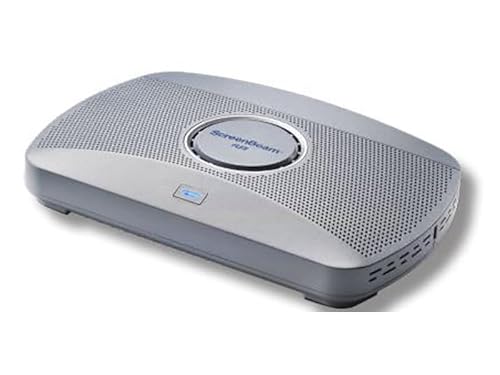
- App-free mirroring for Windows, Android, Apple, and macOS
- Built for 4K wireless presentations in enterprise meeting rooms
- Supports multi-network setups for employee and guest access
Best For: IT-managed meeting spaces that need scalable wireless sharing across mixed devices.
Best for Multi-Standard Sharing
j5create ScreenCast 4K Wireless Adapter

- Supports Miracast, AirPlay, and Chromecast
- Works with Windows, macOS, iOS, and Android
- Compact body with external antenna for stronger coverage
Best For: Teams that need broad device compatibility and flexible wireless presenting.
Best for Quick Wireless Presenting
Microsoft Wireless Display Adapter

- Easy wireless projection for meetings and slides
- Compact, cable-free setup for shared screens
- Good fit for simple, portable business use
Best For: Teams that want a simple plug-and-play adapter for meeting-room presentations and screen mirroring.
Best for USB-C Presenters
j5create ScreenCast USB-C Wireless Display Kit

- Simple USB-C-to-HDMI wireless setup for meeting rooms.
- Up to 1080p with dual-band connectivity for steadier casting.
- Compatible with many USB-C devices, including iPhone 15 and MacBook.
Best For: USB-C presenters who want a quick, clutter-free wireless screen share for meetings.
Best for 4K Meetings
Microsoft 4K Wireless Display Adapter

- Up to 4K at 30fps for cleaner room displays
- Quick connect and faster bootup
- Reliable range for typical office setups
Best For: Teams that want dependable wireless presenting on 4K TVs and monitors.
Best for Cross-Platform Presentations
j5create ScreenCast HDMI Wireless Display Adapter

- Miracast and AirPlay support
- Works with Windows, macOS, iOS, and Android
- Portable 1080p meeting-room adapter
Best For: Teams that need one adapter for mixed-device conference rooms and quick screen sharing.
Best for No-WiFi Presentations
AIMIBO 2026 Wireless Display Adapter

- Works without Wi‑Fi or internet for flexible meeting-room use.
- Supports AirPlay, Miracast, and DLNA across major devices.
- Simple plug-and-play setup with dual-band wireless stability.
Best For: Teams and presenters who need quick, dependable screen sharing in rooms without reliable Wi‑Fi.
Best for Easy Setup
AIMIBO iOS Wireless Display Adapter 4K 5G

- No Wi-Fi needed for direct screen mirroring
- Plug-and-play setup with PIN on iPhone/iPad
- Dual-band connection helps reduce lag in meetings
Best For: Teams and travelers who need fast, cable-free mirroring for presentations.
Best for Miracast Office Presentations – Microsoft Wireless Display V2 Adapter
If you need wireless display adapters for business meetings, the Microsoft Wireless Display V2 Adapter is a simple way to mirror a Windows laptop, Surface, or other Miracast-enabled device to a conference-room TV or projector. It is built for quick screen sharing of presentations, Office files, websites, and videos without dealing with cables during a meeting.
Best For: Windows-based teams that want a straightforward wireless mirroring option for presentations and shared screens.
Pros:
- Works with Miracast-enabled Windows 10 and Windows 8.1 devices
- Easy plug-in setup for TVs, monitors, and projectors
- Useful for presenting Office documents, business apps, and web content
- Compact design is easy to pack for travel or shared offices
Cons:
- Limited value if your team uses non-Miracast or mixed-platform devices
- Full functionality is not available with non-HDCP devices
- Not as flexible as cross-platform wireless display options
For Windows-centric workplaces, this adapter is a practical, low-friction pick among wireless display adapters for business meetings. It keeps setup simple and focuses on the core job: getting content on the screen fast.
Best for Multi-Network Offices – ScreenBeam 1100 Wireless Display Receiver
If you need wireless display adapters for business meetings that work across employee and guest devices without extra software, the ScreenBeam 1100 is built for that job. It supports app-free native mirroring on Windows, Android, Apple devices, and macOS, while also handling 4K presentations in office environments with mixed network setups.
Best For: IT-friendly meeting rooms that need simple, scalable wireless sharing for both staff and visitors.
Pros:
- App-free screen sharing for Windows, Android, and Apple devices
- Supports duplicate and extended screen modes on Windows and macOS
- Multi-network deployment options with local Wi‑Fi, Miracast, and network bridge support
- Works with interactive touch displays and Windows Ink for collaboration
Cons:
- More feature-rich than a simple plug-and-play adapter
- Best suited to managed office environments rather than casual home use
For teams comparing wireless display adapters for business meetings, the ScreenBeam 1100 stands out for flexibility and enterprise-ready connectivity. It’s a strong choice when you want smooth guest access, mixed-device support, and a cleaner room setup without hunting for cables or dongles.
Best for Multi-Standard Sharing – j5create ScreenCast 4K Wireless Adapter
If you want one of the more flexible wireless display adapters for business meetings, the j5create ScreenCast 4K is built to cover mixed-device teams. It supports Miracast, AirPlay, and Chromecast, so presenters can connect from Windows, macOS, iOS, Android, and cast-compatible laptops without relying on a single ecosystem.
Best For: Teams that need broad device compatibility, easy wireless presenting, and a compact adapter for office or travel use.
Pros:
- Works with Miracast, AirPlay, and Chromecast for broad meeting-room compatibility
- Supports wireless screen mirroring and extended display modes for presentations
- Compact design with an external antenna for better signal coverage
- Customizable background and PIN code option can improve presentation security and polish
Cons:
- AirPlay and Chromecast require Wi-Fi setup, so it is not fully plug-and-play for every platform
- Signal can be affected by walls, so it works best in the same room
- PIN code features are limited to Miracast
For teams shopping wireless display adapters for business meetings, this model stands out when device variety matters more than a single-stream, one-platform solution. Its broad compatibility and portable form factor make it a practical pick for conference rooms, shared offices, and travel presentations.
Best for Quick Wireless Presenting – Microsoft Wireless Display Adapter
Microsoft Wireless Display Adapter, Model: CG4-00001, Electronics & Accessories Store
Check Price On AmazonIf you need one of the most straightforward wireless display adapters for business meetings, the Microsoft Wireless Display Adapter makes it easy to mirror a laptop, tablet, or compatible device to a larger screen without extra cables cluttering the room. It’s a practical choice for quick presentations, shared content, and impromptu meeting setups.
Best For: Teams that want a simple plug-and-play adapter for casual meeting-room presentations and screen mirroring.
Pros:
- Easy wireless projection for presentations, videos, and other content
- Simple meeting-room setup with no HDMI cable run across the table
- Works well for sharing PowerPoint slides and other visual materials
- Compact design is convenient for portable business use
Cons:
- Not ideal if you need advanced conference-room features
- Performance can depend on the wireless environment
For teams that value simplicity over extra features, this adapter is a solid fit among wireless display adapters for business meetings. It’s best when you want fast screen sharing and a minimal setup rather than a more complex AV solution.
Best for USB-C Presenters – j5create ScreenCast USB-C Wireless Display Kit
For teams that need a simple, cable-free way to share screens, this j5create ScreenCast kit fits well into wireless display adapters for business meetings. It connects a USB-C source to an HDMI display, supports up to 1080p, and is built for quick presentations from laptops, tablets, and phones without adding much setup hassle.
Best For: USB-C presenters who want an easy wireless link for conference rooms, classrooms, and on-the-go demos.
Pros:
- USB-C transmitter and HDMI receiver keep meeting-room setups tidy.
- 1080p output with dual-band wireless helps maintain a stable presentation feed.
- Works with a wide range of USB-C devices, including iPhone 15, MacBook, iPad Pro, and Chromebook.
- HDCP/DRM support is useful for streaming approved video content during presentations.
Cons:
- Requires compatible USB-C video-out support, so not every device will work.
- 1080p is solid for meetings, but not ideal if you need higher-resolution display casting.
This is a practical pick if you need wireless display adapters for business meetings and want a compact, cross-device solution that reduces cable clutter. It’s especially appealing for presenters who value convenience and broad USB-C compatibility over advanced pro-level features.
Best for 4K Meetings – Microsoft 4K Wireless Display Adapter
If you want a simple way to present from a Windows laptop or Miracast-enabled Android device, this Microsoft adapter is a strong fit for wireless display adapters for business meetings. It supports 4K TVs and monitors up to 4K at 30fps, boots quickly, and keeps setup straightforward when you need to move from desk to conference room fast.
Best For: Teams that need reliable wireless presenting on 4K displays with minimal setup friction.
Pros:
- Supports up to 4K at 30fps for sharper meeting-room displays
- Quick connect and faster bootup help save time before presentations
- Reliable wireless range works well in typical office environments
- HDMI-CEC support can reduce remote input switching hassles
Cons:
- Miracast compatibility limits use with some non-supported devices
- Requires both HDMI and USB power at the display
- Not the best choice if you need advanced collaboration software features
For straightforward presenting, this is one of the more practical wireless display adapters for business meetings, especially if your team already uses Windows or Miracast-enabled Android devices. It focuses on dependable connection quality and easy operation rather than extra bells and whistles.
Best for Cross-Platform Presentations – j5create ScreenCast HDMI Wireless Display Adapter
If you need a simple way to share slides, demos, or video from almost any device, this is a practical pick among wireless display adapters for business meetings. It supports Miracast and AirPlay, works with Windows, macOS, iOS, and Android, and keeps the setup focused on plug-in-and-present rather than IT-heavy configuration.
Best For: Teams that need one adapter for mixed-device conference rooms and quick meeting room screen sharing.
Pros:
- Supports both Miracast and AirPlay for broad device compatibility.
- Compact and portable for conference rooms, travel, or shared workspaces.
- Dual-band 2.4/5GHz support helps improve stability during presentations.
- 1080p output is sharp enough for slides, charts, and everyday meeting content.
Cons:
- Not compatible with Chromebook.
- Wireless performance can vary depending on room interference and network conditions.
- It is more presentation-focused than a full collaboration or conferencing system.
For teams comparing wireless display adapters for business meetings, the j5create ScreenCast stands out for broad compatibility and straightforward sharing. It’s a smart fit when you want a portable adapter that works across common office devices without adding much setup overhead.
Best for Easy Plug-and-Play – 2027 Upgraded Wireless HDMI Dongle
If you want one of the simplest wireless display adapters for business meetings, this HDMI dongle focuses on quick mirroring with no apps, Bluetooth, or Wi‑Fi setup required. It’s designed to get a laptop or phone onto a projector, monitor, or HDTV fast, making it a practical pick for meeting rooms, ad hoc presentations, and lightweight collaboration.
Best For: Teams and presenters who need a fast, low-friction way to share screens in conference rooms or small meeting spaces.
Pros:
- Plug-and-play setup keeps meeting prep simple and fast
- Supports 1080p/60Hz output with claimed 4K input support
- Cross-platform compatibility with AirPlay, Miracast, Android, Windows, iOS, and Mac
- Low-latency design helps keep slides and demos responsive
Cons:
- Short 16-foot/5-meter transmission range may limit room layout
- Protected streaming apps like Netflix and Hulu are not supported
For wireless display adapters for business meetings, this model stands out more for convenience than advanced enterprise features. It’s a solid choice if you value quick setup, broad device compatibility, and reliable basic screen sharing over long-distance performance or app-based streaming support.
Best for No-WiFi Presentations – AIMIBO 2026 Wireless Display Adapter
If you need one of the more flexible wireless display adapters for business meetings, the AIMIBO 2026 is built for quick mirroring without relying on office Wi‑Fi. Its direct peer-to-peer mode, broad AirPlay/Miracast/DLNA support, and simple plug-and-play setup make it a practical choice for impromptu presentations, conference rooms, and travel.
Best For: Teams, trainers, and presenters who need a fast wireless display solution in rooms without dependable Wi‑Fi.
Pros:
- Direct connection works even when there’s no Wi‑Fi or internet available.
- Easy setup with PIN-based mirroring for iPhone and straightforward casting on Android/Windows.
- Wide compatibility across iOS, Android, Windows, and macOS devices.
- Dual-band wireless and 1080p output help keep presentations smooth and clear.
Cons:
- Not ideal for HDCP-protected streaming apps on iOS and macOS.
- 1080p output is solid for meetings, but not the sharpest option for higher-end visual work.
For wireless display adapters for business meetings, this model stands out for its offline-friendly design and broad device support rather than premium conference-room features. It’s a strong fit when you want dependable screen sharing with minimal setup and fewer network headaches.
Best for Easy Setup – AIMIBO iOS Wireless Display Adapter 4K 5G
If you want one of the most straightforward wireless display adapters for business meetings, the AIMIBO iOS adapter is built around quick plug-and-play screen mirroring. It skips app downloads and can connect directly to a TV, monitor, or projector, making it a practical choice for conference rooms, hotel setups, and on-the-go presentations.
Best For: Teams, presenters, and travelers who need fast screen mirroring without relying on local Wi-Fi.
Pros:
- Direct peer-to-peer connection works without Wi-Fi or internet
- Simple plug-and-play setup with PIN-based iPhone mirroring
- Broad support for AirPlay, Miracast, DLNA, and Cast
- Dual-band wireless helps keep presentations smoother and more stable
Cons:
- iOS and macOS app mirroring can be limited by HDCP-protected services
- 1080p output is solid, but not true 4K playback on the display
- Some users may prefer a dongle with more advanced meeting controls
Overall, this adapter is a good fit if you value quick setup and flexible connectivity over advanced conferencing features. For wireless display adapters for business meetings, it stands out most when you need a reliable, cable-free way to share a screen in rooms that may not have dependable Wi-Fi.
How We Picked the Best Wireless Display Adapters for Business Meetings
We prioritized adapters that are practical for conference rooms, huddle spaces, and portable meeting kits. The strongest options combine simple setup, broad device compatibility, stable streaming, and enough resolution for crisp slide decks and video.
We also favored products that fit common business needs: quick screen sharing, low-friction switching between presenters, and support for both modern USB-C devices and older HDMI-based setups.
Quick Comparison
For most teams, the best choice depends on where the adapter will live. Permanent rooms benefit from receivers that stay connected and support reliable handoffs. Mobile presenters may prefer compact dongle-style solutions that travel well with a laptop bag. If your meetings involve higher-detail visuals, look for 4K support; if compatibility is the priority, choose a model with broad protocol support such as Miracast, AirPlay, or Chromecast.
Key Buying Factors for Wireless Display Adapters for Business Meetings
Compatibility
Check that the adapter works with your team’s devices and operating systems. Mixed environments often need the broadest support possible, especially when meetings include Windows laptops, Macs, iPhones, Android phones, and tablets.
Resolution and Video Quality
For spreadsheets, charts, and product demos, a sharper signal helps. 1080p is sufficient for many rooms, but 4K can be worthwhile in larger displays or when detailed visuals matter.
Setup and Day-To-Day Use
Business meetings demand quick starts. Look for plug-and-play behavior, clear pairing steps, and stable reconnect performance so presenters do not lose time troubleshooting in front of a room.
Wireless Stability
Interference, distance, and room layout can affect performance. If possible, choose hardware designed for dependable casting over longer sessions, especially in busy office environments with many wireless devices.
Room and Presenter Workflow
Consider whether the adapter will stay with one display or move between rooms. Permanent setups may benefit from receiver-based systems, while traveling presenters may want a compact adapter that can be carried and connected quickly.
Who Should Buy Which Wireless Display Adapters for Business Meetings?
If you run a shared conference room, prioritize reliability and compatibility over extra features. If you present frequently from a laptop, look for the easiest plug-and-play option with the right ports for your device. If your team uses a mix of phones, tablets, and notebooks, choose one of the more flexible Wireless Display Adapters for Business Meetings so guests and employees can connect with fewer barriers.
In general, the best pick is the one that matches your room size, device mix, and need for fast, repeatable presentations.