
Choosing the right screen-sharing tool can make meetings faster, cleaner, and more collaborative. The best options cut setup time, support multiple devices, and keep presentations running smoothly.
Below, we focus on practical picks for business use, from driver-free conference room systems to simple plug-and-play adapters and portable display solutions.
Best 10 Wireless Screen Sharing Devices for Business Picks for 2026
Best for Secure Large-Meeting Rooms
BenQ InstaShow WDC25 Wireless Presentation System

- One-tap, driver-free sharing from Windows, macOS, Linux, and mobile devices
- 4K UHD with 4K/60Hz playback for crisp business presentations
- CVSS 4.0 certified security with 128-bit encryption and WPA3 Enterprise
Best For: Teams needing a secure, plug-and-play wireless presentation system for larger rooms.
Best for Easy Setup
ViewSonic ViewBoard Cast Dongle

- Instant pairing for fast meeting starts
- Cross-platform support for major desktop OSs
- Dual-band Wi‑Fi with WPA2 PSK security
Best For: Teams that need quick, secure wireless presenting in conference rooms or huddle spaces.
Best for Small Spaces
MAGICRAVEN 15.6" Wireless Portable Monitor

- Near real-time wireless casting for fast presentations
- Built-in battery supports up to 5 hours of portable use
- 15.6" 1080p IPS display with dual speakers and stand
Best For: Teams and mobile professionals who need a battery-powered wireless second screen for meetings and travel.
Best for Plug-and-Play IT Teams
LG One:Quick Share Wireless Solution

- Auto pairing simplifies presenter handoffs
- Embedded Wi‑Fi supports flexible room use
- Remote PC control helps IT manage settings
Best For: IT-managed conference rooms that need quick, low-friction wireless sharing.
Best for Everyday Use
MpioLife True 4K Wireless Display Adapter

- No-app, plug-and-play HDMI setup
- Mirror and extend modes for business use
- Dual-band wireless for steadier connections
Best For: Teams and presenters who need fast, simple screen sharing for meetings or demos.
Best for Comfort
ViewSonic ViewShare WPD-900 Wireless Presentation System

- No software or network setup needed
- Miracast and AirPlay support for broad compatibility
- USB-C charging, P2P stability, and up to 98-foot range
Best For: Teams that need fast, low-friction screen sharing in BYOD meeting rooms.
Best for On-the-Go Presentations
MAGICRAVEN 15.6" Wireless Portable Monitor

- 8000mAh battery for cable-free use anywhere
- Low-latency casting for fast presentations
- 15.6" 1080p IPS screen with wide viewing angles
Best For: Business travelers and remote workers who need a portable wireless second screen.
Best for Mixed-Device Presentations
True 4K Wireless HDMI Display Adapter
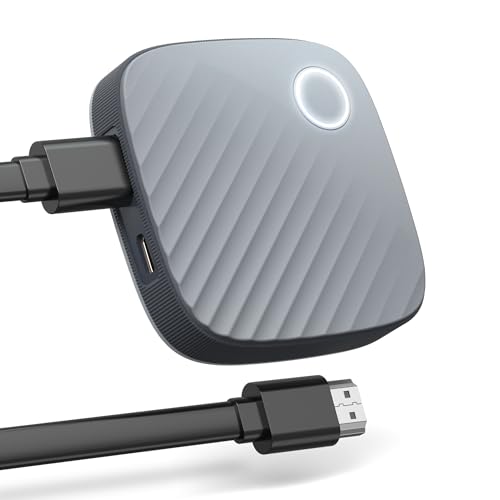
- AirPlay, Miracast, DLNA, and wireless extend support
- Broad compatibility with iOS, Android, Windows, and macOS
- Compact design suits travel, meetings, and hotel TVs
Best For: Teams and presenters who need broad device compatibility in a portable wireless adapter.
Best for Secure Large-Meeting Rooms – BenQ InstaShow WDC25 Wireless Presentation System
If you need wireless screen sharing devices for business that prioritize speed, security, and room-to-room consistency, the BenQ InstaShow WDC25 is built for exactly that. It offers driver-free, one-tap presenting with 4K/60Hz playback, plus flexible HDMI and USB-C support for mixed meeting environments.
Best For: Teams that want a secure, plug-and-play wireless presentation system for huddle spaces, conference rooms, and interactive displays.
Pros:
- One-tap setup with no drivers, software, or network configuration required
- 4K UHD output with 4K/60Hz playback for sharp, professional presentations
- CVSS 4.0 certified security with 128-bit encryption, HDCP, and WPA3 Enterprise
- Wireless touchback control supports collaboration on interactive displays
Cons:
- Higher-end option if you only need basic screen mirroring
- May be more than necessary for small, low-stakes meeting spaces
Overall, the WDC25 stands out among wireless screen sharing devices for business because it balances enterprise-grade security with true plug-and-play simplicity. It is a strong fit when you want dependable sharing across multiple rooms without adding IT friction.
Best for True Wireless Presentations – 15.6" Wireless Portable Monitor
This portable 15.6-inch second screen is a practical pick for wireless screen sharing devices for business when you want a quick, cable-free way to extend a laptop, phone, or PC. With AirPlay and Miracast support, a built-in battery, and a simple two-step setup, it’s aimed at meetings, travel, and everyday multitasking.
Best For: Business travelers, remote workers, and presenters who need a battery-powered wireless display for fast, flexible screen sharing.
Pros:
- True wireless casting with low-latency performance for presentations and multitasking
- Built-in 8000mAh battery provides up to 5 hours of portable use
- 15.6" 1080p IPS panel with wide viewing angles and built-in speakers
- Lightweight design and adjustable stand make it easy to carry and position
Cons:
- Wireless performance can lag if the source device is low on power or running hot
- Battery life is good for short sessions, but not all-day use
- Not a full replacement for a larger desktop monitor
For buyers comparing wireless screen sharing devices for business, this one stands out for mobility first: it’s easy to set up, doesn’t rely on wall power, and works well when you need a second screen in shared spaces or on the road. It’s a smart fit if portability and fast wireless casting matter more than a permanent office monitor.
Best for Easy Setup – ViewSonic ViewBoard Cast Dongle
If you want wireless screen sharing devices for business that keep meetings moving, the ViewSonic ViewBoard Cast Dongle is a practical plug-and-play option. It supports quick presentation sharing, works across major desktop operating systems, and is built for conference rooms or huddle spaces where simple collaboration matters more than complex setup.
Best For: Teams that need fast, secure wireless presenting with minimal onboarding and broad device compatibility.
Pros:
- Instant pairing makes it easy to start sharing with little setup.
- Cross-platform support covers Windows, MacOS, Chrome OS, and Linux.
- Dual-band Wi‑Fi and WPA2 PSK help deliver speed and security.
- Split-screen support is useful for side-by-side collaboration.
Cons:
- Designed around ViewBoard workflows, so it may be less flexible outside that ecosystem.
- Best suited to presentation use rather than advanced AV or multi-user conferencing features.
For teams comparing wireless screen sharing devices for business, this ViewSonic dongle stands out for simplicity, secure connectivity, and dependable compatibility. It is a strong fit when you need employees and guests to present quickly without slowing down the meeting.
Best for Small Spaces – MAGICRAVEN 15.6" Wireless Portable Monitor
If you want one of the more flexible wireless screen sharing devices for business, this MAGICRAVEN portable monitor is built for quick presentations, side-by-side multitasking, and travel-friendly second-screen use without cables or drivers.
Best For: Professionals who need a portable, battery-powered wireless display for meetings, remote work, and impromptu presentations.
Pros:
- Near real-time wireless casting with AirPlay and Miracast support
- Built-in battery offers up to 5 hours of cord-free use
- 15.6" 1080p IPS panel with wide viewing angles and dual speakers
- Lightweight design with a 180° adjustable metal stand
Cons:
- Wireless performance can lag if the device is low on power or running hot
- Battery life may be limiting for full-day meeting use
- Works best for display extension and sharing, not heavy content creation
This is a smart pick if you prioritize simple setup and mobility over desktop-level performance. Among wireless screen sharing devices for business, it stands out for being truly portable, battery powered, and ready for fast meeting-room use.
Best for Plug-and-Play IT Teams – LG One:Quick Share Wireless Solution
If you want one of the more straightforward wireless screen sharing devices for business, the LG SC-00DA One:Quick Share is built around quick pairing, embedded Wi‑Fi, and simple USB 2.0 Type-A connectivity. It’s a practical fit for meeting rooms where presenters need to connect fast without adding a lot of setup steps or extra software friction.
Best For: Small to mid-size offices that want a simple, centrally manageable wireless presentation solution for conference rooms.
Pros:
- Auto pairing and plug-and-play setup help reduce meeting-room delays
- Embedded Wi‑Fi with up to 30 m range supports flexible room layouts
- PC application remote setting control is useful for IT management
- USB 2.0 Type-A connectivity keeps installation straightforward
Cons:
- USB Type-A may be less convenient for newer laptops without adapters
- Range and performance can vary based on room layout and interference
- More specialized than a basic consumer casting device
Overall, this model makes sense if your priority is reliable day-to-day sharing with minimal user training. Among wireless screen sharing devices for business, it leans more toward easy deployment and admin control than flashy extras.
Best for Everyday Use – MpioLife True 4K Wireless Display Adapter
If you want a simple way to add wireless casting to a meeting room or home office, this MpioLife dongle is a practical pick among wireless screen sharing devices for business. It plugs into HDMI, works without apps or Bluetooth, and supports mirror or extend modes for presentations, demos, and multitasking.
Best For: Teams, presenters, and remote workers who want fast plug-and-play screen sharing without a steep setup curve.
Pros:
- Plug-and-play design with no app or Bluetooth required
- Mirror and extend modes for presentations and multitasking
- Dual-band 2.4G/5G connection for more stable streaming
- Portable, lightweight build for travel or shared offices
Cons:
- HDCP-restricted streaming apps may not work on iOS/macOS
- Best performance depends on Wi-Fi conditions and interference
Overall, this adapter is a strong fit if your priority is quick deployment and flexible sharing rather than advanced enterprise management. For small offices and travel-ready wireless screen sharing devices for business, it offers a straightforward balance of convenience, compatibility, and value.
Best for Comfort – ViewSonic ViewShare WPD-900 Wireless Presentation System
If you want wireless screen sharing devices for business that get meetings started fast, the ViewSonic ViewShare WPD-900 is built around simple plug-and-play casting. It supports Miracast and AirPlay, works without network setup or app downloads, and adds USB-C, HDMI, and USB inputs for flexible room use.
Best For: Teams that need a low-friction presentation system for hybrid meetings, BYOD rooms, and quick one-click screen sharing.
Pros:
- No software, app, or network setup required for fast deployment
- Miracast and AirPlay support makes it broadly compatible across devices
- USB-C charging while casting helps keep presenters powered up
- P2P connection and up to 98-foot range suit larger meeting spaces
Cons:
- Best experience depends on device support for Miracast or AirPlay
- As a dedicated presentation system, it may be more than small one-off users need
For teams comparing wireless screen sharing devices for business, the WPD-900 stands out for straightforward setup, broad compatibility, and meeting-friendly features like multi-presenter support and DRM-capable streaming. It is a practical choice when reliability and speed matter more than advanced collaboration tools.
Best for On-the-Go Presentations – MAGICRAVEN 15.6" Wireless Portable Monitor
If you want one of the more flexible wireless screen sharing devices for business, this MAGICRAVEN portable monitor is built for quick presentations, secondary-screen productivity, and travel-friendly work sessions. Its built-in battery and cable-free casting make it easy to use in meeting rooms, coffee shops, or anywhere you need a fast second display.
Best For: Business travelers, remote workers, and presenters who need a portable wireless second screen without relying on outlets or drivers.
Pros:
- Built-in 8000mAh battery offers up to 5 hours of cordless use
- Low-latency wireless casting supports quick presentation workflows
- 15.6-inch 1080p IPS panel delivers sharp text and wide viewing angles
- No-cable setup works across Windows, macOS, Android, and AirPlay/Miracast devices
Cons:
- Wireless performance can vary if the source device is low on power or running hot
- Battery life may be limiting for all-day, unplugged use
- Not a full replacement for a dedicated large office monitor
For teams that need simple, portable wireless screen sharing devices for business, this model stands out for mobility and ease of use more than raw office-monitor power. It’s a smart fit when speed, convenience, and travel readiness matter most.
Best for Mixed-Device Presentations – True 4K Wireless HDMI Display Adapter
If you need one of the more flexible wireless screen sharing devices for business, this HDMI adapter is a practical pick for quick casting from phones, tablets, and laptops. It supports AirPlay, Miracast, DLNA, and wireless extend mode, so it can handle meetings, hotel rooms, classrooms, and casual office use without juggling extra dongles.
Best For: Teams and presenters who want broad iOS, Android, Windows, and macOS compatibility in a compact travel-friendly adapter.
Pros:
- Works with AirPlay, Miracast, DLNA, and wireless extend mode
- Supports iOS, Android, Windows, and macOS devices
- Compact design is easy to pack for travel or off-site meetings
- Up to 4K output helps presentations and media look sharper
Cons:
- Not as polished as a dedicated conference-room wireless system
- Wireless performance can depend on the room setup and signal conditions
Overall, this adapter is a strong budget-friendly flexibility play if you want wireless screen sharing devices for business that can move between environments and device ecosystems with minimal setup. It is especially appealing when you need quick compatibility more than enterprise-grade collaboration features.
Best for Plug-and-Play Sharing – Wireless HDMI Display Adapter
If you want one of the simplest wireless screen sharing devices for business, this plug-and-play HDMI adapter is built for quick presentations, demos, and meeting-room mirroring without app setup or software installs.
Best For: Teams, presenters, and small offices that need fast AirPlay or Miracast screen sharing to a TV, monitor, or projector.
Pros:
- Supports AirPlay and Miracast for iPhone, iPad, Windows, macOS, and Android devices.
- Plug-and-play design with no app, Bluetooth, or Wi-Fi login required.
- 4K decoding and 1080p output with smooth 60Hz playback for sharp slides and video.
- Compact enough for travel, meetings, and ad hoc presentation setups.
Cons:
- Not a full-featured conferencing system, so it only mirrors content rather than managing meetings.
- Wireless performance can vary in busy RF environments despite the dual-band chip.
- Works best for straightforward mirroring, not advanced collaboration tools.
This adapter makes sense if your priority is fast, low-friction sharing rather than a complex AV stack. For straightforward wireless screen sharing devices for business, it’s a practical budget-friendly way to get presentations on screen quickly.
How We Picked the Best Wireless Screen Sharing Devices for Business
We prioritized ease of use, connection stability, device compatibility, and presentation quality. For business settings, the best choices also support fast switching between users, dependable performance in shared spaces, and security features that fit office environments.
Quick Comparison
Conference-room systems are best for teams that need polished, repeatable meetings with minimal friction. Wireless adapters are a better fit for budget-conscious setups or simple one-display sharing. Portable wireless monitors suit mobile professionals who need a second screen rather than a room-based presentation tool.
Key Buying Factors for Wireless Screen Sharing Devices for Business
Compatibility
Check support for Windows, macOS, iOS, Android, and common casting standards such as Miracast and AirPlay if your team uses mixed devices.
Resolution and Latency
For sharp slides, charts, and video, look for Full HD or 4K support with low lag. Higher resolution matters most in larger meeting rooms and when text readability is important.
Connection Type
USB-C, HDMI, and dongle-based systems each solve different problems. USB-C is convenient for modern laptops, HDMI is widely compatible, and dedicated presentation systems usually offer the smoothest office experience.
Security and Administration
Business buyers should look for secure pairing, device access controls, and features that reduce the risk of unauthorized sharing. This is especially important in conference rooms and client-facing environments.
Portability and Power
If your team works across offices or travels often, battery life, compact hardware, and driver-free setup can be more valuable than extra features.
Who Should Buy Which Wireless Screen Sharing Devices for Business?
Choose a full wireless presentation system if you want the most reliable solution for conference rooms and frequent group meetings. Pick a simple wireless adapter if you need an affordable way to add screen sharing to an existing display. Select a portable wireless monitor if your priority is extending a laptop workspace instead of broadcasting to a room. The best Wireless Screen Sharing Devices for Business match your team’s workflow, device mix, and room setup—not just the highest resolution on the box.