
Choosing the right wireless presentation device can make training sessions smoother, faster, and far less distracting. The best options help instructors share content quickly, switch presenters easily, and keep participants focused.
Below, we’ve narrowed down 10 strong picks for different room sizes, budgets, and presentation styles so you can match the right device to your training setup.
Best 10 Wireless Presentation Devices for Training Rooms Picks for 2026
Best for Hybrid Training Rooms
Barco ClickShare C-10 Wireless Presentation System

- One-click wireless sharing for quick presenter handoffs
- Two-user side-by-side display in full HD
- Enterprise security and remote management for IT teams
Best For: Medium to large training rooms running hybrid meetings and collaborative sessions.
Best for NearHub Whiteboards
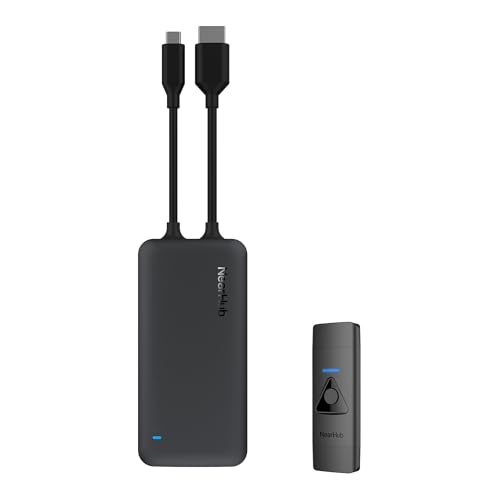
- No-app, no-Wi-Fi plug-and-play setup
- Stable 5GHz casting up to 15 meters
- Supports Windows, macOS, iOS, and Android
Best For: Teams using a NearHub S Max whiteboard and wanting quick in-room wireless casting.
Best for Small Rooms
Barco CS-100 Renewed Wireless Presentation System

- Wireless sharing for laptops, tablets, and smartphones
- Includes 1 ClickShare Button for quick presenting
- HDMI output keeps setup simple for training rooms
Best For: Small training rooms and huddle spaces that need easy wireless screen sharing.
Best for Large Training Rooms
Logitech R500s Wireless Presenter
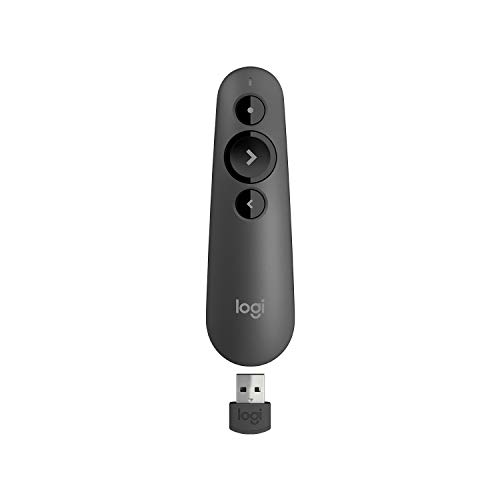
- 20-meter wireless range for medium to large rooms
- USB receiver and Bluetooth connectivity
- Works with major platforms and presentation apps
Best For: Trainers and presenters who need dependable control in medium to large training rooms.
Best for Secure Collaboration
Barco CSE-200 Wireless Presentation System

- One-click sharing via Button or app
- 2-screen display with 16-device connectivity
- Enterprise security and central management
Best For: Small to medium training rooms that need simple sharing with business-grade control.
Best for Training Room Control
Logitech Spotlight Presentation Remote

- Advanced highlighting and magnification
- Mouse-like cursor control for interactive content
- USB-A receiver or Bluetooth connectivity
Best For: Trainers and presenters who need a polished remote for hybrid sessions and interactive slides.
Best for Dual-USB-C Training Rooms
ClearClick Present+Share 4K USB-C Edition

- Two USB-C transmitters included
- 4K output for crisp room displays
- Supports laptops and smartphones
Best For: Training rooms with USB-C laptops that need an easy wireless sharing setup.
Best for Long-Range Classroom Control
QUI Wireless Presenter with Volume Control

- Plug-and-play USB receiver
- 328 ft wireless control range
- Bright red pointer for large rooms
Best For: Trainers who need easy setup and dependable long-distance slide control.
Best for Teacher Voice Amplification
WinBridge WB002 White Amplifier
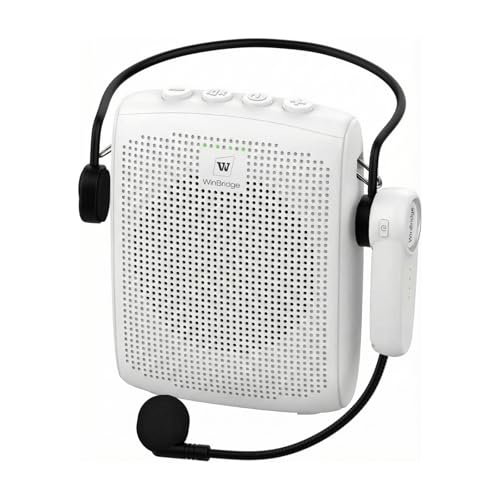
- 15W sound covers small classrooms and training rooms
- Auto-pair Bluetooth headset mic for quick setup
- 6.5 oz design with long battery life and multiple wear options
Best For: Teachers and trainers who need a lightweight voice amplifier for small indoor rooms.
Best for Easy Setup
USB-A/USB-C Presentation Clicker

- Built-in USB-A and USB-C receiver
- Plug-and-play with no software needed
- Red laser pointer plus volume control
Best For: Trainers and presenters who need quick setup across mixed-room computers.
Best for Hybrid Training Rooms – Barco ClickShare C-10 Wireless Presentation System
If you need wireless presentation devices for training rooms that can handle frequent handoffs, mixed devices, and hybrid sessions, the Barco ClickShare C-10 is built for exactly that workflow. It offers one-click wireless sharing, side-by-side content display, and enterprise-friendly management without adding a complicated setup.
Best For: Medium to large training rooms that run Microsoft Teams, Zoom, or Webex and need fast, reliable wireless sharing for presenters and attendees.
Pros:
- One-click wireless sharing with no software required for basic use
- Supports two users sharing side by side in full HD
- Useful collaboration tools like annotation, blackboarding, and touch back
- Enterprise security and remote management options for IT teams
Cons:
- Priced for business deployment rather than casual use
- Best value comes in rooms that will actually use the collaboration features
- May be more system than small, single-purpose meeting spaces need
For organizations comparing wireless presentation devices for training rooms, the ClickShare C-10 stands out when reliability, ease of use, and hybrid meeting support matter more than simple screen mirroring. It is a strong fit for structured learning environments where presenters need to switch quickly and keep the session moving.
Best for NearHub Whiteboards – NearHub Tail Wireless Casting
For teams already using a compatible NearHub setup, this NearHub Tail is a fast way to add wireless presentation devices for training rooms without dealing with extra apps, drivers, or Wi-Fi setup. It is designed for quick plug-and-play casting from laptops and phones, with direct connection to the whiteboard for a simple in-room workflow.
Best For: Training rooms, onboarding spaces, and meeting areas that use a NearHub S Max smart whiteboard and need an easy wireless casting option.
Pros:
- Plug-and-play use with no apps, cables, drivers, or Wi-Fi required
- Stable 5GHz direct connection with up to a 15-meter range
- Supports Windows, macOS, iOS, and Android devices
- Up to 1080p at 60fps for clear screen sharing
Cons:
- Only compatible with the NearHub S Max smart whiteboard
- Less flexible than universal casting systems for mixed hardware environments
As a result, this is a strong niche pick among wireless presentation devices for training rooms, but only if your room is already built around the matching NearHub whiteboard ecosystem. For the right setup, it prioritizes speed, stability, and simplicity over broad compatibility.
Best for Small Rooms – Barco CS-100 Renewed Wireless Presentation System
If you need wireless presentation devices for training rooms with a simple, no-frills setup, the Barco CS-100 is built around fast screen sharing from a laptop, tablet, or smartphone. It’s a practical fit for smaller spaces where one presenter at a time is enough and HDMI output keeps the connection to the main display straightforward.
Best For: Small training rooms, huddle spaces, and teams that want easy wireless sharing without a complicated installation.
Pros:
- Wireless sharing to a central screen from multiple device types
- Simple standalone design with HDMI output for easy display hookup
- Includes 1 ClickShare Button for quick presenter switching
- Renewed option can be a lower-cost way to equip a room
Cons:
- Supports only 1 user on-screen at a time
- Not ideal for larger collaborative rooms that need more simultaneous sharing
- Renewed condition may not appeal to buyers wanting brand-new hardware
Overall, the CS-100 makes sense if you want wireless presentation devices for training rooms that prioritize simplicity over advanced collaboration features. It’s best viewed as a room-ready sharing tool for smaller teams rather than a full-featured enterprise conferencing system.
Best for Large Training Rooms – Logitech R500s Wireless Presenter
The Logitech R500s is a practical pick for wireless presentation devices for training rooms, especially when you need reliable control from the back of a medium or larger space. It supports both USB receiver and Bluetooth connections, works with common presentation software, and keeps navigation simple with tactile buttons and a bright red laser pointer.
Best For: Trainers and presenters who want a dependable, easy-to-use clicker for medium to large rooms.
Pros:
- 20-meter range works well in bigger training spaces
- Dual connectivity via USB receiver or Bluetooth Low Energy
- Compatible with Windows, Mac, iOS, Android, PowerPoint, Google Slides, and more
- Long 12-month battery life with smart power-saving mode
Cons:
- Advanced customization requires Logitech Presentation software
- Laser use is reduced in low-battery power-saving mode
For training teams that want simple controls and room-to-move freedom, the R500s covers the core needs without adding complexity. It’s a strong fit among wireless presentation devices for training rooms when range, compatibility, and ease of setup matter most.
Best for Secure Collaboration – Barco CSE-200 Wireless Presentation System
Barco CSE-200 | Small Medium Size Meeting Room Wireless Presentation System (Renewed)
Check Price On AmazonIf you need wireless presentation devices for training rooms that are easy for guests to join but still suitable for enterprise use, the Barco CSE-200 is a strong fit. It keeps sharing simple with one-click casting from a laptop or mobile device, while supporting multiple users and central management for more controlled deployments.
Best For: Small to medium training rooms that need quick, cable-free sharing with stronger security and collaboration features.
Pros:
- One-click wireless sharing with ClickShare Button or app
- Supports up to 2 people on screen and 16 simultaneous connections
- Designed for enterprise rollouts with security and central management options
- Works with laptops, tablets, and smartphones
Cons:
- Renewed unit, so condition may vary from new-in-box gear
- Best suited to small and medium rooms rather than large auditoriums
- Requires ClickShare hardware for the smoothest experience
For teams comparing wireless presentation devices for training rooms, this Barco model stands out for balancing guest-friendly simplicity with business-ready controls. It’s a practical pick when you want fewer setup hassles and more reliable collaboration during presentations.
Best for Training Room Control – Logitech Spotlight Presentation Remote
If you want one of the more capable wireless presentation devices for training rooms, the Logitech Spotlight adds cursor control, highlighting, and timing alerts that go beyond a basic clicker. It is a strong fit for live, virtual, or hybrid sessions where the presenter needs more control over slides and on-screen content.
Best For: Trainers and presenters who want a polished remote with advanced pointing, dual connectivity, and easy compatibility across common presentation apps.
Pros:
- Advanced highlighting and magnification help draw attention without a traditional laser-only approach.
- Mouse-like cursor control makes it easier to play media, open links, and manage interactive slides.
- Dual connectivity via USB-A receiver or Bluetooth gives flexible setup options.
- Works with Windows, Mac, PowerPoint, Keynote, Google Slides, PDF, and Prezi.
Cons:
- More expensive than basic presentation clickers.
- Advanced features depend on the Logi Options+ app for full customization.
For training environments that need more than slide advancing, this remote stands out among wireless presentation devices for training rooms because it supports clearer audience focus and smoother presenter control. It is especially useful when your sessions mix slides, video, and live interaction.
Best for Dual-USB-C Training Rooms – ClearClick Present+Share 4K USB-C Edition
If your team needs a simple way to share screens from newer laptops and phones, this ClearClick system is a practical fit among wireless presentation devices for training rooms. The package includes two 4K USB-C transmitters plus a 4K HDMI receiver, so it’s geared toward quick plug-in sharing without juggling extra adapters.
Best For: Training spaces that rely on USB-C laptops and want a straightforward wireless share setup for multiple presenters.
Pros:
- Includes two USB-C transmitters for sharing from more than one presenter device
- Supports 4K output for sharp content on larger room displays
- Works with laptops and smartphones, adding flexibility for mixed training setups
- Receiver bundle simplifies building a complete presentation system
Cons:
- Best value is strongest if your devices already use USB-C
- Not as flexible as systems that support more transmitter types out of the box
Overall, this is a smart pick if you want wireless presentation devices for training rooms that prioritize modern USB-C workflows and easy multi-presenter sharing. It’s less about flashy extras and more about making day-to-day presentations reliable and convenient.
Best for Long-Range Classroom Control – QUI Wireless Presenter with Volume Control
If you need wireless presentation devices for training rooms that let you move freely without losing slide control, this QUI presenter is a practical pick. It combines plug-and-play setup, a bright red pointer, and long wireless range for meetings, classrooms, and larger rooms.
Best For: Trainers and presenters who want simple setup, reliable distance, and basic volume control in medium to large training rooms.
Pros:
- Plug-and-play USB receiver with no driver installation
- Up to 328 ft wireless range for room-to-room mobility
- Bright red pointer helps highlight key points in larger spaces
- Works with PowerPoint, Keynote, Google Slides, and more
Cons:
- Requires one AAA battery, which is not included
- Basic remote design lacks advanced presentation features
For teams comparing wireless presentation devices for training rooms, this model stands out for easy compatibility and distance rather than premium extras. It’s a solid choice if you want dependable slide control and a visible laser pointer without a complicated setup.
Best for Teacher Voice Amplification – WinBridge WB002 White Amplifier
If you want a simple, portable pick among wireless presentation devices for training rooms, the WinBridge WB002 focuses on helping instructors speak clearly without straining their voices. Its 15W output, auto-pair Bluetooth headset mic, and lightweight body make it a practical fit for classrooms, small meeting spaces, and other controlled indoor settings.
Best For: Teachers, trainers, and presenters who need a lightweight wireless PA system for small rooms and all-day use.
Pros:
- 15W amplification is strong enough for small training rooms and classes of about 25-50 people.
- Auto-connect Bluetooth headset mic keeps setup fast and hands-free.
- Very light at 6.5 oz, with multiple wearing styles for comfortable daily use.
- Long battery life supports full-day teaching or repeated sessions.
Cons:
- Not a good fit for noisy environments or large outdoor gatherings.
- Only supports one mic and one speaker pairing.
- Best results depend on keeping the mic positioned correctly to avoid feedback.
Overall, this is a solid value option if your priority is voice clarity, mobility, and easy setup rather than room-filling performance. For wireless presentation devices for training rooms, it stands out as a teacher-friendly solution that’s built for everyday indoor use.
Best for Easy Setup – USB-A/USB-C Presentation Clicker
If you need wireless presentation devices for training rooms that work across mixed laptops without extra adapters, this 2.4GHz clicker is a practical choice. The built-in USB-A and USB-C receiver, plug-and-play setup, and full slide control make it easy to walk into a room and start presenting.
Best For: Trainers, instructors, and presenters who want a simple, portable remote for classrooms, conference rooms, and business sessions.
Pros:
- Built-in USB-A and USB-C receiver supports newer Macs and older PCs
- No driver or software installation needed for fast plug-and-play use
- Includes red laser pointer, volume control, and full slide navigation
- Lightweight design with magnetic receiver storage for portability
Cons:
- Uses 2x AAA batteries, which are not included
- Red laser pointer may be less useful on bright screens or in some AV setups
This is a solid pick if your priority is simple compatibility rather than advanced features. For wireless presentation devices for training rooms, it stands out for reducing setup friction and covering both USB-A and USB-C systems in one compact remote.
How We Picked the Best Wireless Presentation Devices for Training Rooms
We focused on Wireless Presentation Devices for Training Rooms that balance reliability, simple setup, broad device compatibility, and practical presenter controls. We also looked for options that fit real training workflows, whether you need room-based screen sharing, a handheld slide advancer, or an all-in-one presentation and voice solution.
Quick Comparison
For larger rooms and shared displays, hub-style systems like Barco and similar casting solutions are the best fit. For lighter, presenter-led sessions, clicker-style remotes are easier to carry and faster to deploy. If your training format includes both live narration and slides, a voice amplifier may be worth considering alongside a presentation remote.
Key Buying Factors for Wireless Presentation Devices for Training Rooms
Room Size and Audience Distance
Match the device to the room. Small rooms usually need a simple plug-and-play remote or standalone casting box, while medium and large rooms benefit from stronger connectivity, more stable sharing, and support for multiple presenters.
Compatibility and Connectivity
Check support for Windows, macOS, iPhone, Android, USB-A, USB-C, HDMI, and browser-based casting as needed. For training environments with mixed laptops and guest devices, compatibility matters more than extra features.
Setup Speed and IT Support
Training rooms should be easy to launch with minimal friction. Devices that require little configuration and work without complex software are ideal for frequent sessions, temporary rooms, and rotating instructors.
Presenter Controls
Useful controls include slide forward/back, volume adjustment, pointer functions, and highlight tools. If trainers move around the room, a responsive remote with a reliable connection is more valuable than advanced features most people won’t use.
Sharing and Collaboration Features
If multiple instructors or participants need to present, look for one-touch switching, multi-user support, and stable wireless casting. That’s especially important in workshops, breakout sessions, and blended learning spaces.
Who Should Buy Which Wireless Presentation Devices for Training Rooms?
If you run a dedicated training room with frequent screen sharing, choose a full wireless presentation system. If your setup is mostly slide-based teaching, a compact presentation clicker will be enough. For instructor-led classes with larger rooms or noisy environments, a voice amplifier can improve clarity more than a basic remote alone.
In short, the best Wireless Presentation Devices for Training Rooms are the ones that reduce setup time, support your devices, and fit the way your trainers actually teach.