
Choosing the right projector can make meetings faster, clearer, and far less frustrating. For teams that rely on presentations, video calls, and shared visuals, the best business projectors for conference rooms need strong brightness, crisp text, and simple connectivity.
Below, we’ve narrowed the field to 10 practical picks that balance image quality, installation flexibility, and everyday usability for real-world business spaces.
Best 10 Business Projectors for Conference Rooms Picks for 2026
Bright 1080p Laser Pick
Epson Pro EX11000 for Business
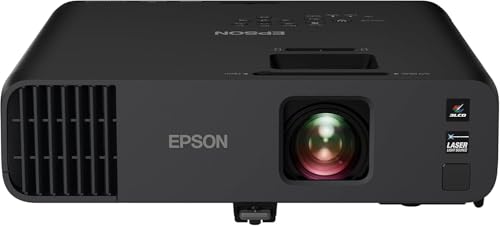
- 4,600 lumens for bright meeting rooms
- 20,000-hour laser light source
- 1080p with Miracast and dual HDMI
Best For: Conference rooms and video meetings in bright spaces
Budget Meeting Room Pick
ViewSonic PA503S for Presentations

- 4,000 ANSI lumens for brighter rooms
- Easy setup with keystone and zoom
- Portable design at 5.5 pounds
Best For: Affordable conference rooms and training spaces
Sharp WUXGA Workhorse
Epson PowerLite 2250U for Large Rooms
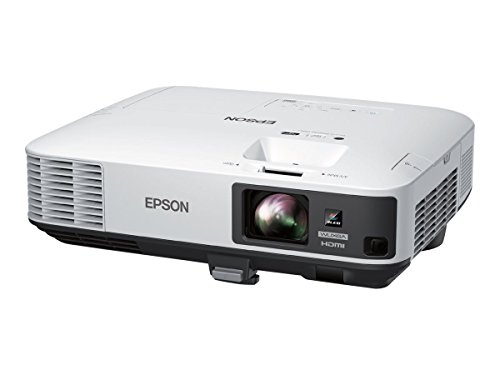
- 5,000 lumens with WUXGA resolution
- Split Screen for dual-source meetings
- Remote management and enterprise controls
Best For: Large conference rooms and text-heavy presentations
Short-Throw Meeting Saver
BenQ MW632ST for Conference Rooms

- Short-throw lens works in tight rooms
- WXGA resolution beats basic SVGA
- 10,000-hour lamp life and dual HDMI
Best For: Small conference rooms and tight presentation spaces
Portable Meeting-Focused Pick

- 3LCD image quality with vibrant color
- Wireless support and moderator function for sharing
- 12,000-hour lamp life for lower upkeep
Best For: Teams needing a flexible projector for everyday conference-room presentations
Bright Full HD Setup
ViewSonic PX700HDH 3700 Lumens

- Full HD 1080p with 3,700 ANSI lumens
- 1.1x optical zoom and vertical keystone
- Dual HDMI for easier source switching
Best For: Meeting rooms needing a bright 1080p projector with flexible setup
Room-Friendly Brightness Choice
Epson EX3290 WXGA Business Projector

- 4,000 lumens of color and white brightness
- WXGA widescreen for meetings and spreadsheets
- Two HDMI ports plus built-in speaker
Best For: Conference spaces needing a bright, easy-to-set-up meeting projector
High-Brightness Laser Pick

- 5,500 ANSI lumens for bright rooms
- Full HD 1080p for clear presentations
- Laser light source rated for 20,000 hours
Best For: Conference rooms needing a bright, ceiling-mounted 1080p projector
Wireless Meeting Upgrade
Epson Pro EX9270 Business Projector

- 4,100 lumens for well-lit meeting rooms
- AirPlay and Miracast for wireless sharing
- Full HD 1080p with 3-chip 3LCD color
Best For: Teams that want wireless presenting and accurate color in conference rooms
Portable Presentation Pick

- Compact and backpack-friendly for travel
- 3,000 lumens with 3-chip 3LCD color
- Up to a 300-inch display size
Best For: Portable presentations and smaller conference rooms
Bright 1080p Laser Pick – Epson Pro EX11000 for Business
If you need business projectors for conference rooms that can stay readable under bright lighting, the Epson Pro EX11000 is built for that job. Its 4,600 lumens of color and white brightness, 1080p resolution, and 3-chip 3LCD engine make it a strong fit for presentations, video calls, and large-screen sharing.
Best For: Conference rooms that need a bright, maintenance-light projector for meetings, video conferencing, and large-group presentations.
Pros:
- 4,600 lumens of color and white brightness helps images hold up in well-lit rooms.
- 20,000-hour laser light source reduces maintenance and removes bulb replacement from the equation.
- 1080p resolution and 3-chip 3LCD technology support clear, color-accurate business content.
- Built-in Miracast, dual HDMI, USB power, and a 16W speaker add flexible meeting-room connectivity.
Cons:
- At 1080p, it is not the highest-resolution option in this group.
- Best suited to meeting spaces that can take advantage of its larger image size and brightness.
Overall, this Epson is a practical pick when brightness and low-maintenance operation matter more than extra resolution. It is especially appealing for rooms that host frequent meetings and hybrid presentations.
Budget Meeting Room Pick – ViewSonic PA503S for Presentations
For business projectors for conference rooms where simple operation and strong brightness matter most, the ViewSonic PA503S is a straightforward option. It delivers 4,000 ANSI lumens, easy setup features, and a compact portable design for meetings, training rooms, and offices.
Best For: Budget-conscious meeting spaces, training rooms, and offices that need a bright, easy-to-set-up projector.
Pros:
- 4,000 ANSI lumens provide clear images for presentations in brighter rooms.
- Easy setup tools like vertical keystone, optical zoom, and digital zoom help with installation.
- Low 16ms input latency and 120Hz refresh rate are helpful for fast-paced content.
- Portable 5.5-pound design makes it easy to move between rooms.
Cons:
- SVGA resolution is lower than the Full HD and WUXGA options here.
- 4500-hour lamp life is shorter than the laser or long-life lamp models in this roundup.
This ViewSonic is best when you want an affordable, bright projector for everyday presentations rather than sharper detailed graphics. It keeps the feature set focused on the basics that matter in a conference room.
Sharp WUXGA Workhorse – Epson PowerLite 2250U for Large Rooms
If your business projectors for conference rooms need extra detail for spreadsheets, slides, and split-screen meetings, the Epson PowerLite 2250U is a strong fit. It combines 5,000 lumens of brightness with WUXGA resolution and Epson’s 3LCD color technology for vivid, readable presentation content.
Best For: Larger conference rooms and teams that need a bright, sharp projector for text-heavy presentations and side-by-side content.
Pros:
- 5,000 lumens of color and white brightness handle well-lit rooms effectively.
- WUXGA resolution with Full HD 1080p support gives extra sharpness for text and graphics.
- Split Screen support lets you show two sources side by side.
- Remote management tools and optional wireless networking suit enterprise environments.
Cons:
- Wireless networking requires an optional module.
- It is larger and heavier than some portable business projectors.
For conference rooms that need clarity first, this Epson stands out with its high brightness and higher-than-1080p resolution. It is especially useful when you regularly present detailed charts, documents, or dual-source content.
Short-Throw Meeting Saver – BenQ MW632ST for Conference Rooms
When space is tight, business projectors for conference rooms need to deliver a big image without forcing the presenter far back. The BenQ MW632ST uses a short-throw lens, 3,200 lumens of brightness, and WXGA resolution to suit compact meeting rooms, classrooms, and small offices.
Best For: Smaller conference rooms and meeting spaces where a short-throw projector helps avoid shadows and tight placement issues.
Pros:
- Short-throw lens is ideal for projecting a large image in smaller rooms.
- WXGA resolution offers more detail than SVGA for presentations and visuals.
- 10,000-hour lamp life helps reduce upkeep over time.
- Two HDMI ports and wireless support provide flexible connectivity.
Cons:
- 3,200 lumens is lower than the brightest projectors in this roundup.
- WXGA is solid for meetings, but not as sharp as Full HD or WUXGA models.
This BenQ makes the most sense for rooms where distance and glare are the bigger challenge than sheer image size. Its short-throw design is the main advantage for small conference-room setups.
Portable Meeting-Focused Pick – Epson PowerLite X49 3LCD XGA
For business projectors for conference rooms, the Epson PowerLite X49 is a practical option when you want a simple, adaptable display setup with wireless connectivity and broad device support. Its 3LCD technology aims to keep images vibrant, while the durable design and long lamp life help reduce maintenance over time.
Best For: Teams that need a flexible, wireless projector for everyday presentations and shared use.
Pros:
- 3LCD technology produces vibrant, eye-catching images.
- Wireless connectivity supports seamless use with your devices.
- Moderator function connects up to 50 users simultaneously.
- 12,000-hour lamp life supports long-term use.
Cons:
- XGA resolution is less detailed than Full HD options.
- Designed for flexible display, but no explicit brightness rating is provided here.
- Best suited to utility-focused meetings rather than high-detail visuals.
Overall, this model fits conference-room use where shared access, reliability, and straightforward wireless presentation matter more than premium image resolution.
Bright Full HD Setup – ViewSonic PX700HDH 3700 Lumens
Among business projectors for conference rooms, the ViewSonic PX700HDH stands out for its Full HD resolution and 3,700 ANSI lumens, making it a strong fit when you need clear presentation text and a bright image. It also includes dual HDMI, optical zoom, and vertical keystone, which helps when the room layout or mounting position is less than ideal.
Best For: Meeting rooms that need a bright 1080p projector with flexible setup options.
Pros:
- Full HD 1080p resolution supports sharp presentations.
- 3,700 ANSI lumens help the image hold up in bright rooms.
- 1.1x optical zoom and vertical keystone simplify setup.
- Dual HDMI makes it easier to connect multiple sources.
Cons:
- Home-entertainment positioning means it is not explicitly conference-room specific.
- Light source life is listed at 6,000 hours, shorter than some business-focused models.
- Built-in speakers are included, but no emphasis is given on business audio performance.
For teams that want a brighter, sharper display with practical installation flexibility, this ViewSonic is a solid conference-room contender.
Room-Friendly Brightness Choice – Epson EX3290 WXGA Business Projector
For business projectors for conference rooms, the Epson EX3290 is built around brightness and ease of use. Its 4,000 lumens of color and white brightness, WXGA widescreen resolution, and dual HDMI ports make it a straightforward choice for presentations, spreadsheets, and video calls in well-lit rooms.
Best For: Conference spaces that need a bright, easy-to-set-up projector for everyday meetings.
Pros:
- 4,000 lumens of color and white brightness for well-lit rooms.
- Widescreen WXGA resolution works well for presentations and spreadsheets.
- Two HDMI ports support laptops and streaming devices.
- Built-in speaker allows quick setup for video and audio.
Cons:
- WXGA resolution is not as sharp as Full HD.
- 1-year limited warranty is shorter than some alternatives.
- Designed as portable, so it may not be as installation-focused as dedicated room systems.
If you want a dependable conference-room projector that prioritizes brightness, simple hookup, and fast deployment, the EX3290 is an easy fit.
High-Brightness Laser Pick – ViewSonic LS740HD FHD Laser
For business projectors for conference rooms, the ViewSonic LS740HD is built for spaces that need a bright, large image without a long setup. Its 5,500 ANSI lumens, Full HD resolution, and flexible mounting tools make it a strong fit for boardrooms, training rooms, and other shared spaces where presentation clarity matters.
Best For: Conference rooms that need a very bright, easy-to-install projector with sharp 1080p detail.
Pros:
- 5,500 ANSI lumens helps keep images visible in well-lit rooms.
- Full HD 1080p resolution supports crisp text and detailed slides.
- 1.3x optical zoom, keystone, 4-corner adjustment, and 360-degree projection make setup more flexible.
- Laser light source is rated for up to 20,000 hours of operation.
Cons:
- Designed as a stationary ceiling-mount style projector, so it is less portable.
- Does not include built-in wireless streaming features in the supplied specs.
The LS740HD is a practical choice if your priority is brightness, image control, and low-maintenance laser performance. It stands out in conference-room use where a dependable, high-output display is more important than portable convenience.
Wireless Meeting Upgrade – Epson Pro EX9270 Business Projector
Among business projectors for conference rooms, the Epson Pro EX9270 is aimed at teams that want strong brightness and simple wireless sharing. Its 4,100 lumens of color and white brightness, Full HD resolution, and support for AirPlay and Miracast make it useful for presentations, video calls, and mixed-device meetings.
Best For: Conference rooms that need wireless screen sharing and bright, color-accurate presentation quality.
Pros:
- 4,100 lumens of color and white brightness support use in well-lit rooms.
- 3-chip 3LCD technology is designed for accurate color without distracting rainbowing.
- Wireless streaming support includes Apple AirPlay and Miracast.
- Two HDMI ports and a USB port add flexible connectivity for meeting gear.
Cons:
- Less bright than the ViewSonic option in this roundup.
- At 300 inches max image size, it is large but still not as installation-focused as some fixed-room models.
The EX9270 is a strong fit if your conference room workflow depends on quick wireless connections and clean image quality. It balances brightness, connectivity, and easy sharing well for everyday business use.
Portable Presentation Pick – Epson EpiqVision Flex CO-W01
If you need business projectors for conference rooms that can also move between offices, the Epson EpiqVision Flex CO-W01 is the most portable option here. It offers 3,000 lumens of color and white brightness, up to a 300-inch image, and a compact body that fits easily in a backpack for on-the-go meetings.
Best For: Mobile presenters and small conference spaces that value portability over maximum brightness.
Pros:
- Compact, lightweight design is easy to carry between rooms or offices.
- 3,000 lumens of color and white brightness provide usable visibility in varied lighting.
- 3-chip 3LCD technology delivers accurate color without rainbowing.
- Built-in HDMI makes it simple to connect streaming devices or presentation sources.
Cons:
- Lower brightness and native 1280 x 800 resolution make it less ideal for larger or very bright conference rooms.
- Light source operating life is rated at 5,000 hours, which is shorter than laser models.
The CO-W01 is best viewed as a flexible, travel-friendly presentation projector rather than a permanent boardroom centerpiece. It makes sense when portability and quick setup matter more than premium room-filling output.
How We Picked the Best Business Projectors for Conference Rooms
We focused on the features that matter most in Business Projectors for Conference Rooms: usable brightness in lit rooms, sharp resolution for slides and spreadsheets, reliable HDMI and wireless input options, and setup features that reduce hassle. We also favored models with practical throw distances, built-in speakers when useful, and enough flexibility for small huddle rooms or larger boardrooms.
Quick Comparison
The strongest options for bright, high-clarity presentations tend to be the Full HD and laser models, especially when the room has ambient light. WXGA and XGA projectors can still work well for basic meetings and training spaces, but they are better suited to smaller groups or less text-heavy content. Short-throw designs are helpful when table placement is limited, while higher-lumen models are better for rooms that stay bright during the day.
Key Buying Factors for Business Projectors for Conference Rooms
Brightness and Room Lighting
Look for enough lumens to keep slides readable without dimming the lights too aggressively. If your conference room has windows or overhead lighting, prioritize stronger brightness over features you may not use every day.
Resolution and Readability
For presentations with charts, small text, or detailed visuals, 1080p or WUXGA is the safest choice. Lower resolutions can work for simple slide decks, but text clarity drops as the screen gets larger.
Installation and Throw Distance
Check whether your room needs standard throw or short throw. Short-throw models are useful in tight rooms and reduce shadows from presenters. Keystone correction and zoom also help when the projector cannot sit perfectly centered.
Connectivity and Collaboration
HDMI remains essential, and wireless casting can save time in fast-moving meetings. If multiple presenters share the room, prioritize easy switching between laptop, mobile, and room-system inputs.
Who Should Buy Which Business Projectors for Conference Rooms?
If you want the cleanest all-around presentation experience, choose a bright 1080p or WUXGA model. If your room is small or table space is limited, a short-throw projector is often the better fit. For budget-conscious teams or basic training spaces, a lower-resolution model can still deliver dependable performance. And if your meetings happen in bright rooms, put brightness near the top of your checklist before anything else.
In short, the best Business Projectors for Conference Rooms are the ones that match your room size, lighting, and presentation style—not just the biggest spec sheet.