
A wireless video receiver can simplify a home studio by sending a camera feed to a monitor, capture device, or streaming computer without adding another long cable run. The right setup depends on resolution, connection type, range, latency, and how many displays you need to support.
We compared 10 options across HDMI, SDI, UVC, 1080p, and 4K workflows to help you choose a reliable receiver for live streaming, recording, monitoring, or multi-screen production.
Best 10 Wireless Video Receivers for Home Studios Picks for 2026
Best All-Around Streaming Pick

- Dual-band 1080p60 transmission
- UVC output for computer streaming
- Up to four monitoring devices
Best For: Home-studio streaming and multi-person monitoring
Best 4K System Bundle

- UHD 4K30 wireless transmission
- HDMI and SDI connectivity
- Supports up to four receivers
Best For: 4K studios with mixed HDMI and SDI equipment
Best Compact 4K Receiver

- 4K30 and 1080p60 support
- HDMI and SDI outputs
- Compact receiver with channel scanning
Best For: Portable 4K monitoring with HDMI or SDI displays
Best Advanced 4K Wireless Kit

- End-to-end 4K30 with H.265
- Dual-band RTMS 4.0 transmission
- Wireless camera control via app
Best For: 4K studios needing stable monitoring and camera control
Silent Long-Range Pick
Compact SYNCO XVision HD System

- Fanless 2W design for quiet recording spaces
- 40ms latency with up to 300m advertised range
- Supports up to nine monitoring endpoints
Best For: Quiet home studios and collaborative monitoring
All-in-One Monitoring Pick
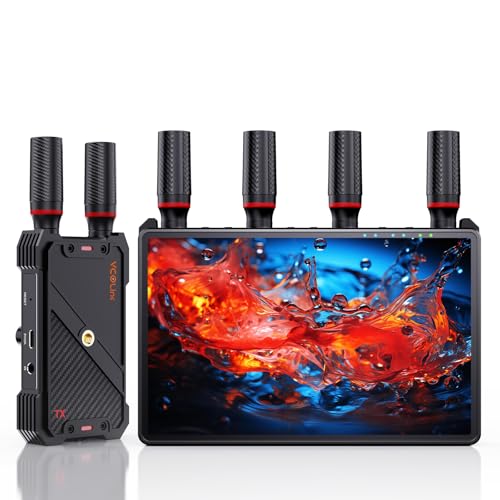
- Integrated 7-inch receiver monitor
- Supports up to five receivers
- Includes HDMI output, loop-out, and headphone monitoring
Best For: Studios needing built-in and shared monitoring
Streaming Flexibility Pick
Vrriis UVC Wireless Video System
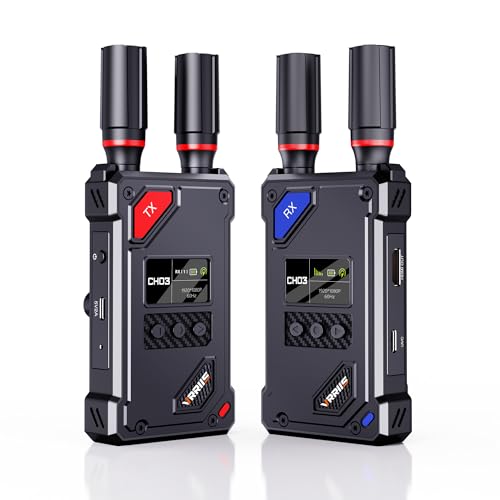
- UVC output for OBS without a separate capture device
- 20 adjustable channels for interference management
- Advertised 1,500-foot line-of-sight range
Best For: OBS livestreaming and computer-based studio capture
Long-Range Pro Pick

- Dual-band 2.4GHz/5GHz transmission
- 0.05-second latency and up to 1,200-foot range
- HDMI and SDI support at up to 1080p/60fps
Best For: Home studios needing flexible, long-range HDMI/SDI monitoring
Flexible HDMI Kit

- 1080p/60Hz video with 0.05-second latency
- Loop-out and dual HDMI receiver outputs
- IR control and multiple power options
Best For: HDMI studios needing local and remote displays
Streaming-Friendly Pick
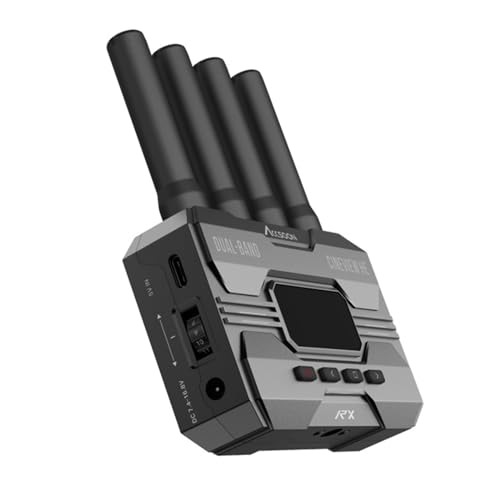
- UVC output for computer-based streaming
- Dual-band transmission with under 0.06-second latency
- Supports up to four receivers or mobile devices
Best For: Streamers sending wireless camera video directly to OBS or YouTube
Best All-Around Streaming Pick – Accsoon CineView HE
For home studios that need dependable wireless video receivers for home studios, the Accsoon CineView HE combines dual-band transmission, low latency, and a useful UVC output for computer-based streaming. It supports 1080p60 workflows and can send a feed to multiple monitoring devices.
Best For: Home-studio streaming, multi-person monitoring, and HDMI camera setups.
Pros:
- Dual-band 2.4GHz and 5GHz transmission is designed to improve stability and reduce interference.
- UVC output lets the receiver connect to a computer for platforms such as OBS without a separate capture device.
- Supports up to four receivers or mobile devices and offers HDMI loop-out with zero-latency lossless output.
- Offers up to 1200 feet of range and latency below 0.06 seconds.
Cons:
- It is limited to 1080p60 rather than 4K.
- Battery and charging cables are not included.
The CineView HE is a practical choice when streaming convenience and flexible monitoring matter more than 4K resolution. Its UVC feature is particularly useful for a compact home-studio setup.
Best 4K System Bundle – Atomos TX 4K/HD Wireless Set
The Atomos TX 4K/HD Wireless Video Transmitter & Receiver Set is a strong option for home studios that want a complete wireless video system with 4K capability. It supports HDMI and SDI connections, multiple power options, and transmission to several receivers or mobile devices.
Best For: 4K monitoring, mixed HDMI/SDI studio rigs, and production setups needing a transmitter-receiver pair.
Pros:
- Transmits up to UHD 4K30 video over the 5GHz band.
- Provides HDMI and SDI inputs, plus HDMI loop-out on the transmitter.
- The receiver includes both HDMI and SDI outputs for flexible monitor connectivity.
- Supports transmission to up to four receivers and Android or iOS smartphones.
Cons:
- The listed system weight is 950g, making it less compact than some single-receiver options.
- The supplied notes do not specify latency.
With both HDMI and SDI throughout the system, the Atomos set fits studios that use varied video equipment. It is best suited to buyers who value 4K and connectivity flexibility over the smallest footprint.
Best Compact 4K Receiver – Hollyland Mars 4K
The Hollyland Mars 4K is a dedicated receiver for home studios that need wireless video receivers for home studios with both HDMI and SDI monitoring options. Its compact design, 4K30 support, and smart channel scanning make it convenient for real-time viewing.
Best For: Compact 4K monitoring stations and studios with HDMI or SDI displays.
Pros:
- Supports UHD 4K at 30fps and 1080p at 60fps over HDMI.
- Offers both HDMI and SDI outputs for compatibility with a range of monitors and equipment.
- Provides a stated 450-foot line-of-sight range and 0.06-second latency.
- Weighs 7.9 ounces according to the supplied product highlights and includes smart channel scanning.
Cons:
- This is a receiver only, so a compatible transmitter is needed.
- The listed range is shorter than some competing systems in this roundup.
The Mars 4K makes sense when you already have a compatible wireless transmitter and want a lightweight receiver with professional HDMI and SDI outputs. Its 4K support also keeps it suitable for higher-resolution monitoring.
Best Advanced 4K Wireless Kit – Accsoon CineView SE 4K
The Accsoon CineView SE 4K is designed for home studios that want wireless video receivers for home studios with 4K30 quality, dual-band stability, and app-based camera control. Its H.265 encoding and USB-C video output add flexibility for monitoring and computer-connected workflows.
Best For: 4K production setups requiring stable wireless monitoring and remote camera control.
Pros:
- Supports end-to-end 4K30 transmission with H.265 encoding.
- Uses dual-band 2.4GHz and 5GHz transmission with Accsoon’s RTMS 4.0 protocol.
- Provides wireless camera control through the Accsoon SEE App.
- Includes USB-C video output and supports one wired plus four wireless connections.
Cons:
- The supplied details list HDMI as the connector, so broader physical connectivity is less clearly specified.
- The kit’s advanced features may be more than a basic home monitoring setup requires.
This kit is a strong fit for creators who want more than simple video transport. Its combination of 4K quality, dual-band transmission, USB-C output, and app control makes it the most feature-focused option here.
Silent Long-Range Pick – Compact SYNCO XVision HD System
For home studios seeking wireless video receivers, the SYNCO XVision system emphasizes quiet operation, low latency, and flexible monitoring. It transmits 1080p video at up to 60 fps over distances up to 300 meters in suitable conditions, while its fanless design helps keep recording spaces free from equipment noise.
Best For: Home studios, interviews, live music, and multi-person monitoring where silent operation matters.
Pros:
- Fanless 2W design helps minimize shooting distractions and power consumption.
- Advertised 40ms latency supports responsive monitoring for focus pulling and fast action.
- Receiver supports up to nine monitoring endpoints, while the transmitter includes HDMI loop-out.
- Compact 119g body offers NP-F battery and USB-C power options.
Cons:
- NP-F battery is not included.
- Its 300-meter range depends on conditions such as obstacles and wireless interference.
- Receiver endpoints are intended for monitoring only.
The SYNCO is a practical choice when a quiet, portable wireless link is more important than built-in viewing hardware. Its automatic pairing, status display, and collaborative monitoring features make it approachable for small studio teams.
All-in-One Monitoring Pick – 7-Inch Wireless HDMI System
Among wireless video receivers for home studios, this system stands out by building a 7-inch monitor directly into the receiver. It also offers HDMI output, headphone monitoring, loop-out, and support for up to five receivers, making it useful when a studio needs both personal and shared viewing.
Best For: Small production teams, studios, and live setups that want an integrated monitor without adding another screen.
Pros:
- Built-in 7-inch HD display provides immediate monitoring without an extra monitor.
- Supports 1080p at 60Hz with advertised latency below 0.05 seconds.
- One transmitter can broadcast to up to five receivers for multi-viewer collaboration.
- Offers HDMI output, transmitter loop-out, headphone monitoring, and IR remote control.
Cons:
- HDMI cable is not included.
- NP-F batteries, power bank, and USB-C power options are supported, but batteries are not specified as included.
- Smartphone or tablet use requires a Type-C-to-HDMI cable.
This is the most self-contained option of the three for studio monitoring. The integrated screen reduces accessory clutter, while external HDMI output and multi-receiver support leave room for client or crew displays.
Streaming Flexibility Pick – Vrriis UVC Wireless Video System
For home studios using OBS or another computer-based workflow, the Vrriis system adds UVC output to the usual wireless HDMI features. Its receiver can send video to a computer through the included USB-C cable, while manual channel selection helps address interference in crowded wireless environments.
Best For: Home livestreaming, OBS workflows, and studios that need direct computer capture without a separate video capture device.
Pros:
- UVC output supports streaming to platforms such as OBS without an additional capture device.
- Offers 20 manually selectable channels with signal-strength and interference indicators.
- Advertised 1080p at 60Hz transmission with 0.05-second latency and up to 1,500 feet line of sight.
- HDMI loop-out and NP-F or USB-C power options add setup flexibility.
Cons:
- Walls, metal, brick, and glass can significantly reduce range or cause signal loss.
- Batteries are not included.
- Adding more receivers can reduce transmission distance.
The Vrriis is especially compelling when wireless video needs to reach a computer for live production. Its channel controls and UVC output give it more streaming-oriented flexibility than a basic point-to-point monitor link.
Long-Range Pro Pick – CineView SE Receiver
For creators who need reliable wireless video receivers for home studios, the Accsoon CineView SE emphasizes low latency, long range, and dual-band stability. This receiver supports HDMI and SDI workflows at up to 1080p/60fps, although this listing is for the receiver only.
Best For: Home studios and small production setups using HDMI or SDI sources with multiple monitoring devices.
Pros:
- Dual-band 2.4GHz and 5GHz transmission is designed to improve stability in the presence of interference.
- Offers approximately 0.05-second latency and up to 1,200 feet of stated range in suitable conditions.
- Supports 1080p video at up to 60fps through HDMI and SDI connections.
- Can share previews through the Accsoon GO app and supports monitoring on up to four devices.
Cons:
- This listing includes only the receiver, so a compatible transmitter is required.
- It is a professional-oriented option rather than a simple all-in-one HDMI kit.
The CineView SE is a strong choice when connection stability and flexible HDMI/SDI compatibility matter more than basic plug-and-play convenience. Confirm that your existing transmitter and camera outputs match before buying.
Flexible HDMI Kit – 1080p Wireless HDMI System
This complete transmitter-and-receiver kit is a practical option for home studios seeking wireless video receivers for home studios without adding software or complicated installation. It sends 1080p/60Hz HDMI video, includes loop-out and dual receiver outputs, and supports several portable power options.
Best For: HDMI-based studio, projector, television, and camera setups that need local monitoring and remote display control.
Pros:
- Plug-and-play 1080p transmission with stated 0.05-second latency.
- Transmitter loop-out supports a local monitor, while the receiver can connect to two displays.
- IR extension lets users control the HDMI source from the display location.
- Supports NP-F batteries, USB-C power, adapters, and portable power banks.
Cons:
- Walls, brick, metal, and glass can significantly reduce the stated 1,300-foot range.
- Batteries are not included.
- The system is HDMI-only, with no SDI connection listed.
For a straightforward HDMI installation, this kit offers useful monitoring and control features at both ends. Its range claims are based on open conditions, so plan for shorter distances in a typical home or studio environment.
Streaming-Friendly Pick – CineView HE Receiver
The Accsoon CineView HE stands out among wireless video receivers for home studios because its receiver provides UVC output for direct computer streaming. It combines dual-band transmission with 1080p/60fps support and low latency, but this listing includes only the receiver.
Best For: Home-studio streamers who want to send received video to OBS, YouTube, or another computer-based streaming platform without a separate capture device.
Pros:
- UVC output can send received footage to a computer over USB-C for live streaming.
- Dual-band 2.4GHz and 5GHz transmission is designed for stable, interference-resistant connections.
- Supports 1080p/60fps transmission with latency below approximately 0.06 seconds.
- One transmitter can send video and audio to up to four receivers or supported mobile devices.
Cons:
- This product is receiver-only and requires a compatible transmitter.
- A USB-C cable for the UVC connection is user-provided.
- The listed receiver connection is HDMI plus USB; SDI support is not specified.
The CineView HE is especially compelling for creators who want a simpler streaming path from a camera to a computer. Its UVC feature can reduce equipment clutter, provided your computer and streaming software work with the receiver’s USB output.
How We Picked the Best Wireless Video Receivers for Home Studios
We focused on the features that matter most in a practical studio setup: supported resolution and frame rate, claimed transmission range, latency, input and output connections, wireless-band design, monitoring flexibility, and ease of installation. We also considered whether each system supports HDMI, SDI, UVC output, loop-out functionality, or multiple receivers.
Specifications such as range and latency are usually measured in favorable conditions. Walls, nearby Wi-Fi networks, crowded 2.4GHz channels, and interference from other equipment can reduce real-world performance, so treat advertised figures as benchmarks rather than guarantees.
Quick Comparison
| Best for | Look for | Recommended capability |
|---|---|---|
| Basic camera monitoring | 1080p HDMI transmission | Low latency and stable pairing |
| Live streaming | UVC output | Direct connection to a computer without a separate capture card |
| Professional camera rigs | HDMI and SDI support | Flexible compatibility with cameras and monitors |
| Higher-resolution production | 4K transmission | 4K input support with acceptable latency |
| Multi-display studios | Multiple receivers or loop-out | Distribution to several monitors or destinations |
Key Buying Factors for Wireless Video Receivers for Home Studios
Resolution, Frame Rate, and Latency
Choose a system that matches your camera output rather than buying based on resolution alone. A 1080p60 system may be preferable for responsive monitoring, while 4K support is more useful when you need to preserve detail for recording or preview. Lower latency helps with talking-head streams, camera operation, and live performances.
Connections and Computer Compatibility
HDMI is common on mirrorless cameras, consumer cameras, and monitors. SDI is more suitable for longer professional cable runs and production hardware. UVC output can let a computer recognize the receiver as a video source, simplifying streaming software setup. Check whether the receiver provides the exact port type, output resolution, and power method your equipment requires.
Range, Reliability, and Interference
A long advertised range is helpful, but stable performance matters more than the maximum number. Dual-band systems can offer more flexibility in busy environments. Keep antennas clear, place the transmitter and receiver where they have a strong line of sight, and avoid assuming that a wireless link will perform through several walls like a wired connection.
Power and Workflow Details
Confirm battery or adapter requirements before buying. For all-day studio use, continuous power may be more convenient than swapping batteries. Loop-out, channel selection, manual frequency switching, and support for multiple receivers can also make a significant difference when your workflow grows.
Who Should Buy Which Wireless Video Receivers for Home Studios?
Choose a compact 1080p receiver if your priority is affordable camera monitoring or straightforward streaming. Pick a UVC-equipped model if you want to connect directly to a computer for live production. A 4K system makes more sense for high-resolution cameras and future-proofing, while HDMI-and-SDI models are better for mixed professional equipment. If you need several screens, prioritize multi-receiver support, loop-out, or a package designed for distribution rather than a basic point-to-point kit.