
A reliable wireless video receiver can simplify live production by sending a camera, laptop, or other HDMI source to a monitor, switcher, or streaming system without a long cable run.
These 10 options cover compact plug-and-play kits, long-range HDMI extenders, multi-receiver systems, and professional-grade wireless video links. Compare resolution, latency, outputs, and operating range to find the right fit for your setup.
Best 10 Wireless Video Receivers for Live Streaming Picks for 2026
Best All-Around Pick

- 4K@30Hz receiver output
- Up to 165 feet unobstructed range
- Supports up to eight transmitters
Best For: Home theaters, presentations, and gaming
Best for Multi-Display Setups
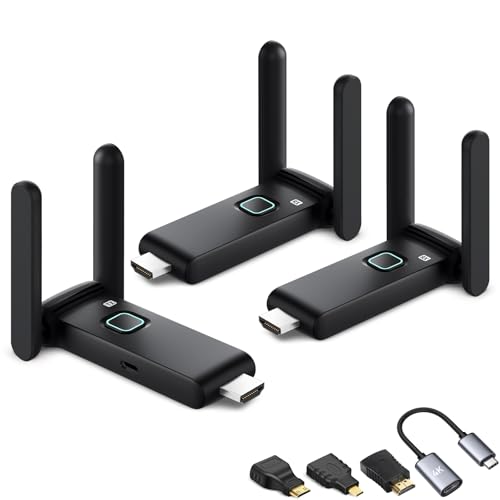
- Includes one transmitter and two receivers
- Supports multiple synchronized displays
- USB-C and mini-HDMI adapters included
Best For: Classrooms, meetings, and multi-room viewing
Best for Computer Streaming
Vrriis UVC Wireless Video System
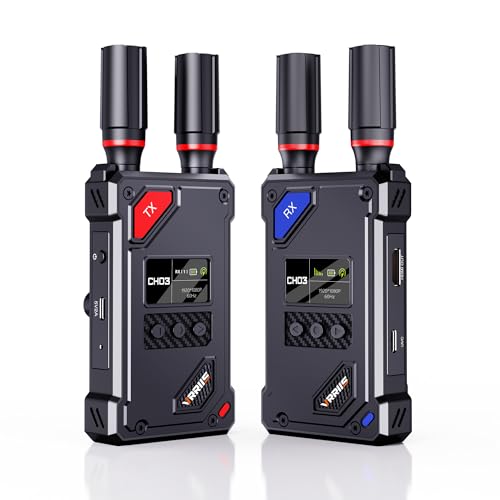
- UVC output for OBS streaming
- 20 adjustable channels
- 1080p@60Hz with HDMI loop-out
Best For: Camera operators and computer-based live production
Best for Long-Range Monitoring
BovBox 1080p Wireless HDMI Extender

- Up to 1,312 feet claimed range
- 1080p@60Hz and 0.05-second latency
- Loop-out, IR control, and up to five receivers
Best For: Outdoor production and event monitoring
Best for Professional Monitoring

- Dual-band 2.4/5GHz transmission
- 0.05-second latency and up to 1,200-foot range
- HDMI and SDI support for 1080p/60fps
Best For: Professional crews and live-event monitoring
Best for Simple Wireless HDMI

- Plug-and-play mirroring and extension
- 1080p/60Hz output with 4K decoding
- Up to 98 feet of wireless transmission
Best For: Presentations, home offices, gaming, and travel
Best for Long-Range Live Production

- 40ms latency for real-time monitoring
- Up to 300 meters at 1080p/60fps
- HDMI loopout and monitoring app features
Best For: Film crews, live events, and long-distance streaming setups
Longest-Range Home & Venue Pick

- Up to 1300 feet in an open field
- 1080p at 60Hz with 0.05s latency
- Loop-out and IR remote support
Best For: Long-distance presentations, church projections, and home entertainment
Multi-Screen Production Pick
Pro 820FT Wireless HDMI System

- One transmitter can support four receivers
- 1080p at 60Hz output with 4K input
- NP-F and USB-C power options
Best For: Live events, film production, churches, and multi-display monitoring
Flexible Multi-Display Value Pick
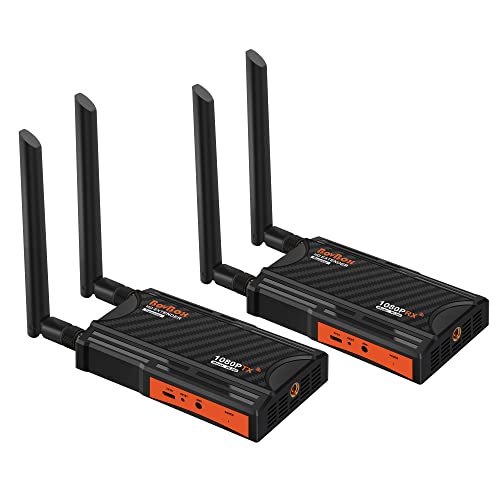
- 1080p at 60Hz over dual-band transmission
- Supports up to four receivers
- Loop-out and IR remote control included
Best For: Streaming, presentations, church use, and expandable home setups
Best All-Around Pick – AIMIBO 4K Wireless HDMI Kit
The AIMIBO kit is a versatile choice among wireless video receivers for live streaming, home entertainment, presentations, and gaming. It supports 4K at 30Hz on the receiver, offers plug-and-play setup without Wi-Fi, Bluetooth, or apps, and reaches up to 165 feet in an unobstructed environment.
Best For: Home theaters, meetings, classrooms, gaming, and users who need broad device compatibility.
Pros:
- Supports 4K@30Hz reception and 1080p@60Hz transmission and reception.
- Dual-band 2.4/5GHz connectivity with claimed 0.1-second latency.
- Can pair up to eight transmitters with one receiver and includes mini- and micro-HDMI adapters.
- Supports screen mirroring from Android, iOS, and Windows devices.
Cons:
- Range drops to about 32 feet when signals pass through walls or floors.
- 4K support is limited to 30Hz.
- The transmitter and receiver must be connected to the correct HDMI devices.
Choose this model if you want a flexible wireless HDMI system with higher-resolution receiver output and useful adapters. It is particularly practical for mixed home and presentation setups, though the advertised range assumes a clear line of sight.
Best for Multi-Display Setups – Wireless HDMI Splitter Kit
This wireless HDMI kit stands out among wireless video receivers for live streaming when one source needs to appear on multiple displays. It includes one transmitter and two receivers, supports simultaneous viewing on TVs and projectors, and uses dual-band 2.4/5GHz transmission with a stated range of up to 165 feet in open conditions.
Best For: Classrooms, conference rooms, churches, restaurants, and multi-room home viewing.
Pros:
- Includes two receivers for simultaneous display on multiple screens.
- Can support up to four receivers at once, with additional phone and tablet combinations noted by the manufacturer.
- Includes USB-C-to-HDMI extension cables and mini-HDMI adapters for broader device compatibility.
- Supports HD video at up to 60Hz with stated latency of about three seconds.
Cons:
- Transmission distance can fall to about 32 feet through walls or floors.
- Wireless congestion may require changing the channel through the setup page.
- The supplied notes describe HD output rather than 4K output.
This is a practical pick when synchronized displays matter more than maximum resolution. Its included adapters and multiple receivers reduce the need for extra hardware, while the range and latency should be evaluated against the layout of your venue.
Best for Computer Streaming – Vrriis UVC Wireless Video System
The Vrriis system is one of the more streaming-focused wireless video receivers for live streaming because its receiver provides UVC output over USB-C. That lets you send received footage to platforms such as OBS without a separate video capture device, while the transmitter’s HDMI loop-out supports local monitoring.
Best For: Camera operators and creators who want to feed wireless video directly into a computer-based streaming workflow.
Pros:
- UVC output supports computer streaming through OBS without an additional capture device.
- Offers a claimed 0.05-second latency and up to 1,500 feet of line-of-sight range in open conditions.
- Provides 20 manually selectable channels with an LCD showing signal and interference information.
- Supports 1080p@60Hz and transmitter-side HDMI loop-out for monitoring.
Cons:
- Walls, metal, brick, and glass can substantially reduce signal coverage.
- The kit does not include NP-F batteries.
- Adding more receivers can reduce the wireless transmission distance.
For live production, the UVC output and channel controls make this model more purpose-built than a basic wireless HDMI extender. It is a strong fit for line-of-sight camera work, provided you plan for power and account for obstacles in the signal path.
Best for Long-Range Monitoring – BovBox 1080p Wireless HDMI Extender
The BovBox extender is designed for long-distance wireless HDMI links, making it a useful option among wireless video receivers for live streaming, event monitoring, and outdoor production. It supports 1080p at 60Hz, includes transmitter loop-out, and offers IR remote control support for compatible source devices.
Best For: Outdoor photography, video shooting, conference rooms, church projection, and real-time sports or gaming displays.
Pros:
- Claims transmission up to about 1,312 feet with dual-band 2.4/5GHz connectivity.
- Supports 1080p@60Hz with stated latency of 0.05 seconds.
- Transmitter HDMI loop-out allows a local monitor to be connected.
- Supports up to five receivers from one transmitter and includes IR remote functionality.
Cons:
- The advertised long range depends on suitable conditions and may be reduced indoors or around obstructions.
- Resolution is limited to 1080p rather than 4K.
- Multi-receiver use can shorten the transmission distance.
This model makes the most sense when range, low latency, and local monitoring are higher priorities than 4K resolution. Its loop-out and multi-receiver support add flexibility for production or presentation setups, but real-world placement will determine whether the maximum range is achievable.
Best for Professional Monitoring – CineView SE Receiver
For demanding wireless video receivers for live streaming setups, the Accsoon CineView SE emphasizes long-range transmission, low latency, and connection flexibility. This listing is for the receiver only, so confirm that you have a compatible CineView SE transmitter before buying.
Best For: Professional video crews, live events, and multi-device monitoring where HDMI and SDI support are useful.
Pros:
- Dual-band 2.4GHz and 5GHz transmission is designed to improve stability in areas with interference.
- Offers claimed 0.05-second latency and transmission distances up to 1,200 feet.
- Supports 1080p video at up to 60fps through HDMI and SDI connections.
- Compact aluminum construction, OLED display, silent cooling, and Accsoon GO app support.
Cons:
- This listing includes only the receiver, not a complete transmitter-and-receiver kit.
- Its professional features may be more than casual home streaming requires.
The CineView SE is a strong choice when low delay, long reach, and HDMI/SDI compatibility matter most. Its receiver-only configuration makes system compatibility the key purchasing check.
Best for Simple Wireless HDMI – TR30 Wireless HDMI Kit
The BRAIDOL TR30 is a straightforward option among wireless video receivers for live streaming when you want to mirror or extend a laptop, camera, or set-top box to a display without a complicated setup. It is a plug-and-play HDMI kit with a shorter stated range than professional video transmission systems.
Best For: Home offices, presentations, gaming, travel, and casual streaming between HDMI-equipped devices.
Pros:
- Supports both screen mirroring and screen extension modes.
- Plug-and-play operation does not require Bluetooth, Wi-Fi configuration, or a dedicated app.
- Supports 1080p output at 60Hz and 4K decoding.
- Compact design and claimed wireless range of up to 98 feet or 30 meters.
Cons:
- It is not designed for direct connection to mobile phones or tablets.
- Walls and other obstacles can reduce transmission distance and speed.
- The included warranty is listed as three months.
The TR30 is best viewed as a convenient HDMI extender rather than a full production-grade wireless video system. It suits users who prioritize quick setup and portability over maximum range or advanced monitoring tools.
Best for Long-Range Live Production – SYNCO XVision System
The SYNCO XVision targets creators seeking wireless video receivers for live streaming and production work. It combines 1080p/60fps transmission, a claimed 300-meter range, HDMI input/output with loopout, and app-based monitoring in a system designed for cameras, events, and larger shooting environments.
Best For: Film production, TV commercials, live events, and streaming workflows that need long-range monitoring with low power use.
Pros:
- Claims 40ms latency for responsive real-time monitoring.
- Supports stable 1080p/60fps transmission over distances up to 300 meters.
- HDMI dual input/output and loopout expand monitoring and routing options.
- Low-power 2W design avoids fan cooling, while the app adds image tools, screenshots, saving, and playback.
Cons:
- The supplied notes do not specify the included accessories or warranty details.
- Its production-oriented feature set may be unnecessary for basic short-range HDMI use.
With its long claimed range, responsive latency, loopout capability, and monitoring app, XVision is the most production-focused option here. It is particularly attractive when quiet operation and extended camera-to-monitor distances are priorities.
Longest-Range Home & Venue Pick – 1300FT Wireless HDMI Extender
For shoppers comparing wireless video receivers for live streaming, this kit stands out for its advertised 1,300-foot open-field range, 1080p at 60Hz support, and low stated latency. It is designed for point-to-point HDMI transmission between cameras, laptops, set-top boxes, TVs, and projectors, with a local loop-out for monitoring.
Best For: Long-distance home entertainment, presentations, church projections, and setups that need local monitoring plus remote source control.
Pros:
- Advertised transmission distance of up to 1,300 feet in an open field.
- Supports 1080p at 60Hz with a stated 0.05-second latency.
- HDMI loop-out enables a local monitor, while included IR cables support remote source control.
- Plug-and-play setup requires no software installation.
Cons:
- Walls, metal, brick, and glass can significantly reduce signal coverage.
- Adding more receivers can shorten the transmission distance.
- The advertised range is based on open-field conditions rather than typical indoor use.
This is a practical choice when range and flexible monitoring matter most. Just plan around environmental interference, since real-world coverage may be lower than the open-field specification.
Multi-Screen Production Pick – Pro 820FT Wireless HDMI System
Among wireless video receivers for live streaming, this system is geared toward production teams that need one transmitter to feed several displays. It supports 1080p at 60Hz output, accepts 4K input, offers a loop-out connection, and is designed for cameras, streaming setups, church events, and outdoor productions.
Best For: Live event crews, filmmakers, churches, and streamers who need multi-screen distribution and battery-friendly operation.
Pros:
- Supports one transmitter with up to four receivers for simultaneous viewing.
- Delivers 1080p at 60Hz output and accepts 4K input.
- Advertised latency is under 0.06 seconds for real-time monitoring and streaming.
- Supports NP-F batteries or USB-C power banks for flexible event use.
Cons:
- Range decreases from 820 feet with one receiver to 623 feet with four receivers.
- It requires separate compatible displays or receivers for multi-screen expansion.
- The supplied details identify an AMS audio input, but do not specify its connector type.
This model makes the most sense for organized productions where directors, clients, or overflow rooms need the same feed. Its multi-receiver design is more useful for events than for a simple one-TV installation.
Flexible Multi-Display Value Pick – 820FT Wireless HDMI Extender
This wireless HDMI extender is a straightforward option for wireless video receivers for live streaming, presentations, and home media. It supports 1080p at 60Hz, uses dual-band 2.4GHz and 5.8GHz transmission, and includes loop-out and IR control for convenient local monitoring and source operation.
Best For: Streamers, presenters, churches, and home users who want plug-and-play HDMI transmission with support for multiple receiving screens.
Pros:
- Supports up to 1080p at 60Hz with clear video and audio.
- Advertised open transmission distance reaches up to 820 feet.
- One transmitter can support up to four receivers, with specified range reductions as receivers are added.
- Loop-out provides a local monitor connection, and IR control supports remote source operation.
Cons:
- The product notes a delay of about 0.06 seconds, which may matter for real-time gaming.
- Maximum range requires favorable open, elevated conditions.
- Additional receivers are needed for multi-screen configurations.
Choose this model when you want a simple installation and the option to expand beyond one display. Its published range and multi-receiver support are useful, but indoor obstacles and added receivers can reduce coverage.
How We Picked the Best Wireless Video Receivers for Live Streaming
We evaluated these Wireless Video Receivers for Live Streaming by focusing on the specifications that affect real production work: supported resolution and refresh rate, claimed transmission range, latency, wireless-band compatibility, connection options, and setup requirements. We also considered practical features such as HDMI loop-out, UVC output, IR control, audio support, channel selection, and the ability to feed multiple displays.
Marketing range figures are measured under favorable conditions, so walls, crowded Wi-Fi networks, interference, and antenna placement can reduce performance. Treat each range as a best-case reference rather than a guaranteed distance.
Quick Comparison
- Best for simple setups: Plug-and-play 2.4GHz/5GHz HDMI kits minimize configuration.
- Best for long cable-free runs: Long-range 1080p extenders prioritize distance and often include loop-out.
- Best for multiple displays: One-to-two or one-to-four receiver systems can distribute a source to several screens.
- Best for cameras and professional production: Systems with low latency, channel control, HDMI/SDI support, or UVC output offer more workflow flexibility.
Key Buying Factors for Wireless Video Receivers for Live Streaming
Resolution, Refresh Rate, and Signal Compatibility
Confirm that the transmitter and receiver support your source and display. A 1080p system at 60Hz is often the practical choice for live streaming, while 4K support matters when you need higher-resolution monitoring or recording. Check whether the kit supports the exact HDMI version, frame rate, and HDCP behavior your equipment requires.
Latency and Reliability
Low latency is important when talent is monitoring themselves, presenters are interacting with a screen, or a camera feed must stay synchronized with audio. Look for a stated latency figure, but also prioritize stable transmission, selectable channels, and dual-band operation. A slightly slower but consistent link is usually more useful than a fast connection that drops intermittently.
Range, Outputs, and Installation
Measure the real distance and account for walls or equipment racks. HDMI loop-out is valuable when the source must remain connected to a local monitor. UVC output can let a computer recognize the receiver as a video source, while SDI support may suit broadcast-oriented workflows. Verify included power adapters, mounting options, and whether both ends need clear placement.
Who Should Buy Which Wireless Video Receivers for Live Streaming?
Choose a compact plug-and-play kit for occasional streams, presentations, classroom use, or a nearby camera-to-monitor connection. Choose a long-range extender with loop-out when your source and display are separated by a venue, studio, or event space. Choose a multi-receiver model when one camera or presentation source must reach multiple screens. Choose a low-latency professional system for live camera operation, event production, or workflows that need better control over channels, audio, and signal routing.
Before buying, confirm connector types, power requirements, supported resolution, and compatibility with your camera, capture card, switcher, or monitor. Those details matter more than the advertised range alone.