
The JSAUX DP to HDMI Adapter 2 Pack is a focused solution for turning a desktop or GPU DisplayPort output into an HDMI display connection.
If you need a simple JSAUX DP to HDMI Adapter 2 Pack review that answers whether it is the right fit, the short version is yes for direct DP-to-HDMI use, and no for anything more complicated.
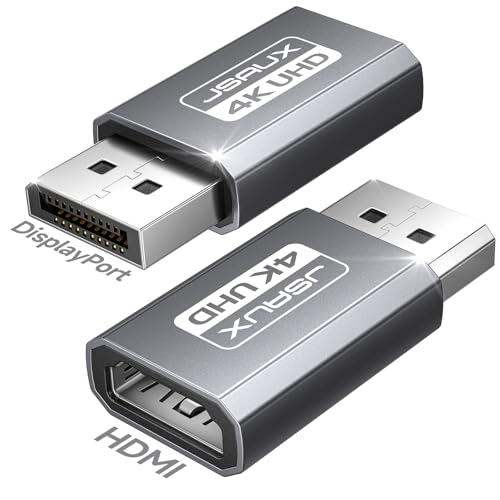
JSAUX DP to HDMI Adapter Review Summary
This adapter pack makes sense for buyers who already know they have a full-size DisplayPort source and need HDMI display compatibility without extra setup.
It is best for office desks, multi-monitor workstations, meeting rooms, and home setups where plug-and-play reliability matters more than advanced features.
The strongest case for buying it is that it stays narrowly focused on one job and does not pretend to be universal.
That clarity is valuable: if your PC or GPU has DisplayPort and your monitor, TV, or projector takes HDMI, this is a practical way to connect them.
The 2-pack also adds obvious utility because one adapter can live at the office while the other stays at home, or one can serve as a backup.
Review Scorecard
| Category | Score | Buyer-focused rationale |
|---|---|---|
| Compatibility clarity | 9/10 | The listing clearly states it is DisplayPort source to HDMI display only, which reduces confusion. |
| Everyday image support | 8/10 | Up to 4K@30Hz is enough for typical desktop, presentation, and media use. |
| Smoothness at lower resolutions | 8/10 | The support for 2K@60Hz and 1080p@120Hz is useful for more fluid output where available. |
| Ease of use | 9/10 | The adapter is described as plug and play, with no software or extra power mentioned. |
| Build practicality | 8/10 | Aluminum housing and gold-plated connector suggest a durable, low-fuss design. |
| Value for multi-location use | 9/10 | Two adapters in the box are useful for backup, travel, or splitting between work and home. |
| Risk of buyer error | 6/10 | The one-way limitation is a feature, but it also makes wrong-port purchases easy if the spec is not checked. |
Key Features and Specifications of JSAUX DP to HDMI Adapter
The product is a uni-directional DisplayPort to HDMI adapter, so the source device must have a full-size DisplayPort output and the display side must accept HDMI.
The listing explicitly says it is not bidirectional, not an HDMI-to-DP solution, and not meant for USB-C or Thunderbolt connections.
It supports up to 4K at 30Hz, plus 2K at 60Hz and 1080p at 120Hz.
That combination is a sensible fit for general productivity, video playback, conference-room displays, and some lighter gaming use where the priority is compatibility rather than the highest possible refresh rate.
The physical design is straightforward: aluminum housing and a gold-plated connector.
The 2-pack format is a practical extra, not a cosmetic one.
If you move between desks or keep a spare in a bag, a second adapter can save time when a cable chain or display setup changes.
Key points from the listing:
- Works from DisplayPort source to HDMI display only
- Supports 4K@30Hz
- Also supports 2K@60Hz and 1080p@120Hz
- Not for USB-C, Thunderbolt, or chained converter setups
- Designed for desktop PCs, Dell/Lenovo/HP systems, and AMD GPUs
- Includes two adapters
- Built with aluminum housing and a gold-plated connector
The biggest practical caution is that this adapter does not solve every display mismatch.
It is not a universal digital video bridge, and the listing warns against unsupported chains with active converters, USB-C to HDMI adapters, or hubs that include embedded chips.
That makes the product easier to understand, but it also means buyers need to check the port on the sending device before ordering.
Pros and Cons of JSAUX DP to HDMI Adapter
Pros
- Clear one-way design reduces ambiguity when the source is definitely DisplayPort.
- 4K@30Hz support is enough for many everyday display tasks.
- 2K@60Hz and 1080p@120Hz provide flexible lower-resolution use cases.
- Two-pack value is genuinely useful for backup and multi-location setups.
- Plug-and-play positioning keeps setup simple for nontechnical users.
- Durable materials should hold up better than a flimsy throwaway adapter.
Cons
- Not bidirectional, so it will not help if you need HDMI to DisplayPort.
- Not for USB-C or Thunderbolt, which limits its usefulness in mixed-device setups.
- 4K output is capped at 30Hz, so it is not ideal for users expecting a smoother high-refresh 4K experience.
- Requires careful port checking, which matters because the wrong purchase will simply not work.
Who Should Buy JSAUX DP to HDMI Adapter?
This is a good buy for anyone with a desktop PC or GPU that still exposes a full-size DisplayPort output and needs to connect to an HDMI-only monitor, TV, or projector.
It fits office users, home office setups, and people who regularly switch a PC between a desk monitor and a larger screen.
It also makes sense if you want a simple spare to keep in a laptop bag, desk drawer, or travel kit.
The second adapter is not just filler; it lowers the chance that a missing cable blocks a meeting or presentation.
You should skip it if your device outputs only USB-C, Thunderbolt, or HDMI.
You should also skip it if you specifically need the reverse direction, because this product is not designed for HDMI-to-DisplayPort conversion.
If you want a single adapter for many device types, this is probably too specialized.
DisplayPort-to-HDMI Fit and Limits
Source Port Matters Most
The key decision is on the sending side.
This product is made for a full-size DisplayPort output, which is common on desktops and many discrete GPUs.
That makes it a clean match for older or workstation-style hardware, but a poor match for ultrabooks and portable devices that rely on USB-C video output.
Resolution Tradeoffs Are Honest
The supported modes are practical rather than ambitious.
4K@30Hz works for many uses, while 2K@60Hz and 1080p@120Hz are more comfortable if you care about motion smoothness at lower resolutions.
The listing does not promise the kind of premium 4K gaming output that would require a different class of adapter.
Desk and Meeting-Room Utility
The best value appears in routine desktop and presentation environments.
If you need to keep one machine connected to an HDMI display for work, or you frequently plug into projectors and conference monitors, this sort of adapter is exactly the kind of small accessory that removes friction without adding complexity.
Why the 2-Pack Helps
Two adapters in one box is a real advantage because display adapters tend to disappear into bags, dock stations, and cable kits.
For a buyer who wants continuity more than features, having a second unit ready is a stronger benefit than it first looks.
Alternatives to JSAUX DP to HDMI Adapter
If you want a different approach, a few credible Amazon search alternatives are worth considering:
- Cable Matters DisplayPort to HDMI adapter
- StarTech DisplayPort to HDMI adapter
- Anker DisplayPort to HDMI adapter
- UGREEN DisplayPort to HDMI adapter
These brands are worth checking if you want to compare cable length, connector style, or package size.
The important comparison point is still the same: make sure the adapter is built for DisplayPort source to HDMI display and not the other direction.
Is JSAUX DP to HDMI Adapter Worth It?
Yes, if your setup matches the direction and port type.
The JSAUX DP to HDMI Adapter 2 Pack is worth it for users who need a dependable, no-drama way to connect a DisplayPort computer or GPU to an HDMI display, especially when the second adapter will be useful as a spare.
It is not the best choice for buyers who need higher-end 4K refresh rates, USB-C compatibility, or a multi-purpose converter.
But for the right desktop-to-display job, this is a practical, easy-to-understand adapter pack that does exactly what the listing says it does.