
USB-C hard drive docking stations make it easy to access, clone, and back up SATA drives without opening your PC. They’re a practical choice for home labs, creators, IT pros, and anyone rotating between multiple 2.5-inch or 3.5-inch drives.
In this roundup, we focused on speed, drive compatibility, cloning features, and ease of use so you can quickly find the right dock for your workflow and budget.
Best 10 USB C Hard Drive Docking Stations Picks for 2026
Universal USB-C SATA Dock

- Supports 2.5in and 3.5in SATA drives
- 10Gbps USB-C with USB-A and USB-C cables
- Tool-free, hot-swappable single-bay design
Best For: Simple SATA drive swaps and backups on mixed USB-C/USB-A systems
Dual-Bay Clone Dock
WAVLINK USB 3.0/USB-C SATA Dock

- Dual-bay dock for two SATA drives
- Offline clone/duplicator function included
- UASP support up to 6Gbps
Best For: Users who need a dual-drive SATA dock with offline cloning
NVMe + SATA Hybrid Dock
SABRENT Lay Flat USB-C 10Gbps Dock

- Reads NVMe and 2.5in/3.5in SATA drives
- 10Gbps USB-C with both cable types included
- Offline clone with tool-free operation
Best For: Users who want one dock for both NVMe and SATA drives
Dual-Bay Offline Cloner
ORICO USB-C to SATA 2-Bay Dock

- Dual-bay dock for 2.5in and 3.5in SATA drives
- Offline clone mode with LED indicators
- USB-C to A/C cable and broad compatibility
Best For: Users who want a flexible dual-bay dock with offline cloning
Best for Easy Setup

- Offline cloning without a computer
- Dual bays mount as separate drives
- USB-C cable included
Best For: Users who want a dual-bay SATA dock with easy drive cloning
Universal 2-in-1 Cable Dock
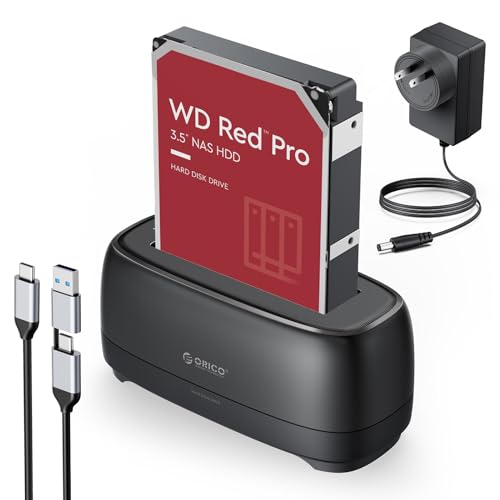
- USB-C and USB-A cable included
- Supports UASP, TRIM, and S.M.A.R.T
- Broad OS and device compatibility
Best For: People who want a simple single-bay SATA dock with flexible connectivity
Triple-Bay NVMe Cloner

- Supports NVMe and SATA drives
- Three independent slots for multiple drives
- One-touch offline cloning
Best For: Users who want a versatile three-slot dock for mixed NVMe and SATA workflows
Dual-Bay Value Dock
RSHTECH USB-C/USB 3.0 to SATA Dock

- Supports 2.5"/3.5" SATA drives up to 22TB
- USB-A/USB-C cable works with many hosts
- Offline clone mode and aluminum housing
Best For: People needing a simple dual-bay dock for large SATA drives and cloning
High-Capacity Clone Dock
UGREEN Dual-Bay Docking Station

- Supports two SATA drives up to 32TB x 2
- Offline cloning without a computer
- USB B to USB-C cable with cooling features
Best For: Anyone prioritizing big-drive support and easy dual-bay cloning
Proven Budget Cloner
SABRENT Dual Bay Docking Station

- Supports 2.5"/3.5" SATA drives and SSDs
- Built-in offline cloning and plug-and-play use
- USB 3.0 speeds up to 5Gbps
Best For: People who want a simple, reliable dual-bay dock for cloning
Universal USB-C SATA Dock – SABRENT 2.5/3.5in 10Gbps Dock
If you want a straightforward USB C hard drive docking station for everyday backup and drive swapping, this SABRENT model keeps things simple and practical. It supports 2.5-inch and 3.5-inch SATA SSDs and HDDs, runs at up to 10Gbps, and includes both USB-A and USB-C to USB-C cables so it can work with newer and older systems.
Best For: Users who want a simple, tool-free SATA dock for Windows, macOS, or Linux.
Pros:
- Supports 2.5-inch and 3.5-inch SATA SSDs and HDDs
- 10Gbps USB 3.2 Gen 2×1 connection for fast transfers
- Includes USB-A and USB-C to USB-C cables
- Tool-less design with retractable dust cover
Cons:
- Single-bay design handles one drive at a time
- Designed for SATA drives only, not NVMe
- 3.5-inch drives need the included power adapter
This is a solid pick if you want a reliable dock for swapping SATA drives without extra setup. Its broad compatibility and included cables make it especially convenient for mixed USB-C and USB-A environments.
Dual-Bay Clone Dock – WAVLINK USB 3.0/USB-C SATA Dock
For buyers comparing USB C hard drive docking stations that can handle two drives and offline cloning, this WAVLINK unit is built around convenience. It works with 2.5-inch and 3.5-inch SATA HDDs and SSDs, supports UASP for faster transfers, and adds a built-in clone function so you can duplicate one drive to another without using a computer.
Best For: Users who want a dual-bay SATA dock with offline cloning support.
Pros:
- Dual-bay design supports two SATA drives
- Offline clone/duplicator function built in
- UASP support with up to 6Gbps transfer rates
- Includes power switch and 30-minute auto sleep mode
Cons:
- Offline cloning requires the target disk to be equal or larger
- Not compatible with M1/M2-based Mac systems
- Cloning is offline only, not online
This dock is a practical fit when you need a two-drive station for backups, duplication, or routine storage work. Its feature set is especially useful if offline cloning matters more to you than maximum speed.
NVMe + SATA Hybrid Dock – SABRENT Lay Flat USB-C 10Gbps Dock
If you want one of the more flexible USB C hard drive docking stations, this SABRENT lay-flat dock handles both M.2 PCIe NVMe SSDs and 2.5-inch or 3.5-inch SATA SSDs and HDDs. It includes both USB-C and USB-A to USB-C cables, supports 10Gbps USB 3.2 Gen 2 speeds, and adds offline cloning for drive-to-drive copying without a PC.
Best For: People who need a single dock for both NVMe and SATA drives.
Pros:
- Supports M.2 PCIe NVMe plus SATA 2.5-inch and 3.5-inch drives
- 10Gbps USB-C connection for fast backups and media access
- Offline clone function with direction switch and progress LEDs
- Includes USB-C and USB-A to USB-C cables
Cons:
- Single-bay design supports one drive at a time
- Real-world speed depends on the installed drive
- 3.5-inch drives require the included 12V power adapter
This is the most versatile option in the group if your drive collection includes both NVMe and SATA formats. It is a strong choice for users who want quick swaps, cross-platform support, and offline cloning in one dock.
Dual-Bay Offline Cloner – ORICO USB-C to SATA 2-Bay Dock
This ORICO pick is aimed at buyers who want a practical USB C hard drive docking station with dual-bay support and offline cloning. It works with 2.5-inch and 3.5-inch drives, uses a 2-in-1 USB-C to USB-A data cable, and supports UASP and TRIM for up to 5Gbps transfer speeds.
Best For: People who want an easy-to-use dual-bay SATA dock with offline clone mode.
Pros:
- Supports two 2.5-inch or 3.5-inch SATA drives
- Offline clone mode with LED indicator lights
- 2-in-1 USB-C to USB-A cable included
- Compatible with Windows, Mac, Linux, iPad OS, Android, and more
Cons:
- Top transfer rate is 5Gbps, not 10Gbps
- Clone mode requires the target disk to be larger than the source disk
- Large number of supported devices may still depend on system compatibility
This dock stands out if you want broad device compatibility and offline cloning in a compact, easy-to-use format. It is best suited to everyday storage work where speed is less important than flexibility and convenience.
Best for Easy Setup – SABRENT USB-C SATA Dock
If you want usb c hard drive docking stations for straightforward SATA drive access and occasional cloning, this SABRENT dock keeps the focus on speed and simplicity. It handles two 2.5-inch or 3.5-inch SATA drives, lets both mount as separate drives over USB, and can copy one drive to another without a computer when you need a quick duplicate.
Best For: Users who want a dual-bay SATA dock with offline cloning for easy drive copies and everyday file access.
Pros:
- Offline one-touch cloning works without a PC, up to 60MBps by design.
- Both bays mount separately over USB, so you can work with two drives at once.
- Supports bare 2.5-inch and 3.5-inch SATA HDDs and SSDs.
- USB-C cable is included, and the dock supports plug-and-play use on Windows and Mac.
Cons:
- Does not support IDE/PATA, M.2, or NVMe drives.
- Target drive for offline cloning must be the same size as the source or larger.
- Real-world transfer speed depends on the drive you install.
For buyers who only need SATA support, this is a practical dual-bay dock that balances cloning convenience with everyday two-drive access. It is a strong fit if you want a simple, tool-free desktop station rather than a more specialized NVMe model.
Universal 2-in-1 Cable Dock – ORICO USB-C SATA Reader
For usb c hard drive docking stations that need broad compatibility, this ORICO reader is built around a single SATA bay and a 2-in-1 USB-C/USB-A cable. It supports 2.5-inch and 3.5-inch SSDs and HDDs, adds UASP, TRIM, and S.M.A.R.T support, and is meant to be an easy tool-free way to access a bare drive across different devices.
Best For: People who want a simple single-bay SATA dock with USB-C and USB-A flexibility.
Pros:
- Includes a 1m 2-in-1 USB-C and USB-A cable for flexible connections.
- Supports UASP, TRIM, and S.M.A.R.T with 5Gbps transfer rates.
- Works with Windows, macOS, Linux, iPad OS, Android, and more.
- Features a non-slip base, dust-proof silicone design, LED indicator, and auto sleep after 10 minutes.
Cons:
- Only supports one drive at a time.
- The listed capacity details vary across the supplied specs.
- Not designed for multi-bay workflow or offline cloning between two drives.
This is a practical pick if you mainly need one bare SATA drive online at a time and want better port compatibility. It is less specialized than a cloning dock, but the cable and broad device support make it easy to keep in a mixed-setup toolbox.
Triple-Bay NVMe Cloner – ICY BOX USB-C 10Gbps Dock
If you need usb c hard drive docking stations that can handle more than basic SATA, this ICY BOX model stands out for its triple-bay layout and NVMe support. It accepts M.2 PCIe NVMe SSDs plus 2.5-inch and 3.5-inch SATA SSDs and HDDs, and it supports one-touch offline cloning for fast drive migration without software setup.
Best For: Users who want a versatile three-slot dock for mixed NVMe and SATA workflows.
Pros:
- Supports NVMe, SATA SSDs, and HDDs in a three-bay design.
- One-touch offline cloning does not require PC software.
- USB 3.2 Gen 2 connection supports up to 10Gbps.
- Includes dual-purpose USB-C/USB-A cable plus a power adapter.
Cons:
- Bulkier and more specialized than a basic single-drive dock.
- The supplied details list the hard disk form factor as 2.5 inches, so buyers should double-check fit for their exact drives.
- Primarily aimed at users who actually need multi-drive and cloning features.
For mixed storage setups, this is the most flexible dock in the group because it combines NVMe and SATA support with standalone cloning. It makes the most sense if you manage several drive types and want one station to cover access, transfer, and duplication tasks.
Dual-Bay Value Dock – RSHTECH USB-C/USB 3.0 to SATA Dock
If you want a practical usb c hard drive docking stations pick for everyday backups and drive swapping, this RSHTECH dual-bay dock is built around convenience. It supports 2.5″ and 3.5″ SATA SSDs/HDDs up to 22TB each, includes a detachable USB-A/USB-C cable, and keeps things simple with tool-free installation and offline cloning.
Best For: Users who want a straightforward dual-bay dock for large SATA drives, cloning, and mixed USB-A/USB-C hosts.
Pros:
- Supports 2.5″/3.5″ SATA drives up to 22TB
- Includes a 2-in-1 USB-A/USB-C cable for broad host compatibility
- Offline clone mode lets you duplicate drives without a computer
- Aluminum housing and 36W power adapter are aimed at stability and heat handling
Cons:
- Top speed is 5Gbps, even though UASP support is listed up to 6Gbps
- Best clone workflow depends on the source and target drive setup
- Large 3.5″ drives require the included external power
Overall, this is a solid all-purpose dock if you need dual-drive access, offline duplication, and flexible cable compatibility. It makes the most sense for users prioritizing value, capacity, and practical features over premium extras.
High-Capacity Clone Dock – UGREEN Dual-Bay Docking Station
For buyers comparing usb c hard drive docking stations for high-capacity storage and easy cloning, this UGREEN dual-bay model stands out on size and convenience. It supports two SATA drives at once, includes a 1-meter USB B to USB-C cable, and offers offline cloning so you can duplicate data without attaching to a computer.
Best For: Users who want a dual-bay dock with lots of capacity headroom, USB-C cabling, and built-in cloning.
Pros:
- Supports two SATA drives with up to 32TB x 2 capacity
- Offline cloning works without a computer connection
- Includes a 1-meter USB B to USB-C cable for easier placement
- 360° surround cooling, dust cover, and anti-slip pads add practical protection
Cons:
- Uses USB 3.0 with a maximum transfer rate of 5Gbps
- Compatibility notes are tied to specific older Windows, Mac, and Linux versions
- Cloning requires the capacity rule A≤B to be followed
This is a strong pick if your priority is handling big drives with a clean USB-C setup and no-fuss duplication. It leans more toward convenience and capacity than raw speed, which is exactly what many dock buyers need.
Proven Budget Cloner – SABRENT Dual Bay Docking Station
If you need usb c hard drive docking stations style functionality in a straightforward USB 3.0 dock, the SABRENT EC-HD2B is a dependable option for basic drive work. It supports standard 2.5″ and 3.5″ SATA drives or SSDs, offers offline cloning, and keeps setup easy with plug-and-play operation.
Best For: Users who want a simple dual-bay dock for drive access and offline copying without extra complexity.
Pros:
- Supports 2.5″/3.5″ SATA HDDs and SSDs
- Offline cloning is built in for duplicating drives without a PC
- Plug-and-play design requires no drivers
- USB 3.0 transfer speeds reach up to 5Gbps
Cons:
- Drive support is listed up to 10TB in the bullet points
- No USB-C cable is called out in the supplied notes
- Basic feature set may not suit users wanting newer convenience extras
This dock is best viewed as a reliable, no-frills choice for cloning and everyday access. It doesn’t try to do everything, but it covers the core job well for users who value simplicity and proven functionality.
How We Picked the Best USB C Hard Drive Docking Stations
We prioritized docks that balance real-world performance with everyday convenience. That means stable USB-C connectivity, support for common 2.5-inch and 3.5-inch SATA drives, and useful extras like offline cloning or dual-bay operation where they add value.
We also looked at transfer standards, enclosure design, and power delivery, since those factors have a major impact on reliability. For USB C Hard Drive Docking Stations, a strong dock should be easy to insert and remove from, avoid unnecessary software, and support the drive types most buyers already own.
Quick Comparison: What Matters Most
If you only need one drive at a time, a single-bay dock is usually the simplest and most compact option. Dual-bay models are better for copying between drives, backup workflows, and users who regularly manage larger storage libraries. If you work with NVMe as well as SATA, a hybrid dock can save desk space and reduce the number of devices you need.
For most buyers, the biggest differences come down to speed, bay count, and whether cloning is built in. USB 3.0 models can still be fine for basic SATA storage, but USB-C 10Gbps docks are the better pick if you want more headroom for faster transfers and more future-proof connectivity.
Key Buying Factors for USB-C Hard Drive Docking Stations
Drive Support
Check whether the dock supports 2.5-inch, 3.5-inch, and SSD or HDD drives, plus SATA I/II/III if you plan to reuse older hardware. If you want NVMe support, make sure it’s explicitly listed rather than assumed.
Cloning and Offline Copying
Offline cloning is especially useful for upgrades and backups because it doesn’t require a computer. Look for clear source-and-target bay labeling and cloning indicators so the process is straightforward.
Speed and Connection Type
USB-C doesn’t automatically mean high speed, so check the rated interface. A 10Gbps dock is a strong all-around choice, while 6Gbps can still be adequate for standard SATA drives and occasional use.
Build Quality and Cooling
Dual-bay and always-on docks should have a sturdy base and enough ventilation to stay stable during longer transfers. Aluminum bodies can help with durability and heat dissipation, especially under heavier workloads.
Who Should Buy Which USB C Hard Drive Docking Stations?
If you want the simplest option for occasional backups, choose a single-bay dock. If you’re replacing drives, copying data, or managing multiple disks regularly, a dual-bay model is usually the better fit. Users with mixed SATA and NVMe needs should consider a hybrid dock to keep their setup compact.
For buyers who value speed and future-proofing, USB C Hard Drive Docking Stations with 10Gbps USB-C are the safest all-around pick. If cloning is your main priority, focus on models that make offline duplication a headline feature rather than an afterthought.