
Choosing among 3d printers for artists means balancing detail, color capability, material options, and workflow speed. The best machine for a studio may not be the best fit for a classroom, prop shop, or home maker setup.
This roundup focuses on printers that help artists prototype faster, produce cleaner finishes, and explore multi-color or high-detail work without unnecessary complexity.
Best 10 3d Printers for Artists Picks for 2026
Multicolor Studio Pick
Snapmaker U1 4-toolhead multicolor printer

- 4 toolheads for true multicolor prints
- Fast 5-second tool changes
- Handles mixed and flexible materials
Best For: Artists and small studios needing fast, low-waste multicolor printing
Detail Resin Pick
ANYCUBIC Photon Mono 4 10K resin printer

- 10K LCD for very fine detail
- Smooth lighting helps reduce layer lines
- Easy 4-point leveling setup
Best For: Artists focused on miniatures, sculptures, and high-detail resin work
Creative Pen Option
SCRIB3D P1 3D printing pen for freehand art
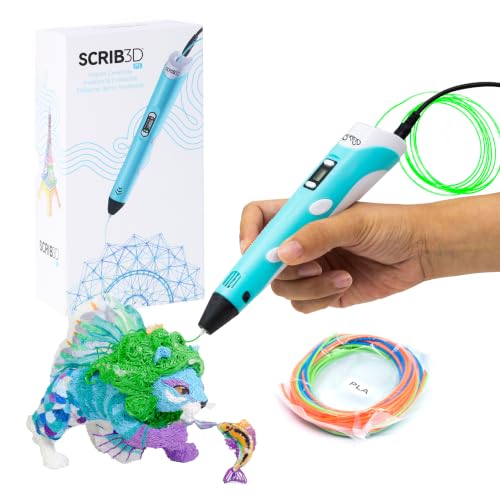
- Draw and build directly in 3D
- Includes PLA starter colors and guide
- Speed and temperature are adjustable
Best For: Artists and families wanting a simple freehand 3D creation tool
Easy Color Starter
ANYCUBIC Kobra X fast 4-color printer

- Pre-assembled with 15-minute setup
- Native 4-color printing for creative work
- Quiet 45dB operation for home use
Best For: Beginners and family creators who want easy multicolor printing
High-Speed Enclosed Pick

- Up to 600mm/s with CoreXY motion and vibration compensation
- Auto-leveling plus quick-swap nozzles for easier workflow
- Enclosed, quiet design with dual filtration and camera monitoring
Best For: Fast, controlled printing for artists working on prototypes and display pieces
Multicolor Creative Pick

- Native 4-color printing, expandable up to 19 colors
- 600mm/s speed with vibration compensation for smoother output
- LeviQ 3.0 leveling and AI monitoring for easier setup
Best For: Color-focused artists making vivid, presentation-ready prints
Color-First Speed Machine
FLASHFORGE AD5X Multi-Material 4-Color Printer

- Up to 4-color printing with IFS
- 600mm/s top speed for fast turnarounds
- Auto leveling and vibration control
Best For: Artists who want vivid multicolor prints and fast setup
Premium Multicolor Workhorse
Creality K2 Combo 16-Color System

- Up to 16 colors with four CFS units
- 600mm/s speed and smart auto leveling
- AI camera helps monitor print issues
Best For: Creators who want advanced multicolor printing with automation
Compact Color Creator
FLASHFORGE AD5X 4-Color High-Speed Printer

- Up to 4-color printing with IFS
- 600mm/s max speed and auto leveling
- 220 x 220 x 220mm build volume
Best For: Artists who want a compact multicolor printer with fast output
Multicolor Studio Pick – Snapmaker U1 4-toolhead multicolor printer
If you want one of the most capable 3d printers for artists who need color, material variety, and speed, the Snapmaker U1 stands out. Its four-toolhead system is built for true multi-color and multi-material printing without constant filament swaps, making it practical for detailed models, display pieces, and mixed-material prototypes.
Best For: Artists, makers, and small studios that want fast multicolor printing with minimal waste.
Pros:
- Four independent toolheads with 5-second automatic tool changing
- Supports true multi-material printing, including rigid, flexible, and soluble-support workflows
- Up to 5X faster multi-color printing with up to 5X less waste
- High-speed CoreXY motion system reaches up to 500 mm/s
Cons:
- Large, heavy machine at 59 pounds
- More advanced than a basic beginner printer
- May be more capability than needed for simple single-color projects
For artists who care about layered color effects and material experimentation, the U1 is clearly designed to reduce workflow friction. Its automatic calibration and app-based controls make it easier to move from concept to finished piece without constant tuning.
Detail Resin Pick – ANYCUBIC Photon Mono 4 10K resin printer
For artists who prioritize fine surface detail, the ANYCUBIC Photon Mono 4 is a strong resin option in the 3d printers for artists category. Its 10K LCD screen, stable light source, and compact build volume make it well suited for miniatures, sculptural parts, and detailed display models.
Best For: Detail-focused artists making miniatures, sculptures, and precision models.
Pros:
- 10K resolution with very fine 17 x 17 μm pixel size
- LighTurbo light source helps produce smooth surfaces and crisp detail
- Laser-engraved build platform improves adhesion and helps reduce warping
- Simple 4-point leveling is beginner friendly
Cons:
- Smaller build volume than larger filament printers
- Resin workflow is less suited to large functional prints
- Anycubic APP service is not supported for this model
If your work depends on sharp textures and clean contours, this printer is a practical fit. It emphasizes precision and surface quality over size, which makes it especially attractive for detailed artistic pieces.
Creative Pen Option – SCRIB3D P1 3D printing pen for freehand art
If you want a more immediate, sketch-like approach to 3d printers for artists, the SCRIB3D P1 3D pen lets you draw and build directly in space. It is a good fit for rapid concepting, handmade decorations, classroom projects, and playful sculptural experiments.
Best For: Artists, hobbyists, and families who want a simple hands-on 3D drawing tool.
Pros:
- Includes 3 starter PLA colors plus a stencil book and project guide
- Stepless speed control helps with both detailed work and faster fill areas
- Temperature adjustable for PLA and ABS filament
- Auto sleep and anti-clogging features add convenience
Cons:
- Less precise than a full 3D printer for complex parts
- Best for smaller, manual projects rather than large builds
- Requires a bit of practice for clean freehand results
This is the most hands-on option in the group, which is exactly why it appeals to creative users. It works best when you want to sketch forms, build small objects, or turn ideas into physical pieces without a full slicer-based workflow.
Easy Color Starter – ANYCUBIC Kobra X fast 4-color printer
The ANYCUBIC Kobra X is aimed at easy, colorful home printing, which makes it a useful pick for artists looking at 3d printers for artists with low setup friction. With native 4-color printing, fast assembly, and auto leveling, it is designed for quick creative output rather than a complicated learning curve.
Best For: Beginners and family makers who want colorful prints with easy setup.
Pros:
- Pre-assembled design can get you printing in about 15 minutes
- Native 4-color printing supports colorful creative projects
- 45dB quiet operation is suitable for home use
- AI guard, object detection, and spaghetti alerts add peace of mind
Cons:
- More geared toward home and educational use than advanced studio workflows
- Large 260 x 260 x 260 mm footprint may take up desk space
- Color-focused convenience may not match specialized multi-material systems
For artists who want an approachable, low-stress machine for colorful DIY projects, this model delivers a lot of convenience. It prioritizes quick setup, quiet operation, and automation, which can help keep the creative process moving.
High-Speed Enclosed Pick – FLASHFORGE Adventurer 5M Pro
For artists comparing 3d printers for artists, the FLASHFORGE Adventurer 5M Pro stands out when speed, surface quality, and cleaner operation matter. Its CoreXY frame, 600mm/s top speed, and vibration compensation are geared toward fast concept work and repeatable results, while the enclosed chamber helps keep prints more stable.
Best For: Artists who want a fast, enclosed printer for clean prototypes, display pieces, and material flexibility.
Pros:
- CoreXY design with up to 600mm/s speed and vibration compensation for smoother surfaces
- One-click auto-leveling and quick-swap nozzles make setup and maintenance easier
- Enclosed chamber with dual filtration and quiet operation under 50dB
- Supports PLA, PETG, ABS, ASA, and PETG-CF with a 280°C hotend
Cons:
- Smaller build size may limit larger art installations
- Advanced materials benefit from careful tuning despite the enclosure
Overall, this is a strong pick for creative users who want speed without giving up an enclosed, more controlled printing environment. The camera, app control, and filament detection also make it convenient for busy studio workflows.
Multicolor Creative Pick – Anycubic Kobra X Multicolor
If your search for 3d printers for artists is centered on color and presentation, the Anycubic Kobra X is built to push beyond single-material output. It starts with native 4-color printing and can expand up to 19 colors with compatible 4 ACE 2 Pro units, making it a strong choice for vivid models and visual storytelling.
Best For: Artists who want multicolor prints, remote monitoring, and a fast, large-format machine.
Pros:
- Native 4-color printing with expansion up to 19 colors using 4 ACE 2 Pro units
- 600mm/s max speed and vibration compensation for efficient, smoother printing
- LeviQ 3.0 auto leveling with 49-point calibration for a reliable first layer
- Supports PLA, PETG, TPU, PVA, and ASA with 300°C nozzle temperature
Cons:
- Filament spools are not included
- Multicolor capability depends on additional compatible ACE 2 Pro units
For makers focused on color-rich art, this printer offers one of the most creative feature sets in the group. Its large 260mm cube build area, app control, and AI monitoring round out a workflow that feels geared toward ambitious presentation pieces.
Reliable Budget-Friendly Pick – ELEGOO Neptune 3 Pro
For artists shopping 3d printers for artists on a more practical budget, the ELEGOO Neptune 3 Pro focuses on dependable everyday printing rather than flashy extras. Its 225x225x280 mm build volume, quiet operation, and auto leveling make it a sensible machine for studying forms, testing concepts, and producing smaller finished pieces.
Best For: Artists who want a straightforward, quiet printer for dependable daily use and smaller projects.
Pros:
- 36-point auto bed leveling helps deliver a consistent first layer
- Dual-gear direct drive extruder supports PLA, TPU, PETG, and ABS
- Quiet stepper motors can run as low as 47dB
- Filament runout sensor and power-loss resume add peace of mind
Cons:
- Build volume is standard rather than large
- Lacks the high-speed and multicolor features of pricier options
This is the most grounded choice of the three if you value reliability over headline features. It is well suited to artists who want a simple, low-stress printer that can handle regular studio work without much fuss.
Color-First Speed Machine – FLASHFORGE AD5X Multi-Material 4-Color Printer
If you want one of the more creative 3d printers for artists, the FLASHFORGE AD5X is built around fast multicolor output and low-friction setup. Its 4-color IFS system, 600mm/s top speed, and full-auto calibration make it a strong fit for makers who want vivid prints without spending extra time on manual tuning.
Best For: Artists and makers who want fast, full-color prints with automatic calibration and space-saving filament handling.
Pros:
- Prints in up to 4 colors with the Intelligent Filament System.
- Up to 600mm/s speed and 20,000mm/s² acceleration for quick turnaround.
- Full auto leveling helps support consistent first layers.
- CoreXY structure and vibration suppression are designed to improve print stability.
Cons:
- Best suited to users who can take advantage of multicolor workflows.
- Compact layout may be less ideal if you want a larger build volume.
Overall, the AD5X is aimed at creators who value color, speed, and a streamlined workflow in one machine. For artistic prints where visual impact matters as much as print efficiency, it offers a very practical mix of features.
Premium Multicolor Workhorse – Creality K2 Combo 16-Color System
The Creality K2 Combo is one of the more ambitious 3d printers for artists if your projects rely on bold color range and reliable automation. With support for up to 16 colors using four CFS units, plus a 600mm/s speed rating and smart auto leveling, it is designed to help creators move from concept to finished piece with less post-processing.
Best For: Artists and advanced hobbyists who want a multicolor printer with a roomy 260mm cube build area and smart monitoring.
Pros:
- Supports up to 16 colors when paired with four CFS units.
- 600mm/s printing speed helps shorten production time.
- Smart auto leveling focuses on the target print area for faster setup.
- AI camera monitoring can watch for issues like spaghetti failure and idling.
Cons:
- The Combo includes one CFS unit, so maximum color capability requires more hardware.
- At 65.9 pounds, it is much heavier than compact printers.
If your art process calls for complex color layering and strong out-of-box convenience, the K2 Combo is built to support that workflow. Its mix of automation, enclosure-ready material support, and large print space makes it a capable creator-focused choice.
Compact Color Creator – FLASHFORGE AD5X 4-Color High-Speed Printer
The FLASHFORGE AD5X version here is a practical pick for 3d printers for artists who want colorful output in a relatively compact package. It combines 4-color printing, an Intelligent Filament System, and a 220 x 220 x 220mm build volume, making it useful for art pieces, prototypes, and decorative models that benefit from quick, reliable production.
Best For: Artists and hobbyists who want multicolor printing, automatic filament handling, and a balanced build size.
Pros:
- Prints with up to 4 colors for more visually detailed models.
- IFS helps automate filament management and refill detection.
- 600mm/s max speed supports fast project turnaround.
- Supports TPU and uses a max 300°C nozzle for more material flexibility.
Cons:
- Build volume is smaller than some larger-format printers.
- Best results will likely depend on using its multicolor workflow as intended.
This AD5X model fits creators who want a capable multicolor printer without stepping up to a larger machine. It focuses on speed, automation, and everyday versatility, which makes it a solid option for artistic work that needs consistent output.
How We Picked These 3d Printers for Artists
We prioritized models that support creative workflows, not just raw specs. That means strong print quality, useful automation, stable calibration, and features that help reduce failed prints and wasted material. For 3d Printers for Artists, reliability and surface quality matter as much as speed.
We also looked at build volume, material support, multi-color or multi-material options, and how easy each printer is to set up and maintain. Machines that suit both experimentation and repeatable production earned extra weight.
Quick Comparison
If you want vivid color work, a multi-material or multi-color FDM printer is often the best fit. If your focus is miniatures, jewelry masters, or highly detailed sculptural work, a resin printer may be the better choice. For hand-drawn concepts, prototyping, and classroom-friendly creativity, a 3D printing pen can be a useful companion tool rather than a main production machine.
Key Buying Factors for 3d Printers for Artists
Detail and Surface Finish
Artists often care about how a print looks before post-processing. Resin printers generally deliver the finest detail, while modern FDM printers are better for larger forms, functional prototypes, and faster turnaround.
Color and Material Flexibility
Native multi-color systems can simplify complex projects and reduce assembly, but they also add cost and setup considerations. If your work relies on color blocking, layered effects, or multi-part character builds, this feature can be worth it.
Ease of Use
Auto-leveling, quick assembly, and one-click workflows are valuable when you want to spend more time designing and less time tuning hardware. This is especially important for studios and classrooms with shared equipment.
Speed and Reliability
Fast printers help with iteration, but only if quality stays consistent. Look for stable motion systems, solid calibration tools, and dependable filament handling to keep production moving.
Who Should Buy Which 3d Printers for Artists?
Choose a resin printer if your priority is fine texture, crisp edges, and miniature-scale art. Choose a multi-color FDM printer if you want larger pieces, faster prototypes, or color-integrated concepts. Choose a simpler single-material printer if you are just getting started and want to learn the process before moving into advanced workflows. And if your work is more exploratory or educational, a 3D printing pen can be a low-commitment way to sketch ideas in space.
For most artists, the best choice comes down to your typical project size, finishing expectations, and how much setup time you are willing to trade for creative capability.