
Choosing the right badge printer can make trade show check-in faster, more professional, and far less stressful. The best models balance print speed, card quality, software ease, and reliable day-of performance.
Whether you need a compact single-sided unit or a higher-volume dual-sided system, this roundup focuses on badge printers for trade shows that can keep lines moving and badges looking sharp.
Best 10 Badge Printers for Trade Shows Picks for 2026
Trade Show Badge Pro
Evolis Primacy 2 Dual Sided Card Printer Bundle

- Dual-sided dye sublimation printing
- Includes ribbon, 100 cards, and design software
- USB/Ethernet with Windows and Mac support
Best For: Trade show teams needing a ready-to-use, faster card printer bundle
Portable Booth Label Maker
Ponek M100 Bluetooth Thermal Label Printer

- Portable thermal label printer for quick setup
- Bluetooth with Android, iOS, and PC support
- 6,000+ icons and 3,000+ templates
Best For: Teams that need a portable label printer for event organization and prep
Dual-Side ID Workhorse
Fargo DTC4250e Dual-Side ID Card Printer Package

- Dual-sided card printing with included supplies
- 250-print ribbon and 100 PVC cards included
- USB and Ethernet connectivity
Best For: Trade show and ID badge setups that need an all-in-one card printer package
Quick Badge Starter
Badgy100 Plastic Card Printer with Badge Studio

- Full-color plastic badge printing on demand
- Includes Badge Studio design software
- Compact design for small print jobs
Best For: Small teams needing simple on-demand badge printing and replacements
Bronze Edition All-in-One
Bodno Seaory S26 Single Sided ID Printer

- All-in-one package includes ribbon, software, and camera.
- Prints single-sided cards up to 300 x 1200 dpi.
- Works with Windows, Mac, and Linux.
Best For: Teams needing a simple starter badge printer for trade shows
Community Badge Starter
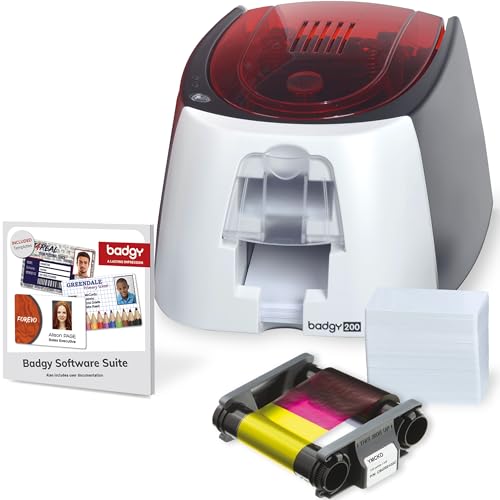
- Includes printer, ribbon, blank cards, and Badge Studio+ software.
- Creates full-color, tamperproof plastic ID badges.
- Good fit for custom badge design with templates and database import.
Best For: Schools and event teams that need a simple full-color badge setup
Dual-Sided Bronze Edition
Bodno Seaory S28 Dual Sided ID Printer

- Prints both sides of a card in one pass.
- Bundle includes ribbon, software, and camera.
- Supports Windows, Mac, and Linux.
Best For: Teams needing efficient double-sided badges for trade show use
Bronze Starter Bundle
Bodno Magicard Pronto ID Card Printer
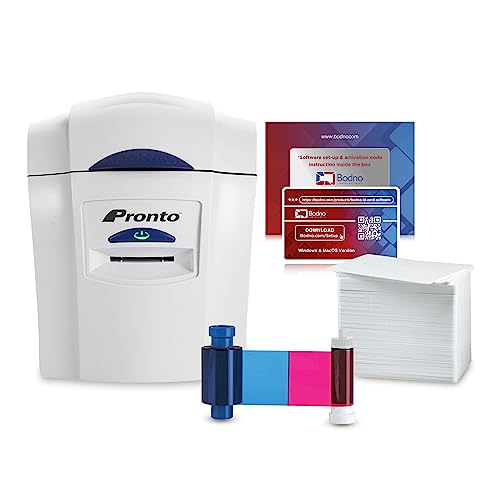
- Includes printer, ribbon, 100 PVC cards, and software
- Easy template-based design with drag-and-drop editing
- Portable USB printer with 2-year hardware warranty
Best For: Small teams printing simple event or membership badges
Bronze Low-Volume Pick
Bodno Seaory S25 Single Sided ID Card Printer

- Manual feed system prints one card at a time
- Includes 100-print color ribbon and software
- Works with Windows, Mac, and Linux
Best For: Low-volume badge printing with precise manual control
Premium Dual-Sided Choice
Bodno Magicard 400X Dual Sided ID Card Printer

- Dual-sided printing for fuller badge layouts
- Includes 300-print YMCKO ribbon and software
- Backed by a 4-year warranty and lifetime support
Best For: Teams needing polished two-sided badges with a larger ribbon supply
Trade Show Badge Pro – Evolis Primacy 2 Dual Sided Card Printer Bundle
If you need badge printers for trade shows that can keep up with on-site registration, the Evolis Primacy 2 is built for fast dual-sided color card production. It includes supplies, design software, USB and Ethernet connectivity, and Windows/Mac compatibility, making it a practical setup for event teams that need polished badges without piecing together extra components.
Best For: Trade show teams that want a faster, dual-sided card printer bundle with included supplies and software.
Pros:
- Dual-sided direct-to-card dye sublimation printing
- Includes color ribbon, 100 blank cards, and card design software
- Rated at 280 full-color cards per hour
- USB and Ethernet connectivity with Windows and Mac support
Cons:
- Designed for card printing only, not broader office printing
- 100-card feeder is standard; 200-card feeder is optional
For event badge workflows, this bundle stands out because it combines speed, dual-sided output, and starter supplies in one package. If your trade show setup values a ready-to-use card printer with room to scale, this is a strong candidate.
Portable Booth Label Maker – Ponek M100 Bluetooth Thermal Label Printer
For badge printers for trade shows where you also need quick labels, the Ponek M100 is a lightweight Bluetooth thermal printer that handles labels, barcodes, and QR codes. Its app-based workflow and portable size make it useful for organizing supplies, containers, folders, and small event prep tasks when you want something easy to carry and simple to print from.
Best For: Small teams that need a portable label printer for trade show prep, barcode labels, and quick organization.
Pros:
- Supports 0.78″ to 2″ printing width
- Bluetooth printing with Android and iOS support
- Includes 6,000+ icons, 3,000+ templates, and 300 fonts
- Lightweight at 0.6 pounds with thermal printing and no ink
Cons:
- Prints monochrome labels rather than full-color badges
- Best suited to labels, not PVC card badge production
This is more of a supporting tool than a primary badge printer, but it can still help trade show teams stay organized. If your priority is portable, fast label creation for event logistics, it offers a very flexible low-maintenance option.
Dual-Side ID Workhorse – Fargo DTC4250e Dual-Side ID Card Printer Package
Fargo DTC4250e Dual-Side ID Card Printer & Supplies Package with Card Imaging Software 52100
Check Price On AmazonIf you want badge printers for trade shows that can produce professional ID cards and access badges, the Fargo DTC4250e package is built around dual-sided color card printing with supplies included. It comes with a full-color ribbon, 100 PVC cards, and design software, so teams can start making event credentials and member-style cards right away.
Best For: Event and badge workflows that need a dual-sided printer package with included cards and software.
Pros:
- Dual-sided direct-to-card printing
- Includes 250-print ribbon, 100 PVC cards, and design software
- Built-in erase and rewrite capability
- USB and Ethernet connectivity for flexible setup
Cons:
- Uses a 100-card sheet capacity, which may require reloading during busy runs
- Focused on card printing rather than general office printing
This package is a strong fit when badge quality and card-based credentialing matter more than versatility. For trade show environments, the included supplies and dual-sided output make it a practical all-in-one starting point.
Quick Badge Starter – Badgy100 Plastic Card Printer with Badge Studio
The Badgy100 is a compact option for badge printers for trade shows when you want to print custom plastic ID badges on demand. It’s designed for single-print needs, includes badge design software, and comes with an online template library, which makes it easy to create professional-looking badges without outsourcing.
Best For: Small teams and one-off badge printing needs for events, IDs, and replacements.
Pros:
- Prints full-color plastic ID badges on demand
- Includes Badge Studio design software
- Online template library for professional-looking designs
- Compact, portable design for small setups
Cons:
- Low output speed compared with larger event printers
- Manual duplex only
- Best suited to single printing rather than high-volume badge runs
If your trade show needs are modest, this printer keeps badge production in-house and simple. It is especially appealing when you want fast replacement badges and a straightforward design workflow.
Bronze Edition All-in-One – Bodno Seaory S26 Single Sided ID Printer
For badge printers for trade shows, the Bodno Seaory S26 is a practical single-sided option if you want an all-in-one setup that gets you printing quickly. It includes the Seaory 17031 color ribbon for 300 prints, along with software and a camera, so you can start producing professional-looking ID cards without assembling a separate workflow.
Best For: Small teams or event staff who want an easy-to-set-up single-sided badge printer with bundled supplies and software.
Pros:
- Includes essential supplies, software, and camera to simplify setup.
- Prints at up to 300 x 1200 dpi for sharp, high-quality cards.
- Compatible with Windows, Mac, and Linux.
- Lifetime Bodno software support and a two-year hardware warranty.
Cons:
- Single-sided printing only.
- USB connectivity keeps it focused on a desktop workflow.
- Output is limited to print-only card production.
This is a solid pick if your trade show badge needs are straightforward and you value a bundled, low-friction start. It leans more toward ease of use and completeness than high-volume flexibility.
Community Badge Starter – Badgy200 Plastic Card Printer
When you need badge printers for trade shows that are simple to deploy, the Badgy200 focuses on fast, full-color ID card creation with a complete starter bundle. It includes Badge Studio+ software, a color ribbon, blank cards, and setup guides, making it a convenient choice for teams that want to design and print custom badges with minimal hassle.
Best For: Schools, workplaces, and event teams that want an easy full-color badge printer with bundled supplies and design software.
Pros:
- All-in-one package includes printer, ribbon, blank cards, software, and cables.
- Badge Studio+ offers templates, database import, a design wizard, and custom layout tools.
- Prints tamperproof full-color plastic ID cards.
- Backed by a 1-year warranty with optional extended coverage.
Cons:
- Print speed is relatively modest at 1.6 color pages per minute.
- USB-only connection limits placement options.
- Single-purpose print-only design may not suit broader office needs.
Overall, the Badgy200 is built for organizations that want an approachable badge printer with useful software rather than a more complex production setup. It’s especially appealing if you need professional-looking event or access badges with minimal learning curve.
Dual-Sided Bronze Edition – Bodno Seaory S28 Dual Sided ID Printer
If you’re comparing badge printers for trade shows and need more flexibility, the Bodno Seaory S28 stands out for dual-sided printing in a single pass. It ships as a complete supplies package with ribbon, software, and a camera, making it a practical option for teams that want to produce professional-looking cards efficiently.
Best For: Teams that need double-sided badge printing with bundled setup tools and fast turnaround.
Pros:
- Dual-sided printing in one pass saves time.
- Includes ribbon, software, and camera for an all-in-one start.
- Compatible with Windows, Mac, and Linux.
- Supports up to 300 x 1200 dpi resolution for sharp output.
Cons:
- USB connection keeps it tied to a workstation.
- Print-only design limits multifunction use.
- Maximum media size is limited to 3 x 5 inches.
The S28 is the strongest fit here if your event badges need content on both sides and you want the setup to be straightforward. It balances bundled convenience with faster badge production than a basic single-sided model.
Bronze Starter Bundle – Bodno Magicard Pronto ID Card Printer
Bodno Magicard Pronto ID Card Printer & Complete Supplies Package ID Software - Bronze Edition
Check Price On AmazonIf you need badge printers for trade shows and want a simple way to produce photo ID cards or membership badges in-house, this Magicard Pronto bundle is a practical starting point. It ships with the printer, a color ribbon, 100 PVC cards, and Bodno Bronze software, so you can begin designing and printing right away without piecing together extras.
Best For: Small teams that want an all-in-one, easy-to-use badge printer package for straightforward event or membership cards.
Pros:
- Includes the printer, MA100YMCKO color ribbon, 100 PVC cards, and software.
- Bodno Bronze software uses pre-made templates and drag-and-drop tools.
- Portable design and simple USB connectivity keep setup straightforward.
- Two-year hardware warranty with lifetime software support.
Cons:
- Prints on one side only.
- Best suited to lower-volume badge runs rather than large event batches.
This bundle focuses on convenience and speed of setup, which makes it a strong fit when you want a complete badge-printing kit instead of a standalone machine. The included supplies and software reduce the guesswork for first-time users.
Bronze Low-Volume Pick – Bodno Seaory S25 Single Sided ID Card Printer
For badge printers for trade shows where control and low-volume printing matter, the Seaory S25 is built around a manual feed system that prints one card at a time. This package includes the color ribbon and Bodno Bronze software, giving you the tools to make professional-grade ID cards without a complicated setup.
Best For: Small offices, schools, or event teams that need precise single-card printing and broad operating system compatibility.
Pros:
- Manual feed system offers precise one-card-at-a-time control.
- Includes the 100-print Seaory 11011 color ribbon.
- Bodno Bronze Edition software includes templates and drag-and-drop design tools.
- Compatible with Windows, Mac, and Linux.
Cons:
- Single-sided printing only.
- Manual feed makes it less efficient for higher-volume badge runs.
The S25 is a sensible choice when your badge printing is occasional or highly controlled. Its bundled software and cross-platform compatibility make it flexible, but the manual workflow is best for smaller print jobs.
Premium Dual-Sided Choice – Bodno Magicard 400X Dual Sided ID Card Printer
If you want badge printers for trade shows that can handle more detailed designs, the Magicard 400X bundle is built for dual-sided card printing. It includes a 300-print YMCKO ribbon and Bodno Bronze software, so you can produce fuller cards with less need to simplify the layout.
Best For: Teams that want a dual-sided ID card printer with a larger included ribbon supply and a more polished card format.
Pros:
- Dual-sided printing supports more complete badge layouts.
- Includes a 300-print YMCKO ribbon for color output.
- Bodno Bronze software offers templates and drag-and-drop editing.
- Comes with a 4-year warranty and lifetime software support.
Cons:
- Still limited to USB connectivity.
- Print speed is modest at 3 color pages per minute.
Compared with the single-sided options, the 400X gives you more flexibility for badges that need both sides used well. The included ribbon supply and longer warranty make it the strongest all-around bundle in this group.
How We Picked the Best Badge Printers for Trade Shows
We focused on Badge Printers for Trade Shows that are practical for real event workflows: quick setup, dependable output, clear text and barcodes, and software that is easy for staff to learn. We also weighed whether bundles include the supplies and tools most teams actually need, since that can reduce last-minute buying and compatibility issues.
We gave extra attention to printers that support consistent card handling, strong color output, and flexible badge design options. For larger events, dual-sided printing and bundled software can save time; for smaller teams, simplicity and compact size often matter more.
Quick Comparison
If your top priority is speed and higher throughput, look closely at dual-sided printers and fuller supply bundles. If you only need on-demand attendee badges for smaller events, a single-sided printer may be the better fit. For teams without dedicated design experience, bundled badge software can be just as important as the hardware.
Key Buying Factors for Badge Printers for Trade Shows
Print Volume and Speed
Estimate how many badges you need per hour, not just per event. A printer that handles your expected rush without bottlenecks will matter more than a slightly lower upfront cost.
Single-Sided Vs. Dual-Sided
Single-sided printers work well for simple attendee badges and lean setups. Dual-sided models are better when you need schedules, sponsor info, QR codes, or emergency details on the back.
Supplies and Software
Bundles that include cards, ribbons, and badge design software can shorten deployment time. This is especially useful for teams buying Badge Printers for Trade Shows for the first time.
Durability and Ease of Use
Look for straightforward loading, clear software workflows, and dependable card feeding. At an event, ease of use often matters more than advanced features you may never use.
Who Should Buy Which Badge Printers for Trade Shows?
Large trade show teams and registration desks with heavy traffic should prioritize faster dual-sided systems and complete bundles. Smaller events, pop-up activations, and occasional badge printing jobs may be better served by compact single-sided or entry-level models.
If you want the simplest path to professional results, choose a bundle with software and supplies included. If you already have a badge workflow in place, compare print capacity, card compatibility, and total supply costs before deciding.